1
PSX
USER GUIDE
PRESET SELECTION
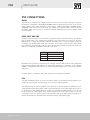
The PSX has 15 internal Preset memories. The memories can hold a set of cabinet parameters
which optimise the PSX for use in a particular situation.
The first three memories (1 to 3) are pre-loaded with Factory Presets as follows:
•
Preset 1 - for using the PSX with a Martin Audio DD6 cabinet
•
Preset 2 - for using the PSX with a Martin Audio XD12 cabinet
•
Preset 3 - for using the PSX with a Martin Audio XD15 cabinet
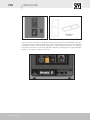
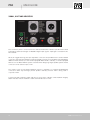
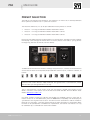
Presets are selected by pressing the Select button on the rear panel. The adjacent seven-segment
LED display scrolls through the Presets with successive presses of the button, cycling back to
the beginning after the last Preset (see Note below).
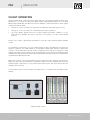
To differentiate them from the memories holding Factory Presets (1, 2 and 3), the User memories
use the first six letters of the alphabet, duplicated with a decimal point, instead of numbers, as
follows:
A b c d E F A. b. c. d. E. F.
Note: When shipped from the factory, the User memories are empty. It is only possible to select
memories that contain Presets: empty memories are ignored. Thus “out-of-the-box”, Preset
selection will cycle through Presets 1 to 3 only.
The 12 User memories can be used to store your own presets, created using Vu-Net. For full
details of Vu-Net control please see the Vu-Net User Guide available from the Martin Audio
website www.martin-audio.com.
If a preset number is flashing it indicates that Vu-Net has modified a preset in some way. To
restore a Preset to its unmodified state, press the Select button repeatedly until the display has
cycled back to the original Preset location. This will recall the stored version and the number or
letter will no longer flash - indicating that the Preset has been returned to its stored state. While
the PSX can be operated with a modified set of parameters, the internal User Presets can only
be overwritten by a command from the Vu-Net software.
PSX User Guide V1.0
23