1
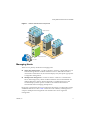
Getting Started with ESX Server 3i Installable VMware Infrastructure Components Familiarity with the components that make up a VMware Infrastructure environment helps you understand the setup process and, ultimately, the process of running virtual machines using VMware VirtualCenter. VMware Infrastructure includes the following components: The VMware Infrastructure Client – The VI Client is the interface to the VirtualCenter Server and hosts. It also provides console access to virtual machines. The VMware VirtualCenter Server – The VirtualCenter Server unifies resources from individual hosts so that those resources can be shared among virtual machines in the entire datacenter. It accomplishes this by managing the assignment of virtual machines to the hosts and the assignment of resources to the virtual machines within a given host based on the policies set by the system administrator. The VirtualCenter Server allows the use of advanced VMware Infrastructure features such as VMware Distributed Resource Scheduler (DRS), VMware High Availability (HA), and VMware VMotion. Datacenter – A datacenter is a structure under which you add hosts and their associated virtual machines to the VirtualCenter inventory. Host – A host is a computer that uses the ESX Server 3i virtualization software run virtual machines. Hosts provide CPU and memory resources, access to storage, and network connectivity for virtual machines that reside on them. You must have a host before following the steps in this manual. Virtual Machine – A virtual machine is a software computer that, like a physical computer, runs an operating system and applications. Multiple virtual machines can run on the same host at the same time. Virtual machines managed by the VirtualCenter Server can also run on a cluster of hosts. The relationships among the basic components of VMware Infrastructure are shown in Figure 1. 4 VMware, Inc.