1
THE MINELAB ‘GP extreme’
THE MINELAB ‘GP extreme’
www.minelab.com
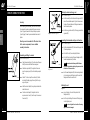
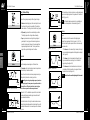
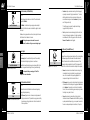
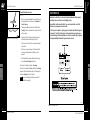
Boost (Shallow/N/Deep)
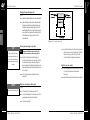
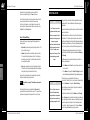
If the threshold level is set too low there is no audible background
signal and small target signals will not go above the threshold of
audibility (Figure 4.6).
Figure 4.3
Enhances the signals produced by different types of targets.
Boost
P0519-A
•
Figure 4.3 Boost switch
•
•
Shallow enables target signals, from small objects close to
the surface of the ground to be amplified. This allows for
easier detection. This setting is best suited for 'quiet' ground.
HINT A soft audible headphone signal which is comfortable to
listen to for extended periods is recommended (Figure 4.7).
P0509-C
Figure 4.7 Threshold control just right
N (Normal) may be used for normal detecting conditions.
This setting responds to all signals without boosting.
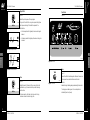
Volume
Deep may be used when searching for large targets at
greater depth in 'noisy' ground. Random soil signals are
smoothed, making small changes in the audio signal from
large deep targets easier to hear. This may mask some
signals from very small targets near the surface.
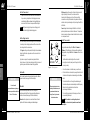
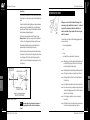
Sets a maximum limit on the loudness of the target signal
obtained from a large target. Refer to Figures 4.9 - 4.11. The
dotted line in these figures represents the level of volume set by
the volume control.
Figure 4.8
Audio
P0521-A
Figure 4.8 Volume control
•
4
P0520-A
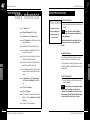
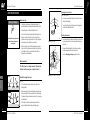
Adjusts the background audio signal or 'threshold' level.
Figure 4.4 Threshold control
The Threshold control should be set just above the point where
the threshold is just audible and stable.
This level should not be at a level where prolonged use may be
irritating. Ideally it should be a smooth, gentle hum.
P0509-A
Figure 4.5 Threshold control too low
If the Volume control is turned down to half way, the target
signal is unaltered for a small target, but is limited for a
bigger target (see Figure 4.10).
•
If the Volume were to be turned down close to minimum, it
potentially will limit all signals to such a degree that most
targets will be lost (see figure 4.11).
NOTE Small targets or large deep targets may not produce a
distinct target signal, but may cause only a small variation in
the threshold level. If the threshold level is set too high or
too low, these very small variations may be missed.
P0508-A
Figure 4.9 Maximum volume
Louder
Audio
•
Figure 4.4
4
CONTROLS
CONTROLS
Threshold
If the Volume is set to maximum (fully clockwise), the target
signal is unaltered and proportional to the target size and depth
(see Figure 4.9).
NOTE Threshold should be reset after adjusting the Volume level.
Mid-range
P0508-B
Figure 4.10 Mid-range volume
In Figures 4.5 - 4.7, the dotted line represents the level at which
the audio output becomes audible; signals cannot be heard if
they are below the dotted line.
P0509-B
20
Figure 4.6 Threshold control too high
CONTROL FUNCTIONS
If the threshold level is set too high then small variations in audio
signal might not be discernible above the threshold level (Figure 4.5).
An example of this would be to hear a whisper within a crowded
noisy room.
P0508-B2
Figure 4.11 Minimum volume
21
CONTROL FUNCTIONS