1
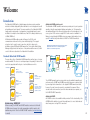
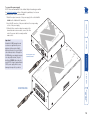
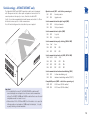
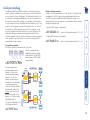
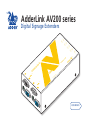
204T/208T AUDIO CATx LINK UP TO 300m SERIAL Y-CABLE RS232 SERIAL RECEIVER TRANSMITTER POWER POWER 200R RECEIVER Additional expansion is also possible by connecting further transmitter modules to the original module in a cascade arrangement, each supporting their own multiple AV200R/AV201R receiver modules - See Expansion via cascade links for details. VIDEO 200R PC The Display Data Channel standard allows video monitors to define their characteristics so that the source computers to which they are connected can optimise their video outputs accordingly. By their nature, the AdderLink AV extenders enable multiple video displays to be attached to a single source computer. This causes a complication for handling the DDC standard, however, in characteristic style we have devised an elegant solution, as detailed below. Whenever an AdderLink AV transmitter is powered on, it checks its local video port for a working display monitor with DDC information. The following strictly ordered actions occur to automatically locate the most suitable DDC data: • If a display monitor is discovered on the local video port of the transmitter, the DDC data are cloned from it and stored within the transmitter. • If no display monitor is discovered on the local video port of the transmitter, the DDC data held within the transmitter will remain unchanged. • If the DDC data or clock lines of the transmitter’s local video port are discovered to be connected to ground, then a default set of DDC data will be reloaded and used. After the initial search period, the stored DDC data are then presented to the video port of the source computer. When transmitters are cascaded, only the primary transmitter (the one connected to the source computer) will perform the search for DDC data. AdderLink AV transmitters hold two pages of DDC data in order to support the most advanced display monitors. The DDC data are held within non-volatile memory so that they are retained when power is removed. The manner in which the transmitters search for suitable ‘DDC donors’ could have an impact if your installation contains display units with differing capabilities. Generally, you should arrange for the display monitor with the most representative capabilities of your whole installation to be the one that the transmitter locates on its local port, either initially (and temporarily) while commissioning or permanently. AdderLink AV204T/AV208T transmitter driving up to four/eight remote receivers, in addition to a local monitor and speaker set Support for DDC (Display Data Channel) AdderLink AV204T and AV208T transmitters The AdderLink AV204T transmitter provides four CATx outputs while the AV208T provides eight CATx output to directly drive AV200R/AV201R receiver modules located at distances up to 300m (1000 feet). Note: An optional serial Y-cable is available (part number: VSC19), which allows a connected receiver to provide a serial link to each display. 3