1
EDIT
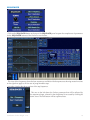
EDIT provide a menu allows you to copy and paste the current program to a different location.
MIDI
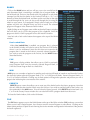
Although the main function of the MIDI button was covered above
in the MIDI Configuration section, there are more features that can
be adjusted in the MIDI Configuration panel.
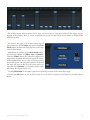
When enabled, the Clock ON/OFF button synchronizes the EDITOR
with the host MIDI clock.
LATENCY and DELAY
Many hosts send MIDI data to Plugin Instruments ahead of time in
order for plugins to prepare the Audio to play. In order to make up
for a time difference in such cases, you can adjust the delay time
needed to compensate for sample rates and buffer sizes that normally
plugins would need to process the operations on the
audio stream. Since the PlugSE™ does not do any
audio processing and instead it passes notes and other
MIDI data directly to the synthesizer, depending on
the host you may need to adjust delay settings. This
delay can be adjusted by adjustment controls located
in the MIDI Setup panel.
If you are using Logic Pro, make sure that the Buffer
Size matches the setting found in Logic’s Preferences
as shown on the left. Preferred settings are:
I/O Buffer Size: 256 Samples,
Process Buffer Range: MEDIUM.
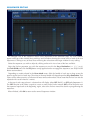
For other host applications, if you experience issues with sync,
you can adjust the delay using a slider (as shown on the right) to
eliminate it.
Soundtower Evolver PlugSE V1.0
7