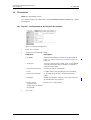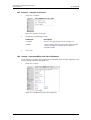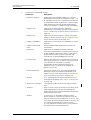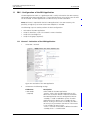
1
TD 92326GB
Installation and Operation Manual
VoIP Gateway
2009-03-10 / Ver. E
Installation and Operation Manual
VoIP Gateway
TD 92326GB
Contents
1 Introduction............................................................................................................. 1
1.1 About this manual ............................................................................................. 2
2 Description............................................................................................................... 3
2.1 Connections and Indicators on the Front ............................................................ 3
2.2 Connections on the Rear Side ............................................................................ 4
2.3 Power-over-Ethernet (PoE) .................................................................................. 4
2.4 Switching the VoIP Gateway On/Off ................................................................... 4
2.5 Pin Assignments for the ISDN Interfaces (PRI) ..................................................... 5
2.6 Management port .............................................................................................. 5
2.7 The MAC Address .............................................................................................. 6
2.8 Licences ............................................................................................................. 6
2.9 Installation and Configuration Steps ................................................................... 7
3 The Graphical User Interface (GUI) ........................................................................ 9
3.1 Change and Save the Configuration .................................................................. 9
3.2 Generate the Default Configuration ................................................................. 10
3.3 Configuration Information ............................................................................... 10
4 Software Upgrade Information ........................................................................... 11
4.1 Upgrade to version 7.00 .................................................................................. 11
4.1.1 Download new Software ........................................................................ 11
4.1.2 Update the Licence .................................................................................. 12
4.2 Upgrade from version 1.01 or earlier, to version 1.2.x ...................................... 12
4.2.1 Gateway Object (former EXTERN object) .................................................. 12
4.2.2 Upgrade Procedure .................................................................................. 13
5 General Settings.................................................................................................... 14
5.1 Info – View Information ................................................................................... 14
5.2 Admin – Name and Password .......................................................................... 14
5.3 License ............................................................................................................. 15
5.3.1 Add License ............................................................................................. 15
5.3.2 Save installed License(s) ............................................................................ 15
5.3.3 Delete installed License(s) ......................................................................... 15
5.4 Update – Automatic Software Update .............................................................. 16
5.5 NTP – Source for Time and Date ....................................................................... 16
5.6 Sync – Source for Synchronizing Gateways ....................................................... 17
5.7 HTTP Server – Port for the Local HTTP server .................................................... 17
5.8 HTTP Client ...................................................................................................... 19
5.9 Logging ........................................................................................................... 20
5.9.1 Transfer the Syslog Entries to a TCP program ............................................ 21
5.9.2 Store the Syslog Entries in a Syslogd ......................................................... 21
2009-03-10 / Ver. E
Installation and Operation Manual
VoIP Gateway
TD 92326GB
5.9.3 Store the Syslog Entries in a Web server ................................................... 22
5.9.4 Store the Syslog Entries on a Local CF Card .............................................. 22
5.10 SNMP – Monitor the VoIP Gateway via SNMP ................................................. 23
5.11 Telnet – Configuration via Telnet .................................................................... 24
5.12 Certificates – Secure TLS Connections ............................................................ 24
5.12.1 Create a self-signed-certificate ............................................................... 26
5.12.2 Signing request ...................................................................................... 26
5.12.3 Create a certificate signing request ........................................................ 26
5.12.4 Uploading the response certificate from a CA ........................................ 27
6 IP – Priority and Security settings ........................................................................ 28
6.1 Settings – Priority and Security ......................................................................... 28
6.2 NAT – Network Address Translation .................................................................. 29
6.3 H.323 – NAT .................................................................................................... 30
6.4 PPP Config – Configuration of Point-to-Point Protocols .................................... 31
6.5 PPP State – The Status of Point-to-Point Protocols ............................................ 32
6.6 Routing – View the IP Routing Table ................................................................. 32
7 Ethernet – IP Interface Parameters ...................................................................... 33
7.1 DHCP – Select Mode ........................................................................................ 34
7.2 IP – Static IP Address ........................................................................................ 35
7.3 NAT – Network Address Translation .................................................................. 36
7.4 VLAN – Priority ................................................................................................. 36
7.5 DHCP Server .................................................................................................... 37
7.6 DHCP Leases .................................................................................................... 38
7.7 Link – Speed and Duplex Settings ..................................................................... 39
7.8 802.1X – Authentication .................................................................................. 39
7.9 Statistics .......................................................................................................... 40
8 LDAP....................................................................................................................... 42
8.1 Server – LDAP User Name and Password .......................................................... 42
8.2 Server Status .................................................................................................... 42
8.3 Replicator – Configuration ............................................................................... 43
8.3.1 Configure Full Directory Replication ......................................................... 44
8.3.2 Configure Active Directory Replication ..................................................... 45
8.3.3 Configure AD Server ................................................................................ 46
8.3.4 Attribute Mappings .................................................................................. 46
8.3.5 In Maps ................................................................................................... 46
8.3.6 Out Maps ................................................................................................ 47
8.4 Replicator Status .............................................................................................. 49
8.5 Expert .............................................................................................................. 49
9 PRI Interfaces ........................................................................................................ 51
9.1 Physical – Configuration of the Physical PRI Interface ........................................ 51
2009-03-10 / Ver. E
Installation and Operation Manual
VoIP Gateway
TD 92326GB
9.1.1 Protocol – Selection of Signalling Protocol ................................................ 52
9.1.2 Interop – Interoperability with Other Equipment ....................................... 53
9.1.3 State – Show Channel Status ................................................................... 55
9.1.4 Statistics – Show Channel Statistics .......................................................... 55
10 TEL Interface ........................................................................................................ 57
10.1 Physical – Configuration of the Physical TEL Interface ..................................... 57
10.2 Protocol – Selection of Protocol ...................................................................... 58
10.3 Interop – Interoperability with Other Equipment ............................................. 58
10.3.1 State – Show Channel Status ................................................................. 60
10.3.2 Statistics – Show Channel Statistics ........................................................ 60
11 PBX – Configuration of the PBX Application..................................................... 62
11.1 General – Activation of the PBX Application ................................................... 62
11.1.1 Create Personalized Music on Hold. ....................................................... 64
11.2 Password – PBX Application Administrator ..................................................... 65
11.3 Filter – Assign User Rights .............................................................................. 66
11.3.1 Create Filter (Call filter and/or IP filter) .................................................... 66
11.4 Objects – Registration of Subscribers etc. to the PBX Application .................... 69
11.4.1 Object Properties ................................................................................... 71
11.4.2 View Configured Objects ....................................................................... 73
11.4.3 Set up Trunk lines .................................................................................. 74
11.4.4 Set up a Gateway Object to handle External Extensions ......................... 76
11.4.5 Register a New Subscriber ...................................................................... 78
11.4.6 Message Waiting Activation/Deactivation ............................................... 79
11.4.7 Call Diversions ....................................................................................... 79
11.4.8 Set up a Call Diversion in the PBX Application ........................................ 80
11.4.9 Transfer External Calls to a Switchboard Position .................................... 81
11.5 Registrations .................................................................................................. 81
11.6 Calls – Display Active Call ............................................................................... 81
11.7 SOAP – Display Active Sessions ...................................................................... 82
12 Gateway .............................................................................................................. 84
12.1 General .......................................................................................................... 84
12.2 Interfaces – Configuration of ISDN Interfaces ................................................. 85
12.2.1 Name and Tone ..................................................................................... 85
12.2.2 Call Number Mapping ............................................................................ 85
12.3 SIP – Configuration of the SIP Interfaces ......................................................... 87
12.4 GK – Configuration of the VoIP Interfaces ...................................................... 89
12.4.1 Call Number Mapping ............................................................................ 92
12.5 Routes – Configuration .................................................................................. 94
12.5.1 Add CGPN map ..................................................................................... 96
12.6 CDR0/CDR1 – Transmission of Call Detail Records .......................................... 98
2009-03-10 / Ver. E
Installation and Operation Manual
VoIP Gateway
TD 92326GB
12.6.1 Transfer Call Data Records to a TCP program ......................................... 98
12.6.2 Store Call Data Records in a Syslogd ...................................................... 99
12.6.3 Store Call Data Records in a Web Server ................................................. 99
12.6.4 Store Call Data Records on the Local Compact Flash Card ...................... 99
12.6.5 Show Active Calls ................................................................................ 100
13 Download – Save or View Current Configuration.......................................... 101
13.1 Download Configuration ............................................................................. 101
13.2 Download Firmware ..................................................................................... 102
13.3 Download Bootcode .................................................................................... 102
14 Upload................................................................................................................ 104
14.1 Upload New Configuration .......................................................................... 104
14.2 Upload New Firmware ................................................................................. 104
14.3 Upload New Boot Code File ......................................................................... 105
14.4 Upload Firmware to DRAM .......................................................................... 106
15 Diagnostics ........................................................................................................ 107
15.1 Logging – Define and View Log Messages .................................................... 107
15.2 Define the Syslog Parameters ....................................................................... 107
15.2.1 Tracing – Define and View Trace Information ........................................ 108
15.2.2 Alarms ................................................................................................. 109
15.2.3 Events – Show all Events ...................................................................... 110
15.2.4 Counters ............................................................................................. 111
15.2.5 Config Show – Show Current Configuration ........................................ 112
15.2.6 Ping ..................................................................................................... 113
15.2.7 Traceroute ........................................................................................... 113
15.2.8 CF ....................................................................................................... 113
16 Reset the VoIP Gateway ................................................................................... 114
16.1 Idle Reset ..................................................................................................... 114
16.2 Reset ........................................................................................................... 114
16.3 TFTP ............................................................................................................. 115
16.4 Boot ............................................................................................................ 115
17 Getting Started: Installation Example ............................................................. 117
17.1 Installation ................................................................................................... 117
17.2 Configuration and Administration Steps ....................................................... 118
17.3 Configuration Settings ................................................................................. 119
17.3.1 Change Password and give the VoIP Gateway a Name ......................... 119
17.3.2 Add Licence ......................................................................................... 119
17.3.3 Get Time from SNTP Server .................................................................. 119
17.3.4 Ethernet Settings ................................................................................. 120
17.3.5 PRI (Primary Rate Interface) Settings ..................................................... 121
17.4 Administration Settings ................................................................................ 123
2009-03-10 / Ver. E
Installation and Operation Manual
VoIP Gateway
TD 92326GB
17.4.1 Create a Gateway Object to handle External Calls ................................ 123
17.4.2 Activate the PBX Application in the VoIP Gateway ................................ 123
17.4.3 Set a Password for the PBX Application ................................................ 124
17.4.4 Configure the PRI (ISDN) Interface ........................................................ 124
17.4.5 Add Users ............................................................................................ 125
17.4.6 Configure Routes ................................................................................. 126
18 Other Configuration Examples ........................................................................ 127
18.1 Redundant System ....................................................................................... 127
18.1.1 Redundancy Test .................................................................................. 128
18.2 Multiple VoIP Gateway Installation ............................................................... 128
18.2.1 Load Balancing .................................................................................... 129
18.3 Operate Several PBX Applications in Combination ........................................ 130
19 Considerations on the Configuration of the Gatekeeper Interfaces............. 132
19.1 Understanding the VoIP Gateway's Gatekeeper ............................................ 133
19.1.1 Gatekeeper Discovery .......................................................................... 135
19.1.2 The Gatekeeper Identifier (ID) .............................................................. 135
19.1.3 H.323 Interop Tweaks .......................................................................... 136
19.1.4 Setting up a Gatekeeper on another VoIP Gateway .............................. 137
19.1.5 Voice Transmission ............................................................................... 137
19.2 Registering the VoIP Gateway with another Gatekeeper ............................... 140
19.3 Routing via the ENUM protocol .................................................................... 141
20 Different Usage of the VoIP Gateway ............................................................. 142
20.1 Dealing with the various ISDN address types ................................................ 142
21 Considerations on the Configuration of Call Routing.................................... 144
21.1 Routes ......................................................................................................... 144
21.2 Maps ........................................................................................................... 145
21.3 Manipulation of a Calling Number (CLI) ....................................................... 146
21.4 Automatic Correction of all Calling Numbers ................................................ 146
21.5 Selective Routes Depending on the Calling Number ..................................... 147
21.6 Change the Calling Party Number for Specific Routes ................................... 147
21.7 Define Call Number Replacements ............................................................... 148
21.8 Configuration of Multiple Routes for a Dial Prefix ......................................... 148
21.9 Call Forwarding ........................................................................................... 148
21.10 Reject calls ................................................................................................. 149
21.11 QSIG Interworking ..................................................................................... 149
21.12 Enforce en-bloc dialling .............................................................................. 150
21.13 Routes from and to Fax Machines .............................................................. 150
21.14 Suppress Echo Compensation .................................................................... 150
21.15 Resources Management ............................................................................. 150
22 Definition of Operating Parameters ................................................................ 151
2009-03-10 / Ver. E
Installation and Operation Manual
VoIP Gateway
TD 92326GB
22.1 Setting the IP-interface parameters via DHCP ............................................... 151
22.2 Setting the IP-interface parameters without DHCP ....................................... 152
22.3 The TE and NT modes .................................................................................. 154
22.4 The Signalling Protocols ............................................................................... 155
22.5 The Assignment of B Channel Numbers for PRI Connections ........................ 156
22.6 Single Digit Dialling on Terminals on Point-to-Multipoint Connections .......... 156
22.7 Suppression of specific Protocol Elements ..................................................... 156
22.8 Dial tones .................................................................................................... 157
22.9 Define Source for Time and Date ................................................................ 157
22.10 Call Pickup ................................................................................................. 159
23 The Virtual Interfaces TONE, TEST and HTTP .................................................. 160
23.1 The Public Dial Tone Interface “TONE” ......................................................... 160
23.2 The TEST Interface ....................................................................................... 160
23.3 The HTTP Interface ....................................................................................... 160
24 Document History ............................................................................................. 161
Appendix A: Safety Instructions for the VoIP Gateway ...................................... 162
A.1 Power Supply ................................................................................................ 162
A.2 Installation and Connection ........................................................................... 162
A.3 Cleaning ........................................................................................................ 163
A.4 Malfunctions ................................................................................................. 163
A.5 Disposal ......................................................................................................... 163
Appendix B: Troubleshooting................................................................................ 164
B.1 NAT and Firewalls .......................................................................................... 165
B.2 VoIP and heavily loaded WAN Links ............................................................... 166
B.3 If Technical Support is required ...................................................................... 167
Appendix C: ISDN Error Codes .............................................................................. 168
Appendix D: Call Routing depending on Device Management.......................... 170
D.1 Calls to and from gateway groups ................................................................. 170
D.2 Calls to and from devices managed by RAS ................................................... 170
D.3 Calls to gatekeeper clients via H.323 name .................................................... 171
D.4 Mapping call numbers onto H.323 names ..................................................... 171
Appendix E: How to add a Large Number of Users to the VoIP Gateway......... 172
E.1 Set up a Database for Mail Merge .................................................................. 172
E.2 Add Database Fields to a Mail Merge Document ............................................ 172
E.3 Complete the Mail Merge .............................................................................. 173
2009-03-10 / Ver. E
Installation and Operation Manual
VoIP Gateway
1
TD 92326GB
Introduction
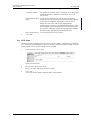
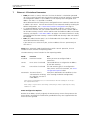
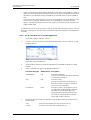
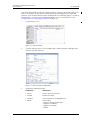
The VoIP Gateway is the gateway for ISDN primary rate interfaces (PRI) in the Ascom
VoWiFi and IP-DECT system. It serves as a link between traditional telephony and IP
telephony.
Management
VoIP clients
LAN
(Local Area Network)
VoIP Gateway
I1
I3
PR
PR
PBX
(Private Branch EXchange)
PSTN
001
(Public Switched Telephone Network)
Figure 1. VoIP Gateway connected via trunk lines to a PBX.
The VoIP Gateway has four PRI interfaces and can be used with several different
configurations. Two PRI interfaces may be switched to ISDN or to cascade redundant
systems, see 18.1 Redundant System on page 127. The additional two PRI interfaces may
then provide PRI access to further devices.
Multiple VoIP Gateways can be used to load balance calls to and from the PBX.
The PRI interfaces can be configured to relay the PRI connections even with the power
supply shut down.
The VoIP Gateway supports up to 2 E1 (up to 60 channels with EDSS1, QSIG, E1-CAS
protocol), or up to 2 T1 (up to 46 channels with QSIG-, 5ESS- or NI-2-protocol or up to 48
channels with T1-CAS protocol). If the channels provided by one box is not sufficient,
several VoIP Gateways may be interconnected. The additional PRI interfaces will then be
administered centrally and used as if provided by just one device. Furthermore, the VoIP
Gateway is prepared with the option to increase its internal memory by installing a
“Compact Flash” Type 1 memory card, which will be available in the future.
The VoIP Gateway has two separate Ethernet interfaces. They can be individually
addressed and may take over routing functions between two networks. For network
switches with a redundant security design, the second Ethernet interface may also be used
for the connection with the second switch. The second interface may also be used as
2009-03-10 / Ver. E
1
Installation and Operation Manual
VoIP Gateway
TD 92326GB
Management port. If the second port is provided with a fixed IP address, a PC used for
administration can be connected directly to this port.
1.1
About this manual
Note: This manual describes the operation of the VoIP Gateway version 7.00, as it is used
in Ascom systems. This means that some functions in the VoIP Gateway are neither
described nor supported by Ascom.
Chapter 17 Getting Started: Installation Example on page 117, helps you to install the VoIP
Gateway and perform basic configuration.
This manual is an integral part of the equipment. All advice and instructions should be
followed carefully and the equipment should only be used as specified. The manufacturer
assumes no responsibility for any personal injury, damage to property or subsequent
damage that can be attributed to improper use of the device.
IMPORTANT: Observe the safety instructions specified in Appendix A: Safety Instructions
for the VoIP Gateway on page 162.
2009-03-10 / Ver. E
2
Installation and Operation Manual
VoIP Gateway
2
TD 92326GB
Description
2.1
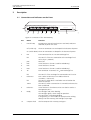
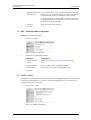
Connections and Indicators on the Front
Figure 1.
1
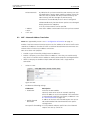
Pwr-off link
Loop
Off
On
PRI1
PRI2
PRI3
PRI4
Tel
prot link
prot link
prot link
prot link
Ethernet0 Ethernet1
link 100M link 100M
Ready
Compact Flash
Reset
2
3
4
5
6
7
8
9
10
002
11
Figure 2. Connectors of the VoIP Gateway
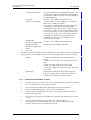
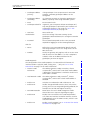
Pos
Name
Function
1
Pwr-off Loop
Interconnects two PRI interfaces (PRI1 and PRI2) and (PRI3
and PRI4) in power off status.
Off (switch up)
The RJ 45 connectors are not looped in the absence of power
On (switch down) The RJ 45 connectors are looped in the absence of power
2
PRI1
RJ 45 connector for an S2M ISDN exchange line.
link
prot
The LED is lit if the PRI1 connection to the exchange line is
active (layer 1 protocol).
Not used
3
PRI2
Same function as for PRI1 (used for redundancy)
4
PRI3
Same function as for PRI1
5
PRI4
Same function as for PRI1 (used for redundancy)
6
Tel
RJ45 connector. To connect an S0-ISDN exchange line.
link
The LED is lit if the exchange line connected to Tel is active.
Ethernet 0
RJ45 -socket to connect to 100 Mbit/s Ethernet.
(10/100BASE-T auto sense).
The LED is lit when data is received or transmitted on the
Ethernet interface.
The LED is lit when a connection via 100 Mbit/s Ethernet has
been established.
7
link
100M
8
Ethernet 1
Same function as for Ethernet 0 but can also be used as a
Management port.s
9
Ready
The LED lights red, when booting.
The LED lights green, when ready for operation.
The LED flashes, when downloading.
If the gateway is in TFTP mode (for example when writing
directly into flash memory) the LED lights up orange.
10
Compact Flash
Slot for compact Flash memory card type 1.
2009-03-10 / Ver. E
3
Installation and Operation Manual
VoIP Gateway
11.
TD 92326GB
Reset
A short press on this button will reset the VoIP Gateway.
Can also be used for generating the factory default
configuration (licenses and configuration files will then be
lost). See 3.2 Generate the Default Configuration on page
10.
Refer to section 16 Reset the VoIP Gateway on page 114, for
reset via the GUI.
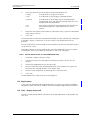
IMPORTANT: If the “Ready” LED flashes when downloading, this process must not be
interrupted. Otherwise the equipment may be damaged.
2.2
Connections on the Rear Side
Note: This section only applies to VoIP Gateways equipped with a C6 type connector.
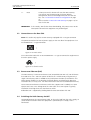
003
The power connection for internal power supply on the rear side of the equipment is an
IEC320/EN60320 - C6 type connector.
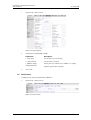
Figure 3. C6 male socket
004
Use a connection cable with an IEC320/EN60320 – C5 type to connect the equipment to
the mains power supply.
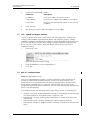
Figure 4. C5 female socket
2.3
Power-over-Ethernet (PoE)
The VoIP Gateway is Power-over-Ethernet (PoE) compatible (IEEE 802.3af). PoE eliminates
the need to run 100 – 240 VAC power to devices on a wired LAN. By using PoE only a
single CAT5 Ethernet cable is needed to carry both power and data to each device. This
allows greater flexibility in the locating of network devices and significantly decreases
installation costs in many cases. For more information refer to the standard (IEEE 802.3af).
To use Power-over-Ethernet an Ethernet switch that supports PoE is needed, or a CAT5
Injector that inserts a DC Voltage onto the CAT5 cable. The CAT5 Injector is typically
installed in the wiring closet near the Ethernet switch.
Redundant PoE is supported by feeding both Ethernet connections with PoE.
2.4
Switching the VoIP Gateway On/Off
Connect/disconnect the CAT5 Ethernet cable, or the mains lead from the mains supply, to
switch the device on/off. When the equipment is powered up the “Ready” LED is
illuminated.
2009-03-10 / Ver. E
4
Installation and Operation Manual
VoIP Gateway
TD 92326GB
IMPORTANT: When a mains lead is used (European versions) only connect the VoIP
Gateway to the wall socket using an IEC320/EN60320 – C5 type
connector.
2.5
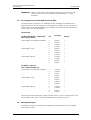
Pin Assignments for the ISDN Interfaces (PRI)
The PRI interfaces are default in TE mode but can be switched to NT mode from the
VoIP Gateway GUI. The pin assignments will change if NT Mode is chosen instead of TE
mode. It will also change depending on the selection of Clock Mode. (Derived from NT,
Slave, Master). See the table below.
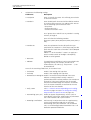
TX/RX Leads
TE Mode (NT Mode = Unchecked)
(we are User/Slave)
Pin
Direction
Polarity
Clock Mode = Derived from NT Mode
1
2
Receive
Receive
+
-
4
5
Transmit
Transmit
+
-
1
2
Receive
Receive
+
-
4
5
Transmit
Transmit
+
-
1
2
Transmit
Transmit
+
-
4
5
Receive
Receive
+
-
1
2
Transmit
Transmit
+
-
4
5
Receive
Receive
+
-
1
2
Receive
Receive
+
-
4
5
Transmit
Transmit
+
-
1
2
Transmit
Transmit
+
-
4
5
Receive
Receive
+
-
Clock Mode = Slave
Clock Mode = Master
NT Mode = Checked
(we are Network/Master)
Clock Mode = Derived from NT Mode
Clock Mode = Slave
Clock Mode = Master
Note that the TX/RX leads always follow the clock source. If we are receiving clock, then
the TX leads are pins 4&5. If we are providing clock, the TX leads are 1&2.
2.6
Management port
The Ethernet 1 port can be used for management of the VoIP Gateway. Use standard
CAT5 Ethernet cable.
2009-03-10 / Ver. E
5
Installation and Operation Manual
VoIP Gateway
2.7
TD 92326GB
The MAC Address
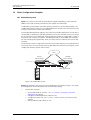
The MAC address of the VoIP Gateway can be found on the label on the case. The label is
placed on the underside of the housing.
Figure 2.
ascom
IGWP - AA91/2C
A0106000025
IP6000
S/N 1234567
005
MAC: XX-XX-XX-XX-XX-XX
HW: xxx
Figure 5. Example of a serial number label for Europe
The hexadecimal numbers (XX - XX - XX - XX - XX - XX) in the illustration separated by (-),
represent the MAC address for the Ethernet interfaces.
2.8
Licences
Licensing (ordered together with the VoIP Gateway), allowing up to 5000 Ascom
endpoints, 1 PRI and 30 DSP channels, is included. No further licences are needed for basic
functions.
Additional licences:
• PBX , a PBX basic licence is required to accept "Registrations" and "SoftwarePhones"
for non-Ascom endpoints.
• PRIs Licences for the PRI hardware interface. One license is required for each PRI port
on the VoIP Gateway. Up to 2 PRI's can be configured for capacity and up to 4 PRI's
when redundancy is required.
• Gatekeeper enables acceptance of incoming registrations at the Gatekeeper (to set the
mode Gatekeeper/Registrar on VoIP interfaces).
- A Gatekeeper is in general used when using more VoIP Gateways (without PBX
Applications) in a network – a practicable/advisable configuration is to use one of the
VoIP Gateways as a Gatekeeper and the other VoIP Gateways register at this
Gatekeeper. The routing of the calls will be centrally configured on the Gatekeeper
and therefore you need one Gatekeeper Licence on the VoIP Gateway used as
Gatekeeper.
No Gatekeeper Licence is needed when:
- linking more Ascom VoIP Gateway PBX Applications
- using ENUM, see 19.3 Routing via the ENUM protocol on page 141
Note: All uploaded licences is shown in the VoIP Gateway GUI under General > Licences.
2009-03-10 / Ver. E
6
Installation and Operation Manual
VoIP Gateway
2.9
TD 92326GB
Installation and Configuration Steps
Note: Read the Appendix A: Safety Instructions for the VoIP Gateway on page 162. Ensure
there is adequate ventilation, if the device is installed in a cabinet.
1
Wire up the connections as described in chapter 2.5 Pin Assignments for the ISDN
Interfaces (PRI) on page 5.
2
Connect the Ethernet0 port on the VoIP Gateway to the LAN. No further
connection is needed if you use Power-over-Ethernet (PoE). See 2.3 Power-overEthernet (PoE) on page 4.
3
(European countries only) Connect the VoIP Gateway to the nearest wall socket
using a main power lead with an IEC320/EN60320 – C5 type plug.
4
Access the VoIP Gateway either via the LAN or via the Ethernet1 port (Management
port).
• LAN: open a Web Browser and enter the URL http://IGWP-XX-XX-XX,
where the Xs should be replaced with the last 6 hexadecimals in the VoIP
Gateway's MAC address.
• Ethernet1 port: connect your computer directly to the Ethernet1 port
(Management port) with a standard CAT5 Ethernet cable. Ethernet1 port is
default in “DHCP off” mode with the IP address 192.168.1.1. Set your PC to the
IP address192.168.1.2.
5
When the web-based GUI is started you will be prompt to enter a user ID and
password. Default user “admin” and password “changeme”.
Change the password (recommended). See 5.2 Admin – Name and Password on
page 14.
6
The following sections are based on the assumption that the VoIP Gateway has the
default configuration and is in the same condition as delivered. The following steps
are recommended if you are unsure about the VoIP Gateway configuration:
a) Save installed licenses to secure that licenses installed by your supplier are saved
(otherwise they will be lost when the default configuration is restored). See 5.3.2
Save installed License(s) on page 15.
b) Restore the default configuration by pressing the reset button and holding it
down (5 - 10 seconds) until the LED starts flashing. The parameters are reset and
the VoIP Gateway will then restart in tftp mode (after further 4 - 6 seconds).
c) Disconnect/connect the CAT5 Ethernet cable, or the main power lead from the
main power supply, to switch the device off and on again to return to DHCP client
mode. See 2.4 Switching the VoIP Gateway On/Off on page 4.
7
If a static IP address is to be used, configure the Ethernet0 connection. See 7.2 IP –
Static IP Address on page 35.
8
Define the time and date source. See 5.5 NTP – Source for Time and Date on page
16.
9
Add licenses. See 5.3.1 Add License on page 15.
10
Define type of connection on the VoIP Gateway's PRI (ISDN) interfaces and select
protocol (PBX dependent). See 9.1 Physical – Configuration of the Physical PRI
Interface on page 51.
Checkpoint: Select PRI > State to check that the Physical and Link state are Up. If
not check the cables and the PRI settings.
11
2009-03-10 / Ver. E
Activate the PBX Application in the VoIP Gateway and set a password. See 11.1
General – Activation of the PBX Application on page 62 and 11.2 Password – PBX
Application Administrator on page 65.
7
Installation and Operation Manual
VoIP Gateway
TD 92326GB
12
Add users. See 11.4.5 Register a New Subscriber on page 78.
13
Calls to non-configured users are usually rejected in the PBX Application. To handle
these calls a gateway object has to be created. This is the formerly automatically
created “EXTERN” object. See an example in 11.4.4 Set up a Gateway Object to
handle External Extensions on page 76.
14
Set up the interface configured above, to register to the PBX Application.
Register a name, for example “Unknown_numbers”. See the example in 17.4.2
Activate the PBX Application in the VoIP Gateway on page 123.
Checkpoint: Select PBX > Objects and check that the VoIP interface is registered to
the _EXTERN_ object in the PBX Application with the correct IP address.
(127.0.0.1 if locally registered, else the IP address of the primary VoIP Gateway.)
15
2009-03-10 / Ver. E
Configure the call routing. See 12.5 Routes – Configuration on page 94.
Here you specify which terminal equipment is to be reached, under which number.
8
Installation and Operation Manual
VoIP Gateway
3
TD 92326GB
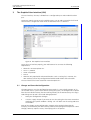
The Graphical User Interface (GUI)
The user interface, the GUI, is divided into a Configuration part and an Administration
part.
Some areas require you to enter the administrator's user ID and password.The left-hand
vertical menu is the general menu while the horizontal menu is submenu.
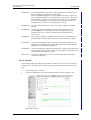
Figure 3.
Figure 4.
Figure 6. The Graphical User Interface
To use the user interface properly, your web browser has to meet the following
requirements:
•
•
•
•
•
Microsoft's Internet Explorer 6.x.
HTTP 1.1 protocol
HTML 4.0 protocol
Frames
XML/XSL (only required for advanced functions such as sorting lists). However, the
VoIP Gateway can be fully configured and administered without these functions.
The user interface has been tested with Internet Explorer 6.x.
3.1
Change and Save the Configuration
The VoIP Gateway saves the configuration permanently in a non-volatile memory so it is
still available after a system restart. When starting the system, the configuration is copied
from the non-volatile memory into the working memory of the VoIP Gateway. This copy is
read during start-up and is then used during operation.
1
Make your configuration changes.
2
Click the “Apply” button if you want to save the setting, but also want to continue
working in that specific window. Clicking “Ok” will both save the setting and close
the window.
Most of the changes to the configuration, changes to the routing information for
example, are executed by the VoIP Gateway without interrupting normal operation. Some
changes, however, require a restart, interrupting calls in the process.
2009-03-10 / Ver. E
9
Installation and Operation Manual
VoIP Gateway
TD 92326GB
To prevent calls from being accidentally interrupted, your VoIP Gateway informs you if a
restart is required.
3
Click the “Reset is required” link. The Reset when idle view will open.
4
Click “OK” to restart when there are no active calls (this prevents existing calls from
being disconnected by a restart) or select Reset > Reset, and click “OK” for an
immediate restart.
Note: When waiting for a Reset when idle, do not browse away from the screen, or the
reset will be cancelled. The “ok” shown in the browser notifies you that the reset has
begun and will be ready after approximately 5 seconds.
If the new configuration was not performed properly, the VoIP Gateway might no longer
be accessible after activating. That would be the case, for example, if an Ethernet interface
parameter such as an IP address or subnet mask is set incorrectly. In such a case the
Management port can be used, since it is no longer possible to fix the mistake by using
the GUI.
3.2
Generate the Default Configuration
You can return to the default configuration at any time by pressing the reset button and
holding it down (5 - 10 seconds) until the LED starts flashing. The parameters are reset and
the VoIP Gateway will then restart in tftp mode (after further 4 - 6 seconds). Then switch
the device off and on again to return to DHCP client mode. See 2.4 Switching the VoIP
Gateway On/Off on page 4.
IMPORTANT: You will lose all licenses as a result of this procedure. Download the
installed licenses from the VoIP Gateway and save them before deleting
the configuration, see 5.3.2 Save installed License(s) on page 15.
Note: You will also lose all of the preceding configuration. If required, you can save the
current configuration in a file, beforehand.
Tip: Press the reset button again, briefly, to return the VoIP Gateway to normal operating
mode. In this case however, the DHCP server mode will be activated (see 22.2
Setting the IP-interface parameters without DHCP on page 152), whereas the DHCP
client mode will be activated after switching the VoIP Gateway on/off.
3.3
Configuration Information
We describe the configuration procedure using the Web Browser, which is usually the
most convenient one for common application scenarios. Configuration via Telnet is
possible but not recommended and is not described in this manual.
Note: Ascom do not support calls through firewalls but if required (i.e. if access to the
VoIP Gateway must be protected by a firewall) the services tcp/23 (telnet) and tcp/80 (http)
need to be enabled. Refer to section B.1 NAT and Firewalls on page 165.
2009-03-10 / Ver. E
10
Installation and Operation Manual
VoIP Gateway
4
TD 92326GB
Software Upgrade Information
Always download the current configuration before upgrading the software, see 13
Download – Save or View Current Configuration on page 101. This is merely a
precautionary measure, the existing configuration should not be affected during the
upgrade.
4.1
Upgrade to version 7.00
An upgrade to version 7.00 also implies that the licences need to be upgraded. Licences
for existing VoIP GW’s have been updated and can be downloaded, free of charge, from
the Ascom extranet.
IMPORTANT: • Software version 7.00 can only be upgraded from version 6.00, i.e. VoIP
GW’s with version 1.3.1 need to be upgraded to version 6.00 before the
upgrade to version 7.00.
• Gatekeeper licence version 6 (used by IGWP 1.3.1) or older, is not
compatible with software version 7.00 and therefore a new Gatekeeper
licence is required before the update.
• The bootcode file format of version 7 is different from earlier bootcode
file format. To upload a version 7 bootcode a version 7 firmware has to be
loaded first.
The upgrade will imply the following:
Existing licence
Converted licence
1 x PRI
Ascom-Lic with support for 5000 users
30 x DSP channels
1 x PRI
2 x PRI
Ascom-Lic with support for 5000 users
60 x DSP channels
2 x PRI
1 x Gateway
Not applicable
1 x Gatekeeper version 6
1 x Gatekeeper version 7
4.1.1
Download new Software
1
Enter the Ascom Extranet and select Products > Software Download.
2
Download and save the following software:
• VoIP Gateway software version 6.00
• VoIP Gateway software version 7.00
• Bootcode 71
1.The new bootcode includes a minimized web GUI.
2009-03-10 / Ver. E
11
Installation and Operation Manual
VoIP Gateway
3
TD 92326GB
Upload the software in the steps given below, refer to 14.2 Upload New Firmware
on page 104 and 14.3 Upload New Boot Code File on page 105.
1) Upload version 6.00 and reboot by clicking the "Reset..." link.
2) Upload version 7.00 and reboot.
3) Upload the Boot Code file and reboot.
4) Upload version 7.00 again and reboot.
4
4.1.2
Update the licence, follow the instructions in 4.1.2 below.
Update the Licence
1
Enter the Ascom Extranet and select Supply > License > Licence.
2
Select "Review Existing Licence" and click "OK".
3
Select License Type "IGWP".
4
Enter your MAC address in the Search text field and click "Search". A new page
opens.
5
Click on the row that shows MAC Address, Customer name and Date. The Licence
page opens.
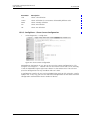
6
Click "Download License" to open the File Download window.
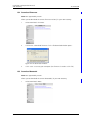
Figure 5.
4.2
7
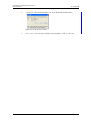
Click "Save" to download the .txt file and save it where you later can find it.
8
Add the .txt file to the VoIP Gateway, refer to 5.3.1 Add License on page 15.
Upgrade from version 1.01 or earlier, to version 1.2.x
There is a number of configuration changes between 1.01 and 1.2.x.
4.2.1
Gateway Object (former EXTERN object)
A call that cannot be terminated in the PBX, will now be sent by the PBX to a preconfigured Gateway object. This Gateway object can be compared to the previously
automatically created EXTERN object. The Gateway object can take multiple registrations,
contrary to the EXTERN object that could only take one registration.
The new parameter PBX/General/”Route External calls to” is used for setting which
Gateway object shall be used for routing calls that cannot be terminated in the PBX.
2009-03-10 / Ver. E
12
Installation and Operation Manual
VoIP Gateway
TD 92326GB
GATEWAY Description
With 1.01 there was an Object User with Gateway Flag – this is removed in 1.2.x. Now
there is an Object called Gateway. Users with gateway Flag to Gateway Objects has to be
re-configured.
4.2.2
Upgrade Procedure
Note: Download the current configuration before upgrading the software, see 13
Download – Save or View Current Configuration on page 101. This is merely a
precautionary measure, the existing configuration should not be affected during the
upgrade but the following configuration changes are needed due to changes in the
software.
1
Upload new boot code, see 14.3 Upload New Boot Code File on page 105.
2
Upload new firmware, see 14.2 Upload New Firmware on page 104.
3
Delete the “PBX Version=5” license. See 5.3.3 Delete installed License(s) on page
15.
4
Delete the “PBX Registration.Ascom=1000” license.See 5.3.3 Delete installed
License(s) on page 15.
5
Add appropriate licenses. See 2.8 Licences on page 6 and 5.3.1 Add License on
page 15.
6
If you want to disable the default MOH, you need to enter “off” in the “Music On
Hold URL” text field. See page 63 for more information about MOH.
7
Create a Gateway object to handle external calls, see 17.4.1 Create a Gateway
Object to handle External Calls on page 123.
8
Enter the long name of the Gateway object that routes external calls in the “Route
External Calls to” text field. This name is the same long name specified in the object
created in 17.4.1 Create a Gateway Object to handle External Calls on page 123. In
this case “Unknown_numbers”.
9
A. If a Gateway license is installed:
A.1) Select Gateway > VoIP.
A.2) Click on the GWn interface registered for the former EXTERN object.
A.3) Set the Name in the Alias list to “Unknown_numbers”.
B. Without a Gateway license:
B.1) Configure the PRI interface. See 17.4.4 Configure the PRI (ISDN) Interface on
page 124.
2009-03-10 / Ver. E
13
Installation and Operation Manual
VoIP Gateway
5
TD 92326GB
General Settings
5.1
Info – View Information
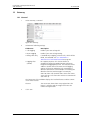
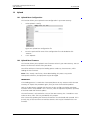
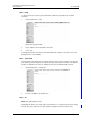
Figure 6.
Figure 7. Information page
1
Select General > Info.
The welcome page will appear once you have connected your web browser to the
IP address of the VoIP Gateway. The URL is http://xxx.xxx.xxx.xxx with xxx. xxx. xxx.
xxx replaced by the IP address of the VoIP Gateway. This view will show:
•
•
•
•
•
•
•
Device's hardware and software versions
Serial number / MAC address
DRAM memory
Flash memory
Number of voice channels and type of codec used
Number of channels (example: 2 E1 channels with 30 voice channels each)
PRI used for Synchronization. The Sync is an indicator of a successful PRI
connection.
• Address of the SNTP server used (if configured)
• Local time of the VoIP Gateway according to the SNTP server and time zone
specified.
• Operating time since the last cold or warm restart
5.2
Admin – Name and Password
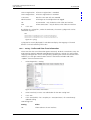
Figure 7.
Figure 8. Set administrator name and password
A name can be assigned to the VoIP Gateway, making it easier to keep an overview when
configuring a number of devices. The user's name and corresponding password can be
defined to secure the VoIP Gateway´s configuration.
1
Select General > Admin and enter a VoIP Gateway name.
The name appears in the window title of the home page and is also added to the ID
sent with outgoing registrations.
2009-03-10 / Ver. E
14
Installation and Operation Manual
VoIP Gateway
2
TD 92326GB
Enter a user name (default User Name = admin).
Used for all password protected pages on the GUI. Can also be used for telnet
access.
3
Enter a new password (default Password = changeme).
4
Re-enter the new password.
(URL to on-line help is normally left blank).
5
5.3
Click “OK”.
License
Figure 8.
Figure 9. License administration
1
Select General > License.
An overview of installed licenses is shown in the upper area of the window. Type of licence
and name of the license followed by the serial number is shown, see 2.8 Licences on page
6 for more information. Licenses are also installed via this menu.
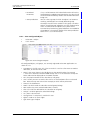
5.3.1
Add License
The licences are loaded into the VoIP Gateway using a text file.
1
Enter the location of the licence text file in the File text field or select the location of
the license files using the “Browse...” button.
2
Click the “Upload” button to load the license files into the VoIP Gateway.
During this procedure the licences are saved in the VoIP Gateway's configuration.
We recommend that all installed licences are downloaded from the VoIP Gateway and
saved in case the configuration needs to be deleted.
5.3.2
Save installed License(s)
1
Click on the link “download” to the right of the license you want to save or click
“download all” if you want to save all installed licenses. The File Download window
opens.
2
Click “Save”.
3
Save the installed license(s) as a text file.
5.3.3
Delete installed License(s)
IMPORTANT: Perform a backup of the installed licenses as previously described, before
deleting them. Or make sure the original license text file is available.
2009-03-10 / Ver. E
15
Installation and Operation Manual
VoIP Gateway
TD 92326GB
Note: Make sure you really want to delete the license(s). There is no confirmation request
(Do you really want to delete? Yes or No) issued prior to the delete.
1
5.4
Click on the link “delete” to the right of the license you want to delete or click
“delete all” if you want to delete all installed licenses.
Update – Automatic Software Update
Note: Not supported by Ascom.
On this page the device can be configured to poll an update server (a normal web server).
A file, pointed to by an URL, is read from the update server and executed. The Current
Update Serials section shows the values of the variables set after last successful execution
of the associated command. These values are provided as standard parameters in the
query part of the URL
1
Select General > Update.
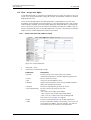
Figure 9.
Figure 10. Automatic software update
5.5
NTP – Source for Time and Date
The VoIP Gateway does not have a battery-backed real-time clock. The internal time will
thus be reset to 0:00 hrs, 1.1.1970 after every restart.
The correct time is not required for normal operation but if, for example call detail records
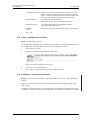
with the correct time are needed, the IP address of a source for time and date can be
specified. The VoIP Gateway will then synchronise its internal clock to the time source at
intervals specified.
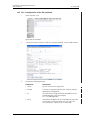
1
Select General > NTP.
Figure 10.
Figure 11. Time and date source
2
2009-03-10 / Ver. E
Select/Enable following settings.
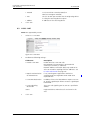
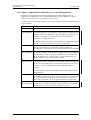
Field name
Description
• Time Server
Enter the SNTP server “IP address”
16
Installation and Operation Manual
VoIP Gateway
3
5.6
TD 92326GB
• Interval
Enter update interval time in minutes
• Timezone
Select zone in the drop-down-list.
If you cannot find your time zone in the list, select
“Other” and enter the tz string manually, follow the
instructions in the next step.
• String
Note: String is only entered manually, if time zone is
not in Timezone drop-down-list above.
Enter the time zone string if you want automatically
updates summer/winter. See 22.9 Define Source for
Time and Date on page 157 for more information.
Click “OK”.
Sync – Source for Synchronizing Gateways
Note: Not supported by Ascom.
For certain call types (such as fax, modem or transparent data), it is important for both
ends to have the same time. To make sure a number of gateways are always in sync, you
may configure a common clock source here. For this to work well, you should use a device
as clock source that has a stable clock itself, for example a gateway that is synchronized to
a public ISDN interface.
Note: This clock source is not used to set the system time, use the NTP Configuration for
this.
Figure 11.
Figure 12. Sync server
4
5
5.7
Select/Enable following settings.
Field name
Description
• Sync Server
Enter the IP address of the clock source
• Interval
Enter polling interval in seconds.
Make sure the Interval is sufficiently short (you should
keep the default of 1 second).
Click “OK”.
HTTP Server – Port for the Local HTTP server
The VoIP Gateway is administered via the network via the TCP port 80 (http). If for some
reason the port 80 is not supposed to be used, you can set up another port for the local
HTTP server and then access the VoIP Gateway via this port.
For web administration via the browser, the link must be specified, for example for port
8080 as follows: http://192.168.0.3:8080. Note that all applications such as the PBX
Operator switchboard position and the TAPI need to be set to the port of the HTTP server.
2009-03-10 / Ver. E
17
Installation and Operation Manual
VoIP Gateway
1
TD 92326GB
Select General > HTTP-Server.
Figure 12.
Figure 13. Local HTTP server
2
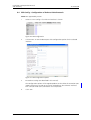
Select/Enable following settings.
Field name
Description
• Force HTTPS
Allow only HTTPS sessions. HTTP requests are redirected to
HTTPS requests. On the first request after enabling this
feature some browsers may not accept redirection of the
XSL file, in this case the reload button of the browser helps.
• Disable HTTP basic
authentication
When using the default HTTP Basic Authentication, the
client's browser will ask the user to supply a user name and
password to be sent to the HTTP server. Only if the user
name and password is correct, the resource will be returned
to the client. The user name and password are transmitted
in the clear which can be a security risk.
Disable HTTP basic authentication if you want to use HTTP
Digest Authentication which defines a protocol that allows
the client to prove to the server that it knows the correct
password without having to send the password itself to the
server. The client does an irreversible computation, using the
password and a random value supplied by the server as
input values. The result is transmitted to the server who does
the same computation and authenticates the client if he
arrives at the same value. Since the computation is
irreversible, an eavesdropper cannot obtain the password.
• Password protect all Password protects all HTTP pages.
HTTP pages
When enabled the Admin name and password is required
from the first page of the VoIP Gateway´s GUI.
2009-03-10 / Ver. E
• Port
The VoIP Gateway is by default administered over the
network via the TCP port 80 (http). If port 80 is not to be
used another port can be set up for access.
For web administration via the browser, you must specify the
link, for example for port 8080 as follows: http://
192.168.0.1:8080.
Note that all applications such as the PBX Operator
switchboard position and the TAPI need to be set to the port
of the HTTP server.
• HTTPS-Port
Port 443 is by default used for HTTPS, but another port can
be specified here.
18
Installation and Operation Manual
VoIP Gateway
• Allowed stations
TD 92326GB
If IP address and Subnet Mask is specified, access only from
matching network is allowed, for example:172.16.0.0/
255.255.0.0
Public compact flash If parts of the compact flash shall be accessed without
access
authentication a list with the path and access rights (read or
write) can be configured. The longest match in the list
defines the user name and the password used for
authentication. Example: If the compact flash drive is used
for an update script in the directory script and the backups
are stored in a directory backup the configuration could be /
drive/cf0/script/ read and /drive/cf0/backup/ write
Active HTTP sessions List of currently active HTTP sessions
3
5.8
Click “OK”.
HTTP Client
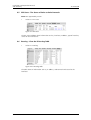
Some files which the equipment must access over HTTP (MoH, announcement, Voicemail,
etc.), can be password protected. Here a list of URLs (Uniform Resource Locator) with the
respective user names and passwords can be specified.
1
Select General > HTTP Client.
Figure 13.
Figure 14. HTTP client
2
Enter the URL to the HTTP client.
3
Enter User name and Password for this client.
4
Click “OK”.
A new row will be shown and more URLs can be added.
2009-03-10 / Ver. E
19
Installation and Operation Manual
VoIP Gateway
5.9
TD 92326GB
Logging
The VoIP Gateway can record significant events during operation. External logging is
disabled by default (Off) but you can still view log messages in real time and display the
syslog in a web browser by clicking the Syslog link on the Diagnostics > Logging page. This
is an immediate view, constantly updated and will be lost unless they are saved.
Figure 14.
Figure 15. Logging
Saving the Syslog
There are four ways of saving the syslog permanently:
• Transfer the Syslog entries to a TCP program.
The VoIP Gateway writes the Syslog entries to a TCP connection. The other end of the
TCP link is then responsible for further evaluating of the entries.
• Store the Syslog entries in a “syslogd”.
The entries are reported to a “syslogd” server in the network. The server is then
responsible for further evaluation or storage.
• Store the Syslog entries in a Web server.
The syslog entries are transferred to a web server where they can be further processed.
Each individual syslog entry is transmitted as form data to the web server in HTTP GET
format.
• Store the Syslog entries into the /log directory on a local CF card, if used1.
Log files named LOG0.n are created, where n goes from 0 to 3. The next log file is
created when either the max file size is reached or the backup time has passed.
LOG0.0 is always the newest log file.
See 15 Diagnostics on page 107 for more information.
Alarm and Event Handling
Alarm and event forwarding are configured on the area Alarm and Event Forward Server,
independently from the handling of log messages.
If no Forward Server is configured, alarms and events are stored locally as specified in the
Local Alarm and Event Queues area. Otherwise, alarms and events are additionally
forwarded to the external server using HTTP requests. Each individual alarm or event entry
is transferred to the server as an individual request.
1.The menu Diagnostics > CF under Administration shows if a CF card is mounted in the device.
2009-03-10 / Ver. E
20
Installation and Operation Manual
VoIP Gateway
TD 92326GB
Figure 15.
Field name
Description
Alarm and Event Forward Server
• Address
The IP-address of an external HTTP server that will receive the
forwarded alarms and events
• Port
Defines the TCP port the HTTP request is sent to.
• Method
Selects the method used to send the the requests. The same
methods as for the Log Server are available here
Local Alarm and Event Queues
This area allows you to control the number of events and alarms that are kept in
memory and stored in non-volatile memory during restarts
• Memory Queue
Entries
Maximum number of faults and alarms to hold in volatile
memory (DRAM).
• Persistent Queue Maximum number of faults and alarms to keep in flash
Entries
memory.
5.9.1
Transfer the Syslog Entries to a TCP program
1
Select General > Logging and select “TCP” in the Log Server Type drop-down list.
Figure 16.
Figure 16. Transfer syslog entries to a TCP program
2
If the VoIP Gateway is to establish the TCP connection automatically, enter the “IP
address” of the destination in the Address text field.
3
Enter the “TCP port number” in the Port text field and click “OK”.
4
Click on “reset required” link
5
Click “OK”
5.9.2
Store the Syslog Entries in a Syslogd
1
Select General > Logging and select “SYSLOG” in the Log Server Type drop-down
list.
Figure 17.
Figure 17. Store syslog entries in a Syslogd
2
Enter the “IP address” of your syslogd in the Address text field.
3
Select the desired syslogd message “class” in the Class text field and click “OK”.
4
Click on “reset required” link
5
Click “OK”
2009-03-10 / Ver. E
21
Installation and Operation Manual
VoIP Gateway
5.9.3
TD 92326GB
Store the Syslog Entries in a Web server
1
Select General > Logging.
2
Select “HTTP” in the Log Server Type drop-down list.
Figure 18.
Figure 18. Store syslog entries in a web server
3
Enter the “IP address” in the Address text field.
4
Enter the “HTTP port number” in the Port text field.
5
Select method to send the request:.
Method
Description
• Standard
This should be used to forward log messages to
another device, for example to store it on a central CF
card.
(URI=hardwired)
• External (GET)
This is identical to the Standard method, except that
you may specify the URI to be used
(URI=as defined in Path)
• External (POST)
The log message will be coded into GET form data
(also known as query args).
(URI=as defined in Path)
6
Enter the “relative URL of the form programme” on your web server in the Path
text field and click “OK”.
7
Click on “reset required” link and click “OK”.
Note: The VoIP Gateway will make an HTTP GET request to the web server on the
registered URL followed by the URL-encoded log entry. Enter the value “/cdr/
cdrwrite.asp” in the “URL-Path” field if, for example, you have a page on your web server
with the name “/cdr/cdrwrite.asp” with a form that expects the log message in the “msg”
parameter. The VoIP Gateway will then make a GET /cdr/
cdrwrite.asp?event=syslog&msg=logmsg request to the server.
5.9.4
Store the Syslog Entries on a Local CF Card
1
Select General > Logging.
2
Select “LOCAL” in the Log Server Type drop-down list.
Figure 19.
Figure 19. Store syslog entries in a local CF card
2009-03-10 / Ver. E
22
Installation and Operation Manual
VoIP Gateway
3
TD 92326GB
Enter the maximum size for the log file in the Max File Size text field.
If the current log file reaches the maximum size it will be backed up and a new file
will be created.
4
Enter the “time for backup” in the Backup Time text field.
At the specified time, the current log file will be backed up and a new file will be
created (independent of size) and click “OK”.
5
Click on “reset required” link and click “OK”
5.10 SNMP – Monitor the VoIP Gateway via SNMP
Note: Not supported by Ascom.
The VoIP Gateway can monitor the operating condition via the Simple Network
Management Protocol (SNMP). The standard MIB-II is supported, along with a
manufacturer-specific MIB. The SNMP framework has three parts:
• An SNMP manager: the system used to control and monitor the activities of network
hosts using SNMP.
• An SNMP agent: the software component within the managed device that maintains
data for the device and reports data, as needed, to managing systems.
• A MIB: The Management Information Base (MIB) is a virtual information storage area
for network management information.
The agent and MIB reside on the routing device (router, access server, or switch). To enable
the SNMP agent on the VoIP Gateway, the relationship between the manager and the
agent must be defined.
1
Select General > HTTP Server.
Figure 20.
Figure 20. Enable monitoring via SNMP
2
2009-03-10 / Ver. E
Select/Enable following settings.
Field name
Description
• Community
Enter a name in the Community field if you are not using
the standard community name (public). The community
text string acts like a password to regulate access to the
agent on the VoIP Gateway.
• Device Name
Optional (for information only)
• Contact
Optional (for information only)
• Location
Optional (for information only)
23
Installation and Operation Manual
VoIP Gateway
TD 92326GB
• Authentification Trap Enable if you want the SNMP notifications sent as traps.
Access via SNMP is only possible if the correct Community
Name is entered. If enabled a trap will be generated in the
event of access with an incorrect Community Name.
3
Trap Destinations
List of defined trap destinations.
SNMP traps will be sent to all of the destinations.
Allowed networks
List of networks allowed to send SNMP requests.
All network allowed if empty.
• Address
• Mask
A maximum of five authorised computers can be defined.
Click “OK”
5.11 Telnet – Configuration via Telnet
Note: Not supported by Ascom.
The configuration procedure in this manual is described when using the Web Browser, but
the configuration is also possible to do via the Telnet program on your PC.
1
Select General > Telnet.
2
Enable the Enable telnet checkbox and click “OK”.
Figure 21.
Figure 21. Enable configuration via Telnet
3
Click on the “reset required” link.
4
Start a Telnet session and enter your commands from there.
5.12 Certificates – Secure TLS Connections
Note: TLS for web browsing (https) is supported. VoIP security (SIPS) is not supported by
Ascom.
The Trust list contains the certificates to be accepted for TLS secured connections (e.g.
HTTPS, SIPS).
The Device certificate contains the certificate chains that have been rejected while trying
to establish a secure TLS connection. This happens for example if the certificate is expired
2009-03-10 / Ver. E
24
Installation and Operation Manual
VoIP Gateway
TD 92326GB
or neither the certificate nor any of the issuing CAs are trusted. If one of that certificates
should be trusted for future connections you can select and add it to the trust list.
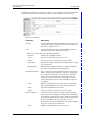
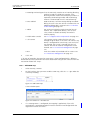
Figure 22.
Figure 22. Certificates
Field name
Description
Trust list
You can add either individual endpoint certificates or a CA
(Certificate Authority) certificate if you want to accept all
certificates issued by that CA.
• File
You can upload either DER- or PEM-encoded certifiates.
PEM-files may contain multiple certificates.
When the list exists you have the following options:
– Remove:
Remove the selected certificate.
– Clear:
Remove all certificates from the trust list.
– Details:
Click the name of a certificate to view its details.
– Download:
Download a single certificate by clicking the PEM- or DERlink, respectively.
– Download all:
Download the complete trustlist as a PEM-encoded text
file. You can upload that file to another box.
Rejected certificates
This list contains the certificate chains that were rejected
before, while trying to establish a secure TLS connection.
This happens for example if the certificate is expired or
neither the certificate nor any of the issuing CAs are
trusted. If one of the certificates should be trusted for
future connections you can select and add it to the trust
list, directly.
– Trust:
Add the selected certificates to the trust list and remove
the corresponding chains from the rejected certificates.
– Clear:
Discard all rejected certificate chains
– Details:
Click the name of a certificate to view its details.
Device certificate
– Trust:
2009-03-10 / Ver. E
The device certificate can be used by remote Transport
Layer Security (TLS) endpoints to authenticate the identity
of the device. In general this is not a single certificate but a
chain containing the device certificate and the certificates
of the intermediate CAs up to the root CA. A TLS
connection can only be established if the remote endpoint
trusts at least one of that certificates.
Add the selected certificates to the trust list.
25
Installation and Operation Manual
VoIP Gateway
TD 92326GB
– Clear:
This button is only displayed if a certificate has been
installed by the user, earlier. Click this button to discard the
current device certificate and restore the standard
certificate.
– Renew:
This button is only displayed if no certificate has been
installed by the user, earlier. Click this button to renew the
automatically generated standard certificate.
– Details:
Click the name of a certificate to view its details.
– Download:
Download a single certificate from the chain by clicking the
PEM or DER-link, respectively.
– Create new:
Click this link to create a new self-singed certificate or
certificate request (see chapter 5.12.1 and 5.12.3).
• File
Select a local certificate file and click the "Upload" button.
You can upload a single certificate corresponding to the
private key of a previously created certificate request in
both PEM or DER-format. You can also upload a complete
certificate chain containing the corresponding private key
as a PEM-encoded text file.
5.12.1 Create a self-signed-certificate
1
Click the "Create new" link. A new window will open.
2
Select "Self-signed certificate" in the Type drop-down list.
3
Choose the bit strength of the key pair in the Key drop-down list. .Available bitstrengths are 1024, 2048 and 4096-bit. Optionally you can reuse the current key
pair.
4
The Common Name should match with the name of the device. For example, if you
access the web interface of the device with https://, the common name should be
"IGWP-XX-XX-XX".
5
There are some other optional naming parameters (e.g. Organisational Unit,
Country). You can use them to describe the role of the device within your
installation.
5.12.2 Signing request
A certificate signing request contains a public key and an identity. While the
corresponding private key is kept secret, the request is being sent to a CA. It will issue an
appropriate certificate for the public key after it verified the identity.
1
Click the name of the signing request to view its details.
2
Download the signing request by clicking the PEM- or DER-link, respectively.
3
Remove the current signing request and the corresponding private key, as a
Certificate of Completion for that key cannot be installed any more.
5.12.3 Create a certificate signing request
1
Click the "Create new" link at the device certificate section. A new window will
open.
2
Select "Signing request" in the Type drop-down list.
2009-03-10 / Ver. E
26
Installation and Operation Manual
VoIP Gateway
TD 92326GB
3
Choose the bit strength of the key pair in the Key drop-down list. Available bitstrengths are 1024, 2048 and 4096-bit. Optionally you can reuse the current key
pair.
4
The Common Name should match with the name of the device. For example, if you
access the web interface of the device with https://, the common name should be
"IGWP-XX-XX-XX".
5
There are some other optional naming parameters (e.g. Organisational Unit,
Country). You can use them to describe the role of the device within your
installation. Keep in mind that the CA signing the request can modify these
parameters according to their policies.
5.12.4 Uploading the response certificate from a CA
Select a local certificate file from your computer and press the "Upload" button to add it
to the trust list.
2009-03-10 / Ver. E
27
Installation and Operation Manual
VoIP Gateway
6
TD 92326GB
IP – Priority and Security settings
6.1
Settings – Priority and Security
1
Select IP > Settings.
Figure 23.
Figure 23. Priority and Security
2
Enable/Enter following settings.
Field name
Description
• TOS priority RTP Data
Configuration of the TOS (Type of Service) value for media (for
example voice) packets. TOS determines the priority from the
TOS field in the IP header. If your router can use TOS priority
control you can use this function.
Hexadecimal, octal or decimal values can be used; 0x10, 020
and 16 are all equivalent.
Default the VoIP Gateway sets the TOS field to 0x10 for all IP
packets that it transmits. This value must be changed to 0xB8
which works better for VoIP.
Note: Remember that the same value should be set in the
TOS field for all devices.
(set to 0xB8 for
Ascom i75 use)
• TOS priority Signalling
Configuration of the TOS value for signalling (e.g. H.323 or
SIP) packets.
Note: leave the following at default settings for the normal case.
• First UDP-RTP port Specify the first port in the port range for the UDP-RTP traffic
(User Datagram Protocol/Real Time Protocol). Used to narrow
down the port ranges to be opened in a firewall.
• Number of ports Specify number of ports.
(Default RTP port range is from 16384 to 32767)
• First UDP-NAT port Specify the first port for the UDP-NAT (User Datagram
Protocol/Network Address Translation). Must be configured
for UDP-NAT to work.
• Number of ports Specify number of ports.
Local Networks:
2009-03-10 / Ver. E
Here you can specify ip addresses or address ranges to be part
of the local network.
This configuration influences the coder selection process on
VOIP endpoints like telephones and physical Gateway
interfaces.
28
Installation and Operation Manual
VoIP Gateway
Private Networks:
TD 92326GB
By indication of a private network the VoIP Gateway can steer
the Media Relay function. Both signalling (and RTP stream for
VoIP calls that are routed into non-private networks by the
VoIP Gateway) will flow through the VoIP Gateway.
All networks are considered private if none is configured.
Without Media Relay function the RTP packets are exchanged
directly between the endpoints.
A list of private networks can be specified.
• Address
• Mask
3
6.2
Enter the IP address and network mask to the private network
Click “OK”.
NAT – Network Address Translation
Note: Not supported by Ascom. See 3.3 Configuration Information on page 10.
Enables a local area network (LAN) to use one set of IP addresses for internal traffic and a
second set of addresses for external traffic. A NAT box located where the LAN meets the
Internet makes all necessary IP address translations.
NAT serves three main purposes:
• Provides a type of firewall by hiding internal IP addresses.
• Enables a company to use more internal IP addresses. Since they are used internally
only, there is no conflict with IP addresses used by other companies and organizations.
• Allows a company to combine multiple ISDN connections into a single Internet
connection
1
Select IP > NAT.
Figure 24.
Figure 24. NAT
2
Enable/Enter following settings.
Field name
Description
• Enable NAT
Activates the NAT module.
NAT only needs to be active on networks requiring
official IP addresses and is not required if the connection
is operated with unofficial, but known, IP addresses. See
B.1 NAT and Firewalls on page 165.
• Default forward
destination
IP address of the host that inbound requests are sent to.
Not recommended. We recommend the Port specific
settings below.
Port specific forwardings: A list of protocol and port specific hosts that inbound
requests are sent to, can be set.
2009-03-10 / Ver. E
29
Installation and Operation Manual
VoIP Gateway
3
6.3
TD 92326GB
• Protocol
TCP (Transmission Control protocol) or
UDP (User Datagram Protocol)
• Port
The TCP or UDP port number that the originating device
is asking the receiving device to open.
• Address
IP addresses of the receiving device.
Click “OK”.
H.323 – NAT
Note: Not supported by Ascom.
1
Select IP > H.323 NAT.
Figure 25.
Figure 25. H.323 NAT
2
3
2009-03-10 / Ver. E
Enable/Enter following settings:.
Field name
Description
• Enable H.323-NAT
Enables NAT for H.323 VoIP calls.
Not required if the connection is operated with
unofficial, but known, IP addresses.
Network Address Translation (NAT) only needs to be
active on networks requiring official IP addresses. See
B.1 NAT and Firewalls on page 165.
• Require authentication
for inbound RAS
If set, incoming RAS registrations need to be
authenticated. The target PBXs LDAP need to be
replicated here.
• H.225/RAS destination
IP address of host that inbound RAS requests are sent
to. Usually a gatekeeper. Allows to access a gatekeeper
behind NAT.
• H.225/Signalling
destination
The H.225 call signalling can be sent to a specified IP
address.
Status
Registered clients and Active calls are shown in this
area.
Click “OK”.
30
Installation and Operation Manual
VoIP Gateway
6.4
TD 92326GB
PPP Config – Configuration of Point-to-Point Protocols
Note: Not supported by Ascom.
1
Select IP > PPP-Config. A list with PPP interfaces is shown.
Figure 26.
Figure 26. PPP configuration
2
Click on PPPx. A new window opens with configuration options for the selected
interface.
Figure 27.
Figure 27. PPP configuration options
3
Enter/Select settings (not described in this manual).
The configuration options will change dependent on the choice of connection port
(ISDN interface PPP, TEL, BRI or PRI can be selected here, but Ethernet interfaces
PPTP (VPN) or PPPoE (DSL) connections are also possible.
4
2009-03-10 / Ver. E
Click “OK”.
31
Installation and Operation Manual
VoIP Gateway
6.5
TD 92326GB
PPP State – The Status of Point-to-Point Protocols
Note: Not supported by Ascom.
1
Select IP > PPP-State.
Figure 28.
Figure 28. PPP status
The PPP status window shows information such as; interface, IP address, Type of interface,
status for the interface etc.
6.6
Routing – View the IP Routing Table
1
Select IP > Routing.
Figure 29.
Figure 29. IP Routing table
The table shows IP information such as; IP address, Subnet Mask and status for the
interfaces.
2009-03-10 / Ver. E
32
Installation and Operation Manual
VoIP Gateway
7
TD 92326GB
Ethernet – IP Interface Parameters
• ETH0 port works as a DHCP client the first time the device is switched on (powered
up). After a restart by briefly pressing the Reset button, the ETH0 interface is allocated
the configured IP address. If an IP address has not explicitly been configured the IP
address 192.168.0.1 is specified as standard.
When delivered from the factory ETH0 is configured in DHCP Automatic mode with the
IP address 192.168.0.1 You can force the DHCP into automatic mode by restoring the
default configuration, see 3.2 Generate the Default Configuration on page 10.
• It is recommended to use ETH0 in DHCP client mode. To do this, a DHCP server is
needed in the network. Ask your network administrator to reserve a fixed IP address
for the VoIP Gateway via DHCP. Tell the administrator the hardware address of the VoIP
Gateway, see chapter 2.7 The MAC Address on page 6. The ETH0 IP interface is usually
configured when the VoIP Gateway is commissioned and normally it does not need to
be changed.
• ETH1 port (Administration port) is set in fixed mode with the IP address 192.168.1.1
when delivered from the factory.
If you connect a PC to the ETH1 port, set the IP address of the PC permanently to
192.168.1.2.
Note: DHCP Automatic mode should not be used for ‘normal’ operation, since an
accidental restart switches the operating mode.
The VoIP Gateway's DHCP function has four operating modes:
Mode
Function
Use
Disabled
No DHCP function
When you want to configure fixed IP
parameters.
Servera
DHCP server is activated
Connected devices are assigned an IP address
by the VoIP Gateway.
Client
DHCP client is activated
The VoIP Gateway gets its IP configuration
from a DHCP server in the network, see DHCP
Configuration Options below.
Automaticb The DHCP client is
ETH0 port is delivered in this condition (as also
activated after switching after restoring the default configuration)
on, and after a reset of a
fixed address.
a.This setting is used primarily in tests or for demonstrations. The VoIP Gateways do not incorporate complete DHCP servers.
b.This setting is only used at the start. During commissioning it must be replaced by the setting
“Disabled” or “Client”.
DHCP Configuration Options
Besides the IP address actually assigned, the VoIP Gateway's DHCP client processes the
DHCP options specified in the table below, provided that they were supplied when the
DHCP lease was granted.
2009-03-10 / Ver. E
33
Installation and Operation Manual
VoIP Gateway
TD 92326GB
Note: Options supplied via DHCP always overwrite any parameters defined in the VoIP
Gateway configuration.
7.1
DHCP # DHCP name
Overwritten
configuration
parameters
Description
001
Subnet mask
IP address mask
The registered network mask is used.
002
Time offset
Offset to UTC
Time difference to Universal Time, in
seconds.
003
Routers
Default Gateway
The first entry in the list of registered
routers will be used as the standard IPgateway.
006
Domain name DNS server address
servers
The first two entries from the list of
registered DNS servers are used as DNS
servers.
042
NTP servers
The first entry, from the list of registered
NTP servers, is used as the NTP server.
SNTP server IP
address
DHCP – Select Mode
It is recommended to use ETH0 in DHCP client mode and to do this a DHCP server is
needed in the network. Ask your network administrator to reserve a fixed IP address
for the VoIP Gateway via DHCP. Tell your administrator the hardware address of the
VoIP Gateway, see chapter 2.7 The MAC Address on page 6.
1
Select ETHX > DHCP.
Figure 30.
Figure 30. DHCP mode
2
Enable/Enter following settings:
Field name
Description
Client settings
• Selected
Server only
The server will issue leases to reserved clients and to clients with
Vendor class identifier = 1.3.6.1.4.1.6666 only
• Wait for
selected
Server:
The number of seconds the client will wait for a lease from the
vendor DHCP server (that is, until a lease is received that has a
vendor option 250 with proper value).
• Server
Identifier
The server will send this string as DHCP vendor option 250 to the
client.
Server settings
• Probe Address before dynamic Assignment.
• Reserved and The client will wait for a lease from the vendor DHCP server
same Vendor forever.
Clients Only
2009-03-10 / Ver. E
34
Installation and Operation Manual
VoIP Gateway
• Server
Identifier
3
7.2
TD 92326GB
The expected value for the DHCP vendor option 250 expected in
the lease offer received. This can normally be left blank.
Click “OK”.
IP – Static IP Address
1
Select ETHX > IP.
Figure 31.
Figure 31. Static IP address
2
Select/Enter the following settings.
Field name
Description
• IP address
Enter a fixed IP address
• Network mask
Enter subnet mask
• Default gateway
If it is necessary to register the standard VoIP Gateway of
your network as the default IP router, enter the default
router IP address.
• DNS server
Default, leave empty. Only needed if the VoIP Gateway is to
also serve as a WAN router.
• Alternate DNS server Default, leave empty. Only needed if the VoIP Gateway is to
also serve as a WAN router.
2009-03-10 / Ver. E
• Proxy ARP
Default, leave deactivated. Only needed if the VoIP
Gateway is to also serve as a WAN router.
The device will answer incoming ARP requests for all nonlocal IP addresses the device has an IP route to. It will then
behave as a router for such addresses even for devices that
have no proper routing configuration for this non-local
network. If the device has a dial-in PPP interface, ticking
this checkmark will allow the remote client to access the
entire network
• Check ARP
Helps to avoid ARP spoofing attacks but may cause interop
problems
• Broadcast IP
Multicast
Enable if Gatekeeper Discovery is used, see 19.1.1
Gatekeeper Discovery on page 135.
Static IP Routes:
If more routes have to be added on the other side of the
standard VoIP Gateway, this can be done in the Routes
text fields.
35
Installation and Operation Manual
VoIP Gateway
TD 92326GB
• Network destination – For network routes, enter the Network address with the
• Network mask
host part as 0 in the Network dest. text field, and enter the
correct Network mask in the Network mask text field.
– For host routes enter the complete IP address of the host
in the Network dest. text field, and enter 255.255.255.255
in the Network mask text field.
• Gateway
3
7.3
Enter the name of the Gateway
Click “OK”.
NAT – Network Address Translation
Note: Not supported by Ascom.
1
Select ETHX > NAT
Figure 32.
Figure 32. NAT configuration
2
3
7.4
Select/Enter the following settings.
Field name
Description
• Include interface
in NAT
Enable if used, see B.1 NAT and Firewalls on page
165.
• Exclude Address
Enter IP address to be excluded from NAT
• Exclude Mask
Enter Subnet mask to be excluded from NAT,
Click “OK”.
VLAN – Priority
Configure the VLAN ID only if the system supports VLAN tagging (IEEE 802.1q). The switch
used must be configured as a trunk port. For priority tagging (802.1p) it is sufficient to
configure the priority value only.
1
Select ETHX > VLAN
Figure 33.
Figure 33. VLAN ID and priority
2009-03-10 / Ver. E
36
Installation and Operation Manual
VoIP Gateway
2
3
7.5
TD 92326GB
Select/Enter the following settings.
Field name
Description
• ID
Enter the 802.1Q VLAN id, for example “1”. This is the ID
of the Virtual LAN.
The VLAN ID with the value 0 switches QoS off, following
802.1Q. The value 0 is assumed if the 802.1 Q VLAN ID
field is empty. If your switch port connected to the VoIP
Gateway is configured to a different VLAN ID, the same
value must be used here, to enable the prioritization of
the Ethernet packets.
Note:Note the configuration of the switch before setting
the VLAN ID.
• Priority - RTP Data
Enter “6” in the 802.1p priority on the Virtual LAN.
The Ethernet packets sent by the equipment can be
prioritized, at layer 2, in the switch. To do this, the packets
must be marked accordingly during transmission. This
function must be supported by the switch used.
• Priority - Signalling
Configuration of the TOS value for Signalling (for example
H.323 or SIP) packets.
Click “OK”.
DHCP Server
The VoIP Gateway supports automatic configuration using standard DHCP options. In
addition they support several specific options for some configuration options for VoIP.
The configuration includes:
• Time Zone string (to define the time zone for the equipment location)
• VLAN ID (the VLAN identity for voice traffic)
• VLAN priority (the VLAN priority for voice traffic)
• TOS Bits (the value of the IP TOS field for VoIP traffic)
• Enbloc dialling (forced en-bloc dialling)
• Configuration parameters for the Update Server.
For information on the options for the DHCP standard, see DHCP Configuration Options
on page 33.
System requirements
To be able to use these specific DHCP options, a DHCP server is required, which actually
supports these options. The most common DHCP servers are, for example, Microsoft
Windows DHCP service and Linux dhcpd.
Installation
To make the specific DHCP options useable for the DHCP server, the server has to be
informed about them. Refer to the documentation for your DHCP server.
2009-03-10 / Ver. E
37
Installation and Operation Manual
VoIP Gateway
1
TD 92326GB
Select ETHX > DHCP Server.
Figure 34.
Figure 34. DHCP options
2
3
7.6
Select/Enter the following settings.
Field name
Description
• Lease time
Set the lease time in minutes
• Check interval
Set the time in minutes
• Address ranges
Specify the first and the last IP address in a range.
Offer parameters:
Supplier specific DHCP options
Click “OK”.
DHCP Leases
IP addresses can be reserved for MAC addresses.
1
Select ETHX > DHCP Leases.
Figure 35.
Figure 35. DHCP leases
2009-03-10 / Ver. E
38
Installation and Operation Manual
VoIP Gateway
2
7.7
TD 92326GB
Select/Enter the following settings.
Field name
Description
• IP address
Enter the IP address you want to reserve
• MAC address
Enter the MAC address the IP address is reserved for
• Host name
Enter the name of the device (which has the reserved
IP address)
3
Click “Reserve”.
4
New empty row appears and more addresses can be added.
Link – Speed and Duplex Settings
The Link is default set to “Auto” which means that auto negotiation is enabled. This
setting is recommended. Auto negotiation detects the speed (for example, 10MBps,
100Mbps) and duplex (half-duplex or full-duplex) settings of the device on the other end
of the wire and adjusts to match those settings. During speed/duplex negotiation the
device transmits its own abilities to the peer device so that the peer can use the
appropriate settings.
1
Select ETHX > Link
Figure 36.
Figure 36. Speed and Duplex setting
7.8
2
Select speed/duplex in the Link drop-down list.
3
Click “OK”.
802.1X – Authentication
Note: Not supported by Ascom.
802.1X, Port-Based Network Control, is an IEEE standard that allows LAN devices to
perform an authentication handshake within the 802.3 link layer (Ethernet). The
authentication is encapsulated within EAP over LAN (EAPOL) frames. No other traffic,
except EAPOL is allowed prior to a successful authentication. 802.1X must not be
considered a bullet-proof security mechanism, since all traffic following the authentication
phase is not authenticated.
The standard specifies the following parties participating in an 802.1X authentication:
• Supplicant: The party supplying credentials towards an authenticator on the other side
of a point-to-point link. An IP phone fulfills a supplicant's role.
• Authenticator: The party facilitating the authentication. A switch will usually be the
authenticator.
• Authentication Server: The party providing the authentication service to the
authenticator. The 802.1X standard mentions a RADIUS server to be an authentication
server.
2009-03-10 / Ver. E
39
Installation and Operation Manual
VoIP Gateway
1
TD 92326GB
Select ETHX > 802.1X
Figure 37.
Figure 37. 802.1X EAP-MD5 authentication handshake
2
Select/Enter the following settings.
Field name
Description
EAP-MD5
3
7.9
•User
Enter the user/identity to authenticate with.
•Password
Enter the shared secret for the MD5 challenge/response
handshake.
Click “OK”.
Statistics
In the Statistics submenu one receives an overview of all transmitted (tx) and received (rx)
packets.
1
Select ETHx > Statistics to see the sending/receiving statistics.
Figure 38.
Figure 38. Statistics for tx and rx packets
Field name
Description
Transmitted packets:
tx-good
The number of successfully transmitted packets
tx-unicast
The number of successfully transmitted Unicast packets
tx-broadcast
The number of successfully transmitted Broadcast packets
tx-multicast
The number of successfully transmitted multicast packets
tx-lostcarrier
The number of missing packets
2009-03-10 / Ver. E
40
Installation and Operation Manual
VoIP Gateway
TD 92326GB
tx-deferred
The number of reset packets
tx-collision
The number of colliding packets (max. 16)
tx-excesscol
The number of colliding packets (if tx-collision >16)
tx-latecol
The number of late collisions.
If a collision error occurs after the first 512 bit times of data are
received by the receiving station a late collision is said to have
occurred.
tx-resource-err
The number of resource errors
Received packets:
rx-good
The number of successfully received packets
rx-unicast
The number of successfully received Unicast packets
rx-broadcast
The number of successfully received Broadcast packets
rx-multicast
The number of successfully received multicast packets
rx-crc-err
The number of received CRC check-sum errors
rx-align-err
The number of Alignment error (wrong driver, cable defectively)
with the receipt of packets.
rx-tooshort
The number of too small packets, during the transmission
rx-too-long
The number of too large packets, during the transmission
rx-collision
The number of colliding packets (max. 16)
rx-overrun-err
The amount of the Buffer Overrun error with the receipt of packets
rx-queue-overrun The amount of the queue Overrun error with the receipt of packets
rx-no-buffer
The amount of the queue Overrun error with the number of NOBuffer with the receipt of packets.
Received and Transmitted packets:
rx-tx-64
The total number of sent and received packets with 64 Bytes
rx-tx-64-127
The total number of sent and received packets between 64 and
127 bytes.
rx-tx-128-255
The total number of sent and received packets between 128
and 255 bytes.
rx-tx-256-511
The total number of sent and received packets between 256 and
511 bytes.
rx-tx-512-1023
The total number of sent and received packets between 512 and
1023 bytes.
rx-tx-1024
The total number of sent and received packets between 512 and
1023 bytes.
2009-03-10 / Ver. E
41
Installation and Operation Manual
VoIP Gateway
8
TD 92326GB
LDAP
Lightweight Directory Access Protocol (LDAP) is an Internet protocol that programs use to
look up information from a server.
Note: Not used by the Ascom i75 VoWiFi Handset.
The LDAP protocol is also required for redundant systems in which the LDAP server and a
replicating client access a joint user database. The replicating client (in this case a
VoIP Gateway) always has an updated database and can continue the work if the
“master” VoIP Gateway goes down.
8.1
Server – LDAP User Name and Password
If a replicating VoIP Gateway is used, a user name and password needs to be specified in
the “master” VoIP Gateway to allow a user to access the LDAP server.
1
Select LDAP > Server.
2
Enter a user name and password in the empty text fields.
Figure 39.
Figure 39. LDAP user name and password
3
8.2
Click “OK”.
Server Status
1
Click LDAP > Server-Status to get an overview of status
Figure 40.
Figure 40. LDAP server status
Field name
Description
connections
Total number of all connections to the LDAP server
write-connections
Number of connections with write authorization
rx-search
Number of received search inquires
rx-modify
Number of received change inquires
rx-add
Number of received add inquires
2009-03-10 / Ver. E
42
Installation and Operation Manual
VoIP Gateway
8.3
TD 92326GB
rx-del
Number of received delete inquires
rx-abandon
Number of received abandon inquires
tx-notify
Number of transmitted notifications
tx-error
Number of transmit errors
tx-error-49
Number of transmit errors due to incorrect entrance data
tx-error-50
Number of transmit errors due to insufficient rights
Replicator – Configuration
The task of LDAP replication is to copy and keep up to date the content of the user
database.
LDAP Replicators are usually configured in the following cases:
• User data is replicated from the Master VoIP Gateway to the Standby or Slave VoIP
Gateway The replicator is configured on the Standby or Slave VoIP Gateway (Full
Directory Replication).
The same user name and password specified in the “master” VoIP Gateway (LDAP
Server) must be entered here. The LDAP user and password is stored in Configuration >
LDAP > Server".
• User data is replicated from the Active Directory (AD) to the Master. The replicator is
configured on the Master.
1
Select LDAP > Replicator.
2
Select Type, either "Full Replication" or "Active Directory replication".
3
Select/Enter the following settings.
Field name
Description
Full Replication
• Enable
Start/Stop the replication.
• Server
The LDAP server “IP address”.
• Alt. Server
If an alternative LDAP server is used enter its “IP address”.
• Filter Type
Select whether an internally required LDAP Filter will be
derived from a PBX Name or is to be entered free-hand.
• BPX Name
Depending on selection of Filter Type, enter either the name
of the PBX Application or the name of an LDAP Filter.
• User
Enter the user name specified in the LDAP server.
• Password
Enter the password specified in the LDAP server.
Active Directory Replication
2009-03-10 / Ver. E
• Enable
Start/Stop the replication.
• Server
The IP address of the remote Active Directory.
• DN
The distinguished Name of the search base. This DN must be
one of the naming contexts, offered by the remote Active
Directory. If the Server setting was entered, the Show..
button will show which naming contexts are available. In
most cases the default naming context will be selected and
can be "OK".
• LDAP Filter
An LDAP Filter according to RFC2254. A default is offered.
43
Installation and Operation Manual
VoIP Gateway
4
8.3.1
TD 92326GB
• User
Enter the name (as [Windows Domain\User Name]) or the
DN (Distinguished Name) of a user with read access to the
Active Directory. If a DN is entered it will usually be one of:
cn=John Doe,cn=users,dc=innovaphone,dc=sifi, where
dc=innovaphone,dc=sifi represents the DN-setting from
above.
• Password
The password required for the User-setting.
• In Maps
Maps for incoming attributes must be configured here. An
in-map controls which content of which incoming attribute
goes into a runtime symbol table. See 8.3.5 In Maps.
• Out Maps
Maps for outgoing or local attributes must be configured
here. An out-map controls which runtime symbol table entry
fills a local attribute. See 8.3.6 Out Maps.
Click “OK”.
Configure Full Directory Replication
1
Select LDAP > Replicator.
Figure 41.
Figure 42.
Figure 43.
Figure 41. Full Replication
2
Select "Full Replication" in the Type drop-down list.
3
Select the Enable check box.
4
Enter the IP address to the LDAP server in the Server text field.
5
Enter the IP address to the alternative LDAP server in the Alt. Server text field.
Note: If this VoIP Gateway is configured as a standby LDAP server, enter "0.0.0.0"
in the Alt. Server text field.
6
Select a filter method from the Filter Type drop-down list
7
• PBX Name - Enter the name of the VoIP gateway to limit the replication to users
of a certain group
• LDAP Filter - Enter an LDAP filter to limit replication to certain LDAP objects
Enter the LDAP User name and Password in the User and Password text fields.
8
Click "OK".
Note: In the case of Master to Standby Master Full Directory Replication, do not register
new Portable Devices when the LDAP Server is down even if there is a Standby LDAP
Server in the system.
2009-03-10 / Ver. E
44
Installation and Operation Manual
VoIP Gateway
8.3.2
TD 92326GB
Configure Active Directory Replication
During Active Directory (AD) replication the configured LDAP replicator retrieves
onlyrelevant data.
AD replication is a one-way replication where data is only transferred from the AD to the
VoWiFi but not from the VoWiFi to the AD. Data originating from the AD cannot be
modified in the VoWiFi system, but it is possible to change or add those user attributes
locally that are not replicated.
Note: If AD replication is enabled, existing local users are replaced with corresponding
users in the AD, and some local attributes may be deleted. Contact Ascom Technical
Support if you would like to enable AD replication with existing local users. For AD Server
configuration settings, see 8.3.3 Configure AD Server on page 46.
1
Select LDAP > Replicator.
Figure 44.
Figure 45.
Figure 46.
Figure 42. Configure Active Directory Replication
2
Select "Active Directory Replication" in the Type drop-down list.
3
Select the Enable check box.
4
Enter the IP address to the AD in the Server text field.
5
Enter a Distinguished Name (DN) to configure a search base for AD users.
The user information is usually replicated so it is recommended to write "CN=Users,
DC=DomainName" where "DomainName" is the name of the domain on the AD
server.
You can also click "Show Options..." to see some naming contexts on the
configured server.
6
Enter an LDAP filter to retrieve only the relevant LDAP objects from the AD.
A default (objectclass=user) filter is offered, but it is recommended to assign all
VoWiFi users to a group within the AD. For example, the following filter can be
entered to retrieve only VoWiFi users.
"(&(objectClass=user)(memberOf=CN=grp_ipdect,CN=Users,DC=DomainName))"
where "grp_vowifi" is the group created for VoWiFi users, "Users" is the default
folder for users and "DomainName" is the name of the domain on the AD server.
2009-03-10 / Ver. E
45
Installation and Operation Manual
VoIP Gateway
TD 92326GB
7
Enter the user name and the password of a user who has read access to the AD in
the User and the Password text fields. It is recommended to choose a user with
Enterprise Administrator rights.
8
Configure In Maps and Out Maps for Attribute mapping. Attribute mapping
describes how the obtained information from the AD is handled within the VoWiFi
system. For more information see 8.3.4 Attribute Mappings on page 46.
9
Click "OK".
10
After proper configuration check the Replicator Status by selecting LDAP >
Replicator Status. The state of the Active Directory Replication should be "Up" and
the state of the remote directory should be "Completed".
8.3.3
Configure AD Server
The VoWiFi system supports only simple binding authentication. However, the default
registry setting for Microsoft Active Directory 2003 does not allow simple binds, so it may
be necessary to change Windows Registry settings to use AD replication.
1
In Windows, select "Run..." in the Start menu.
2
Enter "regedit" and click "OK" to start the Windows Registry Editor.
3
In the Editor go to the
"HKEY_LOCAL_MACHINE\SYSTEM\CurrentControlSet\Services\NTDS\Parameters\
LDAPServerIntegrity" key.
4
Click on the key with the right mouse button and click "Modify".
5
Change the key value of 2 to the value of 1.
6
Click "OK".
8.3.4
Attribute Mappings
The following attributes are generally used to configure attribute mappings:
VoWiFi
designator
VoWiFi AD attribute name Description
attribut
e name
Long Name
cn
cn
Common name, mandatory and must
be unique
Name
h323
userPrincipalName
User name
Number
e164
telephoneNumber
Business or mobile phone number,
mandatory and must be unique
Display
dn
displayName,
givenName, sn
Displayed name, first name or surname
8.3.5
In Maps
In Maps define which attributes of the incoming objects are replicated and how the
attributes are used in the system. In Maps can be configured with the following text fields:
• Source Attribute - The name of the AD attribute to be replicated. Only those users are
replicated who have the defined source attributes. See AD attribute name on page 62
for examples.
• Assignment Pattern - A regular expression that assigns AD attributes to local temporary
variables. A local temporary variable can have any name starting with a % sign, for
example %tel. Regular expressions are written in a formal language that is widely used
2009-03-10 / Ver. E
46
Installation and Operation Manual
VoIP Gateway
TD 92326GB
in Unix environments. For more information, see regular expression manuals on the
internet.
• Description - Short explanation of what is configured with regular expressions
If there are several in maps for one attribute, all maps are handled in the order of
appearance. To change the order of appearance click the "Move Up" or "Move Down"
icons on the left side of the In Maps window.
An in-map is a pair of <source-attr-name> (An AD-attribute name) and
<assignment_pattern>. Approximate Grammar:
Figure 47.
In-Map Examples, Maps for telephone Number
• %dw=/\1/:07031 12345-(.*) that assigns the extension to the symbol %dw
• %dw=/\2/%root=/\1/:07031(.*) -(.*) this assigns the extension to the symbol %dw
and the root-/subscriber number to %root.
• If the <value_expression> was skipped, it defaults to \n, where n is the running index
of the symbol_definition (starting with 1). The second example from above can
therefore be written as: %root%dw:07031(.*) -(.*)
• A default value for a symbol may be defined by simply applying an an always-matchconstant-value. That is, for instance for telephone Number %dw=/0/:.*
• Because of the rule, that a missing regexp defaults to :(.*) , this can be written as
%dw=/0/
• If an attribute value is to copied straight, one simply writes %e164 which is identical
with %e164=/\1/:(.*)
8.3.6
Out Maps
Out Maps define how the local temporary variables configured for In Maps are assigned to
the internal IP-DECT attributes. Out Maps can be configured with the following text fields:
• Dest. Attribute - The name of the VoWiFi attribute. See VoWiFi attribute name on
page 46 for examples.
• Destination Value - The name of the local temporary variable
2009-03-10 / Ver. E
47
Installation and Operation Manual
VoIP Gateway
TD 92326GB
An out-map is a pair of <destination-attr-name> (name of an attribute) and
<destination_values>. Approximate Grammar:
Figure 48.
This grammar allows to fill the e.g. local cn-attribute not only with a single identifier, but
with an intermixed concatenation of several identifiers and literals alike e.g.: "%sn',
'%givenName" - yielding for instance: "Doe, Jon".
Out-Map Example
The following example focuses on the generation of the e164-, node- and loc-attribute.
• Only Sindelfingen-Numbers (+49(7031)...) will match
• The numbering node (a.k.a. node-attribute) will then be set to root.
• The hosting PBX (a.k.a. loc-attribute) will be set to sifi.
Within the AD exists..: Btw, the Filter was configured to:
(&(objectclass=user)(telephoneNumber=*))
Figure 49.
Map configuration underneath Configuration/LDAP/Replicator:
Figure 50.
2009-03-10 / Ver. E
48
Installation and Operation Manual
VoIP Gateway
8.4
TD 92326GB
Replicator Status
1
Click LDAP > Replicator-Status to get an overview of status.
Figure 51.
Figure 43. LDAP Replicator status
8.5
Field name
Description
Server
IP address and port of the remote LDAP server
Full Replication
Current condition of the replication (Stop, Starting, Up, Down)
remote
Indicates the condition of the remote replication
notify
Number of received notifications
modify
Number of modified objects
paged
(ActiveDirectory only) Number of objects received from remote
directory server in response to paged-search requests.
no match
(ActiveDirectory only) Number of objects received from remote
directory server in response to paged-search requests.
discarded
(ActiveDirectory only) Number of objects discarded, because
there was no suitable MAP found.
local
Indicates the condition of the local replication
notify
Number of transmitted notifications
add
Number of locally added objects
del
Number of locally deleted objects
modify
Number of locally modified objects
pending
Number of locally pending objects
Expert
Note: Not supported by Ascom.
This tool allows you to investigate objects within the internal flash directory. Do not use
unless Ascom support has given you instructions on how to use this support tool.
2009-03-10 / Ver. E
49
Installation and Operation Manual
VoIP Gateway
TD 92326GB
Figure 52.
Figure 44. Objects listed
• Objects can be listed by just clicking on Show.
• Objects can be searched for specifically by entering an LDAP filter (RFC2254) or by
entering a single letter into the edit field right next to Show and then click on Show.
• Multiple Objects can be deleted in one instance (up to 100).
- Just select all objects by clicking on the column-selector checkbox or select some
individual objects.
- Click on the Delete menu within the toolbar. A confirmation dialogue will be shown.
- Confirm
• Objects that are shown in the right results pane can be edited. An edit dialogue allows
to add, delete or modify individual attributes of an object.
• New objects can be created by clicking on New (rather an experimental).
• Objects that are shown in the right results pane can be edited. Attributes can be
added, deleted, modified. New objects can be created by clicking on new.
LDAP filter examples
• Show objects replicated from Active Directory:
(repsrc=*)
• Show objects that were not replicated from Active Directory:
(!(repsrc=*))
2009-03-10 / Ver. E
50
Installation and Operation Manual
VoIP Gateway
9
TD 92326GB
PRI Interfaces
The VoIP Gateway has four ISDN PRI interfaces. They are labelled PRI 1 to PRI 4. All four PRI
interfaces are by default in TE mode but can be set in NT mode. See 2.1 Connections and
Indicators on the Front on page 3.
• PRI 1 to PRI 4 are primary multiplex (PRI) interfaces in TE mode for the connection to a
PBX or a public exchange line.
• PRI 1 and PRI 2 (as well as PRI 3 and PRI 4) can be linked, which can be used for looping
the exchange line when power is off.
To configure the ISDN interfaces you first need to decide which devices you want to
connect to the VoIP Gateway. That could be telephones, PBXs, network terminations from
your ISDN network provider, or other ISDN terminal equipment.
9.1
Physical – Configuration of the Physical PRI Interface
All changes in the settings except Swap tx/rx, Do not use for synchronization and Relay off
requires a reboot of the VoIP Gateway (the “Reset is required” link will appear).
1
Select PRIn > Physical.
Figure 53.
Figure 45. PRI physical configuration
2
2009-03-10 / Ver. E
Select/Enter the following settings.
Field name
Description
• NT Mode
The PRI interfaces are default in TE (Terminal) mode but
can be set in NT (Network Termination) mode, see 22.3
The TE and NT modes on page 154.
• Clock Mode
Default the VoIP Gateway synchronises itself to the
network clock (clock slave) in TE mode, and provides the
clock (clock master) in NT mode, but this can also be
manually selected.
• Swap tx/rx
Swaps the receive leads. Enable if you use a modified
(crossed) connection cable instead of a standard 1:1
ISDN connection cable.
• Do not use for
synchronization
Do not use this PRI as a clock source.
• µ-law
Changes from A-law encoding to µ-law encoding.
• T1
Changes from E1-mode to T1-mode.
51
Installation and Operation Manual
VoIP Gateway
TD 92326GB
• CAS
Enables CAS signalling. The VoIP Gateway is prepared to
support CAS as T1-CAS and E1-CAS. In CAS each traffic
channel has a dedicated signalling channel. In other
words the signalling for a particular traffic circuit is
permanently associated with that circuit.
Note: In T1 mode with CAS, only EMN Wink Start is
used.
• No CRC4
Switches off the generation of CRC4 checksums.
• Activate "power off
loop" relay
Manually switches on the internal relay connecting PRI1
and PRI2 or PRI 3 and PRI4.
• Loopback
Used for diagnostics, switches on a loopback on the
interface (everything is echoed back).
• TxLevel for T1 mode The TX level can be set to 0, 7.5 or 15 dB
(visible if T1 is checked)
• Send flags on FDL
Transmits FDL messages (Facility Data Link). The T1 link
(visible if T1 is checked) management protocol AT&T TR 54016 needs flags on
the FDL to work reliable.
3
9.1.1
Click “OK”.
Protocol – Selection of Signalling Protocol
1
Select PRIn > Protocol.
The GUI and protocol options are dependent on the setup; with or without CAS.
With CAS:
Figure 54.
Figure 46. Selection of protocol with CAS
Without CAS:
Figure 55.
Figure 47. Selection of protocol without CAS
2
Select/Enter the following settings.
Field name
Description
• Protocol
Selection of signalling protocol in the drop-down list, see
22.4 The Signalling Protocols on page 155.
• Assign Channels from Assigns the B channels from top to bottom;
Top
recommended if the interface is operated in TE mode.
See 22.5 The Assignment of B Channel Numbers for PRI
Connections on page 156.
2009-03-10 / Ver. E
52
Installation and Operation Manual
VoIP Gateway
• Channelbank mode
3
9.1.2
TD 92326GB
If a VoIP Gateway if configured as channelbank it
converts the T1 to 24 IP phone lines.
Channelbank mode may be used also (with 30 channels)
on an E1 line.
The channelbank mode only applies to CAS applications.
In the channelbank mode, each CAS channel is fixed
assigned to a telephone number and is not dynamically
assigned as in trunk scenarios. The CAS interface then is
connected to a channelbank. E.g. telephone with
number 1 calls to the CAS interface, channel 1 is taken
for this call. If telephone with number 3 calls, channel 3
is taken and so on (this is normally done with maps in the
routing table). It is similar in the incoming direction. If a
call comes in on channel 1, it is transferred to the
telephone with number 1 (or via maps in the routing
table).
Click “OK”.
Interop – Interoperability with Other Equipment
The menu normally does not have to be adjusted. This is only necessary if, for example,
malfunctions occur when transmitting H.323 calls.
Not all ISDN implementations are prepared to receive certain standard-compliant
information elements (referred to as IEs). Such IEs can be created, for example, when
linking up different PABXs or transmitting H.323 calls to an ISDN interface and vice-versa.
If malfunctions are caused by the transmission of certain IEs, the gateways can be made to
remove such IEs from the transmitted messages.
1
Select PRIn > Interop.
Figure 56.
Figure 48. Interoperability with other equipment
2
2009-03-10 / Ver. E
Select/Enter the following settings.
Field name
Description
• Automatic Keypad
Enables Automatic Keypad sending i.e. if the first dialed
digit to be sent on this interface is either '*' or '#' the
digits are not sent as called party number, but as Keypad
information instead. This is used on some ISDN networks
for non call related supplementary services (for example
*21No# to set call forwarding).
53
Installation and Operation Manual
VoIP Gateway
TD 92326GB
• Suppress HLC
Suppresses the transmission of “high layer compatibility”
information elements on the interface. See 22.7
Suppression of specific Protocol Elements on page 156.
• Suppress FTY
Suppresses the transmission of “facility information
elements” on the interface. See 22.7 Suppression of
specific Protocol Elements on page 156.
• Suppress Subaddress
Suppresses the transmission of “Subaddresses” on the
interface.
• Suppress Connected
Num.
No connected number information elements are
transmitted.
• No Restart
Suppresses the sending of RESTART messages.
A restart message requests the recipient to: return to an
idle condition, determine if there is a call present on the
channel, terminate each call found, and respond with an
Acknowledgement message.
• Passive Layer2
Normally the device tries to establish the link layer on
point to point interfaces as soon as the physical layer is
established. This behaviour is especially incompatible to
some ISDN conformance test equipment even if it
conforms to standard. This option turns this off.
• No overlap Receive
Suppresses a SETUP_ACK on incoming single digit
dialling on a point to multipoint connection, in TE mode.
See 22.6 Single Digit Dialling on Terminals on Point-toMultipoint Connections on page 156.
• No Disc
If set, incoming calls cannot be rejected (no DISC in
incoming call accepting status. REL is transmitted
instead.
• No Disc for Call Reject Call Rejection is done with REL message instead of DISC.
3
2009-03-10 / Ver. E
• Annex-N
Refers to the ETS 300 102 Annex-N. This allows in NT
mode inband tones to be sent on incoming calls before
connect (usually the network does not connect the Bchannel in this state).
• Volume
In some cases, it is desirable to adjust the basic volume
level of an interface. The volume of the ISDN interfaces
can be set in the range from -31 to +32. The units of the
volumes setting are Decibels. No entry, or the value 0
corresponds to the factory setting. A - entry reduces the
volume and a + entry increases the volume of the
associated interface.
• CR-Length
Call reference length, see22.4 The Signalling Protocols
on page 155.
• CHI Type
Channel ID coding, see22.4 The Signalling Protocols on
page 155.
Click “OK”.
54
Installation and Operation Manual
VoIP Gateway
9.1.3
TD 92326GB
State – Show Channel Status
Depending on interface and/or the number of channels the structure changes.
1
Click PRIn > State to get an overview of all channel status.
Figure 57.
Figure 49. Channel status
Field name
• Physical
Description
Statea
Shows the current condition of the layer 1 (Physical Layer)
(UP or down).
• Link Stateb
Shows the current condition of the layer 2 (Link Layer)
(UP or down).
• Channels
Number and condition of the individual channels
(Active, Idle, Busy, or D-Channel).
a.A problem with Physical State is usually a protocol mismatch.
b.A problem with Link State is usually a cabling issue
Note: If Link State is Down and Physical State is up, then select PRIn > Physical and enable
“Swap tx/rx”.
9.1.4
Statistics – Show Channel Statistics
1
Click PRIn > Statistics to see the channel statistics.
Figure 58.
Figure 50. Channel statistics
Field name
Description
• State
Indication of the status (UP, down)
• Lost signals
Number lost signals
• Slips
Number of synchronization problems with two
connected ISDN interfaces.
• Alarms
Number of alarms
• Remote Alarms
Number of remote alarms
• Lost Frame Alignments
Number of lost frames
• CRC4-Errors
Number of CRC4 check-sum errors
2009-03-10 / Ver. E
55
Installation and Operation Manual
VoIP Gateway
TD 92326GB
• D-Channel
D-Channel statistics
• Tx-good
Number of successfully sent packets
• Rx-good
Number of successfully received packets
• Rx-errors
Number of incorrectly received packets
2009-03-10 / Ver. E
56
Installation and Operation Manual
VoIP Gateway
10
TD 92326GB
TEL Interface
Note: Not supported by Ascom.
Tel is a BRI interface in TE mode which can be exclusively used as connection for a public
exchange line.
10.1 Physical – Configuration of the Physical TEL Interface
Figure 59.
Figure 51. Physical configuration
1
Select TEL > Physical.
2
Select/Enter the following settings.
Field name
Description
• NT Mode
(Network Termination) switches on the NT mode for
layers 1, 2 and 3, see 22.3 The TE and NT modes on
page 154.
• Swap tx/rx
Swaps the receive leads. Enable if you use a modified
(crossed) connection cable instead of a standard 1:1
ISDN connection cable.
• 100 Ohm Termination
Switches on the bus termination.
• u-law
Changes from A-law encoding to µ-law encoding.
• Permanent activation
(In TE mode only) activates the line permanently
(clock).
• Loopback
Enables the loopback function. This is only necessary
for conformance test purposes.
Do not use as a clock source.
• Do not use for
synchronization
(visible when NT Mode is
unchecked)
3
2009-03-10 / Ver. E
Click “OK”.
57
Installation and Operation Manual
VoIP Gateway
TD 92326GB
10.2 Protocol – Selection of Protocol
1
Select TEL > Protocol.
Figure 60.
Figure 52. Selection of protocol
2
3
Select/Enter the following settings
Field name
Description
• Protocol
See 22.4 The Signalling Protocols on page 155.
• Mode
“Point to Point” switches on the point-to-point mode.
“Point to Multipoint” switches on the point-tomultipoint mode.
Click “OK”.
10.3 Interop – Interoperability with Other Equipment
These settings are used to work-around non-standard behaviour of other equipment and
usually nothing should be configured here.
1
Select TEL > Interop.
Figure 61.
Figure 53. Interoperability with other equipment
2009-03-10 / Ver. E
58
Installation and Operation Manual
VoIP Gateway
2
2009-03-10 / Ver. E
TD 92326GB
Select/Enter the following settings
Field name
Description
• Automatic Keypad
Enables Automatic Keypad sending i.e. if the first
dialed digit to be sent on this interface is either '*' or
'#' the digits are not sent as called party number, but
as Keypad information instead. This is used on some
ISDN networks for non call related supplementary
services (for example *21No# to set call forwarding).
• Suppress HLC
Suppresses the transmission of “high layer
compatibility” information elements on the interface.
See 22.7 Suppression of specific Protocol Elements on
page 156.
• Suppress FTY
Suppresses the transmission of “facility information
elements” on the interface. See 22.7 Suppression of
specific Protocol Elements on page 156.
• Suppress Subaddress
Suppresses the transmission of “subaddresses” on the
interface.
• Suppress Connected
Num.
No connected number information elements are
transmitted.
• No Restart
Suppresses the sending of RESTART messages.
A restart message requests the recipient to: return to
an idle condition, determine if there is a call present
on the channel, terminate each call found, and
respond with an Acknowledgement message.
• Passive Layer2
Normally the device tries to establish the link layer on
point to point interfaces as soon as the physical layer
is established. This behaviour is especially
incompatible to some ISDN conformance test
equipment even if it conforms to standard. This
option turns this off.
• No overlap Receive
Suppresses a SETUP_ACK on incoming single digit
dialling on a point to multipoint connection, in TE
mode. See 22.6 Single Digit Dialling on Terminals on
Point-to-Multipoint Connections on page 156.
• No Disc
If set, incoming calls cannot be rejected (no DISC in
incoming call accepting status. See 21.10 Reject calls
on page 149.
• No Disc for Call Reject
Call Rejection is done with REL message instead of
DISC.
• Annex-N
Refers to the ETS 300 102 Annex-N. This allows in NT
mode inband tones to be sent on incoming calls
before connect (usually the network does not connect
the B-channel in this state).
• Volume
In some cases, it is desirable to adjust the basic
volume level of an interface. The volume of the TEL
interface can be set in the range from -31 to +32. The
units of the volumes setting are Decibels. No entry, or
the value 0 corresponds to the factory setting.
A - entry reduces the volume and a + entry increases
the volume of the associated interface.
59
Installation and Operation Manual
VoIP Gateway
3
TD 92326GB
• CR-Length
Call reference length, see22.4 The Signalling
Protocols on page 155.
• CHI Type
Channel ID coding, see22.4 The Signalling Protocols
on page 155.
Click “OK”.
10.3.1 State – Show Channel Status
1
Click TEL > State to get an overview of all channel status.
• Physical State refers to Layer 1
• Link State refers to layers 2 and 3
Figure 62.
Figure 54. Channel status
Field name
• Physical State
Description
a
Shows the current condition of the layer 1 (Physical Layer)
(UP or down).
• Link Stateb
Shows the current condition of the layer 2 (Link Layer)
(UP or down).
• Channels
Number and condition of the individual channels
(Active, Idle, Busy, or D-Channel).
a.A problem with Physical State is usually a protocol mismatch.
b.A problem with Link State is usually a cabling issue
Note: If Link State is Down and Physical State is up, then select TEL>Physical and enable
“Swap tx/rx”.
10.3.2 Statistics – Show Channel Statistics
The statistics shown are since the last reboot and are kept until the gateway is rebooted
again.
1
Click TEL > Statistics to see the channel statistics.
Figure 63.
Figure 55. Channel statistics
Field name
Description
• Lost signals
Number lost signals
2009-03-10 / Ver. E
60
Installation and Operation Manual
VoIP Gateway
TD 92326GB
• Slips
Number of synchronization problems with two
connected ISDN interfaces.
• D-Channel
D-Channel statistics
• Tx-good
Number of successfully sent packets
• Rx-good
Number of successfully received packets
• Rx-errors
Number of incorrectly received packets
2009-03-10 / Ver. E
61
Installation and Operation Manual
VoIP Gateway
11
TD 92326GB
PBX – Configuration of the PBX Application
The PBX Application works as a gatekeeper and is usually activated on the VoIP Gateway
connected to the ISDN exchange line. If several VoIP Gateways are used, any one of them
can be selected. The PBX Application can administer up to 5000 subscribers.
Note: No licence is required for the basic PBX application in the VoIP Gateway. The
possibility to register up to 5000 Ascom VoIP endpoints is included.
The following steps are used to perform the basic configuration:
•
•
•
•
Activation of the PBX Application
Setup of subscribers, such as the VoWiFi / IP-DECT handsets
Setup of the exchange line
Setup of call groups (Optional)
11.1 General – Activation of the PBX Application
1
Select PBX > General.
Figure 64.
Figure 56. Activation of the PBX Application
2
2009-03-10 / Ver. E
Select/Enter the following settings.
Field name
Description
• PBX Mode
(required)
Select mode for the PBX Application.
“Master” means that the PBX Application on this
device acts as Master. Within a multisite installation
one PBX Application must be configured as Master.
“Standby” is used in redundant systems. The PBX
Application on this device acts as Standby for the
Master. As long as the master is available, this PBX is
not active, but just monitors the Master. If the Master
is not available this PBX is active.
“Slave” is used for several PBXs at different locations.
“Standby-Slave” is a combination.
62
Installation and Operation Manual
VoIP Gateway
TD 92326GB
• System Name
Enter a name, for example the location of the PBX
interface. The name identifies the local PBX and
should be the same as configured in the PBX object.
If a system name is added, remember to add PBX
users. For H.323 end-points this is the Gatekeeper
identifier.
• PBX Name
This name identifies the local PBX. It should be the
same as configured in Objects with the type “PBX”.
This is optional and normally not necessary. But if an
ID is assigned it must be different from all other
gatekeeper ID entries in other PBX configurations and
gatekeepers defined.
• Unknown Registrations
If checked unknown registrations (useful for
deployment of new endpoints) are accepted.
• Music On Hold URL
Enter the URL to be used for music on hold (MOH).
See 11.1.1 Create Personalized Music on Hold.
For disabling MOH, enter “off” in the text field.
• External Music On Hold
Configure an H.323 name. This name is used by an
external music on hold source to register at the PBX.
• Response Timeout
The time limits (in seconds) for call diversions in the
event of no response, for all users. Individual CFNR
timeout will override this setting.
• Dial Complete Timeout
Global timeout (in seconds) after which any action for
incomplete dialled number is taken (for example
incomplete destination at trunk object).
• No of Regs w/o Pwd.
Defines how many times a VoIP client can register
without entering a password.
Set to 0 to deny registrations without password.
• Recall Timeout
Limitation for recalling can be set here in seconds (if
the subscriber not responds).
• Enable External Transfer If not enabled a transfer between two external endpoints is prohibited.
• RTP Proxy
If checked, all media traffic is routed via the PBX
Application. Only use if needed, since it creates CPU
load on the PBX Application.
• Generate CDRs
If checked, the PBX generates CDRs for all calls.
• Route Root-Node
External Calls to
(available on the Master
or Standby PBX only)
Enter the long name of the Root object as destination
for external calls. Any call call which cannot be
terminated inside the PBX Application is sent to this
destination as long as neither the source nor the
destination of the call can be associated with a node
with a PBX configured. This object must be assigned
to this PBX Application.
• Route PBX-Node External Enter the long name of the PBX object created as
Calls to
destination for external calls. Any call call which
cannot be terminated inside the PBX Application is
sent to this destination as long as the source nor the
destination of the call can be associated with the
node of this PBX Application. This object must be
assigned to this PBX Application.
2009-03-10 / Ver. E
63
Installation and Operation Manual
VoIP Gateway
TD 92326GB
• Escape Dialtone from
Enter the long name of the PBX object to which a call
is made to get a dialtone if a dialtone is configured for
the escape of a node. This object must be assigned to
this PBX Application.
Slave PBX
(shown in Slave mode)
• Master – the IP address of the PBX master.
• Alternate Master – the IP address of an alternative
PBX master (standby, if available).
• Password – the password to be used for registration
at the Master as configured in the Node Object.
• Route Master calls if no Master to – if the master is
not available, master calls are sent to this destination.
• Max Calls to Master – can be used to limit the calls
to the master. If a call is sent to the master and there
are already calls to/from the master equal to or
exceeding this value, the call is handled as if the
master was not available.
Standby PBX
• Master – the IP address of the PBX master.
(shown in Standby mode)
Standby-Slave PBX
(shown in Standby-Slave
mode)
3
See Slave PBX and Standby PBX above.
Click “OK”.
The lower area of the window shows installed licenses, the number of VoIP clients allowed
by the license, and the number of VoIP clients currently registered to the VoIP Gateway.
Licences
A list of all installed PBX license with their current
usage.
• Count: The total number of installed licenses of this
type.
• Usage: The total usage of this license type
• Local: The usage of this license on this PBX
• Slaves: The usage of this license on PBX's registered
to this PBX.
Registrations
The Limit row shows how many registrations the
license is valid for, and the Current row shows the
number of VoIP clients currently registered.
11.1.1 Create Personalized Music on Hold.
1
The MOH file(s) that you want to use in the Gateway must be created or converted
into a standard 8 kHz, 16 bit, mono wave file(s).
2
You will need the softcod.exe tool (obtainable from the manufacturer).
3
Place the softcod tool and the .wav file in the same directory.
4
Launch the tool “softcod <filename.wav>” (note replace <filename> with the
actual name of your file).
5
You will receive a prompt from the gateway asking for the gatekeeper alias. Enter
“erwin”.
6
Four files will be generated <filename.g711a>, <filename.g711u>,
<filename.g723>, <filename.g729>. Only the .g729 file will be used by the
gateway. Place that file on an accessible fileserver.
2009-03-10 / Ver. E
64
Installation and Operation Manual
VoIP Gateway
7
TD 92326GB
In the VoIP Gateway GUI, select PBX > General and enter in the field Music On Hold
URL, the http path to the file including the file name and extension.
(For example assume your file server is at http:172.20.96.10 and you placed a file
named “my_music.g729” in an “MOH” folder on the file server. You would then
enter http://172.20.96.10/MOH/my_music.g729 in the Music On Hold URL field).
8
Add “&coder=[codec] or “&coder=[codec1],[codec2]” after the URL, for picking
the right codec.
9
For repetition of the MOH, add &repeat=true after the URL.
11.2 Password – PBX Application Administrator
The PBX administrator password is absolutely necessary, otherwise the PBX will not start.
The password is required in order to be able to use the various functions of the PBX
Application. Private passwords, for example, are encoded with the administrator
password.
Note: It is highly suggested that you make your PBX administrator password the same as
your Gateway password.
1
Select PBX > Password.
Figure 65.
Figure 57. PBX administrator password
2
Enter a password for the PBX interface, as a suggestion use the same as in the
configuration setting.
3
Re-enter the password.
4
Click “OK”.
2009-03-10 / Ver. E
65
Installation and Operation Manual
VoIP Gateway
TD 92326GB
11.3 Filter – Assign User Rights
In the PBX Application it is possible to assign different users rights for calling. In this way
certain users are prevented from calling, for example, international numbers or numbers
beginning with 0190.
Access to the configuration of the PBX Application is protected by user names and
passwords. The passwords are transmitted via a H.323 connection of the H.235 security
and encryption standard, and are therefore adequately protected against unauthorised
access. The level of security can be further increased by activating an IP address filter to
prevent unauthorised access to the PBX Application. The filter is activated if an attempt is
made to access the PBX Application without a password.
11.3.1 Create Filter (Call filter and/or IP filter)
Figure 66.
Figure 58. Create Call/IP filter
1
Select PBX > Filter
2
Select/Enter the following settings:
2009-03-10 / Ver. E
Field name
Description
Call filter
Prevents certain users from calling, for example,
international numbers or numbers beginning with 0190.
• Name
Enter a name of the filter.
• Not
Inverts the current Boolean value.
• Boolean
Adds an announcement to the filter, provided a boolean
object has already been created.
• Number
Enter the number/prefix you want to restrict.
• Next (ok/nok/filter)
Enter the action you want on this filter.
Actions:
“ok” allows the number to be dialled
“nok” prevents the number from being dialled
“filter” calls up a further filter with the designated
filter name. See Examples: on page 67.
IP filter
Prevents unauthorised access to the PBX Application
• Addr
Enter the allowed IP address (for example, 192.168.2.1) or
the respective IP address area (for example, 192.168.0.0)
from which access to the PBX is to be permitted.
66
Installation and Operation Manual
VoIP Gateway
3
TD 92326GB
• Mask
Enter the corresponding IP mask (for example,
255.255.255.0) or the corresponding IP mask area (for
example, 255.255.0.0).
Boolean
Shows the name of created Boolean objects and their
current value (True or False).
Click “OK”.
Examples:
Example 1: Internal calls only
Filter “intern”,
Number “0”,
Next “nok”
This filter prevents the respective users from dialling call numbers beginning with an 0. The
user can therefore only make internal calls if an 0 is defined as exchange access code in
your telephone system
Example 2: Internal calls with exceptions
Filter “intern_ext”,
Number “0”,
Next “nok”
Number “0110”,
Next “ok”
Number “0112”
Next “ok”
In Example 1 the filter also prevents the users from calling emergency numbers such as
those for the police or ambulances. That is why exceptions can be specified as in Example
2.
Example 3: Only domestic calls (Germany) including Austria & Switzerland
Filter “national”,
Number “00”,
Next “nok”
Number “0041”,
Next “ok”
Number “0043”
Next “ok”
In this example it is not possible for the configured users to make international calls,
except for calls to Austria and Switzerland. The exchange access code has not yet been
taken into account here to allow this filter to be used within a further filter in Example 4.
Example 4: Domestic calls (Germany) including call-by-call providers
Filter “national_ext”, Number “0”,
Next “national”
Number “0010..”, Next “national”
The “national” filter from Example 3 is used here. The “national” filter is used after the
exchange access code in the first entry. The second entry has been made to also prevent
international calls from being made via call-by-call providers. The two full stops (periods)
are used as place holders for the dialling codes of the various providers. The “national”
filter is only used after the four-digit dialling code.
Example 5: Recursive call-up of the filter
Filter “national_ext”, Number “0”,
Next “national”
Number “0010..”, Next “national”
Number “8.”,
Next “national_ext”
The filter should also take effect within a network of several PBX Applications if a VoIP
Gateway at a different location is used to access the exchange line. A simple filter is no
2009-03-10 / Ver. E
67
Installation and Operation Manual
VoIP Gateway
TD 92326GB
longer sufficient since the location concept of the PBX Application is so flexible that it
allows several locations to be skipped. In Example 5 the telephone systems can be
accessed via a two-digit dialling code beginning with an “8”. The same filter is therefore
applied repeatedly until the next number is no longer an 8, provided an 8 and a further
digit have been dialled.
2009-03-10 / Ver. E
68
Installation and Operation Manual
VoIP Gateway
TD 92326GB
11.4 Objects – Registration of Subscribers etc. to the PBX Application
PBX objects are registered to the PBX Application when the PBX Application is in
operation. The indication, or not, of registered PBX objects gives a good sense of the
readiness of the system (E.164 number, H.323 name etc.).
The object types supported by Ascom are the user, the Boolean, the PBX, the gateway and
the mwi objects.
Objects
Description
User
The User object type is used to create standard subscribers.
Bc Conference The Call Broadcast Conference object uses a local or remote
(Not supported) conferencing resource (for example a CONF interface) to implement an
automatic multi-party conference. When the object is called, calls to all
members of the group are initiated and then all members can
participate in a single conference.
This object is built-in to the PBX and thus does not need a registration
to work. It will run on the PBX that is set in the PBX field.
Boolean
The Boolean object type is used for announcements. A URL string
indicates to the gateway the audio file to load to enable the
announcement. Time interval for the announcements can be specified.
Call Broadcast
With the Call Broadcast object, it is to possible to distribute all calls
(Not supported) arriving on this object to all member of a group that this Call Broadcast
object belongs to. Here, it is possible to allocate a call number to this
object, enabling in turn a call diversion, if say the subscribers of the
Broadcast group are busy or cannot be reached.
Config Template Config templates can be used to set certain parameters for many users
(Not supported) in an uniform fashion. Templates can be defined and then assigned to
users in the user configuration. All parameters that are not set (that is,
are empty) in the user configuration will be inherited from the
template.
Config templates can be nested by defining a config template for the
config template.
DECT System
To be able to register a DECT system in the PBX application, a DECT
System object is required. All DECT-specific information is stored in this
DECT System object. During initial start-up of a DECT system, this
object must be created in an existing PBX application environment.
Directory Search The LDAP Search object allows dect users to search an ldap directory.
(Not supported) The user just have to dial the object number and the first three digits
(which represents characters) of the searched user name.
2009-03-10 / Ver. E
69
Installation and Operation Manual
VoIP Gateway
DTMF Features
TD 92326GB
The DTMF Features object is used to set call diversions via DTMF (Dual
Tone Multiple Frequency). For this, a DTMF Features object with a
unique name and call number is defined. To set a call diversion, a user
needs only to dial this call number, followed by the desired DTMF
feature code (for example, *21* for CFU) and the destination number
(where the call is to be diverted to) completed by the hash character (#).
It works exactly the same when deleting existing call diversions via
DTMF. First you dial the call number of the DTMF Features object,
followed by the desired DTMF feature code (for example, ##21# for
CFU). The destination number does not have to be specified when
deleting.
The following features codes were implemented for the DTMF Features
object :
• Set CFU = <DTMF object call number>*21*<Destination number>#
• Delete CFU = <DTMF object call number>##21#
• Set CFB = <DTMF object call number>*67*<Destination number>#
• Delete CFB = <DTMF object call number>##67#
• Set CFNR = <DTMF object call number>*61*<Destination number>#
• Delete CFNR = <DTMF object call number>##61#.
Executive
The Executive object type is used to define a boss for the boss-secretary
(Not supported) functions.
Gateway
A Gateway object needs to be created to handle external calls. See
11.4.4 Set up a Gateway Object to handle External Extensions on page
76.
LDAP Quickdial The LDAP Quickdial object allows to map quickdial numbers by means
(Not supported) of LDAP queries into telephone numbers. After a successful query a call
will be forwarded to the resulting destination number.
The LDAP query will be submitted with the dialled number, reduced by
the object's own extension, resp. own prefix. E.g. if an LDAP Quickdial
object has got the extension *1 and a user dialled *11001, the LDAP
query will be submitted for an attribute content of 1001.
MCast
The Multicast object creates an object which distributes the calls as
announcements to all members of the group.
Announce
(Not supported) This relies on the network architecture supporting the multicast
function of the IP protocol, and if the loudspeaker on the telephone is
able to be automatically activated for direct announcements in the
event of calls to subscribers of this group.
Message
Waiting
The Message Waiting Indication object type is used to create an object
which distributes the calls to a voicemail box at no answer. Refer to
11.4.6 Message Waiting Activation/Deactivation on page 79.
Node
The PBX Node object is used to define the node hierachy of the PBX
objects.
Number Map
Depending on the location of the telephone, different call numbers can
(Not supported) be routed to by means of the Mapping object type. This is important for
emergency call numbers, such as the number of the local fire brigade.
PBX
The PBX object defines a location and the corresponding area code. If a
PBX name is set in PBX > General on the remote VoIP Gateway the
name set here should be the same.
Trunk Line
The Trunk object type is used to create exchange lines.
(Not supported) Used to log on VoIP Gateways to the PBX Application. The exchange
call number is added to the subscriber number as prefix for incoming
calls via the exchange. For outgoing calls via the exchange, the
exchange call number is removed form the subscriber number.
2009-03-10 / Ver. E
70
Installation and Operation Manual
VoIP Gateway
TD 92326GB
Waiting Queue The Waiting object create queues in the PBX Application.
(Not supported)
Voicemail
The Voice Mail object type is used to create an object which distributes
(Not supported) the calls to a voicemail box at no answer.
11.4.1 Object Properties
Depending on the type of the object different configuration parameters are available.
Some configuration parameters are common for all objects
2009-03-10 / Ver. E
Field name
Description
• Long Name
This name is used to identify the object in the database and
for display purposes. The long name must be unique
throughout the system. For example, for the User object he
e-mail name of the subscriber can be used here.
• Display Name
This will be shown, for example as calling name. This name
does not need to be unique.
• Name
This name is used for signalling (like a call number) and must
be unique throughout the system. This is the unique H.323
name used in the IP telephone network.
This is the name displayed on a handset in idle mode, for
example J. Smith for a subscriber.
• Number
This is the E.164 number, the unique phone number in the
traditional telephone network, and the IP telephone
network.
For example the number of the exchange or the extension
number for the subscriber.
• Critical
If checked, the object can be modified with full PBX
administration rights only.
• Password
If a registration password is allocated here, then it must be
specified during registration, or otherwise the registration
will fail.
You can enter an appropriate password to protect the data
of a defined subscriber from unauthorized access.
• Hardware ID
The hardware ID is a name which can be used to register an
endpoint to this object. This name is not displayed and
cannot be used to call the object. Some endpoints use
default names to register based on the MAC address of the
endpoint, which can be configured here. This way there is
no need to configure any Name/Number on the endpoint
itself.
If the terminal of a subscriber uses a special device
dependent code for registration, enter this code.
If the terminal is an Ascom VoWiFi Handset it will log on
with i75-XX-XX-XX. Where the Xs should be replaced with
the last 6 hexadecimals in the VoIP client's MAC address.
71
Installation and Operation Manual
VoIP Gateway
TD 92326GB
• Node
Select the node that the object is assigned to provided a
node has been created.
A Node hierachy can be configured using Node Objects.
Objects which are assigned to the same node can call each
other with just the number. To call an object in a different
node escapes and node prefixes have to be used. If no node
is configured, the object is assigned to the node of the
respective local pbx.
• Hide from LDAP
Object will not be shown in users telephone book.
• PBX
You can determine which PBX Application the object
belongs to by selecting an entry from the list, provided a
new PBX Application has been created.
• Local
Marks an object as local. Local means that it can be called
from endpoints physically located at the same PBX without
prefixes even if the calling endpoint is in a different node.
Where the endpoint is physical located is defined by the PBX
the endpoint contacts first (it may be redirected to another
PBX then for registration). If the object does not have a PBX
configured the call is routed to the PBX where the calling
endpoint is registered.
For the User object: Enable if the user is to be administered
by the local slave PBX Application.
Leave empty if the user is to be administered centrally via the
master PBX Application.
• Send Number
The calling party number for this call will be replaced by the
number given (if any). Used to hide an extension. Currently
works for non-gateway object types only.
• Config Template
If a template has been defined it can be used. All parameters
not set (that is, are empty) in configuration will be inherited
from the template.
Config
2009-03-10 / Ver. E
• Filter
You can select a filter for the object provided you have
defined a filter.
• Diversion Filter
Another filter can be added to be used on diverted calls.
• Reject ext. Calls
If set, a call from an external source to this object is rejected.
A calling party numbering plan private is used to decide that
the call is coming from an internal source
• Response Timeout
The time limits (in seconds) for call diversions in the event of
no response.
• Busy On...Calls
If this value is set a call to this user object is rejected with
User Busy if n or more calls are active on this user object. If
the object is of the gateway type (Gateway, Trunk, ...) calls
from endpoints registered to this object are rejected as well
in this case.
Note that entering a “1” will disable the call waiting feature
while entering a “2” or leaving empty will enable call
waiting.
• Twin Phones
With this checkmark the twin phone mode is enabled for
this object, which means that one user uses different
phones. The main difference is, that if one phone is busy
and additional call is sent to the busy phone only as call
waiting and not to the other phones.
72
Installation and Operation Manual
VoIP Gateway
TD 92326GB
• No Inband
Disconnect
If set, a call disconnect with inband information will not be
forwarded to the endpoint registered to the user, but the call
will be cleared immediately without the inband information
being sent.
• Group Indications
You can select a group of which the object is to become a
member, provided you have already defined a group.
The object must be active member in this group. The other
objects (for which group indications are sent) need not to be
active. To monitor other endpoints on a phone with a
Partner/Pickup function key group indications are needed for
the endpoints. The maximal length of the Group Indication
Name in V7 is set to 48 characters.
11.4.2 View Configured Objects
1
Select PBX > Object.
2
Click “Show”.
Figure 67.
Figure 59. Show configured objects
All configured objects, call groups, etc. currently registered to the PBX Application are
shown in a list.
• Long Name is the full name. This is the name that is sent for Caller Name to another
VoIP client, or over the PRI to a PBX.
• Name is the name shown in the idle display on the VoWiFi handset, for example
J. Smith for a subscriber. Recommended to keep this at 12-14 characters to keep the
Name and Extension displayed on the VoWiFi handset.
• No is the phone number for the subscriber or call group
• URL is used if you want to send a voice mail as an attached Wave file to a voicemail
box. Note that only one transmission attempt per email will be performed.
• HW-ID is the hardware ID
• Node is to which node the subscriber and call group belongs
• PBX matches the name entered under PBX > General
• Filter is the Call filter defined for the subscriber or call group
• Groups is to which group the subscriber belongs
• CF* shows Call Diversions
• Config shows if a template is used for this user.
• Rights is used to set access rights
• Type shows type of object
2009-03-10 / Ver. E
73
Installation and Operation Manual
VoIP Gateway
TD 92326GB
11.4.3 Set up Trunk lines
The trunk line is usually connected to one of the ISDN interfaces of the VoIP Gateway on
which the PBX Application is installed. The trunk line can be connected to an ISDN
interface of a different VoIP Gateway if there is more than one VoIP Gateway available.
These steps are required to set up the exchange line:
• Physical connection of the exchange line to the VoIP Gateway
• Setup of the exchange line as a subscriber in the PBX Application
- The trunk line is set up as a normal subscriber
- The trunk access code is configured as a NUMBER
- Access to the trunk line can be disabled for external callers by a conditional call
diversion.
- External direct dialling can be handled by an EXTERNAL registration
• Logon of the gateway to the PBX Application
1
Select PBX > Objects.
2
Select “Trunk Line” in the drop-down list and click “New”. A new window opens.
Figure 68.
Figure 60. Set up a Trunk line
3
Configure general settings, refer to 11.4.1 Object Properties on page 71.
4
Select/Enter the following settings on the Trunk area:
The Trunk area, is used to define how the calls are routed to the defined areas. A
name or number can be selected as routing destination for the routing option.
Select Name or Number and fill in the respective entries in the field.
2009-03-10 / Ver. E
74
Installation and Operation Manual
VoIP Gateway
TD 92326GB
Description
2009-03-10 / Ver. E
• Loopback
Destination (Name or Number) to which calls are
forwarded, which dialled the same Trunk object. This is
typically used if the number of the Trunk object (e.g. 0)
shall be used as extension number to the switchboard for
incoming calls. If the Internal checkmark is set, this is
executed also if the trunk is called from within the PBX
with a calling party number matching the number of the
trunk object. This can happen if for example an escape is
configured for the node of the trunk object matching the
number of the trunk object.
• Incomplete
Destination (Name or Number) to which calls are
forwarded, which dialled an incomplete number. If the
incoming call is enblock this can be determined
immediately. For overlap receiving calls a timeout of 4 s is
used. Sometimes it is desired that calls without extension
number are sent to the switchboard. In this case the
number of the switchboard should be configured here.
• Invalid
Destination (Name or Number) to which calls are
forwarded, which dialled an invalid number. Typically the
number of the switchboard is configured here so that
incoming calls with an invalid extension are not lost.
• Busy
Destination (Name or Number) to which calls are
forwarded, which dialled a busy number. If a CFB is
configured at a called user this takes precedence. A CFB
at the called user to a number - turns this off for this user.
• No Answer
Destination (Name or Number) to which calls are
forwarded, which dialled a destination which exists but
does not answer. There is no Timeout configurable for
this, instead the timeout value configured for CFNR is
used. If a CFNR is configured at a called user this takes
precedence.
• Reroute supported
This check box turn on rerouting of incoming calls which
are diverted to the same Trunk object. Normally an
incoming call which is diverted to the same Trunk object is
sent out on the Trunk as a normal outgoing call. If this
option is checked a reroute request is sent out instead. If
the call is received from an ISDN interface this is mapped
to partial rerouting. By doing this no channel is used on
the ISDN interface for such a call (instead of 2) and the
original calling party number is sent to the final
destination by the ISDN network. Rerouting is supported
only for CFU and CFB, not for CFNR.
75
Installation and Operation Manual
VoIP Gateway
TD 92326GB
• Set Calling
=Diverting No
Concern calls that arrive on the PBX via the Trunk Line PBX
object and are then forwarded by CFU, CFB or CFNR
again to the Trunk Line object.
For example: Subscriber A calls subscriber B. Subscriber B
forwards the call from subscriber A to subscriber C.
The CGPN (Calling Party Number) remains unchanged for
a call diversion. The DGPN (Diverting Party Number) is also
sent as information, so both call numbers are visible at the
diversion destination (subscriber C). For an external call
diversion to the PSTN, it is not permitted to use an
external CGPN (subscriber A), however. Therefore, the
CGPN must be replaced by an associated call number, in
this case the DGPN (subscriber B). If this check box is not
enabled the local telephone office, in such as case, will
automatically replace the CGPN through “screening”.
If you enable this check box, the diversion call is signalled
as a normal outgoing call. The CGPN is then a number
that belongs to the connection (subscriber B).
• Outgoing Calls
restricted
If set all calls sent out on the Trunk object are sent with
CLIR (Calling Line Identification Restricted).
• Outgoing Calls
CGPN
If a number is configured here all calls sent out to the
Trunk object are sent with this number as Calling
extension. For example the number of the switchboard
can be configured here so that callbacks are not sent to
the original caller but to the switchboard.
• Outgoing Calls No
Name
If set no calling name nor calling name display
information is sent with outgoing calls.
• Fake Connect on inc. If set an incoming call is connected (send out a fake
Call
connect message) as soon as inband info is available from
the destination of the call, even if the destination did not
connect the call already. This is especially useful for call
forward out to a public network, so that the caller can
hear the real inband info from the public network. Also
timeouts can be avoided in such a case for the incoming
call if the call is forwarded to a destination with slow alert
or connect (e.g. GSM).
5
Click “OK”.
The exchange line has now been made known within the PBX Application. But it is
not usually desired however, for callers dialling into the PBX Application via the
exchange line to be able to return to the exchange line using a 0. The 0 for external
calls should rather be transferred to a switchboard position. A special call diversion
is set up for this purpose.
11.4.4 Set up a Gateway Object to handle External Extensions
Calls to non-configured users are usually rejected in the PBX Application. To handle these
calls a Gateway object has to be created. This is the formerly automatically created
“EXTERN” object.
1
Select PBX > Objects.
2
Select “Gateway” in the drop-down list and click “New”. A new window opens.
3
Configure general settings, refer to 11.4.1 Object Properties on page 71.
2009-03-10 / Ver. E
76
Installation and Operation Manual
VoIP Gateway
4
TD 92326GB
Select/Enter the following settings on the Gateway area:
Field name
Description
• Enblock Count
If this number of digits is dialed after the number of the
Gateway object itself, the call is sent out as enblock call. This
is useful to connect to gateway which are not capable of
overlap receiving.
• Enblock as Diverting If set, the called party number is transmitted as diverting
No
leg2 information. As called party number the number of the
gateway object is sent or no number if the Prefix checkmark
is set. This is useful with Microsoft Exchange since this
expects the number of the mailbox as diverting number
• Prefix
If a prefix is required
• International Match If a call is received with an international calling party
number, it is compared to this number. If there is a match
(head match) this number is removed from the calling party
number, so that only additional digits remain. If the calling
party number does not match, it is removed completely.
5
2009-03-10 / Ver. E
• National Match
Same as 'International Match' only for national calling party
number
• Subscriber Match
Same as 'International Match' only for subscriber calling
party number
Click “OK”.
77
Installation and Operation Manual
VoIP Gateway
TD 92326GB
11.4.5 Register a New Subscriber
1
Select PBX > Objects.
2
Select “User” in the drop-down list and click “New”. A new window opens.
Figure 69.
Figure 61. Register new subscriber
3
Configure general settings, refer to 11.4.1 Object Properties on page 71.
You must complete the entries in the DECT area as described, if the subscriber is a
wireless DECT device.
4
5
2009-03-10 / Ver. E
Select/Enter the following settings on the DECT area:.
Field name
Description
•Gateway
The name of the DECT system to which the DECT device is
connected. All DECT base stations will have the same
system name.
•IPEI
Optional. This field will be automatically populated when
the device subscribes to the DECT system. Alternatively, you
can enter the serial number of a specific handset (IPEI) to
restrict this assignment to only one device.
•AC (Accesscode)
Additionally an individual password can be assigned to
protect the handset from unauthorized use. It must differ
from the anonymous authentication code in the base
station. The password has to be entered when logging on
the handset. This is required when the IPEI field is populated
by the administrator.
If no password is defined here no password is required
when logging on the handset (the anonymous
authentication code in the base station will be used).
Click “OK”.
78
Installation and Operation Manual
VoIP Gateway
TD 92326GB
11.4.6 Message Waiting Activation/Deactivation
The message waiting object (MWI) is used to store message waiting status for other
endpoints. The MWI status can be interrogated by these endpoints and is also sent actively
to the endpoint if the status changes. For H.323 endpoints H.450-7 messages are used for
this purpose. The endpoint can use this information to turn a message waiting LED on/off.
The MWI status can be set by two methods:
• Normal call to the MWI object with DTMF commands
• H.450-7 MWI-ACTIVATE/MWI-DEACTIVATE facilities
Configuration
Announcement URL
The URL for an announcement to be played when the MWI
object is called. This announcement can be used to give
explanation what DTMF commands are available. If no
Announcement is configured the built-in Music on Hold is
played.
Extern Name/Number
The announcement can also be retrieved from another
endpoint. If a Name or Number is configured a call is sent to
this Name/Number when the MWI object is called. The
configured URL is sent as User User Information (UUI) with this
call, so that it can be used by the called endpoint to retrieve
the announcement.
DTMF Commands
The following DTMF commands are available when the MWI object is called:
*1*<dest>
Set MWI for the endpoint <dest>
*2*<dest>
Clear MWI for the endpoint <dest>
#
Clear MWI for the calling endpoint.
Alternatively (for endpoints not being able to send '*' or '#'):
1<dest>
Set MWI for the endpoint <dest>
2<dest>
Clear MWI for the endpoint <dest>
3
Clear MWI for the calling endpoint.
Call Diversions can be configured for the object, but are of no real use. CFB or CFNR are
never executed. CFU is executed.
11.4.7 Call Diversions
A call diversion automatically diverts a call to a subscriber under certain circumstances. The
PBX Application supports three different types of call diversions:
• CFU (Call Forward Unconditional): With permanent diversions (unconditional), calls to
the subscriber for whom the diversion is configured are always diverted to a different
subscriber.
• CFB (Call Forward on Busy): Diversion if busy is used to divert calls for the subscriber for
whom the diversion has been configured to a different subscriber if there is already an
active call at the subscriber.
2009-03-10 / Ver. E
79
Installation and Operation Manual
VoIP Gateway
TD 92326GB
• CFNR (Call Forward on No Response): Diversion in the event of no response is used to
divert calls to the subscriber for whom the diversion has been configured to a different
subscriber if the subscriber initially called does not respond within a certain period of
time.
The time limit for a call diversion in the event of no response can be set globally in the
Timeout for call forward. Different values can be defined for subscribers and call
groups. The individual timeout value of the respective subscriber can be entered in the
CFNR Timeout field.
Call diversions can be set up in the Users area of the PBX administration interface. The call
diversion is displayed at the VoIP client, provided the VoIP client supports the call diversion
function.
11.4.8 Set up a Call Diversion in the PBX Application
1
Select PBX > Object and click “Show”.
2
Click the + button on the line of the desired subscriber in the CF* column. An edit
window appears.
Figure 70.
Figure 62. Set up Call diversion
3
Select boolean function in the Bool drop-down list provided the object has been
created.
4
Select a call diversion type in the Type drop-down list.
5
2009-03-10 / Ver. E
Call diversion type
Abbreviation Description
unconditional
CFU
Permanent diversion
Calls to the subscriber are always diverted
to a different subscriber.
busy
CFB
Diversion if busy
Calls to the subscriber are diverted to a
different subscriber if there is already an
active call at the subscriber.
no response
CFNR
Diversion if there is no response Calls to
the subscriber are diverted to a different
subscriber if the subscriber does not
respond within a certain period of time.
The time can be specified in the Recall
Timer field in PBX > General.
Determine the call number or subscriber name of destination for the diversion in
the text fields.
• No
Enter the call number you want to divert calls to.
• Name
Enter the name you want to divert calls to.
80
Installation and Operation Manual
VoIP Gateway
6
TD 92326GB
Select the source of the call number in the lower drop-down list.
• Empty
If the diversion is to apply to all callers.
• only
If the diversion is only to apply to selected numbers.
• only not
If the diversion is not to apply only to selected numbers.
For conflicting 'Only' and 'Only Not' configurations the 'Only'
configuration takes precedence.
• Ext.
• Int.
Filter option to check for Internal/External calls explicitly. The
private numbering plan is used to determine if a call is
Internal.
7
Determine the respective call numbers or subscriber names, if you have selected the
source only or only not.
8
Click “OK”.
The call diversion has now been entered and activated. An active call diversion is displayed
in the PBX > Objects > Show area, in the CF* column, with the destination of the
diversion.
Several call diversions can be entered for each subscriber, but only one call diversion type
can be active at a time.
To change or delete an existing call diversion, select the abbreviation in the CF* column.
Call diversions can be set up both for subscribers as well as for call groups.
11.4.9 Transfer External Calls to a Switchboard Position
1
Select PBX > Objects and click “Show”.
2
Click on the entry of the exchange line which has just been set up in the CF*
column.
3
Select the unconditional entry in the Type field.
4
Enter the extension of the switchboard position in the Number entry. Select the
entry only from selected numbers in the Sources field
5
Enter the name assigned to the exchange line in the Name entry.
6
Click “OK”.
The PBX Application is now aware of the exchange line.
11.5 Registrations
In this menu all registered and unregistered devices are listed, and it shows the Address,
Long Name, Name, No, HW-ID, Product, Firmware and Uptime registered for the device.
11.6 Calls – Display Active Call
The calls currently being made by subscribers of the PBX Application are displayed in the
Calls area.
2009-03-10 / Ver. E
81
Installation and Operation Manual
VoIP Gateway
1
TD 92326GB
Select PBX > Calls.
Figure 71.
Figure 63. Shows active calls
A complete call with two subscribers is displayed on each line. The data of the first
subscriber is displayed in the first three columns (E164, H323 and Media), the call direction
is specified in the fourth column (Dir) and the data of the second subscriber is displayed in
the following three columns (E164, H323 and Media).
The call status is indicated in the last column (State). The calling party is generally referred
to as the first subscriber, the called party as the second subscriber. The Calls list is updated
approximately every fifth second.
Field name
Description
• Number
The calling number
• Name
The calling name
• Protocol
Used protocol on the calling side
• Media
Announcement of the Coder used on the calling side. For example
G711AB (2,0,0). The values in parentheses mean in order:
• round trip (blank) = running time of a packet from A to B and
back again.
• jitter = latency (time interval from the end of an event up to the
beginning of the reaction).
• loss (PL) = number of missing packets (Packet Loss).
• Dir
In the condition alerting “>”. and in the condition connected “>>”.
• Number
The called number
• Name
The called name.
• Protocol
Used protocol on the called side
• Media
Used Coder on the called side
• Uptime
The call uptime
• State
Possible conditions: Alerting, Calling, Connected, Disconnecting.
See also 12.6.5 Show Active Calls on page 100.
11.7 SOAP – Display Active Sessions
Note: Not supported by Ascom.
2009-03-10 / Ver. E
82
Installation and Operation Manual
VoIP Gateway
TD 92326GB
SOAP (Simple Object Access Protocol) is a simple XML-based protocol to let applications
exchange information over HTTP.
Figure 72.
Figure 64. Shows active SOAP sessions
2009-03-10 / Ver. E
83
Installation and Operation Manual
VoIP Gateway
12
TD 92326GB
Gateway
12.1 General
1
Select Gateway > General.
Figure 73.
Figure 65. Gateway
2
Select/Enter following settings.
Field name
Description
• Call Logging
Enable if you want to log calls.
• Route Logging
Enable if you want to log routing.
• Billing CDRs only
If enabled only outgoing, external calls, which will be
billed, are recorded. See 12.6 CDR0/CDR1 –
Transmission of Call Detail Records on page 98.
• Logging Filter
(GW:Nr)
For support purposes. This feature allows to
temporarily reduce the logging output relating to
Diagnostics/Logging/Relay Calls. An interfaces name
and/or a number can be entered. The call logging
output will then be reduced to calls matching the
direction towards the interface/cdpn or matching the
direction from the interface/cgpn. For example,
GW1:44 shows calls towards GW1 where the CDPN
starts with 44. Calls from GW1 with the CGPN 44 will
also show up.
The lower area of the window displays the installed licenses and the current
use of these licenses.
Licenses
3
2009-03-10 / Ver. E
The Count row shows how many registrations the
license is valid for, and the Usage row shows the
number of registrations.
Click “OK”.
84
Installation and Operation Manual
VoIP Gateway
TD 92326GB
12.2 Interfaces – Configuration of ISDN Interfaces
1
Select Gateway > Interfaces.
Figure 74.
Figure 66. ISDN interfaces
The first page shows ISDN interfaces and call number mapping for each interface.
12.2.1 Name and Tone
1
Select Gateway > Interfaces.
2
Click on one of the interfaces under the Interface heading. A new window opens.
Figure 75.
Figure 67. Name and Tone selection
3
Select/Enter following settings.
Field name
Description
• Name
Enter a name for the interface.
• Disable
Disables the Interface
• Tonea
Select tone in the Tones drop-down list
• Interface Maps
Manual, Point to Point or Trunk Point to Multipoint
Internal Registration
• Protocol
None, H.323, SIP (over UDP), TSIP (over TCP) or SIPS
(over TLS)
a.Be sure to match the Tone to the country where the system is installed.
4
Click “OK”.
12.2.2 Call Number Mapping
Call number mapping is made for incoming calls, for example adding leading zeros, or 9 in
US. Refer to chapter 20.1 Dealing with the various ISDN address types on page 142.
1
2009-03-10 / Ver. E
Select Gateway > Interfaces.
85
Installation and Operation Manual
VoIP Gateway
2
TD 92326GB
For the interface that you want to set up call number modifications on, click the
“+” sign next to the interface name. A new window opens and call number
mapping can be made for the VoIP interfaces.
Figure 76.
Figure 68. Call number mapping for ISDN interfaces
3
Select one of the following lines.
Field name
Description
• CGPN in
if you want to edit the calling number of incoming calls.
(Calling party no. in) Digits used for the headmatch on the received number. In
addition to the normal dialling digits (0..9,*,#) the
following characters have special meaning:
R If 'R' is used as first digit of the number only numbers
with 'presentation restricted' match. In this case the
'presentation restricted' property is cleared if 'R' is not
used on 'Number Out'.
? Can be used at any place inside the number and means
that any received digit matches.
Examples:
12->
12->34
12??->56
R12->34
12->R34
• CGPN out
(Calling party no.
out)
4
2009-03-10 / Ver. E
An incoming cgpn of 1234 is changed to 34
An incoming cgpn of 1234 is changed to 3434
An incoming cgpn of 1234 is changed to 56
An incoming cgpn of R1234 is changed to 3434. Only
restrcited numbers starting with 12 match.
An incoming cgpn of 1234 is changed to R3434. Any
number starting with 12 matches.
The matching digits are replaced by this number. An 'R' as
first character means that the 'presentation restricted'
property will be set for the calling party number.
• CDPN in
(Called party no. in)
if you want to edit the called number of incoming calls.
• CDPN out
(Called party no. out)
if you want to edit the called number of outgoing calls.
Click “OK”.
86
Installation and Operation Manual
VoIP Gateway
TD 92326GB
12.3 SIP – Configuration of the SIP Interfaces
1
Select Gateway > SIP
Figure 77.
Figure 69. SIP interfaces
2
Click on one of the interfaces under the Interface heading. A new window opens.
Figure 78.
3
2009-03-10 / Ver. E
Select/Enter following settings.
Field name
Description
• Name
Enter a name for this registration.
• Disable
A switch to temporarily disable this interface without
deleting the configuration.
• ID
Here you enter the registration ID followed by the SIP
provider domain name (for example
[email protected]).
• Proxy
The optional IP address of the SIP provider to where the
SIP messages (REGISTER,INVITE,etc.) are to be sent.
Only necessary if a proxy server is to be used.
87
Installation and Operation Manual
VoIP Gateway
• STUN Server
TD 92326GB
The STUN server name or IP address must be configured
if this device has no public IP address while the SIP
server is accessible under a public IP address. The value
is given by the SIP provider or administrator (for
example, stun.xten.com or 64.69.76.23). You can
choose any STUN server; it does not necessarily have to
correspond to the one of the SIP provider.
Authorization
• Username
Username for authorization (only if different from the
registration ID).
• Password/Retype
The password for authorization must be specified here
(Password) and confirmed (Retype).
Media Properties
The configuration of the media properties is evaluated for calls from/to this
interface to/from a physical (ISDN, analog, TEST, ...) only. See 19.1.5 Voice
Transmission on page 137 for more information.
• General Coder
Preferences
The coder preference (Coder, Framesizea, Silence
Compressionb) to be used if a non-local media address
is detected. If the preference is marked as exclusive no
other coder is offered.
• Local Network Coder
The coder preference Coder, Framesizea, Silence
Compressionb) to be used if a local media address is
detected.
• Enable T.38
Enables T.38 fax protocol, see 21.13 Routes from and to
Fax Machines on page 150.
• Enable SRTP
Enables encrypted media streams (SRTP). For perfect
privacy you must use encrypted signalling protocol (for
example SIPS) to hide exchange of SRTP keys
• Media-Relay
If media relay is active for a call using this interface an
'exclusive' coder config is used to prohibit the use of
any other coder. This 'exclusive code media-relay' config
can be used to solve interop problems with other
equipment which does not support media
renegotiation, because with this config no media
renegotiation will be performed.
• No DTMF Detection
DTMF tones are sent in-band through the media
channel but not as separate signalling messages.
• Enable PCM
Enable the media to be connected using the local
timeslot switch if the call is between physical interfaces
of the same gateway.
SIP Interop Tweaks
Miscellaneous interoperability options for SIP.
From Header: Applies to outgoing calls. Controls the
way the CGPN is transmitted to the SIP provider.
• Proposed Registration Set in seconds, default it is 120 seconds
Interval
• Accept INVITE’s from
anywhere
2009-03-10 / Ver. E
By default, registered interfaces will reject INVITE's not
coming from the SIP server with "305 Use Proxy".
88
Installation and Operation Manual
VoIP Gateway
TD 92326GB
• Enforce Sending
Complete
Affects handling of "484 Address Incomplete"
responses. If set, the incoming call is released with
cause #28. If not set and the incoming call did not
indicate "sending complete" neither, the gateway waits
for more dialing digits to come and re-tries the INVITE.
• From Header when
Sending INVITE
Interoperability option for outgoing calls. Controls the
way the CGPN is transmitted to the SIP provider.
– Fixed AOR: The From header contains the fixed
registration URI (AOR). The actual calling party number
and name will be transmitted inside the P-PreferredIdentity header.
– AOR with CGPN as display: The From header contains
the fixed registration URI (AOR) with the calling party
number as display string in front of the AOR.
– CGPN in user part of URI: The From header contains
an URI with the calling party number as user part (left
from @).
• Identity Header when Interoperability option for outgoing calls. Controls the
Sending INVITE
way the CGPN is transmitted to the SIP provider.
• Reliability of
Controls which way the extension "100rel" is offered:
Provisional Responses
Internal Registration
• Protocol
Select protocol, None, H.323, SIP (over UDP), TSIP (over
TCP) or SIPS (over TLS) and enter the protocol specific
parameters.
a. The value defines the period of time for collecting voice data prior to transmitting it as a
voice data packet. Voice transmission is delayed correspondingly. A value of 30 ms is perceived
by the human ear as virtually without delay, a value of 100 ms similarly, does not irritate most
users.
b.Saves bandwidth by not transmitting any data during pauses in speech. Considerable bandwidth can be saved in this way, since only one party usually speaks at a time during a conversation. This function can usually be activated without any loss of quality.
4
Click “OK”.
12.4 GK – Configuration of the VoIP Interfaces
In the same way as ISDN interfaces lead the world of classical telephony, “GK interfaces”
are channels to the world of Voice over IP. If your VoIP Gateway needs to communicate
with other devices via VoIP, access to these devices has to be configured as a VoIP
interface.
These can be different types of equipment:
•
•
•
•
•
The local or remote PBX
Other Ascom VoIP Gateways
VoIP terminal equipment
VoIP terminal adapters to connect analogue terminals or a DECT base station
Third-party VoIP Gateway, as a gateway to telephone switches or, for example, into the
SS7 network
• Further gatekeepers for call control
• VoIP PC programs
2009-03-10 / Ver. E
89
Installation and Operation Manual
VoIP Gateway
TD 92326GB
Each GK interface defines access to a group of devices, which are all treated similarly. This
allows, for example, all VoIP devices at one location to be configured via a single VoIP
interface. Since the VoIP Gateway allows the definition of 12 different groups, it is able to
communicate in all with several hundred VoIP devices. See 19 Considerations on the
Configuration of the Gatekeeper Interfaces on page 132.
1
Click Gateway > GK.
Figure 79.
Figure 70. VOIP interfaces
2
Click the interface name. A new window opens and call number mapping can be
made for the VoIP interfaces.
Figure 80.
Figure 71. VOIP interface configuration
3
2009-03-10 / Ver. E
Select/Enter following settings.
Field name
Description
• Name
Enter a name for the route.
• Disable
Disables the route.
• Protocol
Select protocol in the drop-down list.
• Mode
Select mode:
- Gateway without Registration
- Register as Endpoint
- Register as Gateway
- ENUM
90
Installation and Operation Manual
VoIP Gateway
TD 92326GB
• Gatekeeper address
(primary)
If the gatekeeper is not to operate on its own VoIP
Gateway, a Remote gatekeeper address can be
configured.
• Gatekeeper address
(secondary)
It is important to enter an alternative gatekeeper IP
address, especially when using redundant systems.
• Mask
Enter network mask.
• Gatekeeper Identifier
In general, you can operate without Gatekeeper ID if
only one gatekeeper is operated in your network or if
Gatekeeper discovery is not used. See 19.1.2 The
Gatekeeper Identifier (ID) on page 135.
• Local Port
Not used for SIP.
Authorization
Use these settings if the VoIP Gateway (or the
gatekeeper contained therein) has to log on to another
gatekeeper.
• Password
The Password corresponds to the H.235 password
required for logging on to the remote gatekeeper.
Alias list
• Name
Define the H.323 name required to identify yourself
with the gatekeeper. This is the “Long name” on the
PBX Show area.
• Number
Usually the gateway only registers with an H.323 name
and not with an E.164 address (i.e. with a telephone
number). Refer to the documentation for the
gatekeeper you want to register.
Media Properties
The configuration of the media properties is evaluated for calls from/to this
interface to/from a physical (ISDN, analog, TEST, ...) only. See 19.1.5 Voice
Transmission on page 137 for more information.
2009-03-10 / Ver. E
• General Coder
Preferences
The coder preference (Coder, Framesizea, Silence
Compressionb) to be used if a non-local media address
is detected. If the preference is marked as exclusive no
other coder is offered.
• Local Network Coder
The coder preference Coder, Framesizea, Silence
Compressionb) to be used if a local media address is
detected.
• Enable T.38
Switches on Fax detection and switchover to T.38
• Enable SRTP
enables encrypted media streams (SRTP). For perfect
privacy you must use encrypted signalling protocol (for
example SIPS) to hide exchange of SRTP keys
• No DTMF Detection
DTMF tones are sent in-band through the media
channel but not as separate signalling messages.
• Enable PCM
Enables the PCM switch (Pulse Code Manipulation).
Calls from one interface to another interface are then
handled directly over the ISDN PCM bus, which in turn
saves DSP channels.
• Enable T.38
Enables T.38 fax protocol, see 21.13 Routes from and to
Fax Machines on page 150.
91
Installation and Operation Manual
VoIP Gateway
TD 92326GB
H.323 Interop Tweaks
In addition to the standard fields, several advanced
settings are available in the H.323 Interop Tweaks
section. They are normally not necessary and are merely
used to solve compatibility problems with some PBXs.
Read chapter 19.1.3 H.323 Interop Tweaks on page
136 for information of the following settings.
• No Faststart
A checked check box disables the H.245 faststart
procedure. Outgoing calls are made without faststart,
incoming calls with and without faststart are answered
without faststart.
• No H.245 Tunneling
A TCP connection of its own is established for the voice
data connection negotiation. Only recommended if
compatibility problems occur with third party products.
• Suppress HLC
Suppresses the transmission of “high layer
compatibility” information elements on the interface.
See 22.7 Suppression of specific Protocol Elements on
page 156.
• Suppress FTY
Suppresses the transmission of “facility information
elements” on the interface. See 22.7 Suppression of
specific Protocol Elements on page 156.
• Suppress Subaddress
Suppresses the transmission of “Subaddresses” on the
interface.
a. The value defines the period of time for collecting voice data prior to transmitting it as a
voice data packet. Voice transmission is delayed correspondingly. A value of 30 ms is perceived
by the human ear as virtually without delay, a value of 100 ms similarly, does not irritate most
users.
b.Saves bandwidth by not transmitting any data during pauses in speech. Considerable bandwidth can be saved in this way, since only one party usually speaks at a time during a conversation. This function can usually be activated without any loss of quality.
4
Click “OK”.
12.4.1 Call Number Mapping
Call number mapping is made for incoming calls, for example adding leading zeros, or 9 in
US. Refer to chapter 20.1 Dealing with the various ISDN address types on page 142.
1
Select Gateway > GK.
2
For the interface that you want to set up call number modifications on, click the
“+” sign next to the interface name. A new window opens and call number
mapping can be made for the VoIP interfaces.
Figure 81.
Figure 72. Call number mapping for VOIP interfaces
2009-03-10 / Ver. E
92
Installation and Operation Manual
VoIP Gateway
3
TD 92326GB
Select one of the following lines.
Field name
Description
• CGPN in
if you want to edit the calling number of incoming calls.
(Calling party no. in) Digits used for the headmatch on the received number. In
addition to the normal dialling digits (0..9,*,#) the
following characters have special meaning:
R If 'R' is used as first digit of the number only numbers
with 'presentation restricted' match. In this case the
'presentation restricted' property is cleared if 'R' is not
used on 'Number Out'.
? Can be used at any place inside the number and means
that any received digit matches.
Examples:
12->
12->34
12??->56
R12->34
12->R34
• CGPN out
(Calling party no.
out)
4
2009-03-10 / Ver. E
An incoming cgpn of 1234 is changed to 34
An incoming cgpn of 1234 is changed to 3434
An incoming cgpn of 1234 is changed to 56
An incoming cgpn of R1234 is changed to 3434. Only
restricted numbers starting with 12 match.
An incoming cgpn of 1234 is changed to R3434. Any
number starting with 12 matches.
The matching digits are replaced by this number. An 'R' as
first character means that the 'presentation restricted'
property will be set for the calling party number.
• CDPN in
(Called party no. in)
if you want to edit the called number of incoming calls.
• CDPN out
(Called party no. out)
if you want to edit the called number of outgoing calls.
Click “OK”.
93
Installation and Operation Manual
VoIP Gateway
TD 92326GB
12.5 Routes – Configuration
Call routing is the main feature of the VoIP Gateway. It determines which calls are able to
be accepted by the gateway and where they are to be switched. See 21 Considerations on
the Configuration of Call Routing on page 144.
1
Select Gateway > Routes. All configured routes are shown in a routing table.
Figure 82.
Insert Map
below
Edit CGPN Map
Edit Route
069
Insert Route below Insert Map
above
Figure 73. Clickable symbols in the Routes view
2
a. If no routes have been configured, click on the
in front of From.
b. Add a new route by clicking on the leftmost
in the route which you want to
insert the new route after.
Note the order of the routes here. The new route is always inserted after the current
entry. A new window opens.
Figure 83.
Number in
Number out
117
Name out
Figure 74. New route window
3
Select the check boxes of the VoIP- or ISDN interfaces in the left area, to mark them
as valid sources for this route. Select interfaces which have been configured.
4
In the drop-down list in the right area, select the destination to which the calls are
to be connected. Select interfaces which have been configured.
2009-03-10 / Ver. E
94
Installation and Operation Manual
VoIP Gateway
5
TD 92326GB
Select/Enter the following settings:
Field name
Description
• Description
Enter a name for the route. This will help you maintain
an overview later on.
• Number in
Enter the dial prefix the route shall be valid for. Number
in can be used in two ways: Pre and Post dial. We can
use the following special characters here:
- the period .
- the question mark ?
- and the exclamation mark !
42.3 ignores the 3 and will use any number in starting
with 42, of length 4
42?3 will allow the following numbers
[4203,4213,4223,4233,4243,4253,4263,4273,4283,4
293]
• Number out
Enter the replacement for the dial prefix that you
specified in the “Number in” field. Simply copy the dial
prefix into this field if the call number is to be adopted
unchanged.
Add an “!” to the number if a route is to apply to a
certain number and all of the digits subsequently
dialled are to be ignored.
• Name out
• Add UUI
If manufacturer-specific data is to be transmitted in the
signalling channel, for example, the URL for an
announcement, this URL (e.g. “http://www. ...“) can
be entered here.
Leave all the remaining fields blank, in the normal case.
• Final Route
Enable if the routing shall stop here
• Final Map
Enable if the mapping shall stop here.
• No Reroute on Wrong No Enable if no reroute shall performed if the cause
indicates a wrong number. Usually a reroute is
performed on local interface problems (for example no
channel) or if the cause indicates that the number
cannot be reached through this interface. Should be
set if the reroute should be an overflow to the next
interface of the same bundle.
2009-03-10 / Ver. E
• Verify CGPN
See 21.5 Selective Routes Depending on the Calling
Number on page 147 and 21.6 Change the Calling
Party Number for Specific Routes on page 147.
• Interworking (QSIG, SIP)
Enable to support supplementary services (such as
name display, call transfer, call diversion etc.)u between
the H.323 network and a QSIG network.
• Rerouting as Deflection
Activate only in conjunction with the supplementary
service Partial Rerouting and with an activated
Interworking (QSIG,SIP) checkmark. This checkmark
turns a Call Rerouting protocol handshake into a Call
Deflection protocol handshake.
95
Installation and Operation Manual
VoIP Gateway
TD 92326GB
• Rerouting on Diverting No If set the route only matches to an incoming diverting
number instead of a called party number. If the
diverting number matches the called party number it is
replaced by the diverting number and the diverting
number is removed and the call is routed normally.
6
• Force enblock
Used to convert a call from overlap dialing to enblock
dialing. The call is not sent until for a timeout of 4s no
additional dialing digit is received. See 21.12 Enforce
en-bloc dialling on page 150.
• Add #
A # can be transmitted to mark the end of the call
number. This is required for devices, such as from
Cisco, which are unable to identify the end of a
number properly.
• Disable Echo Canceler
see 21.14 Suppress Echo Compensation on page 150.
• Call Counter
Call Counters can be used to limit the calls sent
through the given route. If the same Call Counter (any
Name) is configured for several maps, each active call
sent through such a map is counted with the Call
Counter. A name for resource management can be
entered. See 21.15 Resources Management on page
150.
• Max
Limits the number of permitted calls for a route. See
21.15 Resources Management on page 150.
Click “OK”
If, by way of exception, the route for a Map entry is to be configured with a different
destination than that specified in the route's destination field, you can select this from the
Destination field of the “Map”.
12.5.1 Add CGPN map
1
Select Gateway > Routes.
2
For the interface, that you want to add a CGPN map, click the “->” sign under the
CGPN map heading.
Figure 84.
Figure 75. Add CGPN map
A new window opens.
Figure 85.
Figure 76. Number In – Number Out
3
2009-03-10 / Ver. E
If a "GK Reg. Name" is configured, the mapping is applied only if the call is
received from a Gatekeeper/Registrar interface and the name configured for the
registration matches this name.
96
Installation and Operation Manual
VoIP Gateway
TD 92326GB
4
Under “Number in” define the number type and –prefix that you wish to have
replaced. The number type is denoted using the abbreviation from the “Number
types” table on previous page.
5
Define the substitution under “Number out”.
6
By using 'Set Presentation Restricted', CLIR (Calling Line Identification Restricted)
can be activated. With 'Clear Presentation Restricted' CLIR is deactivated. This is a
more convenient way to configure CLIR manipulation then using 'R' in Number-In
or Number-Out. If 'Clear Presentation Restricted' is activated the map matches only
to calls with the presentation restricted set. Together with the 'Verify CGPN' flag at
the route this can be used to route calls with CLIR differently.
7
The Screening Indicator (the right most drop-down list) of the Calling Party Number
can be set to 'User provided', 'User provided and verified', 'User provided verify
failed' and 'Network provided'. Only used to solve compatibility issues
8
Click “OK”.
Note: All call numbers within the VoIP Gateway are always processed in “unknown”
format. That is why the result of a number replacement for incoming calls, always is of the
type “unknown” and the call number type of outgoing calls to be replaced is likewise
always “unknown”. Accordingly, you cannot specify a number type for replacements of
incoming numbers in the “Number out” field and for replacements of outgoing numbers
in the “Number in” field.
2009-03-10 / Ver. E
97
Installation and Operation Manual
VoIP Gateway
TD 92326GB
12.6 CDR0/CDR1 – Transmission of Call Detail Records
The VoIP Gateway can transmit detailed information on every single call. This information
is available in the call detail records (CDR).
The recorded data is available for subsequent activities, such as the calculation of
connection charges or the network analysis. CDR files are used in fixed networks, in IP
networks in relation to IP telephony and also in mobile networks. In selected virtual
connections, CDRs contain the call number, the name of the remote communication
computer, the date and time, the connection duration and the error messages.
There are 2 ways of transmitting CDR data, which can be selected in “CDR0” and
“CDR1”. In this way the same data can, for instance, be sent to the administrator via
SYSLOG and to the book-keeping department via HTTP.
Log files can be transmitted using the “SYSLOG”, “TCP” and “HTTP” protocols. Selecting
“off” deactivates the transmission of Call Data Records.
Depending on the protocol chosen the associated parameters such as the server's IP
address, etc. must be entered.
If “Billing CDR´s only” is enabled, see 12.1 General on page 84, then only one “Call Data
Record” will be transmitted, at the end of an outgoing call, over the telephone network.
In this way, only outgoing, external calls, which will be billed, are recorded.
For further information please contact your dealer.
12.6.1 Transfer Call Data Records to a TCP program
1
Select Gateway > CDR0/CDR1.
2
Select “TCP” in the Type drop-down list.
Figure 86.
Figure 77. TCP
3
If the VoIP Gateway is to establish the TCP connection automatically, enter the “IP
address” of the destination in the Address text field.
4
Enter the “TCP port number” in the Port text field.
5
Click “OK”.
The VoIP Gateway writes the Call Data Records to a TCP connection. The other end of the
TCP link is then responsible for further evaluating of the entries.
2009-03-10 / Ver. E
98
Installation and Operation Manual
VoIP Gateway
TD 92326GB
12.6.2 Store Call Data Records in a Syslogd
1
Select Gateway > CDR0/CDR1.
2
Select “SYSLOG” in the Type drop-down list.
Figure 87.
Figure 78. SYSLOG
3
Enter the “IP address” of your syslogd in the Address text field.
4
Select the desired syslogd message “class” in the Class text field.
5
Click “OK”.
The Call Data Records are reported to a “syslogd” server in the network. The server is then
responsible for further evaluation or storage.
12.6.3 Store Call Data Records in a Web Server
1
Select Gateway > CDR0/CDR1.
2
Select “HTTP” in the Type drop-down list.
Figure 88.
Figure 79. HTTP
3
Enter the “IP address” in the Address text field.
4
Enter the “port number” in the Port text field.
5
Select request format in the Method drop-down list.
When External(GET) is selected, the HTTP server will receive a GET request and
when External(POST) is selected, the HTTP server will receive a POST request.
6
Enter the “relative URL of the form programme” on your web server in the Path
text field.
7
Click “OK”.
The Call Data Records are transferred to a web server where they can be further
processed. Each individual Call Data Record is transmitted as form data to the web server
in HTTP GET format.
12.6.4 Store Call Data Records on the Local Compact Flash Card
This will be the place on the CF card where the CDR`s are stored \\Ipaddress\drive\CF0\log.
1
2009-03-10 / Ver. E
Select Gateway > CDR0/CDR1.
99
Installation and Operation Manual
VoIP Gateway
2
TD 92326GB
Select “LOCAL” in the Type drop-down list.
Figure 89.
Figure 80. LOCAL
3
Create a size when a new file should be created In the Max File Size field.
4
Enter a time/date when a new file should be created in the Backup Time field.
5
Click “OK”.
12.6.5 Show Active Calls
Select Gateway > Calls.
In this area you can see the currently active calls to and from the VoIP Gateway. Please
note however that internal calls between PBX Application subscribers are not displayed, if
you have installed the optional PBX components.
The individual columns are explained in the table below.
Calls list
Column
Format
State
Values
Description
Dialling
Alerting
Dialling is in progress.
The dialled distant terminal is being
called.
The call is connected.
The call has been terminated by one
of the two parties.
Connected
Clearing
Numbers
Caller->Called
Caller
Called
Coders
ACoders/BCoders
Encoder used from A to>B or B to>
Coder,ms (round, jitter)
Coder: voice compression used.
ms: packeting used.
round: Transmission duration in ms.
jitter: Variance of transmission delay
in ms.
Protocol
Display of the protocol used on the
calling side
Interfaces
sif:cgpn:cgnm >dif:cdpn:cdnm/ ccn
2009-03-10 / Ver. E
The number of the caller as
transmitted to the call destination.
The number dialled.
Display of the calling interface:
Sif: Interface for incoming call.
Cgpn: calling number, before
routing.
Cgnm: calling name before routing.
Dif: Interface for the outgoing call.
Cdpn: called number after routing.
Cdnm: called name after routing.
ccn: Name of the call counter used
for this route (call counter name).
100
Installation and Operation Manual
VoIP Gateway
13
TD 92326GB
Download – Save or View Current Configuration
13.1 Download Configuration
1
Select Download > Config.
Figure 90.
Figure 81. Save or view current configuration
2
Click on the “download” link. A file download window opens.
Note: In Version 7 there is a new method of encrypting passwords in the
configuration file. It is only used together with a non-standard password.
Configuration files with the standard password still use the old method. Therefore
only v7 configuration files with the standard password can be uploaded to v6
devices.
Figure 91.
Figure 82. File download window
3
Click “Save” to save to your computer (the configuration is saved as a text file) or
click “Open” to view the configuration (the current configuration of your VoIP
Gateway is displayed in text).
Figure 92.
Figure 83. Current configuration
2009-03-10 / Ver. E
101
Installation and Operation Manual
VoIP Gateway
TD 92326GB
13.2 Download Firmware
Note: Not supported by Ascom.
Allows you to download the current firmware version(s) in your VoIP Gateway.
1
Select Download > Firmware.
2
Click on the “download firmware” link. A file download window opens..
Figure 93.
Figure 94.
Figure 84. File download window
3
Click “Save” to save to your computer (the firmware is saved as a .bin file).
13.3 Download Bootcode
Note: Not supported by Ascom.
Allows you to download the current bootcode(s) in your VoIP Gateway.
1
Select Download > Boot.
Figure 95.
2009-03-10 / Ver. E
102
Installation and Operation Manual
VoIP Gateway
2
TD 92326GB
Click on the “download bootcode” link. A file download window opens..
Figure 96.
Figure 85. File download window
3
2009-03-10 / Ver. E
Click “Save” to save to your computer (the bootcode is saved as a .bin file).
103
Installation and Operation Manual
VoIP Gateway
14
TD 92326GB
Upload
14.1 Upload New Configuration
This function allows you to upload a new configuration in your VoIP Gateway.
1
Select Upload > Config.
Figure 86. Upload new configuration file
2
Enter the path and file name of the configuration file to be loaded or click
“Browse”.
3
Click “Upload”.
14.2 Upload New Firmware
This function allows you to upload a new firmware version in your VoIP Gateway. You can
obtain new firmware versions from your dealer.
You will be told not to interrupt the loading process under any circumstances, whilst
loading the new firmware.
Note: If the “Ready” LED flashes, when downloading, this process may not be
interrupted. Otherwise, the equipment may be damaged.
IMPORTANT:
If the loading process is nevertheless interrupted, do not on any account switch the VoIP
Gateway off. Repeat the procedure again, once you have eliminated the problem.
Look at the documents supplied with the new versions to find out whether new boot
firmware also has to be loaded. If this is the case, note the sequence required (if specified)
of the boot code and firmware update.
The new firmware is activated after a reset of the VoIP Gateway. The “immediate” reset
and reset when “idle” links are provided for this purpose.
After successfully updating the firmware all browsers must be closed and restarted. This is
the only way to activate new user interface elements that may be included in the new
firmware.
2009-03-10 / Ver. E
104
Installation and Operation Manual
VoIP Gateway
1
TD 92326GB
Select Upload > Firmware.
Figure 87. Upload new firmware version
2
Enter the path and file name of the firmware file to be loaded or click “Browse”.
3
Click “Upload”.
14.3 Upload New Boot Code File
This function allows you to upload a new version of boot code in your VoIP Gateway. New
versions of boot code can be obtained from your dealer.
You will be told not to interrupt the loading process under any circumstances whilst
loading the new boot code.
IMPORTANT: If the “Ready” LED flashes, when downloading, this process may not be
interrupted. Otherwise, your VoIP Gateway may be damaged.
If the loading process is nevertheless interrupted, do not on any account switch your VoIP
Gateway off. Repeat the procedure again, once you have eliminated the problem.
Note: If the new bootcode is 141 or older it will not be immediately activated. You have to
switch your VoIP Gateway off and then back on again to activate the new version.
Look in the documents supplied with the new versions to find out whether new protocol
firmware also needs to be loaded.
1
Select Upload > Boot.
Figure 88. Upload new version of the boot code file
2
2009-03-10 / Ver. E
Enter the path and file name of the boot code file to be loaded or click “Browse”.
105
Installation and Operation Manual
VoIP Gateway
3
TD 92326GB
Click “Upload”.
14.4 Upload Firmware to DRAM
Note: Not supported by Ascom.
This function allows you to upload a new firmware version into the DRAM of the VoIP
device. The new firmware is started immediately after upload. The firmware loaded to
DRAM is active until the next reset, powercycle or trap. This function can be used to test
new firmware.
1
Select Upload > DRAM.
Figure 97.
Figure 89. Upload new firmware version to the DRAM
2
Enter the path and file name of the firmware file to be loaded or click “Browse”.
3
Click “Upload”.
2009-03-10 / Ver. E
106
Installation and Operation Manual
VoIP Gateway
15
TD 92326GB
Diagnostics
• The VoIP Gateway can record significant events, occurring during operation, in a
system log.
• Defined trace files from the VoIP Gateway can be displayed.
• The current configuration of the VoIP Gateway can be displayed in text.
• The Ping command is often necessary to have for test purposes.
15.1 Logging – Define and View Log Messages
In this area you can view the VoIP Gateway's log messages directly, while it is in operation.
The messages are constantly automatically updated and are scrolled upwards, out of the
window. Messages are displayed, that are configured in the “Logging” area. The log
messages appear here regardless of which Protocol is selected under “Syslog mode”.
15.2 Define the Syslog Parameters
The VoIP Gateway can record significant events, occurring during operation, in a system
log. Only selected events are indicated.
1
Select Diagnostics > Logging.
Figure 90. Define syslog parameters
2
Select the type of events to recorded:
Setting
Effect
TCP
All TCP connection set-ups in the H.225 / H.245 protocol are
recorded.
PPP
All PPP connection activity is recorded.
PBX calls
All call switching operations are recorded.
Gateway Calls
All calls that go via the Relay – only visible for devices with S0 or
S2m interface.
Gateway Routing
The individual call switching steps for processing the routing
table are recorded.
H.323 Registrations
The gatekeeper information is recorded in terms of H.323
terminals logging on and off.
SIP/UDP Registrations All SIP/UDP registrations is recorded.
2009-03-10 / Ver. E
107
Installation and Operation Manual
VoIP Gateway
TD 92326GB
SIP/TCP Registrations All SIP/TCP registrations is recorded.
SIP/TLS Registrations
All SIP/TLS registrations is recorded.
H.323-NAT
NAT for H.232 VoIP calls are recorded.
Administration
All changes to the configuration are logged.
TEL
Tel connection – only for devices with visible TEL interface.
PRIn
All PRI connections – only for devices with visible PRI interface.
3
Click “OK”.
By clicking the “Syslog link”, under the OK button, the current syslog entries can be
checked at any time.
Figure 91. Syslog
Syslog entries are only displayed if a web browser displays the Log page. If the web
browser is not activated they will be lost.
15.2.1 Tracing – Define and View Trace Information
Please note that the trace information grows constantly. To obtain a continuous trace, the
page must be regularly updated. Depending on the browser's settings, this can be done
simply by clicking on the “Trace” link again or by updating the frame in the context menu.
To do this, use the right mouse button to click in the browser window and select
“Update” from the context menu.
1
Select Diagnostics > Tracing.
Figure 92. Define trace information
2
Select interface(s) to trace. See table below for the VoIP tracing level.
3
Click “OK”.
4
Click “Trace(buffer)” for a snapshot, or “Trace(continous)” for a continuously
updated tracing.
VoIP Tracing Level
Setting
Effect
TEL
Information on the TEL interface
2009-03-10 / Ver. E
108
Installation and Operation Manual
VoIP Gateway
TD 92326GB
PRIn
Information on the PRI interfaces
H.323 Signalling
Information on the H.323 signalling
SIP/UDP Signalling
Information on the SIP (over UDP) signalling
SIP/TCP Signalling
Information on the SIP (over TCP) signalling
SIP/TLS Signalling
Information on the SIP (over TLS) signalling
PBX
Information on the PBX application
Gateway
Information on the Gateway interface
NAT
Information on NAT
H.323-NAT
Information on H.323-NAT
All TCP/UDP Traffic
Information on all TCP/UDP traffic
Enable RPCAP
Enables the packet capture (in PCAP format).
The logging of traces does not cause any performance problems since the entries are
written to a special buffer in the device's main memory. This is a ring buffer though, with
the effect that new messages overwrite older ones. It could therefore make sense to hide
some uninteresting aspects to obtain a complete trace for a particularly difficult situation.
15.2.2 Alarms
This view shows the time the alarm occurred, the alarm code, the severity of the alarm,
the alarm source and description of the alarms.
Alarm code
Description
0x00010001
(Interface down
Source is a physical interface (ISDN or analog). Check
cabling.
0x00010002
(Registration down)
Source is a VOIP interface or a SIP interface. Check interface
configuration, authorization, IP configuration, etc.
0x00050001 (
RTP Error)
No packets have been received at all
0x00050002
(RTP Error
Bad audio quality. Overall number of errors (sequence errors
or high jitter) exceeded a critical limit
0x00050003
(RTP Error)
RTP packet with wrong payload type have been received.
Caused by signalling/negotiation problems (interoperability).
An endpoint sends RTP packets with a payload type other
than negotiated.
2009-03-10 / Ver. E
109
Installation and Operation Manual
VoIP Gateway
TD 92326GB
15.2.3 Events – Show all Events
1
Select Diagnostics > Events.
All events are shown in a list. The list can be deleted by clicking the Clear link.
Figure 98.
Figure 93. Show all events
Alarm Code
Description
0x000a0001
Signalling error reported by ISDN interfaces: A broadcast packet was
received on a point-to-point interface, which should not happen. This
indicates that there is a configuration mismatch point-to-point/point-tomultipoint.
0x00090001
The cluster chain of a file or a directory is broken. This can be caused by
removing the card without dismounting it before. Be sure to run chkdsk
0x00090002
The next cluster of a file or a directory is out of range. This error should
not occur. Be sure to run chkdsk
0x00090003
The underlying driver returned no data. This can be caused by an invalid
cluster or if the card was removed while operations are performed on it.
Be sure to run chkdsk
0x00090004
The card is full. You can buy a bigger one or delete some unnecessary
files.
0x00090005
The card is unformatted or formatted with an unknown format. Be sure
to format it with fat32.
0x00090006
The card has a wrong disk format. The needed format is fat32.
0x00050002
RTP: Excessive Loss of Data. This event is generated if in a period of 10s
more than 3 RTP packets were lost.
0x00010003
Protocol error. The gateway process receive a call clearing with cause code
'Protocol Error'. This can be an indication for an interop problem with
some other equipment.
0x00070003
The SIP protocol stack reached its build-in memory allocation limit. The
total number message allocations is limited to be save against denial-ofservice attacks. Under normal working conditions the limit should not be
reached.
2009-03-10 / Ver. E
110
Installation and Operation Manual
VoIP Gateway
TD 92326GB
0x000d0001
Fax: Bad signal quality. This event is generated if the fax modem in the
gateway receives a distorted analog fax signal.
The fax demodulator generates an eye pattern from the fax signal that
shows amplitude and phase. The quality of the eye pattern is the EQM, a
value between 0 ( good ) and 15 (bad). Values from 10 to 15 generate
this event. Changing the fax transmit level or the receive level of the
analog interface ( if present ) should improve the EQM
0x000d0003
Fax: Loss of data. More than 5 lost T.38 packets. Indicates a network
problem.
0x000d0004
Fax: Missing Page Confirmation. Indicates one fax page was not
acknowledged. This can be happen if the fax modems get out of
synchronisation, e.g. if slips on a ISDN interface occur during fax
transmission.
0x000d0005
General Error. Indicates a problem in the T.30 or the T.38 protocol or a
timing problem ( incompatible fax devices, end to end delay to high ).
0x00060001
H323: Unexpected Message. A message was received, which was not
expected by the protocol in this state. This could be caused by network
problems or by incompatible equipment.
0x00020002
You have configured an obsolete pickup prefix. Pickup can be configured
with the DTMF Feature Object. You have to configure a zero length string
to pickup prefix to remove the alarm.
0x00120001
This alarm indicates that there is less then 200000 bytes of memory
available for allocation.
15.2.4 Counters
This function allows you to display the load on the VoIP Gateway for the last 24 hours.
Clicking the left or right arrow will allow you to step forward or back, one hour at the
time.
1
Select Diagnostics > Counters.
2
Select the checkbox(es) for the desired performance statistics and click "OK".
Figure 99.
Figure 94. Counters
2009-03-10 / Ver. E
111
Installation and Operation Manual
VoIP Gateway
TD 92326GB
Parameter
Description
CPU
Shows CPU utilization
CPU-R
Shows utilization of CPU resources allocated by different tasks
MEM
Shows memory utilization
PRI
Shows PRI utilization
TEL
Shows TEL utilization
15.2.5 Config Show – Show Current Configuration
1
Select Diagnostics > Config Show.
Figure 95. Show current configuration
Depending on the browser in use, you can also save the current configuration in a file
using the “Save target as”... function. You can also mark the entire text (Ctrl-A) and copy
it into the clipboard using the right mouse button via the context menu. You can now
paste the configuration into any text editor and save it there.
A configuration saved in this way can be reloaded either partly or fully using the “Config
update” link. In this way, you can save and restore configurations or also create reference
configurations and load them onto a number of devices.
2009-03-10 / Ver. E
112
Installation and Operation Manual
VoIP Gateway
TD 92326GB
15.2.6 Ping
It is often necessary to have a ping command issued for test purposes by the VoIP
Gateways.
1
Select Diagnostics > Ping.
Figure 96. Ping command
2
Any IP address can be entered in the field.
3
Click “OK”.
The ping command is executed on the connected VoIP Gateway. The results are in turn
displayed in the same window.
15.2.7 Traceroute
The Traceroute tool allows you to see how packets travel in the IP network. It shows the
path taken by packets between this device and any other given remote host (IP address).
You get an ordered list of hosts (IP addresses) with the measured round trip time.
1
Select Diagnostics > Traceroute.
2
Enter the IP address to remote host.
15.2.8 CF
Note: Not supported by Ascom.
Depending on device, this menu shows you whether a CF (Compact Flash) card is being
used or not. Please note that the VoIP Gateway supports the FAT32 format only.
2009-03-10 / Ver. E
113
Installation and Operation Manual
VoIP Gateway
16
TD 92326GB
Reset the VoIP Gateway
Most of the changes to the configuration, changes to the routing information for
example, are executed by the VoIP Gateway without interrupting normal operation.
Some changes, however, require a restart, interrupting calls in the process. The VoIP
Gateway informs you if a restart is required, to prevent calls from being accidentally
interrupted. If you decline the restart you can enforce it later on by clicking on the Reset or
Reset when idle button.
16.1 Idle Reset
Reset when idle is used for a restart if there are no active calls. This prevents existing calls
from being disconnected by a restart.
1
Select Reset > Idle Reset.
Figure 97. Idle reset
2
Click “OK”.
16.2 Reset
Reset is used for an immediate restart, whereas Reset when idle only restarts if there are
no active calls. This prevents existing calls from being disconnected by a restart.
1
Select Reset > Reset.
Figure 98. Immediate reset
2
2009-03-10 / Ver. E
Click “OK”.
114
Installation and Operation Manual
VoIP Gateway
TD 92326GB
16.3 TFTP
Note: Not supported by Ascom.
In TFTP mode the device can be reached only with the gwload utility (only used by the
manufacturer). If the VoIP Gateway is in TFTP mode (for example when writing directly into
flash memory) the LED lights up orange.
1
Select Reset > TFTP.
Figure 99. TFTP mode
2
Click “OK”
16.4 Boot
Note: Not supported by Ascom.
During firmware start the bootcode calculates a checksum on the firmware to detect if the
firmware is ok. If the firmware checksum is wrong the firmware cannot be started. In this
case the bootcode includes a small version of the firmware, the minifirmware. The
minifirmware provides the IP stack and the Web interface and should be used to flash a
firmware. The minifirmware has a reduced web interface and shows itself as
IPxxx(Bootcode) .
If also the minifirmware checksum is wrong the device enters TFTP mode.
With a Boot Reset, the VoIP Gateway is transferred to Boot mode and the device executes
the bootcode that contains the minifirmware.
2009-03-10 / Ver. E
115
Installation and Operation Manual
VoIP Gateway
1
TD 92326GB
Select Reset > Boot.
Figure 100.
Figure 100. Boot mode
2
2009-03-10 / Ver. E
Click “OK”.
116
Installation and Operation Manual
VoIP Gateway
17
TD 92326GB
Getting Started: Installation Example
This chapter will help you to install the VoIP Gateway and perform basic configuration.
Detailed information about other configuration possibilities is described in other chapters.
The configuration examples given in this chapter is based on an installation as described in
figure 101.
LAN
Tel1
Tel2
Tel3
Tel4
ppp
pwr link
pwr link
pwr link
pwr link
Pwr-off link
Loop
Off
On
Ethernet1
link
Ethernet2
100M link 100M
VoIP Gateway
Ethernet0 port
PRI1
PRI3
PBX (Private Branch EXchange)
089
PSTN (Public Switched Telephone Network)
Figure 101. Installation example
Assumptions for this installation and configuration are:
•
•
•
•
•
•
Timezone = Eastern Standard Time (EST)
PBX = Meridian
Protocol = 5ESS
ISDN = PRI T1 lines
Codec = G.711
Encoding = µ-law
17.1 Installation
The VoIP Gateway can be stacked. It is also possible to install the devices in a 19’’ rack,
using the supplied mounting brackets. In this case, use the supplied screws to attach the
mounting brackets to the front underside of the VoIP Gateway. The VoIP Gateway is not
suitable for wall mounting.
If you do not use the supplied screws, make sure that the screws you use are not longer
than 6 mm. Otherwise the screws might contact the PCB and cause a fault.
1
2009-03-10 / Ver. E
Wire up the connections as described in chapter 2.5 Pin Assignments for the ISDN
Interfaces (PRI) on page 5.
117
Installation and Operation Manual
VoIP Gateway
2
TD 92326GB
Define the operational configuration, see 17.2 Configuration and Administration
Steps on page 118.
Note: Read the Appendix A: Safety Instructions for the VoIP Gateway on page 162. Ensure
there is adequate ventilation if the device is installed in a cabinet.
3
Connect the Ethernet0 port, default in “DHCP client” mode, to the LAN. No further
connection is needed if you use Power-over-Ethernet (PoE). See 2.3 Power-overEthernet (PoE) on page 4.
4
(European countries only) Connect the VoIP Gateway to the nearest wall socket
using a main power lead with an IEC320/EN60320 – C5 type plug, and connect the
Ethernet0 port to the LAN.
5
Access the VoIP Gateway either via the LAN or via the Ethernet1 port (Management
port).
• LAN: Open a Web Browser and enter the URL http://IGWP-XX-XX-XX,
where the Xs should be replaced with the last 6 hexadecimals in the VoIP
Gateway's MAC address.
• Ethernet1 port: connect your computer directly to the Ethernet1 port
(Management port). Ethernet1 port is default in “DHCP off” mode with the IP
address 192.168.1.1. Set your PC to the IP address192.168.1.2.
17.2 Configuration and Administration Steps
The following sections are based on the assumption that the VoIP Gateway has the default
configuration and is in the same condition as delivered.
If you are unsure about the state of the configuration, we recommend saving installed
licences and restoring the default configuration first, see 5.3.2 Save installed License(s) on
page 15 and 3.2 Generate the Default Configuration on page 10.
The first time you start the web-based GUI you will be prompt to enter a password.
1
Change password (recommended) and enter a gateway name (optional). See
17.3.1 Change Password and give the VoIP Gateway a Name on page 119.
2
Upload licences if not included in delivery. See17.3.2 Add Licence on page 119.
3
Define the time and date source. See17.3.3 Get Time from SNTP Server on page
119.
4
Configure the Ethernet0 connection to be able to access the VoIP Gateway from
the LAN. See 17.3.4 Ethernet Settings on page 120.
5
Select protocol and connect the PRI interface to the PBX. See 17.3.5 PRI (Primary
Rate Interface) Settings on page 121.
6
Create a Gateway object to handle external calls, see 17.4.1 Create a Gateway
Object to handle External Calls on page 123.
7
Activate the PBX Application in the VoIP Gateway and set a password. See 17.4.2
Activate the PBX Application in the VoIP Gateway on page 123.
8
Configure the PRI interface. See 17.4.4 Configure the PRI (ISDN) Interface on page
124.
9
Add users, see 17.4.5 Add Users on page 125.
2009-03-10 / Ver. E
118
Installation and Operation Manual
VoIP Gateway
TD 92326GB
17.3 Configuration Settings
17.3.1 Change Password and give the VoIP Gateway a Name
1
Select General > Admin.
2
Enter a gateway name. The name appears in the window title of the home page.
3
Enter a user and a new password (default “admin”, “changeme”)
4
Re-enter the new password and click “OK”.
Figure 102. Enter password
17.3.2 Add Licence
See 3 The Graphical User Interface (GUI) on page 9.
1
Select General > License.
2
Click “Browse” and select the licence delivered by your supplier.
3
Click “Upload”.
Figure 103. Add licence
17.3.3 Get Time from SNTP Server
1
Select General > NTP.
2
Enter the IP address to the SNTP server, in this case 172.20.10.7
3
Select time interval to update in minutes, in this case 60 minutes.
4
Select time zone in the list and click “OK”.
If you cannot find your timezone in the list, select “Other” and enter the tz string
manually, see 22.9 Define Source for Time and Date on page 157.
2009-03-10 / Ver. E
119
Installation and Operation Manual
VoIP Gateway
5
TD 92326GB
Click “OK”.
Figure 104. Set time from NTP Server
17.3.4 Ethernet Settings
The VoIP Gateway is delivered with a default configuration. The Ethernet 0 port (ETH0)
will try to “automatic” configure the IP parameters via DHCP, and the Ethernet1 port
(ETH1=Management port) is set to fixed or static mode with the IP address 192.168.1.1.
Note: If the power is interrupted while the VoIP Gateway is in automatic mode the DHCP
client mode will be activated. You will then be assigned an IP address by the DHCP server
in the network.
When using the Management port (ETH1) the VoIP Gateway can be configured as a DHCP
server with the IP address 192.168.1.1 and give a connected PC the IP address
192.168.1.2, if the connected PC is configured to get the IP address via DHCP.
Set IP Address
We recommend you set a fixed IP address, either by setting DHCP mode to “Disabled”
and enter a static IP address or, if your network has a DHCP server, by setting DHCP mode
to “Client” and retrieve a reserved IP address from the DHCP server. In both cases you
need to ask your network administrator to reserve an IP address for the VoIP Gateway.
Your network administrator needs the hardware address of your VoIP Gateway, see
chapter 2.7 The MAC Address on page 6.
The reason for having a fixed IP address is that the VoIP Clients need this address for
registration.
Refer to section 22.1 on page 151 and section 22.2 on page 152.
A. With a Static IP Address
1
Select ETH0 > DHCP.
2
Select “Disabled” in the Mode drop-down list.
Figure 105. Disable DHCP
3
Click “OK”.
4
Select ETH0 > IP.
2009-03-10 / Ver. E
120
Installation and Operation Manual
VoIP Gateway
5
TD 92326GB
Enter “IP Address”, subnet “Network mask”, “Default gateway” and “DNS server”
address in the text fields.
Figure 101.
Figure 106. Set static IP address
6
Click “OK”.
7
Now start the web-based configuration, using the new IP address.
B. With a fixed IP address via DHCP
1
Select ETH0 > DHCP.
2
Select “Client” in the Mode drop-down list.
Figure 107. Set DHCP to Client
3
Click “OK”.
4
Now start the web-based configuration, using the new IP address.
You can display the allocated IP address with NetBIOS over TCP/IP as follows.
In the command line, enter C:> plus the following command:
nbtstat –R
nbtstat –a IGWP-XX-XX-XX. l
Where the Xs should be replaced with the last 6 hexadecimals in the
VoIP Gateway's MAC address, see 2.7 The MAC Address on page 6.
17.3.5 PRI (Primary Rate Interface) Settings
The VoIP Gateway has four PRI interfaces, 2×TE mode for trunk interface, or 2×TE and
2×NT mode to insert in trunk lines. The PRI interfaces are default in TE (Terminal) mode but
can be set in NT (Network) mode. For more information refer to chapter 22.3 The TE and
NT modes on page 154.
This example: A PRI protocol must be selected and the PRI1 interface needs to be
connected to the PBX. If more than 23 channels are needed, connect PRI3 as well for a
total of 46 channels.
2009-03-10 / Ver. E
121
Installation and Operation Manual
VoIP Gateway
TD 92326GB
• The protocol is in this case 5ESS and PRI1 is to be connected to a Meridian. T1 is used
and the codec is G.711 with µ-law encoding.
• The Meridian PBX has only TE mode implemented which means that the VoIP Gateway
PRI interface must be set to NT mode.
• The clock is derived from the Meridian which means that the VoIP Gateway PRI
interface must be set to slave (default setting for NT mode is master).
Select PRI Protocol
1
Select PRI1 >Protocol.
2
Select “5ESS” in the Protocol drop-down list.
Figure 108. Select protocol
3
Click “OK”.
If 46 channels are needed, repeat with PRI3.
Connect PRI1 to the Meridian
1
Select PRI1 > Physical.
2
Enable “NT Mode”, “µ-Law” and “T1” check-boxes. (PBX dependent).
3
Select “Slave” in the Clock Mode drop-down list. (PBX dependent).
Figure 109. Set PBX dependent PRI settings
4
Click “OK”.
If PRI3 is to be used, repeat with “PRI3” but remember to enable the Do not use for
Synchronization checkbox.
Figure 110. Only one PRI can be used for synchronization.
2009-03-10 / Ver. E
122
Installation and Operation Manual
VoIP Gateway
TD 92326GB
17.4 Administration Settings
17.4.1 Create a Gateway Object to handle External Calls
Calls to non-configured users are usually rejected in the PBX Application. To handle these
calls a gateway object has to be created (this is the formerly automatically created
“EXTERN” object), see 11.4.4 Set up a Gateway Object to handle External Extensions on
page 76 for more information.
1
Select PBX > Objects.
2
Select “Gateway” in the drop-down list and click “new”.
Figure 111. Gateway object for external numbers
3
Enter a name in the Long Name text field, for example “Unknown_numbers”.
4
Enter a name in the Name text field, for example “Unknown_numbers”.
5
Click “OK”.
17.4.2 Activate the PBX Application in the VoIP Gateway
The PBX Application is used for setting up users, VoIP clients, trunk lines, call groups etc.
and the PBX Application works as a gatekeeper as well.
1
Select PBX > General.
2
Select “Master” in the PBX mode drop-down list.
2009-03-10 / Ver. E
123
Installation and Operation Manual
VoIP Gateway
3
TD 92326GB
Enter a name for the PBX interface (optional) in the System Name text field. If no
name is specified the name will be “PBX0” by default.
Figure 112. Activate the PBX Application
4
Enter the long name of the Gateway object that routes external calls in the “Route
External Calls to” text field. This name is the same long name specified in the object
created in 17.4.1 Create a Gateway Object to handle External Calls. In this case
“Unknown_numbers”.
5
Click “OK”.
17.4.3 Set a Password for the PBX Application
1
Select PBX > Password.
2
Enter a password for the PBX interface, as a suggestion use the same as in the
configuration setting.
3
Click “OK”.
17.4.4 Configure the PRI (ISDN) Interface
Note: There is an issue when interface (PRI) licenses are assigned to physical interfaces.
Interface licenses are assigned to physical interfaces “bottom up” i.e. a VoIP Gateway with
2 PRI interface licenses will by default be assigned to PRI1 and PRI2. If PRI3 is to be used,
PRI2 must be disabled so that PRI3 interface gets a license assigned and will become
visible.
1
Select Gateway > Interfaces.
2
Click on “PRI1”.
3
Enter a name for the interface in the Name text field (in this example we give PRI1
the name “Meridian_1”.
4
Select tone in the Tones drop-down list (we select the “US” tone).
5
Select “H.323” in the Protocol drop-down list. The open window will expand with
more setting alternatives.
6
In the Media Properties area select the coder “G711u” and enter “30” in the
Framesize text fields.
7
Enter the name of the Gateway object, that is used for routing calls to this specific
PRI interface, (in this case “Unknown_numbers”) in the Name text field.
2009-03-10 / Ver. E
124
Installation and Operation Manual
VoIP Gateway
8
TD 92326GB
Set password if set on the Gateway object. This setting is in junction with the “No
of Regs w/o Pwd.” on the PPX > General page.
Figure 102.
Figure 113. Configure the PRI interface
9
Click “OK”.
If PRI3 is connected the procedure is repeated but PRI3 is given the name
Meridian_2.
The call number mapping for incoming calls, for example adding leading zeros, or 9 in US,
is also performed In Gateway > Interfaces. Refer to chapter 20.1 Dealing with the various
ISDN address types on page 142.
17.4.5 Add Users
1
Select PBX > Objects.
2
Select “User” in the drop-down list and click “new”.
Figure 114. Add user
3
Enter a name in the Long Name text field. This is the name presented in a called
party´s display.
4
Enter a name in the Name text field. This is the VoIP client name (the name
displayed on the handset in idle mode) the unique H.323 name used in the IP
telephone network.
5
Enter the telephone number in the Number text field.
6
Enter a number in the Busy On text field, or leave empty. Here you specify how
many calls the user can have, and switch between, before a calling party is getting
2009-03-10 / Ver. E
125
Installation and Operation Manual
VoIP Gateway
TD 92326GB
a busy tone. Note that entering a “1” will disable the call waiting feature while
entering a “2” or leaving empty will enable call waiting.
Figure 115. Enter user settings
7
Click “OK”.
17.4.6 Configure Routes
Routes are automatically created but other settings might be needed to support
supplementary services between the VoIP (H.323) network and the PBX, see 12.5 Routes –
Configuration on page 94.
2009-03-10 / Ver. E
126
Installation and Operation Manual
VoIP Gateway
18
TD 92326GB
Other Configuration Examples
18.1 Redundant System
Note: Early versions of the VoIP Gateway do not support redundancy. Check the MAC
address of the VoIP Gateway and contact your supplier for information.
A redundant system requires two VoIP Gateways and the use of the LDAP protocol. The
standby VoIP Gateway always has an updated database and takes over the function in the
event of a failure of the master VoIP Gateway.
The standby PBX Application registers at the active master PBX Application. All user data is
simultaneously replicated via the LDAP protocol. This ensures that both systems are always
on the same level. The standby VoIP Gateway does not accept any registrations as long as
the master VoIP Gateway is available. The PBX Application in the standby VoIP Gateway,
will start accepting the registrations within 2 minutes from the failure of the master VoIP
Gateway.
The VoIP clients checks its registration with the master VoIP Gateway every second minute.
This means that if the master VoIP Gateway goes down the VoIP clients will register at the
standby VoIP Gateway within three minutes.
LAN
Standby
VoIP Gateway
Master
VoIP Gateway
Pwr-off Loop=on
PRI2 to PRI1
PRI4 to PRI3
PRI1
PRI3
104
PBX Application
Figure 116. Redundant system
Note: Both gateways must have the same configuration, passwords, licences, etc. except
the configuration of the PBX Application and the LDAP settings.
1
Master VoIP Gateway:
• Set the PBX mode to “Master”, see 11.1 General – Activation of the PBX
Application on page 62.
• Configure the PBX Application, add users etc.
• Configure an LDAP user, see 8.1 Server – LDAP User Name and Password on
page 42.
• Set the PWR-off Loop switch to “on”.
2009-03-10 / Ver. E
127
Installation and Operation Manual
VoIP Gateway
2
TD 92326GB
Standby VoIP Gateway:
• Set the PBX mode to “Standby”, see 11.1 General – Activation of the PBX
Application on page 62.
• Enter the same user name and password as set in the LDAP Server on the Master
VoIP Gateway, see 8.3 Replicator – Configuration on page 43.
3
Connect PRI2 on the Master VoIP Gateway to PRI1 on the Standby VoIP Gateway.
4
If two PRIs are used, connect PRI4 on the master VoIP Gateway to PRI3 on the
Standby VoIP Gateway.
The Standby VoIP Gateway will now have a copy of the PBX Application in the Master VoIP
Gateway.
18.1.1 Redundancy Test
When the installation is finished and the configuration is working, test the redundancy.
1
Remove the power from the Master VoIP Gateway.
2
Check that the relay on the Master VoIP Gateway is activated.
3
Connect a call to make sure that the Standby VoIP Gateway has taken over.
18.2 Multiple VoIP Gateway Installation
A configuration with multiple VoIP Gateways is used for installations above 300 VoIP
clients (@150mE, 1% blocking and 60 channels) and for load balancing calls to and from
the PBX.
In this case only one of the VoIP Gateways has the PBX Application running, the other VoIP
Gateways are only ISDN- VoIP gateways. See figure 117 below.
LAN
VoIP Gateway 1
PRI1
PRI3
VoIP Gateway 2
PRI1
PRI3
VoIP Gateway ....n
PRI1
PRI3
105
PBX Application
Figure 117. Multiple VoIP Gateways
License requirements:
• 1 PRI license per 30 voice channels (max. 2 PRI licenses per gateway)
• 1 Relay Gateway license for each additional VoIP Gateway (the local VoIP Gateway is
excluded)
2009-03-10 / Ver. E
128
Installation and Operation Manual
VoIP Gateway
TD 92326GB
1
VoIP Gateway 1 is installed and configured as described in 17 Getting Started:
Installation Example on page 117.
2
Install a Relay Gateway license on every additional VoIP Gateway (VoIP Gateways
2....n).
3
VoIP Gateways 2....n are installed and configured the same way as VoIP Gateway 1
except the following settings:
• Select PBX > General and set PBX mode to “off”.
• Enter the IP address of VoIP Gateway 1 and a password for the PRI interface.
A password is needed since the PRI interface is supposed to register to an
external PBX Application. This setting is in junction with the “No of Regs w/o
Pwd.” on the PPX > General page. The password has to match the password on
the Gateway object in VoIP Gateway 1. See 17.4.4 Configure the PRI (ISDN)
Interface on page 124 and 11.4.4 Set up a Gateway Object to handle External
Extensions on page 76 for more information.
(The Gatekeeper Address (primary and secondary) and Gatekeeper ID are visible
in the PRI configuration when a Relay Gateway license is installed). See figure
118.
Figure 118. Gatekeeper address and password on additional VoIP Gateway
18.2.1 Load Balancing
When several VoIP Gateways are connected to one PBX, calls to the ISDN lines (PRIs) are
sent in a round-robin manor which means that multiple VoIP Gateways installed and
configured as described in chapter 18.2 Multiple VoIP Gateway Installation , are load
balancing calls automatically. The first call goes out on the first PRI and the second call
goes out on the second PRI and so on. This means that all PRI connections between the
PBX and the VoIP Gateways will have approximately the same amount of calls.
2009-03-10 / Ver. E
129
Installation and Operation Manual
VoIP Gateway
TD 92326GB
18.3 Operate Several PBX Applications in Combination
Several PBX Applications used at different locations can be connected and operated in
combination. This makes the administration considerably easier and clearer and it allows
the connections between the different locations to be switched inexpensively via the IP
connections.
VoIP Gateway 1
Master PBX Application
LAN
VoIP Gateway 2
Slave PBX Application
107
Slave PBX Application
VoIP Gateway 3
Figure 119. Several PBX Applications in combination
The location concept of the PBX Application includes a master PBX Application in each
configuration. Each subscriber is aware of its location there.
New subscribers can be administered centrally via the master PBX Application. The
subscriber is set up at the respective local PBX Application solely by the entry in the PBX
field.
If a subscriber is called from a location at which the subscriber is not configured, the local
PBX Application forwards the call to the master PBX Application. The call is forwarded
there either to a subscriber of the master PBX Application or to a further location.
In addition, the master PBX Application backs up the respective local PBX Application. If a
local PBX Application happens to fail, but the IP connection to the master PBX Application
is retained, the master PBX Application can immediately take over the work of the local
PBX.
The different PBX locations still operate absolutely autonomously however and remain
operational if the IP connection between them happens to fail. In this case the calls are
forwarded via the local exchange access line.
2009-03-10 / Ver. E
130
Installation and Operation Manual
VoIP Gateway
1
TD 92326GB
Create a PBX object in the master PBX Application in VoIP Gateway 1.
Figure 120. Create PBX object
Set up a the slave PBX Application in VoIP Gateway 2...n as follows:
2
Select PBX > General and set PBX mode to “Slave”.
Figure 121. Set up a Slave PBX Application
3
Enter the IP address of the PBX to be used as master in the Slave PBX area.
4
Enter the IP address of an alternative master PBX in the Slave PBX area, if available.
5
Enter the respective password of the location definition which you have created in
the master PBX Application for this PBX object definition under Password.
Proceed as follows to assign a PBX to a user:
6
Set up a new subscriber or click on the name of the desired user in the Objects list.
7
Select the location of your choice in the PBX field.
2009-03-10 / Ver. E
131
Installation and Operation Manual
VoIP Gateway
19
TD 92326GB
Considerations on the Configuration of the Gatekeeper Interfaces
The telephony infrastructure in the VoIP environment always consists of three different
modules: VoIP end points, VoIP Gateways and Gatekeeper.
• VoIP end points
These are devices that implement the end points of telephone calls, for example the i75
VoWiFi handsets.
• VoIP Gateways
These are gateways to other telephony networks or technologies. These can be gateways
to the ISDN network or to the analogue telephone network, but also adapters to connect
traditional, analogue terminals or existing PBXs. Gateways make it possible to reach users
or terminals outside of your local VoIP network.
• Gatekeeper
Gatekeepers are used for call control and call switching. Gatekeepers can manage VoIP
terminals and gateways, interpret call numbers and names and thus switch calls. They
adopt the role of the PBXs or the exchange in traditional telephony.
Gatekeepers and VoIP end points, or VoIP Gateways, usually communicate via the RAS
protocol. The VoIP Gateway can be used with or without RAS (Registration, Admission and
Status) protocol. As far as the telephony features are concerned, no disadvantages result
from operating without RAS. Even the sophisticated routing functions of your VoIP
Gateway can be fully used in this operating mode.
Using the RAS protocol though, offers a number of advantages:
• The gatekeeper is able to convert logical device names into IP addresses. This allows
VoIP devices with dynamic IP addresses to be integrated. Only in this way can VoIP
devices be used which have been configured via DHCP.
• The gatekeeper is able to continuously keep a record of the availability of the VoIP
devices known to it. This allows the administrator to have an overview of the status at
any time. Furthermore, the switching of calls can be made dependent on availability,
without having to make this time-consuming check at the time of the call. This results
in a considerable improvement in dealing with errors.
• For many third party VoIP devices, the RAS protocol is mandatory. We recommend
putting the VoIP Gateway's gatekeeper into operation and, if possible, using the RAS
protocol. Individual VoIP devices with which the VoIP Gateway is supposed to
communicate which do not allow the RAS protocol can still be addressed directly
without any difficulty.
You can also operate the VoIP Gateways in conjunction with a gatekeeper which is already
available.
Note however, that a number of features in a VoIP network also depend on the
gatekeeper in use. The specific features available when operating with an external
gatekeeper therefore vary depending on the individual case.
2009-03-10 / Ver. E
132
Installation and Operation Manual
VoIP Gateway
TD 92326GB
19.1 Understanding the VoIP Gateway's Gatekeeper
What is a Gatekeeper in general?
– A Gatekeeper/Registrar takes registrations from Endpoints (Gateways, Phones)
– Thus the Gatekeeper is possible to route Calls to Endpoints without configuring their
IP address.
– Can determine what Endpoints are not available / not registered and so re-route
without trying first to give the call to the not available / not registered Endpoint.
There are basically two tasks that the gatekeeper has to carry out:
• Management of the terminal equipment (device management)
• Switching of voice calls (call switching)
Both functions are features of the VoIP Gateway, although device management is
optional.
1
VoIP client
1
4 GHI
gatekeeper
3
device
management
7 PQRS
3 DE F
6 MNO
9 WXYZ
0
call
switching
4
2 ABC
5 JKL
8 TUV
6
5
Tel1
Tel2
Tel3
Tel4
ppp
pwr link
pwr link
pwr link
pwr link
Pwr-off link
Loop
Off
Ethernet1
link
On
Ethernet2
100M link 100M
VoIP Gateway
ISDN gateway
2
Legend:
ISDN
110
Device management (RAS)
Call signalling (H.323)
Voice data (RTP)
Figure 122. Call sequence with a gatekeeper and RAS
In figure 122 a scenario with a VoIP client, an ISDN gateway and a gatekeeper is shown.
The gatekeeper can be another VoIP Gateway or alternatively, it can be the gatekeeper
incorporated in every VoIP Gateway. For a clearer understanding though, the gatekeeper
and ISDN gateway are shown separately.
The individual steps of a call which are relevant in this context are as follows. In reality, the
procedures can be far more complex.
• Both the VoIP client (1.) and the ISDN gateway (2.) register with the gatekeeper's
device management. They submit their identity and their current IP address in the
process. This step requires the RAS protocol and therefore doesn't apply when
operating without the RAS protocol.
• The VoIP client initiates a call (3.) and sets up a signalling connection to the gatekeeper.
• The gatekeeper determines the call destination and sets up a signalling connection to
the destination (4.). The VoIP client and the gateway exchange their IP addresses.
Further signalling between the two of them goes via the gatekeeper.
• The VoIP client and ISDN gateway directly set up the two voice channels (5. and 6.)
between one another.
2009-03-10 / Ver. E
133
Installation and Operation Manual
VoIP Gateway
TD 92326GB
The source and destination of the call do not necessarily have to use the same gatekeeper,
figure 123 on page 135 shows the sequence of a call which is forwarded via two
gatekeepers.
The sequence of the call is the same for the destination and source as illustrated by figure
122 on page 133. The more complex infrastructure is fully concealed by the gatekeepers.
Only two gatekeepers now have to be known to one another. This again can be done via
the RAS protocol, either by one gatekeeper logging on to the other or by both
gatekeepers logging on to the other (step 1). The incoming call from the VoIP client is now
forwarded by the first gatekeeper to the second, which in turn forwards it to the
destination gateway. In this way, very complex structures can be set up involving a number
of gatekeepers.
The devices are managed dynamically by means of “Registration” in the RAS (Registration,
Admission and Status) protocol. First of all the registering device finds out which
gatekeeper is responsible. During this procedure, referred to as Gatekeeper discovery, the
terminal searches the network for a gatekeeper with the desired gatekeeper ID, a logical
name for the gatekeeper.
A number of gatekeepers can be operated in a network and found by “their” respective
devices by means of the gatekeeper ID. However, many external gatekeepers do not
support the gatekeeper ID.
Tip: Many gatekeepers (and also some VoIP devices) do not support the Discovery
procedure. In this case the gatekeeper's IP address has to be configured in the
device to be registered. Likewise, multicasts of routers are not usually transmitted.
That is why the IP address of the gatekeeper also has to be registered if it is
separated from the registering device by a router.
The device transmits its identity and IP address once the gatekeeper has been identified.
This can be a logical name, a telephone number or both. The device is ready for operation
2009-03-10 / Ver. E
134
Installation and Operation Manual
VoIP Gateway
TD 92326GB
and accessible if the ID is OK. Devices that log on to the gatekeeper using the RAS
protocol are configured in “Gatekeeper client group mode”.
3
VoIP client
4
1
4 GHI
7 PQRS
2 ABC
3 DE F
5 JKL
6 MNO
8 TUV
9 WXYZ
Gatekeeper 1
0
device
management
call
switching
7
5
Gatekeeper 2
1
8
device
management
call
switching
6
Tel1
Tel2
Tel3
Tel4
ppp
pwr link
pwr link
pwr link
pwr link
Pwr-off link
Loop
Off
On
2
Ethernet1
link
Ethernet2
100M link 100M
VoIP Gateway
ISDN Gateway
Device management (RAS)
Call signalling (H.323)
Voice data (RTP)
ISDN
111
Legend:
Figure 123. Call sequence with two gatekeepers and RAS
A number of VoIP devices do not support the RAS protocol. Such devices can nevertheless
still be managed by being statically configured (hence with fixed IP addresses) in the
gatekeeper. Steps 1 and 2 then no longer apply in the sequence in figure 122 on page
133. Such devices are configured in “Gateway” or “Gateway group” mode.
The VoIP Gateway itself can also log on to another gatekeeper with RAS protocol as
illustrated in figure 123. This operating mode is configured in “Registration at Gatekeeper
as endpoint” or “Registration at Gatekeeper as Gateway” mode.
19.1.1 Gatekeeper Discovery
Gatekeeper discovery works via IP multicast packets which a gatekeeper client transmits if
it wants to find a suitable gatekeeper.
Normally such packets are only transmitted within one's own LAN segment and, in
particular, are not routed into other networks. That is why gatekeepers can only be found
within one's own LAN segment. However, routers can be configured so that they transfer
such packets according to certain rules. This makes it possible to also find gatekeepers
which are connected via WAN links.
The difference made is based on the so called multicast addresses. The multicast address
used for gatekeeper discovery is 224.0.1.41.
19.1.2 The Gatekeeper Identifier (ID)
Each gatekeeper within a network can be identified by means of its own Gatekeeper
Identifier (ID), i.e. the name defined in the GUI. This ID allows the administrator to operate
2009-03-10 / Ver. E
135
Installation and Operation Manual
VoIP Gateway
TD 92326GB
a number of gatekeepers in parallel within a network, with each terminal nevertheless
identifying the “correct” gatekeeper by means of “gatekeeper discovery”.
If you have assigned your gateway a Gatekeeper ID, it will only answer those RAS
Discovery inquiries in which either this ID, or no Gatekeeper ID at all, is specified. Even if
your terminals have configured the gatekeeper permanently and therefore do not perform
gatekeeper discovery, the RAS registrations are again only accepted if they include the
configuration of the correct gatekeeper ID or of no gatekeeper ID at all.
A configured Gatekeeper ID applies to the entire gateway.
In general, you can operate without Gatekeeper ID if only one gatekeeper is operated in
your network or if Gatekeeper discovery is not used.
19.1.3 H.323 Interop Tweaks
With regard to communication with other VoIP devices, the VoIP Gateway supports a
series of protocol options which affect certain details of its behaviour. These options are
available regardless of the VoIP Gateway mode used.
H.323 protocol options
Option
Description
No Faststart
Default settings allow the H245 Faststart procedure which means
that outgoing calls are implemented with Faststart and incoming
calls with Faststart are answered with Faststart.
If the “No Faststart” option is activated outgoing calls are made
without Faststart and incoming calls, with or without Faststart, are
answered without Faststart.
We only recommend activating the “No Faststart” option if
compatibility problems occur with third party products.
Note: Some ring tones might not be audible if connections are
established to end points with H.323 version 2. In this case, update
the protocol of the remote entity.
No H245tunneling
In the default settings, the voice data connection is negotiated in
the TCP signalling connectiona already available, which can be of
advantage in connection with NAT and firewalls. This applies to the
signalling connection out of the gatekeeper.
If “No H245-tunneling” is activated, a separate TCP connection is
established for this negotiation.
We only recommend disabling the H245 tunnelling if compatibility
problems occur with third party products.
Note: Some ring tones might not be audible if connections are
established to end points with H.323 version 2. In this case, update
the protocol of the remote entity.
Enable T.38
Voice connections used for transmitting a fax use the special Fax
over IP protocol “T.38”. Otherwise fax transmissions are not treated
specially.
We always recommend this option unless compatibility problems
occur with third party products.
Enable PCM
Activates the Pulse Code manipulation (PCM). An ITU standard for
digitalization of voice. Optional.
2009-03-10 / Ver. E
136
Installation and Operation Manual
VoIP Gateway
TD 92326GB
Suppress HLC
Prevents the transmission of so called “high layer compatibility”
(HLC) information elements. This is required if the receiving VoIP
device responds erroneously to HLCs. Otherwise the HLCs are
forwarded transparently by the gatekeeper. Only use this option if a
VoIP device with this kind of fault needs to be used. Do not use this
option when linking PBX systems via VoIP Gateways, since
otherwise under certain circumstances important information could
be lost.
Suppress FTY
Prevents the transmission of so called “facility (FTY) messages”. This
is required if the receiving VoIP device responds erroneously to FTYs.
Otherwise the FTYs are forwarded transparently by the gatekeeper.
Only use this option if a VoIP device with this kind of fault needs to
be used. Do not use this option when linking PBX systems via VoIP
Gateways, since otherwise under certain circumstances important
information could be lost.
Suppress
subadress
Suppresses the transmission of “Subaddresses” on the interface.
a.From a technical viewpoint, the H.245 protocol doesn't establish its own TCP connection, but
shares the H.225 TCP connection.
19.1.4 Setting up a Gatekeeper on another VoIP Gateway
If the gatekeeper is not to operate on its own VoIP Gateway, a remote gatekeeper address
can be configured in the “Gatekeeper” area.
The VoIP Gateway tries to log onto a remote gatekeeper if its IP address is entered in the
(primary) “Gatekeeper ID“ field. If the attempt to register is unsuccessful, the VoIP
Gateway tries to log onto an alternative gatekeeper, provided an alternative address has
been entered in the (secondary) “Gatekeeper address” field.
It is important to enter an alternative gatekeeper IP address, especially when using
redundant systems.
If the gatekeeper operates with a gatekeeper ID (see section 19.1.2 The Gatekeeper
Identifier (ID) on page 135), type it in the “Gatekeeper ID” field.
The Password corresponds to the H.235 password required for logging on to the remote
gatekeeper.
By clicking on the “Disable dynamic signalling port” button, a fixed Signalling port can be
entered, which, for example, can be configured on firewall systems.
19.1.5 Voice Transmission
The VoIP Gateway supports various methods of voice transmission using IP. For calls
between one of the VoIP Gateway's ISDN interfaces and a VoIP device defined by this VoIP
interface, you can make the relevant definitions in the “Media Properties” area.
Note that calls between two VoIP devices, for example from IP to IP, do not take this
setting into account since the parameters are negotiated directly by the terminals and their
configuration is thus relevant.
Voice coding
There are various ways of encoding voice transmission. Some of the available encoding
options compress speech, others do not. The VoIP Gateway supports various standard
voice-encoding schemes whose properties are described in the following table:
2009-03-10 / Ver. E
137
Installation and Operation Manual
VoIP Gateway
TD 92326GB
Voice encoding schemes
Encoding
Bandwidth Minimum
delayb
per call
Properties
G.711A
64 kbit/s
20 ms
No compression, best voice quality
(comparable to digital telephone
systems). Sound digitising using
European encoding
G.711U
64 kbit/s
20 ms
As above; sound digitising using US
encodingc
G.726-32
32 kbit/s
20 ms
Intended only in exceptional cases for fax
and modem data.
G.723-53
5.3 kbit/s
30 ms
Good voice quality (comparable to
analogue telephone systems)
G.729A
8 kbit/s
20 ms
Best voice quality of all compression
encoding schemes, lowest minimum
delay.
a
a.The specified bandwidth is merely the nominal bandwidth of the encoding algorithm. Additional
control information is transmitted in the network together with the compressed data, with the effect that, depending on the configuration, the total bandwidth required may turn out to be considerably higher.
b.This is the minimum delay caused by data encoding and packeting. Further delays occur in connection with the transmission of data in networks.
c.You can use both µ-law and A-law encoding, regardless of the encoding used on your ISDN connection. In both cases, the encoding is correctly adapted to the ISDN connection.
If the remote VoIP device does not support the selected encoding, encoding supported by
both parties will be negotiated. Select the exclusive check box if you want to force the use
of the selected encoding. This can of course result in call failure if the VoIP Gateway and
the remote VoIP device do not support a common Coder.
Tip:
The best trade-off between voice quality and required bandwidth is offered by
G.729. Select this scheme for remote telephony gateways accessed via the
Internet, the intranet or heavily loaded local area networks.
Use G.711 in powerful local networks, to ensure best voice quality.
You need G.723.1 for connections to telephony gateways which do not support
the G.729 standard.
G.726 encoding should only be used in cases where fax data is to be transmitted
on a line without T.38.
Packet size
You can set the size of the packets used for exchanging encoded voice data between
telephony gateways in Frame. The value defines the period of time for collecting voice
data prior to transmitting it as a voice data packet. Voice transmission is delayed
correspondingly. A value of 30 ms is perceived by the human ear as virtually without delay,
a value of 100 ms similarly, does not irritate most users.
Larger packets cause greater delays in voice data transmission, but cause less stress to the
network since the overhead involved in transporting packets in the network is lower.
Note that the overhead is increased considerably if the packet size is reduced, since the
overhead data required for transmission with the IP-protocol (on a LAN) and also in the
2009-03-10 / Ver. E
138
Installation and Operation Manual
VoIP Gateway
TD 92326GB
PPP protocol (in the WAN) remains the same per packet, whilst the voice data quantity,
and with it the data actually used, is reduced. The bandwidth actually required is therefore
considerably higher (depending on the packet size) than the pure voice data bandwidth as
specified in the table Voice encoding schemes on page 138.
Background noise (crackling) or greatly increased delays, tells you if voice data can no
longer be transmitted quickly enough, due to insufficient bandwidth or excessive network
transit times. In such a case, increase the packet size for the telephony interface concerned
to reduce the effect, or select a more efficient encoding scheme (for example G.723-53
instead of G.729). The following table shows the required bandwidths, depending on the
encoding and packet size.
Required bandwidths depending on the packet size
Encoding Effective bandwidth used (in kbit/s) related to packet sizes of:
scheme
20 ms
30 ms
60 ms
90 ms
150 ms
possible connections per 64 kbit/s
G.711
83 kbit/s
77 kbit/s
70 kbit/s
68 kbit/s
67 kbit/s
G.723-53 24 kbit/s
18 kbit/s
12 kbit/s
9 kbit/s
8 kbit/s
3
5
6
8
19 kbit/s
13 kbit/s
10 kbit/s
9 kbit/s
2
3
5
6
7
27 kbit/s
21 kbit/s
14 kbit/s
12 kbit/s
11 kbit/s
2
3
4
5
6
2
G.723-63 25 kbit/s
G.729
G.726-16
19 kbit/s at 150 ms
3
G.726-24
27 kbit/s at 150 ms
2
G.726-32
35 kbit/s at 150 ms
1
G.726-40
43 kbit/s at 150 ms
1
T.38
14 kbit/s at 120 msa
4
a.Faxes are transmitted using the T.38 protocol at a fixed packet size of 150 ms. Strictly speaking,
the fax data is not compressed. There is merely no overhead which would otherwise be necessary
for analogue transmission.
2009-03-10 / Ver. E
139
Installation and Operation Manual
VoIP Gateway
TD 92326GB
The values specified here are approximate values, as determining the bandwidth exactly
depends upon a number of factors.
Tip: The effective bandwidth required can vary according to conditions in the given
environment. On the one hand, routers used in the transmission link can apply
special compression techniques (RTP header compression) and thus reduce the
required bandwidth. On the other hand, voice channels being switched off during
pauses in speech also results in reduced bandwidth requirement. The values
specified in the table represent the most unfavourable values for transmission over
long-distance routes (PPP).
Please note however that the specified values only apply to one direction. The overall
values for a call without “Silence compression” are thus twice as high.
The bandwidth of communications media are usually specified per direction. An ISDN
connection uses 64 kbit/s per direction, the data in the table can thus be compared
intuitively with the familiar bandwidths.
Another way of saving bandwidth is by not transmitting any data during pauses in speech.
Considerable bandwidth can be saved in this way, since only one party usually speaks at a
time during a conversation. This function is referred to as “Silence compression” and can
usually be activated without any loss of quality.
Absolute silence at one end would cause some irritation at the active end, since users
often assume that the connection is faulty if they do not hear anything from the remote
end. To avoid this situation, an artificial background noise referred to as “comfort noise” is
introduced at this end. Information is exchanged at regular intervals in order to match the
volume of these simulated background noises to the actual background noises at the
currently silent end. These so called “comfort noise updates” still require considerably less
bandwidth than the bandwidth saved by “silence compression”. “Silence compression”
and “Send comfort noise updates” should therefore be activated together and only
deactivated if compatibility problems arise involving third party devices.
19.2 Registering the VoIP Gateway with another Gatekeeper
If the VoIP Gateway (or the gatekeeper in it) has to log on to another gatekeeper as in the
scenario illustrated in figure 123 on page 135, this can be done using a gateway definition
in “Register as gateway” mode. In most cases, this is the correct mode. Use the “Register
as endpoint” mode, if the other gatekeeper only allows the registration of a VoIP end
point. On the other hand, the behaviour is identical in both modes, if the external
gatekeeper is an Ascom VoIP Gateway.
• To register with a gatekeeper, in the area “GK” under “GW1” to “GW12”, set up a
definition in “Register as gateway”, or “Register as endpoint” mode.
• You can leave the “Gatekeeper Address” field empty, if the gatekeeper is to be found
using Gatekeeper Discovery (see section 19.1.1 Gatekeeper Discovery on page 135).
Otherwise, enter the IP address of the gatekeeper there.
• If the gatekeeper operates with a gatekeeper ID (see section 19.1.2 The Gatekeeper
Identifier (ID) on page 135), enter it into the “Gatekeeper Identifier” field.
• Define the H.323 name required to identify yourself with the gatekeeper. It usually
makes the most sense if the gateway only registers with an H.323 name and not with an
E.164 address (i.e. with a telephone number). This is obligatory with some gatekeepers
though. Look therefore at the documentation for the gatekeeper where you want to
register.
• Define the H.323 protocol options for communication with the gatekeeper (see section
19.1.3 H.323 Interop Tweaks on page 136).
2009-03-10 / Ver. E
140
Installation and Operation Manual
VoIP Gateway
TD 92326GB
• If it is necessary to modify call number processing, then add CGPN Maps and make the
entries, see 21 Considerations on the Configuration of Call Routing on page 144.
• If calls from external gatekeepers are also to have access to the VoIP Gateway's ISDN
interfaces, define the voice transmission parameters (see section 19.1.5 Voice Transmission
on page 137).
19.3 Routing via the ENUM protocol
Another option for routing calls is to use the ENUM protocol. ENUM is a protocol, that
maps E.164 numbers (public switched network numbers) to Uniform Resource Identifiers
(URI). With the help of the ENUM protocol, it is possible to check whether a number can
be called via a cost effective Internet connection, or rather via an ISDN connection. Refer
to www.enum.org for more information.
2009-03-10 / Ver. E
141
Installation and Operation Manual
VoIP Gateway
20
TD 92326GB
Different Usage of the VoIP Gateway
20.1 Dealing with the various ISDN address types
Call numbers are always treated internally by the VoIP Gateway as unknown type of
number. In ISDN however, there are various types of call numbers (see the table below)
with the effect that call numbers are only ever interpreted in combination with their
number types.
On an exchange line in for example Germany, a call number 0711654321 with the type of
number “unknown” corresponds to the call number 711654321 with the type of number
“national”. This is due to the fact that in Germany the code for national numbers is 0.
On the other hand the call number 41551234 with the number type “unknown” refers to
a connection within one's own local network, whereas the same number 41551234 with
a number type “international” refers to a connection in the local network of Pfäffikon in
Switzerland.
The call number type “unknown” therefore has to be standardized in order to evaluate
call numbers within the VoIP Gateway. This can be done with the help of entries in the
CGPN (calling party number) map and CDPN (called party number) map, which can be
defined both on the ISDN interfaces, and in the individual VoIP interface definitions.
Number types:
Name
Description
Typical use
Abbreviationa Codeb
Unknown
Unspecified
Number called in
outgoing call.
u
Subscriber
Call number in local
network.
Number called in
incoming call.
s
National
Call number with area Calling number
code
from home
country.
n
0
International Call number with
Calling number
country code and area from abroad.
code.
i
00
Abbreviated
Unusual
a
Network
specific
Unusual
x
a.In the CGPN/CDPN mappings
b.Equivalent codes for outgoing calls in Germany
The following map entries for the calling number are included by default in all ISDN
interfaces and gatekeeper interfaces:
Type
Number type Number prefix Replaced
number
prefix
Use
Incoming
calling
number
National
Places the discriminating
digit 0 in front of national
calling numbers
2009-03-10 / Ver. E
Blank
0
142
Installation and Operation Manual
VoIP Gateway
Incoming
calling
number
International
TD 92326GB
Blank
00
Places the discriminating
code 00 in front of
international calling
numbers
This ensures that the calling number is displayed correctly for incoming calls of all number
types.
A typical application of CDPN mappings is the manipulation of the root number on pointto-point connections, for incoming calls. Here, the root is removed from the called
number, which is usually received as a number of type “subscriber”. Then only the
extension number is dealt with in the routing table of the gateway.
2009-03-10 / Ver. E
143
Installation and Operation Manual
VoIP Gateway
21
TD 92326GB
Considerations on the Configuration of Call Routing
Your VoIP Gateway's gatekeeper is responsible for call routing. It is controlled by “routes”.
Note: These are voice routes, not to be mistaken with the data or IP routes.
21.1 Routes
Each route defines a permitted path for a call, from the interface where the call arrives, to
the interface from which the call departs. The interfaces concerned can either be an ISDN
interface or a VoIP interface.
Call switching
2 AB C
4 GHI
7 PQRS
PRI
ISDN
3 DE F
5 JKL
6 MNO
8 TUV
9 WXYZ
Route 1: VoIP >> PRI
0
VoWiFi handset
Route 2: VoIP << PRI
112
1
VoIP Gateway
Figure 124. Unidirectional routes
A route is always defined for one call direction only. Two routes are thus necessary for
bidirectional calls (one for each direction).
Routes define call routing within a single VoIP Gateway. If a call is to be switched via two
VoIP Gateways a separate route is required in each VoIP Gateway. Four routes are then
required in total, for bidirectional calls.
The figure 125 shows a scenario in which calls are switched via the Gatekeeper between a
VoIP client connected to VoIP Gateway A and the ISDN network connected to VoIP
Gateway B.
VoIP
1
4 GHI
7 PQRS
2 AB C
Call switching
GW1
VoIP
3 DE F
MNO
5 JKL
6
8 TUV
9 WXYZ
0
VoIP client
Route 1: VoIP >> GW1
Route 2: VoIP << GW1
VoIP Gateway A
VoIP
GW1 Call switching PRI
ISDN
Route 1: GW1 >> PRI
VoIP Gateway B
113
Route 2: GW1 << PRI
Figure 125. Routes via 2 VoIP Gateways
The type of call is of no relevance to call switching. In principle, any call can be forwarded
to any given interface. For instance: For a call from a remote VoIP Gateway to your ISDNtelephone, an incoming call on a Gatekeeper interface of the VoIP Gateway is put through
to the ISDN-interface to which your ISDN-telephone is connected.
Calls from different interfaces are often handled in the same way. That is why a number of
interfaces can be specified as permitted sources for a route.
2009-03-10 / Ver. E
144
Installation and Operation Manual
VoIP Gateway
TD 92326GB
21.2 Maps
Of course, call switching often also depends on the call numbers dialled. That is why it is
necessary to define the validity of routes for calls with certain destination numbers. This is
done by attaching a so called Map entry to the route of each valid dial prefix. Each Map
entry therefore determines that calls from the source interfaces specified in the route with
the combination of digits specified in the map, can be connected to the destination
interface defined in the route, figure 126 shows such a scenario.
1
2 AB C
4 GHI
7 PQRS
3 DE F
5 JKL
6 MNO
8 TUV
9 WXYZ
0
Call switching PRI
VoIP client 1
4 GHI
7 PQRS
2 AB C
3 DE F
5 JKL
6 MNO
8 TUV
9 WXYZ
0
Route 1: VoIP 1/2 >> PRI
Route 2: VoIP 1 << PRI:20
Route 3: VoIP 2 << PRI:30
VoIP client 2
114
1
ISDN
Figure 126. Call number dependent routes
Sometimes it is useful to modify the called number in the course of call switching. After
all, it is sometimes necessary to define routes that depend on the calling number. To do
this so called CGPN Maps are attached to the Maps, very much in the same way as the
Maps are attached to the routes. This not only allows the calling numbers to be modified
in order, for example, to suppress the extension for outgoing calls, but also the entire Map
to be made dependent on the calling number.
Call switching is controlled by the VoIP Gateway's routing table (in the “Routes” area).
Figure 127. Routing table
The routing table is searched through from top down for every single call. If a Map is
found;
• whose route has specified the source interface of the current call as a permitted
interface in the list and whose dial prefix specified in the “Called number in” field
matches the called number of the current call, and whose “Verify CGPN” box is not
selected
or
• whose “Verify CGPN” check box is selected and the calling number of the current call
matches the “Calling number in” entry, “CGPN maps” attached to “Map”
2009-03-10 / Ver. E
145
Installation and Operation Manual
VoIP Gateway
TD 92326GB
then, the current call will be switched to the interface specified in the destination field in
the route of the Map or in the destination field of the Map.
Figure 128. Map
In the process, the called number is modified in such a way that the dial prefix in the
“Number in” field is replaced by the sequence of digits in the “Number out” field. The
calling number is modified accordingly using the “Number in” and “Number out” fields if
the map entry used has a “CGPN map” entry whose “Number in” field matches the dial
prefix of the calling number of the current call.
If it is not possible to switch the call to the identified interface however, the routing table is
searched for the next Map entry that meets the requirements specified above.
Tip:
If no suitable Map entry is found in the routing table, the call is invalid and is not
put through. In this way you can prevent, for example, an exchange line being
accessed from certain sources, resulting in costs.
21.3 Manipulation of a Calling Number (CLI)
When switching calls it may be necessary to manipulate the calling number, for example
to ensure a correct callback.
To ensure that an exchange access digit of 0 is placed in front of the calling number for all
incoming calls via the exchange line, a “CGPN (calling party number) map” must be
created for the respective interface.
The basic procedure for this is described in section 20.1 Dealing with the various ISDN
address types on page 142.
An additional 0 can be added as exchange access code on the PRI interface.
21.4 Automatic Correction of all Calling Numbers
With complex routing tables, manual correction as described above can be very laborious
and error prone. It is possible to automatically have all calling numbers correctly set. To do
this, you only have to select the “Automatic CGPN mapping” check box in the Gateway >
General area.
The modifications to the calling numbers are produced by analysing the routing table.
Here a route is searched for that would enable callback to the current call. The number
replacements for this route would then be used in reverse order. This automatic correction
2009-03-10 / Ver. E
146
Installation and Operation Manual
VoIP Gateway
TD 92326GB
of the calling numbers is made according to the CGPN maps specified for ISDN interfaces
or gateways, if available.
Enable “Exclude from Auto-CGPN” check box if you want certain routes to be excluded
from this process.
21.5 Selective Routes Depending on the Calling Number
In certain cases it can be useful to restrict individual routes to particular calling numbers. In
this way, access to a chargeable exchange line, for example, can be restricted to certain
extensions (selective class of service).
Proceed here as follows:
1
In Gateway > Routes, select the entry that you want to restrict.
2
Select the “Verify CGPN” check box.
3
Click on the Insert Map symbol, see figure 73 on page 94. A new window opens.
Number in
Number out
117
Name out
Figure 129. Insert new map
4
In the Number in field type the common prefix that you wish to allow for this route.
In this case it does not make any sense to make no entries.
5
In the Number out field type the sequence of digits that is to replace the prefix
entered above. It usually does not make any sense to make any replacements here.
The same sequence of digits is then specified as in the Number in field.
6
Leave the remaining fields empty.
If you have set automatic correction of all calling numbers (see section 21.4 Automatic
Correction of all Calling Numbers on page 146) the check applies to numbers already
corrected.
Note: If you delete the CGPN Maps, make absolutely certain that you clear the “Verify
CGPN” check box, since otherwise no calling number at all would be allowed, making the
Map ineffective.
21.6 Change the Calling Party Number for Specific Routes
In some case it can be useful to modify the calling party numbers for calls routed with the
aid of specific Maps. Proceed here in accordance with the relevant descriptions under
section 21.3 Manipulation of a Calling Number (CLI) on page 146.
2009-03-10 / Ver. E
147
Installation and Operation Manual
VoIP Gateway
TD 92326GB
In this case, make certain that the “Verify CGPN” check box is selected. Note also that
during the execution of a route, the interpretation of calling numbers is always
independent of the type of address (see section 20.1 Dealing with the various ISDN
address types on page 142) with the effect that no address types can be specified here.
21.7 Define Call Number Replacements
It often makes sense to replace dial prefixes generally and independent of individual
routes, for instance to implement abbreviated dialling. Here the abbreviated dialling
number is replaced by the complete number and then routing is performed again for the
now complete number.
This can be achieved by defining a route to the destination “MAP” in the destination
drop-down list. After the number replacement, the call is not connected in the usual way
but a suitable “Map” is searched for in the routing table with the replaced call number.
Please note that in order to avoid endless replacement operations only the routes after the
“MAP” route (text-wise) are searched through. “MAP” routes must thus always be
specified before the routes that define the treatment of the replaced number.
21.8 Configuration of Multiple Routes for a Dial Prefix
Different routes for different call sources for the same dial prefix can be specified, with the
effect that the routing process is dependent on the call source and not only on the called
number.
21.9 Call Forwarding
Several routes for calls from the same call source with the same dial prefix can be defined.
The gateway's routing process always uses the first suitable route. If a connection cannot
be established using this route however, a further attempt can be made using another
route. Various types of call forwarding can be implemented in this way.
• If an attempt is made to switch a call using a route and this call is unable to be set up
due to missing local resources (for example, no exchange line available, see the table
“Local problems” concerning call forwarding on page 149), a search will immediately
be made for a further route.
If several exchange lines are connected to the gateway, this allows the calls to be
distributed successively around the exchange lines.
• If a route is used to make an attempt to switch a call and the call can be successfully
signalled to the called terminal, and if a value greater than 0 has been entered in the
“Timeout” field for this route, then a search will be made for a further route if the call
is not accepted within the specified number of seconds. This corresponds to the “Call
forwarding no response (CFNR)” function. If you enter a “Timeout” of more than 120
seconds, this timeout will have no effect since the global timeout for setting up the call
will expire first. Since, if timeout is entered, available alternative routes will always be
tried, after a failed call, it has the same effect as the “Call forwarding busy” (CFB)
function.
Select the “Final Map” check box if, after attempting to switch a call using a map entry,
you want to prevent further routes from being tried out.
2009-03-10 / Ver. E
148
Installation and Operation Manual
VoIP Gateway
TD 92326GB
“Local problems” concerning call forwarding
Error code (decimal)
Description
34
No circuit/channel available
38
Network out of order
41
Temporary failure
42
Switching equipment congestion
44
Requested circuit/channel not available
47
Resources unavailable, unspecified
49
Quality of service unavailable
21.10Reject calls
Every time a call is routed, the VoIP Gateway will try to find routes with suitable Maps and
to switch the call accordingly. If no suitable Map entry is found in the routing table or if all
call attempts fail, the call will finally be rejected.
Sometimes though, it is useful to explicitly reject certain calls by making an entry in the
routing table. This can be done by setting up a route to “DISC” in the destination dropdown list. The reason for rejection can then be specified in the “DISC cause” field.
A list of the defined reasons for rejecting calls can be found in Appendix C. The value
specified in the “Error code (decimal)” column must be used.
21.11QSIG Interworking
QSIG Interworking allows a call originating in an H.323 network to be terminated in a
QSIG network and vice-versa. It includes some interworking supplementary services, see
table below.
Feature
Standard
Messages
Name Display
(readable user names)
ECMA 164
callingName, calledName,
connectedName
Call Completion
– to busy subscriber
– with no reply
ECMA 186
ccnrRequest, ccbsRequest, ccCancel,
ccExecpossible, ccPathReserve,
ccRingout
A subset of call Transfer
(actually name Display)
ECMA 178
CallTransferComplete
A subset of Call Diversion
ECMA 174
checkRestriction, callRerouting,
divertingLegInformation1,..2,..3
In order to use QSIG Interworking:
• the protocol at the affected ISDN interface must be configured to QSIG ECMA 2.
• the checkmark “Interworking (QSIG)” must be enabled at the voice routes (actually at
the maps) that lead from the gateway into the PBX. Remember to enable the
checkmark at the opposite routes (from the Gateway into the PBX).
• the Gateway must not be used to modify or to patch called numbers (CDPN) and/or
calling party number (CGPN). If this limitation is not regarded, Call Completion and
Call Diversion cannot be interworked.
2009-03-10 / Ver. E
149
Installation and Operation Manual
VoIP Gateway
TD 92326GB
21.12Enforce en-bloc dialling
The VoIP Gateway supports continuous digit-by-digit suffix dialling and no specific dial
digit is required to complete the dialled number. This behaviour resembles that of
customary PBXs.
The so called Overlapped sending is however not supported by all H.323-compatible
devices. When a call is set up to such a gateway it will not be able to process the suffix dial
code and the call will fail.
In such a case a hash (#) can be added to the dial prefix for a route. The gateway will then
wait until the user has dialled a hash before it sets up the call to the remote gateway. The
hash itself and any digits subsequently dialled are not transmitted to the remote gateway.
If always a fixed number of digits are required to complete the call number for this route
(for example, always 3-digit extensions), a corresponding number of full stops (periods)
can be added to the dial prefix ((...) for 3-digit extensions). The VoIP Gateway expects a
digit to follow each full-stop and then carries out the call without a hash having to be
dialled. Any digits subsequently dialled are not transmitted to the remote gateway.
The “Force en-bloc” check box can also be selected in the appropriate Map entry if the
number of digits required to complete the call is not constant for this route, and if dialling
is not to be explicitly completed with a hash. If such a Map entry takes effect, the gateway
collects the digits subsequently dialled until more than 4 seconds have elapsed since the
last digit was dialled. The call is then switched and any digits subsequently dialled are
ignored.
21.13Routes from and to Fax Machines
To activate this function, select the “Enable T.38” check box in the relevant gateway
definitions, see 12.4 GK – Configuration of the VoIP Interfaces on page 89.
21.14Suppress Echo Compensation
Your VoIP Gateway implements echo cancellation for all voice connections that terminate
on a local ISDN interface. Echo compensation is automatically not carried out for data and
fax connections. In rare cases though, in may be that no echo compensation is to be
performed even though a connection is treated as a voice connection. This can be the
case, for example, with modem connections.
You can suppress echo compensation by checking the “Disable echo canceler” check box
in the relevant “Map” entry.
21.15Resources Management
The maximum number of permitted calls for a route can be limited, using resource
management, if there are only limited resources for a route, for example, due to the
bandwidth of the data connection being too small.
Resource management is configured in the map of the respective route.
A “Call Counter” name can be entered here and the maximum number of calls permitted
for this route can be defined in the ”max” calls field.
The system checks the number of calls taking this route and rejects calls exceeding the
specified number of calls. If another route is set up to this destination, this will then be
used.
2009-03-10 / Ver. E
150
Installation and Operation Manual
VoIP Gateway
22
TD 92326GB
Definition of Operating Parameters
22.1 Setting the IP-interface parameters via DHCP
Default, the VoIP Gateway tries to configure via DHCP each time it is switched on. The
configuration mode without DHCP is activated however each time the reset button is
pressed (refer here to section 22.2 Setting the IP-interface parameters without DHCP on
page 152.
Tip: The most convenient way of configuring the IP interface parameters is via DHCP,
provided your network has a DHCP server.
1
There are basically two ways of configuring an IP address for the VoIP Gateway;
automatic mode and client mode.
• When the VoIP Gateway is delivered from the factory, DHCP is in an automatic
mode. DHCP can also be forced into automatic mode by doing a factory reset
(3.2 Generate the Default Configuration on page 10).
• With a short reset the DHCP fixed mode is activated and the VoIP Gateway is
allocated the IP address 192.168.1.1.
• It is recommended to use the VoIP Gateway in DHCP client mode. To do this you
need a DHCP server in the network. Ask your network administrator to reserve a
fixed IP address for the VoIP Gateway via DHCP. Tell your administrator the
hardware address of the VoIP Gateway, see chapter 2.7 The MAC Address on
page 6.
• If the power supply is interrupted while the VoIP Gateway is in automatic mode
the DHCP client mode will be activated. The VoIP Gateway will now be assigned
an IP address by the DHCP server in the network.
• You can display the allocated IP address as follows.
In the command line, enter C:> plus the following command:
nbtstat –R
nbtstat –a IGWP-XX-XX-XX
Where the Xs should be replaced by the last 6 hexadecimal numerals from
the VoIP Gateway's MAC address.
2
Now start the web-based configuration, using the new IP address.
Proceed as follows:
3
Connect the Ethernet (ETHX) RJ 45-connector of the VoIP Gateway to the RJ 45connector of your Ethernet switch using a twisted pair cable.
4
Switch the VoIP Gateway off and then on again, to activate the DHCP client.
5
The VoIP Gateway will now be assigned an IP address. If your network administrator
has not set up a permanent IP address for you, you have to find out which IP
address has been assigned. There are two ways of doing this:
• The simplest option is to ask your network administrator.
• The other option is to consult the VoIP Gateway itself. Once the configuration
has been carried out successfully, the VoIP Gateway registers the NetBIOS name
“id- XX-XX-XX“, with id replaced by IGWP and "XX-XX-XX" replaced by the last
6 hexadecimal numerals from the serial number. See 2.7 The MAC Address on
2009-03-10 / Ver. E
151
Installation and Operation Manual
VoIP Gateway
TD 92326GB
page 6. You can now find out which IP address has been assigned, using the
command “nbtstat” on a Windows PC.
C:\> nbtstat – R
C:\> nbtstat -a IGWP-XX-XX-XX
In the following example, the VoIP Gateway has the IP address 195.226.104.217.
NetBIOS remote machine name table
Name
Type
Status
--------------------------------------------------------------------------------------------IGWP-XX-XX-XX<00>
UNIQUE
Registered
195-226-104-217<00>
UNIQUE
Registered
MAC address = 00-90-33-XX-XX-XX
Tip: The IP address cannot be displayed with nbtstat if your NetBIOS environment is
configured exclusively to resolve names via WINS.
Consult your network administrator to configure the NetBIOS name resolution
appropriately, if the nbtstat command is unable to find the VoIP Gateway.
Under Linux, you can use the “nmblookup” command for this purpose, provided the
“SAMBA” package has been installed:
[dvl@cobalt ~ 2] $. nmblookup IGWP-XX-XX-XX
Got a positive name query response from 195.226.104.220 (195.226.104.220 )
195.226.104.220 ip400-XX-XX-XX<00>
[dvl@cobalt ~ 3] $.
Tip: The installation can be concluded using your Web Browser or, using command
lines with the help of Telnet. In this manual we describe the procedure using the
Web Browser, which is usually the most convenient one for common application
scenarios.
Complete the definition of interface parameters using the web browser as follows:
6
Start your web browser and go to the address http://ipaddr.
7
Log on to the VoIP Gateway web page. Default, the user name is “admin” and the
password is “changeme”.
8
Change the user name and password immediately to prevent unauthorised access
(see section17.3.1 Change Password and give the VoIP Gateway a Name on page
119).
9
Set the DHCP Mode to “client”, see section Set IP Address on page 120.
22.2 Setting the IP-interface parameters without DHCP
If your network does not have a DHCP server you need to set an static IP address. Ask your
network administrator which IP address and subnet mask you can use for the VoIP
Gateway, as well as whether you are able to use a default gateway, and if so, which one.
1
2009-03-10 / Ver. E
You have to deactivate the DHCP client built into the VoIP Gateway and activate the
built-in DHCP server. Both are done by pressing the Reset button briefly after a cold
restart.
152
Installation and Operation Manual
VoIP Gateway
2
TD 92326GB
For configuration, connect the VoIP Gateway ETH1 port directly to your computer.
If your computer is connected to the LAN, disconnect it from the network for the
duration of the initial configuration of the VoIP Gateway.
Your computer's Ethernet adapter will now be configured to enable it to communicate
with the VoIP Gateway, as it was delivered, factory default. The easiest way of doing this is
for your computer's IP-details to be configured via DHCP.
3
If your computer is configured to use the DHCP-protocol, the assignment of an IP
address, suitable to communicate with the VoIP Gateway, will now be initiated.
• Under Windows 95/98 this is done using the command winipcfg selecting the options
“Release all” and “Renew all”.
• Under Windows NT/2000/ME/XP execute the following commands:
ipconfig /release /all
ipconfig /renew /all
• Alternatively, you can also restart your computer.
• If your computer has been configured with a fixed IP addresses, alter the settings in
accordance with the following table:
Address:
192.168.2.2
Network mask:
255.255.255.0
After adjusting the settings for the TCP/IP- protocol you need to restart the computer.
Complete the definition of interface parameters using the web browser as follows:
4
Start your web browser and connect it to the address http:// 192.168.1.1.
5
Log on to the VoIP Gateway web page. Default, the user name is “admin” and the
password is “changeme”.
6
Change the user name and password immediately to prevent unauthorised access
(see section17.3.1 Change Password and give the VoIP Gateway a Name on page
119).
7
Under Ethernet:
• disable DHCP Mode, see 7.1 DHCP – Select Mode on page 34.
• set the IP parameters and specify your default gateway, see 7.2 IP – Static IP
Address on page 35.
The VoIP Gateway is now ready to be connected to your LAN.
Do not forget to re-connect your computer to your own network and to restore its original
IP-configuration.
Note: If you want to configure further VoIP Gateways in the same way, you have to delete
the assignment of the IP address to the hardware address first before connecting the next
device to your PC.
This is necessary, as the new device has to respond to the same IP address, despite having
a different hardware address.
With Windows and Unix systems, this is done using the arp command:
C> arp –d 192.168.1.1
8
You can now configure the VoIP Gateway to suit your own particular requirements,
see section 3.3 Configuration Information on page 10.
2009-03-10 / Ver. E
153
Installation and Operation Manual
VoIP Gateway
TD 92326GB
22.3 The TE and NT modes
TE (terminal equipment) mode means here that the interface is operating like a normal
piece of ISDN terminal equipment which means that:
• layers 2 and 3 of the ISDN protocol are configured as terminal equipment.
• the connection lines are used accordingly and the VoIP Gateway synchronises itself to
the network clock (clock slave).
NT (network termination) mode on the other hand, means that the interface operates like
an ISDN network termination (NTBA Network Termination Basic Access) which means that:
• layers 2 and 3 of the ISDN protocol are configured as a network.
• the connection lines are crossed accordingly and the VoIP Gateway provides the clock
(clock master).
The Gateway does not have a stable enough clock to run in Free Mode, therefore it
requires a sync source from the PBX in order to maintain SYNC on the PRI. If there is no
clock source, the PBX will complain about excessive slips, leading to a disruption of service
on the PRI. Normally, this disruption only occurs for a few seconds, but some PBX systems
will shut it down waiting for midnight, counter decrementation, manual intervention, etc.
Since the PBX is receiving clock from the Central Office, and we are attached to the PBX,
we should always receive clock from the PBX.
The Gateway provides us the ability to make changes to the clocking, but it is relevant to
the type of connection as well.
The PRI settings has a section called NT Mode (Network Termination Mode). If this is
checked, the Gateway acts as a Network side (Master) for clocking and for D-Channel
setup. If it is unchecked the gateway acts as a User side (Slave) for clocking and D-Channel
setup.
Normally, the Master side sends clock, and the User side receives clock. However, some
PBX systems (Meridian for example), can only support User side for 5ESS protocol.
Therefore, we have the ability to set the gateway as Network for D-Channel, but Slave for
Clocking. The Clock Mode setting allows this.
Clocking and NT Gateway settings
NT Mode = Checked (We are Network/Master)
Gateway Clocking
Clock Mode = Derived from NT Mode
Sending
Clock Mode = Slave
Receiving
Clock Mode = Master
Sending
NT Mode = Unchecked (we are User/Slave)
Clock Mode = Derived from NT Mode
Receiving
Clock Mode = Slave
Receiving
Clock Mode = Master
Sending
Changing these settings may result in a reversal of the TX/RX leads as well. So if you
make a change on a working PRI, it may require you to check the Swap TX/RX box as
well. Changing the NT mode or Clock Mode requires a gateway reset, swapping TX/RX
does not.
2009-03-10 / Ver. E
154
Installation and Operation Manual
VoIP Gateway
TD 92326GB
TX/RX Lead Gateway settings
NT Mode = Checked (We are Network/Master)
Gateway TX Lead
Clock Mode = Derived from NT Mode
1&2
Clock Mode = Slave
4&5
Clock Mode = Master
1&2
NT Mode = Unchecked (we are User/Slave)
Clock Mode = Derived from NT Mode
4&5
Clock Mode = Slave
4&5
Clock Mode = Master
1&2
Note that the TX/RX leads always follow the clock source. If we are receiving clock, then
the TX leads are pins 4&5. If we are providing clock, the TX leads are 1&2.
22.4 The Signalling Protocols
The VoIP Gateway supports different D channel1 protocols on the ISDN interfaces; Euro
ISDN (EDSS1), NI, 15ESS, DMS100 and QSIG.
Euro-ISDN is the type of signalling that has gained worldwide acceptance for ISDN
subscriber interfaces and, despite the name, is also common outside Europe. The chief
exception at the moment is the United States, where other digital signalling methods are
generally used.
NI-1 (National ISDN-1) and NI-2 (National ISDN-2) are specifications for a “standard” ISDN
phone line. National ISDN 1 and National ISDN 2 are intended to be a set of standards to
which every manufacturers' equipment should conform for maximum interoperability. NI3
is a future standard currently under development.
5ESS is an ISDN protocol used in the USA by AT&T. It is the most widely used of the ISDN
protocols and contains 19 network-specific message types. It has no Codeset 5, but does
have 18 Codeset 6 elements and an extensive information management element.
DMS100 is the name of a central office switch manufactured by Northern Telecom. These
switches use Custom (proprietary) or National ISDN-1 (NI-1) software. The DMS switches
used by Southwestern Bell currently support the NI-1 standard
QSIG is a common channel signalling protocol based on ISDN Q.931 standards, that is
mainly used to connect PBXs. QSIG is used for the establishment and release of calls and
for the control of a large number of features. Here, “basic call” and “tunnelling” are
supported by the VoIP Gateway. This allows, in particular, homogenous PBX systems to be
linked with QSIG, in which manufacturer- specific properties are exchanged via QSIG.
There are several variants of the QSIG standard and various implementations; some
conform more and some less to the standard. The VoIP Gateway supports 3 different
variants which vary with regard to the following:
• length of the call reference
• coding of the channel id
• numbering of the B channels
The following table specifies the differences.
1.Short for Delta-channel, the channel in an ISDN connection that carries control and signaling information.
2009-03-10 / Ver. E
155
Installation and Operation Manual
VoIP Gateway
TD 92326GB
Differences between the QSIG variants:.
Variant
CR Length
CHI Type
Numbering of
(Call reference (Channel ID coding) the B channels
length)
QSIG-PRI- 2 bytes
ECMA1
As for primary rate
1 to 15, 17 to 31
QSIG-PRI- 2 bytes
ECMA2
As for primary rate 1 to 30
Use
S0, PRI
PRIa
a.If the setting QSIG-PRI-ECMA2 is used for TEL it behaves as if the setting were QSIGECMA1.
22.5 The Assignment of B Channel Numbers for PRI Connections
Sometimes collisions occur on PRI connections, even if a mechanism is defined in ISDN to
determine how incoming and outgoing calls are to be assigned to different B channels.
By default the VoIP Gateway assigns the B channels for outgoing calls starting at the
bottom (i.e. 1, 2, ...). If this results in any collisions, the assignment must be changed in
such a way that the B channels are assigned starting at the top (i.e. 30, 29, ...). This is
done using the “Assign Channels from Top” setting. If you are uncertain which
assignment mechanism is the right one, select “from top” for PRI1 and “from bottom” for
PRI3.
The recommendation is that the channel assignment should be opposite of the attached
PBX setting.
22.6 Single Digit Dialling on Terminals on Point-to-Multipoint Connections
Normally, single digit dialling (overlapped sending) is not used to call terminals (i.e. devices
in TE mode) on point-to-multipoint connections. Under certain circumstances however, it
is possible for gateways to be connected to a PBX system in “point-to-multipoint” mode
and then also support incoming single digit dialling (overlapped receive). In this case, an
incoming SETUP message is answered as required in the standard, with a SETUP_ACK
message. Some PBXs however do not expect this sort of message from terminal
equipment and terminate the call at this point. In such a case, the “No overlap receive”
setting prevents the VoIP Gateway from answer the incoming SETUP message with
SETUP_ACK.
22.7 Suppression of specific Protocol Elements
Not all ISDN implementations are prepared to receive certain information elements (so
called IEs) which conform to the standards. Such IEs can be created, for example when
linking up different PBXs or transmitting H.323 calls to an ISDN interface and vice-versa.
If malfunctions are caused by the transmission of certain IEs, the VoIP Gateway can
remove them from the transmitted messages by suppression of the transmission of IEs:
Setting
Effect
Suppress sending of HLC
No high layer compatibility information elements are
transmitted.
Suppress sending of FTY
No facility information elements are transmitted.
2009-03-10 / Ver. E
156
Installation and Operation Manual
VoIP Gateway
TD 92326GB
22.8 Dial tones
The VoIP Gateway is able to generate call progress tones at the ISDN interfaces (dial tone,
ring tone, busy tone).
This is done for outgoing calls from the VoIP Gateway in the direction of the calling party,
whenever the called party does not generate any dial tones of its own.
Tip: Dial tones can be identified by the “inband information”, which is signalled by the
called party.
For incoming calls at the ISDN interface, this is usually only done in the direction of the
calling party if the interface is in NT mode, not however if it is in TE mode. In a few cases
though, in particular when linking up PBXs via tie lines, it can be useful to also generate
these tones in TE mode. This can be done using the “Provide inband call progress tones”
setting.
22.9 Define Source for Time and Date
The VoIP Gateway does not have a battery-backed real-time clock. The internal time will
thus be reset to 0:00 hrs, 1.1.1970 after every restart.
The correct time is not required for normal operation. However, if this is important to you,
to get, for example call detail records with the correct time, you can specify the IP address
of a source for time and date. The VoIP Gateway will then synchronise its internal clock to
the time source at intervals specified.
You can use a public server if your network does not have an NTP server. The TU Berlin, for
example, provides a time service under the IP address 130.149.17.21. Bear in mind that it
is a voluntary service and no claims can be made with regard to its availability
Note: Every Windows 2000 server can work as an SNTP server. Equally, there are freely
available SNTP software packages for Windows and Unix/Linux platforms.
The VoIP Gateway also operates at the same time as an NTP server. If you are operating
additional gateways, you can synchronise one of them with a time server (external if
required) and then in turn synchronise the other ones with it.
Further public time services can be found worldwide on the Internet under http:/ /
www.eecis.udel.edu/~mills/ntp/.
If you are operating other devices in your network that require a time server (for example
further gateways or VoIP clients), please enter the IP address of your VoIP Gateway there.
Your VoIP Gateway will then operate as the time service and signal the correct time to the
other devices. Avoid synchronising all devices with one external time service, since this
results in unnecessary high loads on these servers.
Time services always provide the coordinated world time (Universal Time Coordinated
[UTC] which corresponds to Greenwich Mean Time [GMT]), not however the correct time
zones and summer time. You can therefore specify the time difference between your time
zone and the universal time in the String field. The difference from the time zone GMT+1
(Central European time zone) is 60 minutes. A further 60 minutes has to be added with
summer time, adding up to a total difference of 120 minutes. In this case however, you
must adjust the time difference manually when switching from winter to summer time
and vice versa.
This setting can be automatically made by the device if you specify the “Timezone” field.
The name of the time zone, the name of the summer time zone, their respective
2009-03-10 / Ver. E
157
Installation and Operation Manual
VoIP Gateway
TD 92326GB
differences in time compared to the UTC and the time switch points are encoded in this
value.
Since the values are somewhat complicated, the configuration provides help editing to
make correct entries for Central Europe and Great Britain:
• If you select the value “Central Europe” in the “Load TZ-String for” field, then the TZ
string will be entered in the “String” field for the Central European time zone.
• If you select the value “UK” from the “Timezone” field, then the TZ string for the
British time zone will be entered into the “String” field.
• If you select the value “Other” from the “Timezone” field then the “TZstring” will be
deleted and you will be able to enter any value of your choice. There are various
formats that are defined by the IEEE POSIX standard.
The VoIP Gateway can access the “POSIX time zone” using “DHCP”. For further
information on the “DHCP-Client” and “POSIX TZ”.
Note: You can find further information about this standard at the web address http:/ /
standards.ieee.org/catalog/olis/posix.html.
For most practical purposes however, the following description is sufficient “Timezone”
have the following form (optional parts in square brackets):
<String = StdOffset [Dst[Offset], Date/Time, Date/Time]>
• Std = Time zone (for example EST for Eastern Standard Time).
• Offset = time difference between the timezone and the UTC (Universal Time
Coordinator).
• Dst = summertime zone (for example EDT for Eastern Daylight Time).
• Second Offset = time difference between the summer time and the UTC.
• Date/ Time, Date/ Time = beginning and end of summertime
- date format = Mm.n.d (d day of n week in the m month)
- time format = hh:mm:ss in 24-hour format.
Note that a week always starts on a Sunday and the number for Sunday is 0.
Note: You can find time zone information on www.worldtimezone.com.
Examples:
North Carolina is located in the Eastern Time Zone. Eastern Standard Time (EST) is 5
hours behind UTC (StdOffset = EST5), the Eastern Daylight Time (EDT) is 4 hours
behind UTC (DstOffset = EDT4). Summertime for the year 2006 begins at two
o'clock, on a Sunday, the first week in April (M4.1.0/2). The summertime ends at
two o'clock, on a Sunday, the last week in October (M10.5.0/2).
Note that the last week in a month is represented by the number 5.
<String = EST5EDT4,M4.1.0/2,M10.5.0/2>
Greenwich time with no time diff (StdOffset = GMT0). British summertime - 1 hour
(DstOffset = BST-1), Summertime begins at one o'clock, on a Sunday, the fifth week
in March (M3.5.0/1). The summertime ends at two o'clock, on a Sunday, the fifth
week in October (M10.5.0/2).
<String = GMT0BST-1,M3.5.0/1,M10.5.0/2>
The Central European time zone, which applies to Germany, is specified as follows:
<String = CET-1CEST-2,M3.5.0/2,M10.5.0/3>
2009-03-10 / Ver. E
158
Installation and Operation Manual
VoIP Gateway
TD 92326GB
22.10Call Pickup
Calls for a subscriber can be picked up by other subscribers, provided they have not
already been answered. To do this, you have to know the call number of the called
subscriber or of a call group of which the subscriber is a member. A special function prefix
must be set up in the PBX Application for this purpose.
• Enter the desired prefix with which you would like to initiate the function in the Pickup
prefix dialstring field. The star “*”, for example, can be used for this purpose.
The following code must be dialled in order to pick up calls:
• The configured prefix for picking up calls (e.g. “*”)
• The call number of the subscriber whose call is to be picked up or of a call group of
which this subscriber is a member
• The hash “#” to complete the entry
If, for example, the function prefix “*” has been entered and you want to answer a call
for the subscriber with the extension 100, you have to dial the code “*100#” to pick up
the call.
No call number of a subscriber is specified in the special case of group pickup. “*#” would
be used here in the example above. As a result, the call which has not yet been answered
would be picked up by a subscriber of the same group. The subscriber who wants to
answer the call must be a member of the same group however.
2009-03-10 / Ver. E
159
Installation and Operation Manual
VoIP Gateway
23
TD 92326GB
The Virtual Interfaces TONE, TEST and HTTP
The VoIP Gateway has three virtual interfaces implemented; TONE, TEST and HTTP.
23.1 The Public Dial Tone Interface “TONE”
The TONE interface can be used as a destination for a call. If a call arrives at the TONE
interface, it is not forwarded but the dial tone configured for the interface is played (the
incoming call is acknowledged with SETUP_ACK and a media channel is set up). The call is
rejected if a further digit is dialled or if the original call contained other digits already
dialled.
The TONE interface can be used to play a caller a public dial tone, even though the call has
not yet been connected to a real public exchange line. This happens particularly with leastcost-routing scenarios, where the call only can be switched when some of the dialled
digits have been analysed.
The TONE interface can process a number of calls simultaneously. The dial tone played is
set in the Analogue/ISDN Interfaces, Tone under Tone provider interface configuration.
23.2 The TEST Interface
The TEST interface is used as a destination for a call. If a call arrives at the TEST interface, it
is connected and the hold music stored in the non-volatile memory is played.
Subsequently dialled digits are ignored.
• Note that:
- The TEST interface can only process calls with G.729A or G.723.
- No music is played for incoming calls with G.711.
- It is not possible to configure this interface.
23.3 The HTTP Interface
The HTTP interface makes it possible to play music, make announcements or provide other
information via an external data source. The configuration is only used in combination
with the PBX Application.
2009-03-10 / Ver. E
160
Installation and Operation Manual
VoIP Gateway
24
TD 92326GB
Document History
For details in the latest version, see change bars in the document.
Version
Date
A
2006-03-22 First version based on develop release V6.00
B
2006-11-08 Updated to support release 1.01
C
2007-01-05 Updated for release 1.2.x
D
2007-10-23 Added:
• 11.4.6 Message Waiting Activation/Deactivation on page 79.
• 18.2.1 Load Balancing on page 129.
• Appendix E: How to add a Large Number of Users to the VoIP
Gateway on page 172.
E
2009-03-10 Updated for release 7.00
Added:
• 4.1 Upgrade to version 7.00 on page 11.
• Information about new tabs in the GUI and new PBX objects.
Most of them not supported by Ascom.
2009-03-10 / Ver. E
Description
161
Installation and Operation Manual
VoIP Gateway
TD 92326GB
Appendix A: Safety Instructions for the VoIP Gateway
IMPORTANT: Please note the following instructions for your own safety:
The manufacturer assumes no responsibility for any personal injury, damage to property or
subsequent damage that can be attributed to improper use of the device.
All instructions specified in this Installation and Operation Manual should be followed
carefully and the devices should only be used in accordance with these instructions.
A.1
Power Supply
003
Note: This section only applies to VoIP Gateways equipped with a C6 type connector, see
figure 130.
Figure 130. C6 male socket
The external power supply is designed for operation with a 100-240 V, 50-Hz AC main
network. Never try to connect the equipment to other main systems.
• Internal power supply, 230 V AC + 10% - 15%, 47 – 62 Hz, 25 W.
The equipment cannot be operated during a main system failure. The equipment settings
however, are retained.
The mains socket must be near to the equipment and easy to access. The only way of
interrupting the power supply to the equipment is by removing the main power lead from
the mains socket.
004
Note: Use a connection cable with an IEC320/EN60320 – C5 type connector.
Figure 131. C5 female socket
A.2
Installation and Connection
Only qualified personnel may install and mount (if required) the equipment.
Make sure the equipment has adequate ventilation, particularly in closed cabinets.
Lay the connection cables in such a way that no-one can trip over them. None of the
cables may be bent excessively, pulled or subjected to mechanical strain.
The equipment is intended for use in dry rooms only.
• Operating temperature: 0 °C to 40 °C, 10% to 90% relative humidity, non condensing
• Storage temperature: -10 °C to 70 °C
The equipment may not be installed and operated under the following conditions:
• In damp, dusty rooms or in rooms where an explosion may occur,
• At temperatures over 40 °C or under 0 °C
2009-03-10 / Ver. E
162
Installation and Operation Manual
VoIP Gateway
TD 92326GB
• Where it is subject to impact stress or vibrations
A.3
Cleaning
Use a soft, slightly damp cloth to clean the surface of the equipment housing. Do not use
any chemicals or abrasives. The equipment does not require any maintenance.
A.4
Malfunctions
There is no need to open the device if it is used as intended and serviced as specified.
Should you nevertheless decide to open the device, make sure that all connection cables
are removed beforehand. Before opening the device, interrupt the power supply by
removing the mains plug.
Do not open or reconnect faulty equipment. In this case, return the equipment to your
dealer or service centre. Keep the original packaging in case you need to return the
equipment since it provides ideal protection. Back up all entries (for example, on a PC) to
avoid losing data.
A.5
Disposal
The device should be disposed of as electronic scrap, in accordance with local regulations.
2009-03-10 / Ver. E
163
Installation and Operation Manual
VoIP Gateway
TD 92326GB
Appendix B: Troubleshooting
In our experience, some problems occur more frequently than others. These problems are
listed in the table below, which also gives advice on how to solve them.
Symptom
Description
The VoIP Gateway does not The VoIP Gateway is
waiting for a firmware
respond. The “ready”,
“link” and “act.” LEDs are download.
permanently on.
Action
Perform a quick reset by pressing
the Reset button.
The VoIP Gateway does not The Ethernet connection Check the Ethernet cabling.
respond. “ready” LED is on, is not working.
“link” LED is off.
The VoIP Gateway does not The VoIP Gateway's
respond. The “ready” and configured IP address is
incorrect.
“link” LEDs are on; the
“act.” LED flashes during
attempted access.
Configure the IP parameters
correctly.
The DHCP client is active, Press the Reset button briefly.
As delivered from the
Have the PC assigned an IP
factory, the VoIP Gateway once the equipment is
address again.
does not assign the PC an IP turned on.
address.
Configure the trunk line access
code for the interface where the
call arrives, see 21.3
Manipulation of a Calling
Number (CLI) on page 146, or
activate the “automatic CLI
correction” see 21.4 Automatic
Correction of all Calling Numbers
on page 146.
Incoming calls are received
properly, but call back is not
possible from the call list of
the telephones in use.
The “Calling Line ID” is
incomplete, because the
exchange line access
code is missing.
Calls can be established to
a remote VoIP device, but
no communication is
possible.
The required bandwidth Configure a more efficient
for the voice data stream speech coding scheme for the
is not available.
remote gateway, see Packet size
on page 138.
Calls can be set up to a
remote VoIP device, but no
voice connections can be
established.
The media channel can't
be set up as the two VoIP
devices do not have a
common voice codec.
Make sure that the “exclusive”
checkbox is deactivated, see
19.1.5 Voice Transmission on
page 137.
Calls can be set up to a
remote VoIP device, but no
voice connections are
established.
The media channel can't
be set up as the two VoIP
devices do not have a
common voice codec.
Only the media channel is set up
directly between the two VoIP
devices; all signalling connections
are operated via the gatekeeper.
Make sure both VoIP devices
have been correctly configured
for IP routing, particularly the
subnet mask and standard
gateway.
Calls to a remote telephony The gateway does not
gateway are constantly
support overlapped
rejected.
sending (single digit
dialling).
2009-03-10 / Ver. E
Add a hash (#) to the dial prefix
of the route leading to this
gateway in order to force en-bloc
dialling, see 21.12 Enforce enbloc dialling on page 150.
164
Installation and Operation Manual
VoIP Gateway
The VoIP Gateway loses its
configuration after it has
been disconnected from
the power supply.
B.1
TD 92326GB
The configuration has not Save the configuration to nonbeen saved in the
volatile memory after any
nonvolatile memory.
successful change, see 3.1
Change and Save the
Configuration on page 9.
The firewall does not
The VoIP Gateway is
connected to the network allow any access to the
behind a “firewall” and the VoIP Gateway.
configuration is not
working
In the firewall, enable the
services tcp/23 (telnet) and tcp/
80 (http) for the VoIP Gateway.
The firewall does not
The VoIP Gateway is
connected to the network support the H.323
behind a “firewall” and no protocol.
connections can be
established to other VoIP
devices.
Activate “H.323 Firewalling” in
your firewall software and if
necessary “H.323 NAT” too.
Refer to your firewall
documentation for this purpose.
Refer to sectionB.1 NAT and
Firewalls on page 165.
Your computer's arpYou are using the
cache contains incorrect
“gwload.exe” utility.
Uploading of new firmware information.
fails, although the VoIP
Gateway is found.
Clear the computer's arpcache.
To do this with a Windows PC,
use the command arp –d ip-addr.
Fax transmissions are
interrupted.
T.38 is not authorised in
the gateway definition.
Activate the T.38 protocol, see
19.1.3 H.323 Interop Tweaks on
page 136.
Fax transmissions are
interrupted, in particular
with lengthy faxes.
The gateway and PBX to
which the fax machine is
connected, have not a
synchronous ISDN clock.
Provide correct clock
synchronisation, see 9.1 Physical
– Configuration of the Physical
PRI Interface on page 51.
NAT and Firewalls
If a firewall is protecting your network from the Internet and you want to establish
connections between the VoIP Gateway and remote terminals via the Internet, ensure that
the firewall is correctly configured.
Firewalls usually have two functions. They control access to equipment and areas within
your network and they implement IP address translation in networks that do not have
their own regular network address, so called NAT (Network Address Translation). NAT can
also be implemented by routers.
In connection with VoIP, both functions require a detailed analysis of the data stream in
order to be implemented. The analysis must be performed by the firewall or router
firmware. Please refer to the documentation of the product you are using.
If the product does not support H.323 firewalling there are several ways of proceeding:
• The firewall can be configured to allow all required data to and from the VoIP Gateway.
This solution is usually not well received by system administrators, but it does not
present a security problem since the VoIP Gateway does not perform any services other
than “voice over IP”. No security gaps are caused in the network by opening the path
to and from the VoIP Gateway.
• If none of the H.323 devices (whose data is to cross the firewall) are third party
products, the number of ports to be released can be restricted. For this H.245
2009-03-10 / Ver. E
165
Installation and Operation Manual
VoIP Gateway
TD 92326GB
Tunnelling must be disabled in the VoIP Gateway definitions for any equipment, see
section 19.1.3 H.323 Interop Tweaks on page 136.
The following ports have to be released in both directions:
- Tcp: destination port 80 (http), any source port (for configuration).
- Tcp: Destination port 1720 (h.225), any source port (for VoIP calls). We recommend
releasing ports 1721, 1722, 1723, etc. The number of ports to be released result
from the number of connections and the administrator should do this, as required.
- Udp: destination port >= 2050, source port 5004 and 5005 (RTP) (for VoIP calls)
If the RAS protocol is to be used (recommended) the following ports also need to be
released.
- Udp: Destination port 1718 and 1719
- Udp: Source port 1719 (for RAS and h.225)
- Udp: Source port 5004 and 5005 (for RTP)
- In the configuration all RAS-Gateways must be set to “Register as gateway” mode,
the Remote gatekeeper IP address must be entered and the “Disable dynamic
signalling port” must be activated. In the Signalling Port field, the port (1720, 1721,
1722, 1723, etc.) for the “GWnn interface” must be entered.
- If the fax service is used, Udp: source port 5006 must also be released, as after
establishing a connection, it switches to T.38.
The number of ports to be released cannot be restricted if the VoIP Gateway has to
communicate with third party products. In that case all ports to and from the VoIP
Gateway must be released.
Note: If the RAS protocol is not used the QSIG tunnelling is not possible. This can lead to
performance limitations. For example, in a scenario where two locations with PBXs are
linked, no additional features can be transmitted.
• The VoIP Gateway is located in front of the firewall, which means that the data stream
does not need to pass the firewall. Bear in mind however, that in this case it is not
possible to establish voice connections from within your network to the VoIP Gateway.
It will not be not possible to operate across the firewall if your network is operated in NAT
mode and the product you are using does not support “H.323 NAT”.
B.2
VoIP and heavily loaded WAN Links
The voice quality can be affected if voice data is transmitted over heavily loaded, narrow
band WAN links and the links no longer can ensure adequate transmission quality. See the
tables under section Voice coding on page 137, and Packet size on page 138.
Prioritisation of voice data on the WAN links can help and this can usually be achieved by
the routers used.
Direct use can be made of the “Prioritisation of H.323 voice data” function, if it is
supported by your router.
If your router is able to use the “IP type of service” (TOS) field for prioritisation, you can
use this function. By default he VoIP Gateway sets the TOS field to 0x10 for all IP packets
that it transmits. This value can be changed as required.
Tip:
Hexadecimal, octal or decimal values can be entered; the entries 0x10, 020 and 16
are all equivalent. Remember that the same value should be set in the TOS field for
all devices.
If this is not the case, you can use the function “Prioritisation according to source/
destination address”, if available. In this way, data packets from and to the VoIP Gateway
are prioritized. This in effect corresponds to the prioritisation of voice data as above.
2009-03-10 / Ver. E
166
Installation and Operation Manual
VoIP Gateway
TD 92326GB
In any case, the maximum size of packets transmitted over the WAN link (often referred to
as MTU Size) should be restricted to a value smaller than 800 bytes. This ensures that, in
spite of the prioritisation of voice data, larger data packets do not block the line for an
extended period of time during transmission.
Some routers are able to prioritize but are unable to interrupt the transmission of larger
packets once it has started. This can result in poor quality in spite of prioritisation. In such
a case, check whether this interruption can be separately enabled. Some routers refer to
this function, somewhat confusingly, as interleaving.
B.3
If Technical Support is required
Please have the following information on hand whenever you need to contact your dealer
for support:
• The entire configuration as displayed by Diagnostics > Config show.
• A trace which shows the error situation (Diagnostics > Trace).
• The complete version identifier of your VoIP Gateway. You can find it on the VoIP
Gateway's welcome page.
• The serial number. You can find it on the serial number label which is on the bottom of
the device or on the VoIP Gateway's welcome page.
2009-03-10 / Ver. E
167
Installation and Operation Manual
VoIP Gateway
TD 92326GB
Appendix C: ISDN Error Codes
The following table specifies the error codes (ISDN cause codes) defined in the Q.931
standard.
Error code (hex)
Error code, Error code Description
bit 8 set to 1 (decimal)
(hex)
0x1
0x81
1
Unallocated number
0x2
0x82
2
No route to specified transit
network
0x3
0x83
3
No route to destination
0x6
0x86
6
Channel unacceptable
0x7
0x87
7
Call awarded and being delivered
in an established channel
0x10
0x90
16
Normal call clearing
0x11
0x91
17
User busy
0x12
0x92
18
No user responding
0x13
0x93
19
No answer from user (user
alerted)
0x15
0x95
21
Call rejected
0x16
0x96
22
Number changed
0x1A
0x9A
26
Non-selected user clearing
0x1B
0x9B
27
Destination out of order
0x1C
0x9C
28
Invalid number format
0x1D
0x9D
29
Facility rejected
0x1E
0x9E
30
Response to STATUS ENQUIRY
0x1F
0x9F
31
Normal, unspecified
0x22
0xA2
34
No circuit/channel available
0x26
0xA6
38
Network out of order
0x29
0xA9
41
Temporary failure
0x2A
0xAA
42
Switching equipment congestion
0x2B
0xAB
43
Access information discarded
0x2C
0xAC
44
Requested circuit/channel not
available
0x2D
0xAD
47
Resources unavailable,
unspecified
0x31
0xB1
49
Quality of service unavailable
0x32
0xB2
50
Requested facility not subscribed
0x39
0xB9
57
Bearer capability not authorised
0x3A
0xBA
58
Bearer capability not presently
available
0x3F
0xBF
63
Service or option not available,
unspecified
0x41
0xC1
65
Bearer capability not
implemented
0x42
0xC2
66
Channel type not implemented
2009-03-10 / Ver. E
168
Installation and Operation Manual
VoIP Gateway
TD 92326GB
0x45
0xC5
69
Requested facility not
implemented
0x46
0xC6
70
Only restricted digital information
bearer capability is available
0x4F
0xCF
79
Service or option not
implemented, unspecified
0x51
0xD1
81
Invalid call reference value
0x52
0xD2
82
Identified channel does not exist
0x53
0xD3
83
A suspended call exists, but this
call identity does not
0x54
0xD4
84
Call identity in use
0x55
0xD5
85
No call suspended
0x56
0xD6
86
Call having the requested call
identity has been cleared
0x58
0xD8
88
Incompatible destination
0x5B
0xDB
91
Invalid transit network selection
0x5F
0xDF
95
Invalid message, unspecified
0x60
0xE0
96
Mandatory information element
missing
0x61
0xE1
97
Message type non-existent or not
implemented
0x62
0xE2
98
Message not compatible with call
state
0x63
0xE3
99
Information element non-existent
or nor implemented
0x64
0xE4
100
Invalid information element
contents
0x65
0xE5
101
Message not compatible with call
state
0x66
0xE6
102
Recovery on timer expiry
0x6F
0xEF
111
Protocol error, unspecified
0x7F
0xFF
127
Interworking, unspecified
2009-03-10 / Ver. E
169
Installation and Operation Manual
VoIP Gateway
TD 92326GB
Appendix D: Call Routing depending on Device Management
In principle, calls to and from differently configured VoIP devices are handled in a similar
way by the VoIP Gateway. There are some differences in detail, which are outlined in the
following sections.
D.1
Calls to and from gateway groups
In principle, routes to such groups are configured in the same way as normal routes. The
dial prefix defined for the route is regarded as matching the called number if the number
matches the dial prefix completely and all of the missing digits required to complete the IP
address of the destination device have been dialled. Superfluous digits subsequently
dialled are passed on to the destination device, if appropriate.
Digits required to complete the address
Size of the host share in bits Number of digits
Example
1 to 8
3
Class C address
9 to 16
6
Class B address
17 to 24
9
Class A address
More than 24
12
Unspecified group (0.0.0.0)
3, 6, 9 or 12 digits are required to complete the IP address. This depends on the size of the
host share in accordance with the subnet mask specified in the Gateway definition. The
individual digits are converted to bytes of the address in groups of three digits.
The table above shows the number of digits required. Complete bytes of the address have
to be dialled in groups of three, even if less than 8 bits are required, according to the
subnet mask configured. Leading zeroes must also be dialled.
Assuming there is a group of VoIP devices defined by the network address
195.226.104.128 and the subnet mask is 255.255.255.128. The addresses
195.226.104.129 to 195.226.104.254 are thus accessible. The dial prefix for the route to
this group has been configured with 91. To call the device with the address
195.226.104.135, the number 91135 has to be dialled.
If “Automatic correction of all calling numbers” (see section 21.4 Automatic Correction of
all Calling Numbers on page 146) is activated and a call arrives from a device defined in a
group of VoIP devices, the digits required to complete the IP address of the calling device
are placed in front of the calling number. As a result, callback is possible via the supplied
number.
D.2
Calls to and from devices managed by RAS
Calls can be routed to a device registered with the gatekeeper by means of the RAS
protocol using the call number or name. Here, calls to gateways are treated somewhat
differently than calls to terminals.
In principle, calls are switched to a VoIP device managed by means of the RAS protocol in
a normal manner (refer to section 21 Considerations on the Configuration of Call Routing
on page 144).
If a “Map” entry of a route is found which matches the called number and if this entry or
the route has a “VoIP Interfaces” definition as destination which is configured as
“Gatekeeper client group”, all aliases are searched through in this gateway for an entry
2009-03-10 / Ver. E
170
Installation and Operation Manual
VoIP Gateway
TD 92326GB
with an E.164 Address that matches the called number. If such an entry is found and the
corresponding device is currently registered with the gatekeeper, the call is switched there.
Otherwise the search for suitable aliases is resumed. If there are no suitable entries or the
client is not registered at the time of the call, the call will fail and an alternative route, if
available, will be used (refer to section 21.9 Call Forwarding on page 148).
Due to this procedure, the called number of a call being switched will be checked twice.
The first time when searching for a route appropriate for the call, and the second time
when searching for an appropriate alias within the “VoIP Interfaces” definition. It is
therefore possible, and normal, to configure routes of this kind very simply using empty
“Map” entries. This means that at first there will be an attempt to switch all calls to the
devices registered by means of RAS. However this will fail, silently, if no device is registered
with the correct number.
As opposed to VoIP terminals, which are registered with the gatekeeper with name and
number, no number is usually entered for VoIP gateways. This would also not make sense,
since the gateways implement an entire number range and not an individual number.
With that, determining the call destination using the called number, as described further
above, won't work.
The gateway specification “GWxx” is insufficient to identify the destination of a call, if
gateways have been registered in a “VoIP Interfaces” definition and a route is supposed to
switch a call there. It is thus necessary here to also enter the correct H.323 name in the
“Map” as “Called name out”.
D.3
Calls to gatekeeper clients via H.323 name
Dialling call numbers is only one way of addressing destinations within the VoIP
environment. Another convenient way is to specify a name as the call destination.
If a call arrives at the gatekeeper with an H.323 name but without an E.164 address (i.e.
without a phone number), the number belonging to the ID is determined first by searching
through all of the “VoIP Interfaces” definitions of the type “gatekeeper client group” for
an alias entry with the corresponding H.323 name. The E.164 address of the first
matching entry is then used to further switch the call in the same way as if the call had
arrived right from the start with this number as the called number.
D.4
Mapping call numbers onto H.323 names
You can map telephone numbers to H.323 names. In this way you can make calls based
on names using terminals unable to call H.323 names (e.g. ISDN telephones).
To do this, enter the H.323 names as “Name out” for the normal routes, see 12.5 Routes
– Configuration on page 94.
This procedure only makes sense if the VoIP terminal is not registered directly at your
gateway as gatekeeper, since otherwise the normal methods would of course be
adequate.
2009-03-10 / Ver. E
171
Installation and Operation Manual
VoIP Gateway
TD 92326GB
Appendix E: How to add a Large Number of Users to the VoIP Gateway
By using the Mail Merge function in Microsoft Word and a structured data source, for
example an Excel spreadsheet, multiple users can be added to the VoIP Gateway.
This process involves the following steps:
•
•
•
•
E.1
Create a database (or use an existing source)
Create a Word document (a command template)
Add placeholders for database fields to the document
Merge the data from the data source into the document
Set up a Database for Mail Merge
1
Create a database in Excel with the relevant fields (no spaces in header row).
•
•
•
•
•
Long_Name
Name
Extension
User filter (if applicable)
Call diversion filters (if applicable)
Example:
2
E.2
Long_name
Name
Extension
User_filter
Div_filter
Billy Bob
Billy
1000
Normal
Local
Joe Jens
Joe
1001
Normal
Local
Hank Hill
Hank
1002
Normal
Local
Save the database
Add Database Fields to a Mail Merge Document
3
Open Microsoft Word and create a command template as follows:
For VoWiFi: mod cmd FLASHDIR0 add-item 101
(cn=)(h323=)(e164=)(loc=.)(node=root)(pbx=<user filter="" cdfilter=""/>)
For IP-DECT: mod cmd FLASHDIR0 add-item 101
(cn=)(h323=)(e164=)(loc=.)(node=root)(pbx=<user filter="" cdfilter=""/>)(pbx=<gw name="DECT" dsp=""/>)
Tip: Create and configure one user in the PBX > Objects. Then, to see all
commands needed, view the configuration in Diagnostics > Config show.
Insert Merge Fields after the "=" signs into the proper places, as described in the
following steps:
4
Place the cursor where you want to insert the field and select Insert > Field.
5
Mark "MailMerge"in the Categories drop-down list and "MergeField" in the Field
names drop-down list.
2009-03-10 / Ver. E
172
Installation and Operation Manual
VoIP Gateway
6
TD 92326GB
Assign a merge field name in the Field name text field (make sure it matches the
header columns in Excel).
Figure 103.
7
Continue inserting text fields for all columns in the database. The command
template for VoWiFi in this example will look like this:
mod cmd FLASHDIR0 add-item 101
(cn=<<Long_name>>)(h323=<<Name>>)(e164=<<Extension>>)(loc=.)(node=root)
(pbx=<user filter="<<User_filter>>" cd-filter="<<Div_filter>>"/>)
E.3
Complete the Mail Merge
8
Select Tools > letters and mailings > mail merge.
9
Select Directory and click on the link Starting Document.
10
Select Use current document and click on the link Select Recipients.
11
Select Use an existing List and click on the link Arrange your directory.
The window Select Data Source opens.
12
select the Excel database.
13
Select Table and lines to be used (no more than 100 at a time).
14
Click on the link Next:Arrange your directory.
15
Click on the link Next:Preview your directory.
16
Click on the link To new document.
2009-03-10 / Ver. E
173
Installation and Operation Manual
VoIP Gateway
17
TD 92326GB
Click Complete the merge.
The merged document will look like this:
....................................................................................
mod cmd FLASHDIR0 add-item 101 (cn=Billy
Bob)(h323=Billy)(e164=1000)(loc=.)(node=root)(pbx=<user filter="Normal" cdfilter="Local"/>)
mod cmd FLASHDIR0 add-item 101 (cn=Joe
Bob)(h323=Joe)(e164=1001)(loc=.)(node=root)(pbx=<user filter="Normal" cdfilter="Local"/>)
mod cmd FLASHDIR0 add-item 101 (cn=Hank
Hill)(h323=Hank)(e164=1002)(loc=.)(node=root)(pbx=<user filter="Normal" cdfilter="Local"/>)
....................................................................................
18
Save the merged document as a .txt file.
19
Select Upload > Config in the VoIP Gateway GUI.
20
Browse and select the .txt file.
21
Click the Upload botton.
22
Reset the VoIP gateway.
23
Browse PBX > users.
2009-03-10 / Ver. E
174