1
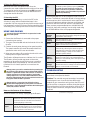
BATTERY ELIMINATOR CIRCUIT
PHOENIX SERIES (does not include Ice or HV models)
You must disable the onboard BEC when using greater than a
3s LiPo on Phoenix ESCs.*
PHOENIX ICE AND PHOENIX ICE LITE
Phoenix Ice and Ice Lite onboard BECs can be run to the
maxiumum rated voltage of the ESC. The maximum voltage
for the Phoenix Ice is 34V (8s) and the Phoenix Ice Lite is
25V (6s). Helicopters with blades larger than 425mm will
need to use an external BEC*. For more details visit www.
castlecreations.com/helisetups.
*Note: If you use a receiver battery pack or any form of an
external BEC, you MUST disconnect the RED WIRE on the
throttle cable for Phoenix, Phoenix Ice and Phoenix Ice Lite.
This does NOT include the Phoenix HV or Phoenix Ice2 HV.
™
PHOENIX ICE2 HV AND PHOENIX HV
Phoenix HV and Phoenix Ice2 HV controllers do not have
an integrated BEC. You must use an external battery or
BEC to power your receiver and servos. You should NEVER
disconnect the red throttle wire on the Phoenix HV or
Phoenix Ice2 HV ESCs.
SAFETY FIRST!
HOW TO CONNECT YOUR PHOENIX
Castle Creations is not responsible for your
use of this product, or any damage or injuries
you may cause or sustain as a result of it’s
usage.
For use by adults only.
Understand that an electric motor that is
connected to a battery and speed control may
start unexpectedly and cause serious injuries.
Always treat them with necessary respect.
Keep the propeller away from your body and
others at all times.
We suggest that you remove the propeller
when you are working on the plane with the
battery connected.
Please observe all local laws regarding the
flying of remote control aircraft.
1. Add Your Battery Connector
You must attach a quality battery connector of your choice
to the red (+) and black (-) power wires. Solder the battery
connector to the wires. ENSURE THAT THE POLARITY IS
CORRECT (red wire to battery red wire, black wire to
battery black wire). Follow the instructions provided with
the battery connector.
2. Connect the Motor to your ESC
Cut the three (red, white & black) motor wires coming off
the ESC to the length you require. Solder the corresponding
connectors for your motor to the wires coming from the ESC,
or solder the motor wires directly to the motor leads on the
ESC. You may find it convenient to temporarily connect the
motor leads to the ESC and test for proper rotation before
you permanently solder them. See “Reversing Rotation”
below.
3. Connect the ESC to Your Receiver
Connect the receiver lead (the three colored small wires with
a black plastic connector on the end) to the throttle channel
on your receiver. Do not connect a receiver battery pack to
the receiver, as the ESC will supply power to the receiver and
servos through the receiver connector.
Phoenix HV and Phoenix Ice2 HV (High Voltage)
controllers require the use of a separate BEC or receiver
pack to power your receiver and servos. Phoenix HV
Controllers DO NOT have an onboard BEC.
Never fly over others or near crowds.
This product may contain chemicals known to the State of California to
cause cancer and or birth defects or other reproductive harm. Do not eat this
controller, it doesn’t taste good.
© 2012 Castle Creations, Inc.
P/N: 095-0000-00
NOTE TO USERS WITH A FUTABA TRANSMITTER: You must
reverse the throttle channel signal on your transmitter.
Please refer to your Futaba instructions.
Revision Date - 05/2012
4. Reversing Rotation (if necessary)
Bench test the motor and speed control after the
connections are made to determine the rotation of the motor.
To change the rotation of the motor, swap ANY two motor
wire connections, or use the Castle Link USB interface to
change the rotation direction.
5. Mounting the ESC
We recommend using Velcro to attach the ESC to the
airframe for easy removal. Double sided tape is also
acceptable. If zip ties are used, do not place them over any of
the components on the ESC. Instead, zip tie around the motor
and battery wires, leaving some slack to allow for movement.
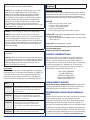
USING YOUR PHOENIX
You must follow this initialization sequence before the
motor will operate.
Safe Power To arm the controller, the throttle must be held in
Up
the “Brake” position (all the way down). Until the
controller is armed, it will not provide any
power to the motor regardless of where the
throttle stick on your transmitter is positioned
when first powered up.
Programmable Options can be changed at the discretion of
the user. The Phoenix comes with default or factory settings
on these options which are the best for most applications.
You may change these settings using your transmitter and
receiver or with the Castle Link, which is sold separately.
There are more programmable options available with the
Castle Link, these extra settings are not easily made using
the YES/NO abilities of the stick programming mode.
Low
Voltage
Cutoff
ESC optionally stops or ramps down the motor
power when the input battery voltage drops to the
programmed cutoff voltage.
Current
Limiting
ESC optionally detects an over-current and shuts
down to protect it’s circuitry.
2. Turn your transmitter ON and set the throttle stick to mid
throttle.
Brake
Stops rotation of the motor when the throttle
signal is moved to the lowest position.
3. Connect the main power battery to the speed controller.
The speed controller will remain disarmed and will not
operate the motor until it sees zero throttle.
Throttle
Allows user to choose between the Phoenix
automatically calibrating the throttle endpoints
every time it is powered up, using preset throttle
endpoint settings, or using one of a number of
helicopter specific settings.
Electronic
Timing
Advance
A setting that may improve the efficiency of the
system for some motors. The standard Phoenix
setting is to automatically detect and adjust for the
motor it is driving.
Low
Voltage
Cutoff Type
Select the method of cutoff employed by the
Phoenix when the low voltage set in #1 is reached.
Options are Hard Cutoff and Soft Cutoff.
1. Ensure that the Phoenix is connected to the proper
channel on your receiver.
4. When you are ready to fly, move the throttle stick to the
lowest position on your transmitter.
The Phoenix will beep the motor to indicate that it is armed.
The Phoenix will not provide any power to the motor,
regardless of where the throttle stick on your transmitter
is positioned when first powered up. You must move the
throttle stick to its lowest position to arm and use the
Phoenix.
Always power your radio transmitter before powering up
the receiver and/or the ESC. Some receivers with failsafe
features or Spektrum receiver units that are not bound on
receiver power up are entirely capable of causing the
arming sequence to occur and command the ESC to drive
the motor. Always keep the aircraft restrained and clear of
body parts when the ESC is powered.
Always perform a range check at full, half, and zero
throttle before flying with any new speed controller! For
helicopters, range check with the blades off the helicopter
at full, half, and zero throttle.
Notes on the Features of Your Phoenix
Standard Features are always employed by the Phoenix.
Problem: The BEC (receiver and servos) works, but the
motor does not respond to throttle.
Solution: The controller may not be seeing a low enough
throttle signal to arm. Increase the low side throttle
endpoint in your transmitter until you hear the ESC arm. If
you do not have a computer transmitter, bring the throttle
stick and throttle trim all the way down to arm the ESC. If
using a Futaba transmitter, verify the throttle channel is
reversed.
(continued on next page)
LED
The LED is used for programming the features on
the Phoenix. Once armed, the LED also provides
an indication that the controller has reached full
throttle by lighting continuously.
Loss of
Signal
The Phoenix will stop the motor as a safety feature
when the throttle signal is lost or corrupt. Moving
the throttle to the brake position for two seconds
may be required to rearm the motor.
© 2012 Castle Creations, Inc.
TROUBLESHOOTING
P/N: 095-0000-00
Revision Date - 05/2012
Problem: When I throttle all the way up, the controller
“cuts off”, even with fully charged batteries.
6 beeps
Over temperature
and flashes
Solution: The controller will automatically shut or ramp
down the motor (depending on which cutoff type is
selected) if the battery voltage falls below the cutoff
voltage. Your controller will repeatedly blink the LED
with 2 flashes. If the cutoff occurs with freshly charged
batteries, it means that the voltage has dropped very
quickly. This is usually an indication of a power system
that is drawing too much current for the batteries to
handle. Try using a smaller prop on the motor or use a pack
with a higher mAh capacity.
Problem: The LED comes on when I go to full throttle.
Solution: This is normal. The LED comes on when full
throttle has been reached. If the unit is in Auto-Calibrating
Throttle mode (program setting 4-1) then you may see
full throttle LED indication before the stick is in the full up
position. Simply continue moving the stick to full up. The
controller will detect the high stick travel and adjust full
throttle accordingly.
Problem: Nothing is working – receiver, servos, and motor
are all dead.
Solution: Check all connections to ensure that the polarity
(+/-) of the connections are correct (especially the receiver
plug polarity). If everything is correctly connected, contact
the dealer where you purchased your Phoenix ESC or
contact Castle Creations directly.
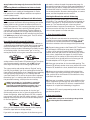
Error Codes:
The following error codes are only applicable to controllers
running version 1.55 or made after December 15, 2006. The
controller will alert you to errors by blinking the LED and
beeping the motor. Please count the error code beeps or
flashes and use the following chart to determine the issue.
1 beep and
flash
2 beeps
Low Voltage Cutoff: Your batteries are likely
and flashes discharged. Check that batteries are fully charged
and that Phoenix detects the proper number of
cells at power-up.
3 beeps
Over-Current: Current draw exceeded the safe
and flashes capacity of the controller. Reduce current draw
by changing to a smaller propeller, different gear
combination, or fewer cells.
4 beeps
Motor Anomaly: Controller encountered abnormal
and flashes motor behavior such as a prop strike or other
physical interference. May also indicate lost
synchronization or magnetic overload within the
motor.
(continued in next column)
© 2012 Castle Creations, Inc.
Red LED
• Blinks out cell-counts /error codes
• Flashes a little at low throttle
• Flashes a lot at high throttle
• Solid on at full-throttle
• Pulses quickly when governor-mode is locked
Yellow LED - used for Data Logging (Phoenix Ice, Phoenix Ice Lite
and Phoenix Ice2 HV only)
• Yellow LED flashes when logging, and is on continuously
when log is full.
Green LED - not currently used - reserved
Look for more troubleshooting tips on the Castle
Creations website at:
www.castlecreations.com/support
CONTACT & WARRANTY INFO
Your Phoenix ESC is warranted for one year from date of
purchase to be free from manufacturing and component
defects. This warranty does not cover abuse, neglect, or
damage due to incorrect wiring, over voltage, or overloading.
If you have any questions, comments, or wish to return
your Phoenix ESC for warranty or non-warranty repair or
replacement, contact Castle Creations, Inc. at:
Phone: (913) 390-6939
Fax: (913) 390-6164
540 North Rogers Road
Olathe, Kansas 66062 USA
www.castlecreations.com
NON-WARRANTY REPAIRS
Start failure: The motor was jammed or locked.
5 beeps
Radio Signal: Signal from receiver is corrupt or
and flashes non-existent. Check transmitter and receiver.
Beep Codes/Conditions
All Castle ESCs will sound a single beep every 20 seconds to
remind the user that the controller is connected to a battery
and drawing power. Leaving a controller connected to a
battery for extended periods will likely damage the battery.
Never throw away a damaged Phoenix! You may send it
to Castle and take advantage of our flat price replacement
offer. Please check our website for specific pricing.
PROGRAMMING PHOENIX AND PHOENIX HV
ESCS
Phoenix Series controllers offer users the option of changing
programmable settings. You do not need to program
anything to make the controller work. Programming is only
necessary if you wish to change the default settings or if
you wish to use advanced features such as helicopter modes.
If you need to change settings, we highly recommend using
the Castle Link (sold separately). It is easier and allows you
to modify many more settings than the “stick” programming
procedure described below. Please note that there are
P/N: 095-0000-00
Revision Date - 05/2012
many features that may only be accessed via Castle
Link.
Connecting Phoenix and Phoenix Ice Series to Castle
Link
The Phoenix line is capable of drawing power for Castle
Link operation from the USB port and does not require an
external power source.
not need to continue through the programming steps for
the remaining settings. Once you have programmed each of
the features you wish to change and the Phoenix ESC has
confirmed the selection, instead of returning to mid-throttle
for the next question, disconnect battery power, re-connect
power, and arm the speed control as normal.
Connecting Phoenix HV and Phoenix Ice2 HV to Castle
Link
You must power the Phoenix HV using a battery pack on the
battery leads in order to power the onboard processor for
Castle Link operation. This is necessary because the throttle
lead/Castle Link serial wire is optically isolated from the
controller and cannot provide power from the USB port to
the controller. Any pack of 4s or larger will be sufficient for
this purpose. You must plug the HV controller into the Castle
Link before you plug in your battery pack. The ESC will not
link if connected out of order.
Manually Changing Programmable Settings
The Phoenix ESC software is designed to make it difficult to
accidentally enter programming mode. Once in programming
mode, the Phoenix ESC “asks” questions by beeping and
flashing the setting number, followed by the number for each
of the setting values. You must answer “yes” or “no” by
moving the throttle stick on your transmitter to each of the
setting values as the Phoenix ESC presents them. The values
are always presented in sequence, and do NOT “tell you”
what any of the settings are currently programmed for.
The current setting and setting value are “flashed” out by
the LED. (For example if you are on setting #3 and value #2,
there will be 3 beeps/flashes, then 2 beeps/flashes repeating
until you answer). Answering “no” to a setting value will
cause the Phoenix ESC to ask for the next value in sequence.
Answering “yes” to a setting value will store that setting in
the permanent memory, and skip to the next setting.
NOTE: If you answer “no” to all values for a particular
setting, the ESC will keep whatever value had been
previously programmed. Only by answering “yes” to a
value will the Phoenix ESC store/change any value.
You will need to move the transmitter stick to the “yes”
(full throttle) position or the “no” (zero throttle) position to
answer the question. When the Phoenix ESC has accepted
your answer, it will flash the LED rapidly, and emit a constant
beeping. Move the throttle stick back to the middle position
for the next question.
Clearing the Phoenix Ice and Ice2 HV data log
Power your controller up with your TX & RX on and set to
full throttle. The controller will chime the normal power up
chimes. Leave your TX at full throttle for 6 seconds after
power up. The controller will emit a short tone after 1
second and then a long tone 5 seconds later. The controller
will then erase the data log. You must then move the throttle
stick to lowest power to arm the controller.
1. Enter Programming Mode
1A. The Phoenix controller must be connected to a motor
in order for you to hear the programming beeps. Turn your
transmitter on, and leave the Phoenix ESC unpowered.
Move the transmitter stick to the top position (full throttle).
1B. Connect battery power to the Phoenix ESC. The Phoenix
ESC will beep its initialization tones when first plugged
in. After a short period of time the Phoenix ESC will emit
another short tone and the LED on the Phoenix ESC should
flash a short, single flash that repeats. If the ESC flashes
continuously it is not seeing a full throttle position. Move
your throttle trim to the top position or increase your full
throttle endpoint or ATV on your transmitter.
1C. Move your transmitter stick to the middle position. The
Phoenix ESC will emit another short tone, and the LED on the
Phoenix ESC should flash a short, double flash that repeats.
1D. Move your transmitter stick back to the top position
again. After a short time, the Phoenix ESC will emit a short
tone, and the LED on the Phoenix ESC should flash a short,
triple flash that repeats.
1E. Move your transmitter stick back to the middle position
again. The Phoenix ESC will emit four short tones in a row,
and the LED on the Phoenix ESC will start a repetitive flash
sequence of a single flash followed by a long pause.
The Phoenix ESC is now in programming mode and asking
you the first question.
2. Enter your Settings
NOTE: When setting LiPo cutoff voltage, always follow
your battery brand recommendations.
After you have verified that the controller works properly,
follow the steps below to change settings.
If you wish to re-program only some of the features you do
© 2012 Castle Creations, Inc.
P/N: 095-0000-00
Revision Date - 05/2012
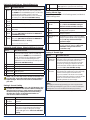
Setting 1A: Cutoff Voltage - Phoenix/Phoenix Ice
Option
Recommended Use
1
AutoLiPo*
Automatically detects LiPo cell count, and sets 3.2v/
cell cutoff voltage. Safe for use with any LiPo packs,
but DO NOT use with NiMH/NiCad packs. The Phoenix
ESC will beep the number of cells it’s detected
immediately after the initialization tones, and before
the arming tones. This is the FACTORY setting.
2
4.0V
Cutoff
5 cell NiCad or NiMH packs only.
3
5.0V
Cutoff
5-8 cell NiCad or NiMH packs only.
4
6.0V
Cutoff
5-10 cell NiCad or NiMH packs, or safe for 2 cell only
LiPo packs.
5
9.0V
Cutoff
5-16 cell NiCad, 5-16 cell NiMH, or safe for 3 cell only
LiPo packs (BEC MUST be disabled for MORE than
10 NiMH/NiCad cells).
6
12.0V
Cutoff
Up to 16* cell NiMH or NiCad packs, or safe for 4 cell
LiPo packs (BEC MUST be disabled for MORE than
10 NiMH/NiCad cells, or 3s LiPo).
*up to 20 cells with PHX 60/80/125
4
Insensitive
**Recommended setting for all helicopters and
LMR applications (covered under warranty).
5
Disabled
Use at your own risk!
Setting 3: Brake Type
Soft brake provides 50% of full braking power; hard brake is
100% braking power.
Option
Recommended Use
1 Soft Delayed
Brake*
General aircraft use, with fixed or folding
prop. This is the FACTORY setting for
Phoenix and Phoenix HV controllers.
2 Hard Delayed
Brake
Direct drive applications where more
braking power is required.
3 Soft Brake – No
Delay
Competition use where a very short brake
delay is required.
4 Hard Brake – No
Delay
Competition use where a very short brake
delay is required. Brake action may be very
abrupt. Be very cautious with highpowered setups.
5 Brake Disabled*
Helicopters, 3D airplanes, and by choice,
on most aerobatic airplanes. This is the
FACTORY setting for Phoenix Ice
controllers only.
Setting 1B: Cutoff Voltage - Phoenix HV/Phoenix Ice2 HV
Option
Recommended Use
1
Automatically detects LiPo cell count, and sets
3.2v/cell cutoff voltage. Safe for use with any
LiPo packs, but DO NOT use with NiMH/NiCad
packs. The Phoenix ESC will beep the number
of cells it’s detected immediately after the
initialization tones, and before the arming tones.
This is the FACTORY setting.
Auto-LiPo*
2
12V Cutoff
4s LiPo packs
3
18V Cutoff
6s LiPo packs
4
24V Cutoff
8s LiPo packs
5
30V Cutoff
10s LiPo packs
6
36V Cutoff
12s LiPo packs
NOTE: 3.2v per cell is the lowest cutoff that should be used
for LiPo packs. Some cell manufacturers may recommend
higher voltages. Please use the cutoff recommended for
your cells.
Setting 2: Current Limiting
NOTE: Change this setting at your own risk! Damage to the
controller as a result of over-current is NOT covered by the
manufacturer’s warranty.** Only experienced modelers
should use this programming feature. Current limiting
describes the reaction of the Phoenix ESC when an
over-current condition is detected.
Option
Recommended Use
1
Very
Sensitive
Will rapidly shut down when over current is
detected.
2
Sensitive
3
Normal*
Setting 4 – Throttle Type
Option
Recommended Use
1 Auto
Calibrating
Throttle*
Any fixed wing aircraft, but NOT for use with
helicopters. When using Auto Calibrating Throttle,
you must throttle up to full throttle for four
seconds and back to the off position each time
you power up and fly your airplane. This will
set the automatic throttle endpoints within the
controller. This is the FACTORY setting.
2 Fixed
Throttle
Any fixed wing aircraft, fixed pitch helicopters,
and collective pitch helicopters using a manually
created and tuned pitch and throttle curve
on your transmitter. This mode uses normally
accepted TX throttle endpoints; some TX throttle
signals are outside these values. Use auto
calibrating throttle for those setups.
THE FOLLOWING ARE FOR HELICOPTER APPLICATIONS
ONLY
We highly recommend programming your ESC using the Castle
Link USB Programming Kit to gain access to advanced helicopter
settings that are not accessible with throttle programming.
(continued on next page)
Moderate over-current threshold, will shut
down after a slight delay. Recommended for
all systems except for helicopters and high
power LMR applications. This is the FACTORY
setting.
(continued in next column)
© 2012 Castle Creations, Inc.
P/N: 095-0000-00
Revision Date - 05/2012
3 Governor
Mode LOW
For collective pitch helicopters only: Governor
mode acts as an RPM control, rather than a
throttle control. Throttle stick position (or
throttle curve %) determines the RPM that the
motor will run and the controller will attempt
to hold that RPM regardless of how the load
(collective) changes. This is useful in a collective
pitch helicopter where a constant head speed
is desirable. The low RPM range has finer RPM
control at lower RPMs. The low RPM range is
useful for low pole count motors (Hacker, Feigao,
HiMax, etc.) and low RPMs on higher pole count
motors. Brake is ALWAYS disabled in Governor
Mode.
4 Governor
Same operation as Low Governor, but allows for
Mode HIGH higher head speeds if the desired head speed
cannot be reached in Low Governor. RPM range
has finer RPM control at higher RPMs. The high
RPM range is useful for higher pole count motors
(Aveox, Astro, Mega, Neu, and all outrunners)
and higher RPMs. Brake is ALWAYS disabled in
Governor Mode.
Setting 5: Electronic Timing Advance
Electronic timing advance may be used to fine tune either
a bit more power or a bit more efficiency out of an electric
power system.
Setting 7: Soft Start
Option
Recommended Use
1 Very
Soft
Start
Governor mode: slowest spool up, and softest start.
Other throttle types: softest start, most throttle
change dampening.
2 Soft
Governor mode: soft start, medium spool up. Other
Start* Throttle types: soft start, slight throttle change
dampening. This is the FACTORY setting.
3 Fast
Start
Governor mode: faster start, fast spool up. Best on
manually optimized pitch and throttle curves with
fixed throttle type. Other throttle types: fast start,
least throttle change dampening.
Setting 8: PWM Switching Rate
Note: The following settings apply only to the Phoenix-35
and above.
Option
Recommended Use
1
12 kHz
Recommended for most brushless motors.
2
16 kHz
Recommended for low inductance motors. RARE.
Suggested for Kontronik Tango motors.
3
24 kHz
Recommended for very low inductance motors.
4
Outrunner Recommended for all outrunner motors.
Mode
Option
Recommended Use
1 High
Advance
May give an increase in RPM and current draw at
the expense of runtime and a hotter motor and
batteries.
If you choose, you may simply connect the wires to your
components and go fly.
2 Standard
Advance*
Almost always the best balance of power and
efficiency for any motor. This is the FACTORY
setting.
The following standard settings will work for most
applications.
3 Low
Advance
May slightly decrease RPM and current draw,
and will give longer runtime and a cooler motor
and batteries. This is the preferred setting for
outrunner motors.
PHOENIX ESC REQUIRES NO PROGRAMMING!
STANDARD SETTINGS:
★★ Auto-LiPo cell detection with soft cutoff when cells
reach discharged state
★★ Throttle Range is self-adjusting
Setting 6: Low Voltage Cutoff Type
Option
Recommended Use
1
Hard
Cutoff*
Will shut the motor off when the
programmed cutoff voltage is
reached. The motor may be restarted by lowering
the throttle to the brake position, and re-arming.
For gliders and some parkflyers where a “motor off”
situation does not put the model
in danger. This is the FACTORY
setting.
2
Soft
Cutoff
Instead of turning the motor off, the Phoenix ESC
ramps down the throttle to safely maintain the
battery voltage at the programmed cutoff level. Very
useful for 3D flying, indoor flying, all helicopters,
and most any sport flying where you do not want
the motor to turn off when the low voltage cutoff is
reached.
★★ Auto motor cutoff when radio signal is lost or radio
interference becomes severe
The Castle Link USB programming kit (sold separately)
gives you access to many advanced programming options,
such as incredible helicopter
governor modes, control line
governor settings, motor timing,
audible alert tones, as well as
incredible data logging capabilities
for the Phoenix Ice. Please visit
castlecreations.com to download the
latest software!
Designed in Kansas
Components manufactured in the USA, Mexico, and China.
Castle Creations logos and Phoenix logos are trademarks of Castle Creations, Inc.
This manual is copyright © Castle Creations, Inc. 2012.
U.S. patent #7,492,122 and 7,400,103 apply. Other patents pending.
© 2012 Castle Creations, Inc.
P/N: 095-0000-00
Revision Date - 05/2012