1
many features that may only be accessed via Castle
Link.
Connecting Phoenix and Phoenix Ice Series to Castle
Link
The Phoenix line is capable of drawing power for Castle
Link operation from the USB port and does not require an
external power source.
not need to continue through the programming steps for
the remaining settings. Once you have programmed each of
the features you wish to change and the Phoenix ESC has
confirmed the selection, instead of returning to mid-throttle
for the next question, disconnect battery power, re-connect
power, and arm the speed control as normal.
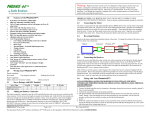
Connecting Phoenix HV and Phoenix Ice2 HV to Castle
Link
You must power the Phoenix HV using a battery pack on the
battery leads in order to power the onboard processor for
Castle Link operation. This is necessary because the throttle
lead/Castle Link serial wire is optically isolated from the
controller and cannot provide power from the USB port to
the controller. Any pack of 4s or larger will be sufficient for
this purpose. You must plug the HV controller into the Castle
Link before you plug in your battery pack. The ESC will not
link if connected out of order.
Manually Changing Programmable Settings
The Phoenix ESC software is designed to make it difficult to
accidentally enter programming mode. Once in programming
mode, the Phoenix ESC “asks” questions by beeping and
flashing the setting number, followed by the number for each
of the setting values. You must answer “yes” or “no” by
moving the throttle stick on your transmitter to each of the
setting values as the Phoenix ESC presents them. The values
are always presented in sequence, and do NOT “tell you”
what any of the settings are currently programmed for.
The current setting and setting value are “flashed” out by
the LED. (For example if you are on setting #3 and value #2,
there will be 3 beeps/flashes, then 2 beeps/flashes repeating
until you answer). Answering “no” to a setting value will
cause the Phoenix ESC to ask for the next value in sequence.
Answering “yes” to a setting value will store that setting in
the permanent memory, and skip to the next setting.
NOTE: If you answer “no” to all values for a particular
setting, the ESC will keep whatever value had been
previously programmed. Only by answering “yes” to a
value will the Phoenix ESC store/change any value.
You will need to move the transmitter stick to the “yes”
(full throttle) position or the “no” (zero throttle) position to
answer the question. When the Phoenix ESC has accepted
your answer, it will flash the LED rapidly, and emit a constant
beeping. Move the throttle stick back to the middle position
for the next question.
Clearing the Phoenix Ice and Ice2 HV data log
Power your controller up with your TX & RX on and set to
full throttle. The controller will chime the normal power up
chimes. Leave your TX at full throttle for 6 seconds after
power up. The controller will emit a short tone after 1
second and then a long tone 5 seconds later. The controller
will then erase the data log. You must then move the throttle
stick to lowest power to arm the controller.
1. Enter Programming Mode
1A. The Phoenix controller must be connected to a motor
in order for you to hear the programming beeps. Turn your
transmitter on, and leave the Phoenix ESC unpowered.
Move the transmitter stick to the top position (full throttle).
1B. Connect battery power to the Phoenix ESC. The Phoenix
ESC will beep its initialization tones when first plugged
in. After a short period of time the Phoenix ESC will emit
another short tone and the LED on the Phoenix ESC should
flash a short, single flash that repeats. If the ESC flashes
continuously it is not seeing a full throttle position. Move
your throttle trim to the top position or increase your full
throttle endpoint or ATV on your transmitter.
1C. Move your transmitter stick to the middle position. The
Phoenix ESC will emit another short tone, and the LED on the
Phoenix ESC should flash a short, double flash that repeats.
1D. Move your transmitter stick back to the top position
again. After a short time, the Phoenix ESC will emit a short
tone, and the LED on the Phoenix ESC should flash a short,
triple flash that repeats.
1E. Move your transmitter stick back to the middle position
again. The Phoenix ESC will emit four short tones in a row,
and the LED on the Phoenix ESC will start a repetitive flash
sequence of a single flash followed by a long pause.
The Phoenix ESC is now in programming mode and asking
you the first question.
2. Enter your Settings
NOTE: When setting LiPo cutoff voltage, always follow
your battery brand recommendations.
After you have verified that the controller works properly,
follow the steps below to change settings.
If you wish to re-program only some of the features you do
© 2012 Castle Creations, Inc.
P/N: 095-0000-00
Revision Date - 05/2012