1
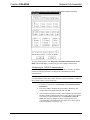
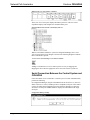
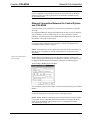
Crestron C2N-NPA8 Network Poll Accelerator Programming Software Have a question or comment about Crestron software? Answers to frequently asked questions (FAQs) can be viewed in the Online Help section of the Crestron website (www.crestron.com). To post your own question or view questions you have submitted to Crestron’s True Blue Support, log in at http://support.crestron.com. First-time users will need to establish a user account. Earliest Version Software Requirements for the PC NOTE: Crestron recommends that you use the latest software to take advantage of the most recently released features. The latest software is available from the Downloads | Software Updates section of the Crestron website (www.crestron.com). The following are the earliest useable software version requirements for the PC: • SIMPL Windows version 2.04.14 or later with Library Update 232 or later. Requires SIMPL+ Cross Compiler version 1.1. • Crestron Database version 16.0.0 or later. NOTE: The following assumes that the reader has knowledge of SIMPL Windows. If not, refer to the extensive help information provided with the software. NOTE: The following are acceptable file extensions for programs that include a C2N-NPA8, developed for specific control system types: .smw .spz .usp .ush .umc projectname.smw (source file) projectname.spz (compiled file for 2-series) projectname.usp (source code module for SIMPL+) projectname.ush (compiled SIMPL+ file) projectname.umc (user macro) NOTE: In the following, the PRO2 control system is used. SIMPL Windows is Crestron's primary software for programming Crestron control systems. It provides a well-designed graphical environment with a number of workspaces (i.e., windows) in which a programmer can select, configure, program, test, and monitor a Crestron control system. SIMPL Windows offers drag and drop functionality in a familiar Windows environment. This section explains how to create a SIMPL Windows program that includes the C2N-NPA8. Configuration Manager is where programmers “build” a Crestron control system by selecting hardware from the Device Library. In Configuration Manager, drag the PRO2 from the Control Systems folder of the Device Library and drop it in the upper pane of the System Views. The PRO2 with its associated communication ports is displayed in the System Views upper pane. Operations Guide – DOC. 6087A Network Poll Accelerator: C2N-NPA8 • 19