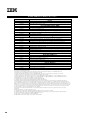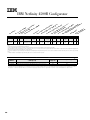
1
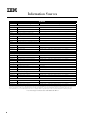
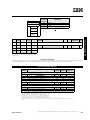
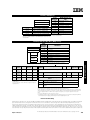
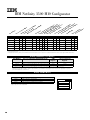
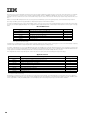
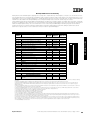
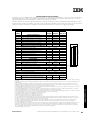
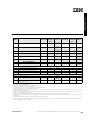
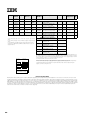
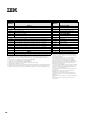
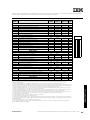
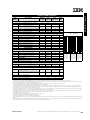
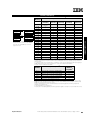
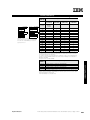
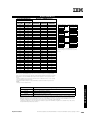
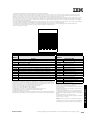
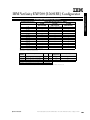
Form
Factor
Height
Front
Access
Usage
-
89 mm
(3.5”)
SL
Yes
Diskette
-
133 mm
(5.25”)
HH
Yes
IDE CDROM
RM 1
133 mm
(5.25”)
HH1
Yes
RM 2
133 mm
(5.25”)
HH1
1...10
or
1...7
HS
NB33
19” Rack
Max.
Qty.
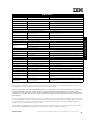
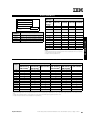
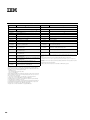
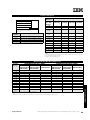
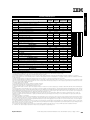
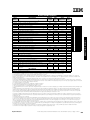
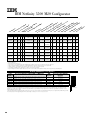
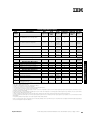
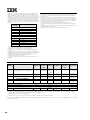
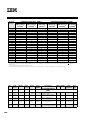
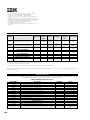
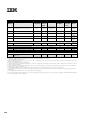
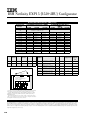
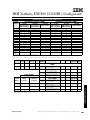
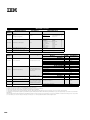
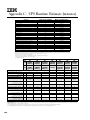
Ultra2 Hard Disk Drives
(HDD)
SL
See diagram
10
Open
36L9745
7200
SL
See diagram
10
Yes
Open
36L9746
Netfinity 36.4 GB Wide Ultra2
SCSI Hot-Swap HDD
7200
HH2
See diagram
7
SL or HH2
Yes
Open
36L9748
Netfinity 9.1 GB 10K-3 Wide Ultra2
SCSI Hot-Swap SL HDD
10,000
SL
See diagram
10
3U
Yes
Open
36L9749
Netfinity 18.2 GB 10K-3 Wide
Ultra2 SCSI Hot-Swap SL HDD
10,000
SL
See diagram
10
36L9750
Netfinity 36.4 GB 10K-3 Wide
Ultra2 SCSI Hot-Swap HDD
10,000
HH2
See diagram
7
HH
0
2
3
4
9
4
10
8
10
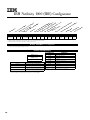
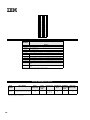
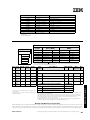
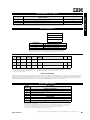
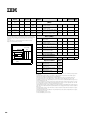
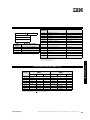
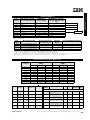
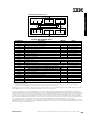
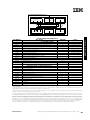
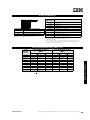
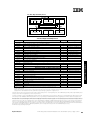
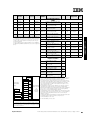
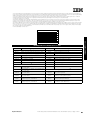
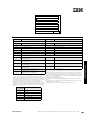
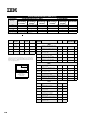
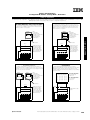
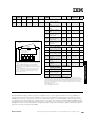
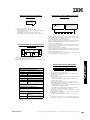
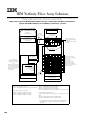
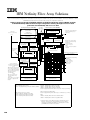
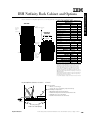
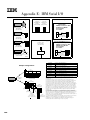
Hot-Swap (HS)
Bays 10 x SL
-or7 x HH
(SCSI IDs
shown)
11
12
13
Bay 2
Bays
Supported
7200
5
Bay 1
Height
Netfinity 18.2 GB Wide Ultra2
SCSI Hot-Swap SL HDD
1
CD-ROM
RPM
Netfinity 9.1 GB Wide Ultra2 SCSI
Hot-Swap SL HDD
SL
0
Diskette
Description
36L9744
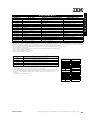
1. Two half-high (HH) bays can be combined to support a single fullhigh (FH) device
2. The top bay is HH; all others are configured in groups of 3 SL bays.
When a HH drive is installed in one of these groups, only another HH or
a single SL drive can be installed in the same group. For clarity, the
SCSI IDs are identified.
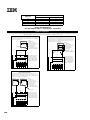
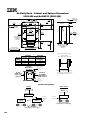
3. Tower configured systems support installation of up to 3 NetBAY3s.
See IBM Netfinity NetBAY3 Stackable Enclosure section for supported
devices.
Removable
Media (RM)
Bays
Part
Number
14
14
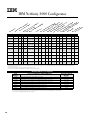
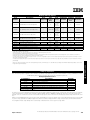
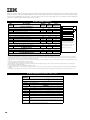
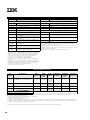
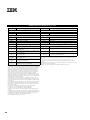
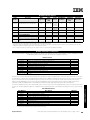
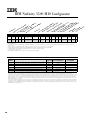
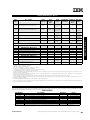
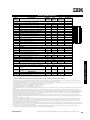
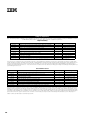
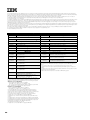
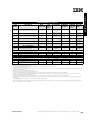
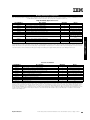
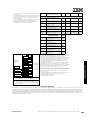
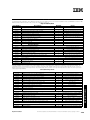
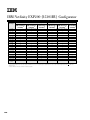
Ultra160 Hard Disk Drives (HDD)
1
37L7201
Netfinity 9.1 GB Ultra160 SCSI
Hot-Swap SL HDD
7200
SL
See diagram
10
37L7202
Netfinity 18.2 GB Ultra160 SCSI
Hot-Swap SL HDD
7200
SL
See diagram
10
37L7203
Netfinity 36.4 GB Ultra160 SCSI
Hot-Swap SL HDD7
7200
SL
See diagram
10
37L7204
Netfinity 9.1 GB 10K-4 Ultra160
SCSI Hot-Swap SL HDD8
10,000
SL
See diagram
10
37L7205
Netfinity 18.2 GB 10K-4 Ultra160
SCSI Hot-Swap SL HDD8
10,000
SL
See diagram
10
37L7206
Netfinity 36.4 GB 10K-4 Ultra160
SCSI Hot-Swap SL HDD8
10,000
SL
See diagram
10
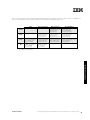
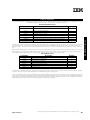
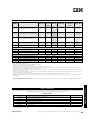
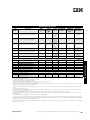
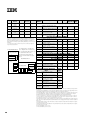
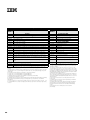
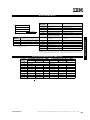
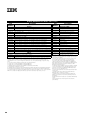
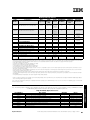
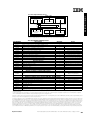
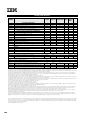
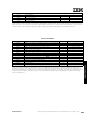
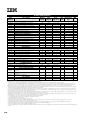
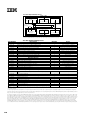
External Storage
Expansion Units3
Form
Factor
35301RU
Netfinity EXP200 Storage
Expansion Unit4
37L5857
Netfiinity EXP200 Rack-to-Tower
Conversion Kit
-
37L0075
Netfinity EXP200 350 W
Redundant Power Supply
-
35311RU
Netfinity EXP300 Storage
Expansion Unit5, 8
Rack
(3U)
09N7296
Netfinity EXP300 Rack-to-Tower
Conversion Kit8
-
35601RU
Netfinity FAStT EXP500 Storage
Expansion Unit6
Rack
(3U)
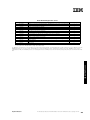
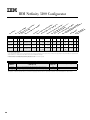
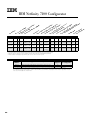
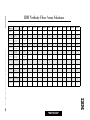
IBM NETFINITY 7100
Bay
Rack
(3U)
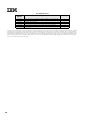
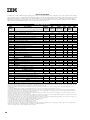
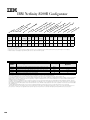
1. Ultra160 HDDs are limited to a maximum of Ultra2 bus speeds.
2. Two slim-line (SL) bays can be combined to support a single half-high (HH)
device. See Bay diagram for identification of which bays can be combined. A
mixture of HH, SL, 10,000 rpm and 7,200 rpm drives is supported.
3. Not supported by the onboard external SCSI port. Select an optional SCSI
controller then refer to Appendix D: Cables-Storage Units-Controllers to confirm
the controller supports the desired External Storage Expansion Unit and to
select a supported cable. For HDD or other expansion unit options, see the
specific expansion unit section.
4. Netfinity EXP200 includes a single 2 M Ultra2 SCSI cable and a single hotswap 350 W power supply and power cord. Optional hot-swap Netfinity
EXP200 350 W Redundant Power Supply (P/N 37L0075) includes an additional
power cord. To convert an EXP200 to a tower form factor, Netfinity EXP200
Rack-to-Tower Conversion Kit (P/N 37L5857) is required.
5. Netfinity EXP300 includes a single 2 M Ultra2 SCSI cable and dual hot-swap
500 W power supplies, each with its own power cord. To convert an EXP300 to
a tower form factor, Netfinity EXP300 Rack-to-Tower Conversion Kit (P/N
09N7296) is required.
6. Netfinity FAStT EXP500 Storage Expansion Unit (P/N 35601RU) includes dual
hot-swap 350 W power supplies, each with its own power cord.
7. Planned availabilty of June 1, 2000.
8. Planned availability of June 30, 2000.
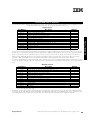
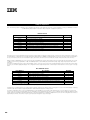
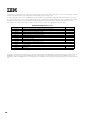
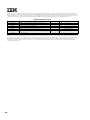
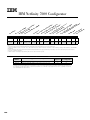
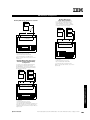
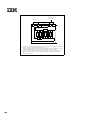
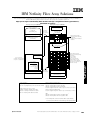
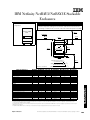
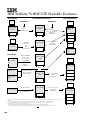
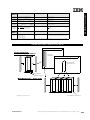
Netfinity NetBAY3 (NB3)
(Optional on Tower Configurations)
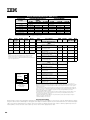
1. The top bay is HH; all others are configured in groups of three SL
bays. When a HH drive is installed in one of these groups, only another
HH or a single SL drive can be installed in the same group. For clarity,
the SCSI IDs are identified.
Updated 04/18/00
For the latest product & technical information, refer to the Information Sources on pages 1 and 2.
95