1
Installation Instructions
Installation Manual
Internal/External Model
BC3200RA
BC3200RA5
To be installed and serviced only
by an authorised person
This appliance is not suitable for
use as a pool heater
The "authorised installing person" is
responsible for:
1. Correct commissioning of this
appliance.
2. Ensure unit performs to the
specifications stated on the
rating label.
3. Demonstrate operation of unit to
customer before leaving.
4. Hand these instructions to
customer.
This appliance must be installed in accordance with the manufacturer's
installation instructions, AS5601, AS/NZS3500.4, AS3000 wiring regulations
and all Local Building, Water and Gas fitting regulations.
Failure to install this appliance in accordance with these installation
instructions may void warranty
Service Department: 1300 30 70 37
www.bosch.com.au/hotwater
In the interest of continued product improvement, Bosch reserves the
right to alter these specifications without notice.
SBA8231
Rev. 09/09
*SBA8231 C*
Installation Instructions
Installation Manual
Robert Bosch
(Australia) Pty. Ltd.
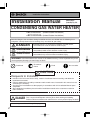
CONDENSING GAS WATER HEATER
<BC3200RA> (Indoor/Outdoor Installation)
<BC3200RA5> (Indoor/Outdoor Installation)
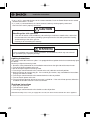
Potential dangers from accidents during installation and use are divided into the following three
categories. Closely observe these warnings, they are critical to your safety.
DANGER
WARNING
CAUTION
DANGER indicates an imminently hazardous situation which,
if not avoided, will result in death or serious injury.
WARNING indicates a potentially hazardous situation which,
if not avoided, could result in death or serious injury.
CAUTION indicates a potentially hazardous situation which,
if not avoided, may result in minor or moderate injury.
WARNING: If the information in this manual is not followed exactly, a fire or explosion may result
causing property damage, personal injury or death.
Prohibited
Disconnect
Power
Earth
Be sure to do
CAUTION
Requests to Installers
• In order to use the water heater safely, read this installation manual carefully, and follow the
installation instructions.
• Failures and damage caused by erroneous work or work not as instructed in this manual are not
covered by the warranty.
• Check that the installation was done properly in accordance with this Installation Manual upon
completion.
• After completing installation, please hand the installation manual to the customer to retain for
future reference.
DANGER
Prior to initial start up, make sure that you fill the neutralizer unit with water.
This is to prevent dangerous exhaust gases from entering the building.
Failure to fill the neutralizer unit could result in severe personal injury or death.
Must use approved Bosch fluing. Refer page 12.
2
Installation Instructions
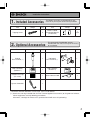
1. Included Accessories
Part
Shape
Tapping Screw
Q’ty
Part
5
Owner's Guide,
Installation Manual
(this document)
2. Optional Accessories
Part
Shape
The following accessories are included with the unit.
Check for any missing items before starting installation.
Shape
Q’ty
1
each
The accessories listed below are not
included with the units, but may be necessary
for installation.
Q’ty
Part
Vertical
Flue Terminal (*1)
1
Horizontal
Flue Terminal (*1)
Main Controller
(RCM3211)
1
Sub Controller
(RCS3211)
Outdoor Vent Cap
(VC-100C)
1
Quick Connect Cord
System Controller
1
Shape
Q’ty
1
Priority
Burner on
2
1
• Maximum two Sub controllers can be used. See P.25 for details.
(*1) Attach the seal ring included with the Flue Terminal (optional accessories) to the groove of exhaust
side of equipment securely following precautions.
Otherwise, a leakage of exhaust air is generated and it will cause CO poisoning.
3
Installation Instructions
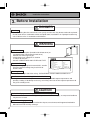
3. Before Installation
DANGER
Checkup
• Check the fixing brackets and exhaust vent yearly to make sure they do not need to be replaced.
Do not install unit in a bathroom or other occupied room, installation in an improper location may
cause failures or fire. In accordance with AS5601.
WARNING
Check the Gas
• Check that the data plate (located inside of front cover) or
a temporary label (located on the front cover)
indicates the correct type of gas.
• Check that the gas supply line is sized for
217 MJ/hr for this unit.
• DO NOT OPERATE WITH ANY OTHER GAS TYPE.
MODEL BC3200RA
Check the Power
• The power supply required is 230/240VAC, at 50Hz.
Using the incorrect voltage may result in fire or
electric shock.
GAS TYPE
: NG
GAS CONSUMPTION
: XXX MJ/hr
HEAT OUTPUT
: XX.X kW
ELECTRICAL RATING
: AC230/240V 50Hz
RATED POWER
: XX.XW
HOT WATER SUPPLY CAPACITY
: XXL/min RAISED 25 C
GAS PRESSURE TEST POINT
: MAX : 0.73kPa
: M I N : 0.18kPa
GAS SUPPLY PRESSURE
MAX 3 0kP
Warning labels
• Located on the right side of the casing -PLEASE READ THESE LABELS CAREFULLY!
Use Extreme Caution if Using With a Solar Pre-Heater
• Using this unit with a solar pre-heater can lead to unpredictable output temperatures and
possibly scalding. If absolutely necessary, use mixing valves to ensure output temperatures do
not get to scalding levels.
CAUTION
Do Not Use Equipment for Purposes Other Than Those Specified
• Do not use for other than increasing the temperature of the water supply, as unexpected accidents
may occur as a result.
Check Water Supply Quality
• If the water supply is hard, acidic or otherwise impure, treat the water with approved methods in
order to ensure full warranty coverage.
4
Installation Instructions
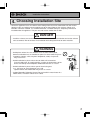
4. Choosing Installation Site
* Locate the appliance in an area where water leakage from the unit or connections will not result in
damage to the area adjacent to the appliance or to the lower floors of the structure. When such
locations cannot be avoided, it is recommended that a suitable drain pan, adequately drained, be
installed under the appliance. The pan must not restrict combustion air flow.
DANGER
• Install the exhaust vent so that there are no obstacles around the termination and so that exhaust
can't accumulate. Do not enclose the termination with corrugated metal or other materials.
WARNING
• Avoid places where fires are common, such as those where petrol,
benzene and adhesives are handled, or places in which corrosive gases
(ammonia, chlorine, sulfur, ethylene compounds, acids) are present.
May result in fire.
• Avoid installation in places where dust or debris will accumulate.
Dust may block the air-supply opening, causing the performance of the
device fan to drop and incomplete combustion to occur as a result.
• Avoid installation in places where special chemical agents
(e.g., hair spray or spray detergent) are used.
Ignition failures and malfunction may occur as a result.
• Carbon Monoxide Poisoning Hazard. Do not install this water heater in a
mobile home, recreation vehicle or on a boat.
5
Installation Instructions
CAUTION
• Install the water heater in a location where it is free from obstacles and
stagnant air.
• Consult with the customer concerning the location of installation.
• Do not install the water heater near staircases or emergency exits.
• Do not install the water heater where the exhaust will blow on outer
walls or material not resistant to heat. Also consider the surrounding
trees and animals.
The heat and moisture from the water heater may cause discoloration
of walls and resinous materials, or corrosion of aluminium materials.
• Do not locate the vent termination directed towards a window or any
other structure which has glass or wired glass facing the termination.
• Avoid installation above gas ranges or stoves.
• Avoid installation between the kitchen fan and stove. If oily fumes or a large
amount of steam are present in the installation location, take measures to
prevent the fumes and steam from entering into the equipment.
• Install in a location where the exhaust gas flow will not be affected by
fans or range hoods. See AS5601.
• Take care that noise and exhaust gas will not affect neighbours.
• Make sure that the location allows installation of the exhaust vent as
specified.
• For outdoor installation, use the outdoor vent cap.
• Avoid installation where the unit will be exposed to excessive winds.
• Before installing, make sure that the vent termination will have the
proper clearances according to AS5601, or your local authority.
• On combustible surfaces e.g. weatherboards etc. it is not required to
install a fire proof back board.
5. Installation Clearances
WARNING
Before installing, check for the following:
The location of the flue terminal must comply with the clearances shown on this page. If you are
unsure about clearances not indicated here, in general refer to AS5601, or your local authority. In
Western Australia refer to the WA Office of Energy rules and regulations.
Flue outlet must be free from any combustible material.
6
Installation Instructions
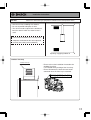
Distance from combustibles
Item
Check
Illustration
• Maintain the following clearances
from both combustible and
non-combustible materials.
• If the unit will be installed in the vicinity of
a permanent kitchen range or stove that
has the possibility of generating steam
that contains fats or oils, use a dividing
plate or other measure to ensure that the
unit is not exposed to air containing such
impurities.
* The dividing plate should be noncombustible and the width must exceed that of
the device.
* Do not remove mounting brackets to
reduce air gap at rear.
(unit: mm)
300mm Indoor
500mm Outdoor
600mm Outdoor
100mm Indoor
Exhaust hood
Dividing plate
Range
500mm Indoor
600mm Outdoor
Outdoor Clearances to any Opening
into Any Building
Securing of space for
repair/inspection
In Accordance with AS5601
(unit: mm)
• If possible, leave 200mm or more on either side of the unit to facilitate inspection.
• If possible, leave 600mm or more in front
of the unit to facilitate maintenance
and service if necessary.
• Maintain the following clearances to any
opening in any building:
1.5m below and 500mm horizontally from
any door, window or gravity air inlet. 1m
above any forced air inlet.
500mm below an overhang.
In accordance with AS5601
Min: 75mm
200mm
or
more
Min: 75mm
200mm
or
600mm more
or more
(unit: mm)
1500mm
500mm
1000mm
7
Installation Instructions
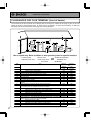
CLEARANCES FOR FLUE TERMINAL (front of heater)
The location of the flue terminal must comply with the clearances shown on this page. If you are unsure
about clearances not indicated here, in general refer to AS5601, or your local authority. In Western
Australia refer to the WA Office of Energy rules and regulations.
a
j
W
f
n
j
h
door
k
h
h
T
I
c
c
T
j
g
k
e
e
d
P
g
d
M
b
T
Use as a guide only. Refer to AS5601 or local gas fitting rules for specific locations
T=Flue terminal
I=Mechanical air inlet
Ref
M=Gas meter
P=Electricity meter
or fuse box
Item
Shaded area indicates
prohibited area
W=Window
Minimum
Natural
draft
a
b
c
d
e
f
g
h
j
k
n
8
Below eaves,balconies and other projections
Appliancesup to 50MJ/h input
300
Appliancesover 50 MJ/h input
500
From the ground, above a balcony or other surface
300
From a return wall or external corner
500
From a gas meter
1000
From an electricity meter or fuse box (P)
500
From a drain pipe or soil pipe
150
Horizontally from any building structure or obstruction facing a flue
500
terminal
From any other flue terminal, cowl, or combustion air intake
500
Horizontally from an opening window, door, non-mechanicalair inlet. Or other opening
into a building with the exception of sub floor ventilation
Appliancesup to 150 MJ/h
500
Appliancesover 150MJ/h input up to 200 MJ/h input
1500
Appliances over 200 MJ/h input up to 250 MJ/h input
1500
Appliances over 250 MJ/h input
1500
All fan assistedflue appliancesin the direction of discharge
From a mechanicalair inlet, including spa blower
1500
Vertically below an openable window, non-mechanicalair inlet, or any other opening into a
building with the exception of sub-floor ventilation:
Spaceheaters up to 50 MJ/h
150
Other appliancesup to 50 MJ/h
500
Appliancesover 50 MJ/h and up to 150 MJ/h input
1000
Appliancesover 150 MJ/h input
1500
Clearance
mm
Fan
assisted
200
300
300
300
1000
500
75
500
300
300
300
500
1500
1500
1000
150
500
1000
1500
Installation Instructions
6. Installation
Securing to the wall
Be sure to do
Item
• Installation must conform with all local building, water or Gas Regulations or AS5601.
• The weight of the device will be applied to the wall. If the strength of the wall is not sufficient, reinforcement must be installed to prevent the transfer of vibration.
• Do not drop or apply unnecessary force to the device when installing. Internal parts may
be damaged and may become highly dangerous.
• Install the unit on a vertical wall and ensure that it is level.
Check
Locating Screw Holes
CAUTION
• When installing with bare hands, take caution to
not inflict injury.
• Be careful not to hit electrical wiring, gas, or water
piping while drilling holes.
Mounting Bracket
(upper)
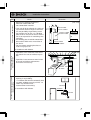
2. Insert and tighten the screw and hang the unit by
the upper wall mounting bracket.
4. Drill holes for the remaining four screws.
Mounting
Location of Screw Hole
1. Drill a single screw hole, making sure to hit a stud.
3. Determine the positions for the remaining four screws
(two for the top bracket and two for the bottom), and
remove the unit.
Structure
Illustration
Locating Screw Holes
Tapping Screw
5. Hang the unit again by the first screw, and then
insert and tighten the remaining four screws.
6. Take waterproofing measures so that water does
not enter the building from screws mounting the
device.
• Make sure the unit is installed securely so that it will
not fall or move due to vibrations or earthquakes.
9
Installation Instructions
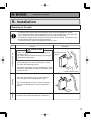
Filling the neutralizer unit with water
The neutralizer unit must be filled before connecting the vent pipe.
Filling the neutralizer unit before vent pipe installation.
DANGER
Prior to initial start up, make sure that you fill the neutralizer unit with water.
This is to prevent dangerous exhaust gases from entering the building.
Failure to fill the neutralizer unit could result in severe personal injury or death.
Please follow one of the procedures described below to ensure that the neutralizer unit is filled with water.
1) Fill the neutralizer unit by pouring approx. 500ml of water into the
exhaust accessory on the top of the appliance as illustrated below.
500ml
Or, if the vent pipe has already been installed:
2) After installing the drain pipe, make sure that the area around the
appliance is well ventilated; open a window or a door if necessary.
Then, operate the unit and verify that condensate is coming out of
the drain pipe.
(During normal use of the water heater, condensate will begin to
discharge from the drain pipe within 15 minutes of use. However,
depending on the season and/or installation site conditions, it may
take longer.)
10
Installation Instructions
7. Vent Pipe Installation (Indoor Installation Only)
Vent Piping
• Use only Bosch vent materials.
• Follow the vent pipe manufacturer's installation
instructions.
Pipe diameter
No. of Elbows
3
2
1
100mm
Max. Straight Vent Length
5m
9m
13m
• Make the vertical section of the exhaust vent
as short as possible.
• Maintain the same vent pipe diameter all the
way to the end.
• Make sure vent pipe is gas tight and will not
leak. Use heat resistant silicon sealant wherever necessary.
• Do not place any dangerous objects at the end
of the exhaust vent.
• Steam (smoke) or water drops may come out
from the end of the exhaust pipe. Select the
location for the end of the vent so that steam is
not visible, and the vent is not wet with dripping water.
• If snow is expected to accumulate, take care
that the end of the pipe is not covered with
snow or hit by falling lumps of snow.
• Use a maximum of 1m of straight vertical pipe
before the first elbow.
• Minimum flue length
1 elbow (90 degree) + Flue Terminal.
• Consult the vent pipe manufacturer's installation instructions for chimney connections.
• Do not common vent or connect more than
one appliance to this venting system.
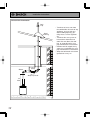
Horizontal Vent Termination
Hanger
Straps
Elbow
Slope
Upwards
1m
Max.
Wall
Thimble
• Terminate at least 350mm above
ground.
• Terminate at least 2.3m above
a public walkway, 2m from the
combustion air intake of any
appliance, and 1m from any
Termination
other building opening, gas
utility meter, service regulator
etc.
• Terminate at least 1m above
any forced air inlet, 1.5m
below, 500mm horizontally
from and 300mm above any
door, window, or gravity air
inlet into any building as per
AS5601.
• Slope the horizontal vent
50mm upwards for every 1m.
• Use a condensation drain if
necessary.
11
Installation Instructions
Vertical Vent Termination
Rain
Cap
Roof
Flashing
Elbow
Hanger
Strap
Slope up wards
1m
Max.
12
• Terminate at least 1.8m from
the combustion air intake of any
appliance, and 1m from any
other building opening, gas
utility meter, service regulator
etc.
• Terminate the vent system at
least 600mm above but not
more than 2m above the roof
line, or according to the vent
pipe manufacture's instructions.
• Provide vertical support every
3.6m or as required by the vent
pipe manufacturer's instructions.
• Slope the horizontal vent 50mm
upwards for every 1m.
Installation Instructions
Observe the commercial gas equipment installation criteria and operation criteria.
Air inlet
• Size the air inlet according with AS5601.
• Be sure to provide adequate air inlet.
• The air inlet needs to open to the outside air
from the room in which the water heater is
used.
For internal installations be sure to provide
adequate ventilation for the unit to operate
correctly and safely (refer to AS5601)
Openings supplying indoor air
Outdoor Vent Cap
Outdoor Vent Cap
(Optional)
• Please refer to the installation instructions for
Outdoor Vent Cap.
It is included to the packing of the Vent Cap.
• Please disconnect the internal water heater
connector once the Vent Cap is attached.
13
Installation Instructions
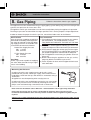
8. Gas Piping
Follow the instructions from the gas supplier.
The appliance must be isolated from the gas supply piping system during any pressure testing of that
system at test pressures in excess of 3.5 kPa.
The appliance and its gas connections must be leak tested before placing the appliance in operation.
The inlet gas pressure must be within the range specified. This is for the purposes of input adjustment.
In order to choose the proper size for the gas line, consult local codes and / or the AS5601.
Gas Pressure
Size the gas line according to total MJ/h
demand of the building and length from
the meter or regulator so that the following supply pressures are available even
at maximum demand refer AS5601:
Natural Gas Supply Pressure
Min. 1.13 kPa
Max. 3.00 kPa
LP Gas Supply Pressure
Min. 2.75 kPa
Max. 3.50 kPa
Gas Meter
Select a gas meter capable of supplying
the entire MJ/h demand of all gas appliances in the building.
Gas Connection
1) Fit a union to the water heater gas inlet for easy connection and removal. The thread diameter is 20 mm.
THIS DOES NOT INDICATE THE SIZE OF THE GAS
SUPPLY.
2) Fit an AGA / NZGA approved isolating gas valve in the
supply line adjacent to the water heater gas connection.
3) Ensure that the supply pipe and the gas pressure regulator (LPG or Natural Gas) has sufficient flow capacity for
this and other appliances connected to the fitting line.
4) For LPG appliances ensure that gas cylinders are of sufficient size.
5) Before connecting the appliance to the gas service,
purge any debris or air from the gas service.
6) Check all joints for leaks with an approved leak tester
after connection.
Measuring Gas Pressure
In order to check the gas supply pressure to the unit, a tap is
provided on the gas inlet. Isolate gas supply, then remove the hex
head philips screw from the tap, and connect a manometer using a
silicon tube.
All appliances must be operating when carrying out test.
In order to check the gas manifold pressure on the gas valve inside
the unit. The pressure can be checked by removing the hex head
philips screw and connecting a manometer with a silicon tube.
Refer to AS 5601 Installation Code or NZS 5261 : 2003 installation code for pipe sizing and details.
Ensure that the gas pipe size is correct. If undersized the appliance will not operate correctly
For Natural Gas installations where the inlet pressure exceeds 1.5kPa an appliance regulator may be
required.
SERVICE CALLS ARE CHARGEABLE FOR UNITS WITH INCORRECT PIPE SIZES OR BLOCKED GAS OR
WATER FILTERS.
14
Installation Instructions
9. Water Piping
Installation and service must be performed
by a qualified plumber.
Observe all applicable codes.
This appliance is suitable for potable water applications. Do not use this appliance if any part has been underwater.
Immediately call a qualified service technician to inspect the appliance and replace any part of the control system and
gas control which has been under water.
If the water heater is installed in a closed water supply system, such as one having a backflow preventer in the cold
water supply line, means shall be provided to control thermal expansion. Contact the water supplier or a local plumbing inspector on how to control this situation.
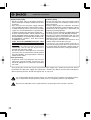
This pressure relief valve must be capable of an hourly J rated temperature steam discharge of 250 MJ/h. Multiple
valves may be used. The pressure relief capacity must not exceed 1029 kPa. The relief valve must be installed such
that the discharge will be conducted to a suitable place for disposal when relief occurs. No reducing coupling or other
restriction may be installed in the discharge line. The discharge line must be installed to allow complete drainage of
both the valve and the line.
Piping and components connected to the water heater shall be suitable for use with potable water.
Toxic chemicals, such as those used for boiler treatment, shall not be introduced into the potable water.
A water heater used to supply potable water may not be connected to any heating system or components previously
used with a nonpotable water heating appliance.
When water is required in one part of the system at a higher temperature than in the rest of the system, means such
as a mixing valve shall be installed to temper the water to reduce the scald hazard.
• Flush water through the pipe to clean out metal powder, sand and dirt before connecting it.
• Perform the following insulation measures for prevention of freezing.
• Take appropriate heat insulation measures (e.g., wrapping with heat
insulation materials, using electric heaters) according to the climate of Completely insulate
Do not cover the water
the water inlet and
the region to prevent the pipe from freezing.
drain plug with insulation
outlet fittings.
so that water in the pipe
• Make sure that there are no water leaks from the cold and hot water
can be drained.
supply pipes, then insulate the pipes completely.
• Be sure to also completely insulate the water supply valve and the
Insulate the water
cold and hot water connections on the water heater (refer to the figure
supply valve completely.
on the right).
• Do not cover the water drain plug with insulation so that water in the
pipe can be drained. (Refer to the figure in the right.)
• Use a union coupling for connecting the pipes to reduce the force applied to the piping.
• When feed water pressure is too high, insert a pressure reducing valve, or take water hammer prevention measure.
• Avoid using joints as much as possible to keep the piping simple.
• Avoid piping in which an air lock can occur.
• Use approved piping materials.
• If installing the unit on a roof (Above lower-level hot water supply):
If the unit is installed on a roof to supply water to the levels below, make sure that the water pressure supplied to
the unit does not drop below 199 kPa. It may be necessary to install a pump system to ensure that the water
pressure is maintained at this level.
Check the pressure before putting the unit into operation.
Failure to supply the proper pressure to the unit may result in noisy operation, shorter lifetime of the unit, and may
cause the unit to shut down frequently.
15
Installation Instructions
Supply water piping
• Do not use PVC, iron, or any piping which has
been treated with chromates, boiler seal or other
chemicals.
• Pipe sizing from the cold water supply should be
sized according to local BY LAWS for water supply.
• If sludge or foreign matter is present in the water
supply it is recommended that a separate filter/
strainer be fitted to the cold water supply line.
• A GATE VALVE OR BALL VALVE must be used
on the cold water inlet to the water heater. THIS
REQUIREMENT IS AN AUSTRALIA WIDE REQUIREMENT UNDER THE NATIONAL
PLUMBING CODE.
STOP TAPS OR COMBINATION STOP TAPS
AND NON-RETURN VALVES ARE NOT TO
BE USED.
• In order for the client to use the water heater
comfortably, 200 to 1000 kPa of pressure is
needed from the water supply.
Be sure to check the water pressure. If the water
pressure is low, the water heater cannot perform
to its full capability, and may become a source of
trouble for the client.
Hot water piping
• Do not use lead, PVC, iron or any piping which
has been treated with chromates, boiler seal or
other chemicals.
• Keep the pipe lengths to a minimum, and make
sure that the pipework is well insulated as correct
performance of the appliance is dependent on
properly insulated pipework.
• DO NOT FIT ANY VALVES OR RESTRICTORS
TO THE OUTLET OF THE WATER HEATER.
• DO NOT FIT ANY OBSTRUCTION TO THE
PRESSURE RELIEF LOCATED ON THE HOT
WATER OUTLET CONNECTION.
• Use mixing valves with low water resistance. Use
shower heads with low pressure loss.
• If necessary, use a pump or other means to ensure that the supply water pressure to the inlet of
the heater does not fall below 199kPa when the
maximum amount of water is being demanded.
Drain processing
• Expansion water may drop from the pressure
relief valve and wet the floor. If necessary, provide drain piping or use a drain hose to remove
the water.
After purging the air from the system using the hot water supply taps, remove the water inlet strainer
located on the cold water supply inlet connection. Remove any debris from the filter and replace.
When replacing the filter, do not over-tighten the “O” ring seal.
It is recommended that for sanitary fixtures use primarily for the purpose of personal hygiene,
that a temperature control device be fitted (such as a tempering valve) as per AS3498.
No pressure reduction valve is required unless the water pressure exceeds 1000 kPa.
16
Installation Instructions
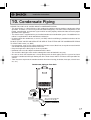
10. Condensate Piping
PLEASE FOLLOW LOCAL CODES ABOUT CONDENSATE PIPING.
• This water heater is a high efficiency, fully condensing appliance which produces condensate during
operation. Therefore, it is necessary to install condensate piping. The water heater incorporates a collection, neutralization, and removal system which must be properly drained in order to ensure proper
operation of this appliance.
• The water heater is supplied with a pre-installed condensate neutralization system. No additional neutralizer is required unless local code dictates otherwise.
• In order to drain the condensate, a 15mm (1/2" BSP) male thread fitting is provided at the base of the
water heater.
DO NOT FIT ANY VALVES OR REDUCE THE SIZE OF THIS FITTING OR THE CONDENSATE PIPING
TO LESS THAN 15mm (1/2" BSP).
• Use plastic pipe, such as PVC, for the drain line. Do not use steel, black iron, or any other material which
can corrode when placed into contact with water.
• Keep the length of the drain pipe as short as possible.
• Horizontal runs must be sloped 1/50 downwards the drain.
• The end of the drain pipe must not be submerged in water or blocked in any way.
• Be sure to check that condensate is freely flowing from the drain piping after the system has been
installed. Condensate will begin flowing out of the water heater within 15 minutes after operation has
started.
• Take measures to prevent the condensate drain lines from freezing (insulation, heat tape, electric heaters, etc.).
Condensate piping to floor drain
DO NOT FIT
ANY VALVES
1/2" PVC pipe
Slope pipe
downwards 1/50.
Floor drain
The end of the drain pipe
must have an air gap.
KEEP CLEARANCE
17
Installation Instructions
11. Electrical Wiring
Consult a qualified electrician
for the electrical work.
Do not connect electrical power to the unit until all electrical wiring has been completed.
Disconnect Power
This appliance must be electrically earthed in accordance with Electrical Authority Regulations.
Caution: Label all wires prior to disconnection when servicing controls. Wiring errors can cause improper
and dangerous operation.
Verify proper operation after servicing.
Field wiring to be performed at time of appliance installation.
WARNING
Electrical Shock Hazard
Do not turn power on until electrical wiring is finished. Disconnect power before servicing.
Failure to do so may result in death or serious injury from electrical shock.
• The appliance is equipped with a 1.8m cable with a three pinned earthed plug to be connected to
230/240VAC at 50 Hz.
The power consumption may be up to 175W.
Use an appropriate circuit.
• The appliance requires a 240V in Australia and 230V in New Zealand, 50Hz general purpose
outlet installed in a protected position adjacent to the appliance.
• If the power cord is damaged and requires replacement, use only an original spare part available
from the manufacturer.
• Do not disconnect the power supply when not in use. When the power is off, the freeze prevention
in the water heater will not activate, resulting in possible freezing damage.
• Do not let the power cord contact the gas piping.
Tie the redundant power cord outside the water heater. Putting the redundant length of cord
inside the water heater may cause electrical interference and faulty operation.
Earth
• To prevent electrical shock, always plug power lead into an earthed point.
CAUTION
Electrostatic discharge can affect electronic components. Take precautions to prevent electrostatic discharges from
personnel or hand tools during the water heater installation and servicing to protect product’s electronic control.
18
Installation Instructions
Remote Controller
• Applicable Model
Remote controller
Main
RCM3211
* Up to three remote controllers can be connected. Additional remote controllers cannot be connected by themselves.
• The remote controller must be installed in accordance with the installation manual enclosed in the package.
Temperature settings without remote controller.
The appliance BC3200RA is preset to 55°C and can be adjusted by connecting the connector of
the harness to 50°C, 75°C, and 85°C. And it can be adjusted by programming the CPU on the
PCB to 40°C, 60°C, and 65°C. BC3200RA5 is preset to 50°C and can be adjusted by connecting
the connector or programming the CPU on the PCB to 40°C, and 42°C .
Refer to the following for the setup method. When it set to 60°C or higher, the water is very hot,
so make sure that a mixing valve is installed.
Modification procedure of temperature setting to 50°C, 75°C, and 85°C.
(40°C and 42°C in case of BC3200RA5)
1. Disconnect electrical power to the water heater.
2. Remove the front cover of the water heater (4 screws).
3. Connect "WATER TEMPERATURE ADJUSTMENT CONNECTOR" tag
connector to "A" or "B" or "85°C (50°C)" tag connector as shown on the right.
(Refer to the table below)
* Factory Default Setting
)
0C
RE OR
ATU ECT
PER ONN
TEM T C
ER MEN
WATJUST
AD
A
4. Replace the front cover of the water heater (4 screws).
5. Reconnect electrical power to the water heater
B
Connector
Not connect
A
B
85°C (50°C)
C (5
BC3200RA5
50°C
40°C
42°C
50°C
85
BC3200RA
55°C
50°C
75°C
85°C
"A" tag "B" tag
WATER TEMPERATURE
ADJUSTMENT CONNECTOR
"85°C (50°C)" tag
19
Installation Instructions
Modification procedure of temperature setting to 40°C, 60°C, and 65°C.
(40°C in case of BC3200RA5)
1. Disconnect electrical power to the water heater.
2. Remove the front cover of the water heater (4 screws).
3. Connect main controller RCM3211 with appliance.
4. Confirm "WATER TEMPERATURE ADJUSTMENT CONNECTOR" is not connected.
5. Reconnect electrical power to the water heater.
6. Press the [ ] or [ ] button on the remote controller prior to switching on the controller.
Changes must be made within 10 minutes of the power being supplied to the unit . If the display
does not switch to setting mode despite pressing the [ ] or [ ] buttons, unplug the power and
repeat the above procedure.
7. The item number and data are shown as well as "Maintenance". (Initial setting for the item number
is "99".)
8. When the [ ] button is pressed, the "99" displayed will chenge to 10, 11, ...., 1F, 20, 21, etc..., and
conversely when the [ ] button is pressed, the "99" displayed will change to 10, FF, FE, FD, FC,
27, etc....
9. 11 and 12 are set as per procedure 7. When the setup switch is pressed, "ON" or "OFF" blink.
BC3200RA
55°C
60°C
65°C
40°C
BC3200RA5
50°C
40°C
40°C
40°C
11
12
OFF
ON
OFF
ON
OFF
OFF
ON
ON
* Factory Default Setting
10. Press [ ] button to switch between ON and OFF.
Note: The setting changes can be cancelled by pressing the Power On/Off button before confirming the settings, or if the unit is left alone for ten minutes without confirming the settings. If
the default setting needs to be changed again, disconnect the electrical power to the unit,
reconnect it and follow this procedure again.
11. Once setup is complete, press the [ ] and [ ] buttons simultaneously for at least five seconds
while the item number is blinking. Once completed, a buzzer sounds. (The modified setup will not
be recorded unless this step is performed.)
20
Installation Instructions
Temperature modification procedure is to compensate for temperature losses in the pipe
work between hot water service and sanitary fixtures.
WARNING
For continued safety of this appliance it must be installed, operated and maintained in
accordance with the manufactures instructions.
The set temperature on the BC3200RA5 can be increased by up to 3 degrees (maximum).
This procedure can be carried out on site by the installer. A temperature controller is required.
Please contact the Bosch Technical Department on 1300 30 70 37 for instructions.
In order to comply with AS 3498 the minimum distances as per the diagram below must be
observed.
Closest hot water outlet
BC3200RA5
COLD
3/4" 2.8m(min)
21
Installation Instructions
Connecting Remote Controller Cord to Unit
• Keep the remote controller cord away from the freeze prevention heaters in the unit.
• Tie the redundant cord outside the water heater. Do not put the extra length inside the equipment.
• The maximum cord length for the remote controller shall be 100 m. If two remote controllers are
installed, the maximum cord length for each shall be 50 m.
• Use a Y type terminal with a resin sleeve. (Without the sleeve, the copper wire may corrode and
cause problems).
• Be sure to hand tighten when screwing to the terminal block. Power tools may cause damage to
the terminal block.
Remote controller cord
• Use an optional cord for the remote controller.
• Install according to the National Electrical Code
and all applicable local codes.
• The cord must not be laid in series from one
remote controller to another.
[One cord must be used per remote controller
(and for optional items other than remote controllers).]
Appliance
Additional Remote controller
remote controller for kitchen
Remote controller cord
Appliance
Additional Remote controller
remote controller for kitchen
Remote controller cord
1. Make sure that sufficient cord protrudes from
the wall to enable connection to the terminal
block by the remote controller cord.
2. Make sure that the power is not plugged in.
3. Remove the front cover of the appliance. (four
screws)
4. Insert the cord for the remote controller through
the electric cable connection hole to the appliance, and connect the Y-shaped terminal to the
terminal block for the remote controller cord.
5. Secure the remote controller cord with a clamp.
6. Replace the front cover.
* If additional remote controllers / optional remote controllers are used, up to two cords can
be connected jointly to a terminal block. If
three cords are connected, press the three
cords together into one and then connect it to
the terminal block.
22
Wiring
Throughway
Remote Controller
Cord
Clamp
Terminal block for the
remote controller cord
Installation Instructions
(An optional connection cord is required for
simple linkage of two appliances.)
Connection between the quick connect cable and appliance
Caution
1The wiring colors of the connector on one of the
appliances to be connected differ from the wiring
colors of the connection cord.
* It makes no difference whether the remote
controller is connected to appliance A or B.
Connection cord
1.Red
2.Black
3.White
4.Green
5.Blue
6.Blue
1.Red
2.Black
3.White
4.Green
5.Blue
6.Blue
A
1.White
2.Green
3.Red
4.Black
5.Blue
6.Blue
1.Red
2.Black
3.White
4.Green
5.Blue
6.Blue
B
Tag:
"Connection cord Z shield: 2 A"
Carry out the following if two appliances are to be
linked.
1. Turn off power to the appliances.
2. Remove the front cover of the appliance. (Four
screws)
3. Introduce the connection cord through the electric
cable connection hole to the appliance.
4. Connect the connector for the connection cord
and the connector for the appliance to be linked.
5. Attach the earth from the connection cord to the
terminal block. (If not earthed, it may operate erroneously due to interference, etc.)
6. Secure the connection cord with the clamp.
7. Replace the front cover.
Wiring
Throughway
Quick
Connect Cord
Clamp
Earth
connection
Linked using connector
23
Installation Instructions
12. Quick Connect Multi System Installation
• The Quick Connect Multi System allows the installation of two units together utilizing only the Quick
Connect Cord.
The Quick Connect Cord is 2m. long. Install the units no more than 950mm apart from each other
to ensure the cord will be able to reach between the units. (See Typical Plumbing diagram).
(If the distance between the two units is too great, not only will the cord not be able to reach,
but the water temperature may also become unstable because of the difference in pipe length
between the two units).
* When two apparatuses are connected,
only one apparatus can connect remote
controller.
System Diagram
Quick Connect
Cord
Cord
Connector
Cord
Connector
Note: Connect the remote
controller to only one
of the units.
Terminal Block
Remote Controller
Remote Controller Cord
Gas Supply Piping
G
Cold Water Supply
Hot Water
Distance at center: max.950mm.
Typical Plumbing
Union
Union
Make this distance as short
as possible.
* The hot water temperature
will become unstable as the
pipe length increases.
Quick Connect
Cord
Shutoff
Valve
Union
Gas Valve
Shutoff Valve
Shutoff
Valve
Hot Water
Cold Water
Leave enough clearance around the plumbing to
apply insulation. It will be necessary to add
bends to the piping to ensure that this clearance
is available.
Size the piping to allow for the maximum
flow rates of the units.
• Insulate the hot water piping to prevent heat loss. Insulate and apply heating materials to the cold
water supply piping to prevent heat loss and freezing of pipes when exposed to excessively cold
temperatures.
24
Installation Instructions
13. Maintenance
Periodically check the following to ensure proper
operation of the water heater.
• The venting system must be examined periodically by a qualified service technician to check for
any leaks or corrosion.
• The burner flame must be checked periodically for a proper blue color and consistency.
• If the flame does not appear normal, the burner may need to be cleaned.
• If the burner needs to be cleaned, it must be performed by a qualified service technician.
• Do not obstruct the flow of combustion and ventilation air.
• The pressure relief valve must be operated once a year to ensure that it is functioning properly
and there is no obstruction. Turn the power off to the unit before opening the relief valve, and
make sure that water draining out of the valve will not cause any damage.
• If the relief valve discharges periodically, it may be due to thermal expansion in a closed water
system. Contact the water supplier or a local plumbing inspector on how to correct this situation.
Do not plug the relief valve.
• See Operation Manual for further maintenance.
Warning: There is a scald potential if the output temperature is set too high.
Should overheating occur, or the gas supply fail to shut off, turn off the manual gas control valve to the appliance.
Do not use this appliance if any part has been under water. Immediately call a qualified service
technician to inspect the appliance and to replace any part of the control system and any gas control
which has been under water.
Periodically check and clean the filter inside the cold water inlet of the unit.
14. Trial Operation
The installer should test operate the unit, explain to
the customer how to use the unit, and give the owner
this manual before leaving the installation.
• Preparation ........... (1) Open a hot water fixture to confirm that water is available, and then close
the fixture.
(2) Open the gas supply valve.
(3) Turn on the power supply. Using the remote controller, turn on the Power
On/Off button (the Operation lamp will turn on).
(1) Open a hot water fixture and confirm that the Burner On lamp comes on, and that hot water is
being produced. (If necessary, repeat until the air in the gas piping is bled out).
* White smoke may be noticed from the exhaust vent during cold weather. However, this is not a
malfunction of the unit.
* If an “11” error code appears on the remote controller, turn the unit off and then back on again,
and then open a hot water fixture again.
(2) Change the temperature setting on the remote controller and check that the water temperature changes.
• If the water heater does not operate normally, refer to “Troubleshooting” in the Operation Manual.
* After the trial operation, clean the filter in the cold water inlet.
<If installed with a quick connect multi-system>
• Turn the system power ON with the remote controller.
• Slowly open a hot water fixture and check that the units ignite sequentially. Check to see that the
hot water temperature is the same as the temperature displayed on the remote controller (*1)
[Method of switching the main operation appliance]
* If both units do not ignite, switch which unit will ignite first by pressing the Max. or Min.
Mani-fold Pressure Set Button on the circuit board. (*2)
Press Max. or Min. Manifold
Unit A Ignites
Unit A Doesn't Ignite
Pressure Set Button on Unit B
Unit B Doesn't Ignite
Unit B Ignites
25
Installation Instructions
* If an 11 or F11 error code flashes on the remote controller, Push the Power Button on the remote
controller off and on 2 -3 times.
* If (*1) and (*2) cannot be done, the Quick Connect Cord may not be properly connected.
Check that the cord is properly connected.
CAUTION
Handling after trial operation
• If the unit will not be used immediately, close off all gas and water shutoff valves, drain all of
the water out of the unit and the plumbing system to prevent the unit and system from freezing,
and bleed the gas out of the gas line.
Freezing is not covered by the warranty.
WARNING
A fire or explosion may result if these instructions are not followed, which may cause lose of
life, personal injury or property damage.
Lighting Instructions
This water heater does not have a pilot. It is equipped with an ignition device that automatically lights
the burner.
Do not try to light the burner by hand.
1. Read the safety information in the installation manual or on the right side of the water heater.
2. Turn off all electrical power to the unit.
3. Do not attempt to light the burner by hand.
4. Turn the gas control manual valve (external to the unit) clockwise to the off position.
5. Wait five minutes to clear out any gas. If the smell of gas remains, stop, and follow the instructions
on page 3 of Owner's Guide.
6. Turn the gas control manual valve counterclockwise to the on position.
7. Turn on electric power to the unit.
8. The unit will now operate whenever hot water is called for. If the unit will not operate, follow the
shutdown instructions and call a service technician.
Shutdown Instructions
1. Stop any water demand.
2. Turn off electric power.
3. Turn the gas control manual valve clockwise to the off position.
Should overheating occur, or the gas supply fail to shut off, turn off the manual control valve to the appliance.
26
Installation Instructions
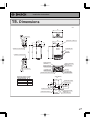
15. Dimensions
< mm >
450
6-6 x 10 OBLONG HOLE
170
140
100
70
36
10
464
EXHAUSTPIPE CONNECTION
101.5
79
40
240
130
(INNER)
UPPERWALL MOUNT BRACKETS
615
586
665
OPERATION LAMP
AIR INLET
LOWERWALL MOUNT BRACKETS
36
70
WIRING THROUGHWAY
(WATER FILTER)
(POWER CORD)
CONDENSATE DRAIN
WATER DRAIN VALVE
WATER DRAIN VALVE
HOTWATER OUTLET
GAS INLET
WATER DRAIN VALVE
COLDWATER INLET
WIRING THROUGHWAY
OVERWATER PRESSURE RELIEF VALVE
HEIGHT OF EACH FITTING
FROM BOTTOM OF CASE
20
CONDENSATE DRAIN
44
HOTWATER OUTLET
56
COLDWATER INLET
51
GAS INLET
(VIEW FROM TOP)
99
70
WIRING THROUGHWAY
79
GAS INLET(R3/4)
109
135
60
361
245
87
6-6 x 10 OBLONG HOLE
WATER DRAIN VALVE
159
100
140
170
HOTWATER OUTLET(R3/4)
CONDENSATE DRAIN(R1/2)
214
259
WIRING THROUGHWAY
(POWER CORD)
COLDWATER INLET(R3/4)
27
Installation Instructions
For Installers:
Read this installation guide
carefully before carrying out
installation.
Remote Controller RCM3211
Installation Guide
Robert Bosch (Australia) Pty. Ltd.
Note
Do not connect power to the water heater before the remote controller has been properly installed.
(1) Remove the decorative cover.
(The decorative cover is attached very simply.)
Connect the Y-shaped terminal to the terminal block at the
back of the remote controller.
* In the case of exposed wiring (attachment to the wall), first
open up the cord intake on the main remote controller
body using pliers. (Take care not to damage the board in
the process.)
Main remote
controller body
Decorative cover
(2) Position the holes (diameter: 6 mm X depth: 25 - 30 mm) to
secure the remote controller for the kitchen, and knock in all
the raw plugs. Next, secure it using oval-headed wood
screws.
* The screws must be tightened manually, and the
remote controller secured properly without rattling.
Main remote controller body
Oval-headed wood screws
(3) Replace the decorative cover.
28
Installation Instructions
For Installers:
Remote Controller RCS3211
Installation Guide
Read this installation guide
carefully before carrying out
installation.
Robert Bosch (Australia) Pty. Ltd.
Note
Do not connect power to the water heater before the remote controller has been properly installed.
1. Put the remote controller cord through the wall
from the bathroom. Be sure to place the 2P
connector at the room side.
Ordinary bathroom
and shower room
Unit bath and
shower unit
2P connector
Seal this part sufficiently.
3. Take off the decorative frame from the remote
controller.
4. Apply the wall packing to the rear side of the
remote controller.
5. Connect the connector.
Through-hole ø 32 to ø 35
Switch box
Bath tub
Conduit
(Nominal: diameter ø19)
Bath tub
Switch box
Use the JIS-C83361 switch box for individual use at
the remote controller side.
A back support board illustrated below is
needed to install the remote controller on the
wall panel of the bath unit.
[Install the back support board at the rear side
of the wall panel prior to installation.]
tch)
w pi
cre
ine s
m
m
118
Dimensions of
back support
board
(reference)
ch
(ma
Connecting
electric cord
Wall packing
(take off the released
paper)
Remote controller cord
Rear side of
remote controller
6. Secure the remote controller with two Phillips
roundhead wood screws.
ø 3 hole
ø 32 hole
Waterproofed plywood
board
2. Drill two holes (6, 25 to 30 mm deep) on the
wall to secure the remote controller case, and
embed the wall plugs into the holes.
118 mm
Wall plug
Phillips roundhead wood screw
ø 6 hole
(25 to 30 mm deep)
Switch box
7. Fit the decorative frame on the remote controller.
29