1
6.4.3 Lock password
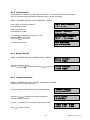
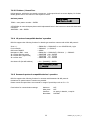
If this password is activated, the keyboard will lock after 30 seconds with no keyboard operation.
Any key press after locking will display a password inquiry at the LCD display.
M
M
N
U
N
R
MEEEN
NU
U > KEYBOARD SETTING > LOCK PASSWORD > EEEN
NTTTEEER
R
Enter a max. 8-character password.
Press EEEN
N
R
NTTTEEER
R to confirm.
Input new Password :
________
Repeat the password.
Press EEEN
N
R
NTTTEEER
R to confirm.
Repeat Password :
________
For activating the password protection, use the
JJJO
to select "YES"
O
OYYYSSSTTTIIICCCKKK
and press EEEN
N
R
NTTTEEER
R to confirm.
Enable Lock Password
NO < [ ↑ ↓ ] to change
Lock password is active.
Lock password
set and enabled.
6.4.4 Buzzer ON/OFF
M
M
N
U
N
R
MEEEN
NU
U > KEYBOARD SETTING > BUZZER ON/OFF > EEEN
NTTTEEER
R
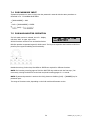
Activate / deactivate buzzer.
Use the JJJO
for selection and press EEEN
O
N
R
OYYYSSSTTTIIICCCKKK
NTTTEEER
R to confirm.
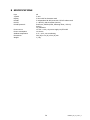
Buzzer Enabled
[↑↓] to toggle
Buzzer Disabled
[↑↓] to toggle
6.4.5 Joystick calibration
M
M
N
U
N
R
MEEEN
NU
U > KEYBOARD SETTING > JOYSTICK CALIBRATION > EEEN
NTTTEEER
R
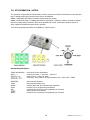
Use this menu for joystick calibration.
Keep the joystick in idle position and press the EEEN
N
R
NTTTEEER
R key.
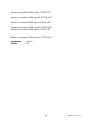
Release Joystick
and press [ ENT ]
Move the JJJO
O
OYYYSSSTTTIIICCCKKK towards all end stops including the
third axis (left/right rotation).
Move joystick
to corners.
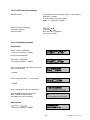
For all X, Y, Z displays, the end stop message must be “OK".
X+000
X-000
Y+000
Y- OK
Z+000
Z-000
Press EEESSSCCC to return to menu.
21
EKB500_ma_en_rev1 5_3