1
i-Personalize™ Operation
About i-Personalize™ ..................................... 28
Data Downloading .......................................... 28
SETUP
Sound Customizing
Adjusting Source Signal Levels ...................... 29
Switching the Tuner Mode .............................. 29
Subwoofer On and Off .................................... 29
Setting the Subwoofer Output ......................... 29
Setting the Response Slope for the High Range
Speaker (TW SETUP) ................................. 29
Sound (Beep) Guide Function ........................ 29
Visual Customizing
Dimmer Control .............................................. 29
Scroll Setting ................................................... 30
Switching the Character Font
(CDA-9833R only) ...................................... 30
Adjusting Display Contrast
(CDA-9833R only) ...................................... 30
Switching the Animation Display type
(CDA-9835R only) ...................................... 30
Demonstration ................................................. 30
MP3/WMA
Playing MP3/WMA Data ................................ 30
External Device
Turning Mute Mode On/Off ........................... 30
Setting the AUX Mode (V-Link) ..................... 30
Connecting to an External Amplifier .............. 30
Setting the Temperture Display
for the External Amplifier ........................... 30
Setting Tone Defeat for External Devices ....... 30
MobileHub™ Link Operation
(Optional)
About MobileHub™ Link .............................. 31
Telephone Mode ON/OFF .............................. 31
Incoming Calls ................................................ 31
Setting the Automatic Calling ......................... 31
Calling ............................................................. 32
SMS (Short Message Service) Operation ....... 32
2-EN
Changer (Optional)
Controlling CD Changer (Optional) ............... 33
Playing MP3 Files with the CD Changer
(Optional) .................................................... 33
Multi-Changer Selection (Optional) ............... 33
Remote Control
Controls on Remote Control ........................... 34
Operating the Audio Processor ....................... 34
Battery Replacement ....................................... 35
Information
In Case of Difficulty ....................................... 35
Specifications .................................................. 37
Installation and Connections
Warning ........................................................... 38
Caution ............................................................ 38
Precautions ...................................................... 38
Installation ...................................................... 39
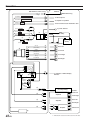
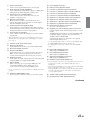
Connections ...................................................... 40