1
Administrator’s Guide
RMS
Resource Management Suite® 3.1
S of t w a r e
AMX Limited Warranty and Disclaimer
AMX Corporation warrants its products to be free of defects in material and workmanship under normal use for three (3) years from the date of purchase from AMX Corporation, with the following
exceptions:
•
•
•
•
•
•
Electroluminescent and LCD Control Panels are warranted for three (3) years, except for the display and
touch overlay components that are warranted for a period of one (1) year.
Disk drive mechanisms, pan/tilt heads, power supplies, and MX Series products are warranted for a period of
one (1) year.
AMX Lighting products are guaranteed to switch on and off any load that is properly connected to our lighting products, as long as the AMX Lighting products are under warranty. AMX Corporation does guarantee
the
control of dimmable loads that are properly connected to our lighting products. The dimming performance or
quality cannot be guaranteed due to the random combinations of dimmers, lamps and ballasts or transformers.
Unless otherwise specified, OEM and custom products are warranted for a period of one (1) year.
AMX Software is warranted for a period of ninety (90) days.
Batteries and incandescent lamps are not covered under the warranty.
This warranty extends only to products purchased directly from AMX Corporation or an Authorized
AMX Dealer.
All products returned to AMX require a Return Material Authorization (RMA) number. The RMA
number is obtained from the AMX RMA Department. The RMA number must be clearly marked on
the outside of each box. The RMA is valid for a 30-day period. After the 30-day period the RMA will
be cancelled. Any shipments received not consistent with the RMA, or after the RMA is cancelled,
will be refused. AMX is not responsible for products returned without a valid RMA number.
AMX Corporation is not liable for any damages caused by its products or for the failure of its products to perform. This includes any lost profits, lost savings, incidental damages, or consequential
damages. AMX Corporation is not liable for any claim made by a third party or by an AMX Dealer
for a third party.
This limitation of liability applies whether damages are sought, or a claim is made, under this warranty or as a tort claim (including negligence and strict product liability), a contract claim, or any
other claim. This limitation of
liability cannot be waived or amended by any person. This limitation of liability will be effective even
if AMX Corporation or an authorized representative of AMX Corporation has been advised of the
possibility of any such damages. This limitation of liability, however, will not apply to claims for personal injury.
Some states do not allow a limitation of how long an implied warranty last. Some states do not allow
the limitation or exclusion of incidental or consequential damages for consumer products. In such
states, the limitation or exclusion of the Limited Warranty may not apply. This Limited Warranty
gives the owner specific legal rights. The owner may also have other rights that vary from state to
state. The owner is advised to consult applicable state laws for full
determination of rights.
EXCEPT AS EXPRESSLY SET FORTH IN THIS WARRANTY, AMX CORPORATION
MAKES NO OTHER WARRANTIES, EXPRESSED OR IMPLIED, INCLUDING ANY
IMPLIED WARRANTIES OF MERCHANTABILITY OR FITNESS FOR A PARTICULAR
PURPOSE. AMX CORPORATION EXPRESSLY DISCLAIMS ALL WARRANTIES NOT
STATED IN THIS LIMITED WARRANTY. ANY IMPLIED WARRANTIES THAT MAY BE
IMPOSED BY LAW ARE LIMITED TO THE TERMS OF THIS LIMITED WARRANTY.
Software License and Warranty Agreement
LICENSE GRANT.
AMX grants to Licensee the non-exclusive right to use the AMX Software in the manner described in this
License. The AMX Software is licensed, not sold. The AMX Software consists of generally available programming and development software, product documentation, sample applications, tools and utilities, and miscellaneous technical information. Please refer to the README.TXT file on the compact disc or download for further
information regarding the components of the AMX Software. The AMX Software is subject to restrictions on
distribution described in this License Agreement. YOU MAY NOT LICENSE, RENT, OR LEASE THE AMX
SOFTWARE. You may not reverse engineer, decompile, or disassemble the AMX Software.
INTELLECTUAL PROPERTY.
The AMX Software is owned by AMX and is protected by United States copyright laws, patent laws, international treaty provisions, and/or state of Texas trade secret laws. Licensee may make copies of the AMX Software solely for backup or archival purposes. Licensee may not copy the written materials accompanying the
AMX Software.
TERMINATION. AMX RESERVES THE RIGHT, IN ITS SOLE DISCRETION, TO TERMINATE THIS
LICENSE FOR ANY REASON AND UPON WRITTEN NOTICE TO LICENSEE.
In the event that AMX terminates this License, the Licensee shall return or destroy all originals and copies of
the AMX Software to AMX and certify in writing that all originals and copies have been returned or destroyed.
PRE-RELEASE CODE.
Portions of the AMX Software may, from time to time, as identified in the AMX Software, include PRERELEASE CODE and such code may not be at the level of performance, compatibility and functionality of the
final code. The PRE-RELEASE CODE may not operate correctly and may be substantially modified prior to
final release or certain features may not be generally released. AMX is not obligated to make or support any
PRE-RELEASE CODE. ALL PRE-RELEASE CODE IS PROVIDED "AS IS" WITH NO WARRANTIES.
LIMITED WARRANTY.
AMX warrants that the AMX Software will perform substantially in accordance with the accompanying written
materials for a period of ninety (90) days from the date of receipt. AMX DISCLAIMS ALL OTHER WARRANTIES, EITHER EXPRESS OR IMPLIED, INCLUDING, BUT NOT LIMITED TO IMPLIED WARRANTIES OF
MERCHANTABILITY AND FITNESS FOR A PARTICULAR PURPOSE, WITH REGARD TO THE AMX SOFTWARE. THIS LIMITED WARRANTY GIVES YOU SPECIFIC LEGAL RIGHTS. Any supplements or updates to
the AMX SOFTWARE, including without limitation, any (if any) service packs or hot fixes provided to you after
the expiration of the ninety (90) day Limited Warranty period are not covered by any warranty or condition,
express, implied or statutory.
LICENSEE REMEDIES.
AMX's entire liability and your exclusive remedy shall be repair or replacement of the AMX Software that does
not meet AMX's Limited Warranty and which is returned to AMX. This Limited Warranty is void if failure of the
AMX Software has resulted from accident, abuse, or misapplication. Any replacement AMX Software will be
warranted for the remainder of the original warranty period or thirty (30) days, whichever is longer. Outside the
United States, these remedies may not available.
NO LIABILITY FOR CONSEQUENTIAL DAMAGES. IN NO EVENT SHALL AMX BE LIABLE FOR ANY DAMAGES WHATSOEVER (INCLUDING, WITHOUT LIMITATION, DAMAGES FOR LOSS OF BUSINESS PROFITS, BUSINESS INTERRUPTION, LOSS OF BUSINESS INFORMATION, OR ANY OTHER PECUNIARY
LOSS) ARISING OUT OF THE USE OF OR INABILITY TO USE THIS AMX SOFTWARE, EVEN IF AMX HAS
BEEN ADVISED OF THE POSSIBILITY OF SUCH DAMAGES. BECAUSE SOME STATES/COUNTRIES DO
NOT ALLOW THE EXCLUSION OR LIMITATION OF LIABILITY FOR CONSEQUENTIAL OR INCIDENTAL
DAMAGES, THE ABOVE LIMITATION MAY NOT APPLY TO YOU.
U.S. GOVERNMENT RESTRICTED RIGHTS. The AMX Software is provided with RESTRICTED RIGHTS.
Use, duplication, or disclosure by the Government is subject to restrictions as set forth in subparagraph
(c)(1)(ii) of The Rights in Technical Data and Computer Software clause at DFARS 252.227-7013 or subparagraphs (c)(1) and (2) of the Commercial Computer Software Restricted Rights at 48 CFR 52.227-19, as applicable.
This Agreement replaces and supercedes all previous AMX Software License Agreements and is governed by
the laws of the State of Texas, and all disputes will be resolved in the courts in Collin County, Texas, USA.
Should you have any questions concerning this Agreement, or if you desire to contact AMX for any reason,
please write: AMX Corporation, 3000 Research Drive, Richardson, TX 75082.
Table of Contents
System Requirements ....................................................... 1
Minimum Hardware Requirements .......................................... 1
Supported Platforms 1 ...............................................................
RMS Supported Databases .................................................... 1
RMS Supported Scheduling Systems ..................................... 1
RMS Supported Web Browsers .............................................. 2
RMS SDK Support .................................................................. 2
Additional System Requirements ............................................ 2
Network Configuration ...................................................... 3
Installation .......................................................................... 5
The RMS SDK ......................................................................... 5
Upgrading to RMS 3.1 from 3.0 .............................................. 5
Upgrading to RMS 3.1 from RMS 2.2 or earlier ...................... 5
Resource Management Suite 3.1 Installation Checklist .......... 7
Hardware System Requirements ................................................ 7
Server Operating System ........................................................... 7
Additional Software Dependencies ............................................. 8
Database Platform ...................................................................... 9
Database Access ...................................................................... 10
Scheduling System ................................................................... 11
Internet Information Services - Virtual Directory ....................... 11
RMS Licensing ......................................................................... 12
RMS TCP/IP Communications ................................................. 13
RMS Security Settings .............................................................. 14
SMTP Email Server .................................................................. 15
SNPP Paging Provider ............................................................. 15
SNMP Management Server ...................................................... 16
RMS Administrator’s Guide
i
RMS Logging Options ...............................................................17
SYSLOG Messaging .................................................................18
RMS Reporting Options ............................................................18
Example: Redundant Server Setup ...................................... 19
Conceptualize the RMS Application ............................... 23
Licensing ............................................................................... 23
Licensing Summary ...................................................................23
Appointment Management Considerations ........................... 24
Messaging and Notification ................................................... 24
Logging Configuration ........................................................... 24
Security ................................................................................. 24
Windows Authentication ............................................................25
Enabling Integrated Windows Authentication ............................26
Vertical Market Support ......................................................... 27
Device Monitoring Framework ........................................ 29
Device Values ....................................................................... 30
Parameter Values ................................................................. 31
Status Types ......................................................................... 33
Notification Process .............................................................. 34
Alert Messages .........................................................................34
Advise Messages ......................................................................34
What Is New in RMS 3.x ................................................... 37
Users ..................................................................................... 37
The RMS Dashboard ............................................................ 37
Rooms ................................................................................... 37
Macros .................................................................................. 38
Notifications ........................................................................... 38
SNMP .................................................................................... 38
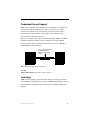
Redundant Server Support ................................................... 39
ii
RMS Administrator’s Guide
Licensing ............................................................................... 39
Doorbell Feature ................................................................... 40
Do Not Disturb Feature ......................................................... 40
Create Ad-Hoc Appointments from Touch Panel .................. 40
Extending Appointments from Touch Panel .......................... 40
Ending Appointments Early from Touch Panel ..................... 40
Getting Started ................................................................. 41
Running Configuration Wizard .............................................. 41
Adding NetLinx Systems As Rooms ..................................... 41
Adding And Configuring Groups ........................................... 42
Adding Users ......................................................................... 42
Adding Notifications .............................................................. 43
Changing The Domain Path for Notifications ............................ 43
RMS Administration ........................................................ 45
Sign in Page .......................................................................... 45
Administration Page .............................................................. 46
RMS Dashboard Page ..................................................... 49
How do you change modes? ................................................. 49
Adding Contents .................................................................... 50
Add Contents ............................................................................ 50
Restore Contents ...................................................................... 50
Imported Web Part Catalog ...................................................... 50
Moving columns .................................................................... 51
Resetting the RMS Dashboard ............................................. 51
RMS Hotlist ....................................................................... 53
Unassigned NetLinx Systems ............................................... 53
Parameter Needing Attention .............................................. 55
Viewing a room when appearing in Parameter Needing Attention
list .......................................................................................... 56
RMS Administrator’s Guide
iii
Resetting a room when appearing in Parameter Needing Attention
list ..........................................................................................56
Responding to a room when appearing in Parameter Needing Attention ....................................................................................56
Room Troller Failure
........................................................... 57
System Status Page ......................................................... 59
Viewing System Status information ....................................... 60
Viewing device information in the System Status page ........ 60
View Devices Page ...................................................................61
Execute Control Function Page ................................................63
Device Information Page ...........................................................64
Modify Device Information Page ...............................................65
Device Parameter Page ............................................................66
Device Parameter History Page ................................................68
Modify Parameter Page ............................................................69
Viewing Device parameters ......................................................70
Viewing Device Parameter history ............................................70
Deleting Device Parameter history ............................................71
Modifying Device parameters ....................................................71
Deleting Device parameters ......................................................72
Viewing detailed Device information .........................................72
Modifying Device information ....................................................72
Deleting Device information ......................................................73
Viewing a Device log .................................................................73
Executing a device control function ...........................................73
Management Page ............................................................ 75
Manage Groups Page ........................................................... 75
Create New Group Page
.................................................76
Create New Group ....................................................................76
View Group Setting Page
.....................................................77
View Group Setting ...................................................................77
iv
RMS Administrator’s Guide
Modify Group Setting Page ..................................................... 77
Modify Group Setting ................................................................ 77
Creating a new Group .............................................................. 77
Viewing Group settings ............................................................. 78
Editing a Group ......................................................................... 78
Deleting Groups ........................................................................ 78
Manage Rooms Page
.................................................... 79
Create New Room Page
........................................................ 80
View Room Setting Page
...................................................... 82
Send Question Page ................................................................ 84
Creating a new Room ............................................................... 84
Editing a Room ......................................................................... 85
Deleting Rooms ........................................................................ 85
Viewing Room settings ............................................................. 86
Sending a question to a room ................................................... 86
Manage Users Page
...................................................... 87
Create New User Page ............................................................. 88
Edit User Page ......................................................................... 90
Creating a new User ................................................................. 91
Editing Users ............................................................................ 91
Deleting Users .......................................................................... 92
How do I disable/enable a user? .............................................. 92
Manage Permissions Page
............................................... 93
Create New Role Page
Edit Role Page
.................................................. 94
...................................................................... 96
Creating a new Role ................................................................. 97
Editing a Role ........................................................................... 97
Deleting a role .......................................................................... 98
Manage Notifications Page
................................................ 98
Create New Notifications Page
............................................. 99
Edit Notification Page ............................................................. 101
RMS Administrator’s Guide
v
Creating a Notification .............................................................101
Editing a Notification ...............................................................102
Deleting a Notification .............................................................102
Changing The Domain Path for Notifications ..........................103
Manage Systems Page ...................................................... 104
View System Page .................................................................105
Viewing a System ....................................................................106
Internal Log Export Page
............................................... 107
Exporting an Internal Log ........................................................108
Viewing Exported Internal Logs ..............................................108
Deleting Exported Internal Logs ..............................................108
Control Functions Page ....................................................... 109
Create Control Function Macro Page ......................................110
Edit Macro Page ......................................................................111
Schedule Macro Page .............................................................111
Control Function Macro Schedules Page ................................113
Creating a new macro .............................................................113
Viewing a macro ......................................................................114
Executing a macro ..................................................................114
Deleting a macro .....................................................................114
Scheduling a macro ................................................................115
Viewing a macro schedule ......................................................115
Reporting Page ............................................................... 117
System Reports Page ......................................................... 117
Room Reports ..................................................................... 118
Help Requests
......................................................................118
Help Requests Results
Help Requests (Detailed)
.......................................................119
.....................................................120
Help Requests (Detailed) Results
......................................121
Residence Usage ..................................................................122
Residence Usage Results
vi
.................................................123
RMS Administrator’s Guide
Source Usage ....................................................................... 124
Source Usage Results
Lamp Hours
....................................................... 125
......................................................................... 126
Lamp Hours Results
.......................................................... 128
Transport Run Time ................................................................ 129
Transport Run Time Results
.............................................. 131
Power Reports .................................................................... 132
System Power
...................................................................... 132
System Power Results
Device Power
..................................................... 133
...................................................................... 134
Device Power Results
...................................................... 135
System Power (Detailed)
.................................................... 136
System Power (Detailed) Results
Device Power (Detailed)
.................................... 137
...................................................... 138
Device Power (Detailed) Results
...................................... 139
Quality of Service Reports .................................................. 140
System Online
...................................................................... 140
System Online Results
Device Online
..................................................... 142
....................................................................... 143
Device Online Results
...................................................... 145
Device Communications ....................................................... 146
Device Communications Results
Device Control Failures
...................................... 148
........................................................ 149
Device Control Failures Results
....................................... 150
Organizer Reports ............................................................... 151
Help Requests ...................................................................... 151
Help Requests Results
..................................................... 152
Help Requests (Detailed)
..................................................... 153
Help Requests (Detailed) Results
Residence Usage
................................................................. 155
Residence Usage Results
RMS Administrator’s Guide
..................................... 154
................................................ 156
vii
Source Usage
.......................................................................157
Source Usage Results
......................................................158
Running a System Report .......................................................159
Internal Log Report Page .................................................... 160
Internal Log Entry Page ..........................................................161
Viewing Log entries .................................................................161
Adding notes to Log entries ....................................................161
Deleting Log entries ................................................................162
Source Usage Page
........................................................ 163
Viewing Source Usage reports ................................................164
Lamp Hours Report Page
................................................ 164
Viewing Lamp Hours reports ...................................................165
Configuration Page ........................................................ 167
Appointment Settings Page ............................................... 167
Configuring the system storage settings .................................168
Setting the Appointment master password .............................168
Configure Internal Log Page
............................................ 169
Configuring the Internal Log ....................................................170
Enabling/Disabling Internal Log ..............................................171
Purging the Internal Log ..........................................................171
Configure Notification Template Page
Create New Template Page
............................. 172
................................................173
Viewing a Notification Template ..............................................176
Creating a new Notification Template .....................................177
Deleting a Notification Template .............................................177
Copying a Notification Template .............................................177
Prestige Levels Page
....................................................... 178
Editing Prestige Levels ............................................................179
Enabling/Disabling Prestige Levels .........................................179
System Licensing Page
.................................................... 180
Checking client licensing information ......................................182
viii
RMS Administrator’s Guide
Adding a Client License .......................................................... 182
Removing a Client License ..................................................... 182
Hotlist Settings Page
....................................................... 183
Creating a new Help Response .............................................. 183
Editing a Help Response ........................................................ 183
Deleting a Help Response ...................................................... 184
Help Page ....................................................................... 185
About RMS Application Page .............................................. 185
Administrator's Guide .......................................................... 185
User's Guide ....................................................................... 186
Version Information Page .................................................... 186
View Readme ...................................................................... 186
System Diagnostics ............................................................. 186
Status Page ............................................................................ 186
Checking System Status ........................................................ 186
Connections Page .................................................................. 187
Checking RMS connections ................................................... 187
Restarting Connection Server ................................................ 187
Resources Page ..................................................................... 188
Displaying/Hiding Resource Keys ........................................... 188
Appending Culture Codes to Strings ...................................... 189
Displaying the Resource Lookup Table .................................. 189
Debugging Page ..................................................................... 190
Setting Debug options and debugging the RMS server .......... 190
Sitemap Page ................................................................. 191
RMS Scheduling Page ................................................... 193
View Schedule Page ........................................................... 193
Day View Page .................................................................... 193
Opening Day view .................................................................. 194
Week View Page ................................................................. 195
RMS Administrator’s Guide
ix
Opening Week view ................................................................195
Month View Page ................................................................ 196
Opening Month view ...............................................................196
Add Appointment Page ....................................................... 197
Creating an Appointment ........................................................200
Creating an Appointment with an External Scheduler .............200
Room Search Page .................................................................203
Conducting a room search ......................................................204
Help ..................................................................................... 204
MeetingManager User Page .......................................... 205
Sign in Page ........................................................................ 205
How do you sign in to RMS? ...................................................205
Preferences Page ............................................................... 205
Setting the default language ...................................................206
Setting the home page ............................................................206
Resetting column sorting .........................................................206
Setting scheduling view hours .................................................206
User Profile Page ................................................................ 207
Editing your User Profile .........................................................208
Changing your User Password ...............................................208
Setting User Notification Time Span .......................................208
User Notifications Page ....................................................... 209
Create New Notification Page .................................................209
Creating new User Notifications ..............................................211
Sign Out Page ..................................................................... 211
Signing Out of RMS ................................................................211
RMS Touch Panel Pages ............................................... 213
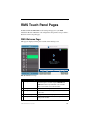
RMS Welcome Page ........................................................... 213
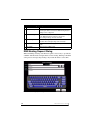
RMS Meeting Request Dialog ............................................. 214
Finding a meeting in a room’s schedule ..................................215
x
RMS Administrator’s Guide
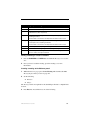
Creating a meeting at the Welcome panel .............................. 215
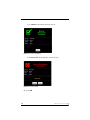
Extending a meeting at the Welcome panel ........................... 217
Ending a meeting early at the Welcome panel ....................... 218
Ringing the doorbell ................................................................ 220
RMS In-room Page ............................................................. 221
Finding a meeting in a room’s schedule ................................. 222
Creating a meeting at the In-room panel ................................ 222
Extending a meeting at the In-room panel .............................. 224
Ending a meeting early at the In-room panel .......................... 225
Executing a meeting preset .................................................... 227
Using the room’s calendar ...................................................... 227
Setting the meeting to "Do Not Disturb" .................................. 228
Placing a Help Request .......................................................... 228
Placing a Service Request ..................................................... 230
Configuration Wizard .................................................... 231
Welcome ............................................................................. 231
Appointment Management/Scheduling System ...................... 232
Database ............................................................................. 233
Connection ............................................................................. 233
Configuration .......................................................................... 234
Updates .................................................................................. 235
Product Selection ................................................................ 236
Web Services ...................................................................... 237
Microsoft IIS Server ................................................................ 237
Virtual Directory ...................................................................... 238
Services .............................................................................. 239
Register .................................................................................. 240
Start ........................................................................................ 242
Licensing ............................................................................. 244
Server Licenses ...................................................................... 244
Enter Server Serial Number .................................................... 245
RMS Administrator’s Guide
xi
Manual Authorization ..............................................................245
Manually authorizing your RMS server ...................................246
Client Licenses ........................................................................247
OS Permissions .................................................................. 249
Service User ............................................................................249
Web User ................................................................................251
System Settings .................................................................. 252
NetLinx ....................................................................................252
Security ...................................................................................253
Administrator ...........................................................................254
Scheduling ..............................................................................255
Appointments ..........................................................................256
SMTP ......................................................................................258
SNPP ......................................................................................260
SNMP ......................................................................................262
Logging ...................................................................................263
Syslog .....................................................................................264
Reporting .................................................................................265
Time Sync ...............................................................................266
Name & Logo ...................................................................... 267
Creating A Custom Logo .........................................................268
Finished ............................................................................... 269
Scheduling System Plug-ins ......................................... 271
Scheduling Systems: Microsoft Exchange Plug-in .............. 271
Overview .................................................................................271
Compatibility Requirements ....................................................272
Installation Checklist ...............................................................273
Scheduling Plug-in Configuration ............................................273
Room Scheduling Configuration .............................................278
Scheduling Systems: Microsoft Outlook Plug-in ................. 280
Overview .................................................................................280
xii
RMS Administrator’s Guide
Compatibility Requirements .................................................... 280
Installation Checklist ............................................................... 281
Scheduling Plug-in Configuration ........................................... 282
Room Scheduling Configuration ............................................. 285
Scheduling Systems: Novell GroupWise Plug-in ................ 287
Overview ................................................................................. 287
Compatibility Requirements .................................................... 287
Installation Checklist ............................................................... 288
Scheduling Plug-in Configuration ........................................... 288
Room Scheduling Configuration ............................................. 292
Scheduling Systems: Lotus Notes Plug-in .......................... 294
Overview ................................................................................. 294
Compatibility Requirements .................................................... 295
Installation Checklist ............................................................... 295
Scheduling Plug-in Configuration ........................................... 296
Room Scheduling Configuration ............................................. 304
Database Wizard ............................................................ 309
Overview ............................................................................. 309
Starting the Database Wizard ............................................. 310
Main Menu .............................................................................. 311
Create / Remove Menu .......................................................... 313
Import / Export Menu .............................................................. 314
Create A New Database ......................................................... 315
Remove A Database .............................................................. 317
Importing Data ........................................................................ 319
Exporting Data ........................................................................ 320
Converting A Database .......................................................... 321
Applying Update Scripts ......................................................... 322
Configuring Connection Settings ............................................ 323
RMS Administrator’s Guide
xiii
Appendix A: Service Configuration for Microsoft
Exchange 5.5 ................................................................ 325
Overview ............................................................................. 325
Configuration ....................................................................... 325
Appendix B: Configuring Microsoft Exchange Mailbox &
Permissions ................................................................. 329
Overview ............................................................................. 329
Create a New Exchange Mailbox ........................................ 329
Configure Exchange Mailbox Permissions .......................... 332
Appendix C: Configuring Novell GroupWise Mailbox
Proxy Access ............................................................... 337
Overview ............................................................................. 337
Configure GroupWise Mailbox Proxy Access ..................... 337
Appendix D: Configuring A Local Mail Profile ............. 341
Overview ............................................................................. 341
Create a Local Mail Profile .................................................. 341
Appendix E: Configuring Lotus Notes Database & Permissions ....................................................................... 345
Overview ............................................................................. 345
Create a New Notes Mailbox .............................................. 345
Configure Notes Database Permissions ............................. 345
Appendix F: Installation Procedure for SQL Server 2005
Express Edition ........................................................... 351
Overview ............................................................................. 351
Installation ........................................................................... 351
Setup ................................................................................... 352
xiv
RMS Administrator’s Guide
System Requirements
System Requirements
Minimum Hardware Requirements
Processor: Intel Pentium IV 2.0 GHz
Memory: 512 MB
Display: 1024x768 resolution
Hard Disk: 500 MB available space
Supported Platforms
Windows 2000 Server (SP4)
Windows 2003 Server (SP1)
RMS Supported Databases
Microsoft SQL Server 2005 Express Edition (download available free
from Microsoft)
Microsoft SQL Server 2005 Standard Edition
Microsoft SQL Server 2005 Enterprise Edition
Microsoft SQL Server 2000
RMS Supported Scheduling Systems
Microsoft Exchange Server 2000 (SP3)
Microsoft Exchange Server 2003 (SP2)
Microsoft Exchange Server 2007
Microsoft Outlook 2000 (SP3)
Microsoft Outlook XP (SP3)
Microsoft Outlook 2003 (SP2)
Microsoft Outlook 2007
Novell GroupWise 6
Lotus Notes R5/R6
RMS is capable of supporting multiple (up to 12) instances of
Scheduling on a single NetLinx Master. If you intend to run multiple
instances of Scheduling on a Master, then that Master should be
dedicated solely to RMS Scheduling only.
RMS Administrator’s Guide
1
System Requirements
RMS Supported Web Browsers
Windows Platform
Microsoft Internet Explorer 6
Microsoft Internet Explorer 7
Mozilla FireFox 2.0
Macintosh Platform
Mozilla FireFox 2.0
RMS SDK Support
All NetLinx hardware platforms
Touch panel files for G4
NetLinx modules
Additional System Requirements
Microsoft .NET Framework 2.0
Internet Information Services (IIS) 5.0 (for Windows 2000 servers)
Internet Information Services (IIS) 6.0 (for Windows 2003 servers)
Adobe Acrobat Reader 7.0.5 or later
Microsoft Outlook 2000/XP/2003/2007 (only needed if RMS is
configured to work with a MS Exchange scheduling system)
Novell GroupWise Client 6.0/6.5 (only needed if RMS is configured to
work with a Novell GroupWise scheduling system)
Lotus Notes R5/R6 Client (only needed if RMS is configured to work
with a Lotus Notes scheduling system)
2
RMS Administrator’s Guide
Network Configuration
Network Configuration
The RMS application is a client/server application where the NetLinx system acts
as the client and the RMS application server listens for connections from NetLinx
systems. NetLinx and the RMS application server communicate using TCP/IP
sockets. In order to establish communication, each NetLinx system must be able
to resolve and connect to the RMS application server. This can be accomplished
with a variety of Network configurations including local area networks (LAN),
wide area networks (WAN), and the Internet.
In order to communicate with the RMS application, a NetLinx system must have
the RMS modules added to its programming by a qualified NetLinx programmer.
The RMS application module includes the core API and communication stack
that allows NetLinx to communicate with the RMS application.
Since each NetLinx system acts as the client, it must be configured to
communicate to the RMS application server using the 'SERVER-' command in
NetLinx programming. NetLinx can accept either an IP address or a HostName
for the server. NetLinx supports DNS so if you are using a HostName, the
HostName must be registered with the DNS server that NetLinx has been
configured to use. The DNS server configuration will be picked up automatically
through DHCP if the DNS servers are registered with the DHCP server. For more
information on configuring DNS servers in NetLinx, see the NetLinx master’s
instruction manual.
Optionally, the server IP or host name can be placed in a file called ServerInfo.txt
and placed in the RMS directory of the NetLinx master's file system. If this file is
present, the RMS communication module ignores the SERVER- command and
uses the address supplied in the file. Enter the IP address or hostname on a single
line using a text editor and FTP the file to the NetLinx master. If the RMS
directory does not exist, you can create it and place the file in the directory.
By default, NetLinx and the RMS application communicate using TCP/IP port
3839. Port 3839 is registered to AMX Resource Management Suite with IANA
(http://www.iana.org/assignments/port-numbers). This can be changed to suit
your particular facility, but it must be changed in both the RMS server software
and each NetLinx system. In the RMS server, this is accomplished through the
Configuration Wizard. In NetLinx, this is accomplished through the 'SERVER-'
RMS Administrator’s Guide
3
Network Configuration
command in NetLinx programming. If using the ServerInfo.txt file, append a ":"
and the port number to the server IP address or host name.
The RMS application 1.0 used port 9090 for communications. If you are
upgrading from MeetingManager 1.0, you may wish to continue to use port 9090.
During the upgrade process, you are prompted to change to port 3839 or continue
to use port 9090. Port 3839 is the new port going forward and 9090 is not
backward compatible. If you change to port 3839, you need to upgrade all
NetLinx systems to use the modules from the latest version of the RMS SDK.
The RMSEngineMod module uses port 3839 as the default port internally. You
can use the old module, MeetingManagerEngineMod, if you add ":3839" to the
server command used to configure the server address. You can use port 9090 with
all RMS application NetLinx systems.
Once a NetLinx system has been programmed with the RMS modules and the
server's IP address or HostName, the NetLinx system automatically connects to
the RMS server.
RMS Application Install Checklist
Is the RMS server's host name registered with your DNS server?
Yes
• Configure each NetLinx system to point to the correct DNS server and obtain the
HostName from the network Administrator to use in the 'SERVER-' command.
The DNS server configuration will be picked up automatically through DHCP if the
DNS servers are registered with the DHCP server.
Note: To verify your NetLinx system can resolve the DNS name of the RMS server,
connect to the NetLinx master using TELNET and use the PING command to
determine if the RMS server DNS name can be resolved.
No
• Determine the IP address of the RMS server from the network Administrator to
use in the 'SERVER-' command.
Do you want to use 3839 as the TCP/IP port for communications between NetLinx
and the RMS server?
4
Yes
• No changes need to be made in either RMS or NetLinx.
No
• Configure the TCP/IP in the RMS server using the Configuration Wizard and
supply the new port to the NetLinx programmer to use in the 'SERVER-'
command.
RMS Administrator’s Guide
Installation
Installation
The RMS SDK
The best method of implementing any RMS code supporting an application of the
RMS suite is to download the RMS SDK. Within the RMS SDK is a sample
RMS CodeCrafter file (you will need to download RMS CodeCrafter from
www.amx.com).
Open the RMS CodeCrafter file, then copy and duplicate the devices, modules,
and ConnectLinx information to suit your needs. While this approach will clarify
your understanding of the RMS code and how it interacts with NetLinx, it is still
recommended that you attain certification as a AMX programmer to achieve full
understanding.
Upgrading to RMS 3.1 from 3.0
RMS 3.0 licenses work with RMS 3.1
The Database Wizard automatically detects an existing RMS 3.0
database and performs the necessary updates for RMS 3.1
Upgrading to RMS 3.1 from RMS 2.2 or earlier
There are changes in the approach to licensing and supported databases.
Contact AMX Global Customer Service to obtain new RMS 3.1
licenses for both Asset and Scheduling functionality. To obtain an
RMS License, please contact AMX at 800-222-0193, by email at
[email protected], or contact your AMX dealer. Existing licenses will
migrate in the following manner:
1 MeetingManager license becomes 1 Asset license and 1 Scheduling
license.
1 AssetManager license becomes 1 Asset license.
The Database Wizard automatically migrates the database from a
previous RMS database into one of the RMS 3.1 supported database
platforms; however, you will need to have one of the RMS 3.1
supported database platforms installed prior to starting the RMS 3.1
installation process.
RMS Administrator’s Guide
5
Installation
Knowing these points, you can now proceed to the regular installation process.
Use the Resource Management Suite 3.1 Installation Checklist section on page 7
to aid your installation.
6
RMS Administrator’s Guide
Installation
Resource Management Suite 3.1 Installation
Checklist
Hardware System Requirements
Hardware System Requirements
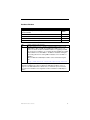
Does your server hardware meet the minimum requirements for RMS? Yes/No
Processor Intel Pentium IV 2.0 GHz (x86)
Memory
512 MB
Display
1024x768 resolution
Hard Disk 500 MB available space for RMS application files and database
Yes to all Please continue to the next step.
No to any You must obtain a server that meets these minimum requirements to install
RMS.
Server Operating System
Server Operating System
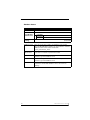
Do you have a compatible server operating system installed?
Yes/No
Windows 2000 Server
Windows 2003 Server
Yes
Please continue to the next step.
No
You must obtain a compatible server operating system to install RMS.
Does your server operating system have the latest service packs
installed?
Yes/No
Windows 2000 Server - Service Pack 4 (current as of 10/02/2006)
Windows 2003 Server - Service Pack 1 (current as of 10/02/2006)
Yes
Please continue to the next step.
No
You must obtain and install the latest operating system service packs to install
RMS.
RMS Administrator’s Guide
7
Installation
Server Operating System (Cont.)
Does your server operating system have Internet Information Services Yes/No
installed?
Windows 2000 Server - Internet Information Services (IIS) 5.0
Windows 2003 Server - Internet Information Services (IIS) 6.0
Yes
Please continue to the next step.
No
You must install IIS on your server for RMS to serve web pages. While this
component is optional for the Windows Server operating system, it is required
by the RMS application. The installer will not continue if this component is not
detected.
Do you have an administrative logon account to the server where RMS will be
installed?
Yes
Please continue to the next step.
No
You must obtain such an account, and logon to the server with a user account
that has administrative access to the server. RMS is a system level application
and requires administrative access to install and configure the RMS services
and security settings.
Additional Software Dependencies
Additional Software Dependencies
Does your server have the Microsoft .NET Framework 2.0 installed?
Yes
Please continue to the next step.
No
You must obtain and install the Microsoft .NET Framework 2.0 before
installing RMS. The installer will not continue if this component is not detected.
Does your server have Adobe Acrobat Reader installed?
8
Yes
Please continue to the next step.
No
You must obtain and install Adobe Acrobat Reader to be able to display the
RMS help files.
RMS Administrator’s Guide
Installation
Database Platform
Database Platform
Do you have a compatible database platform where the RMS database
can be installed?
Yes/No
Microsoft SQL Server 2000
Microsoft SQL Server 2005 - Standard Edition
Microsoft SQL Server 2005 - Enterprise Edition
Microsoft SQL Server 2005 - Express Edition
Yes
Please continue to the next step.
No
You must obtain access to or install a compatible database platform for the
RMS database. Microsoft SQL Server 2005 Express Edition is a no cost
solution for small to medium sized RMS installations. If upgrading from RMS
2.x using an Access database, you can download and install SQL Server 2005
Express Edition for use with RMS 3.1. The RMS 3.1 installation will migrate
your existing data from the existing RMS 2.x database to the new RMS 3.1
database.
Microsoft SQL Server 2005 Express Edition can be downloaded using this
link:
http://msdn.microsoft.com/vstudio/express/sql/download/
Note: If installing Microsoft SQL Server 2005 Express Edition, please review
Appendix F: Installation Procedure for SQL Server 2005 Express Edition section on
page 351 of the RMS Administrator’s Guide. Here you will find the specific information
your will need for installation and configuration for Microsoft SQL Server 2005 Express
Edition.
RMS Administrator’s Guide
9
Installation
Database Access
Database Access
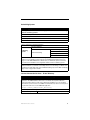
Database Server
Yes
Using Windows
Authentication?
Database Name
(Catalog)
10
No
Username:
Password:
(Default = RMS)
Database Server
This is the server name or path to the database server. If using
Microsoft SQL 2005 Express Edition, this field would also contain the
database instance name and be formatted like
"server_name\instance_name"
Windows
Authentication
If you are using Windows Authentication to access the database
server, then no username or password is needed.
Username
If you are not using Windows Authentication, then a username is
needed to logon to the database server.
Password
If you are not using Windows Authentication, then a password is
needed to logon to the database server.
Database Name
This is the database name to create and use for the RMS system. By
default this is named 'RMS'. Database name is also known as
"Catalog".
RMS Administrator’s Guide
Installation
Scheduling System
Scheduling System
RMS supports both an internal scheduling system and interfaces to the following
external scheduling systems:
Microsoft Exchange 2000/2003/2007 Server
Microsoft Outlook 2000/ 2003/2007 (stand-alone mode)
Novell GroupWise 6.0/6.5
Lotus Notes R5/R6
Please complete the following information:
Internal Scheduling
Microsoft Exchange
Scheduling
System
External Scheduling
Microsoft Outlook
Novell GroupWise
Lotus Notes
Note: If interfacing with an External Scheduling System, please review the corresponding
section for your scheduling system under the Scheduling System Plug-ins section on
page 271 of the RMS Administrator’s Guide. Here you will find the specific information
your will need for installation and configuration with the external scheduling system.
Note: RMS is capable of supporting multiple (up to 12) instances of Scheduling on a single NetLinx Master. If you intend to run multiple instances of Scheduling on a Master, then
that Master should be dedicated solely to RMS Scheduling only. See the RMS Scheduling
Page section on page 193 for details.
Internet Information Services - Virtual Directory
Internet Information Services - Virtual Directory
RMS provides a web user interface for the administration and management of the
application. The RMS installation will create a new virtual directory in the Windows
Internet Information Services web services. During the installation you can specify the
virtual directory name used to access RMS. This virtual directory name is used as part of
the path in the URL to access the RMS web application.
http://server_name/virtual_directotry
Please complete the following information:
Virtual Directory Name
(Default = RMS)
RMS Administrator’s Guide
11
Installation
RMS Licensing
RMS Licensing
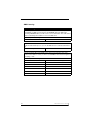
RMS can operate with limited functionality in STANDARD edition. However, if you want the
full capabilities of RMS you must purchase the PREMIUM edition from AMX. Upon
purchasing PREMIUM edition, you will receive a server serial number. This serial number
will be needed during the installation to license the RMS server.
Please complete the following information:
Server Serial Number
If your RMS server is behind a firewall or is otherwise unable to connect to AMX and
finalize the authorization process, you can call AMX and receive a manual authorization
key.
Authorization Key
Once the Premium edition of the RMS server is licensed, you must also enter client
licenses for the number of rooms you wish to use with RMS for either Asset management,
Scheduling, or both.
Please complete the following information:
Client Certificate ID
12
Authentication Key
RMS Administrator’s Guide
Installation
RMS TCP/IP Communications
RMS TCP/IP Communications
RMS uses TCP/IP communications between the RMS server and the remote NetLinx
systems.
Please complete the following information:
TCP/IP
Server Port
Number
(Default = 3839. This is an IANA registered port number for RMS)
Does your server have a firewall that will block TCP/IP communication for this port?
Yes
You will need to create a PINHOLE or exception for TCP/IP communications
on the specified TCP/IP port for RMS communications.
No
Please continue to the next step.
Does your network router restrict or block traffic on this TCP/IP port?
Yes
You will need to create a PINHOLE or exception for TCP/IP communications
on the specified TCP/IP port for RMS communications.
No
Please continue to the next step.
RMS Administrator’s Guide
13
Installation
RMS Security Settings
RMS Security Settings
RMS provides a flexible user account management system.
Please complete the following information:
No
Allow
Anonymous
Access:
Enable User Account Management
Default
Yes Admin
Username:
Yes
No
(Default = Admin)
Default
Admin
Password:
Enable User Account Management If you would like any user that can access the RMS
web pages to have full access to all RMS features
and functions, then disable user account
management.
If you would like restricted user logon RMS web
pages where you can manage individual user’s
access permissions, then enable user account
management.
Allow Anonymous Access
If User Account Management is enabled, then you
will also have the option to allow or disallow
anonymous access to the RMS web pages. If
anonymous access is allowed, users will be able to
view the scheduling pages in RMS without having
to logon with a user account.
Default Admin Username
If User Account Management is enabled, then you
must provide a username for the default
administrator account.
Default Admin Password
If User Account Management is enabled, then you
must provide a password for the default
administrator account.
Note: RMS also supports Windows Authentication for authenticating users in the RMS
web pages. RMS will automatically detect if your website is configured for Windows
Authentication. User account management should be enabled and anonymous access
should be disallowed when using Windows Authentication. To learn more, or to configure
your system for Windows Authentication, please review the
Windows Authentication section on page 25 of the RMS Administrator’s Guide.
14
RMS Administrator’s Guide
Installation
SMTP Email Server
SMTP Email Server
RMS supports Simple Mail Transport Protocol (SMTP) email for all outbound email
notifications. In order to receive email notifications, the following SMTP information will be
needed.
Please complete the following information:
No
SMTP Server
Address
SMTP Server
Port
Allow SMTP
Messaging
(Default = 25)
No
SMTP Server
Requires
Username:
Authentication Yes
Yes
Password
SMTP Email
Address
Friendly Email
Name
Reply-To Email
Address
SNPP Paging Provider
SNPP Paging Provider
RMS support Simple Network Paging Protocol (SNPP) outbound electronic alpha/text
paging notifications. In order to receive SNPP text pages the following SNPP information
will be needed.
Please complete the following information:
No
Enable SNPP
Paging
Yes SNPP Provider Select from the pre-defined list in the RMS
Configuration Wizard or add your own SNPP
provider information
RMS Administrator’s Guide
15
Installation
SNMP Management Server
SNMP Management Server
RMS supports the Simple Network Management Protocol for extending RMS information
to your SNMP management console.
Please complete the following information:
No
SNMP Agent Port
(Default = 161)
SNMP Community
SNMP Trap
Community
Enable SNMP
Services
16
SNMP Trap
Recipients
Yes
RMS Administrator’s Guide
Installation
RMS Logging Options
RMS Logging Options
RMS supports the logging of information to an internal log in the database and to the
Windows Event log.
Please complete the following information:
No
Enable Logging to
the Internal
Database Log
Maximum
Number of
Log Entries
Yes To Retain
(Default = 1000)
Delete Log
Entries After
(Days)
(Default = 90)
No
Log
Informational
Messages
Enable Logging To
the Windows Event
Yes Log Warning
Log
Messages
Log Error
Messages
Yes
No
Yes
No
Yes
No
Maximum Log
Entries
If Internal Logging is enabled, you can specify the maximum
number of log records to retain for log reporting purposes. The
RMS services will automatically purge the oldest log records to
maintain a manageable database size.
Delete Log Entries
After
If Internal Logging is enabled, you can specify the number of days
to retain historical data for log reporting purposes. The RMS
services will automatically purge data records that are older than
the specified number of days in order to maintain a manageable
database size.
RMS Administrator’s Guide
17
Installation
SYSLOG Messaging
SYSLOG Messaging
RMS supports broadcasting SYSLOG messages across the network to a SYSLOG
listening server.
Please complete the following information:
No
Enable
SYSLOG
Messaging
SYSLOG
Server
Address
Yes SYSLOG
Server Port
SYSLOG
Facility ID
(Default = 514)
Select from listing in RMS Configuration Wizard
RMS Reporting Options
RMS Reporting Options
RMS can provide historical and statistical reports based on system-collected data using
the following configuration settings.
Please complete the following information:
No
Enable
Reporting
Delete
Report
Entries After
18
Yes Delete Report
Entries After
(Days)
(Default = 90)
If Reporting is enabled, you can specify the number of days to retain
historical data for reporting purposes. The RMS services will
automatically purge data records that are older than the specified number
of days in order to maintain a manageable database size.
RMS Administrator’s Guide
Installation
Example: Redundant Server Setup
1. One at a time, RMS must be installed on all servers. The servers will share
one drive.
2. In the Cluster Administrators, add the RMS services as Generic Services to
the shared group for the cluster.
3. Start with the RMS Server service and give it a dependency on the SQL
Service running.
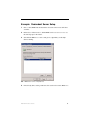
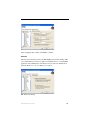
FIG. 1 RMS Server service - Dependencies
4. If not already done, set the parameter to the actual service name, RMSServer.
RMS Administrator’s Guide
19
Installation
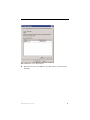
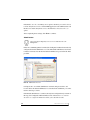
FIG. 2 RMS Server service - Parameters
5. Set the dependency of netlinx, comm, and troller services to the RMSServer.
20
RMS Administrator’s Guide
Installation
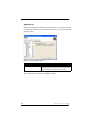
FIG. 3 RMS Troller service - Dependencies
6. The result is 4 services in addition to any other clusters you were already
clustering.
RMS Administrator’s Guide
21
Installation
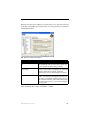
FIG. 4 Cluster Administrator
22
RMS Administrator’s Guide
Conceptualize the RMS Application
Conceptualize the RMS
Application
It is necessary for you to understand a few points to utilize the RMS application
to its fullest potential.
Licensing
RMS provides two key functions, the ability to track devices and provide
notifications based on user defined parameters, and schedule the use of rooms
within RMS. The RMS application suite supports two types of licenses; Asset
and Scheduling.
An Asset license allows you to track devices connected via a NetLinx master
system.
A Scheduling license allows you to schedule a room and run presets defined
through the NetLinx control system.
Licensing Summary
A summary of the RMS application licensing status can be found both in the
Configuration Wizard under the Client Licenses option and in Configuration >
Licensing under the administrative web interface (System Licensing Page section
on page 180).
RMS Administrator’s Guide
23
Conceptualize the RMS Application
Appointment Management Considerations
The RMS application can manage appointments for each room that is marked as
schedulable in the RMS application. The RMS application can manage
appointments using a built-in scheduler or it can connect to external scheduling
systems such as Microsoft Exchange, Novell GroupWise, and Lotus Notes.
Managing appointments is an optional feature of the RMS application and it is
not required that you configure this item.
Messaging and Notification
The RMS application sends notifications for NetLinx systems problems and
appointment confirmations. These notifications rely on external messaging
systems such as email to transfer these messages. You will need to configure the
RMS application to work with these external systems.
The RMS application can provide Notification through SMTP email and Simple
Network Pager Protocol (SNPP). Configuring for SMTP is always recommended
if it is available. Configuring for SNPP should be based on whether your users
have pagers that support SNPP.
Logging Configuration
The RMS application logs systems problems for long-term storage and historical
reporting. The RMS application has a built-in log, but it also supports Windows
Event logging and Syslog logging. All logging options can be configured in the
Configuration Wizard.
Security
The RMS application can be configured to not require secure logins, require
secure logins but allow for anonymous access, or require secure login with no
anonymous access allowed. The RMS application users are configured with a
username, password, and role that determines their access to the system.
The account management is configured through the Configuration Wizard. Two
options, Use Account Management and Allow Anonymous Access are configured
by the Configuration Wizard.
24
RMS Administrator’s Guide
Conceptualize the RMS Application
Windows Authentication
The RMS ASP web application supports the use of Integrated Windows
Authentication. In order to use this feature you must enable Windows
Authentication for the RMS Virtual Web Directory and ensure that RMS is
enabled for user authentication.
If you are using the scheduling features of RMS, you will need to
configure the "dynamicResources" folder in the RMS Virtual directory
to allow anonymous access.
The RMS services will automatically detect if the RMS web application is
configured for Integrated Windows Authentication and apply the following
behavior:
Administrative Web Pages
In the RMS administrative web pages, the web application will auto
detect the integrated windows username and attempt to authenticate
this user account to a user account in the RMS database. If the
username is defined in the RMS database, the user is automatically
logged on and the user's security permissions are applied to the user's
session. If the integrated windows username is not found in the RMS
database, a login prompt will be provided to manually log on to the
RMS administrative pages.
If using Integrated Windows Authentication, the user's password in the
RMS database need not be synchronized with the actual domain
account, this password will not be used in the authentication process.
User Scheduling Web Pages:
In the RMS user scheduling web pages, the web application will auto
detect the integrated windows username and only allow appointment
record modification to appointment records that the user created.
Attempting to access or modify an appointment created by another user
is restricted.
The integrated Windows usernames need not be defined in the RMS
database. The web application will simply restrict access to
appointments based on the appointment's organizer username.
RMS Administrator’s Guide
25
Conceptualize the RMS Application
Enabling Integrated Windows Authentication
1. To enable Integrated Windows Authentication, after the RMS product
installation and completion of the RMS Configuration Wizard, open the IIS
manager from Control Panel > Administrative Tools > Internet
Information Services. Expand the Web Sites and navigate to the RMS web
application.
2. Next, right-click on the RMS web application and select Properties.
3. Select the Directory Security tab and click the Edit button under Anonymous
access and authentication control.
4. Ensure the Anonymous access option is disabled and the Integrated Windows
authentication option is enabled.
5. When done, press OK to save the configuration.
6. Next, expand the RMS web application virtual directory and find the folder
named "dynamicResources"
7. Next, right-click on the "dynamicResources" folder and select Properties.
8. Select the Directory Security tab and click the Edit button under Anonymous
access and authentication control.
9. Ensure the Anonymous access option is enabled allowing anonymous access.
Anonymous access is needed on this folder to allow a room's touch panels to
access and display dynamic images associated with meetings. The touch
panels are not authenticated in the Windows domain and require
unauthenticated access to this folder and its subfolders.
10. When done, press OK to save the configuration.
11. After making these changes, you will need to reset the IIS web application to
ensure the new settings are applied. Select the Run option form the Windows
start menu and type IISRESET and click OK.
26
RMS Administrator’s Guide
Conceptualize the RMS Application
Vertical Market Support
The RMS suite now supports the following markets with their own associated
application syntax. As you read the documentation, you should recognize
references to items such as rooms are also classrooms, exhibits, and venues.
Vertical Market
MeetingManager
ClassroomManager
WorshipManager
ExhibitManager
Location
Room
Classroom
Room
Exhibit
Scheduled
activity
Appointment
Session
Session
Event
Participants
Attendees
for scheduled activity
Participants
Participants
Visitors
Activity scheduler
Organizer
Instructor
Facilitator
Exhibitor
Sequence executed
at time of scheduled
activity
Preset
Preset
Preset
Sequence
Topic for scheduled
activity
Subject
Scheduled by
Topic Instructor Topic
Facilitator
VenueManager
IntelligentManager
HomeManager
Location
Venue
Room
Residence
Scheduled
activity
Event
Meeting
Activity
Participants
Participants
for scheduled activity
Attendees
Guests
Activity scheduler
Scheduler
Organizer
Scheduler
Sequence executed
at time of scheduled
activity
Preset
Preset
Preset
Topic for scheduled
activity
Event Details
Booked by
Subject
Scheduled by
Event
Scheduled by
RMS Administrator’s Guide
Exhibit Details
Scheduled by
27
Conceptualize the RMS Application
28
RMS Administrator’s Guide
Device Monitoring Framework
Device Monitoring Framework
The RMS application provides device monitoring through a user extensible
framework. This framework allows you to customize what devices are monitored,
the conditions that indicate a problem or fault, and what type of problem or fault
this condition represents. The RMS application generates notifications when a
fault condition occurs, as determined by the notification configuration.
Each room has one or more monitored devices. Each device can be a physical
device, such as a video projector, or a logical device, like the RMS application
software. However, each monitored device must be associated with a
NetLinx-connected device. In the case of a video projector, this device would be
the IR card, Serial Card or IP Socket used to communicate with the projector. The
RMS application software is associated with the NetLinx master itself.
Each monitored device has one or more device parameters that represent
monitored items. For instance, monitoring lamp hours of a video projector is
accomplished through a "Lamp Hours" parameter that belongs to the "Video
Projector" device. All parameters must be associated with a device.
In order to monitor a device, the NetLinx system must register the device and one
or more parameters with the RMS application. For instance, monitoring of Lamp
Hours of the Video Projector is only available if the NetLinx system has added
the appropriate code. In many cases, this is as simple as adding an RMS
application support module.
RMS Administrator’s Guide
29
Device Monitoring Framework
Device Values
Each monitored device has a set of values used in its description. These values
are supplied when the device is registered and consist of the following:
Device Values
Device Number
This is the device number of the device, as defined in the
NetLinx program. Devices are tracked by Device ID so this
value must be unique within the devices of a given room. For
instance, you can have multiple devices with a Device ID of
"1:1:0", as long as there is only one device per room with that
particular Device ID.
Name
This is the name of device. This name is displayed on the
administrator’s console and readily identifies the device.
Manufacturer
This is the manufacturer of the device. If this value is not
supplied during registration, the manufacturer of the
NetLinx-connected device will be used.
Model
This is the model number of the device. If this value is not
supplied during registration, the model name of the
NetLinx-connected device will be used.
Device Type
The device type of the NetLinx-connected device, e.g.,
"NI-2000" or "NXP-TPI/4 Touch Panel". This is available for
Axcess and NetLinx devices. Information is registered
automatically by the RMS application.
Serial Number
This is the serial number of the NetLinx-connected Device
and is only available for NetLinx devices.. This information is
registered automatically by the RMS application.
Firmware Version
This is the firmware version of the NetLinx-connected device
and is only available for NetLinx devices.. This information is
registered automatically by the RMS application.
Address and Address Type This is the physical address and address type for the
NetLinx-connected device. This information describes how
the device is connected to the NetLinx master. A device
connected via ICSNet will display "ICSNet" for the address
type and the hardware's network address for the address. A
device connected via IP will display "TCP/IP" for the address
type and the IP address for the address. Axcess devices will
display "AXLink" for both values. This information may be
useful for diagnosing device connectivity problems. This
information is registered automatically by the RMS application.
30
RMS Administrator’s Guide
Device Monitoring Framework
Parameter Values
Each parameter has a set of values used to determine what conditions indicate a
problem and what type of problem this condition represents. These values are
supplied when the parameter is registered and consist of the following:
Parameter Values
Name
This is the name of parameter. This name is displayed on
the RMS application console and readily identifies the
parameter. Parameters are tracked by name so this name
must be unique within the parameters of a given device.
For instance, you can have multiple "Lamp Hours"
parameters as long as there is only one "Lamp Hours"
parameter per monitored device.
Parameter Type
This indicates if the value is a number or a string. This
information is used to determine how to perform
certain operation, such as addition and comparisons
between the new and threshold values. For instance,
comparing "10" and "2" as strings results in "10" less than
"2" but comparing them as numbers results in "2" less than
"10".
Value and Units
This is the current value of the parameter. Units are
appended to the value when displayed in the web console.
Threshold Value and
Comparison Operator
The threshold value is the value for which this parameter is
considered to indicate a problem or fault. The comparison
operator is used to detect when the value changes from
the un-faulted to the faulted condition. The comparison
operators "Less Than", "Less Than or Equal To", "Greater
Than", "Greater Than or Equal To", "Equal To", and "Not
Equal To" can be used for string and number parameters.
The comparison operators "Contains" and "Does Not
Contain" are primarily used for string parameters.
For example, "Lamp Hours" might have a threshold value
of 1000 and any value over this would require
maintenance. The comparison operator would then be
"Greater Than". When this parameter changes from a
value that is not greater than 1000 to a value that is
greater than 1000, the fault status is set. When the value
changes from a value greater than 1000 to a value not
greater than 1000, the fault status is cleared. These values
are supplied during registration, but can be modified by the
administrator from the RMS application console.
RMS Administrator’s Guide
31
Device Monitoring Framework
Parameter Values
Status Type
The status represents the type of problem a faulted
condition represents. Status Types include "Help
Request", "Maintenance Request",
"Room Communication Error", "Control System Error",
"Network Error", "Security", and "Equipment Usage."
For example, when "Lamp Hours" changes from an
un-faulted (not greater than 1000) to a faulted (greater
than 1000), this change represents a "Maintenance
Request" status that requires an AV technician to repair
the equipment. If the "Device Online" parameter changes
from "Online" to "Offline", this change could represent a
"Security" or "Control System Error" status.
These values are supplied during registration, but can be
modified by the administrator from the RMS application
console.
Reset Flag and Reset Value
These values determine if and how the parameter can be
reset from the RMS application console. If the Reset Flag
is set, then the administrator can reset the value remotely.
When the administrator selects "Reset" from the console,
the Reset Value is copied to the Value and the faulted
condition is cleared. These values are useful for
parameters such as VCR "Run Time" which would be
manually reset when the VCR is cleaned.
Minimum and Maximum
Values
These values are used to restrict the range of the
threshold and reset values that the administrator can enter
on the RMS application console. These values would be
used when the parameter represents a value with a
bounded range, such as a Volume Level.
Enumeration List
This value is used to restrict the range of the threshold and
reset values that the administrator can enter on the
RMS application console. This value would be used when
the parameter represents a value with a bounded list,
Power On and Power Off.
All parameters must be registered by the NetLinx system. The administrator
cannot add parameters from the RMS application console. The administrator can
modify Threshold Value, Comparison Operator, and Status Type for any
parameter. This provides the administrator with the ability to set their own
threshold and re-classify messages based on their facility. For instance, an
administrator can set the Video projector's "Lamp Hours" threshold to the
expected lamp life of a newly replaced lamp or change the "Device
Communicating" parameter from a "Control System Error" to a "Security" status
if the projector is in danger of being stolen.
32
RMS Administrator’s Guide
Device Monitoring Framework
Status Types
The RMS application supports the following status types for device monitoring:
"Help Request", "Maintenance Request", "Room Communication Error",
"Control System Error", "Network Error", "Security", and "Equipment Usage."
While there are no firm rules for what these status types mean and how they are
used, AMX provides the following description of each status type and
recommends that your usage is consistent with these descriptions.
Status Types
Help Request
A user generated help request such as a help button on
the touch panel.
Maintenance Request
A user or monitored equipment generated maintenance
request. Maintenance issues would include items that
require a technician to visit the room.
Room Communication Error
A loss of communication between the room and the
RMS application server.
Control System Error
Any error that represents a control system error, such as a
missing device or loss of communication with a device.
Network Error
Any network related error. These would most commonly
be associated with loss of communication with devices
that communicate via IP.
Security
Any security related issue. It might be appropriate to
classify issues that might normally be classified as Control
System or Network errors as Security issues instead. This
might include a touch panel going offline or loss of
communication with a projector depending on the physical
security of these devices.
Equipment Usage
Any issue that does not require repair or maintenance and
that is mainly used for status.
RMS Administrator’s Guide
33
Device Monitoring Framework
Notification Process
As NetLinx sends parameter updates to the RMS server, the RMS server checks
to see if the parameter's threshold value has been reached. This comparison is
made by checking the previous value of the parameter against the threshold and
by checking the new version of the parameter against the threshold using the
threshold comparison operator. If the comparison for the old value is False and
the comparison for the new value is True, then the parameter triggers an Alert
message. If the comparison for the old value is True and the comparison for the
new value is False, then the parameter triggers an Advise message. Therefore an
Alert message is generated when a parameter reaches its threshold and an Advise
message is generated when a parameter returns to its normal operating range.
Alert Messages
When an Alert message occurs, the RMS server first checks to see if the message
should be logged to the various log services. A message is created for each log
service using the Log Text of the parameter's Alert template, or the default
template if a custom template has not been assigned. Next, the RMS server
checks for any notifications in the Notification List matching the group, room
and status type for the parameter and dispatches any messages via SMTP or
SNPP as needed using the appropriate text from the template assigned to the
parameter.
Advise Messages
When an Advise message occurs, the RMS server first checks to see if the
parameter is configured for sending Advise messages. If not, no messages are
sent and no Log entries are created. If the parameter has been configured for
Advise messages, the message is logged and dispatched via SMTP an SNPP as
described above. However, the Advise template assigned to the parameter, or the
default Advise template if no template has been assigned to the parameter, is used
to generate the text for the log entries and messages.
For instance, if the previous value for Projector Lamp Hours is 999 and the new
value is 1001 and the threshold is set to 1000 and the threshold operator is set as
"Greater Than", the RMS server checks to see if the previous value compared to
the threshold, i.e. 999 is Greater than 1000 is False, has a different result than the
new value compared to the threshold, i.e. 1001 is Greater than 1000 is True. This
34
RMS Administrator’s Guide
Device Monitoring Framework
change results in an Alert message being logged using the RMS logging settings.
Also, a message is sent to all users registers for a notification matching the
parameters group, room, and status type.
If the Lamp Hours changes from 1001 to 999, the RMS server triggers an Advise
message. If the parameter is configured to send Advise messages, the message is
sent to the log and to all users registered for a notification matching the
parameters group, room, and status type.
RMS Administrator’s Guide
35
Device Monitoring Framework
36
RMS Administrator’s Guide
What Is New in RMS 3.x
What Is New in RMS 3.x
Perhaps you have already noticed just how smooth RMS 3.1 looks but there is so
much more on the inside you need to see. You are going to like the features we
have added to user support, notifications, application navigation, security, and
control macros to name a few.
Users
Users can now be grouped into roles, and system permissions can then be
assigned to roles rather than just to the individual. One such system permission a
new user role might encounter is appointment access. Appointments viewable
within the scheduler can be enabled with limited viewing. Further, notifications
generated by RMS can not only be directed to specific users, but also to roles.
See Also...
Manage Users Page section on page 87
Manage Permissions Page section on page 93
RMS Scheduling Page section on page 193
The RMS Dashboard
In addition to the navigation menu, the Dashboard is comprised of 2 columns,
arranged and populated by user defined information.
See Also...
RMS Dashboard Page section on page 49
Rooms
It is no longer necessary to have a NetLinx master to create a room within the
RMS applications. For the purposes of scheduling a meeting it may be necessary
to only track its availability. Conversely, a device closet requires no scheduling
support but it is necessary to monitor devices; this room would require a NetLinx
master.
See Also...
Manage Rooms Page section on page 79
RMS Administrator’s Guide
37
What Is New in RMS 3.x
Macros
The RMS application allows you to create control function macros that can be
assigned to rooms and groups and scheduled to execute either manually, or at
specific times.
See Also...
Control Functions Page section on page 109
Notifications
You will notice when editing notification templates that you can now create these
notifications using an HTML editor.
See Also...
Manage Notifications Page section on page 98
SNMP
The RMS server now supports SNMP.
SNMP (Simple Network Management Protocol) - The network management
protocol used almost exclusively in TCP/IP networks. SNMP provides a means
to monitor and control network devices, manage configurations, and gather
statistics on performance and security issues.
When enabled, RMS generates SNMP traps that can then be collected,
monitored, and filtered by an SNMP management station, e.g., NimBUS from
Nimsoft. The management station is the final component in the SNMP
architecture. It functions as the equivalent of a client in the client-server
architecture. It issues requests for management operations on behalf of an
administrator or application and receives traps from agents as well.
38
RMS Administrator’s Guide
What Is New in RMS 3.x
Redundant Server Support
RMS is now compatible with redundant server arrangements or clustering. In a
clustered environment, multiple servers (two or more) operate as a single
network server. Failure of one of the network servers in the cluster will go
unnoticed because the remaining servers in the cluster assume the work
performed by that failed network server.
FIG. 5 is an example of the server arrangement utilized by AMX for the RMS
installation. With two available servers, run Microsoft’s® Cluster Wizard
application; the result is a shared drive between the two servers. AMX then
installed RMS on the shared drive.
The resulting shared drive
from Cluster Wizard.
RMS is installed at this
location.
Server #1
Server #2
FIG. 5 AMX’s Redundant Server Arrangement
See Also...
Microsoft® TechNet, keywords Creating a Cluster.
Licensing
RMS no longer requires a physical hardware dongle for licensing. A software
serial number is provided with your purchase of RMS Premium Edition and you
must enter this serial number on the licensing step of the RMS Configuration
Wizard.
RMS Administrator’s Guide
39
What Is New in RMS 3.x
Doorbell Feature
The Doorbell allows a person to press a button on the external G4 welcome panel
and trigger a sound and/or a popup on the panel inside the room to let the meeting
know that there is someone outside the room needing attention.
Do Not Disturb Feature
Controlled from the G4 touch panel inside a room, the Do Not Disturb feature is
a notification displayed on the external G4 welcome panel indicating the meeting
currently in session should not be interrupted.
Create Ad-Hoc Appointments from Touch Panel
Allows you to create an appointment in an unused meeting room. When used in
conjunction with Microsoft Exchange, the ad-hoc appointment is also created in
the Exchange mailbox. Please note this feature is supported for use with the
internal RMS scheduling system and with a Microsoft Exchange scheduling
system.
Extending Appointments from Touch Panel
RMS communicates with the internal or external scheduling system, checks to
see if admissible and, updates the appointment record with the extended end
time. When used in conjunction with Microsoft Exchange, the extended
appointment time is also updated in the Exchange mailbox. Please note this
feature is supported for use with the internal RMS scheduling system or with a
Microsoft Exchange scheduling system.
Ending Appointments Early from Touch Panel
RMS communicates with the internal or external scheduling system and updates
the appointment record with the early end time and makes the room available on
the schedule. When used in conjunction with Microsoft Exchange, the ended
appointment time is updated in the Exchange mailbox. Please note this feature is
supported for use with the internal RMS scheduling system or with a Microsoft
Exchange scheduling system.
40
RMS Administrator’s Guide
Getting Started
Getting Started
Running Configuration Wizard
The Configuration Wizard runs during your initial installation of the RMS
application. Thereafter, to access the wizard click on the Start button, select
Programs, AMX Resource Management Suite, and select RMS Configuration
Wizard. For more information concerning the RMS Configuration Wizard,
consult the Configuration Wizard section on page 231.
Adding NetLinx Systems As Rooms
All NetLinx systems in the RMS application must be associated with a room to
enabled equipment monitoring. When new NetLinx systems connect to the RMS
application, they automatically show up in the Hot List and can be added as a
room directly from the Hot List.
1. Click on Hot List in the navigation menu.
2. Unassigned systems are listed at the bottom of the page. Click the Add Room
link for the NetLinx system you wish to add.
3. The next screen is the Create New Room Page. The room information is
provided by NetLinx but in the event it is not present, you must enter the
information. The room scheduling settings are set to Yes by default. If you
are using an external scheduling system you must click Configure to set it.
The room properties are set by the server settings.
4. After all information has been provided, click Save.
For more information read the Creating a new Room section on page 84.
RMS Administrator’s Guide
41
Getting Started
Adding And Configuring Groups
Rooms are displayed in a tree view based on these groups
Please note:
A group can contain either rooms or sub groups, but never both.
1. To add a group, first select Management > Groups under Administration
from the navigation list.
2. Then click Create New Group; this launches the Create New Group Page.
3. Enter a group name. Select if it is a group of groups or a group of rooms. If it
is a group of groups, select parent group if any. If it is a group of rooms,
select parent and add the desired rooms to the group.
4. Click Save to save, Cancel to cancel.
For more information, read the Create New Group section on page 76.
Adding Users
A user must be in place in order for the RMS application to send notifications. In
addition, the concept of users is also used to control access to the system. Once a
user has been created, notifications can be assigned.
1. Select Management > Users under Administration in the navigation menu.
2. Click the Create New User; this launches the Create New User Page.
3. First Name, password, and at least one email is required. All other
information is optional but these are the methods by which the RMS
application will send notifications to that user.
For more information, read the Creating a new User section on page 91.
42
RMS Administrator’s Guide
Getting Started
Adding Notifications
Once a user has been created, notifications can be assigned.
1. Click Management > Notifications under Administration in the navigation
menu.
2. Click the Create New Notification; this launches the Create New
Notifications Page.
3. Click Select for the Group. Select the Group from the list and click Select.
4. Click Select for the Room. Select the Room from the list and click Select.
5. Click on the drop-down list to select the type of notification to be sent.
6. Click on the drop-down list to select the user or user role intended to receive
the notification.
7. Click Save.
For more information, read the Creating a Notification section on page 101.
Changing The Domain Path for Notifications
By default, when a notification is sent out the link does not utilize the fully
qualified domain name. You can change the domain path such that those outside
of the immediate network can use the link. To change the host name:
1. Stop all RMS services.
2. Run C:\Program Files\ AMX Resource Management Suite\Scripts\RMS
Hostname.vbs
3. Click Yes.
4. Enter the new hostname, e.g., rms.your-domain.com
5. Click OK.
6. Restart RMS services.
RMS Administrator’s Guide
43
Getting Started
44
RMS Administrator’s Guide
RMS Administration
RMS Administration
All navigation is done via the menu located on the left of the screen. Categories
are in bold with their corresponding menu options indented beneath them.
Sign in Page
The Sign In page is the initial page of all RMS applications. Access and viewable
areas are dictated by your user rights.
How do you sign in to RMS?
To sign in, enter username and password and click the Sign In button.
RMS Administrator’s Guide
45
RMS Administration
Administration Page
The Administration Page is a menu listing of the following Administrator menu
items:
FIG. 6 RMS Administration Page
RMS Dashboard
View your custom user-defined portal.
Hotlist
View the exception hotlist page.
System Status
View the current system status page.
Management
Manage the system's rooms, users, groups, permissions, and NetLinx
systems.
Reporting
View system generated reports and logs.
46
RMS Administrator’s Guide
RMS Administration
Configuration
Configure system options and settings.
Control Functions
Create and Manage Control Function Macros.
Help
View help documents and system version information.
Sitemap
View a hierarchal listing of the application’s web pages.
RMS Administrator’s Guide
47
RMS Administration
48
RMS Administrator’s Guide
RMS Dashboard Page
RMS Dashboard Page
The RMS Dashboard page is the initial page viewed when you log into the RMS
application. In addition to the navigation menu, the Dashboard is comprised of 2
columns, arranged and populated by user defined information.
FIG. 7 RMS Dashboard Page
By default the RMS Dashboard contains the Hotlist (RMS Hotlist section on
page 53), Calendar, Lamp Hours (Lamp Hours Report Page section on page 164)
and Source Usage (Source Usage Page section on page 163).
How do you change modes?
The mode selection links are located at the top right of the RMS Dashboard.
Change modes by clicking one of the following:
Browse - The default mode for the RMS Dashboard.
Catalog - Add items to the RMS Dashboard.
Edit - Move RMS Dashboard items around the page.
RMS Administrator’s Guide
49
RMS Dashboard Page
Adding Contents
To add a content item to the RMS Dashboard:
1. Click the RMS Dashboard link in the menu on the left of the RMS
application.
2. Click Catalog in the modes on the top right of the page.
3. Select one of the links, Add Contents, Restore Contents or Imported Web
Part Catalog.
Add Contents
The Add Contents section is a list of predefined Web Part definition files.
1. Place a check in the box next to the items you want to add to the Dashboard.
Select the column within which you want the content displayed.
2. Click Add.
3. Click Close.
Restore Contents
The Restore Contents section is a collection of Web Part definition files that have
been previously removed from the Dashboard.
1. Place a check in the box next to the items you want to restore to the
Dashboard.
2. Select the column within which you want the content displayed.
3. Click Add.
4. Click Close.
Imported Web Part Catalog
A Web Part catalog is a library of Web Part definition (.dwp) files that you can
import into the RMS Dashboard.
See http://www.microsoft.com/technet/prodtechnol/sppt/sharepoint/
reskit/part5/c22spprk.mspx for more information.
1. Type a file name (.dwp) or click Browse to locate a Web Part file.
2. Click Upload.
50
RMS Administrator’s Guide
RMS Dashboard Page
3. Select the column within which you want the content displayed.
4. Click Add.
5. Click Close.
Moving columns
Contents contained in either the Center or Right column can be moved up, down
and to the other column on the Dashboard page.
To move a content item in the RMS Dashboard (Microsoft IE):
1. Click the RMS Dashboard link in the menu on the left of the RMS
application.
2. Click either Catalog or Edit in the modes on the top right of the page.
3. Click, hold and drag the top of the content item to be moved.
4. Drag to a new location; the insertion point is indicated by a blue horizontal
cursor.
5. Click Browse in the modes on the top right of the page when you are done.
To move a content item in the RMS Dashboard (FireFox):
1. Click the RMS Dashboard link in the menu on the left of the RMS
application.
2. Click either Catalog or Edit in the modes on the top right of the page.
3. Click the view's menu item Edit.
4. In Editor Zone, choose Zone and Zone Index to reposition the views.
5. Click Browse in the modes on the top right of the page when you are done.
Resetting the RMS Dashboard
To return the RMS Dashboard to the default contents and settings:
1. Click the RMS Dashboard link in the menu on the left of the RMS
application.
2. Click Reset in the modes on the top right of the page.
RMS Administrator’s Guide
51
RMS Dashboard Page
52
RMS Administrator’s Guide
RMS Hotlist
RMS Hotlist
The Hot List is the main view of the exception-based reporting system. All items
provide a link to resolve that particular item.
Unassigned NetLinx Systems
FIG. 8 Unassigned NetLinx Systems
The Hot List displays any new NetLinx systems that have connected to the RMS
application.
RMS Administrator’s Guide
53
RMS Hotlist
When a new NetLinx system connects to the RMS application, it displays the
following information and options:
New NetLinx Systems
Detection Time
The date, hour, minute and second the RMS server discovered the
NetLinx system.
Serial Number
Serial Number associated with the room.
IP Address
IP Address associated with the room.
Host Name
Host Name associated with the room.
System Number This is the system number of the NetLinx master. The system number is
used in master-to-master configuration.
Module Name
Module Name associated with the room.
Add Room
The Add Room link opens the Create New Room Page section on
page 80.
See Also:
Create New Room Page section on page 80 - allows you to add rooms to RMS
applications, monitor and schedule. Some information is provided by the
NetLinx master when discovered by the RMS application
Creating a new Room section on page 84 - upon initial discovery of a NetLinx
master you have the option of adding that room to your list of monitored
resources.
54
RMS Administrator’s Guide
RMS Hotlist
Parameter Needing Attention
FIG. 9 Parameter Needing Attention Section
Any issues that need attention in the RMS application are displayed on the Hot
List. If no issues need attention, no items are displayed in the Hot List. The
HotList checks the RMS server for updates behind the scenes and the page is
only refreshed if new HotList content is available.
When an item needs attention, such as a help request, the item will be displayed
with the following information and options:
Parameter Needing Attention
Last Update
Date and time of last system update
Room
Name of room where problem has occurred
Device
The name of the device with which the problem is associated
Parameter
The name of the parameter that requires attention
Current Value
Value of the parameter that requires attention
Reset
Reset the parameter to the default value.
View
View room’s device list. (View Devices Page)
RMS Administrator’s Guide
55
RMS Hotlist
Viewing a room when appearing in Parameter Needing Attention list
The RMS application maintains a device list for each room and the status of each
device listed in that room.
1. In the Hot List page, select View next to parameter needing attention. This
launches the room’s device view page.
2. Click Expand All to display all system status settings. Properly behaving
parameters are indicated with a green check mark and any offending
parameters are indicated with a red X.
3. Select View for the device parameter needing attention to view the Parameter
Settings.
Resetting a room when appearing in Parameter Needing Attention
list
If a notification has been set for a device it is necessary to reset it in the Hot List.
1. Select the Hot List from the menu on the left side of the RMS application
page.
2. Select Reset for the offending parameter.
Responding to a room when appearing in Parameter Needing
Attention
1. Select the Hot List from the menu on the left side of the RMS application
page.
2. Select Respond to launch the Send Response page.
3. Select either a pre-defined response from the drop down menu or type a
response in the text field provided.
4. Click Send.
56
RMS Administrator’s Guide
RMS Hotlist
Room Troller Failure
FIG. 10 Room Troller Failure Section
Troller failure occurs when the internal scheduling system has failed to attach to
the scheduling system mailbox/account and synchronize appointments for the
listed room.
Room Troller Failure
Failure Time
The time stamp from the server when the Troller Failure was detected.
Error Description What error occurred and in which room.
Resolve
Link to the View Room Setting Page.
Check the scheduling plug-in mailbox configuration for this room.
RMS Administrator’s Guide
57
RMS Hotlist
58
RMS Administrator’s Guide
System Status Page
System Status Page
This screen list allows you to view the status of all rooms on a single screen.
FIG. 11 System Status Page
Each room entry lists the Room Name, Room Power Status, Help Request, Room
Communication Error, System Error, Maintenance Issues, Network Errors, and
Security Errors.
System Status
Room Name
The room name for this row.
A link to the View Room Setting Page for a room. This link provides
access to a detailed list of all devices and device parameters for a given
room. To investigate more thoroughly, click on this link.
Power
The Room Power status for this room.
Help Request The Help Request status for this room.
Comm Error
The Room Communication Status for this room.
System Error
The Control System status for this room and its devices.
RMS Administrator’s Guide
59
System Status Page
System Status (Cont.)
Maintenance
The Maintenance Request status for this room and its devices.
Network
The Network status for this room and its devices.
Security
The Security status for this room and its devices.
Rooms are displayed in a tree view of groups and rooms. By default, all groups
are rolled up unless an error has occurred. In that case, the group containing
errors is unrolled. Show Triggered redraws using the default view. Expand all
unrolls all groups. Collapse all rolls up all groups. Refresh refreshes this page.
The Room Power Status field will display a green power icon when the room
power is on. Under normal operating conditions, this page will display the power
status for all rooms with a green check in all error columns. If an error does occur
the System Status page will display a red X for the room with the error.
Additionally, the error will appear as an item in the Hot List.
Viewing System Status information
To access the System Status page:
Select System Status in the menu on the left side of the RMS
application. Any rooms containing a parameter needing attention are
expanded for viewing.
Viewing device information in the System Status
page
1. Select System Status in the menu on the left side of the RMS application.
2. Expand the group name containing the status you want to check.
3. Select the room name to view the device information page.
60
RMS Administrator’s Guide
System Status Page
View Devices Page
The view devices screen lists the devices and their parameters being monitored
by the RMS application.
FIG. 12 View Devices Page
The screen is broken up into a section for each device, each containing the
following:
Device List Information
Device Name
The name of the monitored device.
Manufacturer
The manufacturer of the monitored device.
Model
The model of the monitored device.
Device Number
The NetLinx device number for this device as defined
in the NetLinx program.
Syslog, Internal Log, Windows Log Checkboxes indicate if the device will report any
errors to the various logs.
View
RMS Administrator’s Guide
This link provides more details for the device settings
and allows them to be modified. See the Device
Information Page for more information.
61
System Status Page
Each device can have one or more monitored parameters. They are collapsed
within the table directly below the device and contain the following information:
Device List Monitored Parameters
Name
The name of the parameter being monitored.
Current Value The current value for the parameter.
62
Status
This checkbox indicated if the parameter is operating within or outside of
its threshold value. The tool tip for this checkbox provides details about the
threshold for the parameter.
Status Type
This is the status type with which the parameter is associated.
View
This link provides more details for the parameter settings and allows them
to be modified. See Device Parameter Page section on page 66
RMS Administrator’s Guide
System Status Page
Execute Control Function Page
The Execute Control Function page allows you to execute control functions at the
device level within specified rooms. RMS uses i!-ConnectLinx to facilitate these
controls.
i!-ConnectLinx provides the mechanism to expose actions to the RMS server and
to manage action execution on the NetLinx system. Once a user builds a preset
from the actions in the i!-ConnectLinx action list, the RMS server makes a
request to i!-ConnectLinx to execute those actions. i!-ConnectLinx handles this
request and presents it to the NetLinx program for execution. See the
i!-ConnectLinx section of the RMS Programmer’s guide for details on
programming.
FIG. 13 Execute Control Function Page
Execute Control Function
Select Room
A drop down menu of available rooms and groups within the
RMS system.
Select Control Function Detected control functions for the selected room.
Execute
RMS Administrator’s Guide
Executes the selected control function.
63
System Status Page
Device Information Page
This screen lists the device settings and allows you to modify them.
Device Information
Name
The name of the monitored device.
Manufacturer
The manufacturer of the monitored device.
Model
The model of the monitored device.
Manual URL
A URL link to the manual on the manufacturer’s web site.
Description
A description of the monitored device.
Serial Number The serial number of the monitored device.
Modify
Click to modify the device. See the Viewing a Device log section on
page 73.
Delete
Click to delete the device. The system device cannot be deleted.
Back (X)
Return to the device list.
The NetLinx Device Information section is information for the NetLinx device
with which this device is associated. For instance, if a projector is connected to
NetLinx through an NXC-COM2 card, this table will contain information about
the NXC-COM2 card.
NetLinx Device Information
Device Type
The type of NetLinx device.
Version
The firmware version of the NetLinx device. This is not
available for AXLink devices.
Serial Number
The serial number of the NetLinx device. This is not available
for AXLink devices.
Device Connection Method The connection type of this device. This will be ICSNet,
TCP/IP or AXLink. This can be useful in diagnosing device
connection problems.
Device Address
64
The physical address of the device. For ICSNet, this is the
hardware address of the device on the ICSNet bus. For
TCP/IP connections, this is the IP address of the device. For
AXLink, this is "AXLink."
RMS Administrator’s Guide
System Status Page
Device Logging
Syslog
Internal Log
Windows Log
These checkboxes indicate if the device will report any
errors to the various logs; green checks are enabled and
red Xs are disabled.
SNMP Trap
See Also:
View Log - Launches the Internal Log Report Page section on page 160 for that
specific device.
Viewing a Device log section on page 73
Modify Device Information Page
To modify a device, click modify. This screen allows you to change values. While
in this screen, you can make changes to the Device Information and Device
Logging sections of the Device Information page.
See Also:
Device Information Page section on page 64
RMS Administrator’s Guide
65
System Status Page
Device Parameter Page
Parameter information attributed to a device monitored by the RMS application is
listed here.
FIG. 14 Device Parameter Page
Parameter Settings
Name
The name of the parameter being monitored.
Current Value
The value of the parameter
Threshold Operator
The threshold value is the value for which this parameter is
considered to indicate a problem or fault. The comparison
operator is used to detect when the value changes from the
un-faulted to the faulted condition. The comparison operators
"Less Than", "Less Than or Equal To", "Greater Than",
"Greater Than or Equal To", "Equal To", and "Not Equal To" can
be used for string and number parameters. The comparison
operators "Contains" and "Does Not Contain" are primarily
used for string parameters.
Example: "Lamp Hours" might have a threshold value of 1000
and any value over this would require maintenance. The
comparison operator would then be "Greater Than". When this
parameter changes from a value that is not greater than 1000
to a value that is greater than 1000, the parameter will faulted.
When the value changes from a value greater than 1000 to a
value not greater than 1000, the fault status is cleared.
Threshold
66
The threshold value
RMS Administrator’s Guide
System Status Page
Parameter Settings (Cont.)
Status Type
The status represents the type of problem a faulted condition
represents. Status Types include:
• Control System Error
• Equipment Usage
• Help Request
• Maintenance
• Modified Appointment
• Network
• New Appointment
• New NetLinx System
• Not Assigned
• Room Communication Error
• Security
• Server Status
• System Communication Error
Example: When "Lamp Hours" changes from an un-faulted
(not greater than 1000) to a faulted (greater than 1000), this
change represents a "Maintenance Request" status that
requires an AV technician to repair the equipment. If the
"Device Online" parameter changes from "Online" to "Offline",
this change could represent a "Security" or "Control System
Error" status. The RMS application will route the status type to
the appropriate personnel as determined by the Notification
Configuration settings.
Alert Template
The notification template to use when the parameter's value is
outside the normal operating range.
Advise when parameter
returns to normal range
The RMS application sends a notification for a parameter when
it returns to its normal operating range.
Advise Template
The notification template to use when the parameter's value
returns to the normal operating range.
History - Launches the Device Parameter History Page section on page 68.
Modify - Launches the Modify Parameter Page section on page 69.
Delete - Deletes the parameter.
See Also:
Configure Notification Template Page section on page 172 - modify notification
templates to fulfill your own needs.
RMS Administrator’s Guide
67
System Status Page
Device Parameter History Page
The Device Parameter History page contains status tracking information for each
device assigned to a room.
FIG. 15 Device Parameter History Page
Device Parameter History
Server Time
The date and time the status was logged as set by the server.
Room Name
The name of the room to which the device is assigned.
Device Name
The assigned name of the device.
Parameter Name The assigned name of the parameter tracked by the system status.
Value
The tracked value as it relates to the assigned parameter.
Delete - Clears the Device Parameter History.
68
RMS Administrator’s Guide
System Status Page
Modify Parameter Page
Make changes to existing device parameters via this page.
FIG. 16 Modify Parameter Page
Edit Parameter Settings
Name
The friendly name of the parameter. Cannot be changed.
Current Value
The value of the parameter
Threshold Operator
A drop down selection the threshold designator for the parameter
Threshold
The threshold value.
Status Type
A drop down selection for the category to which the parameter
belongs..
Alert Template
The notification template to use when the parameter's value is
outside the normal operating range.
Drop down selection of the types of alert templates available.
Advise when parameter
returns to normal range
When checked, the RMS application sends a
notification for a parameter when it returns to its
normal operating range.
Advise Template
The notification template to use when the parameter's value
returns to the normal operating range.
Drop down selection of the types of advise templates available.
RMS Administrator’s Guide
69
System Status Page
Reset - Resets all settings for the parameter to default values.
Save - Confirms the changes for the parameter changes and returns to the Device
Parameter Page
Cancel - Exits to the Device Parameter Page without saving changes.
Viewing Device parameters
1. Select System Status in the menu on the left side of the RMS application.
2. Expand the group name containing the status you want to check.
3. Select the room name to view the device information page.
4. Click View for the selected parameter in the Device List Monitored
Parameters section. This launches the Device Parameter Page section on
page 66.
Viewing Device Parameter history
1. Select System Status in the menu on the left side of the RMS application.
2. Expand the group name containing the status you want to check.
3. Select the room name to view the device information page.
4. Click View for the selected parameter in the Device List Monitored
Parameters section. This launches the Device Parameter Page section on
page 66.
5. Click History to launch the Device Parameter History Page section on
page 68.
70
RMS Administrator’s Guide
System Status Page
Deleting Device Parameter history
1. Select System Status in the menu on the left side of the RMS application.
2. Expand the group name containing the status you want to check.
3. Select the room name to view the device information page.
4. Click View for the selected parameter in the Device List Monitored
Parameters section. This launches the Device Parameter Page section on
page 66.
5. Click History to launch the Device Parameter History Page section on
page 68.
6. Click Delete.
Modifying Device parameters
1. Select System Status in the menu on the left side of the RMS application.
2. Expand the group name containing the status you want to check.
3. Select the room name to view the device information page.
4. Click View for the selected parameter in the Device List Monitored
Parameters section. This launches the Device Parameter Page section on
page 66.
5. Click Modify. This launches the Modify Parameter Page section on page 69.
6. Edit any of the following:
Select the Threshold Operator from the drop down menu.
Edit the threshold value in the field Threshold (in).
Set the Status Type in the drop down menu.
Set an Alert Template from the drop down menu.
Enable or disable the option Advise when parameter returns to normal
range.
If you elected to enable the Advise when parameter... option, set the
Advise Template from the drop down menu.
7. Click Reset to reset the parameter.
8. Click Save to save, Cancel to cancel.
RMS Administrator’s Guide
71
System Status Page
Deleting Device parameters
1. Select System Status in the menu on the left side of the RMS application.
2. Expand the group name containing the status you want to check.
3. Select the room name to view the device information page.
4. Click View for the selected parameter in the Device List Monitored
Parameters section. This launches the Device Parameter Page section on
page 66.
5. Click Delete.
Viewing detailed Device information
1. Select System Status in the menu on the left side of the RMS application.
2. Expand the group name containing the status you want to check.
3. Select the room name to view the device information page.
4. Click View for the selected parameter in the Device List Information section.
This launches the Device Information Page section on page 64.
Modifying Device information
1. Select System Status in the menu on the left side of the RMS application.
2. Expand the group name containing the status you want to check.
3. Select the room name to view the device information page.
4. Click View for the selected parameter in the Device List Information section.
This launches the Device Information Page section on page 64.
5. Click Modify. This launches the Modify Device Information Page section on
page 65.
6. Edit any of the following:
The device Name
The device Manufacturer
The device Model
The Manual URL for the device
The Description of the monitored device
72
RMS Administrator’s Guide
System Status Page
The serial number of the monitored device.
7. Place a check next to the Device Logging tools you want enabled.
8. Click Save to save, Cancel to cancel.
Deleting Device information
1. Select System Status in the menu on the left side of the RMS application.
2. Expand the group name containing the status you want to check.
3. Select the room name to view the device information page.
4. Click View for the selected parameter in the Device List Information section.
This launches the Device Information Page section on page 64.
5. Click Delete.
Viewing a Device log
1. Select System Status in the menu on the left side of the RMS application.
2. Expand the group name containing the status you want to check.
3. Select the room name to view the device information page.
4. Click View for the selected parameter in the Device List Information section.
This launches the Device Information Page section on page 64.
5. Click View Log. This launches the Internal Log Report Page section on
page 160.
Executing a device control function
1. Select System Status in the menu on the left side of the RMS application.
2. Expand the group name containing the status you want to check.
3. Select the room name to view the device information page.
4. Click Device Control. This launches the Execute Control Function
Page section on page 63. Only control functions available in this room are
listed in this page. You can change rooms via the Select Room drop down
menu.
5. Navigate to the control function you wish to execute in this room by
double-clicking on each function and device type.
6. Click Execute.
RMS Administrator’s Guide
73
System Status Page
74
RMS Administrator’s Guide
Management Page
Management Page
Manage Groups Page
FIG. 17 Manage Groups Page
The group screen allows you to manage room grouping. Rooms are displayed in
a tree view based on these groups
There are two rules to follow:
A group can contain either rooms or sub groups, but never both.
Manage Groups
Room Count
The number of rooms within the group.
Room List
A drop down menu to select a specific room within the
group.
View
Launches the View Group Setting Page section on
page 77.
RMS Administrator’s Guide
75
Management Page
Create New Group Page
FIG. 18 Create New Group Page
Create New Group
Group Name
Text field for friendly name of the group.
Parent Group
Drop down list establishes the groups relation to other groups. A group
can be separate, a child of another group, or the parent of other
groups.
Room
Rooms included in the group.
Available Rooms Rooms that can be included in the group.
<< / >>
Moves a selected room to the left and right adding or removing the
room from the group list.
Example Group structures:
City
Building
Floor
Campus
Building
Floor
Country
City
Department
76
RMS Administrator’s Guide
Management Page
View Group Setting Page
View Group Setting
Group Name
Text field for friendly name of the group.
Parent Group
Drop down list establishes the groups relation to other groups. A group
can be separate, a child of another group, or the parent of other
groups.
Room
Rooms included in the group.
Modify
Launches the Modify Group Setting Page section on page 77.
Delete
Deletes the selected group.
Modify Group Setting Page
Modify Group Setting
Group Name
Text field for friendly name of the group.
Parent Group
Drop down list establishes the groups relation to other groups. A group
can be separate, a child of another group, or the parent of other
groups.
Room
Rooms included in the group.
Available Rooms Rooms that can be included in the group.
<< / >>
Moves a selected room to the left and right adding or removing the
room from the group list.
Creating a new Group
1. Select Management > Groups in the menu on the left side of the RMS
application.
2. From the Manage Groups Page, select Create New Group.
3. In the Create New Group Page, type the name of the group in the field Group
Name.
4. If it is a group of groups, select the Parent Group in the drop down list.
5. If it is a group of rooms, select the rooms in the window Available Rooms
and click the << button to move the rooms to the Rooms window.
6. Click Save to save, Cancel to cancel.
To reassign a room to another group, delete it from the group to which it
currently belongs, then add the room to the desired group.
RMS Administrator’s Guide
77
Management Page
Viewing Group settings
1. Select Management > Groups in the menu on the left side of the RMS
application.
2. Double-click to open the group or group of groups you intend to view.
3. When you have located the group, click View. This launches the View Group
Setting Page section on page 77.
Editing a Group
1. Select Management > Groups in the menu on the left side of the RMS
application.
2. Double-click to open the group or group of groups you intend to edit.
3. When you have located the group, click View Group. This launches the
Viewing Group settings section on page 78.
4. Click Modify. To open the modify options (Modify Group Setting
Page section on page 77).
5. Edit any of the following fields:
Group Name
Set or remove the Parent Group from the drop down list
Add (<<) or remove (>>) rooms within the group
6. Click Save to save, Cancel to cancel.
Deleting Groups
1. Select Management > Groups in the menu on the left side of the RMS
application.
2. Double-click to open the group or group of groups you intend to edit.
3. When you have located the group, click View Group. This launches the View
Group Setting Page section on page 77.
4. Click Delete.
78
RMS Administrator’s Guide
Management Page
Manage Rooms Page
FIG. 19 Manage Rooms Page
Manage Rooms
Room Name
The friendly name of the rooms. Launches the View Room Setting
Page.
Licensing
Asset License and Scheduling License
Serial Number
Serial Number associated with the room.
IP Address
IP Address associated with the room.
Host Name
Host Name associated with the room.
System Number This is the system number of the NetLinx master. The system number is
used in master-to-master configuration.
Online
The communication status of the room. A green check indicates that the
room is connected to the RMS application. A red X indicates that room
is not connected to the RMS application due to a network or control
system error.
Devices
Launches the View Devices Page section on page 61.
View
Launches the View Room Setting Page section on page 82.
RMS Administrator’s Guide
79
Management Page
Create New Room Page
FIG. 20 Create New Room Page
The Create New Room page allows you to add rooms to RMS applications,
monitor and schedule. Some information is provided by the NetLinx master when
discovered by the RMS application.
Room Information
80
Name
The name of the room.
Location
The location of the room
Owner
Room’s owner
Master
A drop down list to select the NetLinx master with which the room is
associated.
RMS Administrator’s Guide
Management Page
Room Properties
Time zone and Use
Daylight Savings
This is the time zone setting for the room. Select the appropriate
time zone from the drop down list.
Use Daylight Savings This is the daylight saving setting for the room. Select Yes to
enable the use of Daylight Savings from the drop down list.
Prestige Level
Select the level from the drop down list. This is the prestige level for
the room. This value is optional but helps users find a room that
meets their needs through the RMS application's room search.
Number of Seats
This is the number of seats for the room. This value is optional but
helps users find a room that meets their needs through
the RMS application's room search.
Phone Number
In the event the room is equipped with a phone, this is the number
for that phone.
Equipment List
This is the equipment list for the room. This value is optional but
helps users find a room that meets their needs through
the RMS application's room search. All equipment items should be
separated by a comma.
URL to Map of Room This is a URL link to a map of the room. While the RMS application
does not provide any facility to generate and manage maps of your
facility, this link is provided so users can access a map of the
facility with the room shown if you have access to such maps. Click
Open to browse to the selected file.
Web Control Path
This is the i!-WebControl URL of the room. This link is provided to
allow quick access to any HTML based control panels that may
have been programmed into the NetLinx system. Click Open to
browse to the selected file.
Licensing Information
Asset License An Asset License allows you to monitor the room and assign notifications,
but does not allow for scheduling. A room such as an equipment closet,
where you may want to monitor equipment, would be an example of a
room that is not schedulable. If an Asset License is available you can
select one from the drop down list. If you cannot select a license, you must
contact AMX to purchase a license for this system.
Scheduling
License
A Scheduling License allows you to schedule and reserve the room and
execute macros. If a Scheduling License is available you can select one
from the drop down list. If you cannot select a license, you must contact
AMX to purchase a license for this system.
RMS Administrator’s Guide
81
Management Page
View Room Setting Page
FIG. 21 View Room Setting Page
Room Information
Name
The name of the room.
Location
The location of the room
Owner
Room’s owner
Master
The NetLinx master with which the room is associated.
Room Properties
Time zone and Use
Daylight Savings
This is the time zone setting for the room.
Use Daylight Savings This is the daylight saving setting for the room.
Prestige Level
82
This is the prestige level for the room. This value is optional but
helps users find a room that meets their needs through
the RMS application's room search.
RMS Administrator’s Guide
Management Page
Room Properties (Cont.)
Number of Seats
This is the number of seats for the room. This value is optional but
helps users find a room that meets their needs through
the RMS application's room search.
Phone Number
In the event the room is equipped with a phone, this is the number
for that phone.
Equipment List
This is the equipment list for the room. This value is optional but
helps users find a room that meets their needs through
the RMS application's room search.
URL to Map of Room This is a URL link to a map of the room.
Web Control Path
This is the i!-WebControl URL of the room. This link is provided to
allow quick access to any HTML based control panels that may
have been programmed into the NetLinx system.
Licensing Information
Asset License This is the Asset License number for the room. If you do not have a
license, you must contact AMX to purchase a license for this system.
Scheduling
License
This is the Scheduling License number for the room. If you do not have a
license, you must contact AMX to purchase a license for this system.
See Also...
Internal Log Report Page section on page 160
View Devices Page section on page 61
View System Page section on page 105
Send Question Page section on page 84
RMS Administrator’s Guide
83
Management Page
Send Question Page
Use the RMS application interface to communicate simple questions to selected
rooms.
FIG. 22 Send Question Page
Send Question
Question
Text field for you to type a question; the question is sent to the room.
Answers
None
No possible answer to your question is provided to the recipient.
Yes or No
The option of yes or no is provided to the recipient.
Multiple Choice Using the text fields, A, B, C, and D, provide the recipient 4 possible
answers.
Creating a new Room
1. Select Management > Rooms in the menu on the left side of the RMS
application.
2. From the Manage Rooms Page, select Create Room.
3. In the Create New Room Page, type the Room Information; the fields are
Name, Location, Owner. If there is a NetLinx master, select it from the drop
down menu.
4. Enter the Room Properties; the text fields are Number of Seats, Phone
Number, and Equipment List. The drop down menu selections are Timezone,
Use Daylight Savings, and Prestige Level. URL to Map of Room and Web
Control URL are either text field or click Open to browse to the desired files.
84
RMS Administrator’s Guide
Management Page
While this information is not required it does aid your users in deciding
rooms for scheduling use.
5. In the Licensing Information section, select the license type to use for the
room. The Asset License and Scheduling License drop down menus are only
enabled if available licenses are detected on the RMS server.
6. Click Save to save, Cancel to cancel.
Editing a Room
1. Select Management > Rooms in the menu on the left side of the RMS
application.
2. From the Manage Rooms Page, select View.
3. In the View Room Setting Page, click Modify.
4. Edit the Room Information; the fields are Name, Location, Owner. If there is
a NetLinx master, select it from the drop down menu.
5. Edit the Room Properties; the text fields are Number of Seats, Phone
Number, and Equipment List. The drop down menu selections are Timezone,
Use Daylight Savings, and Prestige Level. URL to Map of Room and Web
Control URL are either text field or click Open to browse to the desired files.
While this information is not required it does aid your users in deciding
rooms for scheduling use.
6. In the Licensing Information section, select the license type to use for the
room. The Asset License and Scheduling License drop down menus are only
enabled if available licenses are detected on the RMS server.
7. Click Save to save, Cancel to cancel.
Deleting Rooms
1. Select Management > Rooms in the menu on the left side of the RMS
application.
2. From the Manage Rooms Page, select View.
3. In the View Room Setting Page, click Delete.
RMS Administrator’s Guide
85
Management Page
Viewing Room settings
1. Select Management > Rooms in the menu on the left side of the RMS
application.
2. From the Manage Rooms Page, select View.
Sending a question to a room
1. Select Management > Rooms in the menu on the left side of the RMS
application.
2. From the Manage Rooms Page, select View.
3. In the View Room Setting Page, click Send a Question. This launches the
Send Question Page section on page 84
4. Type your Question in the field provided.
5. Select your Answer type. If you selected Multiple Choice, type the possible
answers in the fields provided.
6. Click Send to send, Cancel to cancel.
86
RMS Administrator’s Guide
Management Page
Manage Users Page
FIG. 23 Manage Users Page
System Users Information
First Name The user’s first name.
Last Name The user’s last name.
Username
The username of the user; the username is used at the time of log in.
Enabled
When checked, the user account is enabled and can be used.
Options
Edit - Launches the Edit User Page.
Delete - Deletes the selected user from the system. Notice you cannot delete
the System Administrator.
RMS Administrator’s Guide
87
Management Page
Create New User Page
FIG. 24 Create New User Page
A user must be in place in order for the RMS application to send notifications. In
addition, users are used to control access to the system. Once a user has been
created, notifications can be assigned.
Create New User Page
88
Username
Username for login. This field is required.
Account Enabled
When unchecked, this account cannot log into the
RMS application. However, this user can still receive
notifications.
RMS Administrator’s Guide
Management Page
Create New User Page (Cont.)
Password
Password for login. This field is required.
Confirm Password
Confirm password for login. This field is required.
First Name
The first name of the user. This field is required.
Last Name
The last name or surname of the user. This field is
required.
Phone
The phone number of the user. This value is not
used by the RMS application; it is only used for
reference by the RMS application administrators.
Mobile Phone
The mobile phone number of the user. This value is
not used by the RMS application; it is only used for
reference by the RMS application administrators.
Fax
The FAX number of the user. This value is not used
by the RMS application; it is only used for reference
by the RMS application administrators.
Email 1
The primary email account for this user if no other
account is specified. This address will be used for
notification emails. Set it as the default from the drop
down menu to the right of the field. Send a test
notification to the account by pushing Test. You can
enter up to 100 characters for an email address.
Email 2, Email 3, Email 4
These are the secondary email accounts for this
user. These addresses will be used for notification
emails. Set it as the default from the drop down
menu to the right of the field. Send a test notification
to the account by pushing Test. You can enter up to
100 characters for an email address.
Pager Provider and Pager Number These are the pager setting for SNPP. Enter a pager
number and select the pager provider for your
alpha-numeric pager. This number will be used for
sending notification messages. Test will send a test
message to this pager.
Notification Time Span:
Disable Notifications
The RMS server does not send notifications to this
user.
Always Send Notifications
The RMS server sends all notifications as they occur
to this user.
Only Send Notification On:
The RMS server sends all notifications but only on
the selected days and within the selected times.
Once the user’s information is in place, select the Save button to complete the
addition.
RMS Administrator’s Guide
89
Management Page
Edit User Page
The fields on the Edit User Page match those of the Create New User Page (see
FIG. 24).
Any changes needed to be made to a preexisting user must be made in the Edit
User page.
Edit User Page
Username
Username for login. This field is required.
Account Enabled
When unchecked, this account cannot log into the
RMS application. However, this user can still receive
notifications.
Password
Password for login. This field is required.
Confirm Password
Confirm password for login. This field is required.
First Name
The first name of the user. This field is required.
Last Name
The last name or surname of the user. This field is
required.
Phone
The phone number of the user. This value is not
used by the RMS application; it is only used for
reference by the RMS application administrators.
Mobile Phone
The mobile phone number of the user. This value is
not used by the RMS application; it is only used for
reference by the RMS application administrators.
Fax
The FAX number of the user. This value is not used
by the RMS application; it is only used for reference
by the RMS application administrators.
Email 1
The primary email account for this user if no other
account is specified. This address will be used for
notification emails. Set it as the default from the drop
down menu to the right of the field. Send a test
notification to the account by pushing Test. You can
enter up to 100 characters for an email address.
Email 2, Email 3, Email 4
These are the secondary email accounts for this
user. These addresses will be used for notification
emails. Set it as the default from the drop down
menu to the right of the field. Send a test notification
to the account by pushing Test.You can enter up to
100 characters for an email address.
Pager Provider and Pager Number These are the pager setting for SNPP. Enter a pager
number and select the pager provider for your
alpha-numeric pager. This number will be used for
sending notification messages. Test will send a test
message to this pager.
90
RMS Administrator’s Guide
Management Page
Edit User Page (Cont.)
Notification Time Span:
Disable Notifications
The RMS server does not send notifications to this
user.
Always Send Notifications
The RMS server sends all notifications as they occur
to this user.
Only Send Notification On:
The RMS server sends all notifications but only on
the selected days and within the selected times.
Once the user’s information is in place, select the Save button to complete the
changes.
Creating a new User
1. Select Management > Users in the menu on the left side of the RMS
application.
2. From the Manage Users Page, select Create New User.
3. In the Create New User Page, provide the following required information,
Username, Password, Password Confirmation, First Name, and Last Name.
4. Account Enabled must be checked for the user to become active.
5. Provide any pertinent contact information, e.g., Mobile Phone and Fax.
6. If desired, provide the RMS application with a default email or pager
number for sending system notifications.
7. Set the Notification Time Span; your choices are Disable Notifications,
Always Send Notifications, and Only Send Notification On parameter.
8. Click Save to save, Cancel to cancel.
Editing Users
1. Select Management > Users in the menu on the left side of the RMS
application.
2. From the Manage Users Page, select Edit.
3. In the Edit User Page, edit the following required information, Username,
Password, Password Confirmation, First Name, and Last Name.
4. Account Enabled must be checked for the user to be active.
5. Provide any pertinent contact information, e.g., Mobile Phone and Fax.
RMS Administrator’s Guide
91
Management Page
6. If desired, provide the RMS application with a default email or pager
number for sending system notifications.
7. Set the Notification Time Span; your choices are Disable Notifications,
Always Send Notifications, and Only Send Notification On parameter.
8. Click Save to save, Cancel to cancel.
Deleting Users
1. Select Management > Users in the menu on the left side of the RMS
application.
2. From the Manage Users Page, select Delete.
How do I disable/enable a user?
1. Select Management > Users in the menu on the left side of the RMS
application.
2. From the Manage Users Page, select Edit.
3. Uncheck the box Account Enabled.
4. Click Save to save, Cancel to cancel.
92
RMS Administrator’s Guide
Management Page
Manage Permissions Page
FIG. 25 Manage Permissions Page
If a user logs in with a valid username and password, their access to pages is
determined by the role set for that user. For instance, if John Doe has Manager
access any user who enters John Doe's username and password can enter the site
with Manager access. This user will only be denied access to pages that
Managers are not allowed to access.
At any point, a user can choose to log out. If a user closes the browser, the user is
automatically logged out. Any attempt to access an Admin page from a new
browser session will require the user to login again.
A role is a collection of user permissions to which users can be assigned.
Manage Permissions
Role Name The friendly name of the security level or "role" within the RMS server.
Description A brief description of the role and the rights it holds.
Options
Edit - Launches the Edit Role Page section on page 96.
Delete - Deletes the selected role from the system.
RMS Administrator’s Guide
93
Management Page
Create New Role Page
FIG. 26 Create New Role Page
Create New Role
94
Role Name
The friendly name of the security level or "role" within the RMS server.
Description
A brief description of the role and the rights it holds.
Available
Users
Users within the RMS application that can be added to the role.
RMS Administrator’s Guide
Management Page
Create New Role (Cont.)
Selected
Users
Users that have been added to the role.
<< / >>
Moves a selected user to the left and right adding or removing the user
from the role.
Manage
Users
When Allow is checked, users in this role can add, edit, and delete other
users and how RMS interacts with those users, e.g., notifications.
Configuration
Settings
When Allow is checked, users in this role can access the configuration
section of the Admin pages. Create and edit log settings.
Manage
Systems
When Allow is checked, users in this role can add, edit, and delete rooms,
and manage NetLinx systems and groups.
Logging &
Reporting
When Allow is checked, users in this role can view and edit all logs and
reports.
Manage
Control
Functions
When Allow is checked, users in this role can run and schedule control
functions.
Manage
Rooms
When Allow is checked, users in this role can manage the hotlist, system
status, room settings, devices and parameters for the selected rooms.
When Allow is checked, users in this role can access another user’s
Access
Other User’s appointments for the selected rooms.
Appointments
Scheduling
When Allow is checked, users in this role can view and modify
appointments for the selected rooms.
Apply
Permissions
to All Rooms
When selected, applies all set permissions to every room within the RMS
system.
Apply
Permissions
to Selected
Rooms
When selected, applies all set permissions to the rooms and groups
selected in the list.
RMS Administrator’s Guide
95
Management Page
Edit Role Page
Edit Role
Role Name
The friendly name of the security level or "role" within the RMS server.
Description
A brief description of the role and the rights it holds.
Available
Users
Users within the RMS application that can be added to the role.
Selected
Users
Users that have been added to the role.
<< / >>
Moves a selected user to the left and right adding or removing the user
from the role.
Manage
Users
When Allow is checked, users in this role can add, edit, and delete other
users and how RMS interacts with those users, e.g., notifications.
Configuration
Settings
When Allow is checked, users in this role can access the configuration
section of the Admin pages. Create and edit log settings.
Manage
Systems
When Allow is checked, users in this role can add, edit, and delete rooms,
and manage NetLinx systems and groups.
Logging &
Reporting
When Allow is checked, users in this role can view and edit all logs and
reports.
Manage
Control
Functions
When Allow is checked, users in this role can run and schedule control
functions.
Manage
Rooms
When Allow is checked, users in this role can manage the hotlist, system
status, room settings, devices and parameters for the selected rooms.
When Allow is checked, users in this role can access another user’s
Access
Other User’s appointments for the selected rooms.
Appointments
96
Scheduling
When Allow is checked, users in this role can view and modify
appointments for the selected rooms.
Apply
Permissions
to All Rooms
When selected, applies all set permissions to every room within the RMS
system.
Apply
Permissions
to Selected
Rooms
When selected, applies all set permissions to the rooms and groups
selected in the list.
RMS Administrator’s Guide
Management Page
Creating a new Role
1. Select Management > Permissions in the menu on the left side of the RMS
application.
2. From the Manage Permissions Page, select Create New Role.
3. In the Create New Role Page, type the name of role in Role Name.
4. Type a brief description of the duties of this role in the space provided.
5. Select the users in Available Users and click >> to add them to the role,
Selected Users.
6. Set the Global System Permissions.
7. Set the Room Level Permissions.
8. Apply the role permissions to either all rooms or select Apply Permissions to
Selected Rooms, and select the rooms/groups from the list.
9. Click Save to save, Cancel to cancel.
Editing a Role
1. Select Management > Permissions in the menu on the left side of the RMS
application.
2. From the Manage Permissions Page, select Edit.
3. In the Edit Role Page, edit the name of role in Role Name.
4. Edit the brief description of the duties of this role in the space provided.
5. Select the users in Available Users and click >> to add them to the role,
Selected Users or vice versa to remove a user from the role.
6. Revise the Global System Permissions.
7. Revise the Room Level Permissions.
8. Revise the role permissions to either all rooms or select Apply Permissions to
Selected Rooms, and select the rooms/groups from the list.
9. Click Save to save, Cancel to cancel.
RMS Administrator’s Guide
97
Management Page
Deleting a role
1. Select Management > Permissions in the menu on the left side of the RMS
application.
2. From the Manage Permissions Page, select Delete.
Manage Notifications Page
FIG. 27 Manage Notifications Page
This screen list allows you to configure notifications for your facility. Any user
can be configured to receive notifications for any combination of groups, rooms
and status types. Once a user has been created, notifications can be assigned. For
more information on creating users, see Creating a new User section on page 91.
Manage Notifications
Group Name
The group for this notification.
Room Name
The room for this notification.
Status Type
The Status Type for this notification.
User/User Group The user or group for this notification.
Email
The user addresses for this notification.
Pager
The user pager number for this notification.
Options
Edit - Launches the Edit Notification Page.
Delete - Deletes the selected notification.
See Also:
Creating a new Group section on page 77 - monitor a group of rooms to utilize
notifications.
98
RMS Administrator’s Guide
Management Page
Creating a new Room section on page 84 - use notifications in conjunction with
scheduling and monitoring rooms.
Create New Notifications Page
FIG. 28 Create New Notifications Page
Create New Notifications
Enabled
A check in this box activates the notification.
Group/
Rooms
The group or rooms for this notification. You can select any one group to
receive notification for all rooms contained in this group. This field is
required
Users
The user or role for this notification. This field is required
RMS Administrator’s Guide
99
Management Page
Create New Notifications Page (Cont.)
Status Type
The Status Type for this notification. You can select one type or all types.
Notifications can be configured beyond the standard Equipment
Monitoring status types. These additional status types are:
• Control System Error
This status type is triggered when the RMS server detects an error
within the NetLinx master control system.
• Equipment Usage
This status type is triggered when any monitored equipment is used.
• Help Request
This status type is triggered when the RMS server reports receiving a
help request.
• Maintenance
This status type is triggered when the RMS server reports receiving a
request for maintenance.
• Modified Appointment
This status type is triggered when an existing appointment is modified
for a room either through the internal scheduler or as detected by the
RMS Scheduling manager for an external scheduling system.
• Network
This status type is triggered when the network creates an error.
• New Appointment
This status type is triggered when a new appointment is added for a
room either through the internal scheduler or as detected by the RMS
Scheduling manager for an external scheduling system.
• New NetLinx System
This status type is triggered when a new NetLinx system connects to
the RMS server.
• Not Assigned
This status type is triggered when a detected NetLinx system has not
been assigned.
• Room Communication Error
This status type is triggered when the RMS server software encounters
a problem communicating with a room within the RMS system.
• Security
This status type is triggered when the RMS server reports a security
parameter has been met.
• Server Status
This status type is trigger when the RMS server software starts up.
• System Communication Error
This status type is triggered when the RMS server software encounters
a problem communicating with an external communication system, such
as SMTP or SNPP.
• This is a required field.
100
RMS Administrator’s Guide
Management Page
Create New Notifications Page (Cont.)
Email, Pager
The user addresses for this notification. Check the addresses which
should be contacted for this notification. You can enter up to 100 characters for an email address.
Edit Notification Page
You can only modify the delivery options of an existing notification.
Edit Notification
Enabled
A check in this box activates the notification.
Users
The user or role for this notification. This field is required
Email, Pager
The user addresses for this notification. Check the addresses which
should be contacted for this notification. You can enter up to 100 characters for an email address.
Creating a Notification
1. Select Management > Notifications in the menu on the left side of the RMS
application.
2. Within the Manage Notifications Page section on page 98, select Create New
Notification. This launches the Create New Notifications Page section on
page 99.
3. Check the box next to Enabled to activate the notification.
4. Set the Groups/Rooms value for the notification. Select a group of rooms, a
single room or all groups and rooms in the RMS system from the drop down
menu. This field is required.
5. Set the Users value for the notification. Select a role or individual user in the
RMS system from the drop down menu. This field is required.
6. Set the Status Type value for the notification. Select all status types or
designate a specific status from the drop down menu. This field is required.
7. Select the delivery method for the notification. Place a check in each box to
enable that option. These values correspond to those set for each user in
RMS.
8. Click Save to save, Cancel to cancel.
RMS Administrator’s Guide
101
Management Page
Editing a Notification
Security settings dictate your ability to add/modify/delete notifications for
anyone or yourself.
1. Select Management > Notifications in the menu on the left side of the RMS
application.
2. Within the Manage Notifications Page section on page 98, select Edit. This
launches the Edit Notification Page section on page 101.
3. Edit any of the following:
Check the box next to Enabled to activate the notification.
Set the Groups/Rooms value for the notification. Select a group of
rooms, a single room or all groups and rooms in the RMS system from
the drop down menu. This field is required.
Set the Users value for the notification. Select a role or individual user
in the RMS system from the drop down menu. This field is required.
Set the Status Type value for the notification. Select all status types or
designate a specific status from the drop down menu. This field is
required.
Select the delivery method for the notification. Place a check in each
box to enable that option. These values correspond to those set for each
user in RMS.
4. Click Save to save, Cancel to cancel.
Deleting a Notification
Security settings dictate your ability to add/modify/delete notifications for
anyone or yourself.
1. Select Management > Notifications in the menu on the left side of the RMS
application.
2. Within the Manage Notifications Page section on page 98, select Delete for
the selected notification.
102
RMS Administrator’s Guide
Management Page
Changing The Domain Path for Notifications
By default, when a notification is sent out the link does not utilize the fully
qualified domain name. You can change the domain path such that those outside
of the immediate network can use the link. To change the host name:
1. Stop all RMS services.
2. Run C:\Program Files\ AMX Resource Management Suite\Scripts\RMS
Hostname.vbs
3. Click Yes.
4. Enter the new hostname, e.g., rms.my-domain.com
5. Click OK.
6. Restart RMS services.
RMS Administrator’s Guide
103
Management Page
Manage Systems Page
FIG. 29 Manage Systems Page
The Manage Systems page allows you to browse the NetLinx masters connected
to the RMS application and inspect their configuration.
Manage Systems
Serial Number
Serial Number associated with the room.
IP Address
IP Address associated with the room.
Host Name
Host Name associated with the room.
MAC Address
The MAC address associated with the room.
System Number This is the system number of the NetLinx master. The system number is
used in master-to-master configuration.
104
Master Version
This is the firmware version of the NetLinx master.
Room Name
The friendly name of the room in the event the NetLinx system is
connected to the RMS application.
Online
Displays whether this NetLinx system is connected to the RMS
application.
Secure
This displays a locked icon if both the Telnet and HTTP server are not
open to anonymous access. An unlock icon means one or both of these
services is available to any user.
RMS Administrator’s Guide
Management Page
Manage Systems (Cont.)
View
This button provides more details on the NetLinx masters configuration.
Launches the View System Page.
This table can be sorted by Serial Number, IP address, Host Name, System
Number, Module Name, Master Version, and System Online.
View System Page
System Information
Module Name
This is the name of the module on the NetLinx master.
Master Version
This is the firmware version of the NetLinx master.
Master Type
The model number of this master.
System Number
This is the system number of the NetLinx master. The system
number is used in master-to-master configuration.
Serial Number
This is the serial number of the NetLinx master.
ICSP Port
This is the IP port currently used for ICSP communications.
The default is 1319.
Telnet Port
This is the IP port currently used for Telnet communication.
The default port is 23.
Telnet Security Enabled
The state of the telnet security settings
HTTP Port
This is the IP port currently used for HTTP communication.
The default port is 80.
HTTP Security Enabled
The state of the HTTP security settings
Supports Welcome Images This indicates if the NetLinx masters support Welcome
Images. Specifically, this value is set when a G4 panel, which
supports Welcome Images, has been added and
programmed to display Welcome Images.
Can be Assigned to Room
This indicates whether the NetLinx master can be assigned
to a room. If this value is set to NO, the NetLinx master will
not appear in the list of available system in Add Room.
RMS SDK Version
This is the version of RMS code running in the NetLinx
system.
RMS SDK Description
This is the description of the RMS code running in the
NetLinx system.
RMS Administrator’s Guide
105
Management Page
IP Configuration
DHCP/Static
Indicates the NetLinx master's IP address configuration type,
either DHCP or static.
IP Address, Subnet Mask, These are the IP settings of the NetLinx master. These
values are the current settings of the master and are
Gateway, DNS List,
Host Name, MAC Address displayed whether the NetLinx master's IP address configuration is set for DHCP or Static.
IP Connection
Connected From
The IP address the NetLinx system is using to connect to the RMS
application. Normally, this is the same as the IP address with which
the NetLinx system is configured. However, if the NetLinx system is
behind a firewall or a router that provide NAT services, this IP address
may be different than that above.
Connect via
These links will open either a HTTP, FTP or Telnet window to the
HTTP/FTP/Telnet NetLinx master. These links can provide a quick way to modify a
master configuration or view other information.
View Room - Launches the View Room Setting Page section on
page 82
Control Functions - Launches the Execute Control Function
Page section on page 63.
Viewing a System
1. Select Management > Systems in the menu on the left side of the RMS
application.
2. Select the system you wish to view by either clicking the Serial Number or
View. This launches the View System Page section on page 105.
106
RMS Administrator’s Guide
Management Page
Internal Log Export Page
FIG. 30 Manage Internal Log Page
The Internal Log displays parameter changes that reached their thresholds for
devices that are configured to report to the Internal Log. The Internal Log is a
historical record of all faults on the RMS application system.
The Internal Log can be exported and saved on the server in a Comma Separated
Value (CSV) formatted text file. This file can then be imported and formatted
using other tools, such as Microsoft Excel®. The exported log files currently on
the server are displayed on the Internal Log Settings page.
Manage Internal Log Export Files
Number of Internal Log The number of Internal Log entries in the report for export.
Entries
Export Log Name
This file is stored on the server and can be downloaded and
deleted.
Export
Exports current log entry.
Name
Name of the previously exported log file.
Created
The date the exported file was created.
Options
View - Launches the Internal Log Report Page section on
page 160.
Delete - Deletes the CSV file.
RMS Administrator’s Guide
107
Management Page
See Also...
Internal Log Report Page section on page 160
Configure Internal Log Page section on page 169
Exporting an Internal Log
1. Select Management > Internal Log in the menu on the left side of the RMS
application. This launches the Internal Log Export Page section on page 107
2. Name your internal log file in the field Export Log Name.
3. Click Export.
Viewing Exported Internal Logs
1. Select Management > Internal Log in the menu on the left side of the RMS
application. This launches the Internal Log Export Page section on
page 107.
2. In the Exported Log Files section of the page, locate your log file and click
View.
Deleting Exported Internal Logs
1. Select Management > Internal Log in the menu on the left side of the RMS
application. This launches the Internal Log Export Page section on
page 107.
2. In the Exported Log Files section of the page, locate your log file and click
Delete.
108
RMS Administrator’s Guide
Management Page
Control Functions Page
The RMS application allows you to create control function (macros) that can be
assigned to rooms and groups and scheduled to execute at specific times.
It is helpful to note that Control Function macros are a collection of ConnectLinx
actions.
FIG. 31 Control Functions Macros Page
Control Functions Macros
Macro Name
The friendly name of the macro.
Room List
A drop down list of the rooms associated with the macro.
Control Function List A drop down list of the control functions associated with the macro.
Options
• View - Launches the Edit Macro Page section on page 111.
• Execute - Executes the selected macro.
• Delete - Deletes the selected macro.
Scheduling
• Schedule - Launches the Schedule Macro Page section on
page 111.
• View Schedule - Launches the Control Function Macro
Schedules Page.
RMS Administrator’s Guide
109
Management Page
Create Control Function Macro Page
It is possible to create your own macros where you establish which rooms are
affected and what actions are taken.
FIG. 32 Create Control Function Macro Page
Create Control Function Macro
110
Name
The friendly name of the macro.
Groups and Rooms
A checkbox list of rooms and groups of rooms detected by RMS.
Available Control
Functions
A list of ConnectLinx control functions for each device found in the
room. If more than one room or group is selected, only functions
common throughout all the selected rooms are displayed in this
field.
Selected Control
Functions
The list of selected ConnectLinx control functions that will make up
the macro.
<< / >>
Moves a selected control function to the left and right adding or
removing it from the macro list.
RMS Administrator’s Guide
Management Page
Edit Macro Page
The fields on the Edit Macro Page match those of the Create Control Function
Macro Page (see FIG. 32).
This page allows you to add and remove rooms, groups and macros from an
existing Control Function macro.
Edit Macro
Name
The friendly name of the macro.
Groups and Rooms
A checkbox list of rooms and groups of rooms detected by RMS.
Available Control
Functions
A list of ConnectLinx control functions for each device found in the
room. If more than one room or group is selected, only functions
common throughout all the selected rooms are displayed in this
field.
Selected Control
Functions
The list of selected ConnectLinx control functions that will make up
the macro.
<< / >>
Moves a selected control function to the left and right adding or
removing it from the macro list.
Schedule Macro Page
After you have created a Control Function macro you can schedule when it
executes and opt to define it as being recurring.
FIG. 33 Schedule Macro Page
RMS Administrator’s Guide
111
Management Page
Schedule Macro
Select Macro:
A drop down list of available macros.
Scheduled By: The user who has scheduled the macro to execute.
Subject:
A text field to provide descriptive information about why this macro has
been scheduled.
Start Time:
A text field for the date (mm/dd/yyyy) the macro has been scheduled. You
can click on the calendar icon to select the date. The three following drop
down menus represent hour, minute, and designation for ante-meridiem
vs. post-meridiem (AM/PM), in that order.
Enabled:
• Make recurring - When checked, this option makes the scheduled
macro a recurring event.
Pattern:
Daily
Makes the recurring scheduled macro a daily pattern.
• Every __ days(s) - text field for number of days between daily recurring
macro
• Every weekday - executes the daily macro only Monday - Friday.
Weekly
Makes the recurring scheduled macro a weekly pattern.
• Every __ week(s) - text field for number of weeks between weekly
recurring macro
Select the day the weekly scheduled macro is to execute; more than one day can
be selected.
Monthly
Makes the recurring scheduled macro a monthly pattern.
• Day __ of every __ month(s) - the drop down menus allow you to set
what day of the month the recurring macro executes and the number of
months between each execution.
• The __ __ of every __ month(s) - this setting allows you to pick either
the first, second, third, fourth, or last day of the week and the number of
months between each execution.
Yearly
Makes the recurring scheduled macro a yearly pattern.
• Every __ __ - the drop down menus allow you to set the month and
day the recurring macro executes.
• The __ __ of __ - this setting allows you to pick either the first, second,
third, fourth, or last day of the week of a specified month.
Lifetime:
112
No end date
The scheduled recurring macro does not end.
End after __
occurrences
The scheduled recurring macro ceases to run upon reaching the user
defined parameter.
End by:
Either type the date the scheduled recurring macro is to end or select the
date from the calendar icon.
RMS Administrator’s Guide
Management Page
Control Function Macro Schedules Page
This page lists all scheduled Control Function macros.
FIG. 34 Control Function Macro Schedules Page
Control Function Macro Schedules
Select
Macro
The friendly name of the macro. Select a specific macro from the drop
down list to or select All Macros to display all scheduled macros.
Macro Name The friendly name of the selected macro.
Subject
A text field to provide descriptive information about why this macro has
been scheduled.
Organizer
The user who has scheduled the macro to execute.
Run Time
The time the macro is scheduled to run.
Schedule
The frequency with which the macro executes.
Start Date
The beginning date for the scheduled macro.
View
Launches the Schedule Macro Page.
Delete
Deletes the macro from the schedule.
Creating a new macro
1. Select Management > Internal Log in the menu on the left side of the RMS
application. This launches the Control Functions Page section on page 109.
2. Click Create New Macro. This launches the Create Control Function Macro
Page section on page 110.
3. Name the macro in the field Name.
4. Select the rooms and or groups included in the macro; this is done by placing
a check in the box next to the group or room. Double-click groups to expand
them.
5. The Available Control Functions window is populated by device control
functions associated to your selected room. In the event you have more than
one room selected, only functions that are shared in all rooms are shown.
RMS Administrator’s Guide
113
Management Page
Select a control function and move it to the Selected Control Functions
window by clicking the << button. Repeat as necessary.
6. Click Save to save, Cancel to cancel.
Viewing a macro
1. Select Management > Internal Log in the menu on the left side of the RMS
application. This launches the Control Functions Page section on page 109.
2. Find your macro and click View. This launches the Edit Macro Page section
on page 111.
3. Edit any of the following:
Rename the macro in the field Name.
Select or deselect the rooms and or groups included in the macro; this
is done by placing a check in the box next to the group or room
(include). Removing the check in the box next to the group or room
(remove). Double-click groups to expand them.
The Available Control Functions window is populated by device
control functions associated to your selected room. In the event you
have more than one room selected, only functions that are shared in all
rooms are shown.
Select a control function and move it to the Selected Control Functions
window by clicking the >> button. Repeat as necessary.
To remove a function, select a control function in the Selected Control
Functions window and move it to the Available Control Functions
window by clicking the << button. Repeat as necessary.
4. Click Save to save, Cancel to cancel.
Executing a macro
1. Select Management > Internal Log in the menu on the left side of the RMS
application. This launches the Control Functions Page section on page 109.
2. Find your macro and click Execute.
Deleting a macro
1. Select Management > Internal Log in the menu on the left side of the RMS
application. This launches the Control Functions Page section on page 109.
114
RMS Administrator’s Guide
Management Page
2. Find your macro and click Delete.
Scheduling a macro
1. Select Management > Internal Log in the menu on the left side of the RMS
application. This launches the Control Functions Page section on page 109.
2. Find your macro and click Schedule. This launches the Schedule Macro
Page section on page 111.
3. Confirm the selected macro is listed in the drop down menu Select Macro.
4. Type the name or title of the person scheduling the macro in the field
Scheduled By.
5. Type a brief description or explanation in the field Subject.
6. Set the Start Time for the macro.
7. If this a recurring macro, check the box next to Recurring to enable and
continue on; otherwise, you can click Save to save, Cancel to cancel.
8. Set the pattern for the macro.
9. Set the lifetime for the macro.
10. Click Save to save, Cancel to cancel.
Viewing a macro schedule
1. Select Management > Internal Log in the menu on the left side of the RMS
application. This launches the Control Functions Page section on page 109.
2. Find your macro and click View Schedule. This launches the Control
Function Macro Schedules Page section on page 113.
3. Confirm the selected macro is listed in the drop down menu Macro Name.
RMS Administrator’s Guide
115
Management Page
116
RMS Administrator’s Guide
Reporting Page
Reporting Page
System Reports Page
The RMS applications support a variety of different reports designed to help you
diagnose and improve the user’s experience with the system network. The system
reports are organized into the following categories: Room Reports, Power
Reports, Quality of Service Reports, or Organizer Reports.
Each report is rendered and displayed on the Report View page. While the
information varies based on the report run, your options are always the same. You
can output the report the following ways.
Note: Popup pages must be enabled on the web browser to export or print system
reports.
1
2
3
4
5
FIG. 35 Report Output Options
1 - Generates a PDF version of the report.
2 - Generates a Excel version of the report.
3 - Generates a HTML version of the report.
4 - Generates a Word version of the report.
5 - Prints the report.
RMS Administrator’s Guide
117
Reporting Page
Room Reports
Help Requests
FIG. 36 Help Requests
This report provides a count of all help requests entered by an organizer within
the parameters designated.
Help Requests
Period
The time parameter the report is to run within. Click the calendar(s) to select
a date; otherwise, type the date in the field provided.
On/After - Selects all instances on or after the designated date.
On - Selects all instances on the designated date.
On/Before - Selects all instances on or before the designated date.
Between - Selects all instances between the designated dates.
Any - Selects all instances.
118
RMS Administrator’s Guide
Reporting Page
Help Requests (Cont.)
Options
Request Count:
>= - Selects all instances that are greater than and equal to the number you
place in the field.
= - Selects all instances that are equal to the number you place in the field.
<= - Selects all instances that are less than and equal to the number you
place in the field.
Between - Selects all instances that are greater than and equal to the
number you place in the field but less than and equal to the other number.
Any - Selects all instances.
Residence
Select either All Residences or Selected Residences. The latter provides a
list of rooms and groups available within the RMS system.
Run Report Generates the report. Help Requests Results section on page 119
Help Requests Results
FIG. 37 Help Requests Results
Help Requests Results
Residence
The rooms where the requests occurred.
Number of Help Requests The number of request instances within the designated
parameters.
RMS Administrator’s Guide
119
Reporting Page
Help Requests (Detailed)
FIG. 38 Help Requests (Detailed)
This report provides a list of all help requests entered by an organizer within the
designated parameters plus the qualifier Request like.
Help Requests (Detailed)
Period
The time parameter the report is to run within. Click the calendar(s) to select
a date; otherwise, type the date in the field provided.
On/After - Selects all instances on or after the designated date.
On - Selects all instances on the designated date.
On/Before - Selects all instances on or before the designated date.
Between - Selects all instances between the designated dates.
Any - Selects all instances.
120
RMS Administrator’s Guide
Reporting Page
Help Requests (Detailed) (Cont.)
Options
Request like - A keyword search for specific requests.
Residence
Select either All Residences or Selected Residences. The latter provides a
list of rooms and groups available within the RMS system.
Run Report Generates the report. Help Requests (Detailed) Results section on page 121
Help Requests (Detailed) Results
FIG. 39 Help Requests (Detailed) Results
Help Requests (Detailed) Results
Residences
The rooms where the requests occurred.
Date/Time
The date and time the request occurred.
Help Request The help request that occurred.
RMS Administrator’s Guide
121
Reporting Page
Residence Usage
FIG. 40 Residence Usage
This report provides the number of hours all rooms included in the report have
been scheduled via the RMS application's scheduling feature within the
parameters specified. If the scheduling features of the RMS application are not
being used, this report will not contain any useful data.
Residence Usage
Period
The time parameter the report is to run within. Click the calendar(s) to select
a date; otherwise, type the date in the field provided.
On/After - Selects all instances on or after the designated date.
On - Selects all instances on the designated date.
On/Before - Selects all instances on or before the designated date.
Between - Selects all instances between the designated dates.
Any - Selects all instances.
122
RMS Administrator’s Guide
Reporting Page
Residence Usage (Cont.)
Options
Hours used:
>= - Selects all instances that are greater than and equal to the number you
place in the field.
= - Selects all instances that are equal to the number you place in the field.
<= - Selects all instances that are less than and equal to the number you
place in the field.
Between - Selects all instances that are greater than and equal to the
number you place in the field but less than and equal to the other number.
Any - Selects all instances.
Residence
Select either All Residences or Selected Residences. The latter provides a
list of rooms and groups available within the RMS system.
Run Report Generates the report. Residence Usage Results section on page 123
Residence Usage Results
FIG. 41 Residence Usage Results
Residence Usage Results
Residence The rooms being tracked for usage.
Usage
The amount of time, in hours, the room has been in use.
RMS Administrator’s Guide
123
Reporting Page
Source Usage
FIG. 42 Source Usage
This report provides the number of hours an organizer has used a source within
any given room and any number of sources available.
Source Usage
Period
The time parameter the report is to run within. Click the calendar(s) to select
a date; otherwise, type the date in the field provided.
On/After - Selects all instances on or after the designated date.
On - Selects all instances on the designated date.
On/Before - Selects all instances on or before the designated date.
Between - Selects all instances between the designated dates.
Any - Selects all instances.
124
RMS Administrator’s Guide
Reporting Page
Source Usage (Cont.)
Options
Source like - A keyword search for specific source items.
Hours used:
>= - Selects all instances that are greater than and equal to the number you
place in the field.
= - Selects all instances that are equal to the number you place in the field.
<= - Selects all instances that are less than and equal to the number you
place in the field.
Between - Selects all instances that are greater than and equal to the
number you place in the field but less than and equal to the other number.
Any - Selects all instances.
Residence
Select either All Residences or Selected Residences. The latter provides a
list of rooms and groups available within the RMS system.
Run Report Generates the report. Source Usage Results section on page 125
Source Usage Results
FIG. 43 Source Usage Results
Source Usage Results
Room
The rooms being tracked for usage.
Source The source in use.
Usage
The amount of time, in hours, the source has been in use.
RMS Administrator’s Guide
125
Reporting Page
Lamp Hours
FIG. 44 Lamp Hours
This report provides the number of hours a projector lamp was powered on
within the designated parameters for all rooms included in the report.
126
RMS Administrator’s Guide
Reporting Page
Lamp Hours
Period
The time parameter the report is to run within. Click the calendar(s) to select
a date; otherwise, type the date in the field provided.
On/After - Selects all instances on or after the designated date.
On - Selects all instances on the designated date.
On/Before - Selects all instances on or before the designated date.
Between - Selects all instances between the designated dates.
Any - Selects all instances.
Options
Device like - A keyword search for specific device items.
Manufacturer like - A keyword search for specific manufacturer name.
Model like - A keyword search for specific model type.
Hours used:
>= - Selects all instances that are greater than and equal to the number you
place in the field.
= - Selects all instances that are equal to the number you place in the field.
<= - Selects all instances that are less than and equal to the number you
place in the field.
Between - Selects all instances that are greater than and equal to the
number you place in the field but less than and equal to the other number.
Any - Selects all instances.
Residence
Select either All Residences or Selected Residences. The latter provides a
list of rooms and groups available within the RMS system.
Run Report Generates the report. Lamp Hours Results section on page 128
RMS Administrator’s Guide
127
Reporting Page
Lamp Hours Results
FIG. 45 Lamp Hours Results
Lamp Hours Results
Residence
The rooms being tracked for usage.
Device
The device in use.
Manufacturer The manufacturer name of the device.
128
Model
The model of the device.
Lamp Hours
The amount of time, in hours, the device has been in use.
RMS Administrator’s Guide
Reporting Page
Transport Run Time
FIG. 46 Transport Run Time
This report provides the number of hours a transport device was running between
the start and end dates for all rooms included in the report.
RMS Administrator’s Guide
129
Reporting Page
Transport Run Time
Period
The time parameter the report is to run within. Click the calendar(s) to select
a date; otherwise, type the date in the field provided.
On/After - Selects all instances on or after the designated date.
On - Selects all instances on the designated date.
On/Before - Selects all instances on or before the designated date.
Between - Selects all instances between the designated dates.
Any - Selects all instances.
Options
Device like - A keyword search for specific device items.
Manufacturer like - A keyword search for specific manufacturer name.
Model like - A keyword search for specific model type.
Hours used:
>= - Selects all instances that are greater than and equal to the number you
place in the field.
= - Selects all instances that are equal to the number you place in the field.
<= - Selects all instances that are less than and equal to the number you
place in the field.
Between - Selects all instances that are greater than and equal to the
number you place in the field but less than and equal to the other number.
Any - Selects all instances.
Residence
Select either All Residences or Selected Residences. The latter provides a
list of rooms and groups available within the RMS system.
Run Report Generates the report. Transport Run Time Results section on page 131
130
RMS Administrator’s Guide
Reporting Page
Transport Run Time Results
FIG. 47 Transport Run Time Results
Lamp Hours Results
Residence
The rooms being tracked for usage.
Device
The device in use.
Manufacturer The manufacturer name of the device.
Model
The model of the device.
Run Time
The amount of time, in hours, the transport device has been in use.
RMS Administrator’s Guide
131
Reporting Page
Power Reports
System Power
FIG. 48 System Power
This report provides the number of hours each system has been powered on
within the parameters for all rooms included in the report.
System Power
Period
The time parameter the report is to run within. Click the calendar(s) to select
a date; otherwise, type the date in the field provided.
On/After - Selects all instances on or after the designated date.
On - Selects all instances on the designated date.
On/Before - Selects all instances on or before the designated date.
Between - Selects all instances between the designated dates.
Any - Selects all instances.
132
RMS Administrator’s Guide
Reporting Page
System Power (Cont.)
Options
Hours used:
>= - Selects all instances that are greater than and equal to the number you
place in the field.
= - Selects all instances that are equal to the number you place in the field.
<= - Selects all instances that are less than and equal to the number you
place in the field.
Between - Selects all instances that are greater than and equal to the
number you place in the field but less than and equal to the other number.
Any - Selects all instances.
Residence
Select either All Residences or Selected Residences. The latter provides a
list of rooms and groups available within the RMS system.
Run Report Generates the report. System Power Results section on page 133
System Power Results
FIG. 49 System Power Results
System Power Results
Residence
The rooms being tracked for usage.
Time On (Hours) The amount of time, in hours, the system has been in use.
RMS Administrator’s Guide
133
Reporting Page
Device Power
FIG. 50 Device Power
This report provides the number of hours a device has been powered on within
the parameters for all devices in all rooms included in the report.
Device Power
Period
The time parameter the report is to run within. Click the calendar(s) to select
a date; otherwise, type the date in the field provided.
On/After - Selects all instances on or after the designated date.
On - Selects all instances on the designated date.
On/Before - Selects all instances on or before the designated date.
Between - Selects all instances between the designated dates.
Any - Selects all instances.
134
RMS Administrator’s Guide
Reporting Page
Device Power (Cont.)
Options
Device like - A keyword search for specific device items.
Hours used:
>= - Selects all instances that are greater than and equal to the number you
place in the field.
= - Selects all instances that are equal to the number you place in the field.
<= - Selects all instances that are less than and equal to the number you
place in the field.
Between - Selects all instances that are greater than and equal to the
number you place in the field but less than and equal to the other number.
Any - Selects all instances.
Residence
Select either All Residences or Selected Residences. The latter provides a
list of rooms and groups available within the RMS system.
Run Report Generates the report. Device Power Results section on page 135
Device Power Results
FIG. 51 Device Power Results
Device Power Results
Residence
The rooms being tracked for usage.
Device
The device in use.
Time On (Hours) The amount of time, in hours, the device has been in use.
RMS Administrator’s Guide
135
Reporting Page
System Power (Detailed)
FIG. 52 System Power (Detailed)
This report provides the times each system was turned on or off between the start
and end dates for all rooms included in the report. This report includes a large
quantity of data, it is recommended that you run this report for a single room and/
or a short reporting period.
System Power (Detailed)
Period
The time parameter the report is to run within. Click the calendar(s) to select
a date; otherwise, type the date in the field provided.
On/After - Selects all instances on or after the designated date.
On - Selects all instances on the designated date.
On/Before - Selects all instances on or before the designated date.
Between - Selects all instances between the designated dates.
Any - Selects all instances.
136
RMS Administrator’s Guide
Reporting Page
System Power (Detailed) (Cont.)
Options
Device like - A keyword search for specific device items.
Power Status - A drop down selection; your choices are On and Off.
Residence
Select either All Residences or Selected Residences. The latter provides a
list of rooms and groups available within the RMS system.
Run Report Generates the report. System Power (Detailed) Results section on page 137
System Power (Detailed) Results
FIG. 53 System Power (Detailed) Results
System Power (Detailed) Results
Residence The rooms being tracked for usage.
Date/Time The date and time the system power change occurred.
Power
The status of the power, on or off.
RMS Administrator’s Guide
137
Reporting Page
Device Power (Detailed)
FIG. 54 Device Power (Detailed)
This report provides the times each device was turned on or off between the start
and end dates for all devices in all rooms included in the report. This report
includes a large quantity of data, it is recommended that you run this report for a
single room and/or a short reporting period.
Device Power (Detailed)
Period
The time parameter the report is to run within. Click the calendar(s) to select
a date; otherwise, type the date in the field provided.
On/After - Selects all instances on or after the designated date.
On - Selects all instances on the designated date.
On/Before - Selects all instances on or before the designated date.
Between - Selects all instances between the designated dates.
Any - Selects all instances.
138
RMS Administrator’s Guide
Reporting Page
Device Power (Detailed) (Cont.)
Options
A drop down selection for device status; your choices are On and Off.
Residence
Select either All Residences or Selected Residences. The latter provides a
list of rooms and groups available within the RMS system.
Run Report Generates the report. Device Power (Detailed) Results section on page 139
Device Power (Detailed) Results
FIG. 55 Device Power (Detailed) Results
Device Power (Detailed) Results
Residence The rooms being tracked for usage.
Device
The device in use.
Date/Time The date and time the device power change occurred.
Power
The status of the device power, on or off.
RMS Administrator’s Guide
139
Reporting Page
Quality of Service Reports
System Online
FIG. 56 System Online
This report provides the count, number of minutes, and quality of service for each
NetLinx system that reported Offline between the start and end dates for all
rooms included in the report. This report is based on the "System Online"
parameter.
140
RMS Administrator’s Guide
Reporting Page
System Online
Period
The time parameter the report is to run within. Click the calendar(s) to select
a date; otherwise, type the date in the field provided.
On/After - Selects all instances on or after the designated date.
On - Selects all instances on the designated date.
On/Before - Selects all instances on or before the designated date.
Between - Selects all instances between the designated dates.
Any - Selects all instances.
Options
% QOS (Percentage of Quality of Service):
>= - Selects all instances that are greater than and equal to the number you
place in the field.
= - Selects all instances that are equal to the number you place in the field.
<= - Selects all instances that are less than and equal to the number you
place in the field.
Between - Selects all instances that are greater than and equal to the
number you place in the field but less than and equal to the other number.
Any - Selects all instances.
Time Offline:
>= - Selects all times offline that are greater than and equal to the number
you place in the field.
= - Selects all times offline that are equal to the number you place in the field.
<= - Selects all time offline that are less than and equal to the number you
place in the field.
Between - Selects all times offline that are greater than and equal to the
number you place in the field but less than and equal to the other number.
Any - Selects all times offline.
Offline Count:
>= - Selects all time offline counters that are greater than and equal to the
number you place in the field.
= - Selects all time offline counters that are equal to the number you place in
the field.
<= - Selects all time offline counters that are less than and equal to the number you place in the field.
Between - Selects all time offline counters that are greater than and equal to
the number you place in the field but less than and equal to the other number.
Any - Selects all time offline counters.
Residence
Select either All Residences or Selected Residences. The latter provides a
list of rooms and groups available within the RMS system.
Run Report Generates the report. System Online Results section on page 142
RMS Administrator’s Guide
141
Reporting Page
System Online Results
FIG. 57 System Online Results
System Online Results
Residence
The rooms being tracked for usage.
Quality of Service (%) The percentage of quality of service.
Time Offline (Minutes) The amount of time, in minutes, the system is offline.
# of Times Offline
142
The number of times the system has reported offline.
RMS Administrator’s Guide
Reporting Page
Device Online
FIG. 58 Device Online
This report provides the count, number of minutes, and quality of service for each
NetLinx device that reported Offline between the start and end dates for all rooms
included in the report. This report is based on the Device Online parameter.
RMS Administrator’s Guide
143
Reporting Page
Device Online
Period
The time parameter the report is to run within. Click the calendar(s) to select
a date; otherwise, type the date in the field provided.
On/After - Selects all instances on or after the designated date.
On - Selects all instances on the designated date.
On/Before - Selects all instances on or before the designated date.
Between - Selects all instances between the designated dates.
Any - Selects all instances.
Options
% QOS (Percentage of Quality of Service):
>= - Selects all instances that are greater than and equal to the number you
place in the field.
= - Selects all instances that are equal to the number you place in the field.
<= - Selects all instances that are less than and equal to the number you
place in the field.
Between - Selects all instances that are greater than and equal to the
number you place in the field but less than and equal to the other number.
Any - Selects all instances.
Minutes Offline:
>= - Selects all times offline that are greater than and equal to the number
you place in the field.
= - Selects all times offline that are equal to the number you place in the field.
<= - Selects all time offline that are less than and equal to the number you
place in the field.
Between - Selects all times offline that are greater than and equal to the
number you place in the field but less than and equal to the other number.
Any - Selects all times offline.
Offline Count:
>= - Selects all time offline counters that are greater than and equal to the
number you place in the field.
= - Selects all time offline counters that are equal to the number you place in
the field.
<= - Selects all time offline counters that are less than and equal to the
number you place in the field.
Between - Selects all time offline counters that are greater than and equal to
the number you place in the field but less than and equal to the other
number.
Any - Selects all time offline counters.
Residence
Select either All Residences or Selected Residences. The latter provides a
list of rooms and groups available within the RMS system.
Run Report Generates the report. Device Online Results section on page 145
144
RMS Administrator’s Guide
Reporting Page
Device Online Results
FIG. 59 Device Online Results
Device Online Results
Residence
The rooms being tracked for usage.
Device
The name of the device reporting online.
Quality of Service (%) The percentage of quality of service.
Time Offline (Minutes) The amount of time, in minutes, the device is offline.
# of Times Offline
The number of times the device has reported offline.
RMS Administrator’s Guide
145
Reporting Page
Device Communications
FIG. 60 Device Communications
This report provides the count, number of minutes, and quality of service for each
NetLinx device that was not able to communicate within the parameters for all
rooms included in the report. This report is based on the Device Communicating
parameter.
146
RMS Administrator’s Guide
Reporting Page
Device Communications
Period
The time parameter the report is to run within. Click the calendar(s) to select
a date; otherwise, type the date in the field provided.
On/After - Selects all instances on or after the designated date.
On - Selects all instances on the designated date.
On/Before - Selects all instances on or before the designated date.
Between - Selects all instances between the designated dates.
Any - Selects all instances.
Options
Device like - A keyword search for specific device items.
% QOS (Percentage of Quality of Service):
>= - Selects all instances that are greater than and equal to the number you
place in the field.
= - Selects all instances that are equal to the number you place in the field.
<= - Selects all instances that are less than and equal to the number you
place in the field.
Between - Selects all instances that are greater than and equal to the
number you place in the field but less than and equal to the other number.
Any - Selects all instances.
Minutes Offline:
>= - Selects all times offline that are greater than and equal to the number
you place in the field.
= - Selects all times offline that are equal to the number you place in the field.
<= - Selects all time offline that are less than and equal to the number you
place in the field.
Between - Selects all times offline that are greater than and equal to the
number you place in the field but less than and equal to the other number.
Any - Selects all times offline.
Offline Count:
>= - Selects all time offline counters that are greater than and equal to the
number you place in the field.
= - Selects all time offline counters that are equal to the number you place in
the field.
<= - Selects all time offline counters that are less than and equal to the
number you place in the field.
Between - Selects all time offline counters that are greater than and equal to
the number you place in the field but less than and equal to the other
number.
Any - Selects all time offline counters.
Residence
Select either All Residences or Selected Residences. The latter provides a
list of rooms and groups available within the RMS system.
Run Report Generates the report. Device Communications Results section on page 148
RMS Administrator’s Guide
147
Reporting Page
Device Communications Results
FIG. 61 Device Communications Results
Device Communications Results
Residence
The rooms being tracked for usage.
Device
The device in use.
Quality of Service (%)
The percentage of quality of service.
Time Offline (Minutes)
The amount of time, in minutes, the device
communications are offline.
# of Times Communications Lost The number of times the communications has reported
offline.
148
RMS Administrator’s Guide
Reporting Page
Device Control Failures
FIG. 62 Device Control Failures
This report provides the count for each device NetLinx was not able to control
within the parameters for all rooms included in the report. This report is based on
the Control Failure parameter.
Device Control Failures
Period
The time parameter the report is to run within. Click the calendar(s) to select
a date; otherwise, type the date in the field provided.
On/After - Selects all instances on or after the designated date.
On - Selects all instances on the designated date.
On/Before - Selects all instances on or before the designated date.
Between - Selects all instances between the designated dates.
Any - Selects all instances.
RMS Administrator’s Guide
149
Reporting Page
Device Control Failures (Cont.)
Options
Device like - A keyword search for specific device items.
Failure Count:
>= - Selects all instances that are greater than and equal to the number you
place in the field.
= - Selects all instances that are equal to the number you place in the field.
<= - Selects all instances that are less than and equal to the number you
place in the field.
Between - Selects all instances that are greater than and equal to the
number you place in the field but less than and equal to the other number.
Any - Selects all instances.
Residence
Select either All Residences or Selected Residences. The latter provides a
list of rooms and groups available within the RMS system.
Run Report Generates the report. Device Control Failures Results section on page 150
Device Control Failures Results
FIG. 63 Device Control Failures Results
Device Control Failures Results
Residence
The rooms being tracked for usage.
Device
The device in use.
# of Control Failures The number of times a device control failure was detected.
150
RMS Administrator’s Guide
Reporting Page
Organizer Reports
Help Requests
FIG. 64 Help Requests
This report provides a count of all help entered by any user within the parameters
for all rooms included in the report.
Help Requests
Period
The time parameter the report is to run within. Click the calendar(s) to select
a date; otherwise, type the date in the field provided.
On/After - Selects all instances on or after the designated date.
On - Selects all instances on the designated date.
On/Before - Selects all instances on or before the designated date.
Between - Selects all instances between the designated dates.
Any - Selects all instances.
RMS Administrator’s Guide
151
Reporting Page
Help Requests (Cont.)
Options
Organizer Name like - A keyword search for specific organizers.
Request Count:
>= - Selects all instances that are greater than and equal to the number you
place in the field.
= - Selects all instances that are equal to the number you place in the field.
<= - Selects all instances that are less than and equal to the number you
place in the field.
Between - Selects all instances that are greater than and equal to the
number you place in the field but less than and equal to the other number.
Any - Selects all instances.
Residence
Select either All Residences or Selected Residences. The latter provides a
list of rooms and groups available within the RMS system.
Run Report Generates the report. Help Requests Results section on page 152
Help Requests Results
FIG. 65 Help Requests Results
Help Requests Results
Scheduler Name The name of the organizer placing the help request.
Help Requests
152
The number of help requests placed by the organizer.
RMS Administrator’s Guide
Reporting Page
Help Requests (Detailed)
FIG. 66 Help Requests (Detailed)
This report provides a list of all help entered by any user within the parameters
for all rooms included in the report.
Help Requests (Detailed)
Period
The time parameter the report is to run within. Click the calendar(s) to select
a date; otherwise, type the date in the field provided.
On/After - Selects all instances on or after the designated date.
On - Selects all instances on the designated date.
On/Before - Selects all instances on or before the designated date.
Between - Selects all instances between the designated dates.
Any - Selects all instances.
RMS Administrator’s Guide
153
Reporting Page
Help Requests (Detailed) (Cont.)
Options
Scheduler Name like - A keyword search for specific organizers.
Request like - A keyword search for specific help requests.
Residence
Select either All Residences or Selected Residences. The latter provides a
list of rooms and groups available within the RMS system.
Run Report Generates the report. Help Requests (Detailed) Results section on page 154
Help Requests (Detailed) Results
FIG. 67 Help Requests (Detailed) Results
Help Requests (Detailed) Results
Scheduler Name The name of the organizer placing the help request.
154
Date/Time
The date and time the help request occurred.
Help Request
The text of each particular help request.
RMS Administrator’s Guide
Reporting Page
Residence Usage
FIG. 68 Residence Usage
This report provides the number of hours a room has been scheduled via the RMS
application's scheduling feature for all rooms within the parameters for all rooms
included in the report. If the scheduling features of the RMS application are not
being used, this report will not contain any useful data.
Residence Usage
Period
The time parameter the report is to run within. Click the calendar(s) to select
a date; otherwise, type the date in the field provided.
On/After - Selects all instances on or after the designated date.
On - Selects all instances on the designated date.
On/Before - Selects all instances on or before the designated date.
Between - Selects all instances between the designated dates.
Any - Selects all instances.
RMS Administrator’s Guide
155
Reporting Page
Residence Usage (Cont.)
Options
Organizer Name like - A keyword search for specific organizers.
Hours Used:
>= - Selects all instances that are greater than and equal to the number you
place in the field.
= - Selects all instances that are equal to the number you place in the field.
<= - Selects all instances that are less than and equal to the number you
place in the field.
Between - Selects all instances that are greater than and equal to the
number you place in the field but less than and equal to the other number.
Any - Selects all instances.
Residence
Select either All Residences or Selected Residences. The latter provides a
list of rooms and groups available within the RMS system.
Run Report Generates the report. Residence Usage Results section on page 156
Residence Usage Results
FIG. 69 Residence Usage Results
Residence Usage Results
Scheduler Name The name of the organizer placing the help request.
156
Residence
The rooms being tracked for usage.
Usage
The amount of time, in hours, the organizer has used that room.
RMS Administrator’s Guide
Reporting Page
Source Usage
FIG. 70 Source Usage
This report provides the number of minutes a source has been selected, i.e.,
viewed, for all sources in all rooms within the parameters for all rooms included
in the report.
Source Usage
Period
The time parameter the report is to run within. Click the calendar(s) to select
a date; otherwise, type the date in the field provided.
On/After - Selects all instances on or after the designated date.
On - Selects all instances on the designated date.
On/Before - Selects all instances on or before the designated date.
Between - Selects all instances between the designated dates.
Any - Selects all instances.
RMS Administrator’s Guide
157
Reporting Page
Source Usage (Detailed) (Cont.)
Options
Organizer Name like - A keyword search for specific organizers.
Source like - A keyword search for a specific source.
Hours Used:
>= - Selects all instances that are greater than and equal to the number you
place in the field.
= - Selects all instances that are equal to the number you place in the field.
<= - Selects all instances that are less than and equal to the number you
place in the field.
Between - Selects all instances that are greater than and equal to the
number you place in the field but less than and equal to the other number.
Any - Selects all instances.
Residence
Select either All Residences or Selected Residences. The latter provides a
list of rooms and groups available within the RMS system.
Run Report Generates the report. Source Usage Results section on page 158
Source Usage Results
FIG. 71 Source Usage Results
Source Usage Results
Scheduler Name The name of the organizer placing the help request.
158
Source
The name of the source used by the organizer.
Usage (Hours)
The amount of time, in hours, the organizer has used that source.
RMS Administrator’s Guide
Reporting Page
Running a System Report
1. Select Reporting > System Reports in the menu on the left side of the RMS
application. This launches the System Reports Page section on page 117.
2. Select one of the following Reports from the drop down men:
Help Requests section on page 118
Help Requests (Detailed) section on page 120
Residence Usage section on page 122
Source Usage section on page 124
Lamp Hours section on page 126
Transport Run Time section on page 129
System Power section on page 132
Device Power section on page 134
System Power (Detailed) section on page 136
Device Power (Detailed) section on page 138
System Online section on page 140
Device Online section on page 143
Device Communications section on page 146
Device Control Failures section on page 149
Help Requests section on page 151
Help Requests (Detailed) section on page 153
Residence Usage section on page 155
Source Usage section on page 157
3. Enter the parameters for the report.
4. Click Run Report.
RMS Administrator’s Guide
159
Reporting Page
Internal Log Report Page
The Internal Log displays parameter changes that reached their thresholds for
devices that are configured to report to the Internal Log. The Internal Log is a
historical record of all faults on the RMS application system.
Internal Log Report
Status Type
The type of notification logged.
Server Time
The time on the server the notification was created.
Room
The friendly name of the room where the notification originated.
Device
The device generating the notification.
Parameter
The parameter threshold that necessitated the notification.
Log Message An abridged version of the message notification logged.
Options
View - Launches the Internal Log Entry Page section on page 161.
Delete - Deletes the selected log entry.
This table can be sorted by Server Time, Room Name, Device Name, Parameter
Name, and Status Type.
You can manage notes for a particular item on the log message screen. The RMS
application automatically includes the name and date the note was added.
The Internal Log can be exported and saved on the server in a Comma Separated
Value (CSV) formatted text file. This file can then be imported and formatted
using other tools, such as Microsoft Excel®. The exported log files currently on a
server are displayed on the Internal Log Settings page.
See Also...
Internal Log Export Page section on page 107.
Configure Internal Log Page section on page 169
160
RMS Administrator’s Guide
Reporting Page
Internal Log Entry Page
The Internal Log Entry page provides detailed information for each log entry on
the RMS server.
Internal Log Entry
Status Type
The type of notification logged.
Server Time The time on the server the notification was created.
Room
The friendly name of the room where the notification originated.
Device
The device generating the notification.
Parameter
The parameter threshold that necessitated the notification.
Description
A brief description of the notification.
Add Note:
Username:
The user currently logged into this RMS session.
Description:
Text field for the user to add information for the notification.
Viewing Log entries
1. Select Reporting > Internal Log in the menu on the left side of the RMS
application. This launches the Internal Log Report Page section on
page 160.
2. Select your log entry from the list and click View. This launches the Internal
Log Entry Page section on page 161.
Adding notes to Log entries
1. Select Reporting > Internal Log in the menu on the left side of the RMS
application. This launches the Internal Log Report Page section on
page 160.
2. Select your log entry from the list and click View. This launches the Internal
Log Entry Page section on page 161.
3. The Username field is populated based on who is logged into RMS. Type
your note in the field Description.
4. Click Save Note, and repeat as necessary.
5. Click Done.
RMS Administrator’s Guide
161
Reporting Page
Deleting Log entries
1. Select Reporting > Internal Log in the menu on the left side of the RMS
application. This launches the Internal Log Report Page section on
page 160.
2. Select your log entry from the list and click Delete.
162
RMS Administrator’s Guide
Reporting Page
Source Usage Page
FIG. 72 Source Usage Page
Display current source usage for all rooms. Rooms are displayed in a tree view
based on groups. Expand all to see all rooms, Collapse all to collapse all groups.
For each source:
Source Usage
Source
Name of source.
Usage
Usage, in hours, of the source since date/time listed in Since column
Percent
% of total system usage this represents based on systems power since the
date/time in the Since column.
ResetVal The number of times the source usage has been reset.
Since
Date/Time this value was last reset.
The Reset button resets the room’s source usage.
RMS Administrator’s Guide
163
Reporting Page
Viewing Source Usage reports
1. Select Reporting > Source Usage in the menu on the left side of the RMS
application. This launches the Source Usage Page section on page 163.
2. Locate the room for which you want a source usage report; double click
groups to expand.
Lamp Hours Report Page
FIG. 73 Lamp Hours Report Page
Display current lamp hours for all rooms. Rooms are displayed in a tree view
based on groups. Expand all to see all rooms, or collapse all to collapse all
groups. Show triggered, displays lamps that should be replaced within the next
two weeks.
164
RMS Administrator’s Guide
Reporting Page
Lamp Hours Report
Room
The friendly name for the room to which the monitored device is
associated.
Projector/Display Name of the projector.
Model
Manufacturer and Model of projector.
Usage
Number of hours on the lamp.
Lamp Life
Expected lamp life set in the RMS application. This is the threshold of
the Lamp Hours parameter.
Average Use
Average use in Hours/Day based on historical data in the RMS
application.
Time Remaining
Estimated time remaining in days on the lamp based on the expected
lamp life and average usage per day. If the lamp is past the established
threshold, it displays Replace Lamp in red. If there are 14 days or less
left on the lamp, it is displayed in orange. If there are 7 or less days left
on the lamp, it is displayed in red.
Viewing Lamp Hours reports
1. Select Reporting > Lamp Hours in the menu on the left side of the RMS
application. This launches the Lamp Hours Report Page section on
page 164.
2. Locate the room for which you want a lamp hour report; double click groups
to expand.
RMS Administrator’s Guide
165
Reporting Page
166
RMS Administrator’s Guide
Configuration Page
Configuration Page
Appointment Settings Page
FIG. 74 Appointment Settings Page
These settings allow you to set the master appointment modification password
and the number of days to retain appointments.
Appointment Settings
Appointment
Master
Password
A password used to help users who forget individual appointment
modification passwords. If a user enters a password for an
appointment and then forgets it, this password can be entered and
used to clear the appointment password. If this password is left
blank, there is no master password for modifying appointments. The
default password is 1988.
Remove After
(Days)
This is the number of days appointments are held in the RMS
application system. The default value of 90 days allow users to
browse past appointment while minimizing storage requirements. To
disable deleting of past appointments, set this value to 0.
Prevent scheduling
of conflicting
appointments
When checked, the RMS application will not permit the scheduling
of more than one appointment at the same time.
External
scheduling system
webmail hyperlink
If the RMS application is configured using an external scheduling
source, selecting Add Appointment redirects you to the webmail
interface defined in this field.
RMS Administrator’s Guide
167
Configuration Page
Configuring the system storage settings
1. Select Configuration > Appointments in the menu on the left side of the
RMS application. This launches the Appointment Settings Page section on
page 167.
2. Type to set the Appointment master password. Leaving this field blank
disables this feature.
3. Type the number of days RMS is to retain the appointment in the field
Remove after: (Days). The value of 0 disables this feature.
4. Enable Prevent scheduling of conflicting appointments by placing a check in
the box. If this feature is disabled, it is possible to schedule multiple
appointments for the same room at the same time.
5. If the RMS application is configured using an external scheduling source,
selecting Add Appointment redirects you to the webmail interface defined in
this field. Click Test to confirm the URL works.
6. Click Save to save.
Setting the Appointment master password
1. Select Configuration > Appointments in the menu on the left side of the
RMS application. This launches the Appointment Settings Page section on
page 167.
2. Type to set the Appointment master password. Leaving this field blank
disables this feature.
3. Click Save to save.
168
RMS Administrator’s Guide
Configuration Page
Configure Internal Log Page
FIG. 75 Internal Log Settings
The size of the Internal Log is automatically managed by the two Internal Log
settings, keeping only messages newer than a given date or by fixing the
maximum number of log entries. Additionally, the Internal Log Settings screen
offers an option to purge the entries.
RMS Administrator’s Guide
169
Configuration Page
Internal Log
Internal Log Enabled:
When checked the RMS server creates and tracks the internal
log.
Maximum Number of
Log Entries to Keep:
This value sets the maximum number of messages contained
in the Internal Log. The default value of 500 allows
administrators to browse past log messages and generate
historical report while keeping storage requirements low. If you
would rather based the Internal Log size on dates of
messages, set this value to 0.
Keep Log Entries for
Specified Number of
Days:
This is the number of days log messages will be held in the
RMS application system. The default value of 90 days allows
administrators to browse past log messages and generate
historical report while keeping storage requirements low. If you
would rather based the internal log size on number of
messages, set this value to 0.
Purge Internal Log
Entries
Delete all log entries
This selection deletes all stored internal log entries from the
RMS server.
Delete only log entries
before this date:
Use the calendar to select the start date of the purge.
Total Existing Log
Entries:
The number of internal log entries currently residing on the
RMS server.
See Also...
Internal Log Report Page section on page 160
Internal Log Export Page section on page 107
Configuring the Internal Log
1. Select Configuration > Internal Log in the menu on the left side of the RMS
application. This launches the Configure Internal Log Page section on
page 169.
2. Place a check in the box Internal Log Enabled to enable the internal log.
3. Type the maximum number of logs the RMS server is to keep in the field
provided (Maximum Number of Log Entries to Keep). The value 0 disables
this feature.
4. Type the maximum number of days the RMS server is to keep in the field
provided (Keep Log Entries for Specified Number of Days). The value 0
disables this feature.
170
RMS Administrator’s Guide
Configuration Page
5. Click Save to save.
Enabling/Disabling Internal Log
1. Select Configuration > Internal Log in the menu on the left side of the RMS
application. This launches the Configure Internal Log Page section on
page 169.
2. Place a check in the box Internal Log Enabled to enable the internal log.
Remove the check to disable.
3. Click Save to save.
Purging the Internal Log
1. Select Configuration > Internal Log in the menu on the left side of the RMS
application. This launches the Configure Internal Log Page section on
page 169.
2. If you select Delete all log entries no further information is needed and you
can click Delete.
3. If you select Delete only log entries before this date:, select a date from the
calendar below.
4. Click Delete to delete.
RMS Administrator’s Guide
171
Configuration Page
Configure Notification Template Page
FIG. 76 Configure Notification Template Page
Templates are used by the RMS application to format emails, pager messages and
log messages. Each template provides the RMS application with a block of text
for use in HTML emails, Plan Text emails, Pager messages and log messages.
Configure Notification Template
TypeName There are seven different types of templates:
• Device Parameter Advise
• Device Parameter Alert
• Modified Appointment
• New Appointment
• New NetLinx Systems
• Server Status
System Communication Error
Name
A friendly name for the notification.
View
Opens the notification’s settings page.
See Also...
Create New Template Page section on page 173
172
RMS Administrator’s Guide
Configuration Page
Create New Template Page
FIG. 77 Create New Template Page
The RMS application comes with a default template for each template type. You
can create additional template types to override the text used for notification. For
any template type, you can create a custom template and set it as the default to
override the default RMS application notification messages.
Device Parameter Advise and Alert templates can be attached to any device
parameter allowing you to override the notification text for any parameter.
New and Modified appointment templates can be attached to any room allowing
you to override the notification text for any room.
RMS Administrator’s Guide
173
Configuration Page
Configure Notification Template
Template Type Name There are seven different types of templates:
• Device/Parameter Advise - These template are used to send
notifications when a parameter that was previously outside its
normal operating range returned to its normal operation range.
• Device Parameter Alert - These templates are used to send
notifications when a parameter's value is outside it's normal
operating range
• Modified Appointment - These templates are used to send
notifications when an existing appointment has been modified.
• New Appointment - These templates are used to send
notifications when a new appointment has been added.
• New NetLinx Systems - These templates are used to send
notifications when a new NetLinx system connects to the RMS
application.
• Server Status - These templates are used to send notifications
when the RMS application server is started.
• System Communication Error - These templates are used to
send notifications when a system communication error occurs.
Template Name
The friendly name of the notification template.
Default Template
When enabled, this is the default setting and format for your
notifications.
Insertable Items
Each template can contain placeholders that are replaced with
data specific to the event when the notification is generated. For
instance, if the template contains [Room.Name], this tag is
replaced with the name of the room that caused the notification to
be sent.
Date/Time
• [DATE] - Short Date in localized format. In US, it would be
"mm/d/yy" e.g. "10/3/06"
• [LONGDATE] - Long Date in localized format. In US, it would be
"month day, yyyy" i.e. "October 3, 2006"
• [Room.Time] - Current localized room time. This is calculated
based on the timezone the room is configured for. e.g. "12:05
AM"
• [Room.TimeZoneName] - The timezone for the room
• [Server.Time] - Current localized server time, e.g. "12:05 AM"
• [Server.UTC] - Current localized server time in UTC, e.g. "6:05
AM"
• [TIME] - Current localized time, e.g. "12:05 AM"
174
RMS Administrator’s Guide
Configuration Page
Configure Notification Template (Cont.)
Device - device that
contains the
parameter change
that invoked the
notification
• [Device.Description] - Device textual description
• [Device.DPS] - Device:Port:System identifier
• [Device.Manufacturer] - Device manufacturer name
• [Device.Model] - Device model name/number
• [Device.Name] - Device name
• [Device.NetLinxDeviceAddress] - NetLinx device address
• [Device.NetLinxDeviceAddressType] - NetLinx device address
type, e.g. "RS-232" , "TCP/IP" , "AXLINK" or "ICSNET"
• [Device.NetLinxDeviceSerialNumber] - The serial number for the
NetLinx device
• [Device.NetLinxDeviceType] - The NetLinx device type name.
e.g. "Volume Control" or "NI Master"
• [Device.NetLinxDeviceVersion] - The version of the NetLinx
device
• [Device.SerialNumber] - Device serial number
Formatting
• [CRLF] - Carriage Return & Line Feed ( 0x0D, 0x0A )
• [TAB] - Tab ( 0x09 )
Parameter parameter change
that invoked the
notification
• [Parameter.LastUpdate] - The UTC time the parameter was last
updated
• [Parameter.Name] - The parameter textual name
• [Parameter.OriginalValue] - The original parameter value before
the parmaeter change
• [Parameter.ParameterType] - The paramter type, e.g. "Numbwe"
or "String"
• [Parameter.StatusType] - The paramter's status type. e.g. "Help
Request" or "Control System Error"
• [Parameter.Threshold] - The parameter's threshold value, the
value that will be compared against to determine if the
parameter change has tripped the parameter
• [Parameter.ThresholdCompare] - The parameters threshold
comparison expression that is used to determine if the
parameter change has tripped the parameter
• [Parameter.Units] - The units of measure for the parameter, e.g.
"hours", "minutes" etc.
• [Parameter.UpdateValue] - The update value of the last
parameter change
• [Parameter.Value] - The current value of the parameter after the
parameter change has been applied
RMS Administrator’s Guide
175
Configuration Page
Configure Notification Template (Cont.)
Room - room that
contains the device
that contains the
parameter change
that invoked the
notification
• [Room.MapURL] - URL link to the room's map
Server Info - the RMS
Server
• [Program.Name] - This is the name of the RMS vertical market
that was selected. e.g. "MeetingManager" or "WorshipManager"
• [Room.Name] - Room Name
• [Server.HostName] - Network hostname of RMS server
• [Server.IPAddress] - IP Address of RMS server
URLs
• [Device.ManualURL] - URL link to the device's user manual
• [Device.URL] - UTL link to the device page in the RMS web
pages
• [Parameter.URL] - URL link to the parameter view page in the
RMS web pages
• [Server.HotListUrl] - URL link to the RMS HotList web page
• [Server.InternalLogURL] - URL link to the RMS Internal Log web
page
• [Server.SystemStatusURL] - URL link to the RMS system status
web page
• [Server.WebBasePath] - URL link to the RMS web pages
Template Text Area
This is the area where you compose your notification. Use both
text and insertable items.
Subject - This is a brief description for the subject line of the
notification.
Plain Text - Plain text with no paragraph formatting.
Pager Text - Text that is capable of being sent to pagers.
HTML - Formatted text with HTML support including hyperlinks.
Log Text - Plain text set for logging.
Viewing a Notification Template
1. Select Configuration > Notification Templates in the menu on the left side of
the RMS application. This launches the Configure Notification Template
Page section on page 172.
2. Select a template from the table and click View.
176
RMS Administrator’s Guide
Configuration Page
Creating a new Notification Template
1. Select Configuration > Notification Templates in the menu on the left side of
the RMS application. This launches the Configure Notification Template
Page section on page 172.
2. Click Create New Template.
3. Select a Template Type.
4. Type a friendly name for the template.
5. If desired, designate the template as the default notification.
6. Type a Subject for the notification.
7. Click the tab of the type of message to use, e.g., Plain Text, Pager Text,
HTML or Log Text.
8. Compose your notification message. When entering template text, you can
insert placeholders by selecting an item from Insertable Items and doubleclicking the item. The item is inserted at the current cursor location.
Placeholders are replaced with data specific to the event when the
notification is generated.
9. Click Save to save, Cancel to cancel.
Deleting a Notification Template
1. Select Configuration > Notification Templates in the menu on the left side of
the RMS application. This launches the Configure Notification Template
Page section on page 172.
2. Select a template from the table right-click and select Delete.
Copying a Notification Template
1. Select Configuration > Notification Templates in the menu on the left side of
the RMS application. This launches the Configure Notification Template
Page section on page 172.
2. Select a template from the table right-click and select Copy. This will create
a copy of your selected template.
RMS Administrator’s Guide
177
Configuration Page
Prestige Levels Page
FIG. 78 Prestige Levels Page
Prestige levels are optional but they can help users find a room that meets their
needs through the RMS application's room search capabilities. Prestige levels are
used to classify rooms based on aesthetics. You can use between one and ten
prestige levels based upon the requirements of your facility.
Prestige Levels
Level
The level of Prestige with Level 1 being the highest.
Name
A friendly name for the Prestige Level.
Description A brief description of the Prestige Level.
Enabled
178
When checked, this Prestige Level is available to be assigned to a room.
RMS Administrator’s Guide
Configuration Page
Editing Prestige Levels
1. Select Configuration > Prestige Levels in the menu on the left side of the
RMS application. This launches the Prestige Levels Page section on
page 178.
2. Select the prestige level by clicking Edit. The Name and Description fields
are now active.
3. Type a new Name and/or Description for the prestige level.
4. Click Save to save, Cancel to cancel.
Enabling/Disabling Prestige Levels
1. Select Configuration > Prestige Levels in the menu on the left side of the
RMS application. This launches the Prestige Levels Page section on
page 178.
2. To enable a selected level, place a check in the box under the column
Enabled. Remove the check to disable that prestige level.
RMS Administrator’s Guide
179
Configuration Page
System Licensing Page
FIG. 79 System Licensing Page
The RMS application is licensed by the total number of rooms that can be
configured within the system. For each room required, you need either one
Scheduling license, one Asset license, or both. To obtain an RMS License, please
contact AMX at 800-222-0193, by email at [email protected] or contact your
AMX dealer.
When adding a room, the licensing information is displayed to let you know how
many licenses you have remaining.
180
RMS Administrator’s Guide
Configuration Page
System Licensing
Licensed
The type of RMS server license. Standard indicates a
constrained license while Premium is a fully functioning
version of RMS.
Software Serial Number
The Serial number of the server software and the license
key.
Total Scheduling Licenses
The total number of scheduling licenses installed.
Scheduling Licenses In Use
The number of scheduling licenses in use.
Scheduling Licenses Available The number of scheduling licenses available for use.
Total Asset Licenses
The total number of asset licenses installed.
Asset Licenses In Use
The number of asset licenses in use.
Asset Licenses Available
The number of asset licenses available for use.
Certificate ID
This table lists the client certificates installed on the
license key. Each client certificate has a certificate ID.
Client Type
The client type of the license, either Asset or Scheduling.
Status
The current status of the license Certificate ID. Invalid
licenses do not function.
Count
Each client certificate has a quantity of client licenses.
InUse
The number of licenses in use on the selected Certificate
ID.
Date
The date the Certificate ID was registered with the RMS
server.
Options
Remove - Removes the Certificate ID and all of its
licenses from the RMS server.
If the number of NetLinx connected systems is greater than the number of
licenses available you can still track them in the Unassigned NetLinx Systems
section of the HotList. You will need more Client Licenses before you can create
rooms for these systems.
The RMS application can run without a license key. In Standard mode, you can
run the RMS application with limited capabilities for previewing the
functionality of the software:
No rooms without masters
No control function macro creation, scheduling, or execution
No external scheduling
Only 1 user other than admin
RMS Administrator’s Guide
181
Configuration Page
Checking client licensing information
1. Select Configuration > Licensing in the menu on the left side of the RMS
application. This launches the System Licensing Page section on page 180.
2. All available license information is listed in this table.
Adding a Client License
1. Select Configuration > Licensing in the menu on the left side of the RMS
application. This launches the System Licensing Page section on page 180.
2. Click Add License to enable the Add Client License section.
3. Type the AMX provided License Certificate and License Key in the available
fields.
4. Click Save to save, Cancel to cancel.
Removing a Client License
1. Select Configuration > Licensing in the menu on the left side of the RMS
application. This launches the System Licensing Page section on page 180.
2. Click Remove for the selected license.
3. Confirm the removal of the license.
182
RMS Administrator’s Guide
Configuration Page
Hotlist Settings Page
FIG. 80 Hotlist Settings Page
The Hotlist Settings page allows you to create custom system responses to Help
and Maintenance requests.
Hotlist Settings Page
Response A text field for input of custom response.
Insert
Adds new Help response.
Cancel
Exits the text Create New Help Response page without creating response.
Creating a new Help Response
1. Select Configuration > Hot List Setting in the menu on the left side of the
RMS application. This launches the Hotlist Settings Page section on
page 183.
2. Click Create New Help Response to enable the new help response defining
area.
3. Type your help response in the text field.
4. Click Insert to save, Cancel to cancel.
Editing a Help Response
1. Select Configuration > Hot List Setting in the menu on the left side of the
RMS application. This launches the Hotlist Settings Page section on
page 183.
2. Select your help response and click Edit to enable the edit help response
defining area.
RMS Administrator’s Guide
183
Configuration Page
3. Edit the help response in the text field.
4. Click Update to save, Cancel to cancel.
Deleting a Help Response
1. Select Configuration > Hot List Setting in the menu on the left side of the
RMS application. This launches the Hotlist Settings Page section on
page 183.
2. Select your help response and click Delete.
184
RMS Administrator’s Guide
Help Page
Help Page
The Help page is a list of links that can aid you in getting the best uses out of the
RMS application.
Help Page
About RMS application
Opens the About RMS Application Page section on page 185,
this page contains copyright information about the application.
Administrator’s Guide
Launches the PDF version of the Administrator’s Guide.
User’s Guide
Launches the PDF version of the User’s Guide.
Version Information
Launches the Version Information Page, this page lists the build
version number for the RMS application.
View Readme
Launches the View Readme Page, this page lists any feature
changes to the RMS application since last release.
System Diagnostics
System Diagnostics provides you with status information for the
overall RMS server as well as the status for connected devices.
About RMS Application Page
This page contains copyright information and version for the application.
Administrator's Guide
In addition to the features covered in the User’s Guide, the Administrator’s Guide
covers room and user management, system status, and other system upkeep
information.
RMS Administrator’s Guide
185
Help Page
User's Guide
The User’s Guide provide information for scheduling rooms and creating
notifications for yourself.
Version Information Page
The Version Information page provide the name of the application, build version
and date and the name, version and date for all associated RMS components
loaded on the server.
View Readme
The Readme lists any known issues associated with the RMS application build
and chronicles any changes that have occurred since the last build of the
application.
System Diagnostics
Status Page
The Status page lists all components parts of the RMS server application, this
page is a pass-fail diagnostics tool. Any error encountered is indicated with a red
X; otherwise, all passing systems are shown with a green check.
Checking System Status
1. Select Help > System Diagnostics in the menu on the left side of the RMS
application. Click the Status tab at the top of the page. This launches the
Status Page section on page 186.
2. Click either Services, Licensing, Product, Reporting, Server, Logging,
Database, SMTP, Dependencies, SNPP, Permissions, or ASP to jump to that
section on the page.
3. Click Refresh at any time to refresh the page for server status.
186
RMS Administrator’s Guide
Help Page
Connections Page
The Connections page is used to display the RMS server connection settings and
all current TCP/IP connections to the RMS Server from NetLinx masters. The
connection listing includes an internal connection identifier, the system identifier
and the remote IP address and port of the NetLinx connection. In addition to
listing the connections, you can click the red "X" to disconnect any single
connection.
Refresh Connection List - Repolls the connections.
Restart Connection Server - Restarts the RMS connection server.
Checking RMS connections
1. Select Help > System Diagnostics in the menu on the left side of the RMS
application. Click the Connections tab at the top of the page. This launches
the Connections Page section on page 187.
2. Click Refresh at any time to refresh the page.
Restarting Connection Server
1. Select Help > System Diagnostics in the menu on the left side of the RMS
application. Click the Connections tab at the top of the page. This launches
the Connections Page section on page 187.
2. Click Restart Connection Server at any time to restart the connection
server for RMS.
RMS Administrator’s Guide
187
Help Page
Resources Page
When checked, displays all the localization resource key names for each text
string that has been localized.
The text displayed gets localized to the foreign language of choice and each
string in the system must have a resource key by which to look up the display
string in the language resource files.
This tool allows you to verify that the strings are localized and get the resource
key name in the event that any changes are made to any specific string, label, text
field, or button.
Resources
Display Resource Keys
Replaces every resource string with the key name that
is used to lookup the string value in the resource file.
This option is useful to understand exactly what key a
particular field is using. This is also a good way to
ensure a field is properly defined.
Append Culture Code to Strings
When enabled, this option appends to each resource
string the current culture code in parentheses. If the
string is coming from the "invariant" culture, no code is
appended. This option will help to understand if a
particular string is pulled from a culture specific
resource file (e.g. "es-MX"), a culture neutral resource
file (e.g. "es"), a product specific resource file (e.g.
"ClassroomManager.es") or from the invariant resource
files. The "invariant" resources are the default resource
files used when no resource key can be found in a
culture localized resource file. For RMS this is US
English.
Display Resource Lookup Table
When enabled, this option displays a table of resource
information used for the current page. This table always
appears at the bottom of the rendered page.
Displaying/Hiding Resource Keys
1. Select Help > System Diagnostics in the menu on the left side of the RMS
application. Click the Resources tab at the top of the page. This launches the
Resources Page section on page 188.
2. Place a check in the box Display Resource Keys to enable. Removing the
check disables this feature.
188
RMS Administrator’s Guide
Help Page
Appending Culture Codes to Strings
1. Select Help > System Diagnostics in the menu on the left side of the RMS
application. Click the Resources tab at the top of the page. This launches the
Resources Page section on page 188.
2. Place a check in the box Append Culture Code to Strings to enable.
Removing the check disables this feature.
Displaying the Resource Lookup Table
1. Select Help > System Diagnostics in the menu on the left side of the RMS
application. Click the Resources tab at the top of the page. This launches the
Resources Page section on page 188.
2. Place a check in the box Display Resource Lookup Table to enable.
Removing the check disables this feature.
RMS Administrator’s Guide
189
Help Page
Debugging Page
The Debugging page allows you to enable detailed diagnostics information on
the RMS server for tracking and identifying errors as they occur at the server
level. The debug server provides a console view for diagnostics and debug
messages. To connect to the debug console, use a TELNET client and connect to
the RMS server on the specified port.
If configured to use port number 24, please note that this is not the
default TELNET port and you will have to specify the port number
when establishing a TELNET based connection.
If a firewall or router is blocking this port you will not be able to
remotely access the RMS debug console.
Debugging
Debug Server Enabled When checked, RMS creates a debug server.
Note: The Debug Server Enabled option should not be left on in
a production running environment. This option is used for support
and in-depth diagnostics of the RMS system. While enabled, the
system will generate a high volume of internal diagnostics
messages and could significantly impact the overall performance
of the RMS application.
Debug Server Port
The port number for the Debug server. The default value is port
24.
Open Debug Session
Launches a telnet session to the Debug server.
Save
Enacts changes to the Debugging server.
Setting Debug options and debugging the RMS server
1. Select Help > System Diagnostics in the menu on the left side of the RMS
application. Click the Debugging tab at the top of the page. This launches the
Debugging Page section on page 190.
2. Place a check in the box Debug Server Enabled to activate the debugging
tool.
3. Set the Debug Server Port number in the field provided. The default port is
24.
4. Click the link next to Open Debug Session to open a telnet session to the
RMS server.
5. Click Save when you are finished.
190
RMS Administrator’s Guide
Sitemap Page
Sitemap Page
The Sitemap is a hierarchal list of links to every page available within the RMS
application; this page is restricted and populated according to the role of the user
currently logged in to the RMS application.
FIG. 81 Sitemap Page
Click on any link to go directly to the desired application feature.
RMS Administrator’s Guide
191
Sitemap Page
192
RMS Administrator’s Guide
RMS Scheduling Page
RMS Scheduling Page
The RMS Scheduling page provides links to viewing the application schedule,
creating an entry to the schedule, and access to the PDF version of the User’s
Guide.
RMS is capable of supporting multiple (up to 12) instances of
Scheduling on a single NetLinx Master. If you intend to run multiple
instances of Scheduling on a Master, then that Master should be
dedicated solely to RMS Scheduling only.
View Schedule Page
The MeetingManager Scheduling page provides links to viewing the schedule in
either Day, Week or Month view.
Day View Page
The Day view lists all appointments for the selected room on a particular date.
Double-clicking within the hour launches the Add Appointment Page section on
page 197.
Day View
Select a room
A drop down list for all rooms available for schedule.
Select Date
A navigation calendar that indicates the current date and
allows you to select other dates by clicking.
Appointments with a "lock" icon indicate that you do not
have the proper permissions to access that appointment.
Appointments with a "key" icon indicate password
protection, and you must provide the correct password to
access the appointment.
Today brings you back to the current date.
Room Information:
Name
The name of the room.
Location
The location of the room.
Occupancy
The maximum number of individuals held in this room.
Timezone
This is the time zone setting for the room.
Equipment
This is the equipment list for the room.
RMS Administrator’s Guide
193
RMS Scheduling Page
Opening Day view
1. Select View Schedule > Day View in the menu on the left side of the RMS
application. This launches the Day View Page section on page 193.
2. You can change rooms by selecting them from the drop down menu, Select a
room.
3. You can change the day in view by clicking on another day in the calendar
under Select Date. Navigate back to the current day by clicking Today.
4. In the event there is an appointment for that room you will see the Room
Details.
5. Mouse over the appointment to display Duration, End Time, Start Time,
Recurring, Scheduled By, Room Details, Location and Appointment Details.
Appointments with a lock indicate you do not have proper permissions to
view; appointments with a key require a password.
6. Double click the appointment to edit.
194
RMS Administrator’s Guide
RMS Scheduling Page
Week View Page
The Week view lists all appointments for the selected room for a particular 7 day
period. Double-clicking on any day in the week will open the Day View
Page section on page 193.
Week View
Select a room
A drop down list for all rooms available for schedule.
Select Date
A navigation calendar that indicates the current date and
allows you to select other dates by clicking.
Appointments with a "lock" icon indicate that you do not
have the proper permissions to access that appointment.
Appointments with a "key" icon indicate password
protection, and you must provide the correct password to
access the appointment.
This Week brings you back to the current week.
Room Information:
Name
The name of the room.
Location
The location of the room.
Occupancy
The maximum number of individuals held in this room.
Timezone
This is the time zone setting for the room.
Equipment
This is the equipment list for the room.
Opening Week view
1. Select View Schedule > Week View in the menu on the left side of the RMS
application. This launches the Week View Page section on page 195.
2. You can change rooms by selecting them from the drop down menu, Select a
room.
3. You can change the week in view by clicking on another day in the calendar
under Select Date. Navigate back to the current day by clicking This Week.
4. In the event there is an appointment for that room you will see the Room
Details.
5. Mouse over the appointment to display Duration, End Time, Start Time,
Recurring, Scheduled By, Room Details, Location and Appointment Details.
Appointments with a lock indicate you do not have proper permissions to
view; appointments with a key require a password.
RMS Administrator’s Guide
195
RMS Scheduling Page
6. Double click the appointment to edit.
Month View Page
The Month view lists all appointments for the selected room for a particular 6
week period. Double-clicking on any day in the month will open the Day View
Page section on page 193.
Month View
Select a room
A drop down list for all rooms available for schedule.
Select Date
A navigation calendar that indicates the current date and
allows you to select other dates by clicking.
Appointments with a "lock" icon indicate that you do not
have the proper permissions to access that appointment.
Appointments with a "key" icon indicate password
protection, and you must provide the correct password to
access the appointment.
This Month brings you back to the current month.
Room Information:
Name
The name of the room.
Location
The location of the room.
Occupancy
The maximum number of individuals held in this room.
Timezone
This is the time zone setting for the room.
Equipment
This is the equipment list for the room.
Opening Month view
1. Select View Schedule > Month View in the menu on the left side of the RMS
application. This launches the Month View Page section on page 196.
2. You can change rooms by selecting them from the drop down menu, Select a
room.
3. You can change the month in view by clicking on another day in the calendar
under Select Date. Navigate back to the current day by clicking This Month.
4. Double click any day to change to Day View Page section on page 193.
196
RMS Administrator’s Guide
RMS Scheduling Page
Add Appointment Page
The Add Appointment page allows you to create and schedule your own event.
MeetingManager will allocate the room for the designated time, execute any
predefined Control Functions if available, and provide welcome text to your
attendees.
FIG. 82 Add Appointment Page
Add Appointment
Room
A drop down list of rooms available for scheduling within
the RMS application. Search allows you to find a room
base on your needs. See the Room Search Page section
on page 203.
Scheduled By:
A text field to provide the name of the meeting scheduler;
this field is populated by the RMS application.
Subject
The subject line for the meeting purpose.
Message
A larger text field for any additional information pertaining
to the meeting.
Start Time:
A text field for the date (mm/dd/yyyy) the meeting has
been scheduled to start. You can click on the calendar
icon to select the date. The three following drop down
menus represent hour, minute, and designation for
ante-meridiem vs. post-meridiem (AM/PM), in that order.
End Time:
A text field for the date (mm/dd/yyyy) the meeting has
been scheduled to end. You can click on the calendar icon
to select the date. The three following drop down menus
represent hour, minute, and designation for ante-meridiem
vs. post-meridiem (AM/PM), in that order.
RMS Administrator’s Guide
197
RMS Scheduling Page
Add Appointment (Cont.)
Recurring:
When checked, this option makes the meeting a recurring
event.
Pattern:
Daily
Makes the recurring scheduled meeting a daily pattern.
• Every __ days(s) - text field for number of days between
daily recurring meeting
• Every weekday - executes the daily meeting only
Monday - Friday
Weekly
Makes the recurring scheduled meeting a weekly pattern.
• Every __ week(s) on - text field for number of weeks
between weekly recurring meeting
Select the day the weekly scheduled meeting is to occur; more
than one day can be selected.
Monthly
Makes the recurring scheduled meeting a monthly pattern.
• Day __ of every __ month(s) - the drop down menus
allow you to set what day of the month the recurring
meeting executes and how many months between each
occurrence.
• The __ __ of every __ month(s) - this setting allows you
to pick either the first, second, third, fourth, or last day of
each week, and the number of months between each
occurrence.
Yearly
Makes the recurring scheduled meeting a yearly pattern.
• Every __ __ - the drop down menus allow you to set the
month and day the recurring meeting occurs.
• The __ __ of __ - this setting allows you to pick either
the first, second, third, fourth, or last of each week of a
specified month.
Lifetime:
No end date
The scheduled recurring meeting does not end.
End after __ occurrences
The scheduled recurring meeting ceases to run upon
reaching the user defined parameter.
End by:
Either type the date the scheduled recurring meeting is to
end or select the date from the calendar icon.
Automation Control
Execution
• Upon user confirmation at start of appointment - The
meeting coordinator must select to run preset at the time
of the meeting from within the room.
• Automatically executes at the start of the
appointment - The preset runs at the Start Time of the
meeting.
198
RMS Administrator’s Guide
RMS Scheduling Page
Add Appointment (Cont.)
Control Event
Drop down menu list of available control function macros
in your selected room. This event executes based on the
Execution designation.
Panel Display
Touch Panel Message:
Up to 5 lines of text. Type a welcome message as it is to
be displayed on the pane in the room. The welcome message can provide your attendees with a warm
greeting. This feature is only available if a panel is
available for display.
Panel Display (Cont.)
Touch Panel Image
RMS supports custom image display for assisting in
informing your attendees. The following formats are
supported:
• BMP (Microsoft Windows Bitmap)
• JPG (Joint Photographics Experts Group)
• PNG (Portable Network Format)
• ICO (Microsoft Windows Icon)
• TIF (Tagged Image File Format)
• TGA
• PCX
• WBMP
• WMF (Microsoft Windows Metafile)
This feature is only available if a G4 panel is available for
display.
Upload Image
Clicking this link enables the file upload area of the page.
• Browse... - Opens the file browse window.
• Upload - Loads the image file to the appointment.
• Cancel - Exits the Image Upload without loading an
image.
This feature is only available if a G4 panel is available for
display.
RMS Administrator’s Guide
199
RMS Scheduling Page
Creating an Appointment
1. Select Add Appointment in the menu on the left side of the RMS application.
This launches the Add Appointment Page section on page 197.
2. In the drop down menu, Room, select the room that will host the
appointment or search for a room by clicking Search (See Conducting a
room search section on page 204).
3. Type a Subject for the appointment in the space provided.
4. Type a Message providing more information about the appointment in the
larger text field.
5. Set the Appointment Times, start, end and if it is a recurring appointment. If
the appointment is recurring, set the Pattern and Lifetime of the appointment.
6. Set the Automation Control if applicable; will the preset execute manually or
automatically? Select the Control Event from the drop down menu.
7. If available, type Welcome Text in the lines provided; these lines are
displayed on the panels in the room at the time of the appointment.
8. If available, select a Touch Panel Image from the drop down menu or click
Upload Image. If you selected Upload Image, either type the path or browse
to the file you wish to use. Click Upload to load the file.
9. Click Save to save, Cancel to cancel.
Creating an Appointment with an External Scheduler
When used in conjunction with an external scheduling system, e.g., Lotus Notes,
RMS must check the scheduling system for changes and updates. RMS utilizes a
trolling engine to log into the external scheduling system, check for new and
updated appointments, and then sync those appointments within the RMS
database. All detected changes can then become notifications RMS sends to
designated users.
1. Within your external scheduler, e.g., Lotus Notes, GroupWise, and Outlook,
create a meeting (appointment). Your room selection is made at this time
within the external scheduler.
2. Once RMS has detected the new appointment, an email notification is sent to
the appointment scheduler (see FIG. 83). Click on the provided Appointment
URL to set presets, welcome messages, and welcome images in the Add
200
RMS Administrator’s Guide
RMS Scheduling Page
Appointment page. See the Add Appointment Page section on page 197 for
more details on the page opened.
The Add Appointment Page disables the Appointment Details,
Appointment Times, and Recurring features, these parts of the
appointment can only be changed in the external scheduler.
FIG. 83 HTML Notification
3. Set the Automation Control if applicable; will the preset execute manually or
automatically? Select the Control Event from the drop down menu.
FIG. 84 Configure External Scheduler Appointments Page
4. If available, type Welcome Text in the lines provided; these lines are
displayed on the panels in the room at the time of the appointment.
RMS Administrator’s Guide
201
RMS Scheduling Page
5. If available, select a Touch Panel Image from the drop down menu or click
Upload Image. If you selected Upload Image, either type the path or browse
to the file you wish to use. Click Upload to load the file.
6. Click Save to save, Cancel to cancel.
Included in the RMS SDK are touch panel files that allow the user to execute
manual presets, send help and maintenance requests, extend the appointment, and
view schedules.
202
RMS Administrator’s Guide
RMS Scheduling Page
Room Search Page
The Room Search page allows you to search for a specific room or find one based
on your appointment needs. Room searching is a feature of internal RMS
scheduling.
Room Search
Room Name
The name of the room.
Location
The location of the room
Number of Seats Needed
This is the number of seats for the room.
Prestige Level
Select the level from the drop down list. This is the
prestige level for the room.
Equipment Needed
This is the equipment listed for any room. All equipment
items should be separated by a comma.
Search for specific Date/Time When checked, RMS will search for a room that meets
your parameters within a window of time.
Date Needed
Type the date the room is needed or click the calendar
icon to select a date.
Duration
The time in hours and minutes the room is needed.
Search for specific time or
search in a range of times
Start Time
The desired start time for the appointment.The three
following drop down menus represent hour, minute and
designation for ante-meridiem vs. post-meridiem, in that
order.
Search By Range
RMS searches the availability of a room based between
the Start and End time range. The three following drop
down menus represent hour, minute and designation for
ante-meridiem vs. post-meridiem, in that order.
RMS Administrator’s Guide
203
RMS Scheduling Page
Room Search Results Page
Based on the criteria used in the Room Search Page section on page 203, choose
the room to use from the list displayed on this page.
Room Search Results
Room
The name of the room.
Location
The location of the room
Prestige Level
Select the level from the drop down list. This is the
prestige level for the room.
Num of Seats Needed
This is the number of seats for the room.
Option
Select - Selects the room for use within the appointment.
Conducting a room search
1. Select Add Appointment in the menu on the left side of the RMS application.
This launches the Add Appointment Page section on page 197.
2. Click the link Search to launch the Room Search Page section on page 203.
3. Enter the room criteria in the spaces provided.
4. Click Search.
5. Find a room that fits your needs and allocate it to your appointment by
clicking Select.
Help
This link launches the User’s Guide.
204
RMS Administrator’s Guide
MeetingManager User Page
MeetingManager User Page
Sign in Page
The Sign in page is the access page for MeetingManager. Username and
Password are unique to each user.
How do you sign in to RMS?
1. Type the URL of your RMS server into your web browser.
2. Type your username in the field provided.
3. Type your password in the field provided.
4. Click Sign In.
Preferences Page
The Preferences page allows each user to customize aspects of their
MeetingManager experience.
Preferences
Language
A drop down list of available translations for the
MeetingManager application. MeetingManager detects the
language of your browser and uses that unless otherwise
specified.
Your language preference is stored at the RMS server level and
it is no longer necessary to enable cookies on your browser.
Home Page:
A drop down list of available MeetingManager application web
pages that can be designated as the home page; this will be the
first page loaded upon a successful login.
Column Sorting:
Clicking Reset All Data Grids returns each table within
MeetingManager to the default sort method.
Scheduling View Hours: A drop down list for the number of hours displayed in the
scheduling view of MeetingManager.
RMS Administrator’s Guide
205
MeetingManager User Page
Setting the default language
1. Select Settings > Preferences in the menu on the left side of the RMS
application. This launches the Preferences Page section on page 205.
2. Select your language from the drop down menu, Language. Auto Detect will
use the language settings of your web browser.
3. Click Save to save the setting.
Setting the home page
1. Select Settings > Preferences in the menu on the left side of the RMS
application. This launches the Preferences Page section on page 205.
2. Select your home page from the drop down menu, Language. The home
page is your default page upon sign in and any time you select Home on any
RMS page.
3. Click Save to save the setting.
Resetting column sorting
1. Select Settings > Preferences in the menu on the left side of the RMS
application. This launches the Preferences Page section on page 205.
2. Click Reset All Data Grids.
3. Click Save to save the setting.
Setting scheduling view hours
1. Select Settings > Preferences in the menu on the left side of the RMS
application. This launches the Preferences Page section on page 205.
2. Select the block of hours from the drop down menu,
3. Click Save to save the setting.
206
RMS Administrator’s Guide
MeetingManager User Page
User Profile Page
The User Profile page allows the user to change personal information and
designate how the RMS application interacts with them.
User Profile
Username:
This is your username in relation to logging into
MeetingManager. This value is required.
Account Enabled:
When this box is checked, a user is valid and can log into
MeetingManager.
Password:
This is the password associated with your user account, used
at the time of login. This value is required.
Confirm Password:
Retype password for confirmation. This value is required.
First Name:
The first name of the user assigned to this account. This value
is required.
Last Name:
The last name of the user assigned to this account. This value
is required.
Phone
User’s phone number.
Mobile Phone:
User’s mobile phone number.
Fax:
User’s fax number.
Email 1,Email 2, Email 3,
Email 4:
User’s email address. The following drop down menu allows
you designate the email address as the default account, send
a plain text message, HTML message, or Pager Message.
Test sends a message to the email address. When
established, RMS will use the account to send notifications.
You can enter up to 100 characters for an email address.
Pager Provider:
A drop down list of pager providers. This option is only
available if the RMS server has been configured to use Simple
Network Paging Protocol (SNPP).
Pager Number:
The number for contacting the pager with notifications.
Notification Time Span:
Disable Notifications
When selected, notifications are not sent to this user.
Always Send Notifications
When selected, all notifications are sent to this user.
Only Send Notifications On: The RMS server will send notification only within the
designated parameters. Place a check in the box next to the
days of the week you would like to receive notifications. Start
Time/End Time - The three drop down menus represent hour,
minute and designation for ante-meridiem vs. post-meridiem
(AM/PM), in that order. Notifications are only sent between the
start and end times.
RMS Administrator’s Guide
207
MeetingManager User Page
Editing your User Profile
1. Select Settings > Profile in the menu on the left side of the RMS application.
This launches the User Profile Page section on page 207.
2. Change any of the fields but be sure to include all of the required
information.
3. Click Save to save the setting.
Changing your User Password
1. Select Settings > Profile in the menu on the left side of the RMS application.
This launches the User Profile Page section on page 207.
2. Click the Profile tab at the top of the page.
3. Enter your new Password in the provided field.
4. Confirm Password in the provided field.
5. Click Save to save the setting.
Setting User Notification Time Span
1. Select Settings > Profile in the menu on the left side of the RMS application.
This launches the User Profile Page section on page 207.
2. Click the Profile tab at the top of the page.
3. In the section, Notification Time Span, select either Disable Notifications,
Always Send Notifications, or Only Send Notification On. If you selected
Disable Notifications or Always Send Notifications, no more information is
needed and you can click Save.
4. If you selected Only Send Notifications On, set the sending parameters of the
notification.
5. Click Save to save the setting.
208
RMS Administrator’s Guide
MeetingManager User Page
User Notifications Page
The User Notifications page is a listing of all notifications you are designated to
receive. Additionally, you can create new notifications for yourself.
If the user is receiving notifications because they are a member of a user role that
has been assigned a notification, they will see this in the notifications listing, but
will not be able to edit it. This can only be changed by a user administrator via
the Manage Notifications Page section on page 98.
User Notifications
Group Name The name of the group or groups receiving the selected notification.
Room Name The name of the room being monitored for the notification.
Status Type
The type of status monitored for the notification.
User
The username receiving the notification.
Email
User’s email address.
Pager
The pager number for the user.
Options
Edit - Launches the Create New Notification Page.
Delete - Deletes the selected notification.
Create New Notification Page
You can assign RMS to track status types for rooms and groups and then provide
you with notifications.
Create New Notification
Enabled
When checked, the notification is active.
Groups/Rooms
A drop down list of groups and rooms in the RMS system.
Selecting one tracks it for the purposes of the notification.
This field is required.
Users
The username receiving the notification. This field is
required.
RMS Administrator’s Guide
209
MeetingManager User Page
Create New Notification (Cont.)
Status Type
The type of status monitored for the notification.
• Control System Error
This status type is triggered when the RMS server
detects an error within the NetLinx master control
system.
• Equipment Usage
This status type is triggered when any monitored
equipment is used.
• Help Request
This status type is triggered when the RMS server
reports receiving a help request.
• Maintenance
This status type is triggered when the RMS server
reports receiving a request for maintenance.
• Modified Appointment
This status type is triggered when an existing
appointment is modified for a room either through the
internal scheduler or as detected by the RMS
Scheduling manager for an external scheduling system.
• Network
This status type is triggered when the network creates
an error.
• New Appointment
This status type is triggered when a new appointment is
added for a room either through the internal scheduler
or as detected by the RMS Scheduling manager for an
external scheduling system.
• New NetLinx System
This status type is triggered when a new NetLinx system
connects to the RMS server.
• Not Assigned
This status type is triggered when a detected NetLinx
system has not been assigned.
• Room Communication Error
This status type is triggered when the RMS server
software encounters a problem communicating with a
room within the RMS system.
210
RMS Administrator’s Guide
MeetingManager User Page
Create New Notification (Cont.)
• Security
This status type is triggered when the RMS server
reports a security parameter has been met.
• Server Status
This status type is trigger when the RMS server
software starts up.
• System Communication Error
This status type is triggered when the RMS server
software encounters a problem communicating with an
external communication system, such as SMTP or
SNPP.
This field is required.
Emails & Pager
User’s email addresses. The pager number for the user.
You can enter up to 100 characters for an email address.
Creating new User Notifications
1. Select Settings > Notifications in the menu on the left side of the RMS
application. This launches the User Notifications Page section on page 209.
2. Click Create New Template to launch the Create New Notification
Page section on page 209.
3. Place a check in the box, Enabled.
4. Select a room or group from the drop down list Groups/Rooms.
5. Select a Status Type to monitor from the drop down list.
6. Select the email and/or pager accounts the notification will use by placing a
check in the box.
7. Click Save to save, Cancel to cancel.
Sign Out Page
The Sign Out page confirms your selection to exit the MeetingManager
application; select Yes or No.
Signing Out of RMS
1. Select Sign Out in the menu on the left side of the RMS application.
2. Click Yes to confirm.
RMS Administrator’s Guide
211
MeetingManager User Page
212
RMS Administrator’s Guide
RMS Touch Panel Pages
RMS Touch Panel Pages
Included within the RMS SDK are G4 touch panel pages for your RMS
installation. Based on NetLinx code configuration, the panel boots up as either a
Welcome or In-room panel page.
RMS Welcome Page
This page is displayed on the panel outside of the meeting room.
2
1
3
4
5
6
7
8
9
10
11
FIG. 85 RMS Welcome Page
RMS Welcome Page
1
Meeting room schedule The schedule for the meeting room. Navigate back and
forward through the schedule using the EARLIER and
LATER buttons at the top and bottom of the schedule.
2
Meeting room name
The name of the meeting room.
3
Meeting room status
The current status of the meeting room; Room Available or
Room In Use.
4
Welcome image
If configured, a welcome image appears in this space.
5
Meeting information
The time span and welcome text of a meeting selected in the
meeting room schedule.
Select a reserved time to view its information.
RMS Administrator’s Guide
213
RMS Touch Panel Pages
RMS Welcome Page (Cont.)
6
Date and time
The current date and time.
7
Create Meeting
When available, create a meeting and reserve the room.
Selecting this button launches the RMS Meeting Request
Dialog section on page 214.
8
Extend Meeting
When available, extends the reserve time for the meeting
room. RMS extends in increments of 15 minutes.
Reoccurring meetings cannot be extended.
9
End Meeting
Ends the meeting early and makes the room available to the
schedule. Reoccurring meetings cannot end early.
10 Ring Doorbell
Triggers a sound and/or a popup on the panel inside the
room.
1‘
Opens the About RMS popup.
About RMS
RMS Meeting Request Dialog
When scheduling a meeting at the Welcome panel, it is necessary to provide the
scheduler with information and parameters for the meeting. Meetings scheduled
at the panel are non-repeating meetings only. Touch the fields to select them.
FIG. 86 RMS Meeting Request Dialog
214
RMS Administrator’s Guide
RMS Touch Panel Pages
RMS Meeting Request Dialog
Start Date The start date for the meeting reservation.
Start Time The start time for the meeting reservation.
Duration
The length of time the meeting reservation is to run; press the + and - buttons
to add and remove time respectively.
Subject
Subject field for the meeting reservation. The subject is displayed in the
scheduling information.
Touch the field to select and use the keyboard a the bottom of the screen.
Message
Message field for the meeting reservation. The message is displayed on the
panel and part of the scheduling information.
Touch the field to select and use the keyboard a the bottom of the screen.
Keyboard
QWERTY keyboard for inputting text in designated fields.
Cancel
Exits the Reserve Meeting dialog without creating a meeting.
Reserve
Places the request for meeting reservation with the scheduling troller. In the
event of a conflict, the request is denied.
Finding a meeting in a room’s schedule
1. Press the EARLIER and LATER buttons within the Meeting room schedule
area.
2. Once you have located the meeting, press the meeting to see more
information.
Creating a meeting at the Welcome panel
1. Within the Welcome page, press Create Meeting. This launches the RMS
Meeting Request Dialog section on page 214.
2. Set the following:
Duration
Subject
The Message field is not required for the scheduling troller but is a helpful field
for users.
3. Press Reserve. You will then see one of the following:
RMS Administrator’s Guide
215
RMS Touch Panel Pages
Confirmed - the meeting has been created.
FIG. 87 Reservation Confirmed
Unsuccessful - the meeting has not been created.
FIG. 88 Reservation Failed
4. Press OK.
216
RMS Administrator’s Guide
RMS Touch Panel Pages
Extending a meeting at the Welcome panel
Within the Welcome page, press Extend Meeting. RMS extends the meeting in
15 minute increments. Both successful and failed extension attempts receive a
message.
Confirmed - the meeting has been extended.
FIG. 89 Extension Confirmed
Unsuccessful - the meeting has not been extended.
FIG. 90 Extension Failed
RMS Administrator’s Guide
217
RMS Touch Panel Pages
Ending a meeting early at the Welcome panel
1. Within the Welcome page, press End Meeting. This launches the Confirm
Meeting End dialog.
FIG. 91 Meeting End
2. press Yes. Based upon your scheduling system’s support of this feature, you
will see either:
218
RMS Administrator’s Guide
RMS Touch Panel Pages
Confirmed - the meeting has been ended.
FIG. 92 End Confirmed
Unsuccessful - the meeting has not been ended.
FIG. 93 End Failed
RMS Administrator’s Guide
219
RMS Touch Panel Pages
Ringing the doorbell
Within the Welcome page, press Ring Doorbell. This launches the Doorbell
dialog on the In-room panel and a doorbell tone.
FIG. 94 Doorbell
The ring doorbell button will be hidden if the meeting room has enabled Do Not
Disturb.
220
RMS Administrator’s Guide
RMS Touch Panel Pages
RMS In-room Page
This page is displayed on the panel inside of the meeting room.
2
1
3
4
5
6
7
8
9
10
10
11
12
13
14
FIG. 95 RMS In-room Page
RMS In-room Page
1
Meeting room schedule The schedule for the meeting room. Navigate back and
forward through the schedule using the EARLIER and
LATER buttons at the top and bottom of the schedule.
Select a reserved time to view its information.
2
Meeting room name
The name of the meeting room.
3
Meeting room status
The current status of the meeting room; Room Available or
Room In Use.
4
Welcome image
If configured, a welcome image appears in this space.
5
Meeting information
The time span and welcome text of a meeting selected in the
meeting room schedule.
6
Create Meeting
When available, create a meeting and reserve the room.
Selecting this button launches the RMS Meeting Request
Dialog section on page 214.
7
Extend Meeting
When available, extends the reserve time for the meeting
room. RMS extends in increments of 15 minutes.
Reoccurring meetings cannot be extended.
8
End Meeting
Ends the meeting early and makes the room available to the
schedule. Reoccurring meetings cannot end early.
RMS Administrator’s Guide
221
RMS Touch Panel Pages
RMS In-room Page (Cont.)
9
Run Preset
If the meeting was created on the Scheduling page of RMS,
the user had the option of creating a preset. The preset
option allows you to execute it automatically or by this
button. See Creating an Appointment section on page 200
of the RMS Administrator’s manual.
10 Date and time
The current date and time.
11 Room Calendar
Launches the calendar popup for the room schedule.
Reservations for the selected room are displayed here.
12 Do Not Disturb
Selecting this button displays a "Do Not Disturb" dialog on
the RMS Welcome Page section on page 213, and disables
the doorbell feature.
13 Help
Launches the RMS Help Request dialog. You must establish
who receives the request.
14 Service Request
Launches the RMS Service Request dialog. You must
establish who receives the request.
15 Exit RMS
Exits the RMS panel pages.
Finding a meeting in a room’s schedule
1. Press the EARLIER and LATER buttons within the Meeting room schedule
area.
2. Once you have located the meeting, press the meeting to see more
information.
Creating a meeting at the In-room panel
1. Within the In-room page, press Create Meeting. This launches the RMS
Meeting Request Dialog section on page 214.
2. Set the following:
Start Date
Subject
The Message field is not required for the scheduling troller but is a helpful field
for users.
3. Press Reserve. You will then see one of the following:
222
RMS Administrator’s Guide
RMS Touch Panel Pages
Confirmed - the meeting has been created.
FIG. 96 Reservation Confirmed
Unsuccessful - the meeting has not been created.
FIG. 97 Reservation Failed
4. Press OK.
RMS Administrator’s Guide
223
RMS Touch Panel Pages
Extending a meeting at the In-room panel
Within the In-room page, press Extend Meeting. RMS extends the meeting in 15
minute increments. Both successful and failed extension attempts receive a
message.
Confirmed - the meeting has been extended.
FIG. 98 Extension Confirmed
Unsuccessful - the meeting has not been extended.
FIG. 99 Extension Failed
224
RMS Administrator’s Guide
RMS Touch Panel Pages
Ending a meeting early at the In-room panel
1. Within the In-room page, press End Meeting. This launches the Confirm
Meeting End dialog.
FIG. 100 Meeting End
2. press Yes. Based upon your scheduling system’s support of this feature, you
will see either:
RMS Administrator’s Guide
225
RMS Touch Panel Pages
Confirmed - the meeting has been ended.
FIG. 101 End Confirmed
Unsuccessful - the meeting has not been ended.
FIG. 102 End Failed
226
RMS Administrator’s Guide
RMS Touch Panel Pages
Executing a meeting preset
If a manually executed preset was created when the meeting was set, press Run
Preset.
See Also...
Creating an Appointment section on page 200 in the RMS
Administrator’s guide.
Creating a new macro section on page 113 in the RMS Administrator’s
guide.
Using the room’s calendar
1. Within the In-room page, press Room Calendar. This launches the
Calendar dialog.
FIG. 103 Room Calendar
2. The first drop down menu allows you to change months. Press the current
month to access other months.
3. The second drop down menu allows you to change years. Press the current
year to access other years.
4. Press any day in the calendar to view information for that room on that day.
5. You can return back to your current date at any time by pressing Today.
RMS Administrator’s Guide
227
RMS Touch Panel Pages
6. Press OK when you are finished with the calendar.
Setting the meeting to "Do Not Disturb"
Press the Do Not Disturb button to toggle the feature on and off. Enabling this
feature places a dialog on the Welcome panel outside of the room and disables the
doorbell.
FIG. 104 Do Not Disturb
Placing a Help Request
1. Within the In-room page, press Help. This launches the Help Request dialog.
FIG. 105 Help Request
2. Type your message using the provided QWERTY keyboard.
3. Press Send. There are 2 responses you can expect from the Help Desk:
228
RMS Administrator’s Guide
RMS Touch Panel Pages
Message from Help Desk
FIG. 106 Message from Help Desk
Press OK to confirm.
Question from Help Desk
FIG. 107 Question from Help Desk
Press your response to select.
RMS Administrator’s Guide
229
RMS Touch Panel Pages
Placing a Service Request
1. Within the In-room page, press Service. This launches the Service Request
dialog.
FIG. 108 Service Request
2. Type your message using the provided QWERTY keyboard.
3. Press Send; RMS will confirm with you that the request has been sent.
230
RMS Administrator’s Guide
Configuration Wizard
Configuration Wizard
Welcome
The RMS application suite Configuration Wizard is used to guide you through
the initial setup and configuration of your RMS application suite server. After
installing an RMS application you must complete the Configuration Wizard to
register and enable your server. Additionally, you may return to the Configuration
Wizard at any time to modify system settings or diagnose system related
problems.
FIG. 109 Welcome
Click Next to begin the RMS application suite Configuration Wizard.
RMS Administrator’s Guide
231
Configuration Wizard
Appointment Management/Scheduling System
The RMS application suite server software can manage appointments using an
Internal or External scheduler such as Microsoft Exchange, Lotus Notes, or
Novell GroupWise. Depending on your configuration, additional configuration
steps need to be taken. This step helps the configuration wizard guide you
through the appropriate options for your configuration.
Appointment Management/Scheduling System
Internal Appointment
Management/Schedule
System
Select this option if you want to use the Appointment
Management features of the RMS application suite, but do not
want to connect to an external scheduling system.
External Appointment
Management/Schedule
System
Select this option if you want to use the Appointment
Management features of the RMS application suite with an
external scheduling system.
If you wish to use an existing scheduling system, please choose the External
Appointment Management/Scheduling System option.
Otherwise, select Internal Appointment Management/Scheduling System.
FIG. 110 Scheduling System
Click Next to continue.
232
RMS Administrator’s Guide
Configuration Wizard
Database
The AMX RMS application suite uses a single central database for all data
storage. This database can be configured in the RMS application suite
Configuration Wizard.
Connection
The next step is to verify the RMS application suite database connection.
FIG. 111 Connection to Database
RMS Administrator’s Guide
233
Configuration Wizard
Configuration
The Configuration screen may be skipped in the Configuration Wizard
if a successful database connection is detected. You can navigate to
the Configuration screen at any time by double-clicking the
"Configuration" item in the navigation tree under the "Database"
heading.
The Configuration screen allows you to manually configure the database
connection settings. The RMS application suite supports the following database
types:
Microsoft SQL Server 2000
Microsoft SQL Server 2005 Standard Edition
Microsoft SQL Server 2005 Enterprise Edition
Microsoft SQL Server 2005 Express Edition
You need to specify the database server name/address and the database/catalog
name.
FIG. 112 Configuration
Upon completion of the database configuration settings, click Next to proceed.
234
RMS Administrator’s Guide
Configuration Wizard
Updates
The Updates screen may be skipped in the Configuration Wizard if a
successful database connection is detected and no updates are
required. You can navigate to the Updates screen at any time by
double-clicking the "Updates" item in the navigation tree under the
"Database" heading.
The database update screen indicates if the existing database needs to be updated.
If the database versions are mismatched, the Update Database button is
available; click the Update Database button to start the database update process.
FIG. 113 Updates
After the updates are complete, click Next to proceed.
RMS Administrator’s Guide
235
Configuration Wizard
Product Selection
AMX strategically focuses on meeting the needs of high-growth vertical markets.
In the commercial space, this includes: Broadcasting, Education, Entertainment,
Government, Healthcare, Hotels, Houses of Worship, Network Operations
Centers, Presentation Facilities, and Retail. For the residential market, AMX
delivers solutions for Whole Homes, Home Theater, Multi-Dwelling Units, and
Private Transportation.
The RMS application suite now supports several vertical markets. Selecting one
of the following determines what branch of RMS is installed as your server.
MeetingManager - Presentation Facilities
ClassroomManager - Education
ExhibitManager - Retail and Museums
VenueManager - Entertainment, Hotels, Healthcare, and Broadcasting
WorshipManager - Houses of Worship
HomeManager - Whole Homes, Home Theater, Multi-Dwelling
Units, and Private Transportation
IntelligentManager - Government
FIG. 114 Product Selection
236
RMS Administrator’s Guide
Configuration Wizard
Web Services
The RMS application suite requires the use of the Microsoft Internet Information
Services to host the RMS application suite web pages (ASP).
Microsoft IIS Server
This step in the Configuration Wizard ensures that the IIS web server is running.
If the IIS web server is not running, click Start IIS Web Server.
FIG. 115 Start Microsoft IIS Server
Click Next to continue.
RMS Administrator’s Guide
237
Configuration Wizard
Virtual Directory
The RMS application suite user interfaces are web pages designed to run in
Windows IIS Server. This configuration step guides you through the proper setup
of the IIS Virtual Directory.
Web Virtual Directory Configuration (IIS)
Virtual Directory Alias Name Enter the name of the virtual directory you would like to use
for the RMS application suite web pages. The configuration
wizard will make the appropriate changes to your IIS
configuration when you click Create Virtual Web Directory.
These include creating a virtual directory, creating an ASP
application for this directory, and setting the "Enable Parent
Paths" option to true.
FIG. 116 Web Virtual Directory Configuration
1. Enter the name of the virtual directory used for the RMS application suite
web pages, in the Virtual Directory Alias Name field.
2. Click Create Virtual Web Directory, the configuration wizard will make
the appropriate changes to your IIS configuration.
3. Click Next to proceed.
238
RMS Administrator’s Guide
Configuration Wizard
Services
The RMS application suite server software is comprised of a collection of
Windows NT Services. NT Services allow the program to load automatically on
computer boot up and to run unattended without a user being logged onto the
computer. NT Services must be registered with the Windows operating system.
The RMS application suite services are compatible with Microsoft Windows
2000 and newer operating systems. You must register all services before
proceeding to the next step.
Service Registration
AMX RMS Server
This service is the primary RMS application suite service.
This service loads automatically upon Windows boot up.
AMX RMS Communications
Manager
This service handles all outbound communication for
the RMS application suite system notifications and the
following communication methods:
• SMTP Email Messages
• SYSLOG Messages
• Windows Event Log Messages
• SNPP Paging Messages
• SNMP Trap Messages
This service loads automatically upon Windows boot up.
AMX RMS NetLinx Manager This service is responsible for hosting, facilitating, and
maintaining all connections and communications with the
NetLinx systems.
This service loads automatically upon Windows boot up.
AMX RMS Scheduling
Manager
This service connects to external scheduling systems
(Microsoft Exchange, Novell GroupWise, Lotus Notes, etc.)
and acquires appointments for a given calendar folder for
each room configured in the RMS application suite system.
Upon clicking the "Register Services" button, you are
prompted to choose between the system account and a
local user account if you are connecting to an external
scheduling system. If you are planning on integrating the
room scheduling and appointment features of the AMX
RMS application suite with an external messaging system
you must configure this service to log on as a user or
resource account that has Domain permissions to the
target messaging system mailbox/calendar or local MAPI
profile.
This service loads automatically upon Windows boot up.
RMS Administrator’s Guide
239
Configuration Wizard
FIG. 117 RMS Application Suite Services
Click Next to continue.
Register
Initially, the RMS application suite services are not be registered. Click the
Register Services button to start the registration process.
FIG. 118 Register RMS Application Suite Services
If the External Appointment Management/Scheduling System option was selected
in the Appointment Management/Scheduling System step, the service registration
prompts you to select a user account which the scheduling service will utilize for
240
RMS Administrator’s Guide
Configuration Wizard
appointment access functions. This is important for some scheduling systems
where specific user accounts require domain user security privileges. For
example, to access a Microsoft Exchange account, the scheduling service must
log on with a user account that has access to all of the desired Exchange
mailboxes. If your third-party scheduling system does not require domain user
permissions, you can use the Local System account option. Please review the
documentation covering the particular RMS application suite Scheduling Plug-in
that you intend to use.
FIG. 119 Scheduling Manager Service
After making your selection, click Register Service to continue.
RMS Administrator’s Guide
241
Configuration Wizard
After completing the registration process, the Configuration Wizard indicates all
RMS application suite services were registered successfully.
FIG. 120 RMS Application Suite Services Successfully Registered
Click Next to continue.
Start
After the RMS application suite services have been registered, you must start
them.
Click the Start Services button.
FIG. 121 Start RMS Application Suite Services
242
RMS Administrator’s Guide
Configuration Wizard
As the Configuration Wizard is starting each service, a dialog indicates the
startup status. Click Cancel to cease starting services and return to the
Configuration Wizard.
FIG. 122 Starting Services Dialog
Upon the successful start of the RMS application suite services, the
Configuration Wizard visually indicates all services as Running.
FIG. 123 RMS Application Suite Services Running
Click Next to proceed.
The AMX RMS Server Service is the primary service. All other
services depend on this service; therefore it must always be started
first and stopped last. The Windows Services manager and the RMS
application suite Service Manager Utility will not allow you to stop this
service until all other services have been stopped. When starting one
of the other services first, the Windows Services manager and the
RMS application suite Service Manager Utility will start the RMS
Server service first.
RMS Administrator’s Guide
243
Configuration Wizard
Licensing
The RMS application suite requires a Server serial number, and the appropriate
client licenses to provide either Asset management or Scheduling functions as
desired.
Server Licenses
To obtain RMS application suite licensing, contact AMX at:
Contact AMX Global Customer Service at 800-222-0193
by email at [email protected] or
contact your AMX dealer.
FIG. 124 Server License Detected
Click Next to continue.
If you do not have a RMS application suite license key and you opted to operate
in Standard mode, the Configuration Wizard indicates the key was not detected
and the Software Serial Number reads: Standard Edition.
Click Next to continue.
244
RMS Administrator’s Guide
Configuration Wizard
Enter Server Serial Number
The Enter Server Serial Number window (FIG. 125) allows you to set the RMS
server serial number, company name and contact information. The Manual
Authorization button allows you to authorize your RMS server without
connecting to AMX.
FIG. 125 Enter Server Serial Number
Manual Authorization
The Manual Authorization window allows you to finalize your server
authorization without a connection to AMX.
RMS Administrator’s Guide
245
Configuration Wizard
FIG. 126 Manual Authorization
Server Serial Number - The number for your RMS server software
installation.
Hardware ID - This number is taken from the server.
Authorization Key - This number can be provided by AMX when a
proper connection cannot be made.
Manually authorizing your RMS server
If your RMS server cannot connect to AMX for authorization, follow these steps:
1. Contact AMX at one of the following to obtain an Authorization Key:
AMX Global Customer Service at 800-222-0193
by email at [email protected] or
contact your AMX dealer.
2. In the Server Licenses section on page 244, click Edit Server License
Information. This launches the Enter Server Serial Number section on
page 245 dialog window.
3. Click the Manual Authorization button. This launches the Manual
Authorization section on page 245 dialog window.
4. Type the AMX provided authorization key in the field provided and click
OK.
246
RMS Administrator’s Guide
Configuration Wizard
Client Licenses
RMS application suite requires additional Client Licenses. Additional Client
Licenses can be entered now, or at any time in the RMS application suite
Configuration Wizard.
To obtain RMS application suite Client Licensing, contact AMX at:
Contact AMX Global Customer Service at 800-222-0193
by email at [email protected] or
contact your AMX dealer.
If you have a licensed RMS Premium edition with a software serial number, the
Configuration Wizard displays the Software Serial Number and allows you to
add or remove Client Licenses.
FIG. 127 Client Licenses
To remove a client license, click on it and select Remove.
Click Add to enter additional client licenses.
1. Enter the Client License Certificate ID and the Authorization Key in the
appropriate fields.
2. Click OK to complete the client license entry.
If you do not wish to enter additional client licenses, click Next to continue.
RMS Administrator’s Guide
247
Configuration Wizard
FIG. 128 Add Client License
If you do not have a RMS application suite license key installed and you opted to
operate in Standard mode, the Configuration Wizard indicates the key was not
detected and the Software Serial Number reads: Standard Edition.
Click Next to continue.
248
RMS Administrator’s Guide
Configuration Wizard
OS Permissions
Certain NTFS and registry access permissions may be required by the AMX
RMS Scheduling Manager service to access resources on the RMS application
suite server.
Service User
The configuration wizard automatically creates the appropriate NTFS and
registry access permissions for the service user account. Below is a list of files
and directories that require special permissions:
Web NTFS Permissions
RMS application suite
Registry Access
The RMS Scheduling Manager service user account must
have read and write registry access permissions to the
registry key:
HKEY_LOCAL_MACHINE\SOFTWARE\AMX Corp.\RMS
If the External Appointment Management/Scheduling System option was not
selected on the Appointment Management/Scheduling System step, or the
scheduling service was registered with a the Local System user account, then no
permissions need to be configured.
FIG. 129 OS Permissions Configuration (Scheduling Service) No Permissions Needed
Click Next to continue.
RMS Administrator’s Guide
249
Configuration Wizard
If the External Appointment Management/Scheduling System option was selected
on the Appointment Management/Scheduling System step, and the scheduling
service was registered with a user account other than the Local System account,
then the Configuration Wizard ensures the scheduling server user account has all
of the appropriate NTFS directory permissions and registry access permissions
required to allow the scheduling service to interact with the system.
1. Click Set Permissions to begin.
2. Once the Configuration Wizard has completed setting all of the appropriate
system permissions, it will indicate Permissions Are Set.
3. Click Next to continue.
250
RMS Administrator’s Guide
Configuration Wizard
Web User
This screen may be skipped if your servers' file system is formatted
as a FAT or FAT32 file system. These file systems do not support
security options so this step is not required.
Certain NTFS permissions are required for the users of the web pages to access
resources on the RMS application suite server. The configuration wizard
automatically creates the appropriate NTFS permissions for the web users.
Below is a list of files and directories that require special permissions:
Web NTFS Permissions
RMS application suite
Dynamic Images Directory
The web users must have read and write access to the
dynamic images directory.
RMS Temporary files
directory
The web users must have read and write access to the
temporary files directory.
FIG. 130 OS Permissions Configuration (Web User)
1. To set the appropriate permissions, click Set Permissions.
2. Once the Configuration Wizard has completed setting all of the appropriate
system permissions, it will indicate Permissions Are Set.
3. Click Next to continue.
RMS Administrator’s Guide
251
Configuration Wizard
System Settings
In the system settings section of the Configuration Wizard, the Configuration
Wizard configures application specific setting and options.
NetLinx
The first step in the system settings section is the NetLinx Server Settings. All
NetLinx systems must connect to the RMS application suite server over a TCP/IP
connection. In this configuration step you can modify the IP Server Port the
NetLinx systems uses to establish a connection and facilitate communication.
The RMS application suite uses IP port 3839 by default.
NetLinx Server Settings
TCP/IP Server Port This field configures the IP port on which the RMS application suite
server accepts connections from NetLinx masters. The default port
is 3839, which is a IANA register port for RMS application suite
communications. If you are upgrading from a version 1.0 of
MeetingManager, you may wish to use port 9090. The
MeetingManager 2.0 server is fully backwards compatible with the
MeetingManager 1.0 NetLinx clients; however they will not take
advantage of the new features and optimizations of 2.0. If this value
is changed from one of the defaults, this new value must be
configured in each NetLinx system using the 'SERVER-' command.
Ping Delay Time
The ping delay time is used to ensure that NetLinx clients are
connected to the RMS application suite server. On this configured
time interval, the RMS application suite server broadcasts request
messages to the NetLinx clients. If the NetLinx clients do not
respond within a specified amount of time, the MeetingManager
server assumes the connection has been lost and the NetLinx
system is offline. The default ping time is 30 seconds.
Ping Timeout Time The ping timeout time setting is used as the maximum amount of
time the MeetingManager server allows between NetLinx client ping
responses. If the NetLinx client does not return a ping response
within this amount of time, the RMS application suite server
assumes the connection has been lost and the NetLinx system is
offline. The default ping timeout time is 60 seconds.
252
RMS Administrator’s Guide
Configuration Wizard
FIG. 131 NetLinx Server Settings
After completing these settings, click Next to continue.
Security
The next system settings section is the MeetingManager Security Settings. Here
you can determine if you want to require user authentication to access the RMS
application suite administrative web interface. If you want user authentication,
check the Enable User Account Management option.
FIG. 132 Security Settings
RMS Administrator’s Guide
253
Configuration Wizard
If the Enable User Account Management option is checked, you can also choose
to allow anonymous access to view the RMS application suite administrative web
interface. To enable anonymous access, check the Allow Anonymous Access
option.
After completing these settings, click Next to continue.
Administrator
This screen may be skipped if you choose not to enable User Account
Management.
If User Account Management is enabled, the Configuration Wizard automatically
configures the default administrator account. The default administrator user name
is Admin. You must enter the desired default administrator password in the field
provided.
FIG. 133 Administrator Account
It is important to record this administrator username and password in a safe
location. Once the default administrator account has been established, you cannot
return to this step to alter it.
If the default administrator account has already been configured and you return to
this step, the Configuration Wizard indicates The Administrator account has
already been configured and does not allow you to alter the account.
254
RMS Administrator’s Guide
Configuration Wizard
Click Next to continue.
Scheduling
If the Internal Appointment Management/Scheduling System option was selected
on the Appointment Management/Scheduling System step, then you will only
need to enter a default master appointment password. This password is used to
gain access to any user created appointment record in the system.
Appointment Modification Master Password
Master Appointment Password Type a password in the field provided. If this password is
blank, there is no master password for modifying
appointments. The default password is 1988.
FIG. 134 Master Appointment Password Modification
Click Next to continue.
If the External Appointment Management/Scheduling System option was selected
on the Appointment Management/Scheduling System step, then you need to
configure which RMS application suite scheduling plug-in interface you wish to
use with the RMS application suite.
For specific details on each scheduling plug-in, see the documentation that is
associated with that plug-in.
After you have selected and registered the desired scheduling plug-in, click Next
to continue.
RMS Administrator’s Guide
255
Configuration Wizard
Appointments
If the Internal Appointment Management/Scheduling System option was selected
on the Appointment Management/Scheduling System step, you are presented with
the dialog below.
FIG. 135 Internal Appointment Options
Internal Appointment Options
Keep Expired Appointments For After appointments have expired, the RMS application
suite automatically remove them from the system after
this elapsed time. The default setting is 90 days.
After completing these settings, click Next to continue.
256
RMS Administrator’s Guide
Configuration Wizard
If the External Appointment Management/Scheduling System option was selected
on the Appointment Management/Scheduling System step, then you are presented
with the dialog below.
FIG. 136 External Appointment Options
External Appointment Options
Keep Expired Appointments
For
After appointments have expired, the RMS application
suite automatically removes them from the system after
this elapsed time. The default setting is 90 days.
Appointment Synchronization
Refresh Rate
The RMS application suite scheduling service attempts to
connect to your third-party scheduling system at this time
interval to update all new, modified, and deleted
appointment records. The default setting is 15 minutes.
Web Mail URL
If your third-party scheduling system has a web based
interface, you should enter the web path in the web mail
URL field. If your third-party scheduling system does not
have a web based interface, make sure this field is empty.
After entering the web path, you can click the Test button
to verify the path.
After completing these settings, click Next to continue.
RMS Administrator’s Guide
257
Configuration Wizard
SMTP
SMTP or Simple Mail Transport Protocol is the standard for sending email on the
Internet. The RMS application suite uses SMTP for sending email notifications
to users.
Enter all the appropriate SMTP settings.
FIG. 137 SMTP Email System
SMTP Settings
SMTP Enabled
Check this item to enable SMTP email delivery.
Server
Enter the IP address or host name of the SMTP server. IP port 25
is used for all SMTP communications.
Server Required
Authentication
Check this item if your SMTP server requires a username and
password authentication.
Username
Enter a valid username on the SMTP server.
Password
Enter the password for the username on the SMTP server.
Email Address
Enter an email address of which all notifications from the RMS
application suite will be sent on behalf. You can enter up to 100
characters for an email address.
Reply Email Address
Enter the reply-to email address. Typically this is the same as the
Email Address.
Friendly Name
Enter the display name you want to appear as the sender for
notification emails.
You can test these SMTP setting using the Test button.
258
RMS Administrator’s Guide
Configuration Wizard
If you press the Test button, an SMTP Test dialog appears. Enter the email
address you wish to send the test message. You can optionally modify the subject
and message to send. When ready, press the Send Test Message button to send
the text message.
FIG. 138 SMTP Test
When you have competed testing, click Close.
Click Next to continue.
RMS Administrator’s Guide
259
Configuration Wizard
SNPP
SNPP or Simple Network Paging Protocol is an alternative method to SMTP for
delivering text-based messages to alphanumeric pager and cellular phones. If
your wireless provider supports SNPP messaging, the RMS application suite can
send notifications messages to users using SNPP. SNPP is preferred over the
standard SMTP method of delivering text messages to wireless devices, as it is
more direct and efficient.
FIG. 139 SNPP Paging
SNPP Settings
Enable SNPP Paging
Place a check in the box to enable SNPP Paging.
SNPP Default Provider Make a selection from the list.
Add
If your SNPP provider is not in the provider list, you can add
additional providers.
Remove
Remove an SNPP provider from the list.
If you wish to use SNPP paging, check the Enable SNPP Paging option and
select a default SNPP provider from the provider list. If your SNPP provider is
not in the provider list, you can add additional providers using the Add button.
260
RMS Administrator’s Guide
Configuration Wizard
You can test these SNPP settings using the Test button. If you press the Test
button, a SNPP Pager Test dialog will appear. Enter the pager id for the mobile
device you wish to send the test message. You can optionally modify the text
message to send. When ready, press the Send Test Message button to send the
text message.
FIG. 140 SNPP Pager Test
When you have completed testing, click Close.
After you have finished setting the desired SNPP options, click Next to continue.
RMS Administrator’s Guide
261
Configuration Wizard
SNMP
The network management protocol used almost exclusively in TCP/IP networks.
SNMP provides a means to monitor rooms, systems, and devices in the RMS
system.
FIG. 141 SNMP Service
SNMP Settings
Enable RMS SNMP
Services
Place a check in the box to enable SNMP Services.
SNMP Agent Port
(161 default)
Type the port number to use for SNMP.
SNMP Community
The group to which devices and management stations running
SNMP belong. This field is usually a "friendly" name.
SNMP Trap
Community
An alert that is sent to a management station by agents. This
field is usually a "friendly" name.
SNMP Trap Recipients The name or IP address of hosts to which traps are to be sent.
This is the management station, either a DNS name or IP
address.
262
Add
Adds a new recipient.
Remove
Removes selected recipient.
RMS Administrator’s Guide
Configuration Wizard
Logging
The RMS application suite can record room device and parameter changes to an
internal database log as well as the Windows event log.
FIG. 142 Logging Options
Logging Options
Enable Internal Log
Select this option to enable internal logging.
Maximum Log Entries
Enter the number of messages. If you would rather base
the Internal Log size on dates of messages, set this value
to 0 and set Delete Log Entries After.
Delete Log Entries After
Enter the number of days. If you would rather base the
internal log size on number of messages, set this value to 0
and set Keep Maximum Log Entries.
Enable Windows Event Log
Select this option to enable event logging.
Log Informational Messages If this option is selected, the RMS application suite server
logs all informational type messages to the windows event
log. It is not recommended to use this option, if a large
number of messages are posted to the event log.
Log Warning Messages
If this option is selected, the RMS application suite server
logs all warning type messages to the windows event log. It
is recommended to use this option to record any warning
level notifications.
Log Error Messages
If this option is selected, the RMS application suite server
logs all error type messages to the windows event log. It is
recommended to use this option to record any error level
notifications.
RMS Administrator’s Guide
263
Configuration Wizard
After you have selected the desired logging options, click Next to continue.
Syslog
Syslog logging can also be used to log messages. You need to supply the Syslog
Server IP Address or hostname and the Syslog IP Port to enable communication.
The default syslog IP port is 514 and does not need to be changed unless you
have a custom Syslog configuration.
FIG. 143 SYSLOG Options
SYSLOG Options
Enable SYSLOG Messaging
Select the Enable SYSLOG Messaging to enable Syslog
messages.
Syslog Server Address/Port
Enter the IP address or host name for the Syslog server.
Enter the IP port for the Syslog server.
Syslog Facility ID
Select the facility from the drop down list.
Test Message Severity
Select from the drop-down list the message level severity.
Test Message
Text field for the message to be sent.
You can test Syslog messages by setting some sample text in the Test Message
Severity field, and clicking the Test button.
After you have selected the desired Syslog options, click Next to continue.
264
RMS Administrator’s Guide
Configuration Wizard
Reporting
The RMS application suite can provide detailed reporting on room device and
parameter changes based on a tracked history.
FIG. 144 Reporting Options
Place a check next to Enable Reporting to allow for this function. You must also
specify the number of days for the RMS application suite to track. Note, the
larger the number of days, the greater the number of records the database needs
to store and the longer report queries take to run. The default is 90 days.
After you have selected the desired reporting options, click Next to continue.
RMS Administrator’s Guide
265
Configuration Wizard
Time Sync
The RMS application suite can maintain time and date synchronization between
the RMS server and the remote NetLinx systems.
Synchronize NetLinx System Time/Date: if this option is enabled, the RMS
application suite server synchronizes the time and date on NetLinx systems upon
connection and subsequently once each evening. This option is recommended to
maintain a consistent time and date throughout the system.
Synchronize Server Time/Date: if this option is enabled, the RMS application
suite server connects to an Internet time synchronization server once per evening
and synchronizes the server local time and date. This option is recommended
only if the server is not already synchronized by other means such as a network
time synchronization program. When selecting this option you can select a NIST
time server from the NIST Time Server drop-down list or type in your own NIST
time server address. You can click the Synchronization button to test the time
synchronization process.
FIG. 145 Time Synchronization
After you have selected the desired time synchronization options, click Next to
continue.
266
RMS Administrator’s Guide
Configuration Wizard
Name & Logo
The RMS application suite allows user customization of the web page title and
web page logo graphic.
To change the web page title, please enter the desired name in the Application
Title field.
Selecting one of the logo options below can customize the web page logo:
Default Logo - If this option is selected, the RMS application suite
uses the default logo graphic.
User Defined Logo - If this option is selected, you can browse to select
an image file of your choice.
Custom Created Logo - If this option is selected, the RMS application
suite uses a custom implemented logo image. This option provides the
user a method to create a logo image that seamlessly matches the
graphic style of the web pages without the need for a border or
background color. For more information, please click the How to
Create Custom Logo? link on this page of the Configuration Wizard.
FIG. 146 Name & Logo
RMS Administrator’s Guide
267
Configuration Wizard
Creating A Custom Logo
1. Open the "logo_custom.GIF" in your favorite graphics manipulation
software. This file can be found in the "C:\Program Files\AMX Resource
Management Suite\Web\App_Themes\MeetingManager\images" directory
(if you used the default installation location).
The pixel dimensions for the logo are 147x101.
2. Add the logo to the image.
3. Save the logo to the "C:\Program Files\AMX Resource Management
Suite\Web\App_Themes\MeetingManager\images" directory, make sure you
save it as a .gif file and retain the name "logo_custom.GIF".
4. Use the configuration wizard to select "Custom Created Logo".
268
RMS Administrator’s Guide
Configuration Wizard
Finished
Congratulations you have completed the configuration wizard. You can return to
the configuration wizard at any time to update or modify the RMS application
suite settings.
FIG. 147 Finished
Now that the RMS application suite server is fully configured, the administrative
web pages are ready to use and the server is ready to accept NetLinx connections.
If the Launch RMS application suite Admin Web Page option is selected, after
closing the configuration wizard, the administrative web pages are automatically
loaded. You now need to add users (Creating a new User section on page 91),
add rooms (Creating a new Room section on page 84) and create notifications
(Creating a Notification section on page 101).
RMS Administrator’s Guide
269
Configuration Wizard
270
RMS Administrator’s Guide
Scheduling System Plug-ins
Scheduling System Plug-ins
Scheduling Systems: Microsoft Exchange
Plug-in
Overview
The RMS application installation includes the Exchange MAPI Appointment
Interface for appointment synchronization with Microsoft Exchange servers. The
Exchange MAPI Appointment Interface provides access to multiple Exchange
servers, multiple Exchange mailboxes, and multiple Calendar folders within a
single mailbox. This wide variety of connection options provides a robust and
flexible solution for attaching RMS application rooms to Exchange calendars.
If you are using the Appointment Management features of the RMS application
and you are using the RMS application with Exchange, some additional
configuration is needed. Each room in the RMS application that has a schedule
on the Exchange server needs to have access to that schedule through a mailbox
on Exchange. You need to configure your Exchange server to have a calendar
folder for each room in the RMS application. Normally, this is accomplished by
creating a single mailbox for each room. The RMS application allows a room to
read schedule information from the default calendar folder or a particular
calendar folder. This allows you to use a single Exchange mailbox with multiple
calendar folders for multiple rooms in the RMS application.
To read schedule information from an Exchange mailbox, the Exchange MAPI
Appointment Interface connects to the Exchange server, logs into the mailbox
and accesses the calendar folder. In order to do this, the user context of the RMS
Scheduling Manager Service must have access to the Exchange mailbox.
Normally, Windows services are run as the System account. In this configuration,
the RMS Scheduling Manager Service needs to be configured to use an account
that has access to every mailbox which the RMS application will access. The
Configuration Wizard allows you to set the user for the RMS Scheduling
Manager Service but you must configure Exchange to allow this user access to
the mailboxes used by the RMS application. See Appendix B: Configuring
Microsoft Exchange Mailbox & Permissions section on page 329 for more details
on how to configure Exchange.
RMS Administrator’s Guide
271
Scheduling System Plug-ins
Compatibility Requirements
The Exchange MAPI Appointment Interface can interface with
Microsoft Exchange 2000, 2003, and 2007.
The MAPI (Messaging Application Programming Interface)
Subsystem must be installed on the RMS application server. (Installing
Microsoft Outlook ensures that the MAPI subsystem is installed.)
Microsoft has documented an issue with MAPI and Exchange 2000.
This issue requires a patch from Microsoft to be installed on the
Exchange 2000 server. Without this patch, the RMS Scheduling
Manager service may stop responding.
Please see this article:
http://support.microsoft.com/default.aspx?scid=kb%3ben-us%3b326389
If you are attempting to use the RMS application with a Microsoft Exchange 5.5
server, it is important to note that the RMS application Configuration Wizard
does not natively support the required RMS Scheduling Manager service
configuration, and these steps must be performed manually. See Appendix A:
Service Configuration for Microsoft Exchange 5.5 section on page 325.
Microsoft has documented an issue with MAPI and Exchange 5.5. This issue
requires a patch from Microsoft to be installed on the Exchange 5.5 server.
Without this patch, the RMS Scheduling Manager service may stop responding
Please see this article:
http://support.microsoft.com/default.aspx?scid=kb%3ben-us%3b293150
272
RMS Administrator’s Guide
Scheduling System Plug-ins
Installation Checklist
Exchange MAPI Appointment Interface Install Checklist
• Create a calendar folder for each schedulable room in Exchange. You can use a single
Exchange mailbox or multiple Exchange mailboxes to accomplish this.
• Create a user and grant that user access to the mailboxes that contain the schedule
information. See Appendix B: Configuring Microsoft Exchange Mailbox &
Permissions section on page 329 for more details on how to configure Exchange.
• Ensure the MAPI subsystem is installed on the RMS application server. Installing
Microsoft Outlook installs the MAPI subsystem.
• In the Configuration Wizard, select External Appointment Management/Schedule
System on the Scheduling page in the Welcome section.
• In the Configuration Wizard, configure the Scheduling Manager Service to run as the
user created above.
• In the Configuration Wizard, you must register and configure the Exchange MAPI
Appointment Interface scheduling plug-in.
For Each Room in the RMS application:
• Set Room Is Schedulable to Yes when adding new rooms.
• When adding a new room, click the Configure button on the Configure Exchange MAPI
Appointment Interface item and enter the Exchange server, mailbox names, and pick a
calendar folder if you are not using the default calendar.
• Use the Test button to ensure that the RMS application can access the mailbox and
calendar.
Scheduling Plug-in Configuration
To use the Exchange MAPI Appointment Interface scheduling plug-in, it must
first be registered. Only a single scheduling plug-in may be registered at one
time. The plug-in configuration is performed in the Configuration Wizard under
the System Settings, Scheduling node of the navigation tree.
The RMS application must be configured for External Scheduling
Systems for the scheduling plug-in configuration dialog to be
displayed.
RMS Administrator’s Guide
273
Scheduling System Plug-ins
FIG. 148 External Scheduling System Options
To register the Exchange MAPI Appointment Interface, place a checkmark in the
box to the left of the entry in the scheduling plug-in list. This will automatically
load the plug-in configuration dialog.
The Exchange Servers tab provides the RMS application with a list of all the
exchange servers to which you wish the RMS application to have access. These
Exchange servers must be accessible via the network the RMS application server
is on. Add all the desired Exchange servers to this list (Typically this will only be
a single Exchange server). Additionally, you can place a check next to the
Exchange server you wish to be the RMS application default Exchange server.
This default setting forces the room configuration to select this server as the
default in the list; however, you can specify any of the listed servers for a room.
274
RMS Administrator’s Guide
Scheduling System Plug-ins
FIG. 149 Plug-in Options
After entering your Exchange servers, it is important to test access to each one.
To test connection to an Exchange server, select it in the server list and click Test
Connection.
The first dialog that appears displays the actual Windows user account that aligns
with the configuration of the RMS Scheduling Manager service. If this account
is incorrect, review the Service Registration topic in the Configuration Wizard
documentation.
If the account is correct, click OK to continue.
FIG. 150 Test Connection
RMS Administrator’s Guide
275
Scheduling System Plug-ins
Next, you are prompted to enter a mailbox on the Exchange server to test.
Enter a valid mailbox name and click OK.
FIG. 151 Test Mailbox
If access to the Exchange server and mailbox was successful, the Exchange
MAPI Appointment Interface test dialog will display a success message.
If a connection to the Exchange server was successfully, but the test was unable
to access the specified mailbox, the Exchange MAPI Appointment Interface test
dialog will display the following message:
The server and mailbox are valid but access to the mailbox is denied.
This error can be caused because the Windows user account the RMS Scheduling
Manager service is configured as is incorrect or does not have access permissions
to the specified mailbox. If this account is incorrect, review the Service
Registration topic in the Configuration Wizard documentation. If the account is
correct, you can view the Configuring A Microsoft Exchange Mailbox &
Permissions in Appendix B.
The Blackout Period tab contains the settings for scheduling synchronization/
trolling blackout. During this blackout period, The RMS application will not
attempt to establish a connection to any Exchange server. Many systems perform
nightly backups or system related processing where the server may not be
available or should not be accessed. The blackout option prevents the RMS
application from accessing the server during these times. This option is enabled
by default and is recommended. You may change the time frame to accommodate
your specific environment.
276
RMS Administrator’s Guide
Scheduling System Plug-ins
FIG. 152 Blackout Period
The Notifications tab provides options for sending return notification emails to
the appointment originator. If you select Do Not Send Appointment Notifications,
the Exchange MAPI Appointment Interface will not send any notification
emails to the appointment originator. Otherwise, the RMS application can deliver
this appointment notification message via either MAPI or SMTP. Notifications
routed via MAPI, are delivered to the originator directly on the Exchange server
by the Exchange MAPI Appointment Interface scheduling plug-in.
Notifications routed via SMTP are not delivered via the Exchange MAPI
Appointment Interface scheduling plug-in, but rather through the standard
RMS application email and notification system.
RMS Administrator’s Guide
277
Scheduling System Plug-ins
FIG. 153 Notifications
After you can set all the appropriate plug-in settings, click OK to complete the
plug-in configuration. You can return to this configuration at any time using the
Configuration Wizard, selecting this plug-in from the list, and clicking the
Configure button.
Room Scheduling Configuration
For a given room to access a specific calendar on an Exchange mailbox, the room
must first be configured with the appropriate access information. In the web
administrative interface, when you add a new room or modify an existing room,
you are provided with Room Scheduling Settings.
FIG. 154 Room Scheduling Settings
278
RMS Administrator’s Guide
Scheduling System Plug-ins
Configure Exchange MAPI Appointment Interface: click the Configure
button to access the room scheduling configuration.
Schedule Server: select the desired Exchange server from the list. The default
Exchange sever is initially selected.
Scheduling Mailbox: enter the mailbox/account that you wish this room to
access and that exists on the selected Exchange server.
Schedule Folder: this field allows you to change the calendar folder that this
room accesses on appointment synchronization and trolling cycles. By default it
uses the default primary calendar folder.
Ensure that you only select a folder that contains appointments. The RMS
application will not access emails, tasks, notes, etc.
After completing the room configuration fields, it is recommended to test the
mailbox and calendar access using the Test button in the room scheduling plug-in
configuration window.
If the RMS application successfully accesses the provided mailbox and calendar
on the provided Exchange server, you are prompted with a success message.
Success: Connected Successfully to Mailbox.
If a connection to the Exchange server was successful but the application was
unable to access the specified mailbox, the following message is displayed:
Failed: MAPI Logon Failure The server and mailbox are valid but access to the
mailbox is denied.
This error can be caused because the Windows user account the RMS
Scheduling Manager service is configured as is incorrect or does not have
access permissions to the specified mailbox. If this account is incorrect, review
the Service Registration topic in the Configuration Wizard documentation. If the
account is correct, you can view the Configuring A Microsoft Exchange Mailbox
& Permissions in Appendix B.
Once you have completed the room scheduling plug-in configuration and tested
the mailbox successfully, make sure to click the Save button in the room
scheduling plug-in configuration window to store your settings
RMS Administrator’s Guide
279
Scheduling System Plug-ins
Scheduling Systems: Microsoft Outlook Plug-in
Overview
The RMS application installation includes the Outlook MAPI Appointment
Interface for appointment synchronization with Microsoft Outlook calendars.
The Outlook MAPI Appointment Interface provides access to local mail
profiles and multiple calendar folders within a single mailbox. This wide variety
of connection options provides a robust and flexible solution for attaching RMS
application rooms to Outlook calendars.
If you are using the Scheduling/Appointment Management features of the RMS
application and you are using the RMS application with Outlook, some
additional configuration is needed. Each room in the RMS application that
requires access to an Outlook calendar needs to have access to that calendar
through a local profile for Outlook. You need to configure your Outlook mail
profile to have a calendar folder for each room in the RMS application. Normally,
this is accomplished by creating a single mail profile for each room. The RMS
application allows a room to read schedule information from the default calendar
folder or a particular calendar folder. This allows you to use a single mail profile
with multiple calendar folders for multiple rooms in the RMS application.
To read schedule information from a mail profile, the Outlook MAPI
Appointment Interface connects to the mail profile, logs into the profile, and
accesses the calendar folder. In order to do this, the user context of the RMS
Scheduling Manager Service must have access to the local mail profile(s).
Normally, Windows services are run as the System account. In this configuration,
the RMS Scheduling Manager Service needs to be configured to use an account
that has access to every mail profile which the RMS application accesses. The
Configuration Wizard allows you to set the user for the RMS Scheduling
Manager Service, but you must configure the mail profiles on the RMS
application server for this user account. (See Appendix D: Configuring A Local
Mail Profile section on page 341 for more details on how to configure local
profiles.)
Compatibility Requirements
The Outlook MAPI Appointment Interface can interface with
Microsoft Outlook® 2000, 2003, and 2007.
280
RMS Administrator’s Guide
Scheduling System Plug-ins
The MAPI (Messaging Application Programming Interface)
Subsystem must be installed on the RMS application server. (Installing
Microsoft Outlook® will ensure that the MAPI subsystem is installed.)
Installation Checklist
Outlook MAPI Appointment Interface Install Checklist
• Create a user account on the RMS application server and configure local mail profiles.
See Appendix D: Configuring A Local Mail Profile section on page 341 for more details
on how to configure Profiles.
• Create a mail profile for each schedulable RMS application room. You can use a single
mail profile if each room is to access separate calendars on this single mail profile.
• Ensure the MAPI subsystem is installed on the RMS application server. Installing
Microsoft Outlook installs the MAPI subsystem.
• In the Configuration Wizard, select External Appointment Management/Schedule
System on the Scheduling page in the Welcome section.
• In the Configuration Wizard, configure the Scheduling Manager Service to run as the
user created above.
• In the Configuration Wizard, you must register and configure the Outlook MAPI
Appointment Interface scheduling plug-in.
For Each Room in the RMS application:
• Set Room Is Schedulable to Yes when adding new rooms.
• When adding a new room, click the Configure button on the Configure Outlook MAPI
Appointment Interface item and enter the mail profile. Select a calendar folder if you are
not using the default calendar.
• Use the Test button to ensure that the RMS application can access the mail profile and
calendar.
RMS Administrator’s Guide
281
Scheduling System Plug-ins
Scheduling Plug-in Configuration
To use the Outlook MAPI Appointment Interface scheduling plug-in, it must
first be registered. Only a single scheduling plug-in may be registered at one
time. The plug-in configuration is performed in the Configuration Wizard under
the System Settings, Scheduling node of the navigation tree.
The RMS application must be configured for External Scheduling
Systems for the scheduling plug-in configuration dialog to be
displayed.
FIG. 155 External Scheduling System Options
To register the Outlook MAPI Appointment Interface, place a checkmark in the
box to the left of the entry in the scheduling plug-in list. This automatically loads
the plug-in configuration dialog.
282
RMS Administrator’s Guide
Scheduling System Plug-ins
The Blackout Period tab contains the settings for scheduling synchronization/
trolling blackout. During this blackout period, The RMS application does not
attempt to establish a connection to any mail profiles. Many systems perform
nightly backups or system related processing where the mail profile may not be
available or should not be accessed. The blackout option prevents the RMS
application from accessing the profile during these times. This option is enabled
by default and is recommended. You may change the time frame to accommodate
your specific environment.
FIG. 156 Blackout Period
RMS Administrator’s Guide
283
Scheduling System Plug-ins
The Notifications tab provides options for sending return notification emails to
the appointment originator. If you select Do Not Send Appointment Notifications,
the Outlook MAPI Appointment Interface does not send any notification
emails to the appointment originator. Otherwise, the RMS application can deliver
this appointment notification message via either MAPI or SMTP. Notifications
routed via MAPI, are delivered to the originator directly on the Outlook mail
profile by the Outlook MAPI Appointment Interface scheduling plug-in.
Notifications routed via SMTP are not delivered via the Outlook MAPI
Appointment Interface scheduling plug-in, but rather through the standard RMS
application email and notification system.
FIG. 157 Notifications
284
RMS Administrator’s Guide
Scheduling System Plug-ins
After you set all the appropriate plug-in settings, click OK to complete the plugin configuration. You can return to this configuration at any time using the
Configuration Wizard, selecting this plug-in from the list, and clicking the
Configure button.
Room Scheduling Configuration
For a given room to access a specific calendar on an Exchange mailbox, the room
must first be configured with the appropriate access information. In the web
administrative interface, when you add a new room or modify an existing room,
you are provided with Room Scheduling Settings.
FIG. 158 Room Scheduling Settings
Configure Outlook MAPI Appointment Interface: click the Configure button
to access the room scheduling configuration.
The room scheduling configuration popup page appears and allows you to
configure this room's scheduling options.
RMS Administrator’s Guide
285
Scheduling System Plug-ins
Local Profile: select the local profile from the drop down list of profiles. These
mail profiles are based on the user account the RMS Scheduling Manager
Service is configured to logon as.
Schedule Folder: this field allows you to change the calendar folder that this
room accesses on appointment synchronization and trolling cycles. By default it
uses the default primary calendar folder, or you can change the folder by clicking
the Select button.
Ensure that you only select a folder that contains appointments. The RMS
application does not access emails, tasks, notes, etc.
After completing the room configuration fields, it is recommended to test the
mailbox and calendar access using the Test button in the room scheduling plug-in
configuration window.
If the RMS application successfully accesses the provided mail profile and
calendar on the provided Exchange server, you are prompted with a success
message.
Success: Connected Successfully to Mailbox.
Once you have completed the room scheduling plug-in configuration and tested
the mailbox successfully, make sure to click the Save button in the room
scheduling plug-in configuration window to store your settings.
286
RMS Administrator’s Guide
Scheduling System Plug-ins
Scheduling Systems: Novell GroupWise Plug-in
Overview
The RMS application installation includes the Novell GroupWise Appointment
Interface for appointment synchronization with Novell GroupWise calendars.
The Novell GroupWise Appointment Interface provides access to GroupWise
mailboxes.
If you are using the Scheduling/Appointment Management features of the RMS
application and you are using the RMS application with Novell GroupWise,
some additional configuration is needed. Each room in the RMS application that
requires access to a GroupWise calendar needs to have access to that calendar
through a GroupWise mailbox. The Novell GroupWise Appointment Interface
needs to logon to GroupWise using a single primary login account. After a
successful logon, the Novell GroupWise Appointment Interface can fully
access the mailbox's calendar and appointments. The Novell GroupWise
Appointment Interface can access other mailbox calendars using a proxy logon.
Each GroupWise mailbox you wish to access must grant the primary logon
account proxy access to their respective calendars. For more information on how
to grant proxy access to GroupWise mailboxes, see Appendix C: Configuring
Novell GroupWise Mailbox Proxy Access section on page 337.
Compatibility Requirements
The Novell GroupWise Appointment Interface can interface with
Novell GroupWise® 6.0 and 6.5.
The Novell GroupWise Object API must be installed.
(Installing Novell GroupWise® 6.x Client automatically installs Novell
GroupWise Object API.)
RMS Administrator’s Guide
287
Scheduling System Plug-ins
Installation Checklist
Novell GroupWise Appointment Interface Install Checklist
• Create a primary GroupWise mailbox/account for the RMS Scheduling Manager
service. This primary mailbox/account is used to actually logon to the GroupWise
server.
• Create a GroupWise mailbox for each schedulable RMS application room. Grant proxy
access to each of these room mailboxes to the primary mailbox/account. (for more
information on how to configure proxy access, see Appendix C: Configuring Novell
GroupWise Mailbox Proxy Access section on page 337).
• Install and configure the GroupWise 6.x Client using the primary mailbox/account on the
RMS application server.
• In the Configuration Wizard, select External Appointment Management/Schedule
System on the Scheduling page in the Welcome section.
• In the Configuration Wizard, configure the Scheduling Manager Service to run as the
system account or an administrative account.
• In the Configuration Wizard, you must register and configure the Novell GroupWise
Appointment Interface scheduling plug-in.
For Each Room in the RMS application:
• Set Room Is Schedulable to Yes when adding new rooms.
• When adding a new room, click the Configure button on the Configure Novell
GroupWise Appointment Interface item and enter the appropriate GroupWise proxy
mailbox.
• Use the Test button to ensure that the RMS application can access the GroupWise
mailbox.
Scheduling Plug-in Configuration
To use the Novell GroupWise Appointment Interface scheduling plug-in, it
must first be registered. Only a single scheduling plug-in may be registered at one
time. The plug-in configuration is performed in the Configuration Wizard under
the System Settings, Scheduling node of the navigation tree.
The RMS application must be configured for External Scheduling
Systems for the scheduling plug-in configuration dialog to be
displayed.
288
RMS Administrator’s Guide
Scheduling System Plug-ins
FIG. 159 External Scheduling System Options
To register the Novell GroupWise Appointment Interface, place a checkmark
in the box to the left of the entry in the scheduling plug-in list. This automatically
loads the plug-in configuration dialog.
The GroupWise Mailbox tab contains the access settings for scheduling
synchronization/trolling. The Novell GroupWise Appointment Interface
scheduling plug-in uses a single primary GroupWise mailbox/account to logon to
the GroupWise server. All other mailboxes are accessed via proxy permissions.
GroupWise Mailbox: enter the primary GroupWise account name.
GroupWise Password: enter the primary GroupWise account password. (if
required)
You must configure the Novell GroupWise Client program on the RMS
application server prior to configuring the Novell GroupWise
Appointment Interface scheduling plug-in.
After entering the GroupWise primary account mailbox and password, you need
to test the GroupWise primary account/mailbox access. Click Test Connection
to begin the connection test.
If the connection is established successfully, you are prompted with a success
message:
Connected successfully to GroupWise mailbox:
RMS Administrator’s Guide
289
Scheduling System Plug-ins
FIG. 160 GroupWise Mailbox
If the Novell GroupWise Appointment Interface scheduling plug-in is not able to
connect to the GroupWise mailbox, you are prompted with a connection failure
message:
Connection to GroupWise Mailbox Failed!
The Blackout Period tab contains the settings for scheduling synchronization/
trolling blackout. During this blackout period, the RMS application does not
attempt to establish a connection to any GroupWise mailboxes. Many systems
perform nightly backups or system related processing where the mailbox may not
be available or should not be accessed. The blackout option prevents the RMS
application from accessing the mailbox during these times. This option is enabled
by default and is recommended. You may change the time frame to accommodate
your specific environment.
290
RMS Administrator’s Guide
Scheduling System Plug-ins
FIG. 161 Blackout Period
The Notifications tab provides options for sending return notification emails to
the appointment originator. If you select Do Not Send Appointment Notifications,
the Novell GroupWise Appointment Interface does not send any notification
emails to the appointment originator. Otherwise, the RMS application can deliver
this appointment notification message via either GroupWise or SMTP.
Notifications routed via GroupWise are delivered to the originator directly on the
GroupWise mailbox by the Novell GroupWise Appointment Interface
scheduling plug-in. Notifications routed via SMTP are not delivered via the
Novell GroupWise Appointment Interface scheduling plug-in, but rather
through the standard RMS application email and notification system.
RMS Administrator’s Guide
291
Scheduling System Plug-ins
FIG. 162 Notifications
After you set all the appropriate plug-in settings, click OK to complete the plugin configuration. You can return to this configuration at any time using the
Configuration Wizard, selecting this plug-in from the list, and clicking the
Configure button.
Room Scheduling Configuration
For a given room to access a specific calendar on an GroupWise mailbox, the
room must first be configured with the appropriate access information. In the web
administrative interface, when you add a new room or modify an existing room,
you will be provided with Room Scheduling Settings.
FIG. 163 Room Scheduling Settings
292
RMS Administrator’s Guide
Scheduling System Plug-ins
Configure Novell GroupWise Appointment Interface: click the Configure
button to access the room scheduling configuration.
The room scheduling configuration popup page appears and allows you to
configure this room's scheduling options.
GroupWise Account: enter the desired GroupWise mailbox/account name with
which this room should synchronize.
After completing the room configuration fields, it is recommended to test the
mailbox and calendar access using the Test button in the room scheduling plug-in
configuration window.
If the RMS application successfully accesses the provided GroupWise mailbox,
you are prompted with a success message.
Success: Connected Successfully to Mailbox.
If the RMS application connects to the GroupWise server and is unable to access
the GroupWise mailbox, you are prompted with an error message.
Failed: GroupWise Proxy Account Access Denied: Could not proxy for user.
If you get this error, the mailbox you are attempting to access is not configured
for proxy access or does not have the appropriate proxy permissions. For more
information on how to grant proxy access to GroupWise mailboxes, see the
Appendix C: Configuring Novell GroupWise Mailbox Proxy Access section on
page 337.
Once you have completed the room scheduling plug-in configuration and tested
the mailbox successfully, make sure to click the Save button in the room
scheduling plug-in configuration window to store your settings.
RMS Administrator’s Guide
293
Scheduling System Plug-ins
Scheduling Systems: Lotus Notes Plug-in
Overview
The RMS application installation includes the Lotus Notes Appointment Interface
for appointment synchronization with Lotus Notes servers. The Lotus Notes
Appointment Interface provides access to multiple Notes resources, mailboxes or
databases, and multiple Calendar views within a single database. This wide
variety of connection options provides a robust and flexible solution for attaching
RMS application rooms to Notes calendars.
If you are using the Appointment Management features of the RMS application
and you will be using the RMS application with Lotus Notes, some additional
configuration is needed. Each room in the RMS application that has a schedule
on the Notes server will need to have access to that schedule in Notes. You will
need to configure your Notes server to allow access to a calendar view for each
room in the RMS application. The calendar view in Notes can be a standard
resource entered in the Resource Reservation database or a calendar view of a
mail user. If you have a custom calendar implementation, you can use a mapping
in the RMS application to read schedules from any database.
To read schedule information from Lotus Notes, the Lotus Notes Appointment
Interface will connect to the Notes server, login to a mailbox and access a
database view containing schedule information. In order to do this, the user
context of the Lotus Notes Appointment Interface must have access to the Notes
database from which it will read. A Lotus Notes client must be installed on the
RMS application server and a Notes account must allow a login from the Notes
Client. This account will need access to each Notes database from which
schedule information will be read. See the Appendix E: Configuring Lotus Notes
Database & Permissions section on page 345 for more details on how to
configure Notes.
294
RMS Administrator’s Guide
Scheduling System Plug-ins
Compatibility Requirements
The Lotus Notes Appointment Interface can interface with Lotus Notes R5/R6.
The Notes Client must be installed on the RMS application server. An account
must be created for the RMS application and this account must be able to logon
using the installed Lotus Notes client.
The RMS application account must have read access to all databases from which
the RMS application will read scheduling information.
Installation Checklist
Lotus Notes Appointment Interface Install Checklist
• Create or identify a calendar view for each schedulable room in Notes. This can be a
resource, a mailbox or any custom view or search query on a database that contains
schedule information
• Create a user and grant that user access to the databases that contain the schedule
information. See the Appendix E: Configuring Lotus Notes Database &
Permissions section on page 345 for more details on how to configure Notes.
• Ensure the Notes client is installed on the RMS application server and that the newly
created account can logon to Notes using the installed Notes Client.
• In the Configuration Wizard, select External Appointment Management/Schedule
System on the Scheduling page in the Welcome section.
• In the Configuration Wizard, configure the Scheduling Manager Service to run as the
system user (default).
• In the Configuration Wizard, you must register and configure the Lotus Notes
Appointment Interface scheduling plug-in.
For Each Room in the RMS application:
• When adding a new room, the configuration fields for Lotus Notes is displayed at the
bottom of the modify room page. Please enter the Notes server, resource, mailbox
name, or custom view and mapping.
• Ensure that a Scheduling license is assigned to each room.
• Use the Test button to ensure that the RMS application can access the schedule
information.
RMS Administrator’s Guide
295
Scheduling System Plug-ins
Scheduling Plug-in Configuration
To use the Lotus Notes Appointment Interface scheduling plug-in, it must first be
registered. Only a single scheduling plug-in may be registered at one time. The
plug-in configuration is performed in the Configuration Wizard under the System
Settings, Scheduling node of the navigation tree.
The RMS application must be configured for External Scheduling
Systems for the scheduling plug-in configuration dialog to be
displayed.
FIG. 164 External Scheduling System Options
To view version information or provider information about the scheduling plugin, select the Lotus Notes Appointment Interface from the scheduling plug-in
listing, then click the About button. An About dialog will appear providing
information about the specific scheduling plug-in.
296
RMS Administrator’s Guide
Scheduling System Plug-ins
To register the Lotus Notes Appointment Interface, place a checkmark in the box
to the left of the entry in the scheduling plug-in list. This will automatically load
the plug-in configuration dialog.
The Lotus Notes tab provides the RMS application with a password with which to
login to Notes. The RMS application will use the account the Notes Client has
been configured as to login. Enter the Domino server name and the password for
this account.
FIG. 165 Lotus Notes Tab
After entering the Domino server and Notes password you will need to connect to
the Lotus Domino server by clicking the Connect button.
Note: A successful connection is required to configure the Resource Database
and any custom mappings.
If access to Notes was successful, the Lotus Notes Appointment Interface test
dialog will display a success message.
RMS Administrator’s Guide
297
Scheduling System Plug-ins
FIG. 166 Test Connection
After a successful connection to the Domino server has been established, the next
item to configure is the Resource Reservation Database. At the bottom of the
Lotus Notes tab is a drop down list of all the databases provided on the Domino
server. Select the Resource database from the list.
Note: The name of this database will vary depending on how it was named when
it was created. In general practice it is often the database file name:
"resource.nsf". This database is the central data store for all resources and
resource reservations in your organization. This is the database that was created
using the Resource Reservations database template that is installed with Lotus
Domino server.
FIG. 167 Resource Reservation Database
The Mappings tab provides the RMS application with a list of the Notes mapping
you wish the RMS application to use. Notes mapping are used for custom Notes
298
RMS Administrator’s Guide
Scheduling System Plug-ins
scheduling implementations. If your Lotus Notes system is using the Lotus
provided resource reservations database, then a custom mapping is not needed. A
Notes mapping is a list of fields that the RMS application can use to read
schedule information from a Notes database using a custom search formula or
view. The RMS application can read scheduling information from any Notes
database; however, each custom mapping must contain scheduling information
for a single room. A single custom mapping can be used across multiple
databases. For example, if each room's reservation records were contained in
their own separate database files and they can be queried using the same view or
search formula then they could share a single custom mapping. On the other
hand, if all appointment records for multiple rooms are stored in a single
database, then a mapping would need to be created for each room. Additionally,
you can place a check next to the Notes mapping you wish to be the RMS
application default Notes mapping. This default setting forces the room
configuration to select this mapping as the default in the list; however, you can
specify any of the listed mappings for a room.
FIG. 168 Mappings Tab
To add a new mapping, click Add. To modify an existing mapping, highlight the
mapping you wish to edit and click Edit. To remove a mapping, highlight the
mapping you with to remove and click Remove. If you remove the default
mapping, make sure to select a default mapping from any remaining mapping.
RMS Administrator’s Guide
299
Scheduling System Plug-ins
To add or edit a mapping, first select the database which contains the view for
which you want to create a mapping.
FIG. 169 Mapping Database
Next, you must provide the selection formula to query the database. You can
type in a custom selection formula using the Notes @function formula syntax or
you can select a pre-defined database view
FIG. 170 Mapping View
300
RMS Administrator’s Guide
Scheduling System Plug-ins
The custom selection formula option provides a very powerful and efficient
method to obtain the scheduling records from a Notes database. To learn more
about the Lotus Notes @function formula syntax, please see the topic Formula
Language in the Lotus Notes Designer help documentation.
FIG. 171
Finally, select the fields that correspond to the schedule information required by
the RMS application. If your scheduling implementation does not offer the
information required by the RMS application, do not select a field from the view
in the respective combo box. To limit the fields in each box to only those types
compatible with the RMS application, check the Show Compatible Types Only
checkbox. To view all fields, uncheck the Show Compatible Types Only
checkbox.
RMS Administrator’s Guide
301
Scheduling System Plug-ins
FIG. 172 Mapping Items
Once you have selected the fields for each RMS application option, you should
test the mapping. Click Test Mapping to view how the information from the
view will be imported into the RMS application. The test is performed on the first
records retuned from the selected database using the custom selection formula or
view.
FIG. 173 Test Mapping
302
RMS Administrator’s Guide
Scheduling System Plug-ins
Once you have verified that all the correct fields have been selected, enter a name
for the mapping. You can choose if you would like this mapping to be the default
by checking the Save As Default checkbox. Click Finish when you have entered
a name.
The Blackout Period tab contains the settings for scheduling synchronization/
trolling blackout. During this blackout period, the RMS application will not
attempt to establish a connection to any Notes server. Many systems perform
nightly backups or system related processing where the Notes server is not
available or should not be accessed, and this blackout option will prevent any
interruptions. This option is enabled by default and is recommended. You may
change the time frame to accommodate your specific environment.
FIG. 174 Blackout Period Tab
The Notifications tab provides system options for return notification emails to the
appointment originator. If you select Do Not Send Appointment Notifications, the
Lotus Notes Appointment Interface will not send any notification emails to the
appointment originator. Otherwise, the RMS application can deliver this
appointment notification message via either Notes or SMTP. Notifications routed
via Notes are delivered to the originator directly on the Notes server by the Lotus
Notes Appointment Interface scheduling plug-in. Notifications routed via SMTP
are not delivered via the Lotus Notes Appointment Interface scheduling plug-in,
but rather through the standard RMS application email and notification system.
RMS Administrator’s Guide
303
Scheduling System Plug-ins
FIG. 175 Notifications Tab
After you set all the appropriate plug-in settings, click OK to complete the plugin configuration. You can return to this configuration at any time using the
Configuration Wizard, selecting this plug-in in the list and clicking the
Configure button.
Room Scheduling Configuration
For a given room to access a calendar in Notes, the room must first be configured
with the appropriate access information. In the web administrative interface,
when you add a new room or modify an existing room, you will be provided with
Lotus Notes Scheduling Configuration section.
If you wish this RMS room to synchronize with appointment records with that of
rooms or resources from the default Lotus Notes resource reservations database
as configured in the RMS Lotus Notes Plug-in, then choose the first option
Resource and select the resource name in the drop down list named: Scheduling
Resource
304
RMS Administrator’s Guide
Scheduling System Plug-ins
FIG. 176 Resource
If you wish this RMS room to synchronize with appointment records from a
specific user mailbox, then choose the second option Mailbox and select the
mailbox name in the drop down list named: Scheduling Mailbox.
FIG. 177 Mailbox
If you wish this RMS room to synchronize with appointment records from a
custom mapping, then choose the third option Custom Implementation and then
select the specific scheduling database which to obtain the records and the
specific mapping that knows how to query the database and what fields to
synchronize against.
FIG. 178 Custom Implementation
RMS Administrator’s Guide
305
Scheduling System Plug-ins
After completing the room configuration fields, it is recommended to test the
configuration using the Test button in the room scheduling plug-in configuration
section.
If the RMS application successfully accesses the provided resource, mailbox, or
database view on the provided Notes server, you will be prompted with a success
message.
Success: Connected Successfully to Notes.
FIG. 179 Test Success
If a connection to the Notes server was not successfully, a message will be
displayed indicating failed access. You may see the following messages:
Failed: Could Not Access resource: Cannot access Resource.
FIG. 180 Test Failure Resource
Failed: Could Not Access Database: Cannot access Database.
These errors can be caused because the Notes account for the RMS application
does not have access to the selected database. To configure access to the
database, you can view the Appendix E: Configuring Lotus Notes Database &
Permissions section on page 345.
306
RMS Administrator’s Guide
Scheduling System Plug-ins
FIG. 181 Test Failure Database
Once you have completed the room scheduling plug-in configuration and tested
the mailbox successfully, make sure to click the Save button in the room
scheduling plug-in configuration window to store your settings.
RMS Administrator’s Guide
307
Scheduling System Plug-ins
308
RMS Administrator’s Guide
Database Wizard
Database Wizard
Overview
The AMX RMS application suite includes a utility program called RMS
Database Wizard. The RMS Database Wizard tool performs the following:
Tests the RMS application database connection.
Modifies the RMS application database connection settings.
Creates new RMS application databases.
Removes RMS application databases.
Imports data to an RMS application database.
Exports data from an RMS application database.
Backs up an RMS application database.
Converts the RMS application database to another database platform.
Applies updates to the RMS application database.
During installation, the RMS Database Wizard will be used to create the RMS
database on one of the following supported database platforms:
Microsoft SQL Server 2000
Microsoft SQL Server 2005 Standard Edition
Microsoft SQL Server 2005 Enterprise Edition
Microsoft SQL Server 2005 Express Edition
RMS Administrator’s Guide
309
Database Wizard
Starting the Database Wizard
To access and perform the Database Wizard tasks, the RMS application services
must first be stopped. If one of more of the RMS services are running when the
Database Wizard starts, it will prompt you to stop the services before continuing.
1. Click the Stop Services button and wait for all the services to stop.
2. Click Next to continue.
FIG. 182 Stop Services
First, the RMS Database Wizard checks the existing RMS application database
connection. If a connection error is detected, you are prompted to re-configure
the database connection settings. (see Configuring Connection Settings section
on page 323).
Otherwise, click Next to continue to the main menu.
310
RMS Administrator’s Guide
Database Wizard
FIG. 183 Database Connection
Main Menu
The Database Wizard main menu allows you to select the desired database
operation to perform.
FIG. 184 Menu Options
RMS Administrator’s Guide
311
Database Wizard
1. Create new database / Remove existing database
Select this option to create a new RMS application database or to remove an
existing RMS application database.
2. Import / Export data from MeetingManager database
Select this option to import data into or to export data from the configured RMS
application database. You can use the export option to backup the data in your
RMS application database.
The export function of the Database Wizard should not be used as a
replacement for standard network and systems backup procedures
typically performed by an IT department, but rather in addition to
standard backup procedures. The export function creates a snapshot
of the data contents in the RMS database, but does not backup the
database file nor the database server.
3. Convert RMS Database
Select this option to convert the currently configured database to an alternate
database platform.This option automates the process of creating a new database
on the Microsoft SQL Server, migrating the data from the existing database to the
new database, and re-configuring the RMS application's connection settings to
use this new database.
4. Apply RMS Update Script.
Select this option if you have a database update script that you need to apply to
your database. Database update scripts are created by AMX to provide a means
of updating the existing database in place.
Configure Connection
Select this button to re-configure the RMS application database connection
settings.
312
RMS Administrator’s Guide
Database Wizard
Create / Remove Menu
FIG. 185 Create / Remove
1. Create new database.
Select this option to create a new RMS application.
2. Remove / Delete existing database.
Select this option to delete an RMS application database file or remove an RMS
application database from a database server.
RMS Administrator’s Guide
313
Database Wizard
Import / Export Menu
FIG. 186 Import / Export
1. Import to RMS database.
Select this option to import data into the configured RMS application database.
2. Export Data from RMS database.
Select this option to export data from the configured RMS application database.
You can use the export option to backup the data in your RMS application
database.
The export function of the Database Wizard should not be used as
replacement for standard network and systems backup procedures
typically performed by an IT department, but rather in addition to
standard backup procedures. The export function creates a snapshot
of the data contents of the RMS database, but does not backup the
database file nor the database server.
314
RMS Administrator’s Guide
Database Wizard
Create A New Database
The RMS Database Wizard can create a new RMS application database for the
following database platforms:
Microsoft SQL Server 2000
Microsoft SQL Server 2005
You need to provide the following information:
Microsoft SQL Server Address
Use Windows Authentication
or
Use SQL Server Authentication
Microsoft SQL Server Username
Microsoft SQL Server Password
RMS application Database Name
FIG. 187 Create Microsoft SQL Database
RMS Administrator’s Guide
315
Database Wizard
Click Next to begin creating the new database.
The RMS Database Wizard creates the database structure of tables, then imports
all of the default data into the new database. When the processes have completed,
the RMS Database Wizard automatically reconfigures the RMS application
connection settings to point to this new database.
FIG. 188 Importing Database Completed
Click Next to continue.
The RMS Database Wizard performs a database connection test and then returns
to the main menu.
316
RMS Administrator’s Guide
Database Wizard
Remove A Database
The Database Wizard can remove an existing RMS application database for the
following database platforms:
Microsoft SQL Server 2000
Microsoft SQL Server 2005
You need to provide the following information:
Microsoft SQL Server Address
Use Windows Authentication
or
Use SQL Server Authentication
Microsoft SQL Server Username
Microsoft SQL Server Password
FIG. 189 Remove Microsoft SQL Database
1. Select the desired RMS application database to remove.
2. Click Next to continue.
The RMS Database Wizard can only remove RMS application databases. If you
attempt to remove another database, an error is returned and no action taken.
RMS Administrator’s Guide
317
Database Wizard
FIG. 190 Select Database to Remove
As a final confirmation to remove the database, you are prompted to enter the
word destroy to confirm that you are certain about removing the database. Once
a database has been removed, it cannot be recovered.
Enter destroy and click OK to continue.
FIG. 191 Complete Database Removal Process
After the database has been removed, the Database Wizard performs a database
connection test and then returns to the main menu.
318
RMS Administrator’s Guide
Database Wizard
Importing Data
The RMS Database Wizard can import data files that were exported using this
tool. This data file is an XML formatted collection of all the records in the
database. This process is useful if you have created a new database and want to
import data from an existing alternate database.
After selecting Import from the Import / Export menu, you are prompted to select
the import file. After selecting the import file, click Next to begin the import
process.
FIG. 192 Importing Database Complete
After the import file has been processed, the Database Wizard will return to the
main menu.
RMS Administrator’s Guide
319
Database Wizard
Exporting Data
The RMS Database Wizard can export all records in a database to a data file. This
data file is an XML formatted collection of all the records in the database. This
process is useful if you want to migrate to another database platform and want to
export all records from your existing database. It can also be used to store
backups of the data in your database.
After selecting Export from the Import / Export menu, you are prompted to select
the export file. After selecting the export file, click Next to begin the export
process.
FIG. 193 Exporting Database Complete
After the export file has been completed, the Database Wizard returns to the main
menu.
320
RMS Administrator’s Guide
Database Wizard
Converting A Database
The Database Wizard can fully automate the steps required to migrate from an
existing database to an alternate database platform. The RMS Database Wizard
can migrate between any of the following database platforms.
Microsoft SQL Server 2000
Microsoft SQL Server 2005
The steps required to migrate are as follows:
Read the corresponding sections for more information about each specific step.
1. Export all data from existing RMS database.
2. Create new RMS database.
3. Import RMS data into new database.
4. Configure RMS access to new database.
Click Next to continue.
FIG. 194 Database Conversion
After the migration process has completed, the RMS Database Wizard performs a
database connection test and then returns to the main menu.
RMS Administrator’s Guide
321
Database Wizard
Applying Update Scripts
The RMS Database Wizard can perform database maintenance and updates of the
configured RMS application database using Update Scripts. Database update
scripts are created by AMX to provide a means of updating the existing database
in place.
1. Select the desired update script.
2. Click Next to continue.
FIG. 195 Select Update Script
If the Configuration Wizard detects that the database must be upgraded, it
automatically launches the Database Wizard Update Script dialog.
The RMS Database Wizard tests to ensure that the update script can be applied to
the existing configured database. It also ensures that the update script has not
already been applied to the database. If these tests are passed, you are prompted
with the Ready To Update message. If the update script does not pass these tests,
an error message is displayed and you are not able to apply the update script.
Click Next to continue.
After the database script has been applied successfully, click Next to continue.
322
RMS Administrator’s Guide
Database Wizard
The RMS Database Wizard performs a database connection test and then returns
to the main menu.
Configuring Connection Settings
You can use the Database Wizard at anytime to configure the RMS application
database connection settings. The RMS application uses a DSN-less connection,
and thus stores all the database connection settings internally.
Database Server:
Enter the database server IP address or hostname.
Use Windows Authentication
Enable Windows Authentication or,
Use SQL Server Authentication
Username:
Enter the database username (if needed).
Password:
Enter the database password (if needed).
Database Name:
Enter the database file name.
RMS Administrator’s Guide
323
Database Wizard
FIG. 196 Database Connection Settings
After configuring the RMS application database connection settings, the RMS
Database Wizard performs a database connection test and then returns to the
main menu.
324
RMS Administrator’s Guide
Appendix A: Service Configuration for Microsoft Exchange 5.5
Appendix A: Service
Configuration for Microsoft
Exchange 5.5
Overview
This information is intended to assist you in configuring the RMS application to
work with a Microsoft Exchange 5.5 server. The Network Administrator should
perform this type of configuration.
Microsoft has documented two problems with MAPI and Exchange. Both of
these problems require patches from Microsoft to be installed on the Exchange
server. Without these patches, the RMS Scheduling Manager services may stop
responding.
For Exchange 5.5, see this article:
http://support.microsoft.com/default.aspx?scid=kb%3ben-us%3b293150
For Exchange 2000, see this article:
http://support.microsoft.com/default.aspx?scid=kb%3ben-us%3b326389
Configuration
The RMS application does not provide the native support to configure the RMS
Scheduling Manager service to work with Microsoft Exchange 5.5 mailboxes.
The RMS Scheduling Manager service must be configured to logon as the actual
domain user account, not a local computer user account. Since the RMS
application configuration Wizard only lists local user accounts, you must use the
Windows Services console. During the service registration step of the
Configuration Wizard you will be prompted to configure the logon account for
the RMS Scheduling Manager service; you can configure it here to use the local
system account. You must change this user account manually after the services
have been registered. Finish all the steps in the Configuration Wizard, then
perform the additional steps below on the RMS application server
3. Begin by starting the Services console utility located in the Control
Panel\Administrative Tools folder.
RMS Administrator’s Guide
325
Appendix A: Service Configuration for Microsoft Exchange 5.5
4. Find the AMX RMS Scheduling Manager service in the services list.
5. Right-click on the AMX RMS Scheduling Manager service and select
Properties.
FIG. 197 Services - Properties
6. Select the Log On tab.
FIG. 198 AMX RMS Scheduling Manager Properties
7. Click the Browse button.
8. In the Look In field, select your domain.
326
RMS Administrator’s Guide
Appendix A: Service Configuration for Microsoft Exchange 5.5
FIG. 199 Select User
9. Select the user account the RMS application should logon with and click
OK.
10. Enter the user account's password.
FIG. 200 Account Password
11. Click OK.
12. You are prompted with the following message, The new logon name will not
take effect until you stop and restart the service. Click OK.
13. Right-click the AMX RMS Scheduling Manager service and select
Restart.
RMS Administrator’s Guide
327
Appendix A: Service Configuration for Microsoft Exchange 5.5
FIG. 201 Services - Restart
14. After the service restarts, you need to re-run the Configuration Wizard to
ensure the proper OS / NTFS permissions are configured for this user
account.
328
RMS Administrator’s Guide
Appendix B: Configuring Microsoft Exchange Mailbox & Permissions
Appendix B: Configuring
Microsoft Exchange Mailbox &
Permissions
Overview
This information is intended to assist you in creating Exchange mailboxes and
configuring Exchange mailboxes for use with the RMS application. The Network
Administrator should perform this type of configuration.
Create a New Exchange Mailbox
Microsoft Exchange creates mailboxes based on user accounts in the active
directory or domain. To create a new mailbox in Exchange, create a new user in
the active directory/domain. To create a new user account, you must logon to the
domain controller (or remote computer with domain administration utilities). You
must logon to the domain controller as an existing user with domain
administrator privileges.
1. Begin by starting the Active Directory Users and Computers utility
located in the Control Panel\Administrative Tools folder.
RMS Administrator’s Guide
329
Appendix B: Configuring Microsoft Exchange Mailbox & Permissions
FIG. 202 Active Directory Users and Computers
2. Select and expand the desired domain container.
3. Select the Users container.
4. Click the Create New User button on the toolbar.
5. Enter the appropriate username and logon account name.
FIG. 203 New Object - User Account Name
6. Enter the appropriate account password.
330
RMS Administrator’s Guide
Appendix B: Configuring Microsoft Exchange Mailbox & Permissions
FIG. 204 New Object - User Password
7. Enter the appropriate account mailbox name, exchange server, and mailbox
store.
FIG. 205 New Object - Mailbox Name, Exchange Server and Mailbox Store
8. The new user account and mailbox have been successfully created. Click
Finish.
RMS Administrator’s Guide
331
Appendix B: Configuring Microsoft Exchange Mailbox & Permissions
FIG. 206 New User Created
9. Continue to Configure Exchange Mailbox Permissions.
Configure Exchange Mailbox Permissions
This help topic will assist in configuring user account access to another Exchange
mailbox. Microsoft Exchange mailbox permissions are managed in the active
directory. To manage Exchange mailbox permissions, you must logon to the
domain controller (or remote computer with domain administration utilities). You
must logon to the domain controller as an existing user with domain
administrator privileges.
1. Begin by starting the Active Directory Users and Computers utility
located in the Control Panel/Administrative Tools folder.
332
RMS Administrator’s Guide
Appendix B: Configuring Microsoft Exchange Mailbox & Permissions
FIG. 207 Active Directory Users and Computers
2. Select View > Advanced Features.
3. Select and expand the desired domain container.
4. Select the Users container.
5. Select the user account whose mailbox you wish to configure permissions.
6. Right-click the user account and select Properties.
RMS Administrator’s Guide
333
Appendix B: Configuring Microsoft Exchange Mailbox & Permissions
FIG. 208 Active Directory Users and Computers - Properties
7. Select the Exchange Advanced tab.
8. Click Mailbox Rights.
FIG. 209 Exchange Advanced - Mailbox Rights
334
RMS Administrator’s Guide
Appendix B: Configuring Microsoft Exchange Mailbox & Permissions
9. Add the user to whom you want to grant access to this mailbox.
10. Select the newly added user.
11. At a minimum, enable Read permissions and Full mailbox access for the
selected user.
FIG. 210 User Permissions
The example above grants user "Jane P User" full access to "John Q. User"
mailbox. The RMS Scheduling Manager service should be configured to logon
using the "Jane P User" user account. A room in the RMS application could be
configured to access the "Jane P User" mailbox or the "John Q. User" mailbox,
since the "Jane P User" now possesses access permissions to both.
RMS Administrator’s Guide
335
Appendix B: Configuring Microsoft Exchange Mailbox & Permissions
336
RMS Administrator’s Guide
Appendix C: Configuring Novell GroupWise Mailbox Proxy Access
Appendix C: Configuring
Novell GroupWise Mailbox
Proxy Access
Overview
This information is intended to assist you in configuring proxy access to Novell
GroupWise mailboxes. The Network Administrator should perform this type of
configuration.
Configure GroupWise Mailbox Proxy Access
The RMS application uses a single GroupWise mailbox/account to logon to the
GroupWise server. The RMS application rooms can be configured to access
separate GroupWise mailboxes via proxy access. Each room's mailbox/account
needs to grant proxy access to the primary logon mailbox/account. Proxy access
can be granted to each room mailbox/account using the GroupWise
administration utility or by using the GroupWise client.
1. Begin by starting the GroupWise client.
2. Logon as a Room mailbox/account.
3. Select Tools > Options.
RMS Administrator’s Guide
337
Appendix C: Configuring Novell GroupWise Mailbox Proxy Access
FIG. 211 GroupWise Account
4. Double-click the Security menu option.
FIG. 212 Security Options
5. Enter the primary logon mailbox/account to grant access to this mailbox.
6. Select the newly added mailbox/account.
7. At a minimum, grant write access to Mail/Phone and read access to
Appointments.
338
RMS Administrator’s Guide
Appendix C: Configuring Novell GroupWise Mailbox Proxy Access
FIG. 213 Mailbox/Account Access
8. Click OK to complete.
The example above grants primary mailbox/account "RMS" access to "John Q.
User" mailbox. A room in RMS could be configured to access the "RMS"
mailbox or the "John Q. User" mailbox, since "RMS" now possesses access
permissions to both.
RMS Administrator’s Guide
339
Appendix C: Configuring Novell GroupWise Mailbox Proxy Access
340
RMS Administrator’s Guide
Appendix D: Configuring A Local Mail Profile
Appendix D: Configuring A
Local Mail Profile
Overview
This information is intended to assist you in creating local mail profiles for use
with the RMS application.
Create a Local Mail Profile
The Outlook MAPI Appointment Interface can access calendars in local MAPI
mail profiles to synchronize appointments with the RMS application. Local
MAPI mail profiles are stored on a per user basis, thus you must configure the
local mail profiles while logged on as the same user account RMS Scheduling
Manager service is configured to logon as. To create local mail profiles, the
MAPI subsystem must be installed on the RMS application server. Installing
Microsoft Outlook will ensure that the MAPI subsystem is installed.
1. Begin by logging on to the RMS application server as the same user the
RMS Scheduling Manager service is configured to use for its logon.
2. Click the Windows Start Menu.
3. Click Settings.
4. Click Control Panel.
5. Double-click the Mail icon in the Control Panel.
RMS Administrator’s Guide
341
Appendix D: Configuring A Local Mail Profile
FIG. 214 Control Panel - Mail
6. Click the Show Profiles button.
FIG. 215 Mail Profile
7. Click Add.
342
RMS Administrator’s Guide
Appendix D: Configuring A Local Mail Profile
FIG. 216 Show Profile
8. Enter a profile name.
FIG. 217 Enter Profile Name
9. Select the desired mail provider service and complete the profile setup
wizard.
RMS Administrator’s Guide
343
Appendix D: Configuring A Local Mail Profile
FIG. 218 Profile - Mail Provider
10. After completing the profile wizard, access the new profile using both
Microsoft Outlook and the RMS application.
344
RMS Administrator’s Guide
Appendix E: Configuring Lotus Notes Database & Permissions
Appendix E: Configuring Lotus
Notes Database & Permissions
Overview
This information is intended to assist you in configuring Access Control for
Notes databases and configuring Notes mailboxes for use with the RMS
application. The Network Administrator should perform this type of
configuration.
Create a New Notes Mailbox
Lotus Notes administrators create mailboxes using the Lotus Domino
Administrator Tool supplied with Lotus Notes. To create a new mailbox in Notes,
you must login to a Notes server using Lotus Domino Administrator. You must
logon to the Notes server as an existing user with administrator privileges.
1. Begin by starting the Lotus Domino Administrator application located in the
Start->Program Files->Lotus Applications folder.
2. Open the desired Notes server and click on the Administration Tab.
3. Select the People & Groups tab.
4. Click the Register link under People on the toolbar on the right side of the
screen.
5. Enter the appropriate username, logon account name, and password. Click,
Add Person, Register, and Done.
6. Continue to the Configure Exchange Mailbox Permissions help topic.
Configure Notes Database Permissions
This help topic will assist in configuring user account access to another Notes
database. Notes database permissions are managed using Access Control. To
manage Notes database permissions, you must login to a Notes server using
Lotus Domino Administrator. You must logon to the Notes server as an existing
user with administrator privileges.
RMS Administrator’s Guide
345
Appendix E: Configuring Lotus Notes Database & Permissions
FIG. 219 Domino Admin
FIG. 220 Register User
1. Begin by starting the Lotus Domino Administrator application located in the
Start->Program Files->Lotus Applications folder.
2. Open the desired Notes server and click on the Administration Tab.
346
RMS Administrator’s Guide
Appendix E: Configuring Lotus Notes Database & Permissions
3. Select the Files tab.
FIG. 221 Files Tab
4. Select the database you wish to configure permissions on.
5. Right-click the database and select Access Control->Manage.
FIG. 222 Access Control
6. Select the Basics tab.
RMS Administrator’s Guide
347
Appendix E: Configuring Lotus Notes Database & Permissions
7. Click Add.
FIG. 223 Access Control List
8. Enter a user name or click the Address book icon to see a list of addresses.
FIG. 224 Add User
9. Select the newly added user and click OK.
10. At a minimum, enable Read Public Documents for the selected user.
348
RMS Administrator’s Guide
Appendix E: Configuring Lotus Notes Database & Permissions
11. Click OK.
FIG. 225 Access Settings
The example above grants user "John Q User" read access to Resource
Reservations database. The Lotus Notes client installed on the RMS application
server should be configured to logon using the "John Q User" user account. A
room in the RMS application could be configured to access the "John Q User"
mailbox or a resource from the Resource Reservations database since the "John Q
User" account now possesses access permissions to both.
RMS Administrator’s Guide
349
Appendix E: Configuring Lotus Notes Database & Permissions
350
RMS Administrator’s Guide
Appendix F: Installation Procedure for SQL Server 2005 Express Edition
Appendix F: Installation
Procedure for SQL Server 2005
Express Edition
Overview
This information is intended to assist you in installing and configuring SQL
Server 2005 Express Edition for use with the RMS application. The Network
Administrator should perform this type of configuration.
Resource Management Suite™ does support Microsoft SQL Express
2005 databases; however, the RMS services and website must
connect using a TCP/IP connection or named pipes. Connecting to
SQL Express 2005 via shared memory is not supported.
Installation
1. Download the SQL Server 2005 Express Edition (SP1 min.) from Microsoft.
2. Run the SQLEXPR.EXE.
3. Follow the default installation except as follows:
In the Feature Selection window, select Client Components > Connectivity
Components > Entire feature...
RMS Administrator’s Guide
351
Appendix F: Installation Procedure for SQL Server 2005 Express Edition
FIG. 226 Feature Selection
4. Finish the default install.
Setup
1. Go to Start > Microsoft SQL Server 2005 > SQL Server Configuration
Manager.
2. Go to SQL Server 2005 Network Configuration > Protocols for SQLExpress.
FIG. 227 SQL Server 2005 Network Configuration
3. Right-click TCP/IP; select Enable.
352
RMS Administrator’s Guide
Appendix F: Installation Procedure for SQL Server 2005 Express Edition
4. Go to SQL Native Client Configuration > Client Protocols. Ensure TCP/IP
is enabled. If it is not, right-click TCP/IP; select Enable.
FIG. 228 SQL Native Client Configuration
5. Go to SQL 2005 Services.
FIG. 229 SQL 2005 Services
6. Right-click (SQLEXPRESS); select Restart. After the database has restarted,
you may exit the SQL 2005 Configuration Manager.
RMS Administrator’s Guide
353
Appendix F: Installation Procedure for SQL Server 2005 Express Edition
354
RMS Administrator’s Guide
RMS Administrator’s Guide
355
It’s Your World - Take Control™
3000 Research Drive, Richardson, TX 75082 USA • 800.222.0193 • 469.624.8000 • 469-624-7153 fax • 800.932.6993 technical support •
www.amx.com
93-3002-06 REV: D
9/07 ©2007 AMX. All rights reserved. AMX and the AMX logo are registered trademarks of AMX.
AMX reserves the right to alter specifications without notice at any time.