1
Troubleshooting
12.1
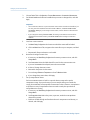
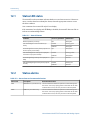
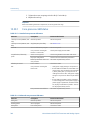
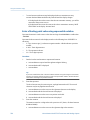
Status LED states
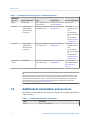
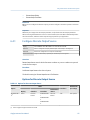
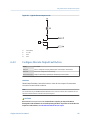
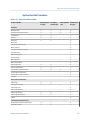
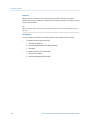
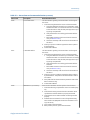
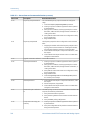
The status LED on the transmitter indicates whether or not alarms are active. If alarms are
active, view the alarm list to identify the alarms, then take appropriate action to correct
the alarm condition.
Your transmitter has a status LED only if it has a display.
If the transmitter has a display and LED Blinking is disabled, the status LED does not flash to
indicate an unacknowledged alarm.
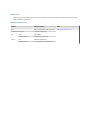
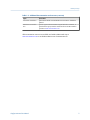
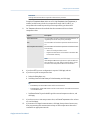
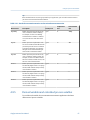
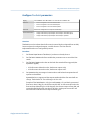
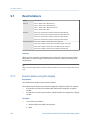
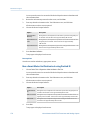
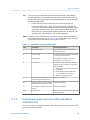
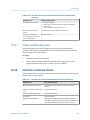
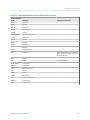
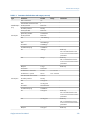
Table 12-1: Status LED states
12.2
Condition
LED Blinking parameter
LED behavior
Normal operation (no alarm)
N/A
Solid green
Unacknowledged corrected condition (no
alarm)
Enabled
Flashing green
Disabled
Solid green
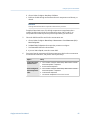
Acknowledged low-severity alarm (outputs con- N/A
tinue to report process data)
Solid yellow
Unacknowledged low-severity alarm (outputs
continue to report process data)
Enabled
Flashing yellow
Disabled
Solid yellow
Acknowledged high-severity alarm (outputs in
fault)
N/A
Solid red
Unacknowledged high-severity alarm (outputs
in fault)
Enabled
Flashing red
Disabled
Solid red
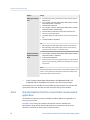
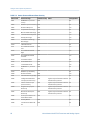
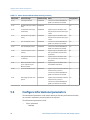
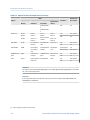
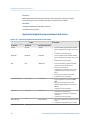
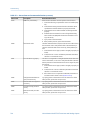
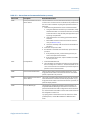
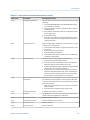
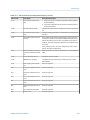
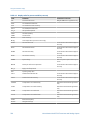
Status alarms
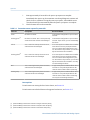
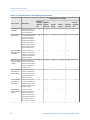
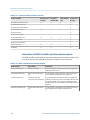
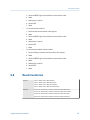
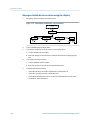
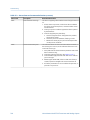
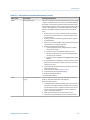
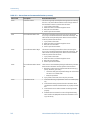
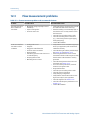
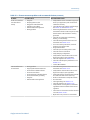
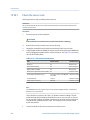
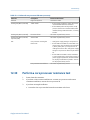
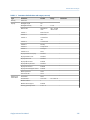
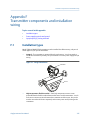
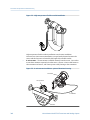
Table 12-2: Status alarms and recommended actions
Alarm code
Description
A001
EEPROM Error (Core Processor) The transmitter has detected a problem communicating with
the sensor. You can try cycling power to the meter to see if the
condition clears. If not, the core processor must be replaced.
A002
RAM Error (Core Processor)
208
Recommended actions
The transmitter has detected a problem communicating with
the sensor. You can try cycling power to the meter to see if the
condition clears. If not, the core processor must be replaced.
Micro Motion® Model 2700 Transmitters with Analog Outputs