1
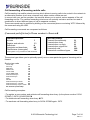
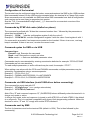
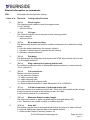
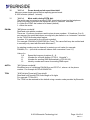
Example 1: “1234 cfg3=2”
Example 2: “1234 cfg3=2;cfg4=1”
If one or more space characters are used after the PIN, they will be ignored.
All commands that do not implicitly require a response are automatically replied to with a summary of
the terminal status. This automatic reply may be suppressed by placing a stop character after the pin
number. For example 1234. cfg3=2 will change the configuration without replying. An error in the
command will always result in a reply. The reply is either sent to the number that sent the command
or if a colon is used after the PIN, the reply will be sent to the number specified by PNUM11. For
example 1234: cfg3=2.
If the colon is used and PNUM11 is not programmed, no reply will be sent.
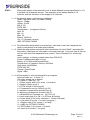
List of commands
Commands for all models:
CFG
PNUM
AUTO
TPIN
STAT
STIME
CLOCK
CLRTEMP
CLRCALL
REPORT
INIT
VER
HVER
RESTORE
CODE
ON
OFF
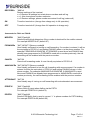
Read and write configuration settings.
Read and write phone number memories.
Sets automatic off-hook dial.
Read and write terminal PIN.
Returns the status of the terminal.
Time to send daily or periodic SMS status.
Sets the clock to the time recorded in the SMS delivery.
Clears the maximum and minimum temperature memory.
Ends any call in progress.
Report error event to specified destination number.
Restarts the terminal.
Returns the firmware version number.
Returns the hardware version number.
Restores the default settings.
Command to unlock optional features.
Turns the terminal on.
Turns the terminal off.
Commands for TX2L and TX2LR:
MPREFIX
FORWARD
CANCEL
ANNOUNCE
ATTENDANT
PPREFIX
IPREFIX
Sets the prefix used to determine if the number is destined for the mobile network.
Activate call forwarding without an announcement.
Cancel call forwarding mode
User friendly way of turning on call forwarding with announcement.
User friendly way of turning on call forwarding with auto-attendant announcement
Sets the prefix to optionally insert when dialling via the PSTN
Sets the IDD prefix that is used to convert “+” in phone numbers for PSTN dialling
Optional call logging commands for all models:
CLOG
CLRLOG
LTIME
Returns the specified number of call log entries.
Clears the specified number of oldest call log entries.
Time to send regular SMS call log 24h format.
© 2014 Burnside Technology Ltd.
Page 9 of 24
Rev 1.1