1
3.1 Introduction
This chapter describes basic features and procedures for using the panel PC.
Topics covered include the floppy drive, CD-ROM drive, I/O ports, touchscreen, and so on.
3.2 Floppy Drive
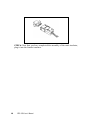
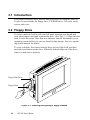
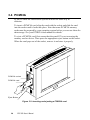
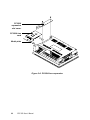
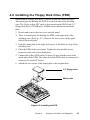
To insert a diskette, hold it with your left hand, between your thumb and
your other fingers, and push it toward the drive. (See Fig. 3-1.) Slide the disk
until it clicks into place. Note that new diskettes must be formatted by your
operating system before you can use them for data storage. See your operating system manual for details.
To eject a diskette, first ensure that the drive activity light is off, and then
press the eject button on the drive. When the diskette pops out of the drive,
remove it and store it properly.
Floppy Disk Drive
Floppy Disk
Figure 3-1: Inserting and ejecting a floppy diskette
26
PPC-150 User's Manual