1
ENGLISH
Using the TV Features
1
2
3
4
16
5
17
18
19
20
6
21
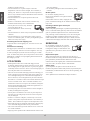
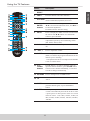
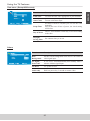
Button
Description
18 FREEZE
Press this btton picture will be static.
19 ASPECT
Press this button repeatedly to select the
screen size. You can select from Normal,
wide,cinema,zoom,full 100%(above 720p timing).
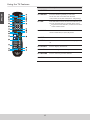
20 FAV
Press this button to show Favorite List and select your
favorite channels that have already been stored.
*To preset favorite channels, use the Favorite item
in the Channel menu.
21 SOUND
Press this button to select between the sound
modes of Standard, soft,user,Dynamic.
22 EXIT
OSD exit.
23 MENU
Press to turn the OSD (On-Screen Display) menu
on.
24 CH-LIST
Press to display channel list.
25 ▼ CH ▲
Press to change the channels up or down.
26 RETURN
Press to return to previous channel.
27 YPbPr
Press to charge source to YPbPr.
7
8
9
22
23
24
10
11
25
12
13
14
15
26
27
12