1
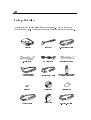
4 English Package Overview This projector comes with all the items shown below. Check to make sure your unit is complete. Contact your dealer immediately if anything is missing. Projector S-Video Cable DVI Signal Cable for HDTV/Component Power Cord RCA Audio Cable D-Sub RGB to DVI Cable Composite Video Cable Remote Mouse Y Cable Remote Control with Mouse Function & Laser Pointer Battery x 2 Users Guide Quick Start Card DVI to DVI Cable Carrying Case D-sub to D-sub Cable