1
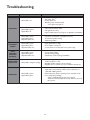
Troubleshooting
PROBLEM
CONDITION
CAUSE
Status LED is off.
• Amplifier not plugged in.
• AC outlet dead.
• Power switch off.
• Breaker (power switch) tripped.
- Turn off, then turn back on.
Status LED is green.
Signal LED is off.
• Level controls turned down.
• No signal from source.
• Input module jumpers in wrong bus configuration (if available).
Status LED is green.
Signal LED is green.
Clip/Limit LED is off.
• 70V mono connections on amplifier incorrect.
• Poor/broken speaker wiring.
• Defective speakers.
DISTORTED
SOUND
Status LED is green.
Signal LED is green.
Clip/Limit LED is off.
• Input signal level too high.
• Poor speaker connections.
• Lo-cut switch set to Flat (70V mono system only).
POOR
LOW-FREQ.
RESPONSE
(NO BASS)
Status LED is green.
Signal LED is green.
Clip/Limit LED is off.
• Lo-cut switch setting.
• Speaker wiring phasing.
• Module bass control setting (if available).
Status LED is red/green cycling.
• DC level at signal input.
• Load impedance too low.
• Amplifier speaker output is short-circuited.
• Amplifier too hot (check for proper ventilation clearances).
Status LED is green.
Signal LED is green.
• Poor electrical connections at input.
• Input cable routed near AC cables, power transformer, or
other EMI radiating devices.
• Electrically noisy devices operating on the same AC circuit.
• Poor equipment grounding.
- Ensure that all AC safety grounds are connected.
- Make sure that all components in audio chain are tied to the
same ground.
NO SOUND
INTERMITTENT
OPERATION
NOISE/HUM
14