1
C HAPTER 8: T ROUBLESHOOTING
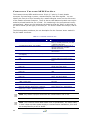
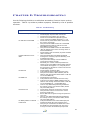
Use the following checklist to troubleshoot anomalous Crescent Vector receiver
operation. Table 8-1 provides a problem symptom, followed by a list of possible
solutions.
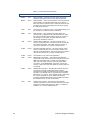
Table 8 -1 Troubleshooting
Symptom
Possible Solution
Receiver fails to power
•
•
•
•
No data from Vector OEM
•
•
•
•
Random data from Vector
OEM
•
•
•
No GPS lock
•
•
•
No SBAS lock
•
•
•
•
No beacon lock
•
•
•
•
No DGPS position in external
RTCM mode
•
•
Verify polarity of power leads
Check integrity of power cable connections
Check power input voltage (8 to 40 VDC)
Check current restrictions imposed by power
source (minimum available should be > 1.0 A)
Check receiver power status LED to ensure that
the receiver is powered
Verify that Vector OEM is locked to a valid DGPS
signal through the LEDs or with the use with
PocketMAX running on a PC)
Verify that Vector OEM is locked to GPS satellites
(this can often be done on the receiving device or
with PocketMAX PC)
Check integrity and connectivity of power and data
cable connections
Verify that the RTCM or the Bin95 and Bin96
messages are not being output accidentally (send
a $JSHOW command)
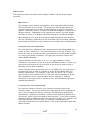
Verify baud rate settings of Vector OEM and
remote device match correctly
Potentially, the volume of data requested to be
output by the Vector OEM could be higher than the
current baud rate supports. Try using 38,400 as
the baud rate for all devices or reduce the amount
of data being output
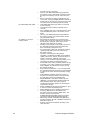
Check integrity of antenna cable
Verify antennas have unobstructed view of sky
Verify the lock status of GPS satellites (this can
often be done through the board’s LEDs or with the
use of PocketMAX PC)
Check antenna connections
Verify antennas have unobstructed view of sky
Verify the lock status of SBAS satellites (this can
often be done through the board’s LEDs or with the
use of PocketMAX PC - monitor BER value)
There is only differential positioning enabled for
the Primary receiver, and the Secondary should
only have GPS position
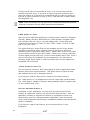
Check beacon antenna connected to J410 port
Verify that the receiver is tuned to the correct
frequency and bit rate
Ensure that beacon signal coverage is expected in
your area
There is only differential positioning enabled for
the Primary receiver, and the Secondary should
only have GPS position
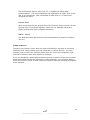
Verify that the baud rate of the RTCM input port
matches the baud rate of the external source
Verify the pin-out between the RTCM source and
the RTCM input port (transmit from the source
must go to receive of the RTCM input port and
51