1
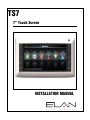
TS7
7” Touch Screen
INSTALLATION MANUAL
ELAN HOME SYSTEMS
TS7 INSTALLATION MANUAL
Preface
Purpose of this Manual
This manual provides step-by-step installation instructions and connection examples, along with basic user information for
installation and ongoing use of the TS7. This manual is written for the installer of this equipment.
Organization
The following information is contained in this manual.
TS7 Introduction
Provides an introduction to ELAN Home Systems’ TS7, along with system features including Front
panel controls, and Rear panel connections, along with a short description of each.
TS7 System Design and
Installation
TS7 System Connections
Provides a system design application overview and installation requirements for the TS7.
TS7 Setup and Programming
Provides directions for initial TS7 incorporation into the system.
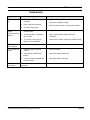
Troubleshooting
Provides troubleshooting tables to help fix common problems that may be encountered when
installing the TS7.
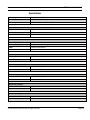
Specifications
Provides equipment specifications for the TS7.
Provides a description of the TS7 system connections and direct connections from the TS7 to other
components.
© ELAN Home Systems 2010 | All rights reserved.
Page 1
TS7 INSTALLATION MANUAL
ELAN HOME SYSTEMS
Table of Contents
Preface ............................................................................................... 1
Purpose of this Manual................................................................................................. 1
Organization ................................................................................................................. 1
Chapter 1: Introduction ............................................................ 3
The ELAN Story ...................................................................................... 3
TS7 Features......................................................................................... 4
Applications.......................................................................................... 4
Application Configurations ........................................................................ 5
TS7 Controls and Display .......................................................................... 6
Front Panel Hardware .............................................................................. 7
TS7 Rear Panel Connections ...................................................................... 8
Chapter 2: System Design and Installation..................................... 9
Planning .............................................................................................. 9
Installation ......................................................................................... 10
Pre-Wire ............................................................................................ 10
Rough-In............................................................................................ 11
Mounting Height .................................................................................. 11
Chapter 3: System Connections ................................................ 12
TS7 to PPSP Connections ........................................................................ 12
Chapter 4: Setup and Programming ........................................... 13
Troubleshooting ................................................................................... 14
Specifications ..................................................................................... 15
© ELAN Home Systems 2010 | All rights reserved.
Page 2
TS7 INSTALLATION MANUAL
ELAN HOME SYSTEMS
•
•
•
•
•
•
Items in Package:
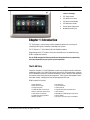
TS7 Touchscreen
TS7 White Trim Plate
TS7 Quick Install Guide
TS7 Reference Guide
Ferrite Noise Suppressor
#6 Wood Screws (x4)
Chapter 1: Introduction
TS7 Touchscreen is a permanently installed, hardwired interface for accessing and
controlling ELAN System Controllers and multiple sub-systems.
The TS7 features a 7” Active Matrix LCD with 800x480 resolution.
Programming for the TS7 resides in the System Controller and is accomplished using
ELAN’s configuration software.
See the ELAN configuration Reference Guide and Integration Notes for programming
and setup information for your specific system components.
The ELAN Story
Located in Lexington, KY, USA, ELAN Home Systems has designed innovative multi-room
audio/video systems since 1989. ELAN systems were the first to integrate music, intercom
and TV distribution features that used the homeowner’s stereos, televisions and telephones
to create the whole-house entertainment experience. These Systems allow people to move
from room to room, controlling centrally located equipment with ease.
ELAN’s product line includes:
•
•
•
•
•
•
•
•
Power Amplifiers
Multi-Zone Pre-Amps
Intelligent Keypads
In-Wall LCD Color Touch Panels
Wireless LCD Color Touch Panels
Film Interactive Touchpads
In-Wall and In-Ceiling Speakers
Outdoor Speakers
© ELAN Home Systems 2010 | All rights reserved.
•
•
•
•
•
•
•
•
A/V Controllers
System Controllers
Volume Controls
Telephone-Based Intercom Controllers
Video Switchers
Digital Music & DVD Management Systems
Satellite Radios
Accessories for Home Systems Installation
Page 3
ELAN HOME SYSTEMS
TS7 INSTALLATION MANUAL
TS7 Features
7” Active Matrix LCD with an 800x480 High Resolution Touchscreen
Composite Video Input and Loop Output
Audible feedback to indicate a button press or system announcement
Programmed using ELAN’s configuration software
Compatible with all current ELAN System Controllers
System and sub-system feedback
Built-in speaker and microphone for messaging features
Screen saver mode that can display photos
Removable bezel with color options (white, ivory, almond, light almond, brown, and black)
Applications
Applications are interfaces that enable control of various sub-systems like Lighting,
Security, HVAC, Media, etc. Not all systems will have all applications.
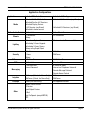
For Application configurations see the chart on page five of this manual.
© ELAN Home Systems 2010 | All rights reserved.
Page 4
TS7 INSTALLATION MANUAL
ELAN HOME SYSTEMS
Application Configurations
Application
Included With Controller
Included with Pro App
Unlimited ELAN A/V Controllers
Unlimited Sunfire A/V Receivers
Unlimited Display Devices
1 A/V Receiver (any Brand)
Unlimited in-home sources
Unlimited A/V Controllers (any Brand)
Online Audio Content
Not Available
Online Music Sources
Climate
2 Thermostats
History
32 Thermostats
16 Loads or System Scenes
Maximum Loads/Scenes available
Media
Lighting
Unlimited A/V Receivers (any Brand)
Unlimited g! Viewer Keypads
Unlimited g! Viewer Scenes
History using Graph Object
Security
1 Partition
8 Partitions
8 Zones
256 Zones
History
IP Camera
DVR
Messaging
Irrigation
Pool/Spa
2 IP Video Streams
16 IP Video Streams
Not Available
Records all Cameras
1 Voicemail Box
Internal Voicemail
8 Voicemail Boxes
Internal and Telephone Voicemail
Remote Message Retrieval
Remote House Control
16 Groups (Virtual, for Demo Only)
256 Zones (Virtual, for Demo Only)
16 Groups
256 Zones
Virtual (For Demo Only)
Generic Serial Devices
All Supported Features
IR Devices
Other
Input/Output Devices
E-Mail
Text-To-Speech (except MB100)
UPS
© ELAN Home Systems 2010 | All rights reserved.
Page 5
TS7 INSTALLATION MANUAL
ELAN HOME SYSTEMS
TS7 Controls and Display
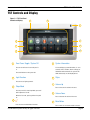
Figure 1-1: TS7 Front Panel
Controls and Display
4
5
6
1
3
7
2
8
1
9
Zone Power Toggle / System Off
5
This area displays system information, i.e. zone
selected, source selection, volume settings, etc.
Information and controls for sub-systems like
HVAC and Security are also displayed here.
Press to turn off or on the zone the panel is
in.
Press and hold to turn the system off.
2
Light Function
System Information
6
Stylus
7
Volume Up
Press to access lighting controls.
3
Sleep Mode
Press to put the TS7 into Sleep Mode, press and
hold to power the TS7 off.
Press to increase the volume in the zone.
8
When the TS7 is off, pressing will turn the panel
on.
4
Press to decrease the volume in the zone.
9
Press to access the Main Menu Functions
© ELAN Home Systems 2010 | All rights reserved.
Volume Down
Mute Button
Press to mute or un-mute the audio in the zone.
Page 6
TS7 INSTALLATION MANUAL
ELAN HOME SYSTEMS
Front Panel Hardware
Figure 1-2: TS7 Front Panel Hardware
1
3
2
1
Mini USB Download Port
3
Speaker
(Future firmware upgrades)
2
Microphone
© ELAN Home Systems 2010 | All rights reserved.
Page 7
TS7 INSTALLATION MANUAL
ELAN HOME SYSTEMS
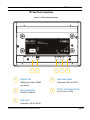
TS7 Rear Panel Connections
Figure 1-3: TS7 Rear Panel Connections
1
1
3
2
Ethernet Port
4
Power Connection
16 AWG 2 Conductor
3
5
Video Loop Output
F-Connector / RG-6 or RG-59
T568A (end to end) or T568B
(end to end)
2
4
5
75 Ohm Termination Switch
(Factory Default is TERM)
Video Input
F-Connector / RG-6 or RG-59
© ELAN Home Systems 2010 | All rights reserved.
Page 8
ELAN HOME SYSTEMS
TS7 INSTALLATION MANUAL
Chapter 2: System Design and Installation
Planning
Before installing the TS7, it is essential to have a detailed and accurate system design. Talk
with the homeowner to make sure all expectations and design goals are explored. The first
step to a good design is to map the system. It is advisable to mark up a copy of the house
floor plan with speaker, touchpad, touchscreen, volume control, and equipment locations
etc. Make sure that all locations are decided upon before pre-wiring commences so that all
necessary wiring and installation hardware is in place.
It is essential that ALL system components are accounted for prior to the pre-wire stage.
After establishing design goals with the homeowner, make a detailed list of all components.
Include source equipment, keypads, touchscreens, volume controls, amplifiers,
communications gear, etc. Gather up any IR remote controls that may be necessary for
final programming, or ensure that the IR codes for all equipment to be installed are
available in the ELAN configuration software.
When planning specific in-wall installation locations for LCD touchscreens, please keep the
following tips in mind:
• When properly installed, nothing should be applying contact pressure to the touchscreen
except for the operator’s finger or the stylus. If something is touching the touchscreen
window, a false signal can be generated, causing the touchscreen to respond incorrectly.
• Avoid installation in direct sunlight or strong ultraviolet light (such as grow lamps for
plants). This can degrade and discolor polyester film.
• Avoid installation over heat generating devices and/or in moist areas where condensation
can form on the polyester film. Both heat and condensed moisture can affect touchscreen
performance.
• Avoid installation next to thermostats. The touchscreen generates heat that can affect
thermostat control and readings.
• Avoid applying any foreign objects, such as adhesive labels, glue, etc. to the
touchscreen’s polyester film. This can release chemicals that can discolor the clear film.
• The touchscreen/LCD assembly should not be mounted near electronics that emit radio
frequencies or electromagnetic interference (such as CRT monitors, light dimmers, and
some power supplies).
• Do not mount the TS7 outdoors or in areas exceeding the operating temperature range of
32° to +104°F (0° to +40°C). If the LCD display is over-heated, or its temperature reduced
below the recommended minimum, the liquid crystal polymer can be damaged and the
display image may not recover.
© ELAN Home Systems 2010 | All rights reserved.
Page 9
ELAN HOME SYSTEMS
TS7 INSTALLATION MANUAL
Installation
The TS7 is designed to mount into a TS7BKT rough in bracket. The TS7BB back box can
be used in conjunction with the TS7BKT in installations where a back box is desired. It can
also be retrofitted into existing construction. See the TS7BKT and TS7BB documentation
for additional information.
When installing the TS7 in a retrofit application, the cutout dimensions are:
7.84” W X 4.46” H.
200mm W X 114mm H
Pre-Wire
TS7 Touchscreens require power and Ethernet connections to function correctly. Video
connections may also be required.
Control: Cat-5
Power: 2 Conductor (16 AWG)
Video: RG-6 or RG-59 Coaxial Cable
Control / Power
Run Cat-5 and 2 conductor wiring from the main equipment location (head-end) to the
location where the touchscreen will be installed. Make sure that provisions have been made
for installation of a PPSP Power Precision Panel (typically at the headend).
Alternatively, the TS7 can be powered using a PoE adapter. Refer to the PoE Integration
Note for additional details.
Video
TS7 Touchscreens have both a Video Input and a Video Loop Output for composite video
signals. Run RG-6 or RG-59 coaxial cable from the headend location (possibly a video
switcher) to the location where the touch panel will be installed. Be careful not to make
sharp bends when installing coax. F-to-RCA connectors will be necessary to adapt the RCA
composite output of the video source (or switcher) to the F-connector of the coax run. The
TS7s have female F-connectors for both Video Input and Loop Output.
When using the Loop Output to send video signals to another display be sure to set the 75
Ohm termination switch to OPEN.
Note: Maximum wire run is 330 feet (100 meters).
© ELAN Home Systems 2010 | All rights reserved.
Page 10
TS7 INSTALLATION MANUAL
ELAN HOME SYSTEMS
Rough-In
Roughing-in the TS7 requires careful attention to the design plan made previously. See
System Design & Applications for a list of things to factor in to specific mounting locations
before deciding exactly where to place the unit. In order to avoid Electro-Magnetic
Interference (EMI), do not mount touchscreens close to light dimmers. Leave at least one
stud-bay open between touchscreens and dimmers (leave more space if multiple dimmers
are present). Avoid installing TS7 Touchscreens in areas that will receive direct sunlight.
Do not mount touchscreens outdoors! Corrosion will damage them. ELAN does not
warrant TS7 Touchscreens for outdoor use.
Mounting Height
The TS7 mounting height should be determined by the average height of the user. Typical
mounting height is 56-60 inches (142-152 cm) from the floor to the bottom of the cutout.
This will provide optimum viewing for the largest number of people.
Figure 2-1: TS7 Mounting Height
© ELAN Home Systems 2010 | All rights reserved.
Page 11
TS7 INSTALLATION MANUAL
ELAN HOME SYSTEMS
Chapter 3: System Connections
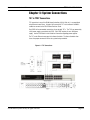
TS7 to PPSP Connections
TS7 connection to any of the ELAN Home Controllers (HC12, HC6, etc.) is accomplished
using Ethernet connections. A single Cat5 connects the TS7 to the network. 16 AWG 2
conductor connects to the PPSP Power Precision Panel.
Each PPSP will accommodate connections for up to eight TS7s. The TS7s are powered by
a 16V power supply connected to the PPSP. Each PPSP requires its own 16V power
supply. See the PPSP Quick Install Guide for information regarding power supplies.
The TS7 sends Ethernet messages to the Home Controller. The Home Controller then
issues the proper commands for the sub-system being controlled.
Figure 3-1: TS7 Connections
© ELAN Home Systems 2010 | All rights reserved.
Page 12
ELAN HOME SYSTEMS
TS7 INSTALLATION MANUAL
Chapter 4: Setup and Programming
The TS7 is automatically added to the system when it is powered up and the Ethernet
connection is made. It will automatically import the DEFAULT touchscreen settings from
the ELAN configuration software.
See the ELAN configuration Reference Guide and Integration Notes for programming
and setup information for your specific system components.
© ELAN Home Systems 2010 | All rights reserved.
Page 13
TS7 INSTALLATION MANUAL
ELAN HOME SYSTEMS
Troubleshooting
Symptom
Possible Cause
Solution
TS7 will not power
up.
1.
Power supply / PPSP connected
incorrectly.
1.
Verify power supply / PPSP connections.
2.
Verify power supply with a meter.
2.
Power supply not functioning.
3.
Verify AC outlet with meter. Reset breaker if needed.
3.
AC outlet not functioning.
1.
Ethernet connection has an
incorrect pinout.
1.
Verify Cat5 pinout at both ends.
2.
System Controller is not powered
up or is offline.
2.
Verify System Controller power and Ethernet
connections.
3.
TS7 has been set to a static IP
address that is incompatible.
3.
Correct static IP address settings or use DHCP settings.
TS7 powers up but
displays
“Disconnected from
gateway.”
TS7 hard buttons
do not respond.
Trim bezel is not aligned properly.
Align trim bezel.
TS7 video does not
display.
1.
Video connection not made or
incorrect.
1.
Correct connection.
2.
Video switcher not functioning
properly
2.
Verify video switcher functionality
3.
Incorrect commands programmed
for video switcher
3.
Verify video switcher commands
TS7 video displays
but is blurry..
75 Ohm termination switch set
incorrectly.
© ELAN Home Systems 2010 | All rights reserved.
Set switch correctly
Page 14
TS7 INSTALLATION MANUAL
ELAN HOME SYSTEMS
Specifications
Viewing Angle
50°up, 60°down, 65° left/right
Operating Temperature
32°F-104°F / 0°C-40°C
Wiring Requirements
Cat5, 16-18 AWG 2-wire, RG59 or RG6
Display
Type
7” High Resolution Color LCD Touchscreen
Colors
65K
Resolution
800 pixels (W) x 480 pixels (H)
Connectors
Ethernet Port
RJ-45
Download Port
Mini USB
Power
2-position screw terminal
Video In/Out
“F” Connections
Power
DC Power Requirements
16VDC
Current Draw
350mA
Dimensions (w/front bezel)
In.
8.59 W x 5.46 H x 2.58 D
mm.
218 W x 139 H x 66 D
Dimensions (w/o front bezel)
In.
8.35 W x 5.16 H x 2.28 D
mm.
212 W x 131 H x 58 D
Weight (w/o packaging)
lbs.
2.25
Kg.
1.02
Weight (w/packaging)
lbs.
3.2
Kg.
1.45
© ELAN Home Systems 2010 | All rights reserved.
Page 15
ELAN HOME SYSTEMS
TS7 INSTALLATION MANUAL
Limited Warranty
ELAN HOME SYSTEMS L.L.C. (ELAN) warrants the TS7 to be free from defects
in materials and workmanship for the period of two years (2 years) from date of purchase.
If within the applicable warranty period above purchaser discovers that such item was
not as warranted above and promptly notifies ELAN in writing, ELAN shall repair or replace
the item at the company’s option. This warranty shall not apply (a) to equipment not
manufactured by ELAN, (b) to equipment which shall have been installed by other than an
ELAN authorized installer, (c) to installed equipment which is not installed to ELAN’s
specifications, (d) to equipment which shall have been repaired or altered by others than
ELAN, (e) to equipment which shall have been subjected to negligence, accident, or
damage by circumstances beyond ELAN’s control, including, but not limited to, lightning,
flood, electrical surge, tornado, earthquake, or other catastrophic events beyond ELAN’s
control, or to improper operation, maintenance or storage, or to other than normal use of
service. With respect to equipment sold by, but not manufactured by ELAN, the warranty
obligations of ELAN shall in all respects conform to the warranty actually extended to ELAN
by its supplier. The foregoing warranties do not cover reimbursement for labor, transportation,
removal, installation or other expenses which may be incurred in connection with repair
or replacement.
Except as may be expressly provided and authorized in writing by ELAN, ELAN shall not be
subject to any other obligations or liabilities whatsoever with respect to equipment
manufactured by ELAN or services rendered by ELAN.
THE FOREGOING WARRANTIES ARE EXCLUSIVE AND IN LIEU OF ALL OTHER EXPRESSED
AND IMPLIED WARRANTIES EXCEPT WARRANTIES OF TITLE, INCLUDING BUT NOT
LIMITED TO IMPLIED WARRANTIES OF MERCHANTABILITY AND FITNESS FOR A PARTICULAR
PURPOSE.
ATTENTION: TO OUR VALUED CONSUMERS
To ensure that consumers obtain quality pre-sale and after-sale support and service,
ELAN Home Systems products are sold exclusively through authorized dealers. ELAN
products are not sold online. The warranties on ELAN products are NOT VALID if the
products have been purchased from an unauthorized dealer or an online E-tailer. To
determine if your ELAN reseller is authorized, please contact ELAN Home Systems
at (859) 269-7760.
www.elanhomesystems.com
P/N 9901074
Rev. A 4/22/10
© ELAN Home Systems 2010 | All rights reserved.
Page 16