1
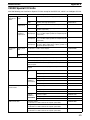
C200H Programmable Controllers
(CPU01-E/03-E/11-E)
Operation Manual
Revised June 2003
Notice:
OMRON products are manufactured for use according to proper procedures by a qualified operator
and only for the purposes described in this manual.
The following conventions are used to indicate and classify precautions in this manual. Always heed
the information provided with them. Failure to heed precautions can result in injury to people or damage to property.
DANGER
Indicates an imminently hazardous situation which, if not avoided, will result in death or
serious injury.
! WARNING
Indicates a potentially hazardous situation which, if not avoided, could result in death or
serious injury.
! Caution
Indicates a potentially hazardous situation which, if not avoided, may result in minor or
moderate injury, or property damage.
!
OMRON Product References
All OMRON products are capitalized in this manual. The word “Unit” is also capitalized when it refers
to an OMRON product, regardless of whether or not it appears in the proper name of the product.
The abbreviation “Ch,” which appears in some displays and on some OMRON products, often means
“word” and is abbreviated “Wd” in documentation in this sense.
The abbreviation “PC” means Programmable Controller and is not used as an abbreviation for anything else.
Visual Aids
The following headings appear in the left column of the manual to help you locate different types of
information.
Note Indicates information of particular interest for efficient and convenient operation
of the product.
1, 2, 3...
1. Indicates lists of one sort or another, such as procedures, checklists, etc.
OMRON, 1990
All rights reserved. No part of this publication may be reproduced, stored in a retrieval system, or transmitted, in any
form, or by any means, mechanical, electronic, photocopying, recording, or otherwise, without the prior written permission of OMRON.
No patent liability is assumed with respect to the use of the information contained herein. Moreover, because OMRON is
constantly striving to improve its high-quality products, the information contained in this manual is subject to change
without notice. Every precaution has been taken in the preparation of this manual. Nevertheless, OMRON assumes no
responsibility for errors or omissions. Neither is any liability assumed for damages resulting from the use of the information contained in this publication.
v
TABLE OF CONTENTS
PRECAUTIONS . . . . . . . . . . . . . . . . . . . . . . . . . . . . . . . . .
1 Intended Audience . . . . . . . . . . . . . . . . . . . . . . . . . . . . . . . . . . . . . . . . . . . . . . . . . . . . . . . . . . .
2 General Precautions . . . . . . . . . . . . . . . . . . . . . . . . . . . . . . . . . . . . . . . . . . . . . . . . . . . . . . . . . .
3 Safety Precautions . . . . . . . . . . . . . . . . . . . . . . . . . . . . . . . . . . . . . . . . . . . . . . . . . . . . . . . . . . .
4 Operating Environment Precautions . . . . . . . . . . . . . . . . . . . . . . . . . . . . . . . . . . . . . . . . . . . . .
5 Application Precautions . . . . . . . . . . . . . . . . . . . . . . . . . . . . . . . . . . . . . . . . . . . . . . . . . . . . . .
SECTION 1
Introduction . . . . . . . . . . . . . . . . . . . . . . . . . . . . . . . . . . . .
1-1
1-2
1-3
1-4
1-5
1-6
1-7
1-8
Overview . . . . . . . . . . . . . . . . . . . . . . . . . . . . . . . . . . . . . . . . . . . . . . . . . . . . . . . . . . . . . .
The Origins of PC Logic . . . . . . . . . . . . . . . . . . . . . . . . . . . . . . . . . . . . . . . . . . . . . . . . . .
PC Terminology . . . . . . . . . . . . . . . . . . . . . . . . . . . . . . . . . . . . . . . . . . . . . . . . . . . . . . . . .
OMRON Product Terminology . . . . . . . . . . . . . . . . . . . . . . . . . . . . . . . . . . . . . . . . . . . . .
Overview of PC Operation . . . . . . . . . . . . . . . . . . . . . . . . . . . . . . . . . . . . . . . . . . . . . . . . .
Peripheral Devices . . . . . . . . . . . . . . . . . . . . . . . . . . . . . . . . . . . . . . . . . . . . . . . . . . . . . . .
Available Manuals . . . . . . . . . . . . . . . . . . . . . . . . . . . . . . . . . . . . . . . . . . . . . . . . . . . . . . .
LSS Capabilities . . . . . . . . . . . . . . . . . . . . . . . . . . . . . . . . . . . . . . . . . . . . . . . . . . . . . . . . .
SECTION 2
Hardware Considerations . . . . . . . . . . . . . . . . . . . . . . . . .
2-1
2-2
Indicators . . . . . . . . . . . . . . . . . . . . . . . . . . . . . . . . . . . . . . . . . . . . . . . . . . . . . . . . . . . . . .
PC Configuration . . . . . . . . . . . . . . . . . . . . . . . . . . . . . . . . . . . . . . . . . . . . . . . . . . . . . . . .
SECTION 3
Memory Areas . . . . . . . . . . . . . . . . . . . . . . . . . . . . . . . . . .
3-1
3-2
3-3
3-4
3-5
3-6
3-7
3-8
3-9
3-10
3-11
Introduction . . . . . . . . . . . . . . . . . . . . . . . . . . . . . . . . . . . . . . . . . . . . . . . . . . . . . . . . . . . .
Data Area Structure . . . . . . . . . . . . . . . . . . . . . . . . . . . . . . . . . . . . . . . . . . . . . . . . . . . . . .
IR (Internal Relay) Area . . . . . . . . . . . . . . . . . . . . . . . . . . . . . . . . . . . . . . . . . . . . . . . . . .
SR (Special Relay) Area . . . . . . . . . . . . . . . . . . . . . . . . . . . . . . . . . . . . . . . . . . . . . . . . . .
AR (Auxiliary Relay) Area . . . . . . . . . . . . . . . . . . . . . . . . . . . . . . . . . . . . . . . . . . . . . . . .
DM (Data Memory) Area . . . . . . . . . . . . . . . . . . . . . . . . . . . . . . . . . . . . . . . . . . . . . . . . . .
HR (Holding Relay) Area . . . . . . . . . . . . . . . . . . . . . . . . . . . . . . . . . . . . . . . . . . . . . . . . .
TC (Timer/Counter) Area . . . . . . . . . . . . . . . . . . . . . . . . . . . . . . . . . . . . . . . . . . . . . . . . .
LR (Link Relay) Area . . . . . . . . . . . . . . . . . . . . . . . . . . . . . . . . . . . . . . . . . . . . . . . . . . . .
Program Memory . . . . . . . . . . . . . . . . . . . . . . . . . . . . . . . . . . . . . . . . . . . . . . . . . . . . . . . .
TR (Temporary Relay) Area . . . . . . . . . . . . . . . . . . . . . . . . . . . . . . . . . . . . . . . . . . . . . . .
SECTION 4
Writing and Inputting the Program . . . . . . . . . . . . . . . . .
4-1
4-2
4-3
4-4
4-5
4-6
4-7
4-8
4-9
4-10
Basic Procedure . . . . . . . . . . . . . . . . . . . . . . . . . . . . . . . . . . . . . . . . . . . . . . . . . . . . . . . . .
Instruction Terminology . . . . . . . . . . . . . . . . . . . . . . . . . . . . . . . . . . . . . . . . . . . . . . . . . . .
Basic Ladder Diagrams . . . . . . . . . . . . . . . . . . . . . . . . . . . . . . . . . . . . . . . . . . . . . . . . . . .
The Programming Console . . . . . . . . . . . . . . . . . . . . . . . . . . . . . . . . . . . . . . . . . . . . . . . .
Preparation for Operation . . . . . . . . . . . . . . . . . . . . . . . . . . . . . . . . . . . . . . . . . . . . . . . . . .
Inputting, Modifying, and Checking the Program . . . . . . . . . . . . . . . . . . . . . . . . . . . . . . .
Controlling Bit Status . . . . . . . . . . . . . . . . . . . . . . . . . . . . . . . . . . . . . . . . . . . . . . . . . . . . .
Work Bits (Internal Relays) . . . . . . . . . . . . . . . . . . . . . . . . . . . . . . . . . . . . . . . . . . . . . . . .
Programming Precautions . . . . . . . . . . . . . . . . . . . . . . . . . . . . . . . . . . . . . . . . . . . . . . . . .
Program Execution . . . . . . . . . . . . . . . . . . . . . . . . . . . . . . . . . . . . . . . . . . . . . . . . . . . . . . .
xiii
xiv
xiv
xiv
xv
xv
1
2
2
3
4
4
5
7
8
11
12
12
15
16
16
18
20
32
38
40
40
41
42
42
43
44
44
45
58
62
72
89
90
92
94
vii
TABLE OF CONTENTS
SECTION 5
Instruction Set . . . . . . . . . . . . . . . . . . . . . . . . . . . . . . . . . .
5-1
5-2
5-3
5-4
5-5
5-6
5-7
5-8
5-9
5-10
5-11
5-12
5-13
5-14
5-15
5-16
5-17
5-18
5-19
5-20
5-21
5-22
5-23
Notation . . . . . . . . . . . . . . . . . . . . . . . . . . . . . . . . . . . . . . . . . . . . . . . . . . . . . . . . . . . . . . .
Instruction Format . . . . . . . . . . . . . . . . . . . . . . . . . . . . . . . . . . . . . . . . . . . . . . . . . . . . . . .
Data Areas, Definer Values, and Flags . . . . . . . . . . . . . . . . . . . . . . . . . . . . . . . . . . . . . . .
Differentiated Instructions . . . . . . . . . . . . . . . . . . . . . . . . . . . . . . . . . . . . . . . . . . . . . . . . .
Coding Right-hand Instructions . . . . . . . . . . . . . . . . . . . . . . . . . . . . . . . . . . . . . . . . . . . . .
Ladder Diagram Instructions . . . . . . . . . . . . . . . . . . . . . . . . . . . . . . . . . . . . . . . . . . . . . . .
Bit Control Instructions . . . . . . . . . . . . . . . . . . . . . . . . . . . . . . . . . . . . . . . . . . . . . . . . . . .
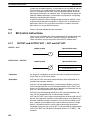
INTERLOCK and INTERLOCK CLEAR – IL(02) and ILC(03) . . . . . . . . . . . . . . . . . . .
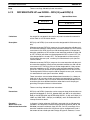
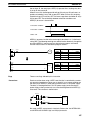
JUMP and JUMP END – JMP(04) and JME(05) . . . . . . . . . . . . . . . . . . . . . . . . . . . . . . . .
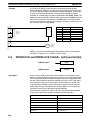
END – END(01) . . . . . . . . . . . . . . . . . . . . . . . . . . . . . . . . . . . . . . . . . . . . . . . . . . . . . . . . .
NO OPERATION – NOP(00) . . . . . . . . . . . . . . . . . . . . . . . . . . . . . . . . . . . . . . . . . . . . . . .
Timer and Counter Instructions . . . . . . . . . . . . . . . . . . . . . . . . . . . . . . . . . . . . . . . . . . . . .
Data Shifting . . . . . . . . . . . . . . . . . . . . . . . . . . . . . . . . . . . . . . . . . . . . . . . . . . . . . . . . . . .
Data Movement . . . . . . . . . . . . . . . . . . . . . . . . . . . . . . . . . . . . . . . . . . . . . . . . . . . . . . . . .
Data Comparison . . . . . . . . . . . . . . . . . . . . . . . . . . . . . . . . . . . . . . . . . . . . . . . . . . . . . . . .
Data Conversion . . . . . . . . . . . . . . . . . . . . . . . . . . . . . . . . . . . . . . . . . . . . . . . . . . . . . . . . .
BCD Calculations . . . . . . . . . . . . . . . . . . . . . . . . . . . . . . . . . . . . . . . . . . . . . . . . . . . . . . . .
Binary Calculations . . . . . . . . . . . . . . . . . . . . . . . . . . . . . . . . . . . . . . . . . . . . . . . . . . . . . .
Logic Instructions . . . . . . . . . . . . . . . . . . . . . . . . . . . . . . . . . . . . . . . . . . . . . . . . . . . . . . . .
Subroutines and Interrupt Control . . . . . . . . . . . . . . . . . . . . . . . . . . . . . . . . . . . . . . . . . . .
Step Instructions . . . . . . . . . . . . . . . . . . . . . . . . . . . . . . . . . . . . . . . . . . . . . . . . . . . . . . . . .
Special Instructions . . . . . . . . . . . . . . . . . . . . . . . . . . . . . . . . . . . . . . . . . . . . . . . . . . . . . .
SYSMAC NET Link/SYSMAC LINK Instructions . . . . . . . . . . . . . . . . . . . . . . . . . . . . .
SECTION 6
Program Execution Timing . . . . . . . . . . . . . . . . . . . . . . . .
6-1
6-2
6-3
6-4
Cycle Time . . . . . . . . . . . . . . . . . . . . . . . . . . . . . . . . . . . . . . . . . . . . . . . . . . . . . . . . . . . . .
Calculating Cycle Time . . . . . . . . . . . . . . . . . . . . . . . . . . . . . . . . . . . . . . . . . . . . . . . . . . .
Instruction Execution Times . . . . . . . . . . . . . . . . . . . . . . . . . . . . . . . . . . . . . . . . . . . . . . .
I/O Response Time . . . . . . . . . . . . . . . . . . . . . . . . . . . . . . . . . . . . . . . . . . . . . . . . . . . . . . .
SECTION 7
Program Monitoring and Execution . . . . . . . . . . . . . . . .
7-1
7-2
Monitoring Operation and Modifying Data . . . . . . . . . . . . . . . . . . . . . . . . . . . . . . . . . . . .
Program Backup and Restore Operations . . . . . . . . . . . . . . . . . . . . . . . . . . . . . . . . . . . . .
SECTION 8
Troubleshooting . . . . . . . . . . . . . . . . . . . . . . . . . . . . . . . . .
8-1
8-2
8-3
8-4
8-5
Alarm Indicators . . . . . . . . . . . . . . . . . . . . . . . . . . . . . . . . . . . . . . . . . . . . . . . . . . . . . . . . .
Programmed Alarms and Error Messages . . . . . . . . . . . . . . . . . . . . . . . . . . . . . . . . . . . . .
Reading and Clearing Errors and Messages . . . . . . . . . . . . . . . . . . . . . . . . . . . . . . . . . . .
Error Messages . . . . . . . . . . . . . . . . . . . . . . . . . . . . . . . . . . . . . . . . . . . . . . . . . . . . . . . . . .
Error Flags . . . . . . . . . . . . . . . . . . . . . . . . . . . . . . . . . . . . . . . . . . . . . . . . . . . . . . . . . . . . .
95
97
97
97
99
100
102
104
108
110
111
112
112
123
132
141
149
162
179
184
187
193
202
211
219
220
226
228
234
237
238
254
263
264
264
264
265
268
Appendices
A
B
C
D
E
F
G
H
I
viii
Standard Models . . . . . . . . . . . . . . . . . . . . . . . . . . . . . . . . . . . . . . . . . . . . . . . . . . . . . . . . . . .
Programming Instructions . . . . . . . . . . . . . . . . . . . . . . . . . . . . . . . . . . . . . . . . . . . . . . . . . . .
Programming Console Operations . . . . . . . . . . . . . . . . . . . . . . . . . . . . . . . . . . . . . . . . . . . . .
Error and Arithmetic Flag Operation . . . . . . . . . . . . . . . . . . . . . . . . . . . . . . . . . . . . . . . . . . .
Data Areas . . . . . . . . . . . . . . . . . . . . . . . . . . . . . . . . . . . . . . . . . . . . . . . . . . . . . . . . . . . . . . .
Word Assignment Recording Sheets . . . . . . . . . . . . . . . . . . . . . . . . . . . . . . . . . . . . . . . . . . .
Program Coding Sheet . . . . . . . . . . . . . . . . . . . . . . . . . . . . . . . . . . . . . . . . . . . . . . . . . . . . . .
Data Conversion Table . . . . . . . . . . . . . . . . . . . . . . . . . . . . . . . . . . . . . . . . . . . . . . . . . . . . . .
Extended ASCII . . . . . . . . . . . . . . . . . . . . . . . . . . . . . . . . . . . . . . . . . . . . . . . . . . . . . . . . . . .
271
281
315
325
329
333
339
341
343
TABLE OF CONTENTS
Glossary . . . . . . . . . . . . . . . . . . . . . . . . . . . . . . . . . . . . . . .
Index . . . . . . . . . . . . . . . . . . . . . . . . . . . . . . . . . . . . . . . . . .
Revision History . . . . . . . . . . . . . . . . . . . . . . . . . . . . . . . . .
345
363
369
ix
About this Manual:
The OMRON C200H PCs offer a simple but effective way to automate processing. Manufacturing,
assembly, packaging, and many other processes can be automated to save time and money.
This manual describes the characteristics and abilities of the PCs, as well as programming operations
and instructions and other aspects of operation and preparation. Before attempting to operate the PC,
thoroughly familiarize yourself with the information contained herein. Hardware information is provided in detail in the C200H PCs (CPU01-E/03-E/11-E) Installation Guide. A table of other manuals
that can be used in conjunction with this manual is provided at the end of Section 1 Introduction.
Section 1 Introduction explains the background and some of the basic terms used in ladder-diagram programming. It also provides an overview of the process of programming and operating a PC
and explains basic terminology used with OMRON PCs. Descriptions of Peripheral Devices used with
the C200H PCs and a table of other manuals available to use with this manual for special PC applications are also provided.
Section 2 Hardware Considerations explains basic aspects of the overall PC configuration and describes the indicators that are referred to in other sections of this manual.
Section 3 Memory Areas takes a look at the way memory is divided and allocated and explains the
information provided there to aid in programming. It explains how I/O is managed in memory and how
bits in memory correspond to specific I/O points. It also provides information on System DM, a special
area in C200H PCs that provides the user with flexible control of PC operating parameters.
Section 4 Writing and Entering Programs explains the basics of ladder-diagram programming,
looking at the elements that make up the parts of a ladder-diagram program and explaining how execution of this program is controlled. It also explains how to convert ladder diagrams into mnemonic
code so that the programs can be entered using a Programming Console.
Section 5 Instruction Set describes all of the instructions used in programming.
Section 6 Program Execution Timing explains the scanning process used to execute the program
and tells how to coordinate inputs and outputs so that they occur at the proper times.
Section 7 Program Debugging and Execution explains the Programming Console procedures
used to input and debug the program and to monitor and control operation.
Finally, Section 8 Troubleshooting provides information on error indications and other means of reducing down-time. Information in this section is also useful when debugging programs.
The Appendices provide tables of standard OMRON products available for the C200H PCs, reference tables of instructions and Programming Console operations, coding sheet to help in programming and parameter input, and other information helpful in PC operation.
! WARNING Failure to read and understand the information provided in this manual may result in
personal injury or death, damage to the product, or product failure. Please read each
section in its entirety and be sure you understand the information provided in the section
and related sections before attempting any of the procedures or operations given.
xi
PRECAUTIONS
This section provides general precautions for using the Programmable Controller (PC) and related devices.
The information contained in this section is important for the safe and reliable application of the Programmable Controller. You must read this section and understand the information contained before attempting to set up or operate a
PC system.
1 Intended Audience . . . . . . . . . . . . . . . . . . . . . . . . . . . . . . . . . . . . . . . . . . . . . . . . . . . . . . . . . . . .
2 General Precautions . . . . . . . . . . . . . . . . . . . . . . . . . . . . . . . . . . . . . . . . . . . . . . . . . . . . . . . . . . .
3 Safety Precautions . . . . . . . . . . . . . . . . . . . . . . . . . . . . . . . . . . . . . . . . . . . . . . . . . . . . . . . . . . . .
4 Operating Environment Precautions . . . . . . . . . . . . . . . . . . . . . . . . . . . . . . . . . . . . . . . . . . . . . .
5 Application Precautions . . . . . . . . . . . . . . . . . . . . . . . . . . . . . . . . . . . . . . . . . . . . . . . . . . . . . . . .
xiv
xiv
xiv
xv
xv
xiii
3
Safety Precautions
1
Intended Audience
This manual is intended for the following personnel, who must also have knowledge of electrical systems (an electrical engineer or the equivalent).
• Personnel in charge of installing FA systems.
• Personnel in charge of designing FA systems.
• Personnel in charge of managing FA systems and facilities.
2
General Precautions
The user must operate the product according to the performance specifications
described in the relevant manuals.
Before using the product under conditions which are not described in the manual
or applying the product to nuclear control systems, railroad systems, aviation
systems, vehicles, combustion systems, medical equipment, amusement machines, safety equipment, and other systems, machines, and equipment that
may have a serious influence on lives and property if used improperly, consult
your OMRON representative.
Make sure that the ratings and performance characteristics of the product are
sufficient for the systems, machines, and equipment, and be sure to provide the
systems, machines, and equipment with double safety mechanisms.
This manual provides information for programming and operating the Unit. Be
sure to read this manual before attempting to use the Unit and keep this manual
close at hand for reference during operation.
! WARNING It is extremely important that a PC and all PC Units be used for the specified
purpose and under the specified conditions, especially in applications that can
directly or indirectly affect human life. You must consult with your OMRON
representative before applying a PC system to the above-mentioned
applications.
3
Safety Precautions
! WARNING Do not attempt to take any Unit apart while the power is being supplied. Doing so
may result in electric shock.
! WARNING Do not touch any of the terminals or terminal blocks while the power is being
supplied. Doing so may result in electric shock.
! WARNING Do not attempt to disassemble, repair, or modify any Units. Any attempt to do so
may result in malfunction, fire, or electric shock.
! WARNING Provide safety measures in external circuits (i.e., not in the Programmable
Controller), including the following items, to ensure safety in the system if an
abnormality occurs due to malfunction of the PC or another external factor
affecting the PC operation. Not doing so may result in serious accidents.
• Emergency stop circuits, interlock circuits, limit circuits, and similar safety
measures must be provided in external control circuits.
• The PC will turn OFF all outputs when its self–diagnosis function detects any
error or when a severe failure alarm (FALS) instruction is executed. As a countermeasure for such errors, external safety measures must be provided to ensure safety in the system.
xiv
5
Application Precautions
• The PC outputs may remain ON or OFF due to deposition or burning of the
output relays or destruction of the output transistors. As a countermeasure for
such problems, external safety measures must be provided to ensure safety in
the system.
• When the 24-VDC output (service power supply to the PC) is overloaded or
short-circuited, the voltage may drop and result in the outputs being turned
OFF. As a countermeasure for such problems, external safety measures must
be provided to ensure safety in the system.
4
Operating Environment Precautions
! Caution
Do not operate the control system in the following locations:
• Locations subject to direct sunlight.
• Locations subject to temperatures or humidity outside the range specified in
the specifications.
• Locations subject to condensation as the result of severe changes in temperature.
• Locations subject to corrosive or flammable gases.
• Locations subject to dust (especially iron dust) or salts.
• Locations subject to exposure to water, oil, or chemicals.
• Locations subject to shock or vibration.
! Caution
Take appropriate and sufficient countermeasures when installing systems in the
following locations:
• Locations subject to static electricity or other forms of noise.
• Locations subject to strong electromagnetic fields.
• Locations subject to possible exposure to radioactivity.
• Locations close to power supplies.
! Caution
5
The operating environment of the PC system can have a large effect on the longevity and reliability of the system. Improper operating environments can lead to
malfunction, failure, and other unforeseeable problems with the PC system. Be
sure that the operating environment is within the specified conditions at installation and remains within the specified conditions during the life of the system.
Application Precautions
Observe the following precautions when using the PC system.
! WARNING Always heed these precautions. Failure to abide by the following precautions
could lead to serious or possibly fatal injury.
• Always ground the system to 100 Ω or less when installing the Units. Not connecting to a ground of 100 Ω or less may result in electric shock.
• Always turn OFF the power supply to the PC before attempting any of the following. Not turning OFF the power supply may result in malfunction or electric
shock.
• Mounting or dismounting Power Supply Units, I/O Units, CPU Units,
Memory Units, or any other Units.
• Assembling the Units.
• Setting DIP switches or rotary switches.
• Connecting cables or wiring the system.
• Connecting or disconnecting the connectors.
xv
Application Precautions
! Caution
5
Failure to abide by the following precautions could lead to faulty operation of the
PC or the system, or could damage the PC or PC Units. Always heed these precautions.
• Fail-safe measures must be taken by the customer to ensure safety in the
event of incorrect, missing, or abnormal signals caused by broken signal lines,
momentary power interruptions, or other causes.
• Interlock circuits, limit circuits, and similar safety measures in external circuits
(i.e., not in the Programmable Controller) must be provided by the customer.
• Always use the power supply voltages specified in this manual. An incorrect
voltage may result in malfunction or burning.
• Take appropriate measures to ensure that the specified power with the rated
voltage and frequency is supplied. Be particularly careful in places where the
power supply is unstable. An incorrect power supply may result in malfunction.
• Install external breakers and take other safety measures against short-circuiting in external wiring. Insufficient safety measures against short-circuiting may
result in burning.
• Do not apply voltages to the Input Units in excess of the rated input voltage.
Excess voltages may result in burning.
• Do not apply voltages or connect loads to the Output Units in excess of the
maximum switching capacity. Excess voltage or loads may result in burning.
• Disconnect the functional ground terminal when performing withstand voltage
tests. Not disconnecting the functional ground terminal may result in burning.
• Be sure that all the mounting screws, terminal screws, and cable connector
screws are tightened to the torque specified in this manual. Incorrect tightening torque may result in malfunction.
• Leave the label attached to the Unit when wiring. Removing the label may result in malfunction if foreign matter enters the Unit.
• Remove the label after the completion of wiring to ensure proper heat dissipation. Leaving the label attached may result in malfunction.
• Double-check all wiring and switch settings before turning ON the power supply. Incorrect wiring may result in burning.
• Wire correctly. Incorrect wiring may result in burning.
• Mount Units only after checking terminal blocks and connectors completely.
• Be sure that the terminal blocks, Memory Units, expansion cables, and other
items with locking devices are properly locked into place. Improper locking
may result in malfunction.
• Check the user program for proper execution before actually running it on the
Unit. Not checking the program may result in an unexpected operation.
• Confirm that no adverse effect will occur in the system before attempting any of
the following. Not doing so may result in an unexpected operation.
• Changing the operating mode of the PC.
• Force-setting/force-resetting any bit in memory.
• Changing the present value of any word or any set value in memory.
• Resume operation only after transferring to the new CPU Unit the contents of
the DM Area, HR Area, and other data required for resuming operation. Not
doing so may result in an unexpected operation.
• Do not pull on the cables or bend the cables beyond their natural limit. Doing
either of these may break the cables.
• Do not place objects on top of the cables or other wiring lines. Doing so may
break the cables.
• Use crimp terminals for wiring. Do not connect bare stranded wires directly to
terminals. Connection of bare stranded wires may result in burning.
xvi
Application Precautions
5
• When replacing parts, be sure to confirm that the rating of a new part is correct.
Not doing so may result in malfunction or burning.
• Before touching a Unit, be sure to first touch a grounded metallic object in order
to discharge any static built-up. Not doing so may result in malfunction or damage.
xvii
SECTION 1
Introduction
This section gives a brief overview of the history of Programmable Controllers and explains terms commonly used in
ladder-diagram programming. It also provides an overview of the process of programming and operating a PC and explains basic terminology used with OMRON PCs. Descriptions of peripheral devices used with the C200H, and a table of
other manuals available to use with this manual for special PC applications, are also provided.
1-1
1-2
1-3
1-4
1-5
1-6
1-7
1-8
Overview . . . . . . . . . . . . . . . . . . . . . . . . . . . . . . . . . . . . . . . . . . . . . . . . . . . . . . . . . . . . . . .
The Origins of PC Logic . . . . . . . . . . . . . . . . . . . . . . . . . . . . . . . . . . . . . . . . . . . . . . . . . . .
PC Terminology . . . . . . . . . . . . . . . . . . . . . . . . . . . . . . . . . . . . . . . . . . . . . . . . . . . . . . . . . .
OMRON Product Terminology . . . . . . . . . . . . . . . . . . . . . . . . . . . . . . . . . . . . . . . . . . . . . .
Overview of PC Operation . . . . . . . . . . . . . . . . . . . . . . . . . . . . . . . . . . . . . . . . . . . . . . . . . .
Peripheral Devices . . . . . . . . . . . . . . . . . . . . . . . . . . . . . . . . . . . . . . . . . . . . . . . . . . . . . . . .
Available Manuals . . . . . . . . . . . . . . . . . . . . . . . . . . . . . . . . . . . . . . . . . . . . . . . . . . . . . . . .
LSS Capabilities . . . . . . . . . . . . . . . . . . . . . . . . . . . . . . . . . . . . . . . . . . . . . . . . . . . . . . . . . .
1-8-1 Offline Operations . . . . . . . . . . . . . . . . . . . . . . . . . . . . . . . . . . . . . . . . . . . . . . . . .
1-8-2 Online Operations . . . . . . . . . . . . . . . . . . . . . . . . . . . . . . . . . . . . . . . . . . . . . . . . .
1-8-3 Offline and Online Operations . . . . . . . . . . . . . . . . . . . . . . . . . . . . . . . . . . . . . . . .
2
2
3
4
4
5
7
8
8
9
10
1
Section 1-2
The Origins of PC Logic
1-1
Overview
A PC (Programmable Controller) is basically a CPU (Central Processing Unit)
containing a program and connected to input and output (I/O) devices. The
program controls the PC so that when an input signal from an input device
turns ON, the appropriate response is made. The response normally involves
turning ON an output signal to some sort of output device. The input devices
could be photoelectric sensors, pushbuttons on control panels, limit switches,
or any other device that can produce a signal that can be input into the PC.
The output devices could be solenoids, switches activating indicator lamps,
relays turning on motors, or any other devices that can be activated by signals output from the PC.
For example, a sensor detecting a passing product turns ON an input to the
PC. The PC responds by turning ON an output that activates a pusher that
pushes the product onto another conveyor for further processing. Another
sensor, positioned higher than the first, turns ON a different input to indicate
that the product is too tall. The PC responds by turning on another pusher
positioned before the pusher mentioned above to push the too-tall product
into a rejection box.
Although this example involves only two inputs and two outputs, it is typical of
the type of control operation that PCs can achieve. Actually even this example is much more complex than it may at first appear because of the timing
that would be required, i.e., “How does the PC know when to activate each
pusher?” Much more complicated operations, however, are also possible.
The problem is how to get the desired control signals from available inputs at
appropriate times.
To achieve proper control, the C200H uses a form of PC logic called ladderdiagram programming. This manual is written to explain ladder-diagram programming and to prepare the reader to program and operate the C200H.
1-2
The Origins of PC Logic
PCs historically originate in relay-based control systems. And although the
integrated circuits and internal logic of the PC have taken the place of the
discrete relays, timers, counters, and other such devices, actual PC operation proceeds as if those discrete devices were still in place. PC control, however, also provides computer capabilities and accuracy to achieve a great
deal more flexibility and reliability than is possible with relays.
The symbols and other control concepts used to describe PC operation also
come from relay-based control and form the basis of the ladder-diagram programming method. Most of the terms used to describe these symbols and
concepts, however, have come in from computer terminology.
Relay vs. PC Terminology
The terminology used throughout this manual is somewhat different from relay terminology, but the concepts are the same.
The following table shows the relationship between relay terms and the PC
terms used for OMRON PCs.
Relay term
2
PC equivalent
contact
input or condition
coil
output or work bit
NO relay
normally open condition
NC relay
normally closed condition
Section 1-3
PC Terminology
Actually there is not a total equivalence between these terms. The term condition is only used to describe ladder diagram programs in general and is
specifically equivalent to one of certain set of basic instructions. The terms
input and output are not used in programming per se, except in reference to
I/O bits that are assigned to input and output signals coming into and leaving
the PC. Normally open conditions and normally closed conditions are explained in 4-3 Basic Ladder Diagrams.
1-3
PC Terminology
Although also provided in the Glossary at the back of this manual, the following terms are crucial to understanding PC operation and are thus explained
here.
PC
Because the C200H is a Rack PC, there is no one product that is a C200H
PC. That is why we talk about the configuration of the PC, because a PC is a
configuration of smaller Units.
To have a functional PC, you would need to have a CPU Rack with at least
one Unit mounted to it that provides I/O points. When we refer to the PC,
however, we are generally talking about the CPU and all of the Units directly
controlled by it through the program. This does not include the I/O devices
connected to PC inputs and outputs.
If you are not familiar with the terms used above to describe a PC, refer to
Section 2 Hardware Considerations for explanations.
Inputs and Outputs
A device connected to the PC that sends a signal to the PC is called an input
device; the signal it sends is called an input signal. A signal enters the PC
through terminals or through pins on a connector on a Unit. The place where
a signal enters the PC is called an input point. This input point is allocated a
location in memory that reflects its status, i.e., either ON or OFF. This memory location is called an input bit. The CPU, in its normal processing cycle,
monitors the status of all input points and turns ON or OFF corresponding
input bits accordingly.
There are also output bits in memory that are allocated to output points on
Units through which output signals are sent to output devices, i.e., an output bit is turned ON to send a signal to an output device through an output
point. The CPU periodically turns output points ON or OFF according to the
status of the output bits.
These terms are used when describing different aspects of PC operation.
When programming, one is concerned with what information is held in memory, and so I/O bits are referred to. When talking about the Units that connect
the PC to the controlled system and the places on these Units where signals
enter and leave the PC, I/O points are referred to. When wiring these I/O
points, the physical counterparts of the I/O points, either terminals or connector pins, are referred to. When talking about the signals that enter or leave
the PC, one refers to input signals and output signals, or sometimes just inputs and outputs. It all depends on what aspect of PC operation is being
talked about.
Controlled System and
Control System
The Control System includes the PC and all I/O devices it uses to control an
external system. A sensor that provides information to achieve control is an
input device that is clearly part of the Control System. The controlled system
is the external system that is being controlled by the PC program through
these I/O devices. I/O devices can sometimes be considered part of the controlled system, e.g., a motor used to drive a conveyor belt.
3
Section 1-5
Overview of PC Operation
1-4
OMRON Product Terminology
OMRON products are divided into several functional groups that have generic names. Appendix A Standard Models list products according to these
groups. The term Unit is used to refer to all of the OMRON PC products. Although a Unit is any one of the building blocks that goes together to form a
C200H PC, its meaning is generally, but not always, limited in context to refer
to the Units that are mounted to a Rack. Most, but not all, of these products
have names that end with the word Unit.
The largest group of OMRON products is the I/O Units. These include all of
the Rack-mounting Units that provide non-dedicated input or output points for
general use. I/O Units come with a variety of point connections and specifications.
Special I/O Units are dedicated Units that are designed to meet specific
needs. These include Position Control Units, High-speed Counter Units, and
Analog I/O Units.
Link Units are used to create Link Systems that link more than one PC or
link a single PC to remote I/O points. Link Units include Remote I/O Units, PC
Link Units, Host Link Units, SYSMAC NET Link Units, and SYSMAC LINK
Units. SYSMAC NET Link and SYSMAC LINK Units can be used with the
CPU11-E only.
Other product groups include Programming Devices, Peripheral Devices,
and DIN Rail Products.
1-5
Overview of PC Operation
The following are the basic steps involved in programming and operating a
C200H. Assuming you have already purchased one or more of these PCs,
you must have a reasonable idea of the required information for steps one
and two, which are discussed briefly below. This manual is written to explain
steps three through six, eight, and nine. The relevant sections of this manual
that provide more information are listed with each of these steps.
1, 2, 3... 1.
2.
3.
4.
5.
6.
7.
4
Determine what the controlled system must do, in what order, and at
what times.
Determine what Racks and what Units will be required. Refer to the
C200H Installation Guide. If a Link System is required, refer to the appropriate System Manual.
On paper, assign all input and output devices to I/O points on Units and
determine which I/O bits will be allocated to each. If the PC includes
Special I/O Units or Link Systems, refer to the individual Operation
Manuals or System Manuals for details on I/O bit allocation. (Section 3
Memory Areas)
Using relay ladder symbols, write a program that represents the sequence of required operations and their inter-relationships. Be sure to
also program appropriate responses for all possible emergency situations. (Section 4 Writing ana Inputting the Program, Section 5 Instruction Set, Section 6 Program Execution Timing)
Input the program and all required operating parameters into the PC.
(Section 4-6 Inputting, Modifying, and Checking the Program.)
Debug the program, first to eliminate any syntax errors, and then to find
execution errors. (Section 4-6 Inputting, Modifying, and Checking the
Program , Section 7 Program Monitoring and Execution, and Section 8
Troubleshooting)
Wire the PC to the controlled system. This step can actually be started
as soon as step 3 has been completed. Refer to the C200H Installation
Section 1-6
Peripheral Devices
8.
9.
Guide and to Operation Manuals and System Manuals for details on
individual Units.
Test the program in an actual control situation and carry out fine tuning
as required. (Section 7 Program Monitoring and Execution and Section
8 Troubleshooting)
Record two copies of the finished program on masters and store them
safely in different locations. (Section 4-6 Inputting, Modifying, and
Checking the Program)
Control System Design
Designing the Control System is the first step in automating any process. A
PC can be programmed and operated only after the overall Control System is
fully understood. Designing the Control System requires, first of all, a thorough understanding of the system that is to be controlled. The first step in
designing a Control System is thus determining the requirements of the controlled system.
Input/Output Requirements
The first thing that must be assessed is the number of input and output points
that the controlled system will require. This is done by identifying each device
that is to send an input signal to the PC or which is to receive an output signal from the PC. Keep in mind that the number of I/O points available depends on the configuration of the PC. Refer to 3-3 IR Area for details on I/O
capacity and the allocation of I/O bits to I/O points.
Sequence, Timing, and
Relationships
Next, determine the sequence in which control operations are to occur and
the relative timing of the operations. Identify the physical relationships between the I/O devices as well as the kinds of responses that should occur
between them.
For instance, a photoelectric switch might be functionally tied to a motor by
way of a counter within the PC. When the PC receives an input from a start
switch, it could start the motor. The PC could then stop the motor when the
counter has received a specified number of input signals from the photoelectric switch.
Each of the related tasks must be similarly determined, from the beginning of
the control operation to the end.
Unit Requirements
The actual Units that will be mounted or connected to PC Racks must be determined according to the requirements of the I/O devices. Actual hardware
specifications, such as voltage and current levels, as well as functional considerations, such as those that require Special I/O Units or Link Systems will
need to be considered. In many cases, Special I/O Units, Intelligent I/O Units,
or Link Systems can greatly reduce the programming burden. Details on
these Units and Link Systems are available in appropriate Operation Manuals and System Manuals.
Once the entire Control System has been designed, the task of programming, debugging, and operation as described in the remaining sections of
this manual can begin.
1-6
Peripheral Devices
The following peripheral devices can be used in programming, either to input/
debug/monitor the PC program or to interface the PC to external devices to
output the program or memory area data. Model numbers for all devices
listed below are provided in Appendix A Standard Models. OMRON product
names have been placed in bold when introduced in the following descriptions.
5
Peripheral Devices
Programming Console
Section 1-6
A Programming Console is the simplest form of programming device for OMRON PCs. Although a Programming Console Adapter is sometimes required, all Programming Consoles are connected directly to the CPU without
requiring a separate interface. The Programming Console also functions as
an interface to transfer programs to a standard cassette tape recorder.
Various types of Programming Console are available, including both
CPU-mounting and Hand-held models. Programming Console operations are
described later in this manual.
Graphic Programming
Console: GPC
The GPC allows you to perform all the operations of the Programming Console as well as many additional ones. PC programs can be written on-screen
in ladder-diagram form as well as in mnemonic form. As the program is written, it is displayed on a liquid crystal display, making confirmation and modification quick and easy. Syntax checks may also be performed on the programs before they are downloaded to the PC. Many other functions are available, depending on the Memory Pack used with the GPC.
A Peripheral Interface Unit is required to interface the GPC to the PC.
The GPC also functions as an interface to copy programs directly to a standard cassette tape recorder. A PROM Writer, Floppy Disk Interface Unit, or
Printer Interface Unit can be directly mounted to the GPC to output programs directly to an EPROM chip, floppy disk drive, or printing device, respectively.
Ladder Support Software:
LSS
LSS is designed to run on IBM AT/XT compatibles to enable all of the operations available on the GPC.
A Peripheral Interface Unit or Host Link Unit is required to interface a
computer running LSS to the PC. Using an Optical Host Link Unit also enables the use of optical fiber cable to connect the FIT to the PC. Wired Host
Link Units are available when desired. (Although FIT does not have optical
connectors, conversion to optical fiber cable is possible by using converting
Link Adapters.)
Factory Intelligent Terminal: The FIT is an OMRON computer with specially designed software that allows
FIT
you to perform all of the operations that are available with the GPC or LSS.
Programs can also be output directly to an EPROM chip, floppy disk drive, or
printing device without any additional interface. The FIT has an EPROM
writer and two 3.5” floppy disk drives built in.
A Peripheral Interface Unit or Host Link Unit is required to interface the
FIT to the PC. Using an Optical Host Link Unit also enables the use of optical
fiber cable to connect the FIT to the PC. Wired Host Link Units are available
when desired. (Although FIT does not have optical connectors, conversion to
optical fiber cable is possible by using converting Link Adapters.)
PROM Writer
Other than its applications described above, the PROM Writer can be
mounted to the PC’s CPU to write programs to EPROM chips.
Floppy Disk Interface Unit
Other than its applications described above, the Floppy Disk Interface Unit
can be mounted to the PC’s CPU to interface a floppy disk drive and write
programs onto floppy disks.
Printer Interface Unit
Other than its applications described above, the Printer Interface Unit can be
mounted to the PC’s CPU to interface a printer or X-Y plotter to print out programs in either mnemonic or ladder-diagram form.
6
Section 1-7
Available Manuals
1-7
Available Manuals
The following table lists other manuals that may be required to program and/
or operate the C200H. Operation Manuals and/or Operation Guides are also
provided with individual Units and are required for wiring and other specifications.
Name
Cat. No.
Contents
GPC Operation Manual
W84
Programming procedures for the GPC
(Graphics Programming Console)
FIT Operation Manual
W150
Programming procedures for using the FIT
(Factory Intelligent Terminal
LSS Operation Manual
W237
Programming procedures for using LSS
(Ladder Support Software)
SSS Operation Manual: Basic
SSS Operation Manual: C series PCs
W247
W248
Programming procedures for using SSS
(SYSMAC Support Software)
Data Access Console Operation Guide
W173
Data area monitoring and data modification
procedures for the Data Access Console
Printer Interface Unit Operation Guide
W107
Procedures for interfacing a PC to a printer
PROM Writer Operation Guide
W155
Procedures for writing programs to EPROM chips
Floppy Disk Interface Unit Operation Guide
W119
Procedures for interfacing a PC to a floppy disk
drive
Wired Remote I/O System Manual
(SYSMAC BUS)
W120
Information on building a Wired Remote I/O System
to enable remote I/O capability
Optical Remote I/O System Manual
(SYSMAC BUS)
W136
Information on building an Optical Remote I/O
System to enable remote I/O capability
PC Link System Manual
W135
Information on building a PC Link System to
automatically transfer data between PCs
Host Link System Manual
(SYSMAC WAY)
W143
Information on building a Host Link System to
manage PCs from a ‘host’ computer
SYSMAC NET Link Unit Operation Manual
W114
Information on building a SYSMAC NET Link
System and thus create an optical LAN integrating
PCs with computers and other peripheral devices
SYSMAC LINK System Manual
W174
Information on building a SYSMAC LINK System to
enable automatic data transfer, programming, and
programmed data transfer between the PCs in the
System
High-speed Counter Unit Operation Manual
CT001V1/CT
002: W141
CT021: W311
Information on High-speed Counter Unit
Position Control Unit Operation Manuals
NC111: W137 Information on Position Control Unit
NC112: W128
NC211: W166
Analog I/O Units Operation Guide
W127
Information on the C200H-AD001, C200H-DA001
Analog I/O Units
Analog Input Unit Operation Manual
W229
Information on the C200H-AD002 Analog Input Unit
Temperature Sensor Unit Operation Guide
W124
Information on Temperature Sensor Unit
ASCII Unit Operation Manual
W165
Information on ASCII Unit
ID Sensor Unit Operation Guide
W153
Information on ID Sensor Unit
Voice Unit Operation Manual
W172
Information on Voice Unit
Fuzzy Logic Unit Operation Manual
W208
Information on Fuzzy Logic Unit
Fuzzy Support Software Operation Manual
W210
Information on the Fuzzy Support Software which
supports the Fuzzy Logic Units
Temperature Control Unit Operation Manual
W225
Information on Temperature Control Unit
7
Section 1-8
LSS Capabilities
Name
Cat. No.
Contents
Heat/Cool Temperature Control Unit Operation
Manual
W240
Information on Heating and Cooling Temperature
Control Unit
PID Control Unit Operation Manual
W241
Information on PID Control Unit
Cam Positioner Unit Operation Manual
W224
Information on Cam Positioner Unit
1-8
LSS Capabilities
The LSS is a complete programming and control package designed for C-series
PCs. It provides not only programming capabilities, but also advanced debugging, monitoring, and program/data management. The following tables provide
only a brief introduction to the capabilities of the LSS. For further information and
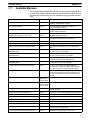
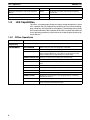
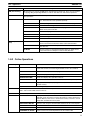
actual operating procedures, please refer to the Ladder Support Software Operation Manual.
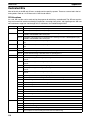
1-8-1 Offline Operations
Group
Description
General
Programming
General programming operations feature function keys to easily read, write, and store programs.
PROGRAMMING
SAVE PROGRAM
Writes all or part of the user program to a data disk.
RETRIEVE PROGRAM
Retrieves all or part of the user program from on a data disk.
CHANGE DISPLAY
Switches the display between four display modes: Ladder, Ladder
with Comments, Mnemonic 1 (function key and numeric key input
mode) and Mnemonic 2 (alphanumeric key input mode).
SEARCH INSTRUCTION
Searches for instructions including specified operands.
I/O COMMENT
Creates, reads, modifies, and searches for I/O comments.
BLOCK COMMENT
Creates, edits, and searches for block comments for output instructions.
LINE COMMENT
Creates, searches for, and edits line comments.
CUT AND PASTE
Edits programs by copying, moving, or deleting instruction blocks.
EDIT I/O COMMENT
Displays 32 I/O comments at once to write, edit, and search.
RETRIEVE COMMENTS
Retrieves comments from programs stored on a data disk.
MEMORY USAGE
Displays the used capacity of user program memory, comments,
and internal memory.
CLEAR MEMORY
Clears the user program memory.
CHECK PROGRAM
Checks whether the user program contains syntax errors. The
check can be performed in three levels.
8
Section 1-8
LSS Capabilities
Group
Description
DM (data memory)
DM operations are used to edit DM data in hexadecimal or ASCII form. There are also features
for copying, filling and printing DM data, as well as data disk save and retrieve operations.
I/O TABLE
I/O TABLE is used to edit, check, and print I/O tables. It also provides data disk save and retrieve operations.
UTILITY
DATA AREA LISTS
Displays lists of such items as used areas and cross-references
(i.e., instructions that use specified operands).
CHANGE ADDRESSES
Globally changes bit and word addresses in the user program.
PRINT LISTS
Prints lists, ladder diagrams, and mnemonics.
EPROM FUNCTIONS
Writes, reads, and compares the user program between the PROM
Writer and system work disk.
C500 → C2000H
Converts the program format from C500 to C2000H
NETWORK DATA LINKS
Creates a data link table.
CREATE LIBRARY FILE
Formats a floppy disk or hard disk for use with the LSS.
TIME CHART MONITOR
Accesses the time chart monitor displays produced online.
SET INSTRUCTIONS
Used to assign instructions to function codes in instructions tables
and to save/retrieve instructions tables to/from data disk files.
RETRIEVE/SAVE INSTR
Used to save and retrieve expansion instruction sets to and from
data disk files.
PC SETUP
Used to set the PC operating parameters in the PC Setup and to
save and retrieve PC Setups to and from data disk files.
UTILITY (continued))
1-8-2 Online Operations
Group
ON-LINE
Function name
Description
MONITOR DATA
Used to monitor up to 20 bits/words during program execution. The status
of bits and contents of words being monitored can also be controlled.
TRANSFER PROGRAM
Transfers and compares the user program between the LSS and PC.
ON-LINE EDIT
Edits the PC program during MONITOR mode execution.
READ CYCLE TIME
Reads and displays the cycle time of the PC.
CLEAR DATA AREAS
Clears the PC data areas such as HR, CNT, AR, and DM (to zero).
MEMORY USAGE
Displays the used capacity of program memory area, comments, and
internal memory.
Operations are also available to change display modes and search for instructions and comments.
DM
DM area operations are available to transfer and compare DM data between the PC, LSS, and data
disks, and to monitor DM contents in the PC.
I/O TABLE
I/O TABLE operations are used to write, transfer, and compare I/O tables between the PC and LSS.
UTILITY
FILE MEMORY
Displays file memory lists; transfers file memory contents between PC
and LSS; clears file memory; transfers file memory contents between PC
and File Memory Unit; saves or retrieves file memory contents to or from
floppy disk; and edits file memory data.
XFER DATA LINK TBL
Transfers and compares data link tables between the PC and computer.
CLOCK
Used to read and set the internal clock in the PC.
TRANSFER INSTR
Used to transfer the expansion instruction set from the PC to the LSS.
TRANSFER PC SETUP
Used to transfer the PC Setup between the PC and the LSS
9
Section 1-8
LSS Capabilities
1-8-3 Offline and Online Operations
Group
Description
SYSTEM SETUP
The SYSTEM SETUP provides settings for the operating environment of the LSS, including
the PC that’s being communicated with (including network and interface settings) and disk
drive, comment, printer, PROM Writer, and monitor settings. It also provides settings for transfer of I/O table and data link tables to UM.
FILE MANAGEMENT
FILE MANAGEMENT operations include basic file management features so that files can be
manipulated directly from the LSS. It also provides a feature for merging program files.
10
SECTION 2
Hardware Considerations
This section provides information on hardware aspects of the C200H that are relevant to programming and software operation. These include indicators on the CPU Unit and basic PC configuration. This information is covered in detail in the
C200H Installation Guide.
2-1
2-2
Indicators . . . . . . . . . . . . . . . . . . . . . . . . . . . . . . . . . . . . . . . . . . . . . . . . . . . . . . . . . . . . . . .
PC Configuration . . . . . . . . . . . . . . . . . . . . . . . . . . . . . . . . . . . . . . . . . . . . . . . . . . . . . . . . .
12
12
11
Section 2-2
PC Configuration
2-1
Indicators
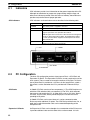
CPU indicators provide visual information on the general operation of the PC.
Although not substitutes for proper error programming using the flags and
other error indicators provided in the data areas of memory, these indicators
provide ready confirmation of proper operation.
CPU Indicators
CPU indicators are shown below and are described in the following table.
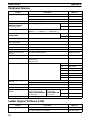
Indicator
Function
POWER
Lights when power is supplied to the CPU.
RUN
Lights when the CPU is operating normally.
ALARM/ERROR ALARM: Flashes when a non-fatal error is discovered in error
diagnosis operations. PC operation will continue.
ERROR: Lights when a fatal error is discovered in error diagnosis
operations. When this indicator lights, the RUN indicator will go
off, CPU operation will be stopped, and all outputs from the PC
will be turned OFF.
OUT INHIBIT
Lights when the Output OFF Bit, SR 25215, is turned ON. All
outputs from the PC will be turned OFF.
RUN
POWER
OUT INHIBIT
ALARM/ERROR
2-2
PC Configuration
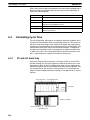
The basic PC configuration consists of two types of Rack: a CPU Rack and
Expansion I/O Racks. The Expansion I/O Racks are not a required part of the
basic system. They are used to increase the number of I/O points. An illustration of these Racks is provided in 3-3 IR Area. A third type of Rack, called a
Slave Rack, can be used when the PC is provided with a Remote I/O System.
CPU Racks
A C200H CPU Rack consists of four components: (1) The CPU Backplane, to
which the CPU and other Units are mounted. (2) The CPU, which executes
the program and controls the PC. (3) Other Units, such as I/O Units, Special
I/O Units, and Link Units, which provide the physical I/O terminals corresponding to I/O points.
A C200H CPU Rack can be used alone or it can be connected to other
Racks to provide additional I/O points. The CPU Rack provides three, five, or
eight slots to which these other Units can be mounted depending on the
backplane used.
Expansion I/O Racks
12
An Expansion I/O Rack can be thought of as an extension of the PC because
it provides additional slots to which other Units can be mounted. It is built
PC Configuration
Section 2-2
onto an Expansion I/O Backplane to which a Power Supply and up to eight
other Units are mounted.
An Expansion I/O Rack is always connected to the CPU via the connectors
on the Backplanes, allowing communication between the two Racks. Up to
two Expansion I/O Racks can be connected in series to the CPU Rack.
Unit Mounting Position
Only I/O Units and Special I/O Units can be mounted to Slave Racks. All I/O
Units, Special I/O Units, Remote I/O Master Units, PC and Host Link Units,
can be mounted to any slot on all other Racks, although mounting to the two
rightmost slots on the CPU Rack may interfere with the mounting of peripheral devices. With the CPU11-E CPU Unit, SYSMAC LINK and NET Link Units
can be mounted to the two rightmost slots on the CPU Rack.
Refer to the C200H Installation Guide for details about which slots can be
used for which Units and other details about PC configuration. The way in
which I/O points on Units are allocated in memory is described in 3-3 IR
Area.
13
SECTION 3
Memory Areas
Various types of data are required to achieve effective and correct control. To facilitate managing this data, the PC is provided with various memory areas for data, each of which performs a different function. The areas generally accessible
by the user for use in programming are classified as data areas. The other memory area is the Program Memory, where
the user’s program is actually stored. This section describes these areas individually and provides information that will be
necessary to use them. As a matter of convention, the TR area is described in this section, even though it is not strictly a
memory area.
3-1
3-2
3-3
3-4
Introduction . . . . . . . . . . . . . . . . . . . . . . . . . . . . . . . . . . . . . . . . . . . . . . . . . . . . . . . . . . . . .
Data Area Structure . . . . . . . . . . . . . . . . . . . . . . . . . . . . . . . . . . . . . . . . . . . . . . . . . . . . . . .
IR (Internal Relay) Area . . . . . . . . . . . . . . . . . . . . . . . . . . . . . . . . . . . . . . . . . . . . . . . . . . . .
SR (Special Relay) Area . . . . . . . . . . . . . . . . . . . . . . . . . . . . . . . . . . . . . . . . . . . . . . . . . . .
3-4-1 Remote I/O Systems . . . . . . . . . . . . . . . . . . . . . . . . . . . . . . . . . . . . . . . . . . . . . . .
3-4-2 Link System Flags and Control Bits . . . . . . . . . . . . . . . . . . . . . . . . . . . . . . . . . . .
3-4-3 Forced Status Hold Bit (CPU11-E Only) . . . . . . . . . . . . . . . . . . . . . . . . . . . . . . . .
3-4-4 I/O Status Hold Bit . . . . . . . . . . . . . . . . . . . . . . . . . . . . . . . . . . . . . . . . . . . . . . . .
3-4-5 Output OFF Bit . . . . . . . . . . . . . . . . . . . . . . . . . . . . . . . . . . . . . . . . . . . . . . . . . . .
3-4-6 FAL (Failure Alarm) Area . . . . . . . . . . . . . . . . . . . . . . . . . . . . . . . . . . . . . . . . . . .
3-4-7 Low Battery Flag . . . . . . . . . . . . . . . . . . . . . . . . . . . . . . . . . . . . . . . . . . . . . . . . . .
3-4-8 Cycle Time Error Flag . . . . . . . . . . . . . . . . . . . . . . . . . . . . . . . . . . . . . . . . . . . . . .
3-4-9 I/O Verification Error Flag . . . . . . . . . . . . . . . . . . . . . . . . . . . . . . . . . . . . . . . . . . .
3-4-10 First Cycle Flag . . . . . . . . . . . . . . . . . . . . . . . . . . . . . . . . . . . . . . . . . . . . . . . . . . .
3-4-11 Clock Pulse Bits . . . . . . . . . . . . . . . . . . . . . . . . . . . . . . . . . . . . . . . . . . . . . . . . . . .
3-4-12 Step Flag . . . . . . . . . . . . . . . . . . . . . . . . . . . . . . . . . . . . . . . . . . . . . . . . . . . . . . . .
3-4-13 Instruction Execution Error Flag, ER . . . . . . . . . . . . . . . . . . . . . . . . . . . . . . . . . .
3-4-14 Arithmetic Flags . . . . . . . . . . . . . . . . . . . . . . . . . . . . . . . . . . . . . . . . . . . . . . . . . .
3-5 AR (Auxiliary Relay) Area . . . . . . . . . . . . . . . . . . . . . . . . . . . . . . . . . . . . . . . . . . . . . . . . .
3-5-1 Optical Transmitting I/O Unit Error Flags . . . . . . . . . . . . . . . . . . . . . . . . . . . . . .
3-5-2 SYSMAC LINK System Data Link Settings . . . . . . . . . . . . . . . . . . . . . . . . . . . . .
3-5-3 Error History Bits (CPU11-E Only) . . . . . . . . . . . . . . . . . . . . . . . . . . . . . . . . . . .
3-5-4 Active Node Flags (CPU11-E only) . . . . . . . . . . . . . . . . . . . . . . . . . . . . . . . . . . .
3-5-5 SYSMAC LINK/SYSMAC NET Link System Service Time (CPU11-E only) . .
3-5-6 Calendar/Clock Area and Bits (CPU11-E Only) . . . . . . . . . . . . . . . . . . . . . . . . . .
3-5-7 TERMINAL Mode Key Bits (CPU11-E Only) . . . . . . . . . . . . . . . . . . . . . . . . . . .
3-5-8 Power-OFF Counter . . . . . . . . . . . . . . . . . . . . . . . . . . . . . . . . . . . . . . . . . . . . . . . .
3-5-9 CPU Low Battery Flag (CPU11-E Only) . . . . . . . . . . . . . . . . . . . . . . . . . . . . . . .
3-5-10 SCAN(18) Cycle Time Flag (CPU11-E Only) . . . . . . . . . . . . . . . . . . . . . . . . . . .
3-5-11 Network Parameter Flags . . . . . . . . . . . . . . . . . . . . . . . . . . . . . . . . . . . . . . . . . . . .
3-5-12 Link Unit Mounted Flags . . . . . . . . . . . . . . . . . . . . . . . . . . . . . . . . . . . . . . . . . . . .
3-5-13 CPU-mounting Device Flag . . . . . . . . . . . . . . . . . . . . . . . . . . . . . . . . . . . . . . . . .
3-5-14 FALS-generating Address . . . . . . . . . . . . . . . . . . . . . . . . . . . . . . . . . . . . . . . . . . .
3-5-15 Cycle Time Indicators . . . . . . . . . . . . . . . . . . . . . . . . . . . . . . . . . . . . . . . . . . . . . .
3-6 DM (Data Memory) Area . . . . . . . . . . . . . . . . . . . . . . . . . . . . . . . . . . . . . . . . . . . . . . . . . . .
3-7 HR (Holding Relay) Area . . . . . . . . . . . . . . . . . . . . . . . . . . . . . . . . . . . . . . . . . . . . . . . . . .
3-8 TC (Timer/Counter) Area . . . . . . . . . . . . . . . . . . . . . . . . . . . . . . . . . . . . . . . . . . . . . . . . . . .
3-9 LR (Link Relay) Area . . . . . . . . . . . . . . . . . . . . . . . . . . . . . . . . . . . . . . . . . . . . . . . . . . . . .
3-10 Program Memory . . . . . . . . . . . . . . . . . . . . . . . . . . . . . . . . . . . . . . . . . . . . . . . . . . . . . . . . .
3-11 TR (Temporary Relay) Area . . . . . . . . . . . . . . . . . . . . . . . . . . . . . . . . . . . . . . . . . . . . . . . .
16
16
18
20
22
23
27
28
29
30
30
30
30
30
30
31
31
31
32
33
34
34
34
35
35
36
36
37
37
37
37
37
37
37
38
40
40
41
42
42
15
Section 3-2
Data Area Structure
3-1
Introduction
Details, including the name, acronym, range, and function of each area are
summarized in the following table. All but the last three of these areas are
data areas. Data and memory areas are normally referred to by their acronyms.
Area
Acronym
Range
Function
Internal Relay
IR
Words: 000 to 235
Bits:
00000 to 23515
Used to control I/O points, other bits, timers,
and counters, and to temporarily store data.
Special Relay
SR
Words: 236 to 255
Bits:
23600 to 25507
Contains system clocks, flags, control bits, and
status information.
Auxiliary Relay
AR
Words: AR 00 to AR 27
Bits:
AR 00 to AR 2715
Contains flags and bits for special functions.
Retains status during power failure.
Data Memory
DM
Read/write: DM 0000 to DM 0999
Read only: DM 1000 to DM 1999
Used for internal data storage and manipulation.
Holding Relay
HR
Words: HR 00 to HR 99
Bits:
HR 0000 to HR 9915
Used to store data and to retain the data values
when the power to the PC is turned off.
Timer/Counter
TC
TC 000 to TC 511 (TC numbers used
to access other information)
Used to define timers and counters, and to access completion flags, PV, and SV. In general,
when used as a bit operand, a TC number accesses the completion flag for the timer or
counter defined using the TC number. When
used as a word operand, the TC number accesses the present value of the timer or counter.
Link Relay
LR
Words: LR 00 to LR 63
Bits:
LR 0000 to 6315
Available for use as work bits.
Temporary Relay
TR
TR 00 to TR 07 (bits only)
Used to temporarily store and retrieve execution conditions. These bits can only be used in
the Load and Output instructions. Storing and
retrieving execution conditions is necessary
when programming certain types of branching
ladder diagrams.
Program Memory
UM
UM: Depends on Memory Unit used.
Contains the program executed by the CPU.
Work Bits and Words
When some bits and words in certain data areas are not being used for their
intended purpose, they can be used in programming as required to control
other bits. Words and bits available for use in this fashion are called work
words and work bits. Most, but not all, unused bits can be used as work bits.
Those that can be used are described area-by-area in the remainder of this
section. Actual application of work bits and work words is described in Section 4 Writing and Inputting the Program.
Flags and Control Bits
Some data areas contain flags and/or control bits. Flags are bits that are
automatically turned ON and OFF to indicate particular operation status. Although some flags can be turned ON and OFF by the user, most flags are
read only; they cannot be controlled directly.
Control bits are bits turned ON and OFF by the user to control specific aspects of operation. Any bit given a name using the word bit rather than the
word flag is a control bit, e.g., Restart bits are control bits.
3-2
Data Area Structure
When designating a data area, the acronym for the area is always required
for any but the IR and SR areas. Although the acronyms for the IR and SR
areas are often given for clarity in text explanations, they are not required,
16
Section 3-2
Data Area Structure
and not entered, when programming. Any data area designation without an
acronym is assumed to be in either the IR or SR area. Because IR and SR
addresses run consecutively, the word or bit addresses are sufficient to differentiate these two areas.
An actual data location within any data area but the TC area is designated by
its address. The address designates the bit or word within the area where the
desired data is located. The TC area consists of TC numbers, each of which
is used for a specific timer or counter defined in the program. Refer to 3-8 TC
Area for more details on TC numbers and to 5-12 Timer and Counter Instructions for information on their application.
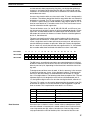
The rest of the data areas (i.e., the IR, SR, HR, DM, AR, and LR areas) consist of words, each of which consists of 16 bits numbered 00 through 15 from
right to left. IR words 000 and 001 are shown below with bit numbers. Here,
the content of each word is shown as all zeros. Bit 00 is called the rightmost
bit; bit 15, the leftmost bit.
The term least significant bit is often used for rightmost bit; the term most
significant bit, for leftmost bit. These terms are not used in this manual because a single data word is often split into two or more parts, with each part
used for different parameters or operands. When this is done, the rightmost
bits of a word may actually become the most significant bits, i.e., the leftmost
bits in another word,when combined with other bits to form a new word.
Bit number
15
14
13
12
11
10
09
08
07
06
05
04
03
02
01
00
IR word 000
0
0
0
0
0
0
0
0
0
0
0
0
0
0
0
0
IR word 001
0
0
0
0
0
0
0
0
0
0
0
0
0
0
0
0
The DM area is accessible by word only; you cannot designate an individual
bit within a DM word. Data in the IR, SR, HR, AR, and LR areas is accessible
either by word or by bit, depending on the instruction in which the data is being used.
To designate one of these areas by word, all that is necessary is the acronym
(if required) and the two-, three-, or four-digit word address. To designate an
area by bit, the word address is combined with the bit number as a single
four- or five-digit address. The following table show examples of this. The two
rightmost digits of a bit designation must indicate a bit between 00 and 15,
i.e., the rightmost digit must be 5 or less the next digit to the left, either 0 or 1.
The same TC number can be used to designate either the present value (PV)
of the timer or counter, or a bit that functions as the Completion Flag for the
timer or counter. This is explained in more detail in 3-8 TC Area.
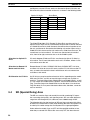
Area
Data Structure
Word designation
Bit designation
IR
000
00015 (leftmost bit in word 000)
SR
252
25200 (rightmost bit in word 252)
DM
DM 1250
Not possible
TC
TC 215 (designates PV)
TC 215 (designates completion flag)
LR
LR 12
LR 1200
Word data input as decimal values is stored in binary-coded decimal (BCD);
word data entered as hexadecimal is stored in binary form. Each four bits of
a word represents one digit, either a hexadecimal or decimal digit, numerically equivalent to the value of the binary bits. One word of data thus con-
17
Section 3-3
IR Area
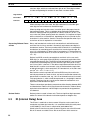
tains four digits, which are numbered from right to left. These digit numbers
and the corresponding bit numbers for one word are shown below.
Digit number
Bit number
Contents
3
2
1
0
15
14
13
12
11
10
09
08
07
06
05
04
03
02
01
00
0
0
0
0
0
0
0
0
0
0
0
0
0
0
0
0
When referring to the entire word, the digit numbered 0 is called the rightmost digit; the one numbered 3, the leftmost digit.
When inputting data into data areas, it must be input in the proper form for
the intended purpose. This is no problem when designating individual bits,
which are merely turned ON (equivalent to a binary value of 1) or OFF (a binary value of 0). When inputting word data, however, it is important to input it
either as decimal or as hexadecimal, depending on what is called for by the
instruction it is to be used for. Section 5 Instruction Set specifies when a particular form of data is required for an instruction.
Converting Different Forms
of Data
Binary and hexadecimal can be easily converted back and forth because
each four bits of a binary number is numerically equivalent to one digit of a
hexadecimal number. The binary number 0101111101011111 is converted to
hexadecimal by considering each set of four bits in order from the right. Binary 1111 is hexadecimal F; binary 0101 is hexadecimal 5. The hexadecimal
equivalent would thus be 5F5F, or 24,415 in decimal (163 x 5 + 162 x 15 + 16
x 5 + 15).
Decimal and BCD are easily converted back and forth. In this case, each
BCD digit (i.e., each group of four BCD bits) is numerically equivalent of the
corresponding decimal digit. The BCD bits 0101011101010111 are converted
to decimal by considering each four bits from the right. Binary 0101 is decimal 5; binary 0111 is decimal 7. The decimal equivalent would thus be 5,757.
Note that this is not the same numeric value as the hexadecimal equivalent
of 0101011101010111, which would be 5,757 hexadecimal, or 22,359 in decimal (163 x 5 + 162 x 7 + 16 x 5 + 7).
Because the numeric equivalent of each four BCD binary bits must be numerically equivalent to a decimal value, any four bit combination numerically
greater then 9 cannot be used, e.g., 1011 is not allowed because it is numerically equivalent to 11, which cannot be expressed as a single digit in decimal
notation. The binary bits 1011 are of course allowed in hexadecimal are a
equivalent to the hexadecimal digit C.
There are instructions provided to convert data either direction between BCD
and hexadecimal. Refer to 5-16 Data Conversion for details. Tables of binary
equivalents to hexadecimal and BCD digits are provided in the appendices
for reference.
Decimal Points
3-3
Decimal points are used in timers only. The least significant digit represents
tenths of a second. All arithmetic instructions operate on integers only.
IR (Internal Relay) Area
The IR area is used both as data to control I/O points, and as work bits to
manipulate and store data internally. It is accessible both by bit and by word.
In the C200H PC, the IR area is comprised of words 000 to 235.
Words in the IR area that are used to control I/O points are called I/O words.
Bits in I/O words are called I/O bits. Bits in the IR area which are not as-
18
Section 3-3
IR Area
signed as I/O bits can be used as work bits. IR area work bits are reset when
power is interrupted or PC operation is stopped.
I/O Words
If a Unit brings inputs into the PC, the bit assigned to it is an input bit; if the
Unit sends an output from the PC, the bit is an output bit. To turn on an output, the output bit assigned to it must be turned ON. When an input turns on,
the input bit assigned to it also turns ON. These facts can be used in the program to access input status and control output status through I/O bits.
Input Bit Usage
Input bits can be used to directly input external signals to the PC and can be
used in any order in programming. Each input bit can also be used in as
many instructions as required to achieve effective and proper control. They
cannot be used in instructions that control bit status, e.g., the Output, Differentiation Up, and Keep instructions.
Output Bit Usage
Output bits are used to output program execution results and can be used in
any order in programming. Because outputs are refreshed only once during
each cycle (i.e., once each time the program is executed), any output bit can
be used in only one instruction that controls its status, including OUT,
KEEP(11), DIFU(13), DIFD(14) and SFT(10). If an output bit is used in more
than one such instruction, only the status determined by the last instruction
will actually be output from the PC.
See 5-13-1 Shift Register - SFT(10) for an example that uses an output bit in
two ‘bit-control’ instructions.
Word Allocation for Racks
I/O words are allocated to the CPU Rack and Expansion I/O Racks by slot
position. One I/O word is allocated to each slot, as shown in the following
table. Since each slot is allocated only one I/O word, a 3-slot rack uses only
the first 3 words, a 5-slot rack uses only the first 5 words, and an 8-slot rack
uses only the first 8 words. Words that are allocated to unused or nonexistent
slots are available as work words.
Right side of a 10-slot rack →
← Left side of rack
Rack
Slot 1
Slot 2
Slot 3
Slot 4
Slot 5
Slot 6
Slot 7
Slot 8
Slot 9
CPU
IR 000
IR 001
IR 002
IR 003
IR 004
IR 005
IR 006
IR 007
IR 008
IR 009
1st
Expansion
IR 010
IR 011
IR 012
IR 013
IR 014
IR 015
IR 016
IR 017
IR 018
IR 019
2nd
Expansion
IR 020
IR 021
IR 022
IR 023
IR 024
IR 025
IR 026
IR 027
IR 028
IR 029
Allocation for Special I/O
Units and Slave Racks
Slot 10
Up to ten Special I/O Units may be mounted in any slot of the CPU Rack or
Expansion I/O Racks. Up to five Slave Racks may be used, whether one or
19
Section 3-4
SR Area
two Masters are used. IR area words are allocated to Special I/O Units and
Slave Racks by the unit number on the unit, as shown in the following tables.
Special I/O Units
Slave Racks
Unit number
0
1
2
3
4
5
6
7
8
9
Unit number
0
1
2
3
4
IR address
100 to 109
110 to 119
120 to 129
130 to 139
140 to 149
150 to 159
160 to 169
170 to 179
180 to 189
190 to 199
IR address
050 to 059
060 to 069
070 to 079
080 to 089
090 to 099
The C500-RT 001/002-(P)V1 Remote I/O Slave Rack may be used, but it
requires 20 I/O words, not 10, and therefore occupies the I/O words allocated
to 2 C200H Slave Racks, both the words allocated to the unit number set on
the rack and the words allocated to the following unit number. When using a
C200H CPU Unit, do not set the unit number on a C500 Slave Rack to 4, because there is no unit number 5. I/O words are allocated only to installed
units, from left to right, and not to slots as in the C200H system.
Allocation for Optical I/O
Units
I/O words between IR 200 and IR 231 are allocated to Optical I/O Units by
unit number. The I/O word allocated to each unit is IR 200+n, where n is the
unit number set on the unit.
Allocation for Remote I/O
Master and Link Units
Remote Master I/O Units, SYSMAC LINK Units, SYSMAC NET Link Units,
and Host Link Units do not use I/O words, and the PC Link Units use the LR
area, so words allocated to the slots in which these units are mounted are
available as work words.
Bit Allocation for I/O Units
An I/O Unit may require anywhere from 8 to 16 bits, depending on the model.
With most I/O Units, any bits not used for input or output are available as
work bits. Transistor Output Units C200H-OD213 and C200H-OD411, as well
as Triac Output Unit C200H-OA221, however, uses bit 08 for the Blown Fuse
Flag. Transistor Output Unit C200H-OD214 uses bits 08 to 11 for the Alarm
Flag. Bits 08 to 15 of any word allocated to these units, therefore, cannot be
used as work bits.
3-4
SR (Special Relay) Area
The SR area contains flags and control bits used for monitoring PC operation, accessing clock pulses, and signalling errors. SR area word addresses
range from 236 through 255; bit addresses, from 23600 through 25507.
The following table lists the functions of SR area flags and control bits. Most
of these bits are described in more detail following the table. Descriptions are
in order by bit number except that Link System bits are grouped together.
Unless otherwise stated, flags are OFF until the specified condition arises,
when they are turned ON. Restart bits are usually OFF, but when the user
20
Section 3-4
SR Area
turns one ON then OFF, the specified Link Unit will be restarted. Other control bits are OFF until set by the user.
Word(s)
236
Bit(s)
Function
00 to 07
Node loop status output area for operating level 0 of
SYSMAC NET Link System
08 to 15
Node loop status output area for operating level 1 of
SYSMAC NET Link System
00 to 07
Completion code output area for operating level 0 following
execution of SEND(90)/RECV(98) SYSMAC
LINK/SYSMAC NET Link System
08 to 15
Completion code output area for operating level 1 following
execution of SEND(90)/RECV(98) SYSMAC
LINK/SYSMAC NET Link System
238 to 241
00 to 15
Data link status output area for operating level 0 of
SYSMAC LINK or SYSMAC NET Link System
242 to 245
00 to 15
Data link status output area for operating level 1 of
SYSMAC LINK or SYSMAC NET Link System
246
00 to 15
Not used
247 to 250
00 to 07
PC Link Unit Run Flags or data link status for operating
level 1
08 to 15
PC Link Unit Error Flags or data link status for operating
level 1
251
00 to 15
Remote I/O Error Flags
252
00
SEND(90)/RECV(98) Error Flag for operating level 0 of
SYSMAC LINK or SYSMAC NET Link System
01
SEND(90)/RECV(98) Enable Flag for operating level 0 of
SYSMAC LINK or SYSMAC NET Link System
02
Operating Level 0 Data Link Operating Flag
03
SEND(90)/RECV(98) Error Flag for operating level 1 of
SYSMAC LINK or SYSMAC NET Link System
04
SEND(90)/RECV(98) Enable Flag for operating level 1 of
SYSMAC LINK or SYSMAC NET Link System
05
Operating Level 1 Data Link Operating Flag
06
Host Computer to Rack-mounting Host Link Unit Level 1
Error Flag
07
Rack-mounting Host Link Unit Level 1 Restart Bit
08
CPU-mounting Host Link Unit Error Flag
09
CPU-mounting Host Link Unit Restart Bit
10
Not used.
11
Forced Status Hold Bit (CPU11-E only)
12
I/O Status Hold Bit
13
Rack-mounting Host Link Unit Level 0 Restart Bit
14
Not used.
15
Output OFF Bit
237
21
Section 3-4
SR Area
Word(s)
253
254
255
3-4-1
Bit(s)
Function
00 to 07
FAL number output area.
08
Low Battery Flag
09
Cycle Time Error Flag
10
I/O Verification Error Flag
11
Host Computer to rack-mounting Host Link Unit Level 0
Error Flag
12
Remote I/O Error Flag
13
Normally ON Flag
14
Normally OFF Flag
15
First cycle
00
1-minute clock pulse bit
01
0.02-second clock pulse bit
02 to 06
Reserved for function expansion. Do not use.
07
Step Flag
08 to 14
Reserved for function expansion. Do not use.
15
Special Unit Error Flag (Special I/O, PC Link, Host Link,
Remote I/O Master, SYSMAC NET Link, and SYSMAC
LINK)
00
0.1-second clock pulse bit
01
0.2-second clock pulse bit
02
1.0-second clock pulse bit
03
Instruction Execution Error (ER) Flag
04
Carry (CY) Flag
05
Greater Than (GR) Flag
06
Equals (EQ) Flag
07
Less Than (LE) Flag
Remote I/O Systems
SR 25312 turns ON to indicate an error has occurred in Remote I/O Systems. The ALARM/ERROR indicator will flash, but PC operation will continue.
SR 251, as well as AR 0014 and AR 0015, contain information on the source
and type of error. The function of each bit is described below. Refer to Optical
and Wired Remote I/O System Manuals for details.
Bit 00 - Error Check Bit
If there are errors in more than one Remote I/O Unit, word 251 will contain
error information for only the first one. Data for the remaining Units will be
stored in memory and can be accessed by turning the Error Check bit ON
and OFF. Be sure to record data for the first error, which will be cleared when
data for the next error is displayed.
Bits 01 and 02
Not used.
Bit 03
Remote I/O Error Flag: Bit 03 turns ON when an error has occurred in a Remote I/O Unit.
Bits 04 to 15
The content of bits 04 to 06 is a 3-digit binary number (04: 20, 05: 21, 06: 22)
and the content of bits 08 to 15 is a 2-digit hexadecimal number (08 to 11:
160, 12 to 15: 161).
22
Section 3-4
SR Area
If the content of bits 12 through 15 is B, an error has occurred in a Remote
I/O Master or Slave Unit, and the content of bits 08 through 11 will indicate
the unit number, either 0 or 1, of the Master involved. In this case, bits 04 to
06 contain the unit number of the Slave Rack involved.
If the content of bits 12 through 15 is a number from 0 to 31, an error has
occurred in an Optical I/O Unit. The number is the unit number of the Optical
I/O Unit involved, and bit 04 will be ON if the Unit is assigned leftmost word
bits (08 through 15), and OFF if it is assigned rightmost word bits (00 through
07).
3-4-2
Link System Flags and Control Bits
Use of the following SR bits depends on the configuration of any Link Systems to which your PC belongs. These flags and control bits are used when
Link Units, such as PC Link Units, SYSMAC LINK Units, Remote I/O Units,
SYSMAC NET Link Units, or Host Link Units, are mounted to the PC Racks
or to the CPU. For additional information, consult the System Manual for the
particular Units involved.
The following bits can be employed as work bits when the PC does not belong to the Link System associated with them.
Host Link Systems
Both Error flags and Restart bits are provided for Host Link Systems. Error
flags turn ON to indicate errors in Host Link Units. Restart bits are turned ON
and then OFF to restart a Host Link Unit. SR bits used with Host Link Systems are summarized in the following table. Rack-mounting Host Link Unit
Restart bits are not effective for the Multilevel Rack-mounting Host Link
Units. Refer to the Host Link System Manual for details.
Bit
Flag
25206
Rack-mounting Host Link Unit Level 1 Error Flag
25207
Rack-mounting Host Link Unit Level 1 Restart Bit
25208
CPU-mounting Host Link Unit Error Flag
25209
CPU-mounting Host Link Unit Restart Bit
25213
Rack-mounting Host Link Unit Level 0 Restart Bit
25311
Rack-mounting Host Link Unit Level 0 Error Flag
SYSMAC NET Link and SYSMAC LINK Systems (CPU11-E only)
SR 25200 turns ON to indicate an error has occurred in level 0, while using
SEND(90) or RECV(98) to transfer data in either a SYSMAC NET Link or
SYSMAC LINK System. SR 25203 indicates an error has occurred in level 1.
Turning ON SR 25201 enables SEND(90) and RECV(98) in level 0 in these
Systems. Turning ON SR 25204 enables SEND(90) and RECV(98) in level 1.
SR 25202 turns ON when a data link is active in operating level 0 of either of
these Systems and SR 25205 turns ON with a data link is active in operating
level 1. These flags and corresponding SR bits are shown below.
Bit
Flag
25200
Operating Level 0 SEND(90)/RECV(98) Error Flag
25201
Operating Level 0 SEND(90)/RECV(98) Enable Flag
25202
Operating Level 0 Data Link Operating Flag
25203
Operating Level 1 SEND(90)/RECV(98) Error Flag
25204
Operating Level 1 SEND(90)/RECV(98) Enable Flag
25205
Operating Level 1 Data Link Operating Flag
23
Section 3-4
SR Area
SYSMAC NET Link Loop
Status Output
SR 236 contains the SYSMAC NET Link Loop Status Flags. Bits 00 through
07 are the Loop Status Flags for operating level 0, and bits 08 through 15 are
the Flags for operating level 1. The bit functions are shown below.
Level 0:
Level 1:
07 06 05 04 03 02 01 00
15 14 13 12 11 10 09 08
1 1
1
1
Central Power Supply Unit:
0: Power supply connected.
1: Power supply not connected.
Transmission status:
0: Reception possible
1: Reception not possible
Loop status:
11: Normal loop
10: Lower back loop
01: Upper back loop
00: Loop error
When SEND(90) or RECV(98) is used in a SYSMAC LINK System, a completion code is output to SR 23700 through SR 23707 for level 0, or SR
23708 through SR 23715 for level 0, to indicate whether or not the data
transfer was completed successfully and to indicate the nature of the error
when communications are not completed successfully. These error codes are
as follows.
Communications
Completion Code
SYSMAC LINK Systems
Completion
code
Name
Meaning
00
Normal end
Data transfer was completed successfully.
01
Parameter error
SEND(90)/RECV(98) instruction operands are not within specified
ranges.
02
Transmission impossible
The System was reset during execution of the instruction or the
destination node is not in the System.
03
Destination not in System
The destination node is not in the System.
04
Busy error
The destination node is busy and cannot receive the transfer.
05
Response timeout
A response was not received within the time limit.
06
Response error
An error response was received from the destination node.
07
Communications controller
error
An error occurred in the communications controller.
08
Setting error
The node address was set incorrectly.
09
CPU error
A CPU error occurred in the PC of the destination node.
24
Section 3-4
SR Area
SYSMAC NET Link Systems
Completion
code
Name
Meaning
00
Normal end
Data transfer was completed successfully.
01
Parameter error
SEND(90)/RECV(98) instruction operands are not within specified ranges.
02
Transmission impossible
The System was reset during execution of the instruction or the destination
node is not in the System.
03
Busy error
The destination node is busy and cannot receive the transfer.
04
Transmission error
The line server token was not received.
05
Loop error
An error occurred in the transmission loop.
06
No response
Destination node does not exist or response was not received within the
time limit.
07
Response error
Incorrect response format.
SYSMAC LINK/SYSMAC NET Link Data link status is output to SR 238
through SR 241 for the operating level 0 data link, and to SR 242 through SR
245 for the operating level 1 data link in the SYSMAC NET Link or SYSMAC
LINK System.
Data Link Status
The meaning of each bit in these areas differs depending on whether the
data link is in a SYSMAC LINK System or SYSMAC NET Link System, as
shown below.
SYSMAC LINK Systems
Level 0
Level 1
Bits
00 to 03
04 to 07
08 to 11
12 to 15
SR 238
SR 242
Node 1
Node 2
Node 3
Node 4
SR 239
SR 243
Node 5
Node 6
Node 7
Node 8
SR 240
SR 244
Node 9
Node 10
Node 11
Node 12
SR 241
SR 245
Node 13
Node 14
Node 15
Node 16
Each of the above sets of four bits operates as shown below.
Leftmost bit
ON when data link is active.
Middle bits
ON when there is a data
communications error.
Rightmost bit
ON when there is a PC
error.
ON when PC is in RUN
mode.
SYSMAC NET Link Systems
Level 0
Level 1
Bit numbers in header/Registration number in the data link table
PC Error Flags
PC Run Flags
00
01
02
03
04
05
06
07
08
09
10
11
12
13
14
15
SR 238
SR 242
1
2
3
4
5
6
7
8
1
2
3
4
5
6
7
8
SR 239
SR 243
9
10
11
12
13
14
15
16
9
10
11
12
13
14
15
16
SR 240
SR 244
17
18
19
20
21
22
23
24
17
18
19
20
21
22
23
24
SR 241
SR 245
25
26
27
28
29
30
31
32
25
26
27
28
29
30
31
32
PC Link Systems
PC Link Unit Error and Run
Flags
When the PC belongs to a PC Link System, words 247 through 250 are used
to monitor the operating status of all PC Link Units connected to the PC Link
System. This includes a maximum of 32 PC Link Units. If the PC is in a Multilevel PC Link System, half of the PC Link Units will be in a PC Link Subsys-
25
Section 3-4
SR Area
tem in operating level 0; the other half, in a Subsystem in operating level 1.
The actual bit assignments depend on whether the PC is in a Single-level PC
Link System or a Multilevel PC Link System. Refer to the PC Link System
Manual for details. Error and Run Flag bit assignments are described below.
Bits 00 through 07 of each word are the Run flags, which are ON when the
PC Link Unit is in RUN mode. Bits 08 through 15 are the Error flags, which
are ON when an error has occurred in the PC Link Unit. The following table
shows bit assignments for Single-level and Multi-level PC Link Systems.
Single-level PC Link Systems
Flag type
Run flags
Error flags
26
Bit no.
SR 247
SR 248
SR 249
SR 250
00
Unit #24
Unit #16
Unit #8
Unit #0
01
Unit #25
Unit #17
Unit #9
Unit #1
02
Unit #26
Unit #18
Unit #10
Unit #2
03
Unit #27
Unit #19
Unit #11
Unit #3
04
Unit #28
Unit #20
Unit #12
Unit #4
05
Unit #29
Unit #21
Unit #13
Unit #5
06
Unit #30
Unit #22
Unit #14
Unit #6
07
Unit #31
Unit #23
Unit #15
Unit #7
08
Unit #24
Unit #16
Unit #8
Unit #0
09
Unit #25
Unit #17
Unit #9
Unit #1
10
Unit #26
Unit #18
Unit #10
Unit #2
11
Unit #27
Unit #19
Unit #11
Unit #3
12
Unit #28
Unit #20
Unit #12
Unit #4
13
Unit #29
Unit #21
Unit #13
Unit #5
14
Unit #30
Unit #22
Unit #14
Unit #6
15
Unit #31
Unit #23
Unit #15
Unit #7
Section 3-4
SR Area
Multilevel PC Link Systems
Flag type
Run flags
Error flags
Application Example
3-4-3
Bit no.
SR 247
SR 248
SR 249
SR 250
00
Unit #8,
level 1
Unit #0,
level 1
Unit #8,
level 0
Unit #0,
level 0
01
Unit #9,
level 1
Unit #1,
level 1
Unit #9,
level 0
Unit #1,
level 0
02
Unit #10,
level 1
Unit #2,
level 1
Unit #10,
level 0
Unit #2,
level 0
03
Unit #11,
level 1
Unit #3,
level 1
Unit #11,
level 0
Unit #3,
level 0
04
Unit #12,
level 1
Unit #4,
level 1
Unit #12,
level 0
Unit #4,
level 0
05
Unit #13,
level 1
Unit #5,
level 1
Unit #13,
level 0
Unit #5,
level 0
06
Unit #14,
level 1
Unit #6,
level 1
Unit #14,
level 0
Unit #6,
level 0
07
Unit #15,
level 1
Unit #7,
level 1
Unit #15,
level 0
Unit #7,
level 0
08
Unit #8,
level 1
Unit #0,
level 1
Unit #8,
level 0
Unit #0,
level 0
09
Unit #9,
level 1
Unit #1,
level 1
Unit #9,
level 0
Unit #1,
level 0
10
Unit #10,
level 1
Unit #2,
level 1
Unit #10,
level 0
Unit #2,
level 0
11
Unit #11,
level 1
Unit #3,
level 1
Unit #11,
level 0
Unit #3,
level 0
12
Unit #12,
level 1
Unit #4,
level 1
Unit #12,
level 0
Unit #4,
level 0
13
Unit #13,
level 1
Unit #5,
level 1
Unit #13,
level 0
Unit #5,
level 0
14
Unit #14,
level 1
Unit #6,
level 1
Unit #14,
level 0
Unit #6,
level 0
15
Unit #15,
level 1
Unit #7,
level 1
Unit #15,
level 0
Unit #7,
level 0
If the PC is in a Multilevel PC Link System and the content of word 248 is
02FF, then PC Link Units #0 through #7 of in the PC Link Subsystem assigned operating level 1 would be in RUN mode, and PC Link Unit #1 in the
same Subsystem would have an error. The hexadecimal digits and corresponding binary bits of word 248 would be as shown below.
Bit no.
15 . . . . . . . . . . . . . . . . . . . . . . . . . . . . . . . . . . . . . . . . . . . . . . . . . . . . 00
Binary
0000
Hex
0
0010
1111
2
F
1111
F
Forced Status Hold Bit (CPU11-E Only)
SR 25211 determines whether or not the status of bits that have been forceset or force-reset is maintained when switching between PROGRAM and
MONITOR mode to start or stop operation. If SR 25211 is ON, bit status will
be maintained; if SR 25211 is OFF, all bits will return to default status when
operation is started or stopped. The Force Status Hold Bit is only effective
when enabled with the Set System instruction (SYS(49)).
The status of SR 25211 in not affected by a power interruption unless the I/O
table is registered; in that case, SR 25211 will go OFF.
27
Section 3-4
SR Area
SR 25211 is not effective when switching to RUN mode.
SR 25211 should be manipulated from a Peripheral Device, e.g., a Programming Console or FIT.
Maintaining Status during
Startup
The status of SR 25211 and thus the status of force-set/force-reset bits can
be maintained when power is turned off and on by inserting the Set System
instruction (SYS(49)) in the program as step 00000 with the proper operand.
If SYS(49) is used in this way, the status of SR 25211 will be preserved when
power is turned off and on. If this is done and SR 25211 is ON, then the status of force-set/force-reset bits will also be preserved, as shown in the following table. The use of SYS(49) does not affect operation when switching to
run mode, i.e., force-set/force-reset bits always return to default status when
switching to RUN mode.
Status before shutdown
SR 25211
ON
OFF
SYS(49)
Status at next startup
SR 25211
Force-set/reset bits
Executed
ON
Status maintained
Not executed
OFF
Default status
Executed
OFF
Default status
Not executed
OFF
Default status
Refer to Section 5 Instruction Set for details on SYS(49).
3-4-4
I/O Status Hold Bit
SR 25212 determines whether or not the status of IR and LR area bits is
maintained when operation is started or stopped, when operation begins by
switching from PROGRAM mode to MONITOR or RUN modes. If SR 25212
is ON, bit status will be maintained; if SR 25212 is OFF, all IR and LR area
bits will be reset. With the CPU11-E CPU Unit, the I/O Status Hold Bit will
only be effective if enabled with the Set System instruction (SYS(49)).
The status of SR 25211 in not affected by a power interruption unless the I/O
table is registered; in that case, SR 25211 will go OFF.
SR 25212 can be turned ON from the program using the Output instruction,
or it can be turned ON from a Peripheral Device.
Maintaining Status during
Startup
With the CPU11-E CPU Unit, the status of SR 25212 and thus the status of
IR and LR area bits can be maintained when power is turned off and on by
inserting the System Operation instruction (SYS(49)) into the program as
step 00000 with the proper operand. If SYS(49) is used in this way, the status
of SR 25212 will be preserved when power is turned off and on. If this is
done and SR 25212 is ON, then the status of IR and LR area bits will also be
preserved, as shown in the following table.
Status before shutdown
SR 25212
ON
OFF
SYS(49)
Status at next startup
SR 25212
IR and LR bits
Executed
ON
Status maintained
Not executed
OFF
Reset
Executed
OFF
Reset
Not executed
OFF
Reset
Refer to Section 5 Instruction Set for details on SYS(49).
The status of the I/O Status Hold Bit is maintained for power interruptions or
when PC operation is stopped.
28
Section 3-4
SR Area
Operating without a Battery In the following cases, DM (DM 0000 to DM 0999), HR, AR, CNT, and SR
area data will not be retained in the CPU Unit’s internal RAM when the power
is turned OFF.
• When a RAM Unit without battery backup is used and the backup time has
been exceeded for the backup capacitor.
• When a RAM Unit with battery backup is used, but the battery is low.
Because this data is not retained, the Output OFF Bit (SR 25215) and the I/O
Status Hold Bit (SR 25212) are not reliable when the power is turned ON. If
the Output OFF Bit is ON, the outputs from all of the Output Units will be
turned OFF. To ensure that the outputs from all of the Output Units are not
turned OFF when the power is turned ON, take a preventive measure, such
as writing the following instructions into the ladder program.
First Cycle Flag
(25315)
ANDW (34)
#6FFF
252
252
3-4-5
Output OFF Bit
SR bit 25215 is turned ON to turn OFF all outputs from the PC. The OUT INHIBIT indicator on the front panel of the CPU will light. When the Output OFF
Bit is OFF, all output bits will be refreshed in the usual way.
The status of the Output OFF Bit is maintained for power interruptions or
when PC operation is stopped, unless the I/O table has been registered
(CPU Units CPU01-E and CPU03-E), or the I/O table has been registered
and either the Force Status Hold Bit or the I/O Status Hold Bit has not been
enabled with SYS(49) (CPU Unit CPU11-E).
Operating without a Battery In the following cases, DM (DM 0000 to DM 0999), HR, AR, CNT, and SR
area data will not be retained in the CPU Unit’s internal RAM when the power
is turned OFF.
• When a RAM Unit without battery backup is used and the backup time has
been exceeded for the backup capacitor.
• When a RAM Unit with battery backup is used, but the battery is low.
Because this data is not retained, the Output OFF Bit (SR 25215) and the I/O
Status Hold Bit (SR 25212) are not reliable when the power is turned ON. If
the Output OFF Bit is ON, the outputs from all of the Output Units will be
turned OFF. To ensure that the outputs from all of the Output Units are not
turned OFF when the power is turned ON, take a preventive measure, such
as writing the following instructions into the ladder program.
First Cycle Flag
(25315)
ANDW (34)
#6FFF
252
252
29
Section 3-4
SR Area
3-4-6
FAL (Failure Alarm) Area
A 2-digit BCD FAL code is output to bits 25300 to 25307 when the FAL or
FALS instruction is executed. These codes are user defined for use in error
diagnosis, although the PC also outputs FAL codes to these bits, such as one
caused by battery voltage drop.
This area can be reset by executing the FAL instruction with an operand of
00 or by performing a Failure Read Operation from the Programming Console.
3-4-7
Low Battery Flag
SR bit 25308 turns ON if the voltage of the RAM Unit or CPU11-E backup
battery drops. The ALARM/ERROR indicator on the front of the CPU will also
flash.
AR bit 2404 is a separate Low Battery Flag for the CPU11-E only. It is therefore possible to determine which backup battery is low, that of the RAM Unit
or CPU11-E, by checking the status of AR 2404.
This bit can be programmed to activate an external warning for a low battery
voltage.
The Set System instruction (SYS(49)) can be used to turn off the operation of
the battery alarm if desired, e.g., when DM 1000 to DM 1999 is placed in
ROM and a battery is not used in operation. Refer to Section 5 Instruction
Set for details.
3-4-8
Cycle Time Error Flag
SR bit 25309 turns ON if the cycle time exceeds 100 ms. The ALARM/ERROR indicator on the front of the CPU will also flash. Program execution will
not stop, however, unless the maximum time limit set for the watchdog timer
is exceeded. Timing may become inaccurate after the cycle time exceeds
100 ms.
3-4-9
I/O Verification Error Flag
SR bit 25310 turns ON when the Units mounted in the system disagree with
the I/O table registered in the CPU. The ALARM/ERROR indicator on the
front of the CPU will also flash, but PC operation will continue.
To ensure proper operation, PC operation should be stopped, Units checked,
and the I/O table corrected whenever this flag goes ON.
3-4-10
First Cycle Flag
SR bit 25315 turns ON when PC operation begins and then turns OFF after
one cycle of the program. The First Cycle Flag is useful in initializing counter
values and other operations. An example of this is provided 5-12 Timer and
Counter Instructions.
3-4-11
Clock Pulse Bits
Five clock pulses are available to control program timing. Each clock pulse
bit is ON for the first half of the rated pulse time, then OFF for the second
half. In other words, each clock pulse has a duty factor of 50%.
These clock pulse bits are often used with counter instructions to create timers. Refer to 5-12 Timer and Counter Instructions for an example of this.
30
Pulse width
1 min
0.02 s
0.1 s
0.2 s
1.0 s
Bit
25400
25401
25500
25501
25502
Section 3-4
SR Area
Bit 25400
1-min clock pulse
30 s
30 s
Bit 25401
0.02-s clock pulse
.01 s
1 min.
.02 s
Bit 25500
0.1-s clock pulse
.05 s
.05 s
0.1 s
0.5 s
1.0 s
3-4-12
Bit 25501
0.2-s clock pulse
0.1 s
0.1 s
0.2 s
Bit 25502
1.0-s clock pulse
0.5 s
.01 s
Caution:
Because the 0.1-second and
0.02-second clock pulse bits have
ON times of 50 and 10 ms, respectively, the CPU may not be able to
accurately read the pulses if program execution time is too long.
Step Flag
SR bit 25407 turns ON for one cycle when step execution is started with the
STEP(08) instruction.
3-4-13
Instruction Execution Error Flag, ER
SR bit 25503 turns ON if an attempt is made to execute an instruction with
incorrect operand data. Common causes of an instruction error are non-BCD
operand data when BCD data is required, or an indirectly addressed DM
word that is non-existent. When the ER Flag is ON, the current instruction
will not be executed.
3-4-14
Arithmetic Flags
The following flags are used in data shifting, arithmetic calculation, and comparison instructions. They are generally referred to only by their two-letter
abbreviations.
Caution These flags are all reset when the END(01) instruction is executed, and
therefore cannot be monitored from a programming device.
Refer to 5-13 Data Shifting, 5-15 Data Comparison, 5-17 BCD Calculations,
and 5-18 Binary Calculations for details.
Carry Flag, CY
SR bit 25504 turns ON when there is a carry in the result of an arithmetic operation or when a rotate or shift instruction moves a “1” into CY. The content
of CY is also used in some arithmetic operations, e.g., it is added or subtracted along with other operands. This flag can be set and cleared from the
program using the Set Carry and Clear Carry instructions.
Greater Than Flag, GR
SR bit 25505 turns ON when the result of a comparison shows the first of two
operands to be greater than the second.
Equal Flag, EQ
SR bit 25506 turns ON when the result of a comparison shows two operands
to be equal or when the result of an arithmetic operation is zero.
Less Than Flag, LE
SR bit 25507 turns ON when the result of a comparison shows the first of two
operands to be less than the second.
Note The four arithmetic flags are turned OFF when END(01) is executed.
31
Section 3-5
AR Area
3-5
AR (Auxiliary Relay) Area
AR word addresses extend from AR 00 to AR 27; AR bit addresses extend
from AR 0000 to AR 2715. Most AR area words and bits are dedicated to
specific uses, such as transmission counters, flags, and control bits, and
words AR 00 through AR 06 and AR 23 through AR 27 cannot be used for
any other purpose. Words and bits from AR 07 to AR 22 are available as
work words and work bits if not used for the following assigned purposes.
Word
Use
AR 0713 to AR 0715
Error History Area (CPU11-E only)
AR 07 to AR 15
SYSMAC LINK Units
AR 16, AR 17
SYSMAC LINK and SYSMAC NET Link Units
AR 18 to AR 21
Calendar/clock Area (CPU11-E only)
AR 0708, AR 22
TERMINAL Mode Key Bits (CPU11-E only)
The AR area retains status during power interruptions, when switching from
MONITOR or RUN mode to PROGRAM mode, or when PC operation is
stopped. Bit allocations are shown in the following table and described in the
following pages in order of bit number.
AR Area Flags and Control Bits
Word(s)
00
Bit(s)
Function
00 to 09
Error Flags for Special I/O Units 0 to 9 (also function as Error Flags for PC Link Units)
10
Error Flag for operating level 1 of SYSMAC LINK or SYSMAC NET Link System
11
Error Flag for operating level 0 of SYSMAC LINK or SYSMAC NET Link System
12
Host Computer to Rack-mounting Host Link Unit Level 1 Error Flag
13
Host Computer to Rack-mounting Host Link Unit Level 0 Error Flag
14
Remote I/O Master Unit 1 Error Flag
15
Remote I/O Master Unit 0 Error Flag
00 to 09
Restart Bits for Special I/O Units 0 to 9 (also function as Restart Bits for PC Link Units)
10
Restart Bit for operating level 1 of SYSMAC LINK or SYSMAC NET Link System
11
Restart Bit for operating level 0 of SYSMAC LINK or SYSMAC NET Link System
12, 13
Not used.
14
Remote I/O Master Unit 1 Restart Bit
15
Remote I/O Master Unit 0 Restart Bit
00 to 04
Error Flags for Slave Racks 0 to 4
05 to 15
Not used.
03
00 to 15
Error Flags for Optical I/O Units 0 to 7
04
00 to 15
Error Flags for Optical I/O Units 8 to 15
05
00 to 15
Error Flags for Optical I/O Units 16 to 23
06
00 to 15
Error Flags for Optical I/O Units 24 to 31
07
00 to 03
Data Link setting for operating level 0 of SYSMAC LINK System
04 to 07
Data Link setting for operating level 1 of SYSMAC LINK System
08
TERMINAL Mode Input Cancel Bit (CPU11-E only)
09 to 12
Not used.
13
Error History Overwrite Bit (CPU11-E only)
14
Error History Reset Bit (CPU11-E only)
15
Error History Enable Bit (CPU11-E only)
00 to 15
Active Node Flags for SYSMAC LINK System nodes of operating level 0
01
02
08 to 11
32
Section 3-5
AR Area
Word(s)
Bit(s)
Function
12 to 15
00 to 15
Active Node Flags for SYSMAC LINK System nodes of operating level 1
16
00 to 15
SYSMAC LINK/SYSMAC NET Link System operating level 0 service time per cycle
17
00 to 15
SYSMAC LINK/SYSMAC NET Link System operating level 1 service time per cycle
18 to 21
00 to 15
Calendar/clock Area (CPU11-E only)
22
00 to 15
TERMINAL Mode Key Bits (CPU11-E only)
23
00 to 15
Power Off Counter
24
00 to 03
Not used.
04
CPU Unit Low Battery Flag (CPU11-E only)
05
Cycle Time Flag
06
SYSMAC LINK System Network Parameter Flag for operating level 1
07
SYSMAC LINK System Network Parameter Flag for operating level 0
08
SYSMAC/SYSMAC NET Link Unit Level 1 Mounted Flag
09
SYSMAC/SYSMAC NET Link Unit Level 0 Mounted Flag
10 to 12
Not used.
13
Rack-mounting Host Link Unit Level 1 Mounted Flag
14
Rack-mounting Host Link Unit Level 0 Mounted Flag
15
CPU-mounting Device Mounted Flag
25
00 to 15
FALS-generating Address
26
00 to 15
Maximum Cycle Time
27
00 to 15
Present Cycle Time
3-5-1
Optical Transmitting I/O Unit Error Flags
AR 03 through AR 06 contain the Error Flags for Optical Transmitting I/O
Units. An error indicates a duplication of a unit number. Up to 64 Optical
Transmitting I/O Units can be connected to the PC. Units are distinguished
by unit number, 0 through 31, and a letter, L or H. Bits are allocated as
shown in the following table.
Bits
AR03 allocation
AR04 allocation
AR05 allocation
AR06 allocation
00
0L
8L
16 L
24 L
01
0H
8H
16 H
24 H
02
1L
9L
17 L
25 L
03
1H
9H
17 H
25 H
04
2L
10 L
18 L
26 L
05
2H
10 H
18 H
26 H
06
3L
11 L
19 L
27 L
07
3H
11 H
19 H
27 H
08
4L
12 L
20 L
28 L
09
4H
12 H
20 H
28 H
10
5L
13 L
21 L
29 L
11
5H
13 H
21 H
29 H
12
6L
14 L
22 L
30 L
13
6H
14 H
22 H
30 H
14
7L
15 L
23 L
31 L
15
7H
15 H
23 H
31 H
33
Section 3-5
AR Area
3-5-2
SYSMAC LINK System Data Link Settings
AR 0700 to AR 0703 and AR 0704 to AR 0707 are used to designate word
allocations for operating levels 0 and 1 of the SYSMAC LINK System. Allocation can be set to occur either according to settings from an FIT or automatically in the LR and/or DM areas. If automatic allocation is designated, the
number of words to be allocated to each node is also designated. These settings are shown below.
External/Automatic Allocation
Operating level 0
AR 0700
Operating level 1
AR 0701
AR 0704
Setting
AR 0705
0
0
0
0
Words set externally (FIT)
1
0
1
0
0
1
0
1
Automatic
allocation
ll
ti
1
1
1
1
LR area only
DM area only
LR and DM
areas
Words per Node
The following setting is necessary if automatic allocation is designated
above.
Operating level 0
Operating level 1
Words per node
LR area
DM area
Max. no.
AR 0702
AR 0703
AR 0706
AR 0707
of nodes
0
0
0
0
4
8
16
1
0
1
0
8
16
8
0
1
0
1
16
32
4
1
1
1
1
32
64
2
The above settings are read every cycle while the SYSMAC LINK System is
in operation.
3-5-3
Error History Bits (CPU11-E Only)
AR 0713 (Error History Overwrite Bit) is turned ON or OFF by the user to
control overwriting of records in the Error History Area in the DM area. Turn
AR 0713 ON to overwrite the oldest error record each time an error occurs
after 10 have been recorded. Turn OFF AR 0713 to store only the first 10
records that occur each time after the history area is cleared.
AR 0714 (Error History Reset Bit) is turned ON and then OFF by the user to
reset the Error Record Pointer (DM 0969) and thus restart recording error
records at the beginning of the history area.
AR 0715 (Error History Enable Bit) is turned ON by the user to enable error
history storage and turned OFF to disable error history storage.
Refer to 3-6 DM Area for details on the Error History Area.
Error history bits are refreshed each cycle.
3-5-4
Active Node Flags (CPU11-E only)
AR 08 through AR 11 and AR 12 through AR 15 provide flags that indicate
which nodes are active in the SYSMAC LINK System at the current time.
These flags are refreshed every cycle while the SYSMAC LINK System is
operating.
The body of the following table show the node number assigned to each bit.
If the bit is ON, the node is currently active.
34
Section 3-5
AR Area
Level 0
Level 1
Bit (body of table shows node numbers)
00
01
02
03
04
05
09
10
AR 08
AR 12
1
2
3
4
5
6
7
06
8
07
9
08
10
11
12
11
13
12
14
13
15
14
16
15
AR 09
AR 13
17
18
19
20
21
22
23
24
25
26
27
28
29
30
31
32
AR 10
AR 14
33
34
35
36
37
38
39
40
41
42
43
44
45
46
47
48
AR 11
AR 15
49
50
51
52
53
54
55
56
57
58
59
60
61
62
*
**
*Communication Controller Error Flag
**EEPROM Error Flag
3-5-5
SYSMAC LINK/SYSMAC NET Link System Service Time
(CPU11-E only)
AR 16 provides the time allocated to servicing operating level 0 of the SYSMAC LINK System and/or SYSMAC NET Link System during each cycle
when a SYSMAC LINK Unit and/or SYSMAC NET Link Unit is mounted to a
Rack.
AR 17 provides the time allocated to servicing operating level 1 of the SYSMAC LINK System and/or SYSMAC NET Link System during each cycle
when a SYSMAC LINK Unit and/or SYSMAC NET Link Unit is mounted to a
Rack.
These times are recorded in 4-digit BCD to tenths of a millisecond (000.0 ms
to 999.9 ms) and are refreshed every cycle.
Bits
3-5-6
15 to 12
11 to 08
07 to 04
03 to 00
102
101
100
10–1
Calendar/Clock Area and Bits (CPU11-E Only)
Calendar/Clock Area
Bits
If AR 2114 (Stop Bit) is OFF, then the date, day, and time will be available in
BCD in AR 18 to AR 20 and AR 2100 to AR 2108 as shown below. This area
can also be controlled with AR 2113 (Seconds Round-off Bit) and AR 2115
(Set Bit).
Contents
Possible values
AR 1800 to AR 1807
Seconds
00 to 59
AR 1808 to AR 1815
Minutes
00 to 59
AR 1900 to AR 1907
Hours
00 to 23 (24-hour system)
AR 1908 to AR 1915
Day of month
01 to 31 (adjusted by month and for leap year)
AR 2000 to AR 2007
Month
1 to 12
AR 2008 to AR 2015
Year
00 to 99 (Rightmost two digits of year)
AR 2100 to AR 2107
Day of week
00 to 06 (00: Sunday; 01: Monday; 02: Tuesday; 03: Wednesday; 04:
Thursday; 05: Friday; 06: Saturday)
Seconds Round-off Bit
AR 2113 is turned ON to round the seconds of the Calendar/clock Area to
zero, i.e., if the seconds is 29 or less, it is merely set to 00; if the seconds is
30 or greater, the minutes is incremented by 1 and the seconds is set to 00.
Stop Bit
AR 2114 is turned OFF to enable the operation of the Calendar/clock Area
and ON to stop the operation.
Set Bit
AR 2115 is used to set the Calendar/clock Area as described below. This
data must be in BCD and must be set within the limits for the Calendar/clock
Area given above.
35
Section 3-5
AR Area
1, 2, 3... 1.
2.
Turn ON AR 2114 (Stop Bit).
Set the desired date, day, and time, being careful not to turn OFF AR
2114 (Stop Bit) when setting the day of the week (they’re in the same
word). (On the Programming Console, the Bit/Digit Monitor and Force
Set/Reset Operations are the easiest ways to set this data.)
Note A more convenient way is if steps 1 and 2 are executed simultaneously as follows.
Set 4000 to 4006 with present value change.
Stop bit ON data
3.
Turn ON AR 2115 (Reset Bit). The Calendar/clock will automatically start
operating with the designated settings and AR 2114 and AR 2115 will
both be turned OFF.
The Calendar/clock Area and Bits are refreshed each cycle while operational.
3-5-7
TERMINAL Mode Key Bits (CPU11-E Only)
If the Programming Console is mounted to the PC and is in TERMINAL
mode, any inputs on keys 0 through 9 (including characters A through F, i.e,
keys 0 through 5 with SHIFT) will turn on a corresponding bit in AR 22. TERMINAL mode is entered either through Programming Console operations or
by executing KEY(62).
The bits in AR 22 correspond to Programming Console inputs as follows:
Bit
Programming Console input
AR 2200
0
AR 2201
1
AR 2202
2
AR 2203
3
AR 2204
4
AR 2205
5
AR 2206
6
AR 2207
7
AR 2208
8
AR 2209
9
AR 2210
A
AR 2211
B
AR 2212
C
AR 2213
D
AR 2214
E
AR 2215
F
Refer to Section 5 Instruction Set for details on KEY(62) and to Section 7
Program Monitoring and Execution for details on the TERMINAL mode.
3-5-8
Power-OFF Counter
AR 23 provides in 4-digit BCD the number of times that the PC power has
been turned off. This counter can be reset as necessary using the PV
Change 1 operation from the Programming Console. (Refer to 7-1-4 Hex/
BCD Data Modification for details.) The Power-OFF Counter is refreshed
every time power is turned on.
36
Section 3-5
AR Area
3-5-9
CPU Low Battery Flag (CPU11-E Only)
AR 2404 is the Battery Alarm Flag for the CPU11-E backup battery.
AR 2404 is refreshed every cycle while the PC is in RUN or MONITOR
mode.
3-5-10
SCAN(18) Cycle Time Flag (CPU11-E Only)
AR 2405 turns ON when the cycle time set with SCAN(18) is shorter than the
actual cycle time.
AR 2405 is refreshed every cycle while the PC is in RUN or MONITOR
mode.
3-5-11
Network Parameter Flags
AR 2406 is ON when the actual setting of the network parameter for operating level 1 of the SYSMAC LINK System differs from the setting at the FIT.
AR 2407 is ON when the actual setting of the network parameter for operating level 0 of the SYSMAC LINK System differs from the setting at the FIT.
3-5-12
Link Unit Mounted Flags
The following flags indicate when the specified Link Units are mounted to the
Racks. (Refer to 3-5-13 CPU-mounting Device Flag for CPU-mounting Host
Link Units.) These flags are refreshed every cycle.
Name
Bit
Link Unit
SYSMAC LINK/SYSMAC NET Link Unit
Level 1 Mounted Flag
AR 2408
SYSMAC LINK/SYSMAC NET Link Unit in operating level 1
SYSMAC LINK/SYSMAC NET Link Unit
Level 0 Mounted Flag
AR 2409
SYSMAC LINK/SYSMAC NET Link Unit in operating level 0
Rack-mounting Host Link Unit Level 1
AR 2413
Rack-mounting Host Link Unit in operating level 1
Rack-mounting Host Link Unit Level 0
AR 2414
Rack-mounting Host Link Unit in operating level 0
3-5-13
CPU-mounting Device Flag
AR 2415 turns ON when any device is mounted directly to the CPU. This includes CPU-mounting Host Link Units, Programming Consoles, and Interface
Units. This flag is refreshed every cycle.
3-5-14
FALS-generating Address
AR 25 contains the address generating a user-programmed FALS code or a
system FALS code 9F (cycle time error). The address is in 4-digit BCD. FALS
codes are described in 5-22-1 FAILURE ALARM - FAL(06) and SEVERE
FAILURE ALARM - FALS(07). The address is refreshed every cycle when an
FALS code has been generated.
3-5-15
Cycle Time Indicators
AR 26 contains the maximum cycle time that has occurred since program
execution was begun. AR 27 contains the present cycle time.
Both times are to tenths of a millisecond in 4-digit BCD (000.0 ms to 999.9
ms), and are refreshed every cycle.
37
Section 3-6
DM Area
3-6
DM (Data Memory) Area
The DM area is divided into various parts as described in the following table.
Addresses
User
read/write
Usage
DM 0000 to DM 0968
Read/write
General User Area
DM 0969 to DM 0999
Read/write
Error History Area (CPU11-E only)
DM 1000 to DM 1999
Read only
Special I/O Unit Data Area
Although composed of 16-bit words like any other data area, all data in any
part of the DM area cannot be specified by bit for use in instructions with bit
operands. DM 0000 to DM 0999 can be written to by the program, but DM
1000 to DM 1999 can only be written to using a peripheral programming device, such as a Programming Console, GPC, FIT, or SYSMATE software.
The DM area retains status during power interruptions.
Indirect Addressing
Normally, when the content of a data area word is specified for an instruction,
the instruction is performed directly on the content of that word. For example,
suppose MOV(21) is performed with DM 0100 as the first operand and LR 20
as the second operand. When this instruction is executed, the content of DM
0100 is moved to LR 20.
It is possible, however, to use indirect DM addresses as the operands for
many instructions. To indicate an indirect DM address, *DM is input with the
address of the operand. With an indirect address, with content of this operand does not contain the actual data to be used. Instead, it’s contents is assumed to hold the address of another DM word, the content of which will actually be used in the instruction. If *DM 0100 was used in our example above
and the content of DM 0100 is 0324, then *DM 0100 actually means that the
content of DM 0324 is to be used as the operand in the instruction, and the
content of DM 0324 will be moved to LR 20.
MOV(21)
*DM 0100
LR 00
Indirect
address
Word
DM 0099
DM 0100
DM 0101
Content
4C59
0324
F35A
DM 0324
DM 0325
DM 0326
5555
2506
D541
Indicates
DM 0324
5555 moved
to LR 00.
Error History Area
DM 0969 to DM 0999 are used to store up to 10 records that show the nature, time, and date of errors that have occurred in the PC. The time and date
entries in these records are only recorded in PCs that are equipped with the
calendar/clock function.
The Error History Area will store system-generated or
FAL(06)/FALS(07)-generated error codes whenever AR 0715 (Error History
Enable Bit) is ON. Refer to Section 8 Troubleshooting for details on error
codes.
38
Section 3-6
DM Area
Area Structure
Error records occupy three words each stored between DM 0970 and DM
0999. The last record that was stored can be obtained via the content of DM
0969 (Error Record Pointer). The record number, DM words, and pointer value for each of the ten records are as follows:
Record
Addresses
Pointer value
None
N.A.
0000
1
DM 0970 to DM 0972
0001
2
DM 0973 to DM 0975
0002
3
DM 0976 to DM 0978
0003
4
DM 0979 to DM 0981
0004
5
DM 0982 to DM 0984
0005
6
DM 0985 to DM 0987
0006
7
DM 0988 to DM 0990
0007
8
DM 0991 to DM 0993
0008
9
DM 0994 to DM 0996
0009
10
DM 0997 to DM 0999
000A
Although each of them contains a different record, the structure of each record is the same: the first word contains the error code; the second and third
words, the day and time. The error code will be either one generated by the
system or by FAL(06)/FALS(07); the time and date will be the date and time
from AR 18 and AR 19 (Calender/date Area). Also recorded with the error
code is an indication of whether the error is fatal (08) or non-fatal (00). This
structure is shown below.
Word
First
Second
Third
Operation
Bit
Content
00 to 07
Error code
08 to 15
00 (non-fatal) or 80 (fatal)
00 to 07
Seconds
08 to 15
Minutes
00 to 07
Hours
08 to 15
Day of month
When the first error code is generated with AR 0715 (Error History Enable
Bit) turned ON, the relevant data will be placed in the error record after the
one indicated by the History Record Pointer (initially this will be record 1) and
the Pointer will be incremented. Any other error codes generated thereafter
will be placed in consecutive records until the last one is used. Processing of
further error records is based on the status of AR 0713 (Error History Overwrite Bit).
If AR 0713 is ON and the Pointer contains 000A, the next error will be written
into record 10, the contents of record 10 will be moved to record 9, and so on
until the contents of record 1 is moved off the end and lost, i.e., the area
functions like a shift register. The Record Pointer will remain set to 000A.
If AR 0713 is OFF and the Pointer reaches 000A, the contents of the Error
History Error will remain as it is and any error codes generate thereafter will
not be recorded until AR 0713 is turned OFF or until the Error History Area is
reset.
The Error History Area can be reset by turning ON and then OFF AR 0714
(Error History Reset Bit). When this is done, the Record Pointer will be reset
39
Section 3-8
TC Area
to 0000, the Error History Area will be reset (i.e., cleared), and any further
error codes will be recorded from the beginning of the Error History Area. AR
0715 (Error History Enable Bit) must be ON to reset the Error History Area.
Special I/O Unit Data
The DM area between 1000 and 1999 is allocated to Special I/O Units as
shown below. When not used for this purpose, this area is available for other
uses.
Unit
3-7
Addresses
0
DM 1000 to DM 1099
1
DM 1100 to DM 1199
2
DM 1200 to DM 1299
3
DM 1300 to DM 1399
4
DM 1400 to DM 1499
5
DM 1500 to DM 1599
6
DM 1600 to DM 1699
7
DM 1700 to DM 1799
8
DM 1800 to DM 1899
9
DM 1900 to DM 1999
HR (Holding Relay) Area
The HR area is used to store/manipulate various kinds of data and can be
accessed either by word or by bit. Word addresses range from HR 00
through HR 99; bit addresses, from HR 0000 through HR 9915. HR bits can
be used in any order required and can be programmed as often as required.
The HR area retains status when the system operating mode is changed,
when power is interrupted, or when PC operation is stopped.
HR area bits and words can be used to to preserve data whenever PC operation is stopped. HR bits also have various special applications, such as
creating latching relays with the Keep instruction and forming self-holding
outputs. These are discussed in Section 4 Writing and Inputting the Program
and Section 5 Instruction Set.
When a SYSMAC LINK System is used, a certain number of HR bits is required for a routing table and monitor timer. These bits are taken from between HR 00 to HR 42. Refer to the SYSMAC LINK System Manual for details.
3-8
TC (Timer/Counter) Area
The TC area is used to create and program timers and counters and holds
the Completion flags, set values (SV), and present values (PV) for all timers
and counters. All of these are accessed through TC numbers ranging from
TC 000 through TC 511. Each TC number is defined as either a timer or
counter using one of the following instructions: TIM, TIMH, CNT, CNTR(12),
TIMW<13>, TMHW<15>, or CNTW<14>. No prefix is required when using a
TC number in a timer or counter instruction.
Once a TC number has been defined using one of these instructions, it cannot be redefined elsewhere in the program either using the same or a different instruction. If the same TC number is defined in more than one of these
instructions or in the same instruction twice, an error will be generated during
the program check. There are no restrictions on the order in which TC numbers can be used.
40
Section 3-9
LR Area
Once defined, a TC number can be designated as an operand in one or more
of certain set of instructions other than those listed above. When defined as a
timer, a TC number designated as an operand takes a TIM prefix. The TIM
prefix is used regardless of the timer instruction that was used to define the
timer. Once defined as a counter, the TC number designated as an operand
takes a CNT prefix. The CNT is also used regardless of the counter instruction that was used to define the counter.
TC numbers can be designated for operands that require bit data or for operands that require word data. When designated as an operand that requires
bit data, the TC number accesses the completion flag of the timer or counter.
When designated as an operand that requires word data, the TC number accesses a memory location that holds the PV of the timer or counter.
TC numbers are also used to access the SV of timers and counters from a
Programming Device. The procedures for doing so using the Programming
Console are provided in 7-1 Monitoring Operation and Modifying Data.
The TC area retains the SVs of both timers and counters during power interruptions. The PVs of timers are reset when PC operation is begun and when
reset in interlocked program sections. Refer 5-8 INTERLOCK and INTERLOCK CLEAR - IL(02) and ILC(03) for details on timer and counter operation
in interlocked program sections. The PVs of counters are not reset at these
times.
Note that in programming “TIM 000” is used to designate three things: the
Timer instruction defined with TC number 000, the completion flag for this
timer, and the PV of this timer. The meaning in context should be clear, i.e.,
the first is always an instruction, the second is always a bit, and the third is
always a word. The same is true of all other TC numbers prefixed with TIM or
CNT.
3-9
LR (Link Relay) Area
The LR area is used as a common data area to transfer information between
PCs. This data transfer is achieved through a PC Link System, a SYSMAC
LINK System, or a SYSMAC NET Link System. Certain words will be allocated as the write words of each PC. These words are written by the PC and
automatically transferred to the same LR words in the other PCs in the System. The write words of the other PCs are transferred in as read words so
that each PC can access the data written by the other PCs in the PC Link
System. Only the write words allocated to the particular PC will be available
for writing; all other words may be read only. Refer to the PC Link System
Manual, SYSMAC LINK System Manual, or SYSMAC NET Link System Manual for details.
The LR area is accessible either by bit or by word. LR area word addresses
range from LR 00 to LR 63; LR area bit addresses, from LR 0000 to LR
6315. Any part of the LR area that is not used by the PC Link System can be
used as work words or work bits.
LR area data is not retained when the power is interrupted, when the PC is
changed to PROGRAM mode, or when it is reset in an interlocked program
section. Refer to 5-8 INTERLOCK and INTERLOCK CLEAR - IL(02) and
ILC(03) for details on interlocks.
41
Section 3-11
TR Area
3-10
Program Memory
Program Memory is where the user program is stored. The amount of Program Memory available is either 4K or 8K words, depending on the type of
Memory Unit mounted to the CPU.
Memory Units come in different types, such as RAM and ROM Units, and for
each type there are different sizes. (Refer to the Installation Guide for details.)
To store instructions in Program Memory, input the instructions through the
Programming Console, or download programming data from a FIT, floppy
disk, cassette tape, or host computer, or from a File Memory Unit if one is
mounted to the CPU Rack. Refer to the end of Appendix A Standard Models
for information on FIT and other special products. Programming Console operations, including those for program input, are described in Sections 4 and
7.
3-11
TR (Temporary Relay) Area
The TR area provides eight bits that are used only with the LD and OUT instructions to enable certain types of branching ladder diagram programming.
The use of TR bits is described in Section 4 Writing and Inputting the Program.
TR addresses range from TR 0 though TR 7. Each of these bits can be used
as many times as required and in any order required as long as the same LR
bit is not used twice in the same instruction block.
42
SECTION 4
Writing and Inputting the Program
This section explains the basic steps and concepts involved in writing a basic ladder diagram program, inputting the program into memory, and executing it. It introduces the instructions that are used to build the basic structure of the ladder
diagram and control its execution. The entire set of instructions used in programming is described in Section 5 Instruction Set.
4-1
4-2
4-3
Basic Procedure . . . . . . . . . . . . . . . . . . . . . . . . . . . . . . . . . . . . . . . . . . . . . . . . . . . . . . . . . .
Instruction Terminology . . . . . . . . . . . . . . . . . . . . . . . . . . . . . . . . . . . . . . . . . . . . . . . . . . . .
Basic Ladder Diagrams . . . . . . . . . . . . . . . . . . . . . . . . . . . . . . . . . . . . . . . . . . . . . . . . . . . .
4-3-1 Basic Terms . . . . . . . . . . . . . . . . . . . . . . . . . . . . . . . . . . . . . . . . . . . . . . . . . . . . . .
4-3-2 Mnemonic Code . . . . . . . . . . . . . . . . . . . . . . . . . . . . . . . . . . . . . . . . . . . . . . . . . . .
4-3-3 Ladder Instructions . . . . . . . . . . . . . . . . . . . . . . . . . . . . . . . . . . . . . . . . . . . . . . . .
4-3-4 OUTPUT and OUTPUT NOT . . . . . . . . . . . . . . . . . . . . . . . . . . . . . . . . . . . . . . . .
4-3-5 The END Instruction . . . . . . . . . . . . . . . . . . . . . . . . . . . . . . . . . . . . . . . . . . . . . . .
4-3-6 Logic Block Instructions . . . . . . . . . . . . . . . . . . . . . . . . . . . . . . . . . . . . . . . . . . . .
4-3-7 Coding Multiple Right-hand Instructions . . . . . . . . . . . . . . . . . . . . . . . . . . . . . . .
4-4 The Programming Console . . . . . . . . . . . . . . . . . . . . . . . . . . . . . . . . . . . . . . . . . . . . . . . . .
4-4-1 The Keyboard . . . . . . . . . . . . . . . . . . . . . . . . . . . . . . . . . . . . . . . . . . . . . . . . . . . .
4-4-2 PC Modes . . . . . . . . . . . . . . . . . . . . . . . . . . . . . . . . . . . . . . . . . . . . . . . . . . . . . . . .
4-4-3 The Display Message Switch . . . . . . . . . . . . . . . . . . . . . . . . . . . . . . . . . . . . . . . . .
4-5 Preparation for Operation . . . . . . . . . . . . . . . . . . . . . . . . . . . . . . . . . . . . . . . . . . . . . . . . . . .
4-5-1 Entering the Password . . . . . . . . . . . . . . . . . . . . . . . . . . . . . . . . . . . . . . . . . . . . . .
4-5-2 Buzzer . . . . . . . . . . . . . . . . . . . . . . . . . . . . . . . . . . . . . . . . . . . . . . . . . . . . . . . . . .
4-5-3 Clearing Memory . . . . . . . . . . . . . . . . . . . . . . . . . . . . . . . . . . . . . . . . . . . . . . . . . .
4-5-4 Registering the I/O Table . . . . . . . . . . . . . . . . . . . . . . . . . . . . . . . . . . . . . . . . . . . .
4-5-5 Clearing Error Messages . . . . . . . . . . . . . . . . . . . . . . . . . . . . . . . . . . . . . . . . . . . .
4-5-6 Verifying the I/O Table . . . . . . . . . . . . . . . . . . . . . . . . . . . . . . . . . . . . . . . . . . . . .
4-5-7 Reading the I/O Table . . . . . . . . . . . . . . . . . . . . . . . . . . . . . . . . . . . . . . . . . . . . . .
4-5-8 Clearing the I/O Table . . . . . . . . . . . . . . . . . . . . . . . . . . . . . . . . . . . . . . . . . . . . . .
4-5-9 NET Link Table Transfer . . . . . . . . . . . . . . . . . . . . . . . . . . . . . . . . . . . . . . . . . . . .
4-6 Inputting, Modifying, and Checking the Program . . . . . . . . . . . . . . . . . . . . . . . . . . . . . . . .
4-6-1 Setting and Reading from Program Memory Address . . . . . . . . . . . . . . . . . . . . .
4-6-2 Entering and Editing Programs . . . . . . . . . . . . . . . . . . . . . . . . . . . . . . . . . . . . . . .
4-6-3 Checking the Program . . . . . . . . . . . . . . . . . . . . . . . . . . . . . . . . . . . . . . . . . . . . . .
4-6-4 Displaying the Cycle Time . . . . . . . . . . . . . . . . . . . . . . . . . . . . . . . . . . . . . . . . . .
4-6-5 Program Searches . . . . . . . . . . . . . . . . . . . . . . . . . . . . . . . . . . . . . . . . . . . . . . . . .
4-6-6 Inserting and Deleting Instructions . . . . . . . . . . . . . . . . . . . . . . . . . . . . . . . . . . . .
4-6-7 Branching Instruction Lines . . . . . . . . . . . . . . . . . . . . . . . . . . . . . . . . . . . . . . . . .
4-6-8 Jumps . . . . . . . . . . . . . . . . . . . . . . . . . . . . . . . . . . . . . . . . . . . . . . . . . . . . . . . . . . .
4-7 Controlling Bit Status . . . . . . . . . . . . . . . . . . . . . . . . . . . . . . . . . . . . . . . . . . . . . . . . . . . . . .
4-7-1 DIFFERENTIATE UP and DIFFERENTIATE DOWN . . . . . . . . . . . . . . . . . . . .
4-7-2 KEEP . . . . . . . . . . . . . . . . . . . . . . . . . . . . . . . . . . . . . . . . . . . . . . . . . . . . . . . . . . .
4-7-3 Self-maintaining Bits (Seal) . . . . . . . . . . . . . . . . . . . . . . . . . . . . . . . . . . . . . . . . .
4-8 Work Bits (Internal Relays) . . . . . . . . . . . . . . . . . . . . . . . . . . . . . . . . . . . . . . . . . . . . . . . . .
4-9 Programming Precautions . . . . . . . . . . . . . . . . . . . . . . . . . . . . . . . . . . . . . . . . . . . . . . . . . .
4-10 Program Execution . . . . . . . . . . . . . . . . . . . . . . . . . . . . . . . . . . . . . . . . . . . . . . . . . . . . . . . .
44
44
45
45
46
47
50
50
51
58
58
59
60
62
62
62
63
63
65
66
66
67
69
70
72
72
73
76
78
79
80
83
87
89
89
89
90
90
92
94
43
Section 4-2
Instruction Terminology
4-1
Basic Procedure
There are several basic steps involved in writing a program. Sheets that can
be copied to aid in programming are provided in Appendix F Word Assignment Recording Sheets and Appendix G Program Coding Sheet.
1, 2, 3... 1.
Obtain a list of all I/O devices and the I/O points that have been assigned to them and prepare a table that shows the I/O bit allocated to
each I/O device.
2. If the PC has any Units that are allocated words in data areas other than
the IR area or are allocated IR words in which the function of each bit is
specified by the Unit, prepare similar tables to show what words are
used for which Units and what function is served by each bit within the
words. These Units include Special I/O Units and Link Units.
3. Determine what words are available for work bits and prepare a table in
which you can allocate these as you use them.
4. Also prepare tables of TC numbers and jump numbers so that you can
allocate these as you use them. Remember, the function of a TC number can be defined only once within the program; jump numbers 01
through 99 can be used only once each. (TC number are described in
5-12 Timer and Counter Instructions; jump numbers are described later
in this section.)
5. Draw the ladder diagram.
6. Input the program into the CPU. When using the Programming Console,
this will involve converting the program to mnemonic form.
7. Check the program for syntax errors and correct these.
8. Execute the program to check for execution errors and correct these.
9. After the entire Control System has been installed and is ready for use,
execute the program and fine tune it if required.
10. Make a backup copy of the program.
The basics of ladder-diagram programming and conversion to mnemonic
code are described in 4-3 Basic Ladder Diagrams. Preparing for and inputting the program via the Programming Console are described in 4-4 The Programming Console through 4-6 Inputting, Modifying, and Checking the Program. The rest of Section 4 covers more advanced programming, programming precautions, and program execution. All special application instructions
are covered in Section 5 Instruction Set. Debugging is described in Section 7
Program Monitoring and Execution. Section 8 Troubleshooting also provides
information required for debugging.
4-2
Instruction Terminology
There are basically two types of instructions used in ladder-diagram programming: instructions that correspond to the conditions on the ladder diagram and are used in instruction form only when converting a program to
mnemonic code and instructions that are used on the right side of the ladder
diagram and are executed according to the conditions on the instruction lines
leading to them.
Most instructions have at least one or more operands associated with them.
Operands indicate or provide the data on which an instruction is to be performed. These are sometimes input as the actual numeric values, but are
usually the addresses of data area words or bits that contain the data to be
used. For instance, a MOVE instruction that has IR 000 designated as the
source operand will move the contents of IR 000 to some other location. The
other location is also designated as an operand. A bit whose address is designated as an operand is called an operand bit; a word whose address is
44
Section 4-3
Basic Ladder Diagrams
designated as an operand is called an operand word. If the actual value is
entered as a constant, it is preceded by # to indicate that it is not an address.
Other terms used in describing instructions are introduced in Section 5 Instruction Set.
4-3
Basic Ladder Diagrams
A ladder diagram consists of one line running down the left side with lines
branching off to the right. The line on the left is called the bus bar; the
branching lines, instruction lines or rungs. Along the instruction lines are
placed conditions that lead to other instructions on the right side. The logical
combinations of these conditions determine when and how the instructions at
the right are executed. A ladder diagram is shown below.
00000 06315
25208
HR 0109
LR 2503
24400
24401
Instruction
00001
00100 00002
00501
00003 HR 0050
00502
00007 TIM 001 LR 0515
00503
00504
00403
00405
Instruction
00010
21001
21002
00011
21005
21007
As shown in the diagram above, instruction lines can branch apart and they
can join back together. The vertical pairs of lines are called conditions. Conditions without diagonal lines through them are called normally open conditions and correspond to a LOAD, AND, or OR instruction. The conditions with
diagonal lines through them are called normally closed conditions and correspond to a LOAD NOT, AND NOT, or OR NOT instruction. The number
above each condition indicates the operand bit for the instruction. It is the
status of the bit associated with each condition that determines the execution
condition for following instructions. The way the operation of each of the instructions corresponds to a condition is described below. Before we consider
these, however, there are some basic terms that must be explained.
Note When displaying ladder diagrams with a GPC, a FIT, or LSS, a second bus
bar will be shown on the right side of the ladder diagram and will be connected to all instructions on the right side. This does not change the ladder-diagram program in any functional sense. No conditions can be placed
between the instructions on the right side and the right bus bar, i.e., all instructions on the right must be connected directly to the right bus bar. Refer
to the GPC, FIT, or LSS Operation Manual for details.
4-3-1
Basic Terms
Normally Open and
Normally Closed
Conditions
Each condition in a ladder diagram is either ON or OFF depending on the
status of the operand bit that has been assigned to it. A normally open condition is ON if the operand bit is ON; OFF if the operand bit is OFF. A normally
closed condition is ON if the operand bit is OFF; OFF if the operand bit is
ON. Generally speaking, you use a normally open condition when you want
45
Section 4-3
Basic Ladder Diagrams
something to happen when a bit is ON, and a normally closed condition when
you want something to happen when a bit is OFF.
00000
Instruction
Instruction is executed
when IR bit 00000 is ON.
Instruction
Instruction is executed
when IR bit 00000 is OFF.
Normally open
condition
00000
Normally closed
condition
Execution Conditions
In ladder diagram programming, the logical combination of ON and OFF conditions before an instruction determines the compound condition under which
the instruction is executed. This condition, which is either ON or OFF, is
called the execution condition for the instruction. All instructions other than
LOAD instructions have execution conditions.
Operand Bits
The operands designated for any of the ladder instructions can be any bit in
the IR, SR, HR, AR, LR, or TC areas. This means that the conditions in a
ladder diagram can be determined by I/O bits, flags, work bits, timers/counters, etc. LOAD and OUTPUT instructions can also use TR area bits, but they
do so only in special applications. Refer to 4-6-7 Branching Instruction Lines
for details.
Logic Blocks
The way that conditions correspond to what instructions is determined by the
relationship between the conditions within the instruction lines that connect
them. Any group of conditions that go together to create a logic result is
called a logic block. Although ladder diagrams can be written without actually
analyzing individual logic blocks, understanding logic blocks is necessary for
efficient programming and is essential when programs are to be input in mnemonic code.
4-3-2
Mnemonic Code
The ladder diagram cannot be directly input into the PC via a Programming
Console; a GPC, a FIT, or LSS is required. To input from a Programming
Console, it is necessary to convert the ladder diagram to mnemonic code.
The mnemonic code provides exactly the same information as the ladder diagram, but in a form that can be typed directly into the PC. Actually you can
program directly in mnemonic code, although it in not recommended for beginners or for complex programs. Also, regardless of the Programming Device used, the program is stored in memory in mnemonic form, making it important to understand mnemonic code.
Because of the importance of the Programming Console as a peripheral device and because of the importance of mnemonic code in complete understanding of a program, we will introduce and describe the mnemonic code
along with the ladder diagram. Remember, you will not need to use the mnemonic code if you are inputting via a GPC, a FIT, or LSS (although you can
use it with these devices too, if you prefer).
Program Memory Structure
46
The program is input into addresses in Program Memory. Addresses in Program Memory are slightly different to those in other memory areas because
each address does not necessarily hold the same amount of data. Rather,
each address holds one instruction and all of the definers and operands (described in more detail later) required for that instruction. Because some in-
Section 4-3
Basic Ladder Diagrams
structions require no operands, while others require up to three operands,
Program Memory addresses can be from one to four words long.
Program Memory addresses start at 00000 and run until the capacity of Program Memory has been exhausted. The first word at each address defines
the instruction. Any definers used by the instruction are also contained in the
first word. Also, if an instruction requires only a single bit operand (with no
definer), the bit operand is also programmed on the same line as the instruction. The rest of the words required by an instruction contain the operands
that specify what data is to be used. When converting to mnemonic code, all
but ladder diagram instructions are written in the same form, one word to a
line, just as they appear in the ladder diagram symbols. An example of mnemonic code is shown below. The instructions used in it are described later in
the manual.
Address
Instruction
00000
00001
00002
00003
00004
00005
00006
LD
AND
OR
LD NOT
AND
AND LD
MOV(21)
Operands
HR
DM
00007
00008
00009
00010
00011
00012
00013
0001
00001
00002
00100
00101
00102
000
0000
CMP(20)
DM
HR
0000
00
25505
00501
DM
DM
0000
0500
00502
00005
00503
LD
OUT
MOV(21)
DIFU(13)
AND
OUT
The address and instruction columns of the mnemonic code table are filled in
for the instruction word only. For all other lines, the left two columns are left
blank. If the instruction requires no definer or bit operand, the operand column is left blank for first line. It is a good idea to cross through any blank
data column spaces (for all instruction words that do not require data) so that
the data column can be quickly scanned to see if any addresses have been
left out.
When programming, addresses are automatically displayed and do not have
to be input unless for some reason a different location is desired for the instruction. When converting to mnemonic code, it is best to start at Program
Memory address 00000 unless there is a specific reason for starting elsewhere.
4-3-3
Ladder Instructions
The ladder instructions are those instructions that correspond to the conditions on the ladder diagram. Ladder instructions, either independently or in
combination with the logic block instructions described next, form the execution conditions upon which the execution of all other instructions are based.
LOAD and LOAD NOT
The first condition that starts any logic block within a ladder diagram corresponds to a LOAD or LOAD NOT instruction. Each of these instruction re-
47
Section 4-3
Basic Ladder Diagrams
quires one line of mnemonic code. “Instruction” is used as a dummy instruction in the following examples and could be any of the right-hand instructions
described later in this manual.
00000
A LOAD instruction.
00000
A LOAD NOT instruction.
Address
Instruction
00000
00001
00002
00003
LD
Instruction
LD NOT
Instruction
Operands
00000
00000
When this is the only condition on the instruction line, the execution condition
for the instruction at the right is ON when the condition is ON. For the LOAD
instruction (i.e., a normally open condition), the execution condition will be
ON when IR 00000 is ON; for the LOAD NOT instruction (i.e., a normally
closed condition), it will be ON when 00000 is OFF.
AND and AND NOT
When two or more conditions lie in series on the same instruction line, the
first one corresponds to a LOAD or LOAD NOT instruction; and the rest of
the conditions correspond to AND or AND NOT instructions. The following
example shows three conditions which correspond in order from the left to a
LOAD, an AND NOT, and an AND instruction. Again, each of these instructions requires one line of mnemonic code.
00000
00100
LR 0000
Instruction
Address
Instruction
00000
00001
00002
00003
LD
AND NOT
AND
Instruction
Operands
LR
00000
00100
0000
The instruction will have an ON execution condition only when all three conditions are ON, i.e., when IR 00000 is ON, IR 00100 is OFF, and LR 0000 is
ON.
AND instructions in series can be considered individually, with each taking
the logical AND of the execution condition (i.e., the total of all conditions up to
that point) and the status of the AND instruction’s operand bit. If both of these
are ON, an ON execution condition will be produced for the next instruction.
If either is OFF, the result will also be OFF. The execution condition for the
first AND instruction in a series is the first condition on the instruction line.
Each AND NOT instruction in series takes the logical AND of its execution
condition and the inverse of its operand bit.
OR and OR NOT
48
When two or more conditions lie on separate instruction lines which run in
parallel and then join together, the first condition corresponds to a LOAD or
LOAD NOT instruction; the other conditions correspond to OR or OR NOT
instructions. The following example shows three conditions which correspond
Section 4-3
Basic Ladder Diagrams
(in order from the top) to a LOAD NOT, an OR NOT, and an OR instruction.
Again, each of these instructions requires one line of mnemonic code.
00000
Instruction
00100
LR 0000
Address
Instruction
00000
00001
00002
00003
LD
OR NOT
OR
Instruction
Operands
LR
00000
00100
0000
The instruction will have an ON execution condition when any one of the
three conditions is ON, i.e., when IR 00000 is OFF, when IR 00100 is OFF, or
when LR 0000 is ON.
OR and OR NOT instructions can be considered individually, each taking the
logical OR between its execution condition and the status of the OR instruction’s operand bit. If either one of these were ON, an ON execution condition
will be produced for the next instruction.
Combining AND and OR
Instructions
When AND and OR instructions are combined in more complicated diagrams, they can sometimes be considered individually, with each instruction
performing a logic operation on the execution condition and the status of the
operand bit. The following is one example. Study this example until you are
convinced that the mnemonic code follows the same logic flow as the ladder
diagram.
00000
00001
00002
00003
Instruction
00200
Address
Instruction
00000
00001
00002
00003
00004
00005
LD
AND
OR
AND
AND NOT
Instruction
Operands
00000
00001
00200
00002
00003
Here, an AND is taken between the status of IR 00000 and that of IR 00001
to determine the execution condition for an OR with the status of IR 00200.
The result of this operation determines the execution condition for an AND
with the status of IR 00002, which in turn determines the execution condition
for an AND with the inverse (i.e., and AND NOT) of the status of IR 00003.
In more complicated diagrams, however, it is necessary to consider logic
blocks before an execution condition can be determined for the final instruc-
49
Section 4-3
Basic Ladder Diagrams
tion, and that’s where AND LOAD and OR LOAD instructions are used. Before we consider more complicated diagrams, however, we’ll look at the instructions required to complete a simple “input-output” program.
4-3-4
OUTPUT and OUTPUT NOT
The simplest way to output the results of combining execution conditions is to
output it directly with the OUTPUT and OUTPUT NOT. These instructions are
used to control the status of the designated operand bit according to the execution condition. With the OUTPUT instruction, the operand bit will be
turned ON as long as the execution condition is ON and will be turned OFF
as long as the execution condition is OFF. With the OUTPUT NOT instruction, the operand bit will be turned ON as long as the execution condition is
OFF and turned OFF as long as the execution condition is ON. These appear
as shown below. In mnemonic code, each of these instructions requires one
line.
Address
00000
00200
00000
00001
Instruction
LD
OUT
Operands
00000
00200
00001
00201
Address
Instruction
00000
00001
LD
OUT NOT
Operands
00001
00201
In the above examples, IR 00200 will be ON as long as IR 00000 is ON and
IR 00201 will be OFF as long as IR 00001 is ON. Here, IR 00000 and IR
00001 will be input bits and IR 00200 and IR 00201 output bits assigned to
the Units controlled by the PC, i.e., the signals coming in through the input
points assigned IR 00000 and IR 00001 are controlling the output points assigned IR 00200 and IR 00201, respectively.
The length of time that a bit is ON or OFF can be controlled by combining the
OUTPUT or OUTPUT NOT instruction with TIMER instructions. Refer to Examples under 5-12-1 TIMER – TIM for details.
4-3-5
The END Instruction
The last instruction required to complete a simple program is the END instruction. When the CPU cycles the program, it executes all instruction up to
the first END instruction before returning to the beginning of the program and
beginning execution again. Although an END instruction can be placed at any
point in a program, which is sometimes done when debugging, no instructions past the first END instruction will be executed until it is removed. The
number following the END instruction in the mnemonic code is its function
code, which is used when inputted most instruction into the PC. These are
50
Section 4-3
Basic Ladder Diagrams
described later. The END instruction requires no operands and no conditions
can be placed on the same instruction line with it.
00000
00001
Instruction
END(01)
Address
Instruction
00000
00001
00002
00003
LD
AND NOT
Instruction
END(01)
Program execution
ends here.
Operands
00000
00001
---
If there is no END instruction anywhere in the program, the program will not
be executed at all.
Now you have all of the instructions required to write simple input-output programs. Before we finish with ladder diagram basic and go onto inputting the
program into the PC, let’s look at logic block instruction (AND LOAD and OR
LOAD), which are sometimes necessary even with simple diagrams.
4-3-6
Logic Block Instructions
Logic block instructions do not correspond to specific conditions on the ladder diagram; rather, they describe relationships between logic blocks. The
AND LOAD instruction logically ANDs the execution conditions produced by
two logic blocks. The OR LOAD instruction logically ORs the execution conditions produced by two logic blocks.
AND LOAD
Although simple in appearance, the diagram below requires an AND LOAD
instruction.
00000
00002
00001
00003
Instruction
Address
00000
00001
00002
00003
00004
Instruction
LD
OR
LD
OR NOT
AND LD
Operands
00000
00001
00002
00003
---
The two logic blocks are indicated by dotted lines. Studying this example
shows that an ON execution condition will be produced when: either of the
conditions in the left logic block is ON (i.e., when either IR 00000 or IR 00001
is ON), and when either of the conditions in the right logic block is ON (i.e.,
when either IR 00002 is ON or IR 00003 is OFF).
The above ladder diagram cannot, however, be converted to mnemonic code
using AND and OR instructions alone. If an AND between IR 00002 and the
results of an OR between IR 00000 and IR 00001 is attempted, the OR NOT
between IR 00002 and IR 00003 is lost and the OR NOT ends up being an
51
Section 4-3
Basic Ladder Diagrams
OR NOT between just IR 00003 and the result of an AND between IR 00002
and the first OR. What we need is a way to do the OR (NOT)’s independently
and then combine the results.
To do this, we can use the LOAD or LOAD NOT instruction in the middle of
an instruction line. When LOAD or LOAD NOT is executed in this way, the
current execution condition is saved in a special buffer and the logic process
is restarted. To combine the results of the current execution condition with
that of a previous “unused” execution condition, an AND LOAD or an OR
LOAD instruction is used. Here “LOAD” refers to loading the last unused execution condition. An unused execution condition is produced by using the
LOAD or LOAD NOT instruction for any but the first condition on an instruction line.
Analyzing the above ladder diagram in terms of mnemonic instructions, the
condition for IR 00000 is a LOAD instruction and the condition below it is an
OR instruction between the status of IR 00000 and that of IR 00001. The
condition at IR 00002 is another LOAD instruction and the condition below is
an OR NOT instruction, i.e., an OR between the status of IR 00002 and the
inverse of the status of IR 00003. To arrive at the execution condition for the
instruction at the right, the logical AND of the execution conditions resulting
from these two blocks will have to be taken. AND LOAD does this. The mnemonic code for the ladder diagram is shown below. The AND LOAD instruction requires no operands of its own, because it operates on previously determined execution conditions. Here too, dashes are used to indicate that no
operands needs designated or input.
OR LOAD
The following diagram requires an OR LOAD instruction between the top logic block and the bottom logic block. An ON execution condition will be produced for the instruction at the right either when IR 00000 is ON and IR
00001 is OFF, or when IR 00002 and IR 00003 are both ON. The operation
of the OR LOAD instruction and its mnemonic code is exactly the same as
that for an AND LOAD instruction, except that the current execution condition
is ORed with the last unused execution condition.
00000
00001
Instruction
00002
00003
Address
Instruction
00000
00001
00002
00003
00004
LD
AND NOT
LD
AND
OR LD
Operands
00000
00001
00002
00003
---
Naturally, some diagrams will require both AND LOAD and OR LOAD instructions.
Logic Block Instructions in
Series
52
To code diagrams with logic block instructions in series, the diagram must be
divided into logic blocks. Each block is coded using a LOAD instruction to
code the first condition, and then AND LOAD or OR LOAD is used to logically
combine the blocks. With both AND LOAD and OR LOAD there are two ways
to achieve this. One is to code the logic block instruction after the first two
blocks and then after each additional block. The other is to code all of the
Section 4-3
Basic Ladder Diagrams
blocks to be combined, starting each block with LOAD or LOAD NOT, and
then to code the logic block instructions which combine them. In this case,
the instructions for the last pair of blocks should be combined first, and then
each preceding block should be combined, working progressively back to the
first block. Although either of these methods will produce exactly the same
result, the second method, that of coding all logic block instructions together,
can be used only if eight or fewer blocks are being combined, i.e., if seven or
fewer logic block instructions are required.
The following diagram requires AND LOAD to be converted to mnemonic
code because three pairs of parallel conditions lie in series. The two options
for coding the programs are also shown.
00000
00002
00004
00500
00001
00003
Address
Instruction
00000
00001
00002
00003
00004
00005
00006
00007
00008
LD
OR NOT
LD NOT
OR
AND LD
LD
OR
AND LD
OUT
00005
Operands
00000
00001
00002
00003
—
00004
00005
—
00500
Address
00000
00001
00002
00003
00004
00005
00006
00007
00008
Instruction
LD
OR NOT
LD NOT
OR
LD
OR
AND LD
AND LD
OUT
Operands
00000
00001
00002
00003
00004
00005
—
—
00500
Again, with the method on the right, a maximum of eight blocks can be combined. There is no limit to the number of blocks that can be combined with
the first method.
The following diagram requires OR LOAD instructions to be converted to
mnemonic code because three pairs of series conditions lie in parallel to
each other.
00000 00001
00501
00002 00003
00040 00005
The first of each pair of conditions is converted to LOAD with the assigned bit
operand and then ANDed with the other condition. The first two blocks can
be coded first, followed by OR LOAD, the last block, and another OR LOAD;
53
Section 4-3
Basic Ladder Diagrams
or the three blocks can be coded first followed by two OR LOADs. The mnemonic codes for both methods are shown below.
Address
Instruction
00000
00001
00002
00003
00004
00005
00006
00007
00008
LD
AND NOT
LD NOT
AND NOT
OR LD
LD
AND
OR LD
OUT
Operands
Address
Instruction
00000
00001
00002
00003
00004
00005
00006
00007
00008
LD
AND NOT
LD NOT
AND NOT
LD
AND
OR LD
OR LD
OUT
00000
00001
00002
00003
—
00004
00005
—
00501
Operands
00000
00001
00002
00003
00004
00005
—
—
00501
Again, with the method on the right, a maximum of eight blocks can be combined. There is no limit to the number of blocks that can be combined with
the first method.
Combining AND LOAD and
OR LOAD
Both of the coding methods described above can also be used when using
AND LOAD and OR LOAD, as long as the number of blocks being combined
does not exceed eight.
The following diagram contains only two logic blocks as shown. It is not necessary to further separate block b components, because it can be coded directly using only AND and OR.
00000 00001
00002 00003
00501
00201
00004
Block
a
Block
b
Address
Instruction
00000
00001
00002
00003
00004
00005
00006
00007
LD
AND NOT
LD
AND
OR
OR
AND LD
OUT
Operands
00000
00001
00002
00003
00201
00004
—
00501
Although the following diagram is similar to the one above, block b in the diagram below cannot be coded without separating it into two blocks combined
with OR LOAD. In this example, the three blocks have been coded first and
then OR LOAD has been used to combine the last two blocks, followed by
AND LOAD to combine the execution condition produced by the OR LOAD
with the execution condition of block a.
When coding the logic block instructions together at the end of the logic
blocks they are combining, they must, as shown below, be coded in reverse
order, i.e., the logic block instruction for the last two blocks is coded first, fol-
54
Section 4-3
Basic Ladder Diagrams
lowed by the one to combine the execution condition resulting from the first
logic block instruction and the execution condition of the logic block third from
the end, and on back to the first logic block that is being combined.
Block
b1
00000 00001
00002 00003
00502
00004 00202
Block
b2
Block
a
Block
b
Complicated Diagrams
Address
Instruction
00000
00001
00002
00003
00004
00005
00006
00007
00008
LD NOT
AND
LD
AND NOT
LD NOT
AND
OR LD
AND LD
OUT
Operands
00000
00001
00002
00003
00004
00202
—
—
00502
When determining what logic block instructions will be required to code a diagram, it is sometimes necessary to break the diagram into large blocks and
then continue breaking the large blocks down until logic blocks that can be
coded without logic block instructions have been formed. These blocks are
then coded, combining the small blocks first, and then combining the larger
blocks. Either AND LOAD or OR LOAD is used to combine the blocks, i.e.,
AND LOAD or OR LOAD always combines the last two execution conditions
that existed, regardless of whether the execution conditions resulted from a
single condition, from logic blocks, or from previous logic block instructions.
When working with complicated diagrams, blocks will ultimately be coded
starting at the top left and moving down before moving across. This will generally mean that, when there might be a choice, OR LOAD will be coded before AND LOAD.
The following diagram must be broken down into two blocks and each of
these then broken into two blocks before it can be coded. As shown below,
blocks a and b require an AND LOAD. Before AND LOAD can be used, however, OR LOAD must be used to combine the top and bottom blocks on both
sides, i.e., to combine a1 and a2; b1 and b2.
Block
a1
00000 00001
Block
b1
00004 00005
00503
00002 00003
00006 00007
Blocks a1 and a2
Block
a2
Block
b2
Block
a
Block
b
Blocks b1 and b2
Blocks a and b
Address
Instruction
00000
00001
00002
00003
00004
00005
00006
00007
00008
00009
00010
00011
LD
AND NOT
LD NOT
AND
OR LD
LD
AND
LD
AND
OR LD
AND LD
OUT
Operands
00000
00001
00002
00003
—
00004
00005
00006
00007
—
—
00503
The following type of diagram can be coded easily if each block is coded in
order: first top to bottom and then left to right. In the following diagram,
55
Section 4-3
Basic Ladder Diagrams
blocks a and b would be combined using AND LOAD as shown above, and
then block c would be coded and a second AND LOAD would be used to
combined it with the execution condition from the first AND LOAD. Then
block d would be coded, a third AND LOAD would be used to combine the
execution condition from block d with the execution condition from the second AND LOAD, and so on through to block n.
00500
Block
a
Block
b
Block
c
Block
n
The following diagram requires an OR LOAD followed by an AND LOAD to
code the top of the three blocks, and then two more OR LOADs to complete
the mnemonic code.
00000
00001
Address
Instruction
00000
00001
00002
00003
00004
00005
00006
00007
00008
00009
00010
00011
00012
LD
LD
LD
AND NOT
OR LD
AND LD
LD NOT
AND
OR LD
LD NOT
AND
OR LD
OUT
Operands
LR 0000
00002
00004
00005
00006
00007
00003
LR
00000
00001
00002
00003
--00004
00005
-00006
00007
-0000
Although the program will execute as written, this diagram could be drawn as
shown below to eliminate the need for the first OR LOAD and the AND
LOAD, simplifying the program and saving memory space.
00002
00003
00000
LR 0000
00001
00004
00005
00006
00007
Address
Instruction
00000
00001
00002
00003
00004
00005
00006
00007
00008
00009
00010
LD
AND NOT
OR
AND
LD NOT
AND
OR LD
LD NOT
AND
OR LD
OUT
Operands
LR
00002
00003
00001
00000
00004
00005
-00006
00007
-0000
The following diagram requires five blocks, which here are coded in order
before using OR LOAD and AND LOAD to combine them starting from the
56
Section 4-3
Basic Ladder Diagrams
last two blocks and working backward. The OR LOAD at program address
00008 combines blocks blocks d and e, the following AND LOAD combines
the resulting execution condition with that of block c, etc.
00000
00001
Address
00002
LR 0000
Block b
Block a
Block c
00003
Block d
00004
00005
00006
00007
Blocks d and e
Block c with result of above
Block e
Block b with result of above
Block a with result of above
00000
00001
00002
00003
00004
00005
00006
00007
00008
00009
00010
00011
00012
Instruction
LD
LD
AND
LD
AND
LD
LD
AND
OR LD
AND LD
OR LD
AND LD
OUT
Operands
LR
00000
00001
00002
00003
00004
00005
00006
00007
----0000
Again, this diagram can be redrawn as follows to simplify program structure
and coding and to save memory space.
00006
00007
00003
00004
Address
00000
LR 0000
00005
00001
00002
00000
00001
00002
00003
00004
00005
00006
00007
00008
00009
Instruction
LD
AND
OR
AND
AND
LD
AND
OR LD
AND
OUT
Operands
LR
00006
00007
00005
00003
00004
00001
00002
-00000
0000
The next and final example may at first appear very complicated but can be
coded using only two logic block instructions. The diagram appears as follows:
Block a
00000
00001
01000
01001
00002
00003
00004
00005
00500
00006
00500
Block b
Block c
The first logic block instruction is used to combine the execution conditions
resulting from blocks a and b, and the second one is to combine the execu-
57
Section 4-4
The Programming Console
tion condition of block c with the execution condition resulting from the normally closed condition assigned IR 00003. The rest of the diagram can be
coded with OR, AND, and AND NOT instructions. The logical flow for this and
the resulting code are shown below.
Block a
Block b
00000
00001
01000
01001
LD
AND
00000
00001
LD
AND
01000
01001
OR LD
Block c
00500
00004
00005
00004
00005
OR
00500
LD
AND
00002
00003
00006
AND
00002
AND NOT 00003
LD
00006
AND LD
Address
Instruction
00000
00001
00002
00003
00004
00005
00006
00007
00008
00009
00010
00011
00012
LD
AND
LD
AND
OR LD
OR
AND
AND NOT
LD
AND
OR
AND LD
OUT
Operands
00000
00001
01000
01001
-00500
00002
00003
00004
00005
00006
-00500
00500
4-3-7
Coding Multiple Right-hand Instructions
If there is more than one right-hand instruction executed with the same execution condition, they are coded consecutively following the last condition on
the instruction line. In the following example, the last instruction line contains
one more condition that corresponds to an AND with IR 00004.
00000
00003
HR
0001
00001
00500
00002
00004
00506
HR 0000
4-4
Address
00000
00001
00002
00003
00004
00005
00006
00007
00008
Instruction
LD
OR
OR
OR
AND
OUT
OUT
AND
OUT
Operands
HR
HR
00000
00001
00002
0000
00003
0001
00500
00004
00506
The Programming Console
Once a program has been written, it must be input into the PC. This can be
done in graphic (ladder diagram) form using a GPC,a FIT, or LSS. The most
common way of inputting a program, however, is through a Programming
Console using mnemonic code. This and the next section describe the Pro-
58
Section 4-4
The Programming Console
gramming Console and the operation necessary to prepare for program input. 4-6 Inputting, Modifying, and Checking the Program describes actual
procedures for inputting the program into memory.
Depending on the model of Programming Console used, it is either connected to the CPU via a Programming Console Adapter and Connecting Cable or it is mounted directly to the CPU.
4-4-1
The Keyboard
The keyboard of the Programming Console is functionally divided by key
color into the following four areas:
White: Numeric Keys
The ten white keys are used to input numeric program data such as program
addresses, data area addresses, and operand values. The numeric keys are
also used in combination with the function key (FUN) to enter instructions
with function codes.
Red: CLR Key
The CLR key clears the display and cancels current Programming Console
operations. It is also used when you key in the password at the beginning of
programming operations. Any Programming Console operation can be cancelled by pressing the CLR key, although the CLR key may have to be
pressed two or three times to cancel the operation and clear the display.
Yellow: Operation Keys
The yellow keys are used for writing and correcting programs. Detailed explanations of their functions are given later in this section.
Gray: Instruction and Data
Area Keys
Except for the SHIFT key on the upper right, the gray keys are used to input
instructions and designate data area prefixes when inputting or changing a
program. The SHIFT key is similar to the shift key of a typewriter, and is used
to alter the function of the next key pressed. (It is not necessary to hold the
SHIFT key down; just press it once and then press the key to be used with
it.)
59
Section 4-4
The Programming Console
The gray keys other than the SHIFT key have either the mnemonic name of
the instruction or the abbreviation of the data area written on them. The functions of these keys are described below.
Pressed before the function code when inputting an instruction
via its function code.
Pressed to enter SFT (the Shift Register instruction).
Input either after a function code to designate the differentiated
form of an instruction or after a ladder instruction to designate
an inverse condition.
Pressed to enter AND (the AND instruction) or used with NOT
to enter AND NOT.
Pressed to enter OR (the OR instruction) or used with NOT to
enter OR NOT.
Pressed to enter CNT (the Counter instruction) or to designate
a TC number that has already been defined as a counter.
Pressed to enter LD (the Load instruction) or used with NOT to
enter LD NOT. Also pressed to indicate an input bit.
Pressed to enter OUT (the Output instruction) or used with
NOT to enter OUT NOT. Also pressed to indicate an output bit.
Pressed to enter TIM (the Timer instruction) or to designate a
TC number that has already been defined as a timer.
Pressed before designating an address in the TR area.
Pressed before designating an address in the LR area.
Pressed before designating an address in the HR area.
Pressed before designating an address in the AR area.
Pressed before designating an address in the DM area.
Pressed before designating an indirect DM address.
Pressed before designating a word address.
Pressed before designating an operand as a constant.
Pressed before designating a bit address.
Pressed before function codes for block programming instructions, i.e., those placed between pointed parentheses <>.
4-4-2
PC Modes
The Programming Console is equipped with a switch to control the PC mode.
To select one of the three operating modes—RUN, MONITOR, or PROGRAM—use the mode switch. The mode that you select will determine PC
60
Section 4-4
The Programming Console
operation as well as the procedures that are possible from the Programming
Console.
RUN mode is the mode used for normal program execution. When the switch
is set to RUN and the START input on the CPU Power Supply Unit is ON, the
CPU will begin executing the program according to the program written in its
Program Memory. Although monitoring PC operation from the Programming
Console is possible in RUN mode, no data in any of the memory areas can
be input or changed.
MONITOR mode allows you to visually monitor in-progress program execution while controlling I/O status, changing PV (present values) or SV (set values), etc. In MONITOR mode, I/O processing is handled in the same way as
in RUN mode. MONITOR mode is generally used for trial system operation
and final program adjustments.
In PROGRAM mode, the PC does not execute the program. PROGRAM
mode is for creating and changing programs, clearing memory areas, and
registering and changing the I/O table. A special Debug operation is also
available within PROGRAM mode that enables checking a program for correct execution before trial operation of the system.
The CPU11-E also has a TERMINAL mode which allows the display of a
32-character message, as well as operation of the keyboard mapping function. To enter TERMINAL mode, press the CHG key or execute the TERMINAL Mode Change instruction (TERM(48)).
DANGER! Do not leave the Programming Console connected to the PC by an extension
cable when in RUN mode. Noise picked up by the extension cable can enter
the PC, affecting the program and thus the controlled system.
Mode Changes
When the PC is turned on, the mode it will be in is affected by any peripheral
device connected or mounted to the CPU, as follows:
1, 2, 3... 1.
2.
3.
No Peripheral Device Connected
When power is applied to the PC without a Peripheral Device connected, the PC is automatically set to RUN mode. Program execution is
then controlled through the CPU Power Supply Unit’s START terminal.
Programming Console Connected
If the Programming Console is connected to the PC when PC power is
applied, the PC is set to the mode set on the Programming Console’s
mode switch.
Other Peripheral Connected
If a Peripheral Interface Unit, a PROM Writer, a Printer Interface Unit, or
a Floppy Disk Interface Unit is attached to the PC when PC power is
turned on, the mode the PC will inter is determined by the the setting of
the Initial Mode Setting on the Memory Unit. If the initial mode switch is
set to OFF, the PC is automatically set to PROGRAM mode. If the initial
mode switch is set to ON, the PC will automatically enter RUN mode.
If the PC power supply is already turned on when a Peripheral Device is attached to the PC, the PC will stay in the same mode it was in before the peripheral device was attached. The mode can be changed with the mode
switch on the Programming Console once the password has been entered. If
it is necessary to have the PC in PROGRAM mode, (for the PROM Writer,
Floppy Disk Interface Unit, etc.), be sure to select this mode before connecting the peripheral device; or, alternatively, apply power to the PC after the
peripheral device is connected.
61
Section 4-5
Preparation for Operation
The mode will not change when a peripheral device is removed from the PC
after PC power is turned on.
DANGER! Always confirm that the Programming Console is in PROGRAM mode when
turning on the PC with a Programming Console connected unless another
mode is desired for a specific purpose. If the Programming Console is in
RUN mode when PC power is turned on, any program in Program Memory
will be executed, possibly causing a PC-controlled system to begin operation.
If the START input on the CPU Power Supply Unit is ON and there is no device connected to the CPU, ensure that commencing operation is safe and
appropriate before turning on the PC.
4-4-3
The Display Message Switch
Next to the external connector for peripheral devices on the PC there is a
small switch for selecting either Japanese or English language messages for
display on the Programming Console. It is factory set to OFF, which causes
English language messages to be displayed.
4-5
Preparation for Operation
This section describes the procedures required to begin Programming Console operation. These include password entry, clearing memory, error message clearing, and I/O table operations. I/O table operations are also necessary at other times, e.g., when changes are to be made in Units used in the
PC configuration.
The following sequence of operations must be performed before beginning
initial program input.
1, 2, 3... 1.
2.
3.
4.
5.
6.
7.
8.
9.
Confirm that all wiring for the PC has been installed and checked properly.
Confirm that a RAM Unit is mounted as the Memory Unit and that the
write-protect switch is OFF.
Connect the Programming Console to the PC. Make sure that the Programming Console is securely connected or mounted to the CPU; improper connection may inhibit operation.
Set the mode switch to PROGRAM mode.
Turn on PC power.
Enter the password.*
Clear memory.
Register the I/O table.
Check the I/O table until the I/O table and system configuration are correct and in agreement.
*Unlike the C500 and C1000H PCs, it is not necessary to register the I/O
table. Register the I/O table if you want an error alarm to be given when I/O
Units are added, removed, or interchanged with a different type.
Each of these operations from entering the password on is described in detail
in the following subsections. All operations should be done in PROGRAM
mode unless otherwise noted.
4-5-1
Entering the Password
To gain access to the PC’s programming functions, you must first enter the
password. The password prevents unauthorized access to the program.
62
Section 4-5
Preparation for Operation
The PC prompts you for a password when PC power is turned on or, if PC
power is already on, after the Programming Console has been connected to
the PC. To gain access to the system when the “Password!” message appears, press CLR and then MONTR. Then press CLR to clear the display.
If the Programming Console is connected to the PC when PC power is already on, the first display below will indicate the mode the PC was in before
the Programming Console was connected. Ensure that the PC is in PROGRAM mode before you enter the password. When the password is entered, the PC will shift to the mode set on the mode switch, causing PC operation to begin if the mode is set to RUN or MONITOR. The mode can be
changed to RUN or MONITOR with the mode switch after entering the password.
<PROGRAM>
PASSWORD
<PROGRAM>
BZ
Indicates the mode set by the mode selector switch.
4-5-2
Buzzer
Immediately after the password is input or anytime immediately after the
mode has been changed, SHIFT and then the 1 key can be pressed to turn
on and off the buzzer that sounds when Programming Console keys are
pressed. If BZ is displayed in the upper right corner, the buzzer is operative.
If BZ is not displayed, the buzzer is not operative.
This buzzer also will also sound whenever an error occurs during PC operation. Buzzer operation for errors is not affected by the above setting.
4-5-3
Clearing Memory
Using the Memory Clear operation it is possible to clear all or part of the Program Memory, and the IR, HR, AR, DM and TC areas. Unless otherwise
specified, the clear operation will clear all of the above memory areas, provided that the Memory Unit attached to the PC is a RAM Unit or an EEPROM
Unit and the write-enable switch is ON. If the write-enable switch is OFF or
the Memory Unit is an EPROM Unit, Program Memory cannot be cleared.
Before beginning to programming for the first time or when installing a new
program, all areas should normally be cleared. Before clearing memory,
check to see if a program is already loaded that you need. If you need the
program, clear only the memory areas that you do not need, and be sure to
check the existing program with the program check key sequence before using it. The check sequence is provided later in this section. Further debugging methods are provided in Section 7 Program Monitoring and Execution.
To clear all memory areas press CLR until all zeros are displayed, and then
input the keystrokes given in the top line of the following key sequence. The
branch lines shown in the sequence are used only when performing a partial
memory clear, which is described below.
Memory can be cleared in PROGRAM mode only.
63
Section 4-5
Preparation for Operation
Key Sequence
Program Memory cleared
from designated address.
Both AR and HR areas
TC area
Retained if pressed
DM area
All Clear
The following procedure is used to clear memory completely.
MEMORY ERR
I/O VER ERR
Continue pressing
the CLR key once for
each error message
until “00000” appears
on the display
00000
00000
00000 MEM CLR ?
HR
CNT DM
All clear
00000MEM CLR
END HR
CNT DM
Partial Clear
It is possible to retain the data in specified areas or part of the Program
Memory. To retain the data in the HR and AR, TC, and/or DM areas, press
the appropriate key after entering REC/RESET. HR is pressed to designate
both the HR and AR areas. In other words, specifying that HR is to be retained will ensure that AR is retained also. If not specified for retention, both
areas will be cleared. CNT is used for the entire TC area. The display will
show those areas that will be cleared.
It is also possible to retain a portion of the Program Memory from the beginning to a specified address. After designating the data areas to be retained,
specify the first Program Memory address to be cleared. For example, to
leave addresses 00000 to 00122 untouched, but to clear addresses from
00123 to the end of Program Memory, input 00123.
64
Section 4-5
Preparation for Operation
To leave the TC area uncleared and retaining Program Memory addresses
00000 through 00122, input as follows:
00000
00000
00000
00000MEM CLR
?
HR
CNT
DM
00000MEM CLR
?
HR
DM
00123MEM CLR
?
HR
DM
00000MEM CLR
END HR
DM
4-5-4
Registering the I/O Table
The I/O Table Registration operation writes the types of I/O Units controlled
by the PC and the Rack locations of the I/O Units into the I/O table memory
area of the CPU (see Section 3-3 IR Area). It also clears all I/O bits. The I/O
table must be registered before programming operations are begun. As the
I/O table remains in memory, a new I/O table must also be registered whenever I/O Units are changed.
Unlike the C500H and C1000H PCs, C200H memory is allocated to slots in
the CPU and Extension I/O Racks, so it is not necessary to register the I/O
table. Register the I/O table if you want an error to occur when I/O Units have
been added, removed, or replaced with another type.
I/O Table Registration can be performed only in PROGRAM mode.
The I/O verification error message, “I/O VER ERR”, will appear when starting
programming operations or after I/O Units have been changed. This error is
cleared by registering a new I/O table.
When the I/O table has not been registered, the PC will operate according to
the I/O Units mounted when power is applied. The I/O verification error will
not occur.
Key Sequence
65
Section 4-5
Preparation for Operation
Initial I/O Table Registration
Memory cleared completely
00000
00000
FUN (??)
00000I/OTBL?
?Ć?U=
00000I/OTBL WRIT
????
Register I/O table
00000I/OTBL WRIT
9713
00000I/OTBL WRIT
OK
4-5-5
Clearing Error Messages
After the I/O table has been registered, any error messages recorded in
memory should be cleared. It is assumed here that the causes of any of the
errors for which error messages appear have already been taken care of. If
the beeper sounds when an attempt is made to clear an error message,
eliminate the cause of the error, and then clear the error message (refer to
Section 8 Troubleshooting).
To display any recorded error messages, press CLR, FUN, and then
MONTR. The first message will appear. Pressing MONTR again will clear the
present message and display the next error message. Continue pressing
MONTR until all messages have been cleared.
Although error messages can be accessed in any mode, they can be cleared
only in PROGRAM mode.
Key Sequence
4-5-6
Verifying the I/O Table
The I/O Table Verification operation is used to check the I/O table registered
in memory to see if it matches the actual sequence of I/O Units mounted.
The first inconsistency discovered will be displayed as shown below. Every
subsequent pressing of VER displays the next inconsistency.
Key Sequence
66
Section 4-5
Preparation for Operation
Example
00000
00000
FUN (??)
00000I/OTBL?
?Ć?U=
00000I/OTBL
OK
VER
00000I/OTBL VER
0Ć1U=O*** I***
(No errors)
(An error occurred)
Actual I/O words
Registered I/O table words
I/O slot number
Rack number
Meaning of Displays
00000I/OTBL VER
**=R*ĆI
R*ĆW
Duplication
00000I/OTBL VER
*Ć*U=****
RMT*
Indicates a Remote I/O Unit
that has not been registered
4-5-7
Reading the I/O Table
The I/O Table Read operation is used to access the I/O table that is currently
registered in the CPU memory.
Key Sequence
[0 to 2]
[0 to 9]
Rack
number
Unit
number
Press the EXT key to select Remote
I/O Slave Racks or Optical I/O Units.
67
Section 4-5
Preparation for Operation
Example
00000
00000
FUN (??)
00000I/OTBL ?
?Ć?U=
(PC Unit)
(Slave Rack Units)
00000I/OTBL ?
R??Ć?U=
(Optical I/O Unit)
00000I/OTBL ?
2??LU=
00000I/OTBL ?
0Ć?U=
00000I/OTBL ?
0Ć5U=
00000I/OTBL READ
0Ć5U=i***
005
00000I/OTBL READ
0Ć4U=o***
004
00000I/OTBL READ
0Ć5U=i***
005
Meaning of Displays:
I/O Unit Designations for Displays (see I/O Units Mounted in Remote Slave Racks, next page)
C500, 1000H/C2000H I/O Units
No. of points
Input Unit
Output Unit
16
0 * * *
32
I * * *
I I * *
64
I I I I
0 0 0 0
0 0 * *
C200H I/O Units
No. of points
8
16
Input Unit
i(*)* *
i i * *
Output Unit
o * * *
o o * *
Note: (*) is i for non-fatal errors or F_
68
Section 4-5
Preparation for Operation
I/O Units
00000I/OTBL READ
*Ć*U=****
***
I/O word number
I/O type: i: (input), o: (output)
Unit number (0 to 9)
Rack number (0 to 2)
Special I/O Units
00000I/OTBL READ
*Ć*U=$***
Blank:
W:
Unit 1 exclusively
Unit 2 exclusively
C: High-speed Counter
Special I/O
N: Host Link Unit
Unit type:
A: Other
Unit number (0 to 9)
Indicates Special I/O Unit
Remote I/O Master Units
00000I/OTBL READ
*Ć*U=RMT*
Remote I/O
Master no. (0 to 1)
Remote I/O Slave Racks
00000I/OTBL READ
R**Ć*U=****
***
I/O word number
I/O type: I, O
i, o (see tables on previous page)
Unit number (0 to 9)
Remote I/O Slave Unit number (0 to 4)
Remote I/O Master Unit number (0 to 1)
Indicates a Remote I/O Rack
Optical I/O Units and
Remote Terminals
00000I/OTBL READ
2**HU=R*Ć*
I/O type: I (input), O (output), or
W (input/output)
Remote I/O Master Unit number (0 to 1)
Word (H: leftmost 8 bits; L: rightmost 8 bits)
I/O word number (200 to 231)
4-5-8
Clearing the I/O Table
The I/O Table Clear operation is used to delete the contents of the I/O table
that is currently registered in the CPU memory. The PC will be set for opera-
69
Section 4-5
Preparation for Operation
tion based on the I/O Units mounted when the I/O Table Clear operation is
performed.
The I/O Table Clear operation will reset all Special I/O Units and Link Units
mounted at the time. Do not perform the I/O Table Clear operation when a
Host or PC Link Unit, Remote I/O Master Unit, High-speed Counter Unit, Position Control Unit, or other Special I/O Unit is in operation.
Key Sequence
Example
00000
00000
FUN (??)
00000I/OTBL
?Ć?U=
00000I/OTBL WRIT
????
00000I/OTBL CLR
????
00000I/OTBL CLR
9713
00000I/OTBL CLR
OK
4-5-9
NET Link Table Transfer
The NET Link Table Transfer operation transfers a copy of the SYSMAC NET
Link Data Link table to RAM or EEPROM program memory.This allows the
user program and NET Link table to be written into EPROM together. This
operation is applicable to the CPU11-E only.
Note When power is applied to a PC which has a copy of a NET Link table stored
in its program memory, the NET Link table of the CPU will be overwritten.
Changes made in the NET Link table do not affect the copy of the NET Link
table in program memory; NET Link Table Transfer must be repeated to
change the copy in program memory.
The NET Link Table Transfer operation will not work if:
1.
2.
3.
The Memory Unit is not RAM or EEPROM, or the write protect switch is
not set to write.
There isn’t an END(01) instruction.
The contents of program memory exceeds 2.3K words with a 4K
memory, or 6.4K words with an 8K memory. (To find the size of the contents of program memory, do an instruction search for END(01).)
NET Link table transfer can only be done in PROGRAM mode.
70
Section 4-5
Preparation for Operation
Key Sequence
Example
00000
00000
FUN(??)
00000LINK TBL~UM
(SYSMACĆNET)????
00000LINK TBL~UM
(SYSMACĆNET)9713
00000LINK TBL~UM
OK
The following indicates that the
I/O table cannot be transferred.
00000LINK TBL~UM
DISABLED
71
Inputting, Modifying, and Checking the Program
4-6
Section 4-6
Inputting, Modifying, and Checking the Program
Once a program is written in mnemonic code, it can be input directly into the
PC from a Programming Console. Mnemonic code is keyed into Program
Memory addresses from the Programming Console. Checking the program
involves a syntax check to see that the program has been written according
to syntax rules. Once syntax errors are corrected, a trial execution can begin
and, finally, correction under actual operating conditions can be made.
The operations required to input a program are explained below. Operations
to modify programs that already exist in memory are also provided in this
section, as well as the procedure to obtain the current cycle time.
Before starting to input a program, check to see whether there is a program
already loaded. If there is a program loaded that you do not need, clear it first
using the program memory clear key sequence, then input the new program.
If you need the previous program, be sure to check it with the program check
key sequence and correct it as required. Further debugging methods are provided in Section 7 Program Monitoring and Execution.
4-6-1
Setting and Reading from Program Memory Address
When inputting a program for the first time, it is generally written to Program
Memory starting from address 00000. Because this address appears when
the display is cleared, it is not necessary to specify it.
When inputting a program starting from other than 00000 or to read or modify
a program that already exists in memory, the desired address must be designated. To designate an address, press CLR and then input the desired address. Leading zeros of the address need not be input, i.e., when specifying
an address such as 00053 you need to enter only 53. The contents of the
designated address will not be displayed until the down key is pressed.
Once the down key has been pressed to display the contents of the designated address, the up and down keys can be used to scroll through Program
Memory. Each time one of these keys is pressed, the next or previous word
in Program Memory will be displayed.
If Program Memory is read in RUN or MONITOR mode, the ON/OFF status
of any displayed bit will also be shown.
Key Sequence
72
Section 4-6
Inputting, Modifying, and Checking the Program
Example
If the following mnemonic code has already been input into Program Memory,
the key inputs below would produce the displays shown.
00000
Address
00200
00200
00201
00202
LD
AND
TIM
00203
LD
Instruction
Operands
#
00200READ
LD
OFF
00000
00201READ
AND
ON
00001
00202READ
TIM
OFF
000
00202
TIM
00203READ
LD
00100
4-6-2
00000
00001
000
0123
00100
#0123
ON
Entering and Editing Programs
Programs can be entered and edited only in PROGRAM mode.
The same procedure is used to either input a program for the first time or to
edit a program that already exists. In either case, the current contents of Program Memory is overwritten, i.e., if there is no previous program, the
NOP(00) instruction, which will be written at every address, will be overwritten.
To enter a program, input the mnemonic code that was produced from the
ladder diagram step-by-step, ensuring that the correct address is set before
starting. Once the correct address is displayed, enter the first instruction
word and press WRITE. Next, enter the required operands, pressing WRITE
after each, i.e., WRITE is pressed at the end of each line of the mnemonic
code. When WRITE is pressed at the end of each line, the designated instruction or operand is entered and the next display will appear. If the instruction requires two or more words, the next display will indicate the next operand required and provide a default value for it. If the instruction requires only
one word, the next address will be displayed. Continue inputting each line of
the mnemonic code until the entire program has been entered.
When inputting numeric values for operands, it is not necessary to input leading zeros. Leading zeros are required only when inputting function codes
(see below). When designating operands, be sure to designate the data area
for all but IR and SR addresses by pressing the corresponding data area key,
and to designate each constant by pressing CONT/#. CONT/# is not required
for counter or timer SVs (see below). The AR area is designated by pressing
SHIFT and then HR. TC numbers as bit operands (i.e., completion flags) are
designated by pressing either TIM or CNT before the address, depending on
whether the TC number has been used to define a timer or a counter. To designate an indirect DM address, press CH/* before the address (pressing DM
is not necessary for an indirect DM address).
73
Section 4-6
Inputting, Modifying, and Checking the Program
Inputting SV for Counters
and Timers
The SV (set value) for a timer or counter is generally entered as a constant,
although inputting the address of a word that holds the SV is also possible.
When inputting an SV as a constant, CONT/# is not required; just input the
numeric value and press WRITE. To designate a word, press CLR and then
input the word address as described above.
Designating Instructions
The most basic instructions are input using the Programming Console keys
provided for them. All other instructions are entered using function codes.
These function codes are always written after the instruction’s mnemonic. If
no function code is given, there should be a Programming Console key for
that instruction.
There are two types of function codes: those for normal instructions and
those for block instructions. Function codes for block instructions are always
written between pointed parentheses <like this>. Both types of function
codes are used in basically the same way, but SHIFT must be pressed before inputting a block instruction function code.
To designate the differentiated form of an instruction, press NOT after the
function code.
To input an instruction using a function code, set the address, press FUN,
press SHIFT if a block instruction is being entered, input the function code
including any leading zeros, press NOT if the differentiated form of the instruction is desired, input any bit operands or definers required for the instruction, and then press WRITE.
Caution Enter function codes with care and be sure to press SHIFT when required.
Key Sequence
[Address displayed]
74
[Instruction word]
[Operand]
Section 4-6
Inputting, Modifying, and Checking the Program
Example
The following program can be entered using the key inputs shown below.
Displays will appear as indicated.
00000
00200
00200
LD
Address
Instruction
00200
00201
LD
TIM
00202
TIMH(15)
Operands
#
#
00002
000
0123
001
0500
00002
00201READ
NOP (00)
00201
TIM
000
00201 TIM DATA
#0000
00201 TIM
#0123
00202READ
NOP (00)
00202
FUN (??)
00202
TIMH (15)
001
00202 TIMH DATA
#0000
00202 TIMH
#0500
00203READ
NOP (00)
Error Messages
The following error messages may appear when inputting a program. Correct
the error as indicated and continue with the input operation. The asterisks in
75
Section 4-6
Inputting, Modifying, and Checking the Program
the displays shown below will be replaced with numeric data, normally an
address, in the actual display.
Message
Cause and correction
****REPL ROM
An attempt was made to write to ROM, or to write-protected RAM or EEPROM. Ensure
that a RAM or EEPROM Unit is mounted and that its write-protect switch is set to OFF.
****PROG OVER
The instruction at the last address in memory is not NOP(00). Erase all unnecessary
instructions at the end of the program or use a larger Memory Unit.
****ADDR OVER
An address was set that is larger than the highest memory in Program Memory. Input a
smaller address
****SETDATA ERR
Data has been input in the wrong format or beyond defined limits, e.g., a hexadecimal
value has been input for BCD. Re-enter the data. This error will generate a FALS 00
error.
****I/O NO. ERR
A data area address has been designated that exceeds the limit of the data area, e.g.,
an address is too large. Confirm the requirements for the instruction and re-enter the
address.
4-6-3
Checking the Program
Once a program has been entered, the syntax should be checked to verify
that no programming rules have been violated. This check should also be
performed if the program has been changed in any way that might create a
syntax error.
To check the program, input the key sequence shown below. The numbers
indicate the desired check level (see below). When the check level is entered, the program check will start. If an error is discovered, the check will
stop and a display indicating the error will appear. Press SRCH to continue
the check. If an error is not found, the program will be checked through to the
first END(01), with a display indicating when each 64 instructions have been
checked (e.g., display #1 of the example after the following table).
CLR can be pressed to cancel the check after it has been started, and a display like display #2, in the example, will appear. When the check has reached
the first END, a display like display #3 will appear.
A syntax check can be performed on a program only in PROGRAM mode.
Key Sequence
To check
up to END(01)
To abort
(0, 1, 2, Check levels)
Check Levels and Error
Messages
Three levels of program checking are available. The desired level must be
designated to indicate the type of errors that are to be detected. The following table provides the error types, displays, and explanations of all syntax
errors. Check level 0 checks for type A, B, and C errors; check level 1, for
type A and B errors; and check level 2, for type A errors only.
The address where the error was generated will also be displayed.
76
Section 4-6
Inputting, Modifying, and Checking the Program
Many of the following errors are for instructions that have not yet been described yet. Refer to 4-7 Controlling Bit Status or to Section 5 Instruction Set
for details on these.
Type
Type A
Type B
Type C
Message
Meaning and appropriate response
?????
The program has been lost. Re-enter the program.
NO END INSTR
There is no END(01) in the program. Write END(01) at the final address in the
program.
CIRCUIT ERR
The number of logic blocks and logic block instructions does not agree, i.e., either
LD or LD NOT has been used to start a logic block whose execution condition has
not been used by another instruction, or a logic block instruction has been used
that does not have the required number of logic blocks. Check your program.
LOCN ERR
An instruction is in the wrong place in the program. Check instruction requirements
and correct the program.
DUPL
The same jump number, block number, or subroutine number has been used
twice. Correct the program so that the same number is only used once for each.
(Jump number 00 may be used as often as required.)
SBN UNDEFD
SBS(91) has been programmed for a subroutine number that does not exist.
Correct the subroutine number or program the required subroutine.
JME UNDEFD
A JME(04) is missing for a JMP(05). Correct the jump number or insert the proper
JME(04).
OPERAND ERR
A constant entered for the instruction is not within defined values. Change the
constant so that it lies within the proper range.
STEP ERR
STEP(08) with a section number and STEP(08) without a section number have
been used correctly. Check STEP(08) programming requirements and correct the
program.
IL-ILC ERR
IL(02) and ILC(03) are not used in pairs. Correct the program so that each IL(02)
has a unique ILC(03). Although this error message will appear if more than one
IL(02) is used with the same ILC(03), the program will executed as written. Make
sure your program is written as desired before proceeding.
JMP-JME ERR
JMP(04) 00 and JME(05) 00 are not used in pairs. Although this error message will
appear if more than one JMP(04) 00 is used with the same JME(05) 00, the
program will be executed as written. Make sure your program is written as desired
before proceeding.
SBN-RET ERR
If the displayed address is that of SBN(92), two different subroutines have been
defined with the same subroutine number. Change one of the subroutine numbers
or delete one of the subroutines. If the displayed address is that of RET(93),
RET(93) has not been used properly. Check requirements for RET(93) and correct
the program.
JMP UNDEFD
JME(05) has been used with no JMP(04) with the same jump number. Add a
JMP(04) with the same number or delete the JME(05) that is not being used.
SBS UNDEFD
A subroutine exists that is not called by SBS(91). Program a subroutine call in the
proper place, or delete the subroutine if it is not required.
COIL DUPL
The same bit is being controlled (i.e., turned ON and/or OFF) by more than one
instruction (e.g., OUT, OUT NOT, DIFU(13), DIFD(14), KEEP(11), SFT(10),
SET<07>). Although this is allowed for certain instructions, check instruction
requirements to confirm that the program is correct or rewrite the program so that
each bit is controlled by only one instruction.
77
Section 4-6
Inputting, Modifying, and Checking the Program
Example
The following example shows some of the displays that can appear as a result of a program check.
00000
00000PROG CHK
CHKLEVEL (0Ć2)?
00064PROG CHK
Display #1
Halts program check
00128PROG CHKEND
Display #2
Check continues until END(01)
03000PROG CHK
END (01)(03.6KW)
Display #3
When errors are found
00178CIRCUIT ERR
OUT
00200
00196COIL DUPL
OUT
00200
00200ILĆILC
ILC (03)
ERR
32000NO ENDINSTR
END
4-6-4
Displaying the Cycle Time
Once the program has been cleared of syntax errors, the cycle time should
be checked. This is possible only in RUN or MONITOR mode while the program is being executed. See Section 6 Program Execution Timing for details
on the cycle time.
To display the current average cycle time, press CLR then MONTR. The time
displayed by this operation is a typical cycle time. The differences in displayed values depend on the execution conditions that exist when MONTR is
pressed.
78
Inputting, Modifying, and Checking the Program
Section 4-6
Example
00000
00000CYCLE TIME
054.1MS
00000CYCLE TIME
053.9MS
4-6-5
Program Searches
The program can be searched for occurrences of any designated instruction
or data area address used in an instruction. Searches can be performed from
any currently displayed address or from a cleared display.
To designate a bit address, press SHIFT, press CONT/#, then input the address, including any data area designation required, and press SRCH. To
designate an instruction, input the instruction just as when inputting the program and press SRCH. Once an occurrence of an instruction or bit address
has been found, any additional occurrences of the same instruction or bit can
be found by pressing SRCH again. SRCH’G will be displayed while a search
is in progress.
When the first word of a multiword instruction is displayed for a search operation, the other words of the instruction can be displayed by pressing the down
key before continuing the search.
If Program Memory is read in RUN or MONITOR mode, the ON/OFF status
of any bit displayed will also be shown.
Key Sequence
79
Section 4-6
Inputting, Modifying, and Checking the Program
Example:
Instruction Search
00000
00000
LD
00000
00200SRCH
LD
00000
00202
LD
00000
06000SRCH
END (01)(06.4KW)
00000
00100
00100
TIM
001
00203SRCH
TIM
001
00203 TIM DATA
#0123
Example:
Bit Search
00000
00000CONT SRCH
CONT
00005
00200CONT SRCH
LD
00005
00203CONT SRCH
AND
00005
06000
END (01)(06.4K)
4-6-6
Inserting and Deleting Instructions
In PROGRAM mode, any instruction that is currently displayed can be deleted or another instruction can be inserted before it. These are not possible
in RUN or MONITOR modes.
To insert an instruction, display the instruction before which you want the new
instruction to be placed, input the instruction word in the same way as when
inputting a program initially, and then press INS and the down key. If other
80
Section 4-6
Inputting, Modifying, and Checking the Program
words are required for the instruction, input these in the same way as when
inputting the program initially.
To delete an instruction, display the instruction word of the instruction to be
deleted and then press DEL and the up key. All the words for the designated
instruction will be deleted.
Caution Be careful not to inadvertently delete instructions; there is no way to recover
them without reinputting them completely.
Key Sequences
When an instruction is inserted or deleted, all addresses in Program Memory
following the operation are adjusted automatically so that there are no blank
addresses or no unaddressed instructions.
The following mnemonic code shows the changes that are achieved in a program through the key sequences and displays shown below.
Example
Original Program
Address
Instruction
00000
00001
00002
00003
00004
00005
00006
00007
00008
LD
AND
LD
AND NOT
OR LD
AND
AND NOT
OUT
END(01)
00101
00103
00104
00201
00201
00100
00101
00201
00102
00103
00104
00201
-
Before Deletion:
Before Insertion:
00100
Operands
00102
00100
END(01)
00103
00105
00104
00201
00201
00105
00101
00102
Delete
END(01)
The following key inputs and displays show the procedure for achieving the
program changes shown above.
81
Section 4-6
Inputting, Modifying, and Checking the Program
Inserting an Instruction
00000
00000
OUT
00000
00000
OUT
00201
00207SRCH
OUT
00201
00206READ
AND NOT
00104
00206
AND
00000
00206
AND
00105
Find the address
prior to the insertion point
Program After Insertion
Address
Instruction
00000
00001
00002
00003
00004
00005
00006
00007
00008
00009
LD
AND
LD
AND NOT
OR LD
AND
AND
AND NOT
OUT
END(01)
Operands
00100
00101
00201
00102
00103
00105
00104
00201
-
00206INSERT?
AND
00105
00207INSERT END
AND NOT
00104
00206READ
AND
Insert the
instruction
00105
Deleting an Instruction
00000
00000
OUT
00000
00000
OUT
00201
00208SRCH
OUT
00201
00207READ
AND NOT
00104
00207 DELETE?
AND NOT
00104
00207DELETE END
OUT
00201
00206READ
AND
82
00105
Find the instruction
that requires deletion.
Program After Deletion
Address
Instruction
00000
00001
00002
00003
00004
00005
00006
00007
00008
LD
AND NOT
LD
AND NOT
OR LD
AND
AND
AND NOT
OUT
Operands
Confirm that this is the
instruction to be deleted.
00100
00101
00201
00102
00103
00105
00104
00201
Section 4-6
Inputting, Modifying, and Checking the Program
4-6-7
Branching Instruction Lines
When an instruction line branches into two or more lines, it is sometimes
necessary to use either interlocks or TR bits to maintain the execution condition that existed at a branching point. This is because instruction lines are
executed across to a right-hand instruction before returning to the branching
point to execute instructions on a branch line. If a condition exists on any of
the instruction lines after the branching point, the execution condition could
change during this time making proper execution impossible. The following
diagrams illustrate this. In both diagrams, instruction 1 is executed before
returning to the branching point and moving on to the branch line leading to
instruction 2.
00000
Branching
point
Address
Instruction
Instruction 2
00000
00001
00002
00003
LD
Instruction 1
AND
Instruction 2
Instruction 1
Address
Instruction
00000
00001
00002
00003
00004
LD
AND
Instruction 1
AND
Instruction 2
Instruction 1
00002
Diagram A: Correct Operation
00000
Branching
point
Operands
00000
00002
00001
00002
Instruction 2
Diagram B: Incorrect Operation
Operands
00000
00001
00002
If, as shown in diagram A, the execution condition that existed at the branching point cannot be changed before returning to the branch line (instructions
at the far right do not change the execution condition), then the branch line
will be executed correctly and no special programming measure is required.
If, as shown in diagram B, a condition exists between the branching point
and the last instruction on the top instruction line, the execution condition at
the branching point and the execution condition after completing the top instruction line will sometimes be different, making it impossible to ensure correct execution of the branch line.
There are two means of programming branching programs to preserve the
execution condition. One is to use TR bits; the other, to use interlocks
(IL(02)/IL(03)).
TR Bits
The TR area provides eight bits, TR 0 through TR 7, that can be used to temporarily preserve execution conditions. If a TR bit is placed at a branching
point, the current execution condition will be stored at the designated TR bit.
When returning to the branching point, the TR bit restores the execution status that was saved when the branching point was first reached in program
execution.
The previous diagram B can be written as shown below to ensure correct
execution. In mnemonic code, the execution condition is stored at the
branching point using the TR bit as the operand of the OUTPUT instruction.
83
Section 4-6
Inputting, Modifying, and Checking the Program
This execution condition is then restored after executing the right-hand instruction by using the same TR bit as the operand of a LOAD instruction
TR 0
Address
00001
00000
Instruction 1
00002
Instruction 2
Diagram B: Corrected Using a TR bit
00000
00001
00002
00003
00004
00005
00006
Instruction
Operands
LD
OUT
AND
Instruction 1
LD
AND
Instruction 2
00000
0
00001
TR
TR
0
00002
In terms of actual instructions the above diagram would be as follows: The
status of IR 00000 is loaded (a LOAD instruction) to establish the initial execution condition. This execution condition is then output using an OUTPUT
instruction to TR 0 to store the execution condition at the branching point.
The execution condition is then ANDed with the status of IR 00001 and instruction 1 is executed accordingly. The execution condition that was stored
at the branching point is then re-loaded (a LOAD instruction with TR 0 as the
operand), this is ANDed with the status of IR 00002, and instruction 2 is executed accordingly.
The following example shows an application using two TR bits.
TR 0
00000
TR 1
00001
00002
Instruction 1
00003
Instruction 2
00004
Instruction 3
00005
Instruction 4
Address
Instruction
00000
00001
00002
00003
00004
00005
00006
00007
00008
00009
00010
00011
00012
00013
00014
LD
OUT
AND
OUT
AND
OUT
LD
AND
OUT
LD
AND
OUT
LD
AND NOT
OUT
Operands
TR
TR
TR
TR
TR
00000
0
00001
1
00002
00500
1
00003
00501
0
00004
00502
0
00005
00503
In this example, TR 0 and TR 1 are used to store the execution conditions at
the branching points. After executing instruction 1, the execution condition
stored in TR 1 is loaded for an AND with the status IR 00003. The execution
condition stored in TR 0 is loaded twice, the first time for an AND with the
status of IR 00004 and the second time for an AND with the inverse of the
status of IR 00005.
TR bits can be used as many times as required as long as the same TR bit is
not used more than once in the same instruction block. Here, a new instruction block is begun each time execution returns to the bus bar. If, in a single
instruction block, it is necessary to have more than eight branching points
that require the execution condition be saved, interlocks (which are described
next) must be used.
When drawing a ladder diagram, be careful not to use TR bits unless necessary. Often the number of instructions required for a program can be reduced
84
Section 4-6
Inputting, Modifying, and Checking the Program
and ease of understanding a program increased by redrawing a diagram that
would otherwise required TR bits. In both of the following pairs of diagrams,
the bottom versions require fewer instructions and do not require TR bits. In
the first example, this is achieved by reorganizing the parts of the instruction
block: the bottom one, by separating the second OUTPUT instruction and
using another LOAD instruction to create the proper execution condition for
it.
Note Although simplifying programs is always a concern, the order of execution of
instructions is sometimes important. For example, a MOVE instruction may
be required before the execution of a BINARY ADD instruction to place the
proper data in the required operand word. Be sure that you have considered
execution order before reorganizing a program to simplify it.
TR 0
00000
00001
Instruction 1
Instruction 2
00000
Instruction 2
00001
Instruction 1
00000
00003
Instruction 1
TR 0
00001
00002
00004
Instruction 2
00001
00002
00003
Instruction 1
00000
00001
00004
Instruction 2
Note TR bits are only used when programming using mnemonic code. They are
not necessary when inputting ladder diagrams directly, as is possible from a
GPC. The above limitations on the number of branching points requiring TR
bits, and considerations on methods to reduce the number of programming
instructions, still hold.
Interlocks
The problem of storing execution conditions at branching points can also be
handled by using the INTERLOCK (IL(02)) and INTERLOCK CLEAR
85
Section 4-6
Inputting, Modifying, and Checking the Program
(ILC(03)) instructions to eliminate the branching point completely while allowing a specific execution condition to control a group of instructions. The INTERLOCK and INTERLOCK CLEAR instructions are always used together.
When an INTERLOCK instruction is placed before a section of a ladder program, the execution condition for the INTERLOCK instruction will control the
execution of all instruction up to the next INTERLOCK CLEAR instruction. If
the execution condition for the INTERLOCK instruction is OFF, all right-hand
instructions through the next INTERLOCK CLEAR instruction will be executed with OFF execution conditions to reset the entire section of the ladder
diagram. The effect that this has on particular instructions is described in 5-8
INTERLOCK and INTERLOCK CLEAR – IL(02) and ILC(03).
Diagram B can also be corrected with an interlock. Here, the conditions leading up to the branching point are placed on an instruction line for the INTERLOCK instruction, all of lines leading from the branching point are written as
separate instruction lines, and another instruction line is added for the INTERLOCK CLEAR instruction. No conditions are allowed on the instruction
line for INTERLOCK CLEAR. Note that neither INTERLOCK nor INTERLOCK CLEAR requires an operand.
00000
IL(02)
00001
Instruction 1
00002
Instruction 2
ILC(03)
Address
00000
00001
00002
00003
00004
00005
00006
Instruction
LD
IL(02)
LD
Instruction 1
LD
Instruction 2
ILC(03)
Operands
00000
--00001
00002
---
If IR 00000 is ON in the revised version of diagram B, above, the status of IR
00001 and that of IR 00002 would determine the execution conditions for instructions 1 and 2, respectively. Because IR 00000 is ON, this would produce
the same results as ANDing the status of each of these bits. If IR 00000 is
OFF, the INTERLOCK instruction would produce an OFF execution condition
for instructions 1 and 2 and then execution would continue with the instruction line following the INTERLOCK CLEAR instruction.
86
Section 4-6
Inputting, Modifying, and Checking the Program
As shown in the following diagram, more than one INTERLOCK instruction
can be used within one instruction block; each is effective through the next
INTERLOCK CLEAR instruction.
00000
IL(02)
00001
Instruction 1
00002
IL(02)
00003
00004
Instruction 2
00005
Instruction 3
00006
Instruction 4
ILC(03)
Address
00000
00001
00002
00003
00004
00005
00006
00007
00008
00009
00010
00011
00012
00013
Instruction
LD
IL(02)
LD
Instruction 1
LD
IL(02)
LD
AND NOT
Instruction 2
LD
Instruction 3
LD
Instruction 4
ILC(03)
Operands
00000
--00001
00002
--00003
00004
00005
00006
---
If IR 00000 in the above diagram is OFF (i.e., if the execution condition for
the first INTERLOCK instruction is OFF), instructions 1 through 4 would be
executed with OFF execution conditions and execution would move to the
instruction following the INTERLOCK CLEAR instruction. If IR 00000 is ON,
the status of IR 00001 would be loaded as the execution condition for instruction 1 and then the status of IR 00002 would be loaded to form the execution
condition for the second INTERLOCK instruction. If IR 00002 is OFF, instructions 2 through 4 will be executed with OFF execution conditions. If IR 00002
is ON, IR 00003, IR 00005, and IR 00006 will determine the first execution
condition in new instruction lines.
4-6-8
Jumps
A specific section of a program can be skipped according to a designated
execution condition. Although this is similar to what happens when the execution condition for an INTERLOCK instruction is OFF, with jumps, the operands for all instructions maintain status. Jumps can therefore be used to control devices that require a sustained output, e.g., pneumatics and hydraulics,
whereas interlocks can be used to control devices that do not required a sustained output, e.g., electronic instruments.
Jumps are created using the JUMP (JMP(04)) and JUMP END (JME(05))
instructions. If the execution condition for a JUMP instruction is ON, the program is executed normally as if the jump did not exist. If the execution condition for the JUMP instruction is OFF, program execution moves immediately
to a JUMP END instruction without changing the status of anything between
the JUMP and JUMP END instruction.
All JUMP and JUMP END instructions are assigned jump numbers ranging
between 00 and 99. There are two types of jumps. The jump number used
determines the type of jump.
A jump can be defined using jump numbers 01 through 99 only once, i.e.,
each of these numbers can be used once in a JUMP instruction and once in
a JUMP END instruction. When a JUMP instruction assigned one of these
numbers is executed, execution moves immediately to the JUMP END instruction that has the same number as if all of the instruction between them
87
Section 4-6
Inputting, Modifying, and Checking the Program
did not exist. Diagram B from the TR bit and interlock example could be redrawn as shown below using a jump. Although 01 has been used as the
jump number, any number between 01 and 99 could be used as long as it
has not already been used in a different part of the program. JUMP and
JUMP END require no other operand and JUMP END never has conditions
on the instruction line leading to it.
00000
JMP(04) 01
00001
Instruction 1
00002
Instruction 2
JME(05) 01
Diagram B: Corrected with a Jump
Address
00000
00001
00002
00003
00004
00005
00006
Instruction
LD
JMP(04)
LD
Instruction 1
LD
Instruction 2
JME(05)
Operands
00000
01
00001
00002
015
This version of diagram B would have a shorter execution time when 00000
was OFF than any of the other versions.
The other type of jump is created with a jump number of 00. As many jumps
as desired can be created using jump number 00 and JUMP instructions using 00 can be used consecutively without a JUMP END using 00 between
them. It is even possible for all JUMP 00 instructions to move program
execution to the same JUMP END 00, i.e., only one JUMP END 00
instruction is required for all JUMP 00 instruction in the program. When 00 is
used as the jump number for a JUMP instruction, program execution moves
to the instruction following the next JUMP END instruction with a jump number of 00. Although, as in all jumps, no status is changed and no instructions
are executed between the JUMP 00 and JUMP END 00 instructions, the program must search for the next JUMP END 00 instruction, producing a slightly
longer execution time.
Execution of programs containing multiple JUMP 00 instructions for one
JUMP END 00 instruction is similar to that of interlocked sections. The following diagram is the same as that used for the interlock example above, except
redrawn with jumps. The execution of this diagram would differ from that of
the diagram described above (e.g., in the previous diagram interlocks would
reset certain parts of the interlocked section, however, jumps do not affect
the status of any bit between the JUMP and JUMP END instructions).
00000
JMP(04) 00
00001
Instruction 1
00002
JMP(04) 00
00003
00004
Instruction 2
00005
Instruction 3
00006
Instruction 4
JME(05) 00
88
Address
00000
00001
00002
00003
00004
00005
00006
00007
00008
00009
00010
00011
00012
00013
Instruction
LD
JMP(04)
LD
Instruction 1
LD
JMP(04)
LD
AND NOT
Instruction 2
LD
Instruction 3
LD
Instruction 4
JME(05)
Operands
00000
00
00001
00002
00
00003
00004
00005
00006
00
Section 4-7
Controlling Bit Status
4-7
Controlling Bit Status
There are five instructions that can be used generally to control individual bit
status. These are the OUTPUT, OUTPUT NOT, DIFFERENTIATE UP,
DIFFERENTIATE DOWN, and KEEP instructions. All of these instructions
appear as the last instruction in an instruction line and take a bit address for
an operand. Although details are provided in 5-7 Bit Control Instructions,
these instructions (except for OUTPUT and OUTPUT NOT, which have already been introduced) are described here because of their importance in
most programs. Although these instructions are used to turn ON and OFF
output bits in the IR area (i.e., to send or stop output signals to external devices), they are also used to control the status of other bits in the IR area or
in other data areas.
4-7-1
DIFFERENTIATE UP and DIFFERENTIATE DOWN
DIFFERENTIATE UP and DIFFERENTIATE DOWN instructions are used to
turn the operand bit ON for one cycle at a time. The DIFFERENTIATE UP
instruction turns ON the operand bit for one cycle after the execution condition for it goes from OFF to ON; the DIFFERENTIATE DOWN instruction
turns ON the operand bit for one cycle after the execution condition for it
goes from ON to OFF. Both of these instructions require only one line of
mnemonic code.
00000
DIFU(13) 00200
Address
Instruction
00000
00001
LD
DIFU(13)
Address
Instruction
00000
00001
LD
DIFD(14)
Operands
00000
00200
00001
DIFD(14) 00201
Operands
00001
00201
Here, IR 00200 will be turned ON for one cycle after IR 00000 goes ON. The
next time DIFU(13) 00200 is executed, IR 00200 will be turned OFF, regardless of the status of IR 00000. With the DIFFERENTIATE DOWN instruction,
IR 00201 will be turned ON for one cycle after IR 00001 goes OFF (IR 00201
will be kept OFF until then), and will be turned OFF the next time DIFD(14)
00201 is executed.
4-7-2
KEEP
The KEEP instruction is used to maintain the status of the operand bit based
on two execution conditions. To do this, the KEEP instruction is connected to
two instruction lines. When the execution condition at the end of the first instruction line is ON, the operand bit of the KEEP instruction is turned ON.
When the execution condition at the end of the second instruction line is ON,
the operand bit of the KEEP instruction is turned OFF. The operand bit for the
KEEP instruction will maintain its ON or OFF status even if it is located in an
interlocked section of the diagram.
In the following example, HR 0000 will be turned ON when IR 00002 is ON
and IR 00003 is OFF. HR 0000 will then remain ON until either IR 00004 or
IR 00005 turns ON. With KEEP, as with all instructions requiring more than
89
Section 4-8
Work Bits
one instruction line, the instruction lines are coded first before the instruction
that they control.
00002
00003
S: set input
KEEP(11)
HR 0000
00004
R: reset input
00005
4-7-3
Address
Instruction
00000
00001
00002
00003
00004
LD
AND NOT
LD
OR
KEEP(11)
Operands
00002
00003
00004
00005
0000
HR
Self-maintaining Bits (Seal)
Although the KEEP instruction can be used to create self-maintaining bits, it
is sometimes necessary to create self-maintaining bits in another way so that
they can be turned OFF when in an interlocked section of a program.
To create a self-maintaining bit, the operand bit of an OUTPUT instruction is
used as a condition for the same OUTPUT instruction in an OR setup so that
the operand bit of the OUTPUT instruction will remain ON or OFF until
changes occur in other bits. At least one other condition is used just before
the OUTPUT instruction to function as a reset. Without this reset, there would
be no way to control the operand bit of the OUTPUT instruction.
The above diagram for the KEEP instruction can be rewritten as shown below. The only difference in these diagrams would be their operation in an interlocked program section when the execution condition for the INTERLOCK
instruction was ON. Here, just as in the same diagram using the KEEP instruction, two reset bits are used, i.e., HR 0000 can be turned OFF by turning
ON either IR 00004 or IR 00005.
00002
00003
00004
HR 0000
00005
HR 0000
4-8
Address
Instruction
00000
00001
00002
00003
00004
00005
LD
AND NOT
OR
AND NOT
OR NOT
OUT
Operands
HR
HR
00002
00003
0000
00004
00005
0000
Work Bits (Internal Relays)
In programming, combining conditions to directly produce execution conditions is often extremely difficult. These difficulties are easily overcome, however, by using certain bits to trigger other instructions indirectly. Such programming is achieved by using work bits. Sometimes entire words are required for these purposes. These words are referred to as work words.
Work bits are not transferred to or from the PC. They are bits selected by the
programmer to facilitate programming as described above. I/O bits and other
dedicated bits cannot be used as works bits. All bits in the IR area that are
not allocated as I/O bits, and certain unused bits in the AR area, are available for use as work bits. Be careful to keep an accurate record of how and
where you use work bits. This helps in program planning and writing, and
also aids in debugging operations.
90
Section 4-8
Work Bits
Work Bit Applications
Examples given later in this subsection show two of the most common ways
to employ work bits. These should act as a guide to the almost limitless number of ways in which the work bits can be used. Whenever difficulties arise in
programming a control action, consideration should be given to work bits and
how they might be used to simplify programming.
Work bits are often used with the OUTPUT, OUTPUT NOT, DIFFERENTIATE
UP, DIFFERENTIATE DOWN, and KEEP instructions. The work bit is used
first as the operand for one of these instructions so that later it can be used
as a condition that will determine how other instructions will be executed.
Work bits can also be used with other instructions, e.g., with the SHIFT REGISTER instruction (SFT(10)). An example of the use of work words and bits
with the SHIFT REGISTER instruction is provided 5-13-1 SHIFT REGISTER
– SFT(10).
Although they are not always specifically referred to as work bits, many of the
bits used in the examples in Section 5 Instruction Set use work bits. Understanding the use of these bits is essential to effective programming.
Reducing Complex
Conditions
00000
Work bits can be used to simplify programming when a certain combination
of conditions is repeatedly used in combination with other conditions. In the
following example, IR 00000, IR 00001, IR 00002, and IR 00003 are combined in a logic block that stores the resulting execution condition as the status of IR 24600. IR 24600 is then combined with various other conditions to
determine output conditions for IR 00100, IR 00101, and IR 00102, i.e., to
turn the outputs allocated to these bits ON or OFF.
00001
24600
00002
00003
24600
00004
00005
00100
24600
00005
00101
00004
24600
Address
Instruction
00000
00001
00002
00003
00004
00005
00006
00007
00008
00009
00010
00011
00012
00013
00014
00015
00016
LD
AND NOT
OR
OR NOT
OUT
LD
AND
AND NOT
OUT
LD
OR NOT
AND
OUT
LD NOT
OR
OR
OUT
Operands
00000
00001
00002
00003
24600
24600
00004
00005
00100
24600
00004
00005
00101
24600
00006
00007
00102
00102
00006
00007
Differentiated Conditions
Work bits can also be used if differential treatment is necessary for some, but
not all, of the conditions required for execution of an instruction. In this exam-
91
Section 4-9
Programming Precautions
ple, IR 00100 must be left ON continuously as long as IR 00001 is ON and
both IR 00002 and IR 00003 are OFF, or as long as IR 00004 is ON and IR
00005 is OFF. It must be turned ON for only one cycle each time IR 00000
turns ON (unless one of the preceding conditions is keeping it ON continuously).
This action is easily programmed by using IR 22500 as a work bit as the operand of the DIFFERENTIATE UP instruction (DIFU(13)). When IR 00000
turns ON, IR 22500 will be turned ON for one cycle and then be turned OFF
the next cycle by DIFU(13). Assuming the other conditions controlling IR
00100 are not keeping it ON, the work bit IR 22500 will turn IR 00100 ON for
one cycle only.
00000
DIFU(13) 22500
22500
00100
00001
00002
00004
00003
00005
4-9
Address
Instruction
00000
00001
00002
00003
00004
00005
00006
00007
00008
00009
00010
LD
DIFU(13)
LD
LD
AND NOT
AND NOT
OR LD
LD
AND NOT
OR LD
OUT
Operands
00000
22500
22500
00001
00002
00003
--00004
00005
--00100
Programming Precautions
The number of conditions that can be used in series or parallel is unlimited
as long as the memory capacity of the PC is not exceeded. Therefore, use as
many conditions as required to draw a clear diagram. Although very complicated diagrams can be drawn with instruction lines, there must not be any
conditions on lines running vertically between two other instruction lines. Diagram A shown below, for example, is not possible, and should be drawn as
diagram B. Mnemonic code is provided for diagram B only; coding diagram A
would be impossible.
00000
00002
Instruction 1
00004
00001
00003
Instruction 2
Diagram A
00001
00004
00002
Address
Instruction
00000
00001
00002
00003
00004
00005
00006
00007
00008
00009
LD
AND
OR
AND
Instruction 1
LD
AND
OR
AND NOT
Instruction 2
Operands
Instruction 1
00000
00000
00003
00004
Instruction 2
00001
Diagram B
92
00001
00004
00000
00002
00000
00004
00001
00003
Section 4-9
Programming Precautions
The number of times any particular bit can be assigned to conditions is not
limited, so use them as many times as required to simplify your program.
Often, complicated programs are the result of attempts to reduce the number
of times a bit is used.
Except for instructions for which conditions are not allowed (e.g., INTERLOCK CLEAR and JUMP END, see below), every instruction line must also
have at least one condition on it to determine the execution condition for the
instruction at the right. Again, diagram A , below, must be drawn as diagram
B. If an instruction must be continuously executed (e.g., if an output must
always be kept ON while the program is being executed), the Always ON
Flag (SR 25313) in the SR area can be used.
Instruction
Diagram A: Incorrect
25313
Instruction
Diagram B
Address
Instruction
00000
00001
LD
Instruction
Operands
25313
There are a few exceptions to this rule, including the INTERLOCK CLEAR,
JUMP END, and step instructions. Each of these instructions is used as the
second of a pair of instructions and is controlled by the execution condition of
the first of the pair. Conditions should not be placed on the instruction lines
leading to these instructions. Refer to Section 5 Instruction Set for details.
When drawing ladder diagrams, it is important to keep in mind the number of
instructions that will be required to input it. In diagram A, below, an OR LOAD
instruction will be required to combine the top and bottom instruction lines.
This can be avoided by redrawing as shown in diagram B so that no AND
LOAD or OR LOAD instructions are required. Refer to 5-6-2 AND LOAD and
OR LOAD for more details and Section 7 Program Monitoring and Execution
for further examples.
Address
00000
00207
00001 00207
00000
00001
00002
00003
00004
Instruction
LD
LD
AND
OR LD
OUT
Operands
00000
00001
00207
--00207
Diagram A
Address
00001 00207
00207
00000
00000
00001
00002
00003
Instruction
LD
AND
OR
OUT
Operands
00001
00207
00000
002
Diagram B
93
Section 4-10
Program Execution
4-10
Program Execution
When program execution is started, the CPU cycles the program from top to
bottom, checking all conditions and executing all instructions accordingly as it
moves down the bus bar. It is important that instructions be placed in the
proper order so that, for example, the desired data is moved to a word before
that word is used as the operand for an instruction. Remember that an instruction line is completed to the terminal instruction at the right before executing an instruction lines branching from the first instruction line to other terminal instructions at the right.
Program execution is only one of the tasks carried out by the CPU as part of
the cycle time. Refer to Section 6 Program Execution Timing for details.
94
SECTION 5
Instruction Set
The C200H PC has a large programming instruction set that allows for easy programming of complicated control processes. This section explains each instruction individually and provides the ladder diagram symbol, data areas, and flags
used with each.
The many instructions provided by the C200H are organized in the following subsections by instruction group. These
groups include Ladder Diagram Instructions, Bit Control Instructions, Timer and Counter Instructions, Data Shifting Instructions, Data Movement Instructions, Data Comparison Instructions, Data Conversion Instructions, BCD Calculation
Instructions, Binary Calculation Instructions, Logic Instructions, Subroutines, Special Instructions, and SYSMAC NET
Link/SYSMAC LINK System Instructions.
Some instructions, such as Timer and Counter instructions, are used to control execution of other instructions, e.g., a TIM
Completion Flag might be used to turn ON a bit when the time period set for the timer has expired. Although these other
instructions are often used to control output bits through the Output instruction, they can be used to control execution of
other instructions as well. The Output instructions used in examples in this manual can therefore generally be replaced by
other instructions to modify the program for specific applications other than controlling output bits directly.
5-1
5-2
5-3
5-4
5-5
5-6
5-7
5-8
5-9
5-10
5-11
5-12
5-13
5-14
5-15
Notation . . . . . . . . . . . . . . . . . . . . . . . . . . . . . . . . . . . . . . . . . . . . . . . . . . . . . . . . . . . . . . . . . . . . . . . . . . . . . . . . .
Instruction Format . . . . . . . . . . . . . . . . . . . . . . . . . . . . . . . . . . . . . . . . . . . . . . . . . . . . . . . . . . . . . . . . . . . . . . . . .
Data Areas, Definer Values, and Flags . . . . . . . . . . . . . . . . . . . . . . . . . . . . . . . . . . . . . . . . . . . . . . . . . . . . . . . . .
Differentiated Instructions . . . . . . . . . . . . . . . . . . . . . . . . . . . . . . . . . . . . . . . . . . . . . . . . . . . . . . . . . . . . . . . . . . .
Coding Right-hand Instructions . . . . . . . . . . . . . . . . . . . . . . . . . . . . . . . . . . . . . . . . . . . . . . . . . . . . . . . . . . . . . .
Ladder Diagram Instructions . . . . . . . . . . . . . . . . . . . . . . . . . . . . . . . . . . . . . . . . . . . . . . . . . . . . . . . . . . . . . . . . .
5-6-1
LOAD, LOAD NOT, AND, AND NOT, OR, and OR NOT . . . . . . . . . . . . . . . . . . . . . . . . . . . . . . . .
5-6-2
AND LOAD and OR LOAD . . . . . . . . . . . . . . . . . . . . . . . . . . . . . . . . . . . . . . . . . . . . . . . . . . . . . . . .
Bit Control Instructions . . . . . . . . . . . . . . . . . . . . . . . . . . . . . . . . . . . . . . . . . . . . . . . . . . . . . . . . . . . . . . . . . . . . .
5-7-1
OUTPUT and OUTPUT NOT – OUT and OUT NOT . . . . . . . . . . . . . . . . . . . . . . . . . . . . . . . . . . . .
5-7-2
DIFFERENTIATE UP and DOWN – DIFU(13) and DIFD(14) . . . . . . . . . . . . . . . . . . . . . . . . . . . . .
5-7-3
KEEP – KEEP(11) . . . . . . . . . . . . . . . . . . . . . . . . . . . . . . . . . . . . . . . . . . . . . . . . . . . . . . . . . . . . . . .
INTERLOCK and INTERLOCK CLEAR – IL(02) and ILC(03) . . . . . . . . . . . . . . . . . . . . . . . . . . . . . . . . . . . . .
JUMP and JUMP END – JMP(04) and JME(05) . . . . . . . . . . . . . . . . . . . . . . . . . . . . . . . . . . . . . . . . . . . . . . . . .
END – END(01) . . . . . . . . . . . . . . . . . . . . . . . . . . . . . . . . . . . . . . . . . . . . . . . . . . . . . . . . . . . . . . . . . . . . . . . . . .
NO OPERATION – NOP(00) . . . . . . . . . . . . . . . . . . . . . . . . . . . . . . . . . . . . . . . . . . . . . . . . . . . . . . . . . . . . . . . .
Timer and Counter Instructions . . . . . . . . . . . . . . . . . . . . . . . . . . . . . . . . . . . . . . . . . . . . . . . . . . . . . . . . . . . . . . .
5-12-1
TIMER – TIM . . . . . . . . . . . . . . . . . . . . . . . . . . . . . . . . . . . . . . . . . . . . . . . . . . . . . . . . . . . . . . . . . . .
5-12-2
HIGH-SPEED TIMER – TIMH(15) . . . . . . . . . . . . . . . . . . . . . . . . . . . . . . . . . . . . . . . . . . . . . . . . . .
5-12-3
COUNTER – CNT . . . . . . . . . . . . . . . . . . . . . . . . . . . . . . . . . . . . . . . . . . . . . . . . . . . . . . . . . . . . . . .
5-12-4
REVERSIBLE COUNTER – CNTR(12) . . . . . . . . . . . . . . . . . . . . . . . . . . . . . . . . . . . . . . . . . . . . . .
Data Shifting . . . . . . . . . . . . . . . . . . . . . . . . . . . . . . . . . . . . . . . . . . . . . . . . . . . . . . . . . . . . . . . . . . . . . . . . . . . . .
5-13-1
SHIFT REGISTER – SFT(10) . . . . . . . . . . . . . . . . . . . . . . . . . . . . . . . . . . . . . . . . . . . . . . . . . . . . . .
5-13-2
REVERSIBLE SHIFT REGISTER – SFTR(84) . . . . . . . . . . . . . . . . . . . . . . . . . . . . . . . . . . . . . . . . .
5-13-3
ARITHMETIC SHIFT LEFT – ASL(25) . . . . . . . . . . . . . . . . . . . . . . . . . . . . . . . . . . . . . . . . . . . . . .
5-13-4
ARITHMETIC SHIFT RIGHT – ASR(26) . . . . . . . . . . . . . . . . . . . . . . . . . . . . . . . . . . . . . . . . . . . . .
5-13-5
ROTATE LEFT – ROL(27) . . . . . . . . . . . . . . . . . . . . . . . . . . . . . . . . . . . . . . . . . . . . . . . . . . . . . . . . .
5-13-6
ROTATE RIGHT – ROR(28) . . . . . . . . . . . . . . . . . . . . . . . . . . . . . . . . . . . . . . . . . . . . . . . . . . . . . . .
5-13-7
ONE DIGIT SHIFT LEFT – SLD(74) . . . . . . . . . . . . . . . . . . . . . . . . . . . . . . . . . . . . . . . . . . . . . . . .
5-13-8
ONE DIGIT SHIFT RIGHT – SRD(75) . . . . . . . . . . . . . . . . . . . . . . . . . . . . . . . . . . . . . . . . . . . . . . .
5-13-9
WORD SHIFT – WSFT(16) . . . . . . . . . . . . . . . . . . . . . . . . . . . . . . . . . . . . . . . . . . . . . . . . . . . . . . . .
5-13-10 REVERSIBLE WORD SHIFT – RWS(17) . . . . . . . . . . . . . . . . . . . . . . . . . . . . . . . . . . . . . . . . . . . . .
Data Movement . . . . . . . . . . . . . . . . . . . . . . . . . . . . . . . . . . . . . . . . . . . . . . . . . . . . . . . . . . . . . . . . . . . . . . . . . . .
5-14-1
MOVE – MOV(21) . . . . . . . . . . . . . . . . . . . . . . . . . . . . . . . . . . . . . . . . . . . . . . . . . . . . . . . . . . . . . . .
5-14-2
MOVE NOT – MVN(22) . . . . . . . . . . . . . . . . . . . . . . . . . . . . . . . . . . . . . . . . . . . . . . . . . . . . . . . . . .
5-14-3
COLUMN-TO-WORD – CTW(63) . . . . . . . . . . . . . . . . . . . . . . . . . . . . . . . . . . . . . . . . . . . . . . . . . .
5-14-4
WORD-TO-COLUMN – WTC(64) . . . . . . . . . . . . . . . . . . . . . . . . . . . . . . . . . . . . . . . . . . . . . . . . . .
5-14-5
BLOCK SET – BSET(71) . . . . . . . . . . . . . . . . . . . . . . . . . . . . . . . . . . . . . . . . . . . . . . . . . . . . . . . . . .
5-14-6
BLOCK TRANSFER – XFER(70) . . . . . . . . . . . . . . . . . . . . . . . . . . . . . . . . . . . . . . . . . . . . . . . . . . .
5-14-7
DATA EXCHANGE – XCHG(73) . . . . . . . . . . . . . . . . . . . . . . . . . . . . . . . . . . . . . . . . . . . . . . . . . . .
5-14-8
SINGLE WORD DISTRIBUTE – DIST(80) . . . . . . . . . . . . . . . . . . . . . . . . . . . . . . . . . . . . . . . . . . .
5-14-9
DATA COLLECT – COLL(81) . . . . . . . . . . . . . . . . . . . . . . . . . . . . . . . . . . . . . . . . . . . . . . . . . . . . . .
5-14-10 MOVE BIT – MOVB(82) . . . . . . . . . . . . . . . . . . . . . . . . . . . . . . . . . . . . . . . . . . . . . . . . . . . . . . . . . .
5-14-11 MOVE DIGIT – MOVD(83) . . . . . . . . . . . . . . . . . . . . . . . . . . . . . . . . . . . . . . . . . . . . . . . . . . . . . . . .
Data Comparison . . . . . . . . . . . . . . . . . . . . . . . . . . . . . . . . . . . . . . . . . . . . . . . . . . . . . . . . . . . . . . . . . . . . . . . . . .
5-15-1
MULTI-WORD COMPARE – MCMP(19) . . . . . . . . . . . . . . . . . . . . . . . . . . . . . . . . . . . . . . . . . . . . .
5-15-2
COMPARE – CMP(20) . . . . . . . . . . . . . . . . . . . . . . . . . . . . . . . . . . . . . . . . . . . . . . . . . . . . . . . . . . . .
5-15-3
DOUBLE COMPARE – CMPL(60) . . . . . . . . . . . . . . . . . . . . . . . . . . . . . . . . . . . . . . . . . . . . . . . . . .
5-15-4
BLOCK COMPARE – BCMP(68) . . . . . . . . . . . . . . . . . . . . . . . . . . . . . . . . . . . . . . . . . . . . . . . . . . .
5-15-5
TABLE COMPARE – TCMP(85) . . . . . . . . . . . . . . . . . . . . . . . . . . . . . . . . . . . . . . . . . . . . . . . . . . . .
97
97
97
99
100
102
102
103
104
104
105
106
108
110
111
112
112
113
117
118
121
123
123
125
127
127
128
128
129
129
130
131
132
132
133
133
134
135
137
137
138
138
139
140
141
141
142
144
146
147
95
5-16
5-17
5-18
5-19
5-20
5-21
5-22
5-23
96
Data Conversion . . . . . . . . . . . . . . . . . . . . . . . . . . . . . . . . . . . . . . . . . . . . . . . . . . . . . . . . . . . . . . . . . . . . . . . . . .
5-16-1
BCD-TO-BINARY – BIN(23) . . . . . . . . . . . . . . . . . . . . . . . . . . . . . . . . . . . . . . . . . . . . . . . . . . . . . .
5-16-2
DOUBLE BCD-TO-DOUBLE BINARY – BINL(58) . . . . . . . . . . . . . . . . . . . . . . . . . . . . . . . . . . . .
5-16-3
BINARY-TO-BCD – BCD(24) . . . . . . . . . . . . . . . . . . . . . . . . . . . . . . . . . . . . . . . . . . . . . . . . . . . . . .
5-16-4
DOUBLE BINARY-TO-DOUBLE BCD – BCDL(59) . . . . . . . . . . . . . . . . . . . . . . . . . . . . . . . . . . . .
5-16-5
HOURS-TO-SECONDS – HTS(65) . . . . . . . . . . . . . . . . . . . . . . . . . . . . . . . . . . . . . . . . . . . . . . . . . .
5-16-6
SECONDS-TO-HOURS – STH(66) . . . . . . . . . . . . . . . . . . . . . . . . . . . . . . . . . . . . . . . . . . . . . . . . . .
5-16-7
4-TO-16 DECODER – MLPX(76) . . . . . . . . . . . . . . . . . . . . . . . . . . . . . . . . . . . . . . . . . . . . . . . . . . .
5-16-8
16-TO-4 ENCODER – DMPX(77) . . . . . . . . . . . . . . . . . . . . . . . . . . . . . . . . . . . . . . . . . . . . . . . . . . .
5-16-9
7-SEGMENT DECODER – SDEC(78) . . . . . . . . . . . . . . . . . . . . . . . . . . . . . . . . . . . . . . . . . . . . . . .
5-16-10 ASCII CONVERT – ASC(86) . . . . . . . . . . . . . . . . . . . . . . . . . . . . . . . . . . . . . . . . . . . . . . . . . . . . . . .
BCD Calculations . . . . . . . . . . . . . . . . . . . . . . . . . . . . . . . . . . . . . . . . . . . . . . . . . . . . . . . . . . . . . . . . . . . . . . . . .
5-17-1
INCREMENT – INC(38) . . . . . . . . . . . . . . . . . . . . . . . . . . . . . . . . . . . . . . . . . . . . . . . . . . . . . . . . . .
5-17-2
DECREMENT – DEC(39) . . . . . . . . . . . . . . . . . . . . . . . . . . . . . . . . . . . . . . . . . . . . . . . . . . . . . . . . .
5-17-3
SET CARRY – STC(40) . . . . . . . . . . . . . . . . . . . . . . . . . . . . . . . . . . . . . . . . . . . . . . . . . . . . . . . . . . .
5-17-4
CLEAR CARRY – CLC(41) . . . . . . . . . . . . . . . . . . . . . . . . . . . . . . . . . . . . . . . . . . . . . . . . . . . . . . . .
5-17-5
BCD ADD – ADD(30) . . . . . . . . . . . . . . . . . . . . . . . . . . . . . . . . . . . . . . . . . . . . . . . . . . . . . . . . . . . .
5-17-6
DOUBLE BCD ADD – ADDL(54) . . . . . . . . . . . . . . . . . . . . . . . . . . . . . . . . . . . . . . . . . . . . . . . . . .
5-17-7
BCD SUBTRACT – SUB(31) . . . . . . . . . . . . . . . . . . . . . . . . . . . . . . . . . . . . . . . . . . . . . . . . . . . . . . .
5-17-8
DOUBLE BCD SUBTRACT – SUBL(55) . . . . . . . . . . . . . . . . . . . . . . . . . . . . . . . . . . . . . . . . . . . . .
5-17-9
BCD MULTIPLY – MUL(32) . . . . . . . . . . . . . . . . . . . . . . . . . . . . . . . . . . . . . . . . . . . . . . . . . . . . . . .
5-17-10 DOUBLE BCD MULTIPLY – MULL(56) . . . . . . . . . . . . . . . . . . . . . . . . . . . . . . . . . . . . . . . . . . . . .
5-17-11 BCD DIVIDE – DIV(33) . . . . . . . . . . . . . . . . . . . . . . . . . . . . . . . . . . . . . . . . . . . . . . . . . . . . . . . . . .
5-17-12 DOUBLE BCD DIVIDE – DIVL(57) . . . . . . . . . . . . . . . . . . . . . . . . . . . . . . . . . . . . . . . . . . . . . . . . .
5-17-13 FLOATING POINT DIVIDE – FDIV(79) . . . . . . . . . . . . . . . . . . . . . . . . . . . . . . . . . . . . . . . . . . . . .
5-17-14 SQUARE ROOT – ROOT(72) . . . . . . . . . . . . . . . . . . . . . . . . . . . . . . . . . . . . . . . . . . . . . . . . . . . . . .
Binary Calculations . . . . . . . . . . . . . . . . . . . . . . . . . . . . . . . . . . . . . . . . . . . . . . . . . . . . . . . . . . . . . . . . . . . . . . . .
5-18-1
BINARY ADD – ADB(50) . . . . . . . . . . . . . . . . . . . . . . . . . . . . . . . . . . . . . . . . . . . . . . . . . . . . . . . . .
5-18-2
BINARY SUBTRACT – SBB(51) . . . . . . . . . . . . . . . . . . . . . . . . . . . . . . . . . . . . . . . . . . . . . . . . . . .
5-18-3
BINARY MULTIPLY – MLB(52) . . . . . . . . . . . . . . . . . . . . . . . . . . . . . . . . . . . . . . . . . . . . . . . . . . .
5-18-4
BINARY DIVIDE – DVB(53) . . . . . . . . . . . . . . . . . . . . . . . . . . . . . . . . . . . . . . . . . . . . . . . . . . . . . .
Logic Instructions . . . . . . . . . . . . . . . . . . . . . . . . . . . . . . . . . . . . . . . . . . . . . . . . . . . . . . . . . . . . . . . . . . . . . . . . .
5-19-1
COMPLEMENT – COM(29) . . . . . . . . . . . . . . . . . . . . . . . . . . . . . . . . . . . . . . . . . . . . . . . . . . . . . . .
5-19-2
LOGICAL AND – ANDW(34) . . . . . . . . . . . . . . . . . . . . . . . . . . . . . . . . . . . . . . . . . . . . . . . . . . . . . .
5-19-3
LOGICAL OR – ORW(35) . . . . . . . . . . . . . . . . . . . . . . . . . . . . . . . . . . . . . . . . . . . . . . . . . . . . . . . . .
5-19-4
EXCLUSIVE OR – XORW(36) . . . . . . . . . . . . . . . . . . . . . . . . . . . . . . . . . . . . . . . . . . . . . . . . . . . . .
5-19-5
EXCLUSIVE NOR – XNRW(37) . . . . . . . . . . . . . . . . . . . . . . . . . . . . . . . . . . . . . . . . . . . . . . . . . . . .
Subroutines and Interrupt Control . . . . . . . . . . . . . . . . . . . . . . . . . . . . . . . . . . . . . . . . . . . . . . . . . . . . . . . . . . . . .
5-20-1
Overview . . . . . . . . . . . . . . . . . . . . . . . . . . . . . . . . . . . . . . . . . . . . . . . . . . . . . . . . . . . . . . . . . . . . . . .
5-20-2
SUBROUTINE DEFINE and RETURN – SBN(92)/RET(93) . . . . . . . . . . . . . . . . . . . . . . . . . . . . . .
5-20-3
SUBROUTINE ENTER – SBS(91) . . . . . . . . . . . . . . . . . . . . . . . . . . . . . . . . . . . . . . . . . . . . . . . . . .
5-20-4
INTERRUPT CONTROL – INT(89) . . . . . . . . . . . . . . . . . . . . . . . . . . . . . . . . . . . . . . . . . . . . . . . . .
Step Instructions . . . . . . . . . . . . . . . . . . . . . . . . . . . . . . . . . . . . . . . . . . . . . . . . . . . . . . . . . . . . . . . . . . . . . . . . . .
5-21-1
STEP DEFINE and STEP START–STEP(08)/SNXT(09) . . . . . . . . . . . . . . . . . . . . . . . . . . . . . . . . .
Special Instructions . . . . . . . . . . . . . . . . . . . . . . . . . . . . . . . . . . . . . . . . . . . . . . . . . . . . . . . . . . . . . . . . . . . . . . . .
5-22-1
FAILURE ALARM – FAL(06) and SEVERE FAILURE ALARM – FALS(07) . . . . . . . . . . . . . . . .
5-22-2
CYCLE TIME – SCAN(18) . . . . . . . . . . . . . . . . . . . . . . . . . . . . . . . . . . . . . . . . . . . . . . . . . . . . . . . .
5-22-3
MESSAGE DISPLAY – MSG(46) . . . . . . . . . . . . . . . . . . . . . . . . . . . . . . . . . . . . . . . . . . . . . . . . . . .
5-22-4
LONG MESSAGE – LMSG(47) . . . . . . . . . . . . . . . . . . . . . . . . . . . . . . . . . . . . . . . . . . . . . . . . . . . . .
5-22-5
TERMINAL MODE – TERM(48) . . . . . . . . . . . . . . . . . . . . . . . . . . . . . . . . . . . . . . . . . . . . . . . . . . .
5-22-6
SET SYSTEM – SYS(49) . . . . . . . . . . . . . . . . . . . . . . . . . . . . . . . . . . . . . . . . . . . . . . . . . . . . . . . . . .
5-22-7
BIT COUNTER – BCNT(67) . . . . . . . . . . . . . . . . . . . . . . . . . . . . . . . . . . . . . . . . . . . . . . . . . . . . . . .
5-22-8
VALUE CALCULATE – VCAL(69) . . . . . . . . . . . . . . . . . . . . . . . . . . . . . . . . . . . . . . . . . . . . . . . . .
5-22-9
WATCHDOG TIMER REFRESH– WDT(94) . . . . . . . . . . . . . . . . . . . . . . . . . . . . . . . . . . . . . . . . . .
5-22-10 I/O REFRESH – IORF(97) . . . . . . . . . . . . . . . . . . . . . . . . . . . . . . . . . . . . . . . . . . . . . . . . . . . . . . . . .
SYSMAC NET Link/SYSMAC LINK Instructions . . . . . . . . . . . . . . . . . . . . . . . . . . . . . . . . . . . . . . . . . . . . . . .
5-23-1
NETWORK SEND – SEND(90) . . . . . . . . . . . . . . . . . . . . . . . . . . . . . . . . . . . . . . . . . . . . . . . . . . . . .
5-23-2
NETWORK RECEIVE – RECV(98) . . . . . . . . . . . . . . . . . . . . . . . . . . . . . . . . . . . . . . . . . . . . . . . . .
5-23-3
About SYSMAC NET Link/SYSMAC LINK Operations . . . . . . . . . . . . . . . . . . . . . . . . . . . . . . . . .
149
149
149
150
151
151
152
153
155
158
161
162
163
163
163
164
164
165
166
169
171
172
172
173
174
177
179
179
181
183
184
184
184
185
185
186
187
187
187
188
189
190
193
193
202
202
203
204
205
206
206
207
207
210
210
211
211
213
214
Data Areas, Definer Values, and Flags
5-1
Section 5-3
Notation
In the remainder of this manual, all instructions will be referred to by their
mnemonics. For example, the Output instruction will be called OUT; the AND
Load instruction, AND LD. If you’re not sure of the instruction a mnemonic is
used for, refer to Appendix B Programming Instructions.
If an instruction is assigned a function code, it will be given in parentheses
after the mnemonic. These function codes, which are 2-digit decimal numbers, are used to input most instructions into the CPU and are described
briefly below and in more detail in 4-6 Inputting, Modifying, and Checking the
Program. A table of instructions listed in order of function codes, is also provided in Appendix B.
An @ before a mnemonic indicates the differentiated version of that instruction. Differentiated instructions are explained in Section 5-4.
5-2
Instruction Format
Most instructions have at least one or more operands associated with them.
Operands indicate or provide the data on which an instruction is to be performed. These are sometimes input as the actual numeric values (i.e., as
constants), but are usually the addresses of data area words or bits that contain the data to be used. A bit whose address is designated as an operand is
called an operand bit; a word whose address is designated as an operand is
called an operand word. In some instructions, the word address designated
in an instruction indicates the first of multiple words containing the desired
data.
Each instruction requires one or more words in Program Memory. The first
word is the instruction word, which specifies the instruction and contains any
definers (described below) or operand bits required by the instruction. Other
operands required by the instruction are contained in following words, one
operand per word. Some instructions require up to four words.
A definer is an operand associated with an instruction and contained in the
same word as the instruction itself. These operands define the instruction
rather than telling what data it is to use. Examples of definers are TC numbers, which are used in timer and counter instructions to create timers and
counters, as well as jump numbers (which define which Jump instruction is
paired with which Jump End instruction). Bit operands are also contained in
the same word as the instruction itself, although these are not considered
definers.
5-3
Data Areas, Definer Values, and Flags
In this section, each instruction description includes its ladder diagram symbol, the data areas that can be used by its operands, and the values that can
be used as definers. Details for the data areas are also specified by the operand names and the type of data required for each operand (i.e., word or bit
and, for words, hexadecimal or BCD).
Not all addresses in the specified data areas are necessarily allowed for an
operand, e.g., if an operand requires two words, the last word in a data area
cannot be designated as the first word of the operand because all words for a
single operand must be within the same data area. Other specific limitations
are given in a Limitations subsection. Refer to Section 3 Memory Areas for
addressing conventions and the addresses of flags and control bits.
Caution The IR and SR areas are considered as separate data areas. If an operand
has access to one area, it doesn’t necessarily mean that the same operand
97
Section 5-3
Data Areas, Definer Values, and Flags
will have access to the other area. The border between the IR and SR areas
can, however, be crossed for a single operand, i.e., the last bit in the IR area
may be specified for an operand that requires more than one word as long as
the SR area is also allowed for that operand.
The Flags subsection lists flags that are affected by execution of an instruction. These flags include the following SR area flags.
Abbreviation
Name
Bit
ER
Instruction Execution Error Flag
25503
CY
Carry Flag
25504
GR
Greater Than Flag
25505
EQ
Equals Flag
25506
LE
Less Than Flag
25507
ER is the flag most commonly used for monitoring an instruction’s execution.
When ER goes ON, it indicates that an error has occurred in attempting to
execute the current instruction. The Flags subsection of each instruction lists
possible reasons for ER being ON. ER will turn ON if operands are not entered correctly. Instructions are not executed when ER is ON. A table of instructions and the flags they affect is provided in Appendix D Error and Arithmetic Flag Operation.
Indirect Addressing
When the DM area is specified for an operand, an indirect address can be
used. Indirect DM addressing is specified by placing an asterisk before the
DM: *DM.
When an indirect DM address is specified, the designated DM word will contain the address of the DM word that contains the data that will be used as
the operand of the instruction. If, for example, *DM 0001 was designated as
the first operand and LR 00 as the second operand of MOV(21), the contents
of DM 0001 was 1111, and DM 1111 contained 5555, the value 5555 would
be moved to LR 00.
MOV(21)
*DM 0001
LR 00
Indirect
address
Word
DM 0000
DM 0001
DM 0002
Content
4C59
1111
F35A
DM 1111
DM 1113
DM 1114
5555
2506
D541
Indicates
DM 1111.
5555 moved
to LR 00.
When using indirect addressing, the address of the desired word must be in
BCD and it must specify a word within the DM area. In the above example,
the content of *DM 0000 would have to be in BCD between 0000 and 1999.
Designating Constants
98
Although data area addresses are most often given as operands, many operands and all definers are input as constants. The available value range for a
given definer or operand depends on the particular instruction that uses it.
Constants must also be entered in the form required by the instruction, i.e., in
BCD or in hexadecimal.
Section 5-4
Differentiated Instructions
5-4
Differentiated Instructions
Most instructions are provided in both differentiated and non-differentiated
forms. Differentiated instructions are distinguished by an @ in front of the
instruction mnemonic.
A non-differentiated instruction is executed each time it is cycled as long as
its execution condition is ON. A differentiated instruction is executed only
once after its execution condition goes from OFF to ON. If the execution condition has not changed or has changed from ON to OFF since the last time
the instruction was cycled, the instruction will not be executed. The following
two examples show how this works with MOV(21) and @MOV(21), which are
used to move the data in the address designated by the first operand to the
address designated by the second operand.
00000
MOV(21)
HR 10
Diagram A
DM 0000
Address
00000
00001
Instruction
Operands
LD
MOV(21)
00000
HR
DM
10
0000
00000
Diagram B
@MOV(21)
Address
Instruction
HR 10
00000
00001
LD
@MOV(21)
DM 0000
Operands
00000
HR
DM
10
0000
In diagram A, the non-differentiated MOV(21) will move the content of HR 10
to DM 0000 whenever it is cycled with 00000. If the cycle time is 80 ms and
00000 remains ON for 2.0 seconds, this move operation will be performed 25
times and only the last value moved to DM 0000 will be preserved there.
In diagram B, the differentiated @MOV(21) will move the content of HR 10 to
DM 0000 only once after 00000 goes ON. Even if 00000 remains ON for 2.0
seconds with the same 80 ms cycle time, the move operation will be executed only once during the first cycle in which 00000 has changed from OFF
to ON. Because the content of HR 10 could very well change during the 2
seconds while 00000 is ON, the final content of DM 0000 after the 2 seconds
could be different depending on whether MOV(21) or @MOV(21) was used.
All operands, ladder diagram symbols, and other specifications for instructions are the same regardless of whether the differentiated or non-differentiated form of an instruction is used. When inputting, the same function codes
are also used, but NOT is input after the function code to designate the differentiated form of an instruction. Most, but not all, instructions have differentiated forms.
Refer to 5-8 INTERLOCK and INTERLOCK CLEAR – IL(02) and IL(03) for
the effects of interlocks on differentiated instructions.
The C200H also provides differentiation instructions: DIFU(13) and DIFD(14).
DIFU(13) operates the same as a differentiated instruction, but is used to turn
ON a bit for one cycle. DIFD(14) also turns ON a bit for one cycle, but does it
when the execution condition has changed from ON to OFF. Refer to 5-7-2
DIFFERENTIATE UP and DOWN – DIFU(13) and DIFD(14) for details.
Note If SR25313 (Always ON Flag) or SR25315 (First Cycle Bit) are used as input
bits for differentiated instructions, because thre is no rising edge, the differentiated instruction will not be executed. Do not use SR25313 or SR25315 as
input bits for differentiated instructions.
99
Coding Right-hand Instructions
5-5
Section 5-5
Coding Right-hand Instructions
Writing mnemonic code for ladder instructions is described in Section 4 Writing and Inputting the Program. Converting the information in the ladder diagram symbol for all other instructions follows the same pattern, as described
below, and is not specified for each instruction individually.
The first word of any instruction defines the instruction and provides any definers. If the instruction requires only a signal bit operand with no definer, the
bit operand is also placed on the same line as the mnemonic. All other operands are placed on lines after the instruction line, one operand per line and in
the same order as they appear in the ladder symbol for the instruction.
The address and instruction columns of the mnemonic code table are filled in
for the instruction word only. For all other lines, the left two columns are left
blank. If the instruction requires no definer or bit operand, the data column is
left blank for first line. It is a good idea to cross through any blank data column spaces (for all instruction words that do not require data) so that the
data column can be quickly cycled to see if any addresses have been left
out.
If an IR or SR address is used in the data column, the left side of the column
is left blank. If any other data area is used, the data area abbreviation is
placed on the left side and the address is place on the right side. If a constant to be input, the number symbol (#) is placed on the left side of the data
column and the number to be input is placed on the right side. Any numbers
input as definers in the instruction word do not require the number symbol on
the right side. TC bits, once defined as a timer or counter, take a TIM (timer)
or CNT (counter) prefix.
When coding an instruction that has a function code, be sure to write in the
function code, which will be necessary when inputting the instruction via the
Programming Console. Also be sure to designate the differentiated instruction with the @ symbol.
100
Section 5-5
Coding Right-hand Instructions
The following diagram and corresponding mnemonic code illustrates the
points described above.
00000
Address Instruction
00001
DIFU(13) 22500
00002
00100
00200
22500
BCNT(67)
01001 01002
LR 6300
Data
00000
LD
00000
00001
AND
00001
00002
OR
00002
00003
DIFU(13)
22500
00004
LD
00100
00005
AND NOT
00200
00006
LD
01001
00007
AND NOT
00008
AND NOT
00009
OR LD
00010
AND
00011
BCNT(67)
#0001
004
HR 00
00005
TIM 000
01002
LR
6300
-22500
#0150
TIM 000
-#
MOV(21)
0001
004
HR 00
HR
LR 00
HR 0015
00012
LD
00013
TIM
000
#
00500
00014
LD
00015
MOV(21)
TIM
Multiple Instruction Lines
LD
00017
OUT NOT
0150
000
--
HR
00016
00
00005
00
LR
00
HR
0015
00500
If a right-hand instruction requires multiple instruction lines (such as
KEEP(11)), all of the lines for the instruction are entered before the righthand instruction. Each of the lines for the instruction is coded, starting with
101
Section 5-6
Ladder Diagram Instructions
LD or LD NOT, to form ‘logic blocks’ that are combined by the right-hand instruction. An example of this for SFT(10) is shown below.
00000
Address Instruction
00001
I
SFT(10)
00002
P
HR 00
00100
00200
01001 01002
22500
R
HR 00
Data
00000
LD
00000
00001
AND
00001
00002
LD
00002
00003
LD
00100
00004
AND NOT
00200
00005
LD
01001
00006
AND NOT
01002
LR 6300
HR 0015
00500
00007
AND NOT
00008
OR LD
00009
AND
00010
SFT(10)
LR
6300
-22500
--
HR
END(01)
5-6
00011
LD
00012
OUT NOT
00
HR
00
HR
0015
00500
When you have finished coding the program, make sure you have placed
END(01) at the last address.
Ladder Diagram Instructions
Ladder Diagram instructions include Ladder instructions and Logic Block instructions. Ladder instructions correspond to the conditions on the ladder
diagram. Logic block instructions are used to relate more complex parts of
the diagram that cannot be programmed with Ladder instructions alone.
5-6-1
LOAD, LOAD NOT, AND, AND NOT, OR, and OR NOT
Ladder Symbols
Operand Data Areas
B
B: Bit
LOAD – LD
LOAD NOT – LD NOT
IR, SR, AR, HR, TC, LR, TR
B
B: Bit
IR, SR, AR, HR, TC, LR
B
B: Bit
AND – AND
IR, SR, AR, HR, TC, LR
B
AND NOT – AND NOT
102
B: Bit
IR, SR, AR, HR, TC, LR
Section 5-6
Ladder Diagram Instructions
B: Bit
OR – OR
B
OR NOT – OR NOT
B
IR, SR, AR, HR, TC, LR
B: Bit
IR, SR, AR, HR, TC, LR
Limitations
There is no limit to the number of any of these instructions, or restrictions in
the order in which they must be used, as long as the memory capacity of the
PC is not exceeded.
Description
These six basic instructions correspond to the conditions on a ladder diagram. As described in Section 4 Writing and Inputting the Program, the
status of the bits assigned to each instruction determines the execution conditions for all other instructions. Each of these instructions and each bit address can be used as many times as required. Each can be used in as many
of these instructions as required.
The status of the bit operand (B) assigned to LD or LD NOT determines the
first execution condition. AND takes the logical AND between the execution
condition and the status of its bit operand; AND NOT, the logical AND between the execution condition and the inverse of the status of its bit operand.
OR takes the logical OR between the execution condition and the status of its
bit operand; OR NOT, the logical OR between the execution condition and
the inverse of the status of its bit operand. The ladder symbol for loading TR
bits is different from that shown above. Refer to 4-3-3 Ladder Instructions for
details.
Flags
5-6-2
There are no flags affected by these instructions.
AND LOAD and OR LOAD
AND LOAD – AND LD
Ladder Symbol
00000
00002
00001
00003
OR LOAD – OR LD
00000
00001
00002
00003
Ladder Symbol
Description
When instructions are combined into blocks that cannot be logically combined using only OR and AND operations, AND LD and OR LD are used.
Whereas AND and OR operations logically combine a bit status and an execution condition, AND LD and OR LD logically combine two execution conditions, the current one and the last unused one.
103
Section 5-7
Bit Control Instructions
In order to draw ladder diagrams, it is not necessary to use AND LD and OR
LD instructions, nor are they necessary when inputting ladder diagrams directly, as is possible from the GPC. They are required, however, to convert
the program to and input it in mnemonic form. The procedures for these, limitations for different procedures, and examples are provided in 4-6 Inputting,
Modifying, and Checking the Program.
In order to reduce the number of programming instructions required, a basic
understanding of logic block instructions is required. For an introduction to
logic blocks, refer to 4-3-6 Logic Block Instructions. For details and examples, refer to 4-3-6 Logic Block Instructions.
Flags
5-7
There are no flags affected by these instructions.
Bit Control Instructions
There are five instructions that can be used generally to control individual bit
status. These are OUT, OUT NOT, DIFU(13), DIFD(14), and KEEP(11).
These instructions are used to turn bits ON and OFF in different ways.
5-7-1
OUTPUT and OUTPUT NOT – OUT and OUT NOT
OUTPUT – OUT
Ladder Symbol
Operand Data Areas
B: Bit
B
OUTPUT NOT – OUT NOT
Ladder Symbol
IR, SR, AR, HR, TC, LR, TR
Operand Data Areas
B: Bit
B
IR, SR, AR, HR, TC, LR
Limitations
Any output bit can generally be used in only one instruction that controls its
status. Refer to 3-3 IR Area for details.
Description
OUT and OUT NOT are used to control the status of the designated bit according to the execution condition.
OUT turns ON the designated bit for an ON execution condition, and turns
OFF the designated bit for an OFF execution condition. With a TR bit, OUT
appears at a branching point rather than at the end of an instruction line. Refer to 4-6-7 Branching Instruction Lines for details.
OUT NOT turns ON the designated bit for a OFF execution condition, and
turns OFF the designated bit for an ON execution condition.
OUT and OUT NOT can be used to control execution by turning ON and OFF
bits that are assigned to conditions on the ladder diagram, thus determining
execution conditions for other instructions. This is particularly helpful and allows a complex set of conditions to be used to control the status of a single
work bit, and then that work bit can be used to control other instructions.
The length of time that a bit is ON or OFF can be controlled by combining the
OUT or OUT NOT with TIM. Refer to Examples under 5-12-1 TIMER – TIM
for details.
104
Section 5-7
Bit Control Instructions
Flags
5-7-2
There are no flags affected by these instructions.
DIFFERENTIATE UP and DOWN – DIFU(13) and DIFD(14)
Ladder Symbols
Operand Data Areas
DIFU(13) B
B: Bit
IR, AR, HR, LR
DIFD(14) B
B: Bit
IR, AR, HR, LR
Limitations
Any output bit can generally be used in only one instruction that controls its
status. Refer to 3-3 IR Area for details.
Description
DIFU(13) and DIFD(14) are used to turn the designated bit ON for one cycle
only.
Whenever executed, DIFU(13) compares its current execution with the previous execution condition. If the previous execution condition was OFF and the
current one is ON, DIFU(13) will turn ON the designated bit. If the previous
execution condition was ON and the current execution condition is either ON
or OFF, DIFU(13) will either turn the designated bit OFF or leave it OFF (i.e.,
if the designated bit is already OFF). The designated bit will thus never be
ON for longer than one cycle, assuming it is executed each cycle (see Precautions, below).
Whenever executed, DIFD(14) compares its current execution with the previous execution condition. If the previous execution condition was ON and the
current one is OFF, DIFD(14) will turn ON the designated bit. If the previous
execution condition was OFF and the current execution condition is either
ON or OFF, DIFD(14) will either turn the designated bit OFF or leave it OFF.
The designated bit will thus never be ON for longer than one cycle, assuming
it is executed each cycle (see Precautions, below).
These instructions are used when differentiated instructions (i.e., those prefixed with an @) are not available and single-cycle execution of a particular
instruction is desired. They can also be used with non-differentiated forms of
instructions that have differentiated forms when their use will simplify programming. Examples of these are shown below.
Flags
There are no flags affected by these instructions.
Precautions
DIFU(13) and DIFD(14) operation can be uncertain when the instructions are
programmed between IL and ILC, between JMP and JME, or in subroutines.
Refer to 5-8 INTERLOCK and INTERLOCK CLEAR – IL(02) and ILC(03), 5-9
JUMP and JUMP END – JMP(04) and JME(05), and 5-20 Subroutines and
Interrupt Control for details.
Example 1:
When There is No
Differentiated Instruction
In diagram A, below, whenever CMP(20) is executed with an ON execution
condition it will compare the contents of the two operand words (HR 10 and
DM 0000) and set the arithmetic flags (GR, EQ, and LE) accordingly. If the
execution condition remains ON, flag status may be changed each cycle if
the content of one or both operands change. Diagram B, however, is an ex-
105
Section 5-7
Bit Control Instructions
ample of how DIFU(13) can be used to ensure that CMP(20) is executed only
once each time the desired execution condition goes ON.
00000
CMP(20)
HR 10
Diagram A
DM 0000
Address
00000
00001
Instruction
Operands
LD
CMP(20)
00000
HR
DM
10
0000
00000
DIFU(13) 22500
22500
CMP(20)
HR 10
Diagram B
DM 0000
Address
00000
00001
00002
00003
Instruction
Operands
LD
DIFU(13)
LD
CMP(20)
00000
22500
22500
HR
DM
Example 2:
Simplifying Programming
Although a differentiated form of MOV(21) is available, the following diagram
would be very complicated to draw using it because only one of the conditions determining the execution condition for MOV(21) requires differentiated
treatment.
00000
DIFU(13) 22500
22500
MOV(21)
00001
00002
00003
HR 10
DM 0000
00004
00005
Address
Instruction
00000
00001
00002
00003
00004
00005
00006
00007
00008
00009
00010
LD
DIFU(13)
LD
LD
AND NOT
AND NOT
OR LD
LD
AND NOT
OR LD
MOV(21)
Operands
00000
22500
22500
00001
00002
00003
--00004
00005
--HR
DM
5-7-3
10
0000
10
0000
KEEP – KEEP(11)
Ladder Symbol
Operand Data Areas
S
B: Bit
KEEP(11)
B
R
IR, AR, HR, LR
Limitations
Any output bit can generally be used in only one instruction that controls its
status. Refer to 3-3 IR Area for details.
Description
KEEP(11) is used to maintain the status of the designated bit based on two
execution conditions. These execution conditions are labeled S and R. S is
106
Section 5-7
Bit Control Instructions
the set input; R, the reset input. KEEP(11) operates like a latching relay that
is set by S and reset by R.
When S turns ON, the designated bit will go ON and stay ON until reset, regardless of whether S stays ON or goes OFF. When R turns ON, the designated bit will go OFF and stay OFF until reset, regardless of whether R stays
ON or goes OFF. The relationship between execution conditions and
KEEP(11) bit status is shown below.
S execution condition
R execution condition
Status of B
KEEP(11) operates like the self-maintaining bit described in 4-7-3 Self-maintaining Bits. The following two diagrams would function identically, though the
one using KEEP(11) requires one less instruction to program and would
maintain status even in an interlocked program section.
00002
00003
Address
Instruction
00000
00001
00002
00003
LD
OR
AND NOT
OUT
S
Address
Instruction
R
00000
00001
00002
00500
00500
00002
KEEP(11)
B
00003
Flags
Precautions
Operands
00002
00500
00003
00500
LD
LD
KEEP(11)
Operands
00002
00003
00500
There are no flags affected by this instruction.
Exercise caution when using a KEEP reset line that is controlled by an external normally closed device. Never use an input bit in an inverse condition on
the reset (R) for KEEP(11) when the input device uses an AC power supply.
The delay in shutting down the PC’s DC power supply (relative to the AC
power supply to the input device) can cause the designated bit of KEEP(11)
to be reset. This situation is shown below.
Input Unit
A
S
KEEP(11)
NEVER
B
A
R
Bits used in KEEP are not reset in interlocks. Refer to the 5-8 INTERLOCK –
and INTERLOCK CLEAR IL(02) and ILC(03) for details.
107
Section 5-8
INTERLOCK and INTERLOCK CLEAR – IL(02) and ILC(03)
Example
If a HR bit or an AR bit is used, bit status will be retained even during a
power interruption. KEEP(11) can thus be used to program bits that will maintain status after restarting the PC following a power interruption. An example
of this that can be used to produce a warning display following a system
shutdown for an emergency situation is shown below. Bits 00002, 00003, and
00004 would be turned ON to indicate some type of error. Bit 00005 would be
turned ON to reset the warning display. HR 0000, which is turned ON when
any one of the three bits indicates an emergency situation, is used to turn ON
the warning indicator through 00500.
00002
Address
S
00000
00001
00002
00003
00004
00005
00006
KEEP(11)
00003
Indicates
emergency
situation
B
00004
R
Reset input
00005
HR 0000
00500
Instruction
LD
OR
OR
LD
KEEP(11)
LD
OUT
Operands
HR
HR
00002
00003
00004
00005
0000
0000
00500
Activates
warning
display
KEEP(11) can also be combined with TIM to produce delays in turning bits
ON and OFF. Refer to 5-12-1 TIMER – TIM for details.
5-8
INTERLOCK and INTERLOCK CLEAR – IL(02) and ILC(03)
Description
Ladder Symbol
IL(02)
Ladder Symbol
ILC(03)
IL(02) is always used in conjunction with ILC(03) to create interlocks. Interlocks are used to enable branching in the same way as can be achieved with
TR bits, but treatment of instructions between IL(02) and ILC(03) differs from
that with TR bits when the execution condition for IL(02) is OFF. If the execution condition of IL(02) is ON, the program will be executed as written, with
an ON execution condition used to start each instruction line from the point
where IL(02) is located through the next ILC(03). Refer to 4-6-7 Branching
Instruction Lines for basic descriptions of both methods.
If the execution condition for IL(02) is OFF, the interlocked section between
IL(02) and ILC(03) will be treated as shown in the following table:
Instruction
108
Treatment
OUT and OUT NOT
Designated bit turned OFF.
TIM and TIMH(15)
Reset.
CNT, CNTR(12)
PV maintained.
KEEP(11)
Bit status maintained.
DIFU(13) and DIFD(14)
Not executed (see below).
All others
Not executed.
Section 5-8
INTERLOCK and INTERLOCK CLEAR – IL(02) and ILC(03)
IL(02) and ILC(03) do not necessarily have to be used in pairs. IL(02) can be
used several times in a row, with each IL(02) creating an interlocked section
through the next ILC(03). ILC(03) cannot be used unless there is at least one
IL(02) between it and any previous ILC(03).
DIFU(13) and DIFD(14) in
Interlocks
Changes in the execution condition for a DIFU(13) or DIFD(14) are not recorded if the DIFU(13) or DIFD(14) is in an interlocked section and the execution condition for the IL(02) is OFF. When DIFU(13) or DIFD(14) is execution in an interlocked section immediately after the execution condition for the
IL(02) has gone ON, the execution condition for the DIFU(13) or DIFD(14)
will be compared to the execution condition that existed before the interlock
became effective (i.e., before the interlock condition for IL(02) went OFF).
The ladder diagram and bit status changes for this are shown below. The
interlock is in effect while 00000 is OFF. Notice that 01000 is not turned ON
at the point labeled A even though 00001 has turned OFF and then back ON.
00000
IL(02)
00001
DIFU(13) 01000
ILC(03)
A
Address
00000
00001
00002
00003
00004
Instruction
LD
IL(02)
LD
DIFU(13)
ILC(03)
Operands
00000
00001
01000
ON
00000
OFF
ON
00001
OFF
ON
01000
OFF
Precautions
There must be an ILC(03) following any one or more IL(02).
Although as many IL(02) instructions as are necessary can be used with one
ILC(03), ILC(03) instructions cannot be used consecutively without at least
one IL(02) in between, i.e., nesting is not possible. Whenever a ILC(03) is
executed, all interlocks between the active ILC(03) and the preceding
ILC(03) are cleared.
When more than one IL(02) is used with a single ILC(03), an error message
will appear when the program check is performed, but execution will proceed
normally.
Flags
There are no flags affected by these instructions.
109
Section 5-9
JUMP and JUMP END – JMP(04) and JME(05)
The following diagram shows IL(02) being used twice with one ILC(03).
Example
Address
00000
IL(02)
00001
TIM
TIM511
511
#0015
001.5 s
Instruction
00000
00001
00002
00003
LD
IL(02)
LD
TIM
00004
00005
00006
00007
00008
LD
IL(02)
LD
AND NOT
CNT
00000
00009
00010
00011
LD
OUT
ILC(03)
00002
#
IL(02)
00003
00100
Operands
00004
CP
R
CNT
001
IR 010
00005
00502
ILC(03)
00001
511
0015
00002
00003
00004
001
010
00005
00502
When the execution condition for the first IL(02) is OFF, TIM 511 will be reset
to 1.5 s, CNT 001 will not be changed, and 00502 will be turned OFF. When
the execution condition for the first IL(02) is ON and the execution condition
for the second IL(02) is OFF, TIM 511 will be executed according to the
status of 00001, CNT 001 will not be changed, and 00502 will be turned OFF.
When the execution conditions for both the IL(02) are ON, the program will
execute as written.
5-9
JUMP and JUMP END – JMP(04) and JME(05)
Ladder Symbols
JMP(04) N
Definer Values
N: Jump number
# (00 to 99)
JME(05) N
N: Jump number
# (00 to 99)
Limitations
Jump numbers 01 through 99 may be used only once in JMP(04) and once in
JME(05), i.e., each can be used to define one jump only. Jump number 00
can be used as many times as desired.
Description
JMP(04) is always used in conjunction with JME(05) to create jumps, i.e., to
skip from one point in a ladder diagram to another point. JMP(04) defines the
point from which the jump will be made; JME(05) defines the destination of
the jump. When the execution condition for JMP(04) in ON, no jump is made
and the program is executed consecutively as written. When the execution
condition for JMP(04) is OFF, a jump is made to the JME(05) with the same
jump number and the instruction following JME(05) is executed next.
If the jump number for JMP(04) is between 01 and 99, jumps, when made,
will go immediately to JME(05) with the same jump number without executing
110
Section 5-10
END – END(01)
any instructions in between. The status of timers, counters, bits used in OUT,
bits used in OUT NOT, and all other status bits controlled by the instructions
between JMP(04) and JMP(05) will not be changed. Each of these jump
numbers can be used to define only one jump. Because all of instructions
between JMP(04) and JME(05) are skipped, jump numbers 01 through 99
can be used to reduce cycle time.
If the jump number for JMP(04) is 00, the CPU will look for the next JME(05)
with a jump number of 00. To do so, it must search through the program,
causing a longer cycle time (when the execution condition is OFF) than for
other jumps. The status of timers, counters, bits used in OUT, bits used in
OUT NOT, and all other status controlled by the instructions between
JMP(04) 00 and JMP(05) 00 will not be changed. jump number 00 can be
used as many times as desired. A jump from JMP(04) 00 will always go to
the next JME(05) 00 in the program. It is thus possible to use JMP(04) 00
consecutively and match them all with the same JME(05) 00. It makes no
sense, however, to use JME(05) 00 consecutively, because all jumps made
to them will end at the first JME(05) 00.
DIFU(13) and DIFD(14) in
Jumps
Although DIFU(13) and DIFD(14) are designed to turn ON the designated bit
for one cycle, they will not necessarily do so when written between JMP(04)
and JMP (05). Once either DIFU(13) or DIFD(14) has turned ON a bit, it will
remain ON until the next time DIFU(13) or DIFD(14) is executed again. In
normal programming, this means the next cycle. In a jump, this means the
next time the jump from JMP(04) to JME(05) is not made, i.e., if a bit is
turned ON by DIFU(13) or DIFD(14) and then a jump is made in the next
cycle so that DIFU(13) or DIFD(14) are skipped, the designated bit will remain ON until the next time the execution condition for the JMP(04) controlling the jump is ON.
Precautions
When JMP(04) and JME(05) are not used in pairs, an error message will appear when the program check is performed. Although this message also appears if JMP(04) 00 and JME(05) 00 are not used in pairs, the program will
execute properly as written.
Flags
There are no flags affected by these instructions.
Examples
5-10
Examples of jump programs are provided in 4-6-8 Jumps.
END – END(01)
Ladder Symbol
Description
END(01)
END(01) is required as the last instruction in any program. If there are subroutines, END(01) is placed after the last subroutine. No instruction written
after END(01) will be executed. END(01) can be placed anywhere in the program to execute all instructions up to that point, as is sometimes done to debug a program, but it must be removed to execute the remainder of the program.
If there is no END(01) in the program, no instructions will be executed and
the error message “NO END INST” will appear.
Flags
END(01) turns OFF the ER, CY, GR, EQ, and LE flags.
111
Timer and Counter Instructions
5-11
NO OPERATION – NOP(00)
Description
Flags
5-12
Section 5-12
NOP(00) is not generally required in programming and there is no ladder
symbol for it. When NOP(00) is found in a program, nothing is executed and
the program execution moves to the next instruction. When memory is
cleared prior to programming, NOP(00) is written at all addresses. NOP(00)
can be input through the 00 function code.
There are no flags affected by NOP(00).
Timer and Counter Instructions
TIM and TIMH are decrementing ON-delay timer instructions which require a
TC number and a set value (SV).
CNT is a decrementing counter instruction and CNTR is a reversible counter
instruction. Both require a TC number and a SV. Both are also connected to
multiple instruction lines which serve as an input signal(s) and a reset.
Any one TC number cannot be defined twice, i.e., once it has been used as
the definer in any of the timer or counter instructions, it cannot be used
again. Once defined, TC numbers can be used as many times as required as
operands in instructions other than timer and counter instructions.
TC numbers run from 000 through 511. No prefix is required when using a
TC number as a definer in a timer or counter instruction. Once defined as a
timer, a TC number can be prefixed with TIM for use as an operand in certain
instructions. The TIM prefix is used regardless of the timer instruction that
was used to define the timer. Once defined as a counter, a TC number can
be prefixed with CNT for use as an operand in certain instructions. The CNT
is also used regardless of the counter instruction that was used to define the
counter.
TC numbers can be designated as operands that require either bit or word
data. When designated as an operand that requires bit data, the TC number
accesses a bit that functions as a ‘Completion Flag’ that indicates when the
time/count has expired, i.e., the bit, which is normally OFF, will turn ON when
the designated SV has expired. When designated as an operand that requires word data, the TC number accesses a memory location that holds the
present value (PV) of the timer or counter. The PV of a timer or counter can
thus be used as an operand in CMP(20), or any other instruction for which
the TC area is allowed. This is done by designating the TC number used to
define that timer or counter to access the memory location that holds the PV.
Note that “TIM 000” is used to designate the TIMER instruction defined with
TC number 000, to designate the Completion Flag for this timer, and to designate the PV of this timer. The meaning of the term in context should be
clear, i.e., the first is always an instruction, the second is always a bit operand, and the third is always a word operand. The same is true of all other TC
numbers prefixed with TIM or CNT.
An SV can be input as a constant or as a word address in a data area. If an
IR area word assigned to an Input Unit is designated as the word address,
the Input Unit can be wired so that the SV can be set externally through
thumbwheel switches or similar devices. Timers and counters wired in this
way can only be set externally during RUN or MONITOR mode. All SVs, including those set externally, must be in BCD.
112
Section 5-12
Timer and Counter Instructions
5-12-1
TIMER – TIM
Definer Values
N: TC number
Ladder Symbol
# (000 through 511)
TIM N
SV
Operand Data Areas
SV: Set value (word, BCD)
IR, AR, DM, HR, LR, #
Limitations
SV is between 000.0 and 999.9. The decimal point is not entered.
The SV of the timers can be set in the range #0000 to #9999 (BCD). If the
SV for a timer is set to #0000 or #0001, it will operate in the following way. If
the SV is set to #0000, when the timer input goes from OFF to ON, the Completion Flag will turn ON. If the SV is set to #0001, because the timer accuracy is 0 to –0.1 s, the actual time will be a value between 0 and 0.1 s, and
the Completion Flag may turn ON as soon as the timer input goes from OFF
to ON. With other values also, allow for a timer accuracy of 0 to –0.1 s when
setting the SV.
Each TC number can be used as the definer in only one TIMER or COUNTER instruction.
TC 000 through TC 015 should not be used in TIM if they are required for
TIMH(15). Refer to 5-12-2 HIGH-SPEED TIMER – TIMH(15) for details.
Description
A timer is activated when its execution condition goes ON and is reset (to
SV) when the execution condition goes OFF. Once activated, TIM measures
in units of 0.1 second from the SV.
If the execution condition remains ON long enough for TIM to time down to
zero, the Completion Flag for the TC number used will turn ON and will remain ON until TIM is reset (i.e., until its execution condition is goes OFF).
The following figure illustrates the relationship between the execution condition for TIM and the Completion Flag assigned to it.
ON
Execution condition
OFF
ON
Completion Flag
OFF
SV
Precautions
SV
Timers in interlocked program sections are reset when the execution condition for IL(02) is OFF. Power interruptions also reset timers. If a timer that is
not reset under these conditions is desired, SR area clock pulse bits can be
counted to produce timers using CNT. Refer to 5-12-3 Counter – CNT for details.
Program execution will continue even if a non-BCD SV is used, but timing will
not be accurate.
113
Section 5-12
Timer and Counter Instructions
Flags
ER:
SV is not in BCD.
Indirectly addressed DM word is non-existent. (Content of *DM word
is not BCD, or the DM area boundary has been exceeded.)
Examples
All of the following examples use OUT in diagrams that would generally be
used to control output bits in the IR area. There is no reason, however, why
these diagrams cannot be modified to control execution of other instructions.
Example 1:
Basic Application
The following example shows two timers, one set with a constant and one set
via input word 005. Here, 00200 will be turned ON after 00000 goes ON and
stays ON for at least 15 seconds. When 00000 goes OFF, the timer will be
reset and 00200 will be turned OFF. When 00001 goes ON, TIM 001 is
started from the SV provided through IR word 005. Bit 00201 is also turned
ON when 00001 goes ON. When the SV in 005 has expired, 00201 is turned
OFF. This bit will also be turned OFF when TIM 001 is reset, regardless of
whether or not SV has expired.
00000
TIM
Address
000
#0150
015.0 s
Instruction
00000
00001
LD
TIM
00002
00003
00004
00005
LD
OUT
LD
TIM
00006
00007
AND NOT
OUT
TIM 000
00200
00001
TIM
001
IR 005
IR 005
TIM 001
00201
Example 2:
Extended Timers
Operands
#
TIM
TIM
00000
000
0150
000
00200
00001
001
005
001
00200
There are two ways to achieve timers that operate for longer than 999.9 seconds. One method is to program consecutive timers, with the Completion
Flag of each timer used to activate the next timer. A simple example with two
900.0-second (15-minute) timers combined to functionally form a 30-minute
timer.
00000
Address
TIM 001
#9000
900.0 s
00000
00001
LD
TIM
900.0 s
00002
00003
LD
TIM
00004
00005
LD
OUT
TIM 001
TIM
Instruction
002
#9000
TIM 002
00200
Operands
#
TIM
#
TIM
00000
001
9000
001
002
9000
002
00200
In this example, 00200 will be turned ON 30 minutes after 00000 goes ON.
TIM can also be combined with CNT or CNT can be used to count SR area
clock pulse bits to produce longer timers. An example is provided in 5-12-3
COUNTER – CNT.
Example 3:
ON/OFF Delays
114
TIM can be combined with KEEP(11) to delay turning a bit ON and OFF in
reference to a desired execution condition. KEEP(11) is described in 5-7-3
KEEP – KEEP(11).
Section 5-12
Timer and Counter Instructions
To create delays, the Completion Flags for two TIM are used to determine
the execution conditions for setting and reset the bit designated for
KEEP(11). The bit whose manipulation is to be delayed is used in KEEP(11).
Turning ON and OFF the bit designated for KEEP(11) is thus delayed by the
SV for the two TIM. The two SV could naturally be the same if desired.
In the following example, 00500 would be turned ON 5.0 seconds after
00000 goes ON and then turned OFF 3.0 seconds after 00000 goes OFF. It
is necessary to use both 00500 and 00000 to determine the execution condition for TIM 002; 00000 in an inverse condition is necessary to reset TIM 002
when 00000 goes ON and 00500 is necessary to activate TIM 002 (when
00000 is OFF).
00000
Address
TIM 001
#0050
Instruction
005.0 s
00000
00001
LD
TIM
003.0 s
00002
00003
00004
LD
AND NOT
TIM
00005
00006
00007
LD
LD
KEEP(11)
00500 00000
#
TIM 002
#0030
TIM 001
S
KEEP(11)
00500
TIM 002
R
Operands
#
TIM
TIM
00500
00000
001
0050
00500
00000
002
0030
001
002
00000
00500
5.0 s
Example 4:
One-Shot Bits
3.0 s
The length of time that a bit is kept ON or OFF can be controlled by combining TIM with OUT or OUT NO. The following diagram demonstrates how this
is possible. In this example, 00204 would remain ON for 1.5 seconds after
00000 goes ON regardless of the time 00000 stays ON. This is achieved by
using 01000 as a self-maintaining bit activated by 00000 and turning ON
00204 through it. When TIM 001 comes ON (i.e., when the SV of TIM 001
has expired), 00204 will be turned OFF through TIM 001 (i.e., TIM 001 will
turn ON which, as an inverse condition, creates an OFF execution condition
for OUT 00204).
115
Section 5-12
Timer and Counter Instructions
01000
TIM 001
01000
00000
01000
TIM 001
#0015
001.5 s
Address
Instruction
00000
00001
00002
00003
00004
00005
LD
AND NOT
OR
OUT
LD
TIM
00006
00007
00008
LD
AND NOT
OUT
Operands
TIM
#
01000 TIM 001
00204
TIM
01000
001
00000
01000
01000
001
0015
01000
001
00204
00000
00204
1.5 s
1.5 s
The following one-shot timer may be used to save memory.
00000
Address
TIM 001
#0015
00100
001.5 s
TIM 001
Instruction
00000
00001
00002
LD
OR
TIM
00003
00004
AND NOT
OUT
00100
Example 5:
Flicker Bits
#
TIM
00000
00100
001
0015
001
00100
Bits can be programmed to turn ON and OFF at regular intervals while a designated execution condition is ON by using TIM twice. One TIM functions to
turn ON and OFF a specified bit, i.e., the Completion Flag of this TIM turns
the specified bit ON and OFF. The other TIM functions to control the operation of the first TIM, i.e., when the first TIM’s Completion Flag goes ON, the
second TIM is started and when the second TIM’s Completion Flag goes ON,
the first TIM is started.
00000 TIM 002
Address
TIM 001
#0010
1.0 s
TIM 001
TIM 002
#0015
TIM 001
Instruction
00000
00001
00002
LD
AND
TIM
00003
00004
LD
TIM
00005
00006
LD
OUT
1.5 s
00205
00000
00205
1.0 s
116
Operands
1.5 s
1.0 s
1.5 s
Operands
TIM
#
TIM
#
TIM
00000
002
001
0010
001
002
0015
001
00205
Section 5-12
Timer and Counter Instructions
A simpler but less flexible method of creating a flicker bit is to AND one of the
SR area clock pulse bits with the execution condition that is to be ON when
the flicker bit is operating. Although this method does not use TIM, it is included here for comparison. This method is more limited because the ON
and OFF times must be the same and they depend on the clock pulse bits
available in the SR area.
In the following example the 1-second clock pulse is used (25502) so that
00206 would be turned ON and OFF every second, i.e., it would be ON for
0.5 seconds and OFF for 0.5 seconds. Precise timing and the initial status of
00206 would depend on the status of the clock pulse when 00000 goes ON.
Address
00000 25502
00206
5-12-2
00000
00001
00002
Instruction
Operands
LD
LD
OUT
00000
25502
00206
HIGH-SPEED TIMER – TIMH(15)
Definer Values
N: TC number
Ladder Symbol
# (000 through 015 preferred)
TIMH(15) N
SV
Operand Data Areas
SV: Set value (word, BCD)
IR, AR, DM, HR, LR, #
Limitations
SV is between 00.00 and 99.99. (Although 00.00 and 00.01 may be set,
00.00 will disable the timer, i.e., turn ON the Completion Flag immediately,
and 00.01 is not reliably cycled.) The decimal point is not entered.
Each TC number can be used as the definer in only one TIMER or COUNTER instruction.
TC 000 through TC 047 must be used to ensure accuracy if the cycle time is
greater than 10 ms.
Description
TIMH(15) operates in the same way as TIM except that TIMH measures in
units of 0.01 second.
The cycle time affects TIMH(15) accuracy if TC 016 through TC 511 are
used. If the cycle time is greater than 10 ms, use TC 000 through TC 015.
Refer to 5-12-1 TIMER – TIM for operational details and examples. Except
for the above, and all aspects of operation are the same.
Precautions
Timers in interlocked program sections are reset when the execution condition for IL(02) is OFF. Power interruptions also reset timers. If a timer that is
not reset under these conditions is desired, SR area clock pulse bits can be
counted to produce timers using CNT. Refer to 5-12-3 COUNTER – CNT for
details.
Program execution will continue even if a non-BCD SV is used, but timing will
not be accurate.
117
Section 5-12
Timer and Counter Instructions
The SV of the timers can be set in the range #0000 to #9999 (BCD). If the
SV for a timer is set to #0000 or #0001, it will operate in the following way. If
the SV is set to #0000, when the timer input goes from OFF to ON, the Completion Flag will turn ON. There may be a time delay if TC 000 to TC 003 are
used. If the SV is set to #0001, because the timer accuracy is 0 to –0.1 s, the
actual time will be a value between 0 and 0.1 s, and the Completion Flag
may turn ON as soon as the timer input goes from OFF to ON. With other
values also, allow for a timer accuracy of 0 to –0.1 s when setting the SV.
Flags
ER:
SV is not in BCD.
Indirectly addressed DM word is non-existent. (Content of *DM word
is not BCD, or the DM area boundary has been exceeded.)
5-12-3
COUNTER – CNT
Definer Values
N: TC number
Ladder Symbol
# (000 through 511)
CP
R
CNT N
SV
Operand Data Areas
SV: Set value (word, BCD)
IR, AR, DM, HR, LR, #
Limitations
Each TC number can be used as the definer in only one TIMER or COUNTER instruction.
Description
CNT is used to count down from SV when the execution condition on the
count pulse, CP, goes from OFF to ON, i.e., the present value (PV) will be
decremented by one whenever CNT is executed with an ON execution condition for CP and the execution condition was OFF for the last execution. If the
execution condition has not changed or has changed from ON to OFF, the
PV of CNT will not be changed. The Completion Flag for a counter is turned
ON when the PV reaches zero and will remain ON until the counter is reset.
CNT is reset with a reset input, R. When R goes from OFF to ON, the PV is
reset to SV. The PV will not be decremented while R is ON. Counting down
from SV will begin again when R goes OFF. The PV for CNT will not be reset
in interlocked program sections or by power interruptions.
Changes in execution conditions, the Completion Flag, and the PV are illustrated below. PV line height is meant only to indicate changes in the PV.
118
Section 5-12
Timer and Counter Instructions
Execution condition
on count pulse (CP)
ON
Execution condition
on reset (R)
ON
OFF
OFF
ON
Completion Flag
OFF
SV
SV
PV
0002
SV – 1
0001
SV – 2
0000
Program execution will continue even if a non-BCD SV is used, but the SV
will not be correct.
Precautions
Flags
ER:
SV is not in BCD.
Indirectly addressed DM word is non-existent. (Content of *DM word
is not BCD, or the DM area boundary has been exceeded.)
In the following example, the PV will be decremented whenever both 00000
and 00001 are ON provided that 00002 is OFF and either 00000 or 00001
was OFF the last time CNT 004 was executed. When 150 pulses have been
counted down (i.e., when PV reaches zero), 00205 will be turned ON.
Example 1:
Basic Application
00000
00001
Address
CP
Instruction
Operands
CNT 004
00002
R
#0150
CNT 004
00000
00001
00002
00003
LD
AND
LD
CNT
00004
00005
LD
OUT
00205
#
CNT
00000
00001
00002
0004
0150
004
00205
Here, 00000 can be used to control when CNT is operative and 00001 can
be used as the bit whose OFF to ON changes are being counted.
The above CNT can be modified to restart from SV each time power is
turned ON to the PC. This is done by using the First Cycle Flag in the SR
area (25315) to reset CNT as shown below.
00000
00001
Address
CP
Instruction
Operands
CNT 004
00002
R
#0150
25315
CNT 004
00000
00001
00002
00003
00004
LD
AND
LD
OR
CNT
00005
00006
LD
OUT
00205
Example 2:
Extended Counter
#
CNT
00000
00001
00002
25315
004
0150
004
00205
Counters that can count past 9,999 can be programmed by using one CNT to
count the number of times another CNT has counted to zero from SV.
119
Section 5-12
Timer and Counter Instructions
In the following example, 00000 is used to control when CNT 001 operates.
CNT 001, when 00000 is ON, counts down the number of OFF to ON
changes in 00001. CNT 001 is reset by its Completion Flag, i.e., it starts
counting again as soon as its PV reaches zero. CNT 002 counts the number
of times the Completion Flag for CNT 001 goes ON. Bit 00002 serves as a
reset for the entire extended counter, resetting both CNT 001 and CNT 002
when it is OFF. The Completion Flag for CNT 002 is also used to reset CNT
001 to inhibit CNT 001 operation, once SV for CNT 002 has been reached,
until the entire extended counter is reset via 00002.
Because in this example the SV for CNT 001 is 100 and the SV for CNT 002
is 200, the Completion Flag for CNT 002 turns ON when 100 x 200 or 20,000
OFF to ON changes have been counted in 00001. This would result in 00203
being turned ON.
00000 00001
Address
CP
CNT 001
00002
R
#0100
CNT 001
Instruction
00000
00001
00002
00003
00004
00005
LD
AND
LD NOT
OR
OR
CNT
00006
00007
00008
LD
LD NOT
CNT
00009
00010
LD
OUT
CNT 002
CNT 001
CP
CNT 002
00002
R
#0200
Operands
CNT
CNT
#
CNT
#
CNT
00000
00001
00002
001
002
001
0100
001
00002
002
0200
002
00203
CNT 002
00203
CNT can be used in sequence as many times as required to produce counters capable of counting any desired values.
Example 3:
Extended Timers
CNT can be used to create extended timers in two ways: by combining TIM
with CNT and by counting SR area clock pulse bits.
In the following example, CNT 002 counts the number of times TIM 001
reaches zero from its SV. The Completion Flag for TIM 001 is used to reset
TIM 001 so that it runs continuously and CNT 002 counts the number of
times the Completion Flag for TIM 001 goes ON (CNT 002 would be executed once each time between when the Completion Flag for TIM 001 goes
ON and TIM 001 is reset by its Completion Flag). TIM 001 is also reset by
the Completion Flag for CNT 002 so that the extended timer would not start
again until CNT 002 was reset by 00001, which serves as the reset for the
entire extended timer.
Because in this example the SV for TIM 001 is 5.0 seconds and the SV for
CNT 002 is 100, the Completion Flag for CNT 002 turns ON when 5 seconds
x 100 times, i.e., 500 seconds (or 8 minutes and 20 seconds) have expired.
This would result in 00201 being turned ON.
120
Section 5-12
Timer and Counter Instructions
00000 TIM 001
CNT 002
TIM 001
#0050
TIM 001
005.0 s
CP
CNT
002
Address
Instruction
00000
00001
00002
00003
LD
AND NOT
AND NOT
TIM
00004
00005
00006
LD
LD
CNT
00007
00008
LD
OUT
00001
#0100
R
CNT 002
00201
Operands
00000
001
002
001
0050
001
00001
002
0100
002
00201
TIM
CNT
#
TIM
#
CNT
In the following example, CNT 001 counts the number of times the 1-second
clock pulse bit (25502) goes from OFF to ON. Here again, 00000 is used to
control the times when CNT is operating.
Because in this example the SV for CNT 001 is 700, the Completion Flag for
CNT 002 turns ON when 1 second x 700 times, or 11 minutes and 40 seconds have expired. This would result in 00202 being turned ON.
00000 25502
Address
CP
CNT
001
00001
R
#0700
CNT 001
Instruction
00000
00001
00002
00003
LD
AND
LD NOT
CNT
00004
00005
LD
OUT
0202
Operands
#
CNT
00000
25502
00001
001
0700
001
00202
Caution The shorter clock pulses will not necessarily produce accurate timers because their short ON times might not be read accurately during longer cycles.
In particular, the 0.02-second and 0.1-second clock pulses should not be
used to create timers with CNT instructions.
5-12-4
REVERSIBLE COUNTER – CNTR(12)
Definer Values
N: TC number
Ladder Symbol
# (000 through 511)
II
DI
R
CNTR(12)
N
Operand Data Areas
SV
SV: Set value (word, BCD)
IR, AR, DM, HR, LR, #
Limitations
Each TC number can be used as the definer in only one TIMER or COUNTER instruction.
Description
The CNTR(12) is a reversible, up/down circular counter, i.e., it is used to
count between zero and SV according to changes in two execution conditions, those in the increment input (II) and those in the decrement input (DI).
121
Section 5-12
Timer and Counter Instructions
The present value (PV) will be incremented by one whenever CNTR(12) is
executed with an ON execution condition for II and the last execution condition for II was OFF. The present value (PV) will be decremented by one
whenever CNTR(12) is executed with an ON execution condition for DI and
the last execution condition for DI was OFF. If OFF to ON changes have occurred in both II and DI since the last execution, the PV will not be changed.
If the execution conditions have not changed or have changed from ON to
OFF for both II and DI, the PV of CNT will not be changed.
When decremented from 0000, the present value is set to SV and the Completion Flag is turned ON until the PV is decremented again. When incremented past the SV, the PV is set to 0000 and the Completion Flag is turned
ON until the PV is incremented again. CNTR(12) is reset with a reset input,
R. When R goes from OFF to ON, the PV is reset to zero. The PV will not be
incremented or decremented while R is ON. Counting will begin again when
R goes OFF. The PV for CNTR(12) will not be reset in interlocked program
sections or by the effects of power interruptions.
Changes in II and DI execution conditions, the Completion Flag, and the PV
are illustrated below starting from part way through CNTR(12) operation (i.e.,
when reset, counting begins from zero). PV line height is meant to indicate
changes in the PV only.
Execution condition
on increment (II)
ON
Execution condition
on decrement (DI)
ON
OFF
OFF
ON
Completion Flag
OFF
SV
PV
SV
SV – 1
SV – 1
0001
SV – 2
0000
Precautions
Flags
SV – 2
0000
Program execution will continue even if a non-BCD SV is used, but the SV
will not be correct.
ER:
SV is not in BCD.
Indirectly addressed DM word is non-existent. (Content of *DM word
is not BCD, or the DM area boundary has been exceeded.)
122
Section 5-13
Data Shifting
5-13
Data Shifting
All of the instructions described in this section are used to shift data, but in
differing amounts and directions. The first shift instruction, SFT(10), shifts an
execution condition into a shift register; the rest of the instructions shift data
that is already in memory.
5-13-1
SHIFT REGISTER – SFT(10)
Ladder Symbol
Operand Data Areas
St: Starting word
I
SFT(10)
IR, AR, HR, LR
P
St
R
E
E: End word
IR, AR, HR, LR
E must be greater than or equal to St, and St and E must be in the same
data area.
Limitations
If a bit address in one of the words used in a shift register is also used in an
instruction that controls individual bit status (e.g., OUT, KEEP(11)), an error
(“COIL DUPL”) will be generated when program syntax is checked on the
Programming Console or another Programming Device. The program, however, will be executed as written. See Example 2: Controlling Bits in Shift
Registers for a programming example that does this.
SFT(10) is controlled by three execution conditions, I, P, and R. If SFT(10) is
executed and 1) execution condition P is ON and was OFF the last execution, and 2) R is OFF, then execution condition I is shifted into the rightmost
bit of a shift register defined between St and E, i.e., if I is ON, a 1 is shifted
into the register; if I is OFF, a 0 is shifted in. When I is shifted into the register, all bits previously in the register are shifted to the left and the leftmost bit
of the register is lost.
Description
E
St+1, St+2, ...
Lost
data
St
Execution
condition I
The execution condition on P functions like a differentiated instruction, i.e., I
will be shifted into the register only when P is ON and was OFF the last time
SFT(10) was executed. If execution condition P has not changed or has gone
from ON to OFF, the shift register will remain unaffected.
St designates the rightmost word of the shift register; E designates the leftmost. The shift register includes both of these words and all words between
them. The same word may be designated for St and E to create a 16-bit (i.e.,
1-word) shift register.
When execution condition R goes ON, all bits in the shift register will be
turned OFF (i.e., set to 0) and the shift register will not operate until R goes
OFF again.
Flags
There are no flags affected by SFT(10).
123
Section 5-13
Data Shifting
Example 1:
Basic Application
The following example uses the 1-second clock pulse bit (25502) so that the
execution condition produced by 00005 is shifted into a 3-word register between IR 010 and IR 012 every second.
00005
Address
I
SFT(10)
25502
P
010
00006
R
012
00000
00001
00002
00003
Instruction
Operands
LD
LD
LD
SFT(10)
00005
25502
00006
010
012
Example 2:
Controlling Bits in Shift
Registers
00200 00201
The following program is used to control the status of the 17th bit of a shift
register running from AR 00 through AR 01. When the 17th bit is to be set,
00004 is turned ON. This causes the jump for JMP(04) 00 not to be made for
that one cycle, and AR 0100 (the 17th bit) will be turned ON. When 12800 is
OFF (i.e., at all times except during the first cycle after 00004 has changed
from OFF to ON), the jump is executed and the status of AR 0100 will not be
changed.
I
Address
SFT(10)
00202
P
AR 00
00203
AR 01
R
00000
00001
00002
00003
00004
Instruction
Operands
LD
AND
LD
LD
SFT(10)
00200
00201
00202
00203
AR
AR
00004
DIFU(13) 12800
12800
JMP(04) 00
12800
AR 0100
00005
00006
00007
00008
00009
00010
00011
LD
DIFU(13)
LD
JMP(04)
LD
OUT
JME(05)
AR
00
01
00004
12800
12800
00
12800
0100
00
JME(05) 00
When a bit that is part of a shift register is used in OUT (or any other instruction that controls bit status), a syntax error will be generated during the program check, but the program will executed properly (i.e., as written).
Example 3:
Control Action
The following program controls the conveyor line shown below so that faulty
products detected at the sensor are pushed down a shoot. To do this, the
execution condition determined by inputs from the first sensor (00001) are
stored in a shift register: ON for good products; OFF for faulty ones. Conveyor speed has been adjusted so that HR 0003 of the shift register can be
used to activate a pusher (00500) when a faulty product reaches it, i.e., when
HR 0003 turns ON, 00500 is turned ON to activate the pusher.
The program is set up so that a rotary encoder (00000) controls execution of
SFT(10) through a DIFU(13), the rotary encoder is set up to turn ON and
OFF each time a product passes the first sensor. Another sensor (00002) is
124
Section 5-13
Data Shifting
used to detect faulty products in the shoot so that the pusher output and HR
0003 of the shift register can be reset as required.
Sensor
(00001)
Pusher
(00500)
Sensor
(00002)
Rotary Encoder
(00000)
00001
Chute
Address
I
SFT(10)
00000
P
HR 00
00003
R
HR 01
00000
00001
00002
00003
Instruction
LD
LD
LD
SFT(10)
00001
00000
00003
HR 0003
00500
00002
00500
00004
00005
00006
00007
00008
Operands
LD
OUT
LD
OUT NOT
OUT NOT
HR
HR
HR
HR
00
01
0003
00500
00002
00500
0003
HR 0003
5-13-2
REVERSIBLE SHIFT REGISTER – SFTR(84)
Operand Data Areas
C: Control word
Ladder Symbols
IR, AR, DM, HR, LR
SFTR(84)
@SFTR(84)
C
C
St
St
E
E
St: Starting word
IR, AR, DM, HR, LR
E: End word
IR, AR, DM, HR LR
Limitations
St and E must be in the same data area and St must be less than or equal
to E.
Description
SFTR(84) is used to create a single- or multiple-word shift register that can
shift data to either the right or the left. To create a single-word register, designate the same word for St and E. The control word provides the shift direc-
125
Section 5-13
Data Shifting
tion, the status to be put into the register, the shift pulse, and the reset input.
The control word is allocated as follows:
15 14 13 12
Not used.
Shift direction
1 (ON): Left (LSB to MSB)
0 (OFF): Right (MSB to LSB)
Status to input into register
Shift pulse bit
Reset
The data in the shift register will be shifted one bit in the direction indicated
by bit 12, shifting one bit out to CY and the status of bit 13 into the other end
whenever SFTR(84) is executed with an ON execution condition as long as
the reset bit is OFF and as long as bit 14 is ON. If SFTR(84) is executed with
an OFF execution condition or if SFTR(84) is executed with bit 14 OFF, the
shift register will remain unchanged. If SFTR(84) is executed with an ON
execution condition and the reset bit (bit 15) is OFF, the entire shift register
and CY will be set to zero.
Flags
ER:
St and E are not in the same data area or ST is greater than E.
Indirectly addressed DM word is non-existent. (Content of *DM word
is not BCD, or the DM area boundary has been exceeded.)
CY:
Example
Receives the status of bit 00 of St or bit 15 of E, depending on the
shift direction.
In the following example, IR 00005, IR 00006, IR 00007, and IR 00008 are
used to control the bits of C used in @SHIFT(84). The shift register is between LR 20 and LR 21, and it is controlled through IR 00009.
Address
00005
05012
Direction
05013
Status to input
05014
Shift pulse
05015
Reset
00006
00007
00008
Operands
LD
OUT
LD
OUT
LD
OUT
LD
OUT
LD
@SFT(10)
00005
05012
00006
05013
00007
00514
00008
05015
00009
LR
LR
00009
@SFTR(84)
050
LR 20
LR 21
126
00000
00001
00002
00003
00004
00005
00006
00007
00008
00009
Instruction
050
20
21
Section 5-13
Data Shifting
5-13-3
ARITHMETIC SHIFT LEFT – ASL(25)
Ladder Symbols
Description
Operand Data Areas
ASL(25)
@ASL(25)
Wd
Wd
Wd: Shift word
IR, AR, DM, HR, LR
When the execution condition is OFF, ASL(25) is not executed. When the
execution condition is ON, ASL(25) shifts a 0 into bit 00 of Wd, shifts the bits
of Wd one bit to the left, and shifts the status of bit 15 into CY.
CY
Bit
Bit
15
00
1 0 0 1 1 1 0 0 0 1 0 1 0 0 1 1
0
Flags
5-13-4
ER:
Indirectly addressed DM word is non-existent. (Content of *DM word
is not BCD, or the DM area boundary has been exceeded.)
CY:
Receives the status of bit 15.
EQ:
ON when the content of Wd is zero; otherwise OFF.
ARITHMETIC SHIFT RIGHT – ASR(26)
Ladder Symbols
Description
Operand Data Areas
ASR(26)
@ASR(26)
Wd
Wd
Wd: Shift word
IR, AR, DM, HR, LR
When the execution condition is OFF, ASR(25) is not executed. When the
execution condition is ON, ASR(25) shifts a 0 into bit 15 of Wd, shifts the bits
of Wd one bit to the right, and shifts the status of bit 00 into CY.
Bit
Bit
15
00
1 1 0 0 1 0 1 1 0 0 1 1 0 0 1 0
CY
0
Flags
ER:
Indirectly addressed DM word is non-existent. (Content of *DM word
is not BCD, or the DM area boundary has been exceeded.)
CY:
Receives the data of bit 00.
EQ:
ON when the content of Wd is zero; otherwise OFF.
127
Section 5-13
Data Shifting
5-13-5
ROTATE LEFT – ROL(27)
Ladder Symbols
Description
Precautions
Flags
5-13-6
Operand Data Areas
ROL(27)
@ROL(27)
Wd
Wd
Wd: Rotate word
IR, AR, DM, HR, LR
When the execution condition is OFF, ROL(27) is not executed. When the
execution condition is ON, ROL(27) shifts all Wd bits one bit to the left, shifting CY into bit 00 of Wd and shifting bit 15 of Wd into CY.
CY
Bit
15
Bit
00
0
1 0 1 1 0 0 1 1 1 0 0 0 1 1 0 1
Use STC(41) to set the status of CY or CLC(41) to clear the status of CY before doing a rotate operation to ensure that CY contains the proper status
before execution ROL(27).
ER:
Indirectly addressed DM word is non-existent. (Content of *DM word
is not BCD, or the DM area boundary has been exceeded.)
CY:
Receives the data of bit 15.
EQ:
ON when the content of Wd is zero; otherwise OFF.
ROTATE RIGHT – ROR(28)
Ladder Symbols
Description
Precautions
128
Operand Data Areas
ROR(28)
@ROR(28)
Wd
Wd
Wd: Rotate word
IR, AR, DM, HR, LR
When the execution condition is OFF, ROR(28) is not executed. When the
execution condition is ON, ROR(28) shifts all Wd bits one bit to the right,
shifting CY into bit 15 of Wd and shifting bit 00 of Wd into CY.
CY
Bit
15
Bit
00
0
0 1 0 1 0 1 0 0 0 1 1 1 0 0 0 1
Use STC(41) to set the status of CY or CLC(41) to clear the status of CY before doing a rotate operation to ensure that CY contains the proper status
before execution ROR(28).
Section 5-13
Data Shifting
Flags
5-13-7
ER:
Indirectly addressed DM word is non-existent. (Content of *DM word
is not BCD, or the DM area boundary has been exceeded.)
CY:
Receives the data of bit 15.
EQ:
ON when the content of Wd is zero; otherwise OFF.
ONE DIGIT SHIFT LEFT – SLD(74)
Ladder Symbols
Operand Data Areas
St: Starting word
SLD(74)
@SLD(74)
St
St
E
E
IR, AR, DM, HR, LR
E: End word
IR, AR, DM, HR, LR
Limitations
St and E must be in the same data area, and E must be greater than or equal
to St.
Description
When the execution condition is OFF, SLD(74) is not executed. When the
execution condition is ON, SLD(74) shifts data between St and E (inclusive)
by one digit (four bits) to the left. 0 is written into the rightmost digit of the St,
and the content of the leftmost digit of E is lost.
...
E
8 F C 5
Lost data
Precautions
Flags
St
D 7 9 1
0
If a power failure occurs during a shift operation across more than 50 words,
the shift operation might not be completed.
ER:
The St and E words are in different areas, or St is greater than E.
Indirectly addressed DM word is non-existent. (Content of *DM word
is not BCD, or the DM area boundary has been exceeded.)
5-13-8
ONE DIGIT SHIFT RIGHT – SRD(75)
Ladder Symbols
Operand Data Areas
E: End word
SRD(75)
@SRD(75)
E
E
St
St
IR, AR, DM, HR, LR
St: Starting word
IR, AR, DM, HR, LR
129
Section 5-13
Data Shifting
Limitations
St and E must be in the same data area, and E must be less than or equal to
St.
Description
When the execution condition is OFF, SRD(75) is not executed. When the
execution condition is ON, SRD(75) shifts data between St and E (inclusive)
by one digit (four bits) to the right. 0 is written into the leftmost digit of St and
the rightmost digit of E is lost.
St
3 4 5 2
...
E
F 8 C 1
Lost data
0
Precautions
Flags
If a power failure occurs during a shift operation across more than 50 words,
the shift operation might not be completed.
ER:
The St and E words are in different areas, or St is less than E.
Indirectly addressed DM word is non-existent. (Content of *DM word
is not BCD, or the DM area boundary has been exceeded.)
5-13-9
WORD SHIFT – WSFT(16)
Ladder Symbols
Operand Data Areas
St: Starting word
WSFT(16)
@WSFT(16)
St
St
E
E
IR, AR, DM, HR, LR
E: End word
IR, AR, DM, HR, LR
Limitations
St and E must be in the same data area, and E must be greater than or equal
to St.
Description
When the execution condition is OFF, WSFT(16) is not executed. When the
execution condition is ON, WSFT(16) shifts data between St and E in word
units. Zeros are written into St and the content of E is lost.
E
F
0
St + 1
C
2
3
4
5
St
2
1
0
2
9
Lost
0000
E
3
Flags
130
ER:
4
St + 1
5
2
1
0
2
St
9
0
0
0
0
The St and E words are in different areas, or St is greater than E.
Section 5-13
Data Shifting
Indirectly addressed DM word is non-existent. (Content of *DM word
is not BCD, or the DM area boundary has been exceeded.)
5-13-10 REVERSIBLE WORD SHIFT – RWS(17)
Operand Data Areas
C: Control word
Ladder Symbols
IR, SR, AR, DM, HR, TC, LR, #
RWS(17)
RWS(17)
St: Starting word
C
C
IR, AR, DM, HR, LR
St
St
E
E
E: End word
IR, AR, DM, HR, LR
Limitations
Can be performed with the CPU11-E only. St and E must be in the same data
area, and E must be less than or equal to St.
Description
When the execution condition is OFF, RWS(17) does nothing and the program moves to the next instruction. When the execution condition is ON,
RWS(17) is used to create and control a reversible asynchronous word shift
register between St and E. This register only shifts words when the next word
in the register is zero, e.g., if no words in the register contain zero, nothing is
shifted. Also, only one word is shifted for each word in the register that contains zero. When the contents of a word are shifted to the next word, the original word’s contents are set to zero. In essence, when the register is shifted,
each zero word in the register trades places with the next word. (See Example below.)
The shift direction (i.e. whether the “next word” is the next higher or the next
lower word) is designated in C. C is also used to reset the register. All of any
portion of the register can be reset by designating the desired portion with St
and E.
Control Word
Flags
Bits 00 through 12 of C are not used. Bit 13 is the shift direction: turn bit 13
ON to shift down (toward lower addressed words) and OFF to shift up (toward higher addressed words). Bit 14 is the Shift Enable Bit: turn bit 14 ON to
enable shift register operation according to bit 13 and OFF to disable the register. Bit 15 is the Reset bit: the register will be reset (set to zero) between St
and E when RWS(17) is executed with bit 15 ON. Turn bit 15 OFF for normal
operation.
ER:
The St and E words are in different areas, or St is greater than E.
Indirectly addressed DM word is non-existent. (Content of *DM word
is not BCD, or the DM area boundary has been exceeded.)
Example
The following example shows instruction RWS(17) used to shift words in an
11-word shift register created between DM 0100 and DM 0110 assuming that
HR 1215 (the Reset Bit in the control word) is ON, the entire register would
131
Section 5-14
Data Movement
be set to 0000. The data changes that would occur for the given register and
control word contents are also shown.
Before
After
execution execution
HR 1213: OFF (Shift upward)
HR 1214: ON (Shift enabled)
HR 1215: OFF (Reset OFF)
5-14
DM 0100
DM 0101
DM 0102
DM 0103
DM 0104
DM 0105
DM 0106
DM 0107
DM 0108
DM 0109
DM 0110
1234
0000
0000
2345
3456
0000
4567
5678
6789
0000
789A
0000
1234
0000
2345
0000
3456
4567
5678
0000
6789
789A
Data Movement
This section describes the instructions used for moving data between different addresses in data areas. These movements can be programmed to be
within the same data area or between different data areas. Data movement is
essential for utilizing all of the data areas of the PC. Effective communications in Link Systems also requires data movement. All of these instructions
change only the content of the words to which data is being moved, i.e., the
content of source words is the same before and after execution of any of the
data movement instructions.
5-14-1
MOVE – MOV(21)
Ladder Symbols
Operand Data Areas
S: Source word
MOV(21)
@MOV(21)
S
S
D
D
IR, SR, AR, DM, HR, TC, LR, #
D: Destination word
Description
IR, AR, DM, HR, LR
When the execution condition is OFF, MOV(21) is not executed. When the
execution condition is ON, MOV(21) copies the content of S to D.
Source word
Destination word
Bit status
not changed.
Precautions
Flags
132
TC numbers cannot be designated as D to change the PV of the timer or
counter. You can, however, easily change the PV of a timer or a counter by
using BSET(71).
ER:
Indirectly addressed DM word is non-existent. (Content of *DM word
is not BCD, or the DM area boundary has been exceeded.)
Section 5-14
Data Movement
EQ:
5-14-2
ON when all zeros are transferred to D.
MOVE NOT – MVN(22)
Ladder Symbols
Operand Data Areas
S: Source word
MVN(22)
@MVN(22)
S
S
D
D
IR, SR, AR, DM, HR, TC, LR, #
D: Destination word
Description
IR, AR, DM, HR, LR
When the execution condition is OFF, MVN(22) is not executed. When the
execution condition is ON, MVN(22) transfers the inverted content of S
(specified word or four-digit hexadecimal constant) to D, i.e., for each ON bit
in S, the corresponding bit in D is turned OFF, and for each OFF bit in S, the
corresponding bit in D is turned ON.
Source word
Destination word
Bit status
inverted.
Precautions
Flags
5-14-3
TC numbers cannot be designated as D to change the PV of the timer or
counter. However, these can be easily changed using BSET(71).
ER:
Indirectly addressed DM word is non-existent. (Content of *DM word
is not BCD, or the DM area boundary has been exceeded.)
EQ:
ON when all zeros are transferred to D.
COLUMN-TO-WORD – CTW(63)
Operand Data Areas
S: First word of 16 word source set
Ladder Symbols
IR, SR, AR, DM, HR, LR
CTW(63)
@CTW(63)
S
S
C
C
D
D
C: Column bit designator (BCD)
IR, AR, DM, HR, TC, LR, #
D: Destination word
IR, AR, DM, HR, LR
Limitations
Can be performed with the CPU11-E only. C must be between #0000 and
#0015.
Description
When the execution condition is OFF, CTW(63) is not executed. When the
execution condition is ON, CTW(63) copies bit column C from the 16-word
set (S to S+15) to the 16 bits of word D (00 to 15).
133
Section 5-14
Data Movement
C
Bit
15
Bit
00
S
S+1
S+2
S+3
.
.
.
0 0 0 0 1 1 1 0 0 0 1 0 0 0 0 1
S+15
0 1 1 1 0 0 0 1 1 0 0 0 1 0 1 0
1 1 0 1 0 0 1 0 0 1 1 1 0 0 0 1
0 0 0 1 1 0 1 1 0 0 1 0 0 1 1 1
1 0 0 0 0 0 1 1 0 0 0 0 0 1 1 1
.
.
.
.
.
.
.
.
.
Bit
15
D
Flags
ER:
0
Bit
00
. . .
0 1 1 1
The column bit designator C is not BCD, or it is specifying a non-existent bit (i.e., bit specification must be between 00 and 15).
Indirectly addressed DM word is non-existent. (Content of *DM word
is not BCD, or the DM area boundary has been exceeded.)
EQ:
Example
ON when the content of D is zero; otherwise OFF.
The following example shows how to use CTW(63) to move bit column 07
from the set (IR 100 to IR 115) to DM 0100.
00000
Address
CTW(63)
00000
00001
100
#0007
Instruction
Operands
LD
CTW(63)
00000
DM 0100
#
DM
5-14-4
100
0007
0100
WORD-TO-COLUMN – WTC(64)
Operand Data Areas
S: Source word
Ladder Symbols
IR, SR, AR, DM, HR, LR
WTC(64)
@WTC(64)
S
S
D
D
C
C
D: First word of the destination set
IR, AR, DM, HR, LR
C: Column bit designator (BCD)
IR, AR, DM, HR, TC, LR, #
Limitations
Can be performed with the CPU11-E only. C must be between 00 and 15.
Description
When the execution condition is OFF, WTC(64) is not executed. When the
execution condition is ON, WTC(64) copies the 16 bits of word S (00 to 15) to
the column of bits, C, of the 16-word set (D to D+15).
134
Section 5-14
Data Movement
Bit
15
0
S
Bit
00
.
.
.
.
.
.
0 1 1 1
C
Bit
15
Flags
.
Bit
00
D
D+1
D+2
D+3
.
.
.
0 0 0 0 1 1 1 0 0 0 1 0 0 0 0 1
D+15
0 1 1 1 0 0 0 1 1 0 0 0 1 0 1 0
1 1 0 1 0 0 1 0 0 1 1 1 0 0 0 1
0 0 0 1 1 0 1 1 0 0 1 0 0 1 1 1
1 0 0 0 0 0 1 1 0 0 0 0 0 1 1 1
.
.
.
.
.
.
ER:
.
.
.
The bit designator C is not BCD, or it is specifying a non-existent bit
(i.e., bit specification must be between 00 and 15).
Indirectly addressed DM word is non-existent. (Content of *DM word
is not BCD, or the DM area boundary has been exceeded.)
EQ:
Example
ON when the content of S is zero; otherwise OFF.
The following example shows how to use WTC(64) to move the contents of
word DM 0100 (00 to 15) to bit column 15 of the set (DM 0200 to DM 0215).
00000
Address
WTC(64)
00000
00001
DM 0100
DM 0200
Operands
LD
WTC(64)
00000
DM
DM
#
#0015
5-14-5
Instruction
0100
0200
0015
BLOCK SET – BSET(71)
Operand Data Areas
S: Source data
Ladder Symbols
IR, SR, AR, DM, HR, TC, LR, #
BSET(71)
@BSET(71)
S
S
St
St
E
E
St: Starting word
IR, AR, DM, HR, TC, LR
E: End Word
IR, AR, DM, HR, TC, LR
Limitations
St must be less than or equal to E, and St and E must be in the same data
area.
Description
When the execution condition is OFF, BSET(71) is not executed. When the
execution condition is ON, BSET(71) copies the content of S to all words
from St through E.
135
Section 5-14
Data Movement
S
St
3 4 5 2
3 4 5 2
St+1
3 4 5 2
St+2
3 4 5 2
E
3 4 5 2
BSET(71) can be used to change timer/counter PV. (This cannot be done
with MOV(21) or MVN(22).) BSET(71) can also be used to clear sections of a
data area, i.e., the DM area, to prepare for executing other instructions.
Flags
ER:
St and E are not in the same data area or St is greater than E.
Indirectly addressed DM word is non-existent. (Content of *DM word
is not BCD, or the DM area boundary has been exceeded.)
The following example shows how to use BSET(71) to change the PV of a
timer depending on the status of IR 00003 and IR 00004. When IR 00003 is
ON, TIM 010 will operate as a 50-second timer; when IR 00004 is ON, TIM
010 will operate as a 30-second timer.
Example
00003
00004
@BSET(71)
#0500
TIM 010
Address
Instruction
00000
00001
00002
LD
AND NOT
@BSET(71)
TIM 010
00004
00003
@BSET(71)
#0300
TIM 010
TIM 010
00003
00004
00005
TIM 010
#9999
00006
00007
00008
00003
00004
#
TIM
TIM
0500
010
010
00004
00003
#
TIM
TIM
0300
010
010
00003
00004
010
9999
LD
AND NOT
@BSET(71)
00003
00004
Operands
LD
OR
TIM
#
136
Section 5-14
Data Movement
5-14-6
BLOCK TRANSFER – XFER(70)
Operand Data Areas
N: Number of words (BCD)
Ladder Symbols
IR, SR, AR, DM, HR, TC, LR, #
XFER(70)
@XFER(70)
N
N
S
S
D
D
S: Starting source word
IR, SR, AR, DM, HR, TC, LR
D: Starting destination word
IR, AR, DM, HR, TC, LR
Limitations
Both S and D may be in the same data area, but their respective block areas
must not overlap. S and S+N must be in the same data area, as must D and
D+N.
Description
When the execution condition is OFF, XFER(70) is not executed. When the
execution condition is ON, XFER(70) copies the contents of S, S+1, ..., S+N
to D, D+1, ..., D+N.
Flags
S
D
3 4 5 2
3 4 5 2
S+1
D+1
3 4 5 1
3 4 5 1
S+2
D+2
3 4 2 2
3 4 2 2
S+N
D+N
6 4 5 2
6 4 5 2
ER:
N is not BCD
S and S+N or D and D+N are not in the same data area.
Indirectly addressed DM word is non-existent. (Content of *DM word
is not BCD, or the DM area boundary has been exceeded.)
5-14-7
DATA EXCHANGE – XCHG(73)
Ladder Symbols
Operand Data Areas
E1: Exchange word 1
XCHG(73)
@XCHG(73)
E1
E1
E2
E2
IR, AR, DM, HR, TC, LR
E2: Exchange word 2
IR, AR, DM, HR, TC, LR
137
Section 5-14
Data Movement
Description
When the execution condition is OFF, XCHG(73) is not executed. When the
execution condition is ON, XCHG(73) exchanges the content of E1 and E2.
E1
E2
If you want to exchange content of blocks whose size is greater than 1 word,
use work words as an intermediate buffer to hold one of the blocks using
XFER(70) three times.
Flags
5-14-8
Indirectly addressed DM word is non-existent. (Content of *DM word
is not BCD, or the DM area boundary has been exceeded.)
ER:
SINGLE WORD DISTRIBUTE – DIST(80)
Operand Data Areas
S: Source data
Ladder Symbols
IR, SR, AR, DM, HR, TC, LR, #
DIST(80)
@DIST(80)
S
S
DBs
DBs
Of
Of
DBs: Destination base word
IR, AR, DM, HR, TC, LR
Of: Offset data (BCD)
IR, AR, DM, HR, TC, LR, #
Limitations
Of must be a BCD. DBs must be in the same data area as DBs+Of.
Description
When the execution condition is OFF, DIST(80) is not executed. When the
execution condition is ON, DIST(80) copies the content of S to DBs+Of,
i.e.,Of is added to DBs to determine the destination word.
Flags
S
DBs + Of
3 4 5 2
3 4 5 2
ER:
The specified offset data is not BCD, or when added to the DBs, the
resulting address lies outside the data area of the DBs.
Indirectly addressed DM word is non-existent. (Content of *DM word
is not BCD, or the DM area boundary has been exceeded.)
ON when the content of S is zero; otherwise OFF.
EQ:
5-14-9
DATA COLLECT – COLL(81)
Operand Data Areas
SBs: Source base word
Ladder Symbols
IR, SR, AR, DM, HR, TC, LR
COLL(81)
@COLL(81)
SBs
SBs
Of
Of
D
D
Of: Offset data (BCD)
138
IR, AR, DM, HR, TC, LR, #
D: Destination word
IR, AR, DM, HR, TC, LR
Section 5-14
Data Movement
Limitations
Of must be a BCD. SBs must be in the same data area as SBs+Of.
Description
When the execution condition is OFF, COLL(81) is not executed. When the
execution condition is ON, COLL(81) copies the content of SBs + Of to D,
i.e., Of is added to SBs to determine the source word.
Flags
SBs + Of
D
3 4 5 2
3 4 5 2
ER:
Of is not BCD, or when added to the SBs, or when added to the SBs,
the resulting address lies outside the data area of the SBs.
Indirectly addressed DM word is non-existent. (Content of *DM word
is not BCD, or the DM area boundary has been exceeded.)
EQ:
ON when the content of S is zero; otherwise OFF.
5-14-10 MOVE BIT – MOVB(82)
Operand Data Areas
S: Source word
Ladder Symbols
IR, SR, AR, DM, HR, LR, #
MOVB(82)
@MOVB(82)
S
S
Bi
Bi
D
D
Bi: Bit designator (BCD)
IR, AR, DM, HR, TC, LR, #
D: Destination word
IR, AR, DM, HR, LR
Limitations
The rightmost two digits and the leftmost two digits of Bi must each be between 00 and 15.
Description
When the execution condition is OFF, MOVB(82) is not executed. When the
execution condition is ON, MOVB(82) copies the specified bit of S to the specified bit in D. The bits in S and D are specified by Bi. The rightmost two digits of Bi designate the source bit; the leftmost two bits designate the destination bit.
Bit
15
Bi
Bi
MSB 1
2
0
1
0 0 0 1 0 0 1 0 0 0 0 0 0 0 0 1
Bit
15
LSB
S
Bit
00
1
2
0
1 Bit
00
0 1 0 1 0 1 0 0 0 1 1 1 0 0 0 1
Source bit (00 to 15)
Bit
15
Destination bit (00 to 15)
D
Flags
ER:
Bit
00
0 1 0 0 0 1 0 0 0 1 1 1 0 0 0 1
C is not BCD, or it is specifying a non-existent bit (i.e., bit specification must be between 00 and 15).
Indirectly addressed DM word is non-existent. (Content of *DM word
is not BCD, or the DM area boundary has been exceeded.)
139
Section 5-14
Data Movement
5-14-11 MOVE DIGIT – MOVD(83)
Operand Data Areas
S: Source word
Ladder Symbols
IR, SR, AR, DM, HR, TC, LR, #
MOVD(83)
@MOVD(83)
S
S
Di
Di
D
D
Di: Digit designator (BCD)
IR, AR, DM, HR, TC, LR, #
D: Destination word
IR, AR, DM, HR, TC, LR
Limitations
The rightmost three digits of Di must each be between 0 and 3.
Description
When the execution condition is OFF, MOVD(83) is not executed. When the
execution condition is ON, MOVD(83) copies the content of the specified
digit(s) in S to the specified digit(s) in D. Up to four digits can be transferred
at one time. The first digit to be copied, the number of digits to be copied,
and the first digit to receive the copy are designated in Di as shown below.
Digits from S will be copied to consecutive digits in D starting from the designated first digit and continued for the designated number of digits. If the last
digit is reached in either S or D, further digits are used starting back at digit 0.
Digit number:
3 2 1 0
First digit in S (0 to 3)
Number of digits (0 to 3)
0: 1 digit
1: 2 digits
2: 3 digits
3: 4 digits
First digit in D (0 to 3)
Not used.
Digit Designator
The following show examples of the data movements for various values of
Di.
Di: 0010
Di: 0030
S
D
S
D
0
0
0
0
1
1
1
1
2
2
2
2
3
3
3
3
S
D
S
D
0
0
0
0
1
1
1
1
2
2
2
2
3
3
3
3
Di: 0031
Flags
140
ER:
Di: 0023
At least one of the rightmost three digits of Di is not between 0 and 3.
Indirectly addressed DM word is non-existent. (Content of *DM word
is not BCD, or the DM area boundary has been exceeded.)
Section 5-15
Data Comparison
5-15
Data Comparison
This section describes the instructions used for comparing data. CMP(20) is
used to compare the contents of two words; BCMP(68) is used to determine
within which of several preset ranges the content of one word lies; and
TCMP(85) is used to determine which of several preset values the content of
one word equals.
5-15-1
MULTI-WORD COMPARE – MCMP(19)
Operand Data Areas
TB1: First word of table 1
Ladder Symbols
IR, SR, AR, DM, HR, TC, LR
MCMP(19)
@MCMP(19)
TB1
TB1
TB2
TB2
R
R
TB2: First word of table 2
IR, SR, AR, DM, HR, TC, LR
R: Result word
IR, AR, DM, HR, TC, LR
Limitations
Can be performed with the CPU11-E only.
Description
When the execution condition is OFF, MCMP(19) is not executed. When the
execution condition is ON, MCMP(19) compares the content of TB1 to TB2,
TB1+1 to TB2+1, TB1+2 to TB2+2, ..., and TB1+15 to TB2+15. If the first pair
is equal, the first bit in R is turned OFF, etc., i.e., if the content of TB1 equals
the content of TB2, bit 00 is turned OFF, if the content of TB1+1 equals the
content of TB2+1, bit 01 is turned OFF, etc. The rest of the bits in R will be
turned ON.
Flags
ER:
One of the tables (i.e., TB1 through TB1+15, or TB2 through
TB2+15) exceeds the data area.
Indirectly addressed DM word is non-existent. (Content of *DM word
is not BCD, or the DM area boundary has been exceeded.)
141
Section 5-15
Data Comparison
The following example shows the comparisons made and the results provided for MCMP(19). Here, the comparison is made during each cycle when
00000 is ON.
Example
00000
MCMP(19)
100
DM 0200
Address
Instruction
00000
00001
LD
MCMP(19)
Operands
00000
DM 0300
DM
DM
TB1: IR 100
IR 100
IR 101
IR 102
IR 103
IR 104
IR 105
IR 106
IR 107
IR 108
IR 109
IR 110
IR 111
IR 112
IR 113
IR 114
IR 115
5-15-2
TB2: DM 0200
0100
0200
0210
ABCD
ABCD
ABCD
ABCD
0800
0900
1000
ABCD
ABCD
ABCD
1400
0210
1212
DM 0200
DM 0201
DM 0202
DM 0203
DM 0204
DM 0205
DM 0206
DM 0207
DM 0208
DM 0209
DM 0210
DM 0211
DM 0212
DM 0213
DM 0214
DM 0215
0100
0200
0210
0400
0500
0600
0210
0800
0900
1000
0210
1200
1300
1400
0210
1600
100
0200
0300
R: DM 0300
DM 030000
DM 030001
DM 030002
DM 030003
DM 030004
DM 030005
DM 030006
DM 030007
DM 030008
DM 030009
DM 030010
DM 030011
DM 030012
DM 030013
DM 030014
DM 030015
0
0
0
1
1
1
1
0
0
0
1
1
1
0
0
1
COMPARE – CMP(20)
Ladder Symbols
Operand Data Areas
Cp1: First compare word
CMP(20)
IR, SR, AR, DM, HR, TC, TR, #
Cp1
Cp2: Second compare word
Cp2
IR, SR, AR, DM, HR, TC, LR, #
Limitations
When comparing a value to the PV of a timer or counter, the value must be in
BCD.
Description
When the execution condition is OFF, CMP(20) is not executed. When the
execution condition is ON, CMP(20) compares Cp1 and Cp2 and outputs the
result to the GR, EQ, and LE flags in the SR area.
Precautions
Placing other instructions between CMP(20) and the operation which accesses the EQ, LE, and GR flags may change the status of these flags. Be
sure to access them before the desired status is changed.
142
Section 5-15
Data Comparison
Flags
ER:
Indirectly addressed DM word is non-existent. (Content of *DM word
is not BCD, or the DM area boundary has been exceeded.)
EQ:
ON if Cp1 equals Cp2.
LE:
ON if Cp1 is less than Cp2.
GR:
ON if Cp1 is greater than Cp2.
Flag
Example 1:
Saving CMP(20) Results
00000
Address
C1 < C2
C1 = C2
C1 > C2
GR
25505
OFF
OFF
ON
EQ
25506
OFF
ON
OFF
LE
25507
ON
OFF
OFF
The following example shows how to save the comparison result immediately. If the content of HR 09 is greater than that of 010, 00200 is turned ON;
if the two contents are equal, 00201 is turned ON; if content of HR 09 is less
than that of 010, 00202 is turned ON. In some applications, only one of the
three OUTs would be necessary, making the use of TR 0 unnecessary. With
this type of programming, 00200, 00201, and 00202 are changed only when
CMP(20) is executed.
TR
0
CMP(20)
HR 09
010
25505
00200
Greater Than
25506
00201
Equal
00202
Less Than
25507
Address
Instruction
00000
00001
00002
LD
OUT
CMP(20)
00003
00004
Example 2:
Obtaining Indications
during Timer Operation
LD
AND
Operands
TR
HR
TR
00000
0
010
09
0
25505
Address
00005
00006
00007
00008
00009
00010
00011
Instruction
OUT
LD
AND
OUT
LD
AND
OUT
Operands
TR
TR
00200
0
25506
00201
0
25507
00202
The following example uses TIM, CMP(20), and the LE flag (25507) to produce outputs at particular times in the timer’s countdown. The timer is started
by turning ON 00000. When 00000 is OFF, TIM 010 is reset and the second
two CMP(20)s are not executed (i.e., executed with OFF execution conditions). Output 00200 is produced after 100 seconds; output 00201, after 200
seconds; output 00202, after 300 seconds; and output 00204, after 500 seconds.
The branching structure of this diagram is important in order to ensure that
00200, 00201, and 00202 are controlled properly as the timer counts down.
143
Section 5-15
Data Comparison
Because all of the comparisons here use to the timer’s PV as reference, the
other operand for each CMP(20) must be in 4-digit BCD.
00000
TIM 010
#5000
500.0 s
CMP(20)
TIM 010
#4000
25507
00200
Output at
100 s.
00200
CMP(20)
TIM 010
#3000
25507
00201
Output at
200 s.
00201
CMP(20)
TIM 010
#2000
25507
00202
Output at
300 s.
00204
Output at
500 s.
TIM 010
Address
Instruction
00000
00001
LD
TIM
00002
CMP(20)
Operands
#
TIM
#
00003
00004
00005
00006
AND
OUT
LD
CMP(20)
TIM
#
5-15-3
00000
010
5000
010
4000
25507
00200
00200
Address
00007
00008
00009
00010
Instruction
Operands
AND
OUT
LD
CMP(20)
25507
00201
00201
TIM
#
00011
00012
00013
00014
AND
OUT
LD
OUT
TIM
010
2000
25507
00202
010
00204
010
3000
DOUBLE COMPARE – CMPL(60)
Ladder Symbols
Operand Data Areas
Cp1: First word of first compare word pair
CMPL(60)
IR, SR, AR, DM, HR, TC, TR
Cp1
Cp2: First word of second compare word pair
Cp2
___
144
IR, SR, AR, DM, HR, TC, LR
Section 5-15
Data Comparison
Limitations
Can be performed with the CPU11-E only.
Description
When the execution condition is OFF, CMPL(60) is not executed. When the
execution condition is ON, CMPL(60) joins the 4-digit hexadecimal content of
Cp1+1 with that of Cp1, and that of Cp2+1 with that of Cp2 to create two
8-digit hexadecimal numbers, Cp+1,Cp1 and Cp2+1,Cp2. The two 8-digit
numbers are then compared and the result is output to the GR, EQ, and LE
flags in the SR area.
Precautions
Placing other instructions between CMPL(60) and the operation which accesses the EQ, LE, and GR flags may change the status of these flags. Be
sure to access them before the desired status is changed.
Flags
Example:
Saving CMPL(60) Results
00000
ER:
Indirectly addressed DM word is non-existent. (Content of *DM word
is not BCD, or the DM area boundary has been exceeded.)
GR:
ON if Cp1+1,Cp1 is greater than Cp2+1,Cp2.
EQ:
ON if Cp1+1,Cp1 equals Cp2+1,Cp2.
LE:
ON if Cp1+1,Cp1 is less than Cp2+1,Cp2.
The following example shows how to save the comparison result immediately. If the content of HR 10, HR 09 is greater than that of 011, 010, then
00200 is turned ON; if the two contents are equal, 00201 is turned ON; if
content of HR 10, HR 09 is less than that of 011, 010, then 00202 is turned
ON. In some applications, only one of the three OUTs would be necessary,
making the use of TR 0 unnecessary. With this type of programming, 00200,
00201, and 00202 are changed only when CMPL(60) is executed.
TR
0
CMPL(60)
HR 09
010
--25505
00200
Greater Than
25506
00201
Equal
00202
Less Than
25507
Address
00000
00001
00002
Instruction
LD
OUT
CMPL(60)
Operands
TR
HR
00003
00004
LD
AND
TR
Address
00000
0
09
010
0
25505
00005
00006
00007
00008
00009
00010
00011
Instruction
OUT
LD
AND
OUT
LD
AND
OUT
Operands
TR
TR
00200
0
25506
00201
0
25507
00202
145
Section 5-15
Data Comparison
5-15-4
BLOCK COMPARE – BCMP(68)
Operand Data Areas
CD: Compare data
Ladder Symbols
IR, SR, DM, HR, TC, LR, #
BCMP(68)
@BCMP(68)
CD
CD
CB
CB
R
R
CB: First comparison block word
IR, SR, DM, HR, TC, LR
R: Result word
IR, AR, DM, HR, TC, LR
Limitations
Each lower limit word in the comparison block must be less than or equal to
the upper limit.
Description
When the execution condition is OFF, BCMP(68) is not executed. When the
execution condition is ON, BCMP(68) compares CD to the ranges defined by
a block consisting of of CB, CB+1, CB+2, ..., CB+32. Each range is defined
by two words, the first one providing the lower limit and the second word providing the upper limit. If CD is found to be within any of these ranges (inclusive of the upper and lower limits), the corresponding bit in R is set. The
comparisons that are made and the corresponding bit in R that is set for each
true comparison are shown below. The rest of the bits in R will be turned
OFF.
CB ≤ CD ≤ CB+1
CB+2 ≤ CD ≤ CB+3
CB+4 ≤ CD ≤ CB+5
CB+6 ≤ CD ≤ CB+7
CB+8 ≤ CD ≤ CB+9
CB+10 ≤ CD ≤ CB+11
CB+12 ≤ CD ≤ CB+13
CB+14 ≤ CD ≤ CB+15
CB+16 ≤ CD ≤ CB+17
CB+18 ≤ CD ≤ CB+19
CB+20 ≤ CD ≤ CB+21
CB+22 ≤ CD ≤ CB+23
CB+24 ≤ CD ≤ CB+25
CB+26 ≤ CD ≤ CB+27
CB+28 ≤ CD ≤ CB+29
CB+30 ≤ CD ≤ CB+31
Flags
ER:
Bit 00
Bit 01
Bit 02
Bit 03
Bit 04
Bit 05
Bit 06
Bit 07
Bit 08
Bit 09
Bit 10
Bit 12
Bit 13
Bit 14
Bit 15
Bit 16
The comparison block (i.e., CB through CB+31) exceeds the data
area.
Indirectly addressed DM word is non-existent. (Content of *DM word
is not BCD, or the DM area boundary has been exceeded.)
146
Section 5-15
Data Comparison
The following example shows the comparisons made and the results provided for BCMP(68). Here, the comparison is made during each cycle when
00000 is ON.
Example
00000
BCMP(68)
Address
Instruction
00000
00001
LD
BCMP(88)
001
HR 10
Operands
00000
HR 05
HR
HR
CD 001
001
Lower limits
0210
HR 10
HR 12
HR 14
HR 16
HR 18
HR 20
HR 22
HR 24
HR 26
HR 28
HR 30
HR 32
HR 34
HR 36
HR 38
HR 40
Compare data in IR 001
(which contains 0210)
with the given ranges.
5-15-5
Upper limits
0000
0101
0201
0301
0401
0501
0601
0701
0801
0901
1001
1101
1201
1301
1401
1501
HR 11
HR 13
HR 15
HR 17
HR 19
HR 21
HR 23
HR 25
HR 27
HR 29
HR 31
HR 33
HR 35
HR 37
HR 39
HR 41
001
10
05
R: HR 05
0100
0200
0300
0400
0500
0600
0700
0800
0900
1000
1100
1200
1300
1400
1500
1600
HR 0500
HR 0501
HR 0502
HR 0503
HR 0504
HR 0505
HR 0506
HR 0507
HR 0508
HR 0509
HR 0510
HR 0511
HR 0512
HR 0513
HR 0514
HR 0515
0
0
1
0
0
0
0
0
0
0
0
0
0
0
0
0
TABLE COMPARE – TCMP(85)
Operand Data Areas
CD: Compare data
Ladder Symbols
IR, SR, AR, DM, HR, TC, LR, #
TCMP(85)
@TCMP(85)
CD
CD
TB
TB
R
R
TB: First comparison table word
Description
Flags
IR, SR, DM, HR, TC, LR
R: Result word
IR, AR, DM, HR, TC, LR
When the execution condition is OFF, TCMP(85) is not executed. When the
execution condition is ON, TCMP(85) compares CD to the content of TB,
TB+1, TB+2, ..., and TB+15. If CD is equal to the content of any of these
words, the corresponding bit in R is set, e.g., if the CD equals the content of
TB, bit 00 is turned ON, if it equals that of TB+1, bit 01 is turned ON, etc. The
rest of the bits in R will be turned OFF.
ER:
The comparison table (i.e., TB through TB+15) exceeds the data
area.
Indirectly addressed DM word is non-existent. (Content of *DM word
is not BCD, or the DM area boundary has been exceeded.)
147
Section 5-15
Data Comparison
Example
The following example shows the comparisons made and the results provided for TCMP(85). Here, the comparison is made during each cycle when
00000 is ON.
00000
TCMP(85)
001
Address
Instruction
00000
00001
LD
TCMP(85)
Operands
00000
HR 10
HR 05
CD: 001
001
Upper limits
0210
Compare the data in IR 001
with the given ranges.
148
HR 10
HR 11
HR 12
HR 13
HR 14
HR 15
HR 16
HR 17
HR 18
HR 19
HR 20
HR 21
HR 22
HR 23
HR 24
HR 25
HR
HR
R: HR 05
0100
0200
0210
0400
0500
0600
0210
0800
0900
1000
0210
1200
1300
1400
0210
1600
HR 0500
HR 0501
HR 0502
HR 0503
HR 0504
HR 0505
HR 0506
HR 0507
HR 0508
HR 0509
HR 0510
HR 0511
HR 0512
HR 0513
HR 0514
HR 0515
0
0
1
0
0
0
1
0
0
0
1
0
0
0
1
0
001
10
05
Section 5-16
Data Conversion
5-16
Data Conversion
The conversion instructions convert word data that is in one format into another format and output the converted data to specified result word(s). Conversions are available to convert between binary (hexadecimal) and BCD, to
7-segment display data, to ASCII, and between multiplexed and non-multiplexed data. All of these instructions change only the content of the words to
which converted data is being moved, i.e., the content of source words is the
same before and after execution of any of the conversion instructions.
5-16-1
BCD-TO-BINARY – BIN(23)
Ladder Symbols
Operand Data Areas
S: Source word (BCD)
BIN(23)
@BIN(23)
S
S
R
R
IR, SR, AR, DM, HR, TC, LR
R: Result word
Description
IR, AR, DM, HR, LR
When the execution condition is OFF, BIN(23) is not executed. When the
execution condition is ON, BIN(23) converts the BCD content of S into the
numerically equivalent binary bits, and outputs the binary value to R. Only
the content of R is changed; the content of S is left unchanged.
BCD
S
Binary
R
BIN(23) can be used to convert BCD to binary so that displays on the Programming Console or any other programming device will appear in hexadecimal rather than decimal. It can also be used to convert to binary to perform
binary arithmetic operations rather than BCD arithmetic operations, e.g.,
when BCD and binary values must be added.
Flags
ER:
The content of S is not BCD.
Indirectly addressed DM word is non-existent. (Content of *DM word
is not BCD, or the DM area boundary has been exceeded.)
EQ:
5-16-2
ON when the result is zero.
DOUBLE BCD-TO-DOUBLE BINARY – BINL(58)
Ladder Symbols
Operand Data Areas
S: First source word (BCD)
BINL(58)
@BINL(58)
S
S
R
R
IR, SR, AR, DM, HR, TC, LR
R: First result word
IR, AR, DM, HR, LR
149
Section 5-16
Data Conversion
Description
Flags
When the execution condition is OFF, BINL(58) is not executed. When the
execution condition is ON, BINL(58) converts an eight-digit number in S and
S+1 into 32-bit binary data, and outputs the converted data to R and R+1.
BCD
S+1
S
Binary
R+1
R
ER:
The contents of S and/or S+1 words are not BCD.
Indirectly addressed DM word is non-existent. (Content of *DM word
is not BCD, or the DM area boundary has been exceeded.)
ON when the result is zero.
EQ:
5-16-3
BINARY-TO-BCD – BCD(24)
Ladder Symbols
Operand Data Areas
S: Source word (binary)
BCD(24)
@BCD(24)
S
S
R
R
IR, SR, AR, DM, HR, LR
R: Result word
IR, AR, DM, HR, LR
Limitations
If the content of S exceeds 270F, the converted result would exceed 9999
and BCD(24) will not be executed. When the instruction is not executed, the
content of R remains unchanged.
Description
BCD(24) converts the binary (hexadecimal) content of S into the numerically
equivalent BCD bits, and outputs the BCD bits to R. Only the content of R is
changed; the content of S is left unchanged.
Binary
S
BCD
R
BCD(24) can be used to convert binary to BCD so that displays on the Programming Console or any other programming device will appear in decimal
rather than hexadecimal. It can also be used to convert to BCD to perform
BCD arithmetic operations rather than binary arithmetic operations, e.g.,
when BCD and binary values must be added.
Flags
ER:
EQ:
150
S is greater than 270F.
Indirectly addressed DM word is non-existent. (Content of *DM word
is not BCD, or the DM area boundary has been exceeded.)
ON when the result is zero.
Section 5-16
Data Conversion
5-16-4
DOUBLE BINARY-TO-DOUBLE BCD – BCDL(59)
Ladder Symbols
Operand Data Areas
S: First source word (binary)
BCDL(59)
@BCDL(59)
S
S
R
R
IR, SR, AR, DM, HR, LR
R: First result word
IR, AR, DM, HR, LR
Limitations
If the content of S exceeds 05F5E0FF, the converted result would exceed
99999999 and BCDL(59) will not be executed. When the instruction is not
executed, the content of R and R+1 remain unchanged.
Description
BCDL(59) converts the 32-bit binary content of S and S+1 into eight digits of
BCD data, and outputs the converted data to R and R+1.
Flags
Binary
S+1
S
BCD
R+1
R
ER:
Content of R and R+1 exceeds 99999999.
Indirectly addressed DM word is non-existent. (Content of *DM word
is not BCD, or the DM area boundary has been exceeded.)
EQ:
5-16-5
ON when the result is zero.
HOURS-TO-SECONDS – HTS(65)
Operand Data Areas
S: Beginning source word (BCD)
Ladder Symbols
IR, SR, AR, DM, HR, TC, LR
HTS(65)
@HTS(65)
S
S
R
R
---
---
R: Beginning result word (BCD)
IR, SR, AR, DM, HR, TC, LR
---: Not used.
Limitations
Can be performed with the CPU11-E only. S and S+1 must be within the
same data area. R and R+1 must be within the same data area. S and S+1
must be BCD and must be in the proper hours/minutes/seconds format.
Description
HTS(65) is used to convert time notation in hours/minutes/seconds to an
equivalent in just seconds.
151
Section 5-16
Data Conversion
For the source data, the seconds is designated in bits 00 through 07 and the
minutes is designated in bits 08 through 15 of S. The hours is designated in
S+1. The maximum is thus 9,999 hours, 59 minutes, and 59 seconds.
The results is output to R and R+1. The maximum obtainable value is
35,999,999 seconds.
Flags
ER:
S and S+1 or R and R+1 are not in the same data area.
S and/or S+1 do not contain BCD.
Number of seconds and/or minutes exceeds 59.
Indirectly addressed DM word is non-existent. (Content of *DM word
is not BCD, or the DM area boundary has been exceeded.)
EQ:
Example
Turns ON when the result is zero.
When 00000 is OFF (i.e., when the execution condition is ON), the following
instruction would convert the hours, minutes, and seconds given in HR 12
and HR 13 to seconds and store the results in DM 0100 and DM 0101 as
shown.
00000
Address
HTS(65)
HR 12
DM 0100
000
HR 12
3
2
0
7
HR 13
2
8
1
5
DM 0100
5
9
2
7
DM 0101
1
0
1
3
5-16-6
00000
00001
Instruction
Operands
LD NOT
HTS(65)
00000
HR
DM
2,815 hrs, 32 min, 07 s
12
0100
000
10,135,927 s
SECONDS-TO-HOURS – STH(66)
Operand Data Areas
S: Beginning source word (BCD)
Ladder Symbols
IR, SR, AR, DM, HR, TC, LR
STH(66)
@STH(66)
S
S
R
R
---
---
R: Beginning result word (BCD)
IR, SR, AR, DM, HR, TC, LR
---: Not used.
Limitations
Can be performed with the CPU11-E only. S and S+1 must be within the
same data area. R and R+1 must be within the same data area. S and S+1
must be BCD and must be between 0 and 35,999,999 seconds.
Description
STH(66) is used to convert time notation in seconds to an equivalent in hours/minutes/seconds.
The number of seconds designated in S and S+1 is converted to hours/minutes/seconds and placed in R and R+1.
152
Section 5-16
Data Conversion
For the results, the seconds is placed in bits 00 through 07 and the minutes
is placed in bits 08 through 15 of R. The hours is placed in R+1. The maximum will be 9,999 hours, 59 minutes, and 59 seconds.
Flags
ER:
S and S+1 or R and R+1 are not in the same data area.
S and/or S+1 do not contain BCD or exceed 36,000,000 seconds.
Indirectly addressed DM word is non-existent. (Content of *DM word
is not BCD, or the DM area boundary has been exceeded.)
EQ:
Example
Turns ON when the result is zero.
When 00000 is OFF (i.e., when the execution condition is ON), the following
instruction would convert the seconds given in HR 12 and HR 13 to hours,
minutes, and seconds and store the results in DM 0100 and DM 0101 as
shown.
00000
Address
STH(66)
HR 12
DM 0100
00000
00001
Instruction
5
9
2
7
HR 13
1
0
1
3
DM 0100
3
2
0
7
DM 0101
2
8
1
5
5-16-7
00000
HR
DM
000
HR 12
Operands
LD NOT
STH(66)
10,135,927 s
12
0100
000
2,815 hrs, 32 min, 07 s
4-TO-16 DECODER – MLPX(76)
Operand Data Areas
S: Source word
Ladder Symbols
IR, SR, AR, DM, HR, TC, LR
MLPX(76)
@MLPX(76)
S
S
Di
Di
R
R
Di: Digit designator
Limitations
IR, AR, DM, HR, TC, LR, #
R: First result word
IR, AR, DM, HR, LR
The rightmost two digits of Di must each be between 0 and 3.
All result words must be in the same data area.
Description
When the execution condition is OFF, MLPX(76) is not executed. When the
execution condition is ON, MLPX(76) converts up to four, four-bit hexadecimal digits from S into decimal values from 0 to 15, each of which is used to
indicate a bit position. The bit whose number corresponds to each converted
value is then turned ON in a result word. If more than one digit is specified,
153
Section 5-16
Data Conversion
then one bit will be turned ON in each of consecutive words beginning with R.
(See examples, below.)
The following is an example of a one-digit decode operation from digit number 1 of S, i.e., here Di would be 0001.
Source word
C
Bit C (i.e., bit number 12) turned ON.
First result word
0
0
0
1
0
0
0
0
0
0
0
0
0
0
0
0
The first digit and the number of digits to be converted are designated in Di. If
more digits are designated than remain in S (counting from the designated
first digit), the remaining digits will be taken starting back at the beginning of
S. The final word required to store the converted result (R plus the number of
digits to be converted) must be in the same data area as R, e.g., if two digits
are converted, the last word address in a data area cannot be designated; if
three digits are converted, the last two words in a data area cannot be designated.
Digit Designator
The digits of Di are set as shown below.
Digit number:
3 2 1 0
Specifies the first digit to be converted (0 to 3)
Number of digits to be converted (0 to 3)
0: 1 digit
1: 2 digits
2: 3 digits
3: 4 digits
Not used
Some example Di values and the digit-to-word conversions that they produce
are shown below.
Di: 0010
Di: 0030
S
S
0
R
1
R+1
0
R
1
R+1
2
2
R+2
3
3
R+3
Di: 0031
Di: 0023
S
0
154
S
R
0
R
1
R+1
1
R+1
2
R+2
2
R+2
3
R+3
3
Section 5-16
Data Conversion
Flags
ER:
Undefined digit designator, or R plus number of digits exceeds a data
area.
Indirectly addressed DM word is non-existent. (Content of *DM word
is not BCD, or the DM area boundary has been exceeded.)
Example
The following program converts three digits of data from DM 0020 to bit positions and turns ON the corresponding bits in three consecutive words starting
with HR 10.
00000
MLPX(76)
Address
Instruction
DM 0020
00000
00001
LD
MLPX(76)
#0021
Operands
00000
DM
#
HR
HR 10
S: DM 0020
DM 00
DM 01
DM 02
DM 03
DM 04
DM 05
DM 06
DM 07
DM 08
DM 09
DM 10
DM 11
DM 12
DM 13
DM 14
DM 15
5-16-8
1
1
1
1
0
1
1
0
0
0
0
0
R: HR 10
20
21
22
23
20
21
22
23
20
21
22
23
20
21
22
23
HR 1000
HR 1001
HR 1002
HR 1003
HR 1004
HR 1005
HR 1006
HR 1007
HR 1008
HR 1009
HR 1010
HR 1011
HR 1012
HR 1013
HR 1014
HR 1015
Not
Converted
1
2
3
15
6
0
R+1: HR 11
0
0
0
0
0
0
0
0
0
0
0
0
0
0
0
1
HR 1100
HR 1101
HR 1102
HR 1103
HR 1104
HR 1105
HR 1106
HR 1107
HR 1108
HR 1109
HR 1110
HR 1111
HR 1112
HR 1113
HR 1114
HR 1115
00200
0021
10
R+2: HR 12
0
0
0
0
0
0
1
0
0
0
0
0
0
0
0
0
HR 1200
HR 1201
HR 1202
HR 1203
HR 1204
HR 1205
HR 1206
HR 1207
HR 1208
HR 1209
HR 1210
HR 1211
HR 1212
HR 1213
HR 1214
HR 1215
1
0
0
0
0
0
0
0
0
0
0
0
0
0
0
0
16-TO-4 ENCODER – DMPX(77)
Operand Data Areas
SB: First source word
Ladder Symbols
IR, SR, AR, DM, HR, TC, LR
DMPX(77)
@DMPX(77)
SB
SB
R
R
Di
Di
R: Result word
Limitations
IR, AR, DM, HR, LR
Di: Digit designator
IR, AR, DM, HR, TC, LR, #
The rightmost two digits of Di must each be between 0 and 3.
155
Section 5-16
Data Conversion
All source words must be in the same data area.
Description
When the execution condition is OFF, DMPX(77) is not executed. When the
execution condition is ON, DMPX(77) determines the position of the highest
ON bit in S, encodes it into single-digit hexadecimal value corresponding to
the bit number of the highest ON bit number, then transfers the hexadecimal
value to the specified digit in R. The digits to receive the results are specified
in Di, which also specifies the number of digits to be encoded.
The following is an example of a one-digit encode operation to digit number 1
of R, i.e., here Di would be 0001.
First source word
0
0
0
1
0
0
0
1
0
0
0
1
0
1
1
0
C transferred to indicate bit number 12 as
the highest ON bit.
Result word
C
Up to four digits from four consecutive source words starting with S may be
encoded and the digits written to R in order from the designated first digit. If
more digits are designated than remain in R (counting from the designated
first digit), the remaining digits will be placed at digits starting back at the beginning of R.
The final word to be converted (S plus the number of digits to be converted)
must be in the same data area as SB.
Digit Designator
The digits of Di are set as shown below.
Digit numbers: 3 2 1 0
Specifies the first digit to receive converted data (0 to 3).
Number of words to be converted (0 to 3)
0: 1 word
1: 2 words
2: 3 words
3: 4 words
Not used.
156
Section 5-16
Data Conversion
Some example Di values and the word-to-digit conversions that they produce
are shown below.
Di: 0030
Di: 0011
R
R
S
0
S
0
S+1
1
S+1
1
2
S+2
2
3
S+3
3
Di: 0013
Di: 0032
R
Flags
S
0
S
R
0
S+1
1
S+1
1
2
S+2
2
3
S+3
3
ER:
Undefined digit designator, or S plus number of digits exceeds a data
area.
Content of a source word is zero.
Indirectly addressed DM word is non-existent. (Content of *DM word
is not BCD, or the DM area boundary has been exceeded.)
Example
When 00000 is ON, the following diagram encodes IR words 010 and 011 to
the first two digits of HR 20 and then encodes LR 10 and 11 to the last two
digits of HR 20. Although the status of each source word bit is not shown, it is
157
Section 5-16
Data Conversion
assumed that the bit with status 1 (ON) shown is the highest bit that is ON in
the word.
00000
DMPX(77)
Address
Instruction
010
00000
00001
LD
DMPX(77)
HR 20
Operands
00000
HR
#
010
20
0010
LR
HR
#
10
20
0012
#0010
DMPX(77)
00002
LR 10
DMPX(77)
HR 20
#0012
IR 010
IR 011
01000
01100
:
:
01011
1
01109
1
01012
0
01110
0
: :
:
: :
:
01015
0
01115
0
LR 11
LR 10
LR 1100
LR 1000
LR 1001 1
:
LR 1002 0
LR 1108 1
: :
:
LR 1109 0
: :
:
: :
B
Digit 1
9
Digit 2
1
Digit 3
8
:
LR 1115 0
LR 1015 0
5-16-9
HR 20
Digit 0
7-SEGMENT DECODER – SDEC(78)
Operand Data Areas
S: Source word (binary)
Ladder Symbols
IR, SR, AR, DM, HR, TC, LR
SDEC(78)
@SDEC(78)
S
S
Di
Di
D
D
Di: Digit designator
Limitations
IR, AR, DM, HR, TC, LR, #
D: First destination word
IR, AR, DM, HR, LR
Di must be within the values given below
All destination words must be in the same data area.
Description
When the execution condition is OFF, SDEC(78) is not executed. When the
execution condition is ON, SDEC(78) converts the designated digit(s) of S
into the equivalent 8-bit, 7-segment display code and places it into the destination word(s) beginning with D.
Any or all of the digits in S may be converted in sequence from the designated first digit. The first digit, the number of digits to be converted, and the
158
Section 5-16
Data Conversion
half of D to receive the first 7-segment display code (rightmost or leftmost 8
bits) are designated in Di. If multiple digits are designated, they will be placed
in order starting from the designated half of D, each requiring two digits. If
more digits are designated than remain in S (counting from the designated
first digit), further digits will be used starting back at the beginning of S.
Digit Designator
The digits of Di are set as shown below.
Digit number:
3 2 1 0
Specifies the first digit to receive converted data (0 to 3).
Number of digits to be converted (0 to 3)
0: 1 digit
1: 2 digits
2: 3 digits
3: 4 digits
First half of D to be used.
0: Rightmost 8 bits (1st half)
1: Leftmost 8 bits (2nd half)
Not used; set to 0.
Some example Di values and the 4-bit binary to 7-segment display conversions that they produce are shown below.
Di: 0011
S digits
0
1
Di: 0030
D
S digits
D
1st half
0
1st half
2nd half
1
2nd half
2
2
3
3
D+1
1st half
2nd half
Di: 0112
S digits
D
0
1st half
1
2nd half
2
3
D+1
Di: 0130
S digits
0
1
2
3
D
1st half
2nd half
D+1
1st half
1st half
2nd half
2nd half
D+2
1st half
2nd half
Example
The following example shows the data to produce an 8. The lower case letters show which bits correspond to which segments of the 7-segment display.
159
Section 5-16
Data Conversion
The table underneath shows the original data and converted code for all hexadecimal digits.
Di
a
D
S
Bit 00
or
bit 08
f
1
a
1
1
b
22
0
1
c
0
23
0
1
d
0
20
0
1
e
21
0
1
f
0
22
0
1
g
1
23
1
0
20
0
21
1
22
1
1
23
1
1
20
1
0
21
0
1
22
1
1
23
1
0
20
0
1
21
0
x100
0
x101
1
x102
1
x103
1: Second digit
0
0: One digit
1
2
0 or 1:
bits 00 through 07 or
08 through 15.
3
Not used.
8
Bit 07
or
bit 15
Flags
e
Bits
-
g
0
f
e
d
c
Display
b
a
0
0
0
0
0
0
0
1
1
1
1
1
1
1
0
0
0
1
0
0
0
0
0
1
1
0
2
0
0
1
0
0
1
0
1
1
0
1
1
3
0
0
1
1
0
1
0
0
1
1
1
1
4
0
1
0
0
0
1
1
0
0
1
1
0
5
0
1
0
1
0
1
1
0
1
1
0
1
6
0
1
1
0
0
1
1
1
1
1
0
1
7
0
1
1
1
0
0
1
0
0
1
1
1
8
1
0
0
0
0
1
1
1
1
1
1
1
9
1
0
0
1
0
1
1
0
1
1
1
1
A
1
0
1
0
0
1
1
1
0
1
1
1
B
1
0
1
1
0
1
1
1
1
1
0
0
C
1
1
0
0
0
0
1
1
1
0
0
1
D
1
1
0
1
0
1
0
1
1
1
1
0
E
1
1
1
0
0
1
1
1
1
0
0
1
F
1
1
1
1
0
1
1
1
0
0
0
1
ER:
c
d
Converted code (segments)
Original data
Digit
b
g
Incorrect digit designator, or data area for destination exceeded
Indirectly addressed DM word is non-existent. (Content of *DM word
is not BCD, or the DM area boundary has been exceeded.)
160
Section 5-16
Data Conversion
5-16-10 ASCII CONVERT – ASC(86)
Operand Data Areas
S: Source word
Ladder Symbols
IR, SR, AR, DM, HR, TC, LR
ASC(86)
@ASC(86)
S
S
Di
Di
D
D
Di: Digit designator
Limitations
IR, AR, DM, HR, TC, LR, #
D: First destination word
IR, AR, DM, HR, LR
Di must be within the values given below
All destination words must be in the same data area.
Description
When the execution condition is OFF, ASC(86) is not executed. When the
execution condition is ON, ASC(86) converts the designated digit(s) of S into
the equivalent 8-bit ASCII code and places it into the destination word(s) beginning with D.
Any or all of the digits in S may be converted in order from the designated
first digit. The first digit, the number of digits to be converted, and the half of
D to receive the first ASCII code (rightmost or leftmost 8 bits) are designated
in Di. If multiple digits are designated, they will be placed in order starting
from the designated half of D, each requiring two digits. If more digits are
designated than remain in S (counting from the designated first digit), further
digits will be used starting back at the beginning of S.
Refer to Appendix I for a table of extended ASCII characters.
Digit Designator
The digits of Di are set as shown below.
Digit number:
3 2 1 0
Specifies the first digit to be converted (0 to 3).
Number of digits to be converted (0 to 3)
0: 1 digit
1: 2 digits
2: 3 digits
3: 4 digits
First half of D to be used.
0: Rightmost 8 bits (1st half)
1: Leftmost 8 bits (2nd half)
Parity
0: none,
1: even,
2: odd
161
Section 5-17
BCD Calculations
Some examples of Di values and the 4-bit binary to 8-bit ASCII conversions
that they produce are shown below.
Di: 0011
S
Di: 0030
D
S
D
0
1st half
0
1st half
1
2nd half
1
2nd half
2
2
3
3
D+1
1st half
2nd half
Di: 0112
S
Di: 0130
D
0
1st half
1
2nd half
S
0
1
D
1st half
2nd half
2
2
D+1
3
3
D+1
1st half
1st half
2nd half
2nd half
D+2
1st half
2nd half
Parity
The leftmost bit of each ASCII character (2 digits) can be automatically adjusted for either even or odd parity. If no parity is designated, the leftmost bit
will always be zero.
When even parity is designated, the leftmost bit will be adjusted so that the
total number of ON bits is even, e.g., when adjusted for even parity, ASCII
“31” (00110001) will be “B1” (10110001: parity bit turned ON to create an
even number of ON bits); ASCII “36” (00110110) will be “36” (00110110: parity bit turned OFF because the number of ON bits is already even). The status of the parity bit does not affect the meaning of the ASCII code.
When odd parity is designated, the leftmost bit of each ASCII character will
be adjusted so that there is an odd number of ON bits.
Flags
ER:
Incorrect digit designator, or data area for destination exceeded.
Indirectly addressed DM word is non-existent. (Content of *DM word
is not BCD, or the DM area boundary has been exceeded.)
5-17
BCD Calculations
The BCD calculation instructions – INC(38), DEC(39), ADD(30), ADDL(54),
SUB(31), SUBL(55), MUL(32), MULL(56), DIV(33), DIVL(57), FDIV(79), and
ROOT(72) – all perform arithmetic operations on BCD data.
For INC(38) and DEC(39) the source and result words are the same. That is,
the content of the source word is overwritten with the instruction result. All
other instructions change only the content of the words in which results are
placed, i.e., the contents of source words are the same before and after execution of any of the other BCD calculation instructions.
STC(40) and CLC(41), which set and clear the carry flag, are included in this
group because most of the BCD operations make use of the Carry Flag (CY)
in their results. Binary calculations and shift operations also use CY.
162
Section 5-17
BCD Calculations
The addition and subtraction instructions include CY in the calculation as well
as in the result. Be sure to clear CY if its previous status is not required in the
calculation, and to use the result placed in CY, if required, before it is
changed by execution of any other instruction.
5-17-1
INCREMENT – INC(38)
Ladder Symbols
Description
Flags
Operand Data Areas
INC(38)
@INC(38)
Wd
Wd
Wd: Increment word (BCD)
IR, AR, DM, HR, LR
When the execution condition is OFF, INC(38) is not executed. When the
execution condition is ON, INC(38) increments Wd, without affecting Carry
(CY).
ER:
Wd is not BCD
Indirectly addressed DM word is non-existent. (Content of *DM word
is not BCD, or the DM area boundary has been exceeded.)
EQ:
5-17-2
ON when the incremented result is 0.
DECREMENT – DEC(39)
Ladder Symbols
Description
Flags
Operand Data Areas
DEC(39)
@DEC(39)
Wd
Wd
Wd: Decrement word (BCD)
IR, AR, DM, HR, LR
When the execution condition is OFF, DEC(39) is not executed. When the
execution condition is ON, DEC(39) decrements Wd, without affecting CY.
DEC(39) works the same way as INC(38) except that it decrements the value
instead of incrementing it.
ER:
Wd is not BCD
Indirectly addressed DM word is non-existent. (Content of *DM word
is not BCD, or the DM area boundary has been exceeded.)
EQ:
5-17-3
ON when the decremented result is 0.
SET CARRY – STC(40)
Ladder Symbols
STC(40)
@STC(40)
When the execution condition is OFF, STC(40) is not executed.When the execution condition is ON, STC(40) turns ON CY (SR 25504).
163
Section 5-17
BCD Calculations
5-17-4
CLEAR CARRY – CLC(41)
Ladder Symbols
CLC(41)
@CLC(41)
When the execution condition is OFF, CLC(41) is not executed.When the execution condition is ON, CLC(41) turns OFF CY (SR 25504).
CLEAR CARRY is used to reset (turn OFF) CY (SR 25504) to “0”.
5-17-5
BCD ADD – ADD(30)
Operand Data Areas
Au: Augend word (BCD)
Ladder Symbols
IR, SR, AR, DM, HR, TC, LR, #
ADD(30)
@ADD(30)
Au
Au
Ad
Ad
R
R
Ad: Addend word (BCD)
Description
R: Result word
IR, AR, DM, HR, LR
When the execution condition is OFF, ADD(30) is not executed. When the
execution condition is ON, ADD(30) adds the contents of Au, Ad, and CY,
and places the result in R. CY will be set if the result is greater than 9999.
Au + Ad + CY
Flags
IR, SR, AR, DM, HR, TC, LR, #
ER:
CY
R
Au and/or Ad is not BCD.
Indirectly addressed DM word is non-existent. (Content of *DM word
is not BCD, or the DM area boundary has been exceeded.)
Example
164
CY:
ON when there is a carry in the result.
EQ:
ON when the result is 0.
If 00002 is ON, the program represented by the following diagram clears CY
with CLC(41), adds the content of LR 25 to a constant (6103), places the result in DM 0100, and then moves either all zeros or 0001 into DM 0101 depending on the status of CY (25504). This ensures that any carry from the
Section 5-17
BCD Calculations
last digit is preserved in R+1 so that the entire result can be later handled as
eight-digit data.
Address
TR 0
00002
CLC(41)
ADD(30)
00000
00001
00002
00003
Instruction
LR
OUT
CLC(41)
AND(30)
LR 25
#6103
DM 0100
25504
MOV(21)
00004
00005
25504
MOV(21)
#0000
DM 0101
00006
00007
00008
TR
LD
AND NOT
MOV(21)
00002
0
LR
#
DM
25
6103
0100
25504
#
DM
TR
0001
0101
0
25504
#
DM
0000
0101
AND
MOV(21)
#0001
DM 0101
Operands
Although two ADD(30) can be used together to perform eight-digit BCD addition, ADDL(54) is designed specifically for this purpose.
5-17-6
DOUBLE BCD ADD – ADDL(54)
Operand Data Areas
Au: First augend word (BCD)
Ladder Symbols
IR, SR, AR, DM, HR, TC, LR
ADDL(54)
@ADDL(54)
Au
Au
Ad
Ad
R
R
Ad: First addend word (BCD)
Description
IR, SR, AR, DM, HR, TC, LR
R: First result word
IR, AR, DM, HR, LR
When the execution condition is OFF, ADDL(54) is not executed. When the
execution condition is ON, ADDL(54) adds the contents of CY to the 8-digit
value in Au and Au+1 to the 8-digit value in Ad and Ad+1, and places the result in R and R+1. CY will be set if the result is greater than 99999999.
Au + 1
Au
Ad + 1
Ad
+
CY
CY
R+1
R
165
Section 5-17
BCD Calculations
Flags
ER:
Au and/or Ad is not BCD.
Indirectly addressed DM word is non-existent. (Content of *DM word
is not BCD, or the DM area boundary has been exceeded.)
Example
CY:
ON when there is a carry in the result.
EQ:
ON when the result is 0.
When 00000 is ON, the following program adds two 12-digit numbers, the
first contained in LR 20 through LR 22 and the second in DM 0012. The result is placed in LR 10 through HR 13. In the second addition (using
ADD(30)), any carry from the first addition is included. The carry from the
second addition is placed in HR 13 by using @ADB(50) (see Section 5-18-1)
with two all-zero constants to indirectly place the content of CY into HR 13.
00000
Address
Instruction
00000
00001
00002
LD
CLC(41)
@ADDL(54)
Operands
CLC(41)
@ADDL(54)
LR 20
DM 0010
HR 10
@ADD(30)
00003
DM 0012
HR 12
00004
#0000
#0000
HR 13
5-17-7
LR
DM
HR
20
0010
10
LR
DM
HR
22
0012
12
#
#
HR
0000
0000
13
@ADD(30)
LR 22
@ADB(50)
00000
@ADB(50)
BCD SUBTRACT – SUB(31)
Operand Data Areas
Mi: Minuend word (BCD)
Ladder Symbols
IR, SR, AR, DM, HR, TC, LR, #
SUB(31)
@SUB(31)
Mi
Mi
Su
Su
R
R
Su: Subtrahend word (BCD)
Description
R: Result word
IR, AR, DM, HR, LR
When the execution condition is OFF, SUB(31) is not executed. When the
execution condition is ON, SUB(31) subtracts the contents of Su and CY
from Mi, and places the result in R. If the result is negative, CY is set and the
10’s complement of the actual result is placed in R. To convert the 10’s complement to the true result, subtract the content of R from zero (see example
below).
Mi – Su – CY
166
IR, SR, AR, DM, HR, TC, LR, #
CY
R
Section 5-17
BCD Calculations
Flags
ER:
Mi and/or Su is not BCD.
Indirectly addressed DM word is non-existent. (Content of *DM word
is not BCD, or the DM area boundary has been exceeded.)
CY:
ON when the result is negative, i.e., when Mi is less than Su plus CY.
EQ:
ON when the result is 0.
Caution Be sure to clear the carry flag with CLC(41) before executing SUB(31) if its
previous status is not required, and check the status of CY after doing a subtraction with SUB(31). If CY is ON as a result of executing SUB(31) (i.e., if
the result is negative), the result is output as the 10’s complement of the true
answer. To convert the output result to the true value, subtract the value in R
from 0.
Example
When 00002 is ON, the following ladder program clears CY, subtracts the
contents of DM 0100 and CY from the content of 010 and places the result in
HR 20.
If CY is set by executing SUB(31), the result in HR 20 is subtracted from zero
(note that CLC(41) is again required to obtain an accurate result), the result
is placed back in HR 20, and HR 2100 is turned ON to indicate a negative
result.
If CY is not set by executing SUB(31), the result is positive, the second subtraction is not performed, and HR 2100 is not turned ON. HR 2100 is programmed as a self-maintaining bit so that a change in the status of CY will
not turn it OFF when the program is recycled.
In this example, differentiated forms of SUB(31) are used so that the subtraction operation is performed only once each time 00002 is turned ON. When
another subtraction operation is to be performed, 00002 will need to be
167
Section 5-17
BCD Calculations
turned OFF for at least one cycle (resetting HR 2100) and then turned back
ON.
TR 0
00002
CLC(41)
@SUB(31)
010
First
subtraction
DM 0100
HR 20
25504
CLC(41)
@SUB(31)
#0000
HR 20
HR 21
25504
HR 2100
HR 2100
Turned ON to indicate
negative result.
Second
subtraction
Address
Instruction
00000
00001
00002
00003
LD
OUT
CLC(41)
@SUB(31)
Operands
TR
DM
HR
00004
00005
00006
00007
00008
00009
00010
AND
CLC(41)
@SUB(31)
LD
AND
OR
OUT
#
HR
HR
TR
HR
HR
00002
0
010
0100
20
25504
0000
20
20
0
25504
2100
2100
The first and second subtractions for this diagram are shown below using
example data for 010 and DM 0100.
Note The actual SUB(31) operation involves subtracting Su and CY from 10,000
plus Mi. For positive results the leftmost digit is truncated. For negative
results the 10s complement is obtained. The procedure for establishing the
correct answer is given below.
First Subtraction
IR 010 1029
DM 0100
– 3452
CY
–0
HR 20 7577
CY
1
168
(1029 + (10000 – 3452))
(negative result)
Section 5-17
BCD Calculations
Second Subtraction
0000
HR 20 –7577
CY
–0
HR 20 2423
CY
1
(0000 + (10000 – 7577))
(negative result)
In the above case, the program would turn ON HR 2100 to indicate that the
value held in HR 20 is negative.
5-17-8
DOUBLE BCD SUBTRACT – SUBL(55)
Operand Data Areas
Mi: First minuend word (BCD)
Ladder Symbols
IR, SR, AR, DM, HR, TC, LR, #
SUBL(55)
@SUBL(55)
Mi
Mi
Su
Su
R
R
Su: First subtrahend word (BCD)
Description
R: First result word
IR, AR, DM, HR, LR
When the execution condition is OFF, SUBL(55) is not executed. When the
execution condition is ON, SUBL(55) subtracts CY and the 8-digit contents of
Su and Su+1 from the 8-digit value in Mi and Mi+1, and places the result in R
and R+1. If the result is negative, CY is set and the 10’s complement of the
actual result is placed in R. To convert the 10’s complement to the true result,
subtract the content of R from zero. Since an 8-digit constant cannot be directly entered, use the BSET(71) instruction (see Section 5-14-5) to create
an 8-digit constant.
Mi + 1
Mi
Su + 1
Su
–
CY
Flags
IR, SR, AR, DM, HR, TC, LR, #
ER:
CY
R+1
R
Mi, M+1,Su, or Su+1 are not BCD.
Indirectly addressed DM word is non-existent. (Content of *DM word
is not BCD, or the DM area boundary has been exceeded.)
Example
CY:
ON when the result is negative, i.e., when Mi is less than Su.
EQ:
ON when the result is 0.
The following example works much like that for single-word subtraction. In
this example, however, BSET(71) is required to clear the content of DM 0000
169
Section 5-17
BCD Calculations
and DM 0001 so that a negative result can be subtracted from 0 (inputting an
8-digit constant is not possible).
TR 0
00003
CLC(41)
First
subtraction
@SUBL(55)
HR 20
120
DM 0100
25504
@BSET(71)
#0000
DM 0000
DM 0001
CLC(41)
Second
subtraction
@SUBL(55)
DM 0000
DM 0100
DM 0100
25504
HR 2100
HR 2100
Address
00000
00001
00002
00003
Instruction
LD
OUT
CLC(41)
@SUBL(55)
Turned ON to indicate
negative result.
Operands
TR
HR
DM
00004
00005
AND
@BSET(71)
#
DM
DM
170
00003
0
20
120
0100
25504
0000
0000
0001
Address
00006
00007
00008
00009
00010
00011
Instruction
Operands
CLC(41)
@SUBL(55)
LD
AND
OR
OUT
DM
DM
DM
TR
HR
HR
0000
0100
0100
0
25504
2100
2100
Section 5-17
BCD Calculations
5-17-9
BCD MULTIPLY – MUL(32)
Operand Data Areas
Md: Multiplicand (BCD)
Ladder Symbols
IR, SR, AR, DM, HR, TC, LR, #
MUL(32)
@MUL(32)
Md
Md
Mr
Mr
R
R
Mr: Multiplier (BCD)
Description
IR, SR, AR, DM, HR, TC, LR, #
R: First result word
IR, AR, DM, HR LR
When the execution condition is OFF, MUL(32) is not executed. When the
execution condition is ON, MUL(32) multiplies Md by the content of Mr, and
places the result In R and R+1.
Md
X
Mr
R +1
Example
R
When IR 00000 is ON with the following program, the contents of IR 013 and
DM 0005 are multiplied and the result is placed in HR 07 and HR 08. Example data and calculations are shown below the program.
00000
Address
MUL(32)
00000
00001
013
DM 0005
HR 07
X
0
Flags
R+1: HR 08
0
0
8
Instruction
Operands
LD
MUL(32)
00000
DM
HR
3
Md: IR 013
3
5
6
0
Mr: DM 0005
0
2
5
3
R: HR 07
9
0
013
00005
07
0
ER:
Md and/or Mr is not BCD.
CY:
EQ:
Indirectly addressed DM word is non-existent. (Content of *DM word
is not BCD, or the DM area boundary has been exceeded.)
ON when there is a carry in the result.
ON when the result is 0.
171
Section 5-17
BCD Calculations
5-17-10 DOUBLE BCD MULTIPLY – MULL(56)
Operand Data Areas
Md: First multiplicand word (BCD)
Ladder Symbols
IR, SR, AR, DM, HR, TC, LR, #
MULL(56)
@MULL(56)
Md
Md
Mr
Mr
R
R
Mr: First multiplier word (BCD)
Description
R: First result word
IR, AR, DM, HR LR
When the execution condition is OFF, MULL(56) is not executed. When the
execution condition is ON, MULL(56) multiplies the eight-digit content of Md
and Md+1 by the content of Mr and Mr+1, and places the result in R to R+3.
x
R+1
Flags
IR, SR, AR, DM, HR, TC, LR, #
ER:
R+2
Md + 1
Md
Mr + 1
Mr
R+1
R
Md, Md+1,Mr, or Mr+1 is not BCD.
Indirectly addressed DM word is non-existent. (Content of *DM word
is not BCD, or the DM area boundary has been exceeded.)
CY:
ON when there is a carry in the result.
EQ:
ON when the result is 0.
5-17-11 BCD DIVIDE – DIV(33)
Operand Data Areas
Ladder Symbol
Dd: Dividend word (BCD)
IR, SR, AR, DM, HR, TC, LR, #
DIV(33)
Dr: Divisor word (BCD)
Dd
Dr
R
IR, SR, AR, DM, HR, TC, LR, #
R: First result word (BCD)
IR, AR, DM, HR, LR
Limitations
R and R+1 must be in the same data area.
Description
When the execution condition is OFF, DIV(33) is not executed and the program moves to the next instruction. When the execution condition is ON, Dd
172
Section 5-17
BCD Calculations
is divided by Dr and the result is placed in R and R + 1: the quotient in R and
the remainder in R + 1.
Remainder
Quotient
R+1
R
Dr
Flags
ER:
Dd
Dd or Dr is not in BCD.
Indirectly addressed DM word is non-existent. (Content of *DM word
is not BCD, or the DM area boundary has been exceeded.)
EQ:
ON when the result is 0.
When IR 00000 is ON with the following program, the content of IR 020 is
divided by the content of HR 09 and the result is placed in DM 0017 and DM
0018. Example data and calculations are shown below the program.
Example
00000
Address
DIV(33)
020
00000
00001
Instruction
Operands
LD
DIV(33)
00000
HR 09
DM 0017
Quotient
1
0
R: DM 0017
1
5
0
Dd: HR 09
0
0
3
3
Remainder
HR
DM
020
09
0017
R + 1: DM 0018
0
0
0
2
Dd: IR 020
4
5
2
5-17-12 DOUBLE BCD DIVIDE – DIVL(57)
Operand Data Areas
Dd: First dividend word (BCD)
Ladder Symbols
IR, SR, AR, DM, HR, TC, LR
DIVL(57)
@DIVL(57)
Dd
Dd
Dr
Dr
R
R
Dr: First divisor word (BCD)
Description
IR, SR, AR, DM, HR, TC, LR
R: First result word
IR, AR, DM, HR LR
When the execution condition is OFF, DIVL(57) is not executed. When the
execution condition is ON, DIVL(57) the eight-digit content of Dd and D+1 is
173
Section 5-17
BCD Calculations
divided by the content of Dr and Dr+1 and the result is placed in R to R+3:
the quotient in R and R+1, the remainder in R+2 and R+3.
Remainder
R+3
Dr+1
Flags
ER:
Quotient
R+2
Dr
R+1
R
Dd+1
Dd
Dr and Dr+1 contain 0.
Dd, Dd+1, Dr, or Dr+1 is not BCD.
Indirectly addressed DM word is non-existent. (Content of *DM word
is not BCD, or the DM area boundary has been exceeded.)
EQ:
ON when the result is 0.
5-17-13 FLOATING POINT DIVIDE – FDIV(79)
Operand Data Areas
Dd: First dividend word (BCD)
Ladder Symbols
IR, SR, AR, DM, HR, TC, LR
FDIV(79)
@FDIV(79)
Dd
Dd
Dr
Dr
R
R
Dr: First divisor word (BCD)
IR, SR, AR, DM, HR, TC, LR
R: First result word
IR, AR, DM, HR LR
Limitations
Dr and Dr+1 cannot contain zero. Dr and Dr+1 must be in the same data
area, as must Dd and Dd+1; R and R+1.
Description
When the execution condition is OFF, FDIV(79) is not executed. When the
execution condition is ON, FDIV(79) divides the floating-point value in Dd and
Dd+1 by that in Dr and Dr+1 and places the result in R and R+1.
Quotient
Dr+1
Dr
R+1
R
Dd+1
Dd
To represent the floating point values, the rightmost seven digits are used for
the mantissa and the leftmost digit is used for the exponent, as shown below.
174
Section 5-17
BCD Calculations
The mantissa is expressed as a value less than one, i.e., to seven decimal
places.
First word
15 14 13 12 11 10 09 08 07 06 05 04 03 02 01 00
1
0
1
0
0
0
0
1
0
Exponent (0 to 7)
Sign of exponent
0
0
1
0
0
0
1
Mantissa (leftmost 3 digits)
0: +
1: –
Second word
15 14 13 12 11 10 09 08 07 06 05 04 03 02 01 00
0
0
0
1
0
0
0
1
0
0
0
1
0
0
0
1
Mantissa (leftmost 4 digits)
= 0.1111111 x 10⁻²
Flags
ER:
Dr and Dr+1 contain 0.
Dd, Dd+1, Dr, or Dr+1 is not BCD.
The result is not between 0.0000001 x 10⁻⁷ and 0.999999 x 10+7.
Indirectly addressed DM word is non-existent. (Content of *DM word
is not BCD, or the DM area boundary has been exceeded.)
EQ:
Example
ON when the result is 0.
The following example shows how to divide two whole four-digit numbers
(i.e., numbers without fractions) so that a floating-point value can be obtained.
First the original numbers must be placed in floating-point form. Because the
numbers are originally without decimal points, the exponent will be 4 (e.g.,
3452 would equal 0.3452 x 10⁴). All of the moves are to place the proper
data into consecutive words for the final division, including the exponent and
zeros. Data movements for Dd and Dd+1 are shown at the right below.
Movements for Dr and Dr+1 are basically the same.The original values to be
divided are in DM 0000 and DM 0001. The final division is also shown.
175
Section 5-17
BCD Calculations
00000
@MOV(21)
HR 01
#0000
HR 00
0 0
0
0
HR 00
@MOV(21)
0000
#0000
HR 02
@MOV(21)
HR 01
4 0 0 0
#4000
HR 00
0 0
0
0
HR 01
@MOV(21)
4000
#4000
HR 03
DM 0000
3 4 5 2
@MOVD(83)
DM 0000
#0021
HR 01
4 3 4 5
HR 01
@MOVD(83)
0
HR 00
0 0
0
DM 0000
3 4 5 2
DM 0000
#0300
HR 00
@MOVD(83)
HR 01
4 3 4 5
2
HR 00
0 0
0
HR 01
4 3 4 5
2
HR 00
0 0
0
HR 03
4 0 0 7
9
HR 02
0 0
0
DM 0003
2 4 3 6
9
DM 0002
6 2 0
DM 0001
#0021
HR 03
@MOVD(83)
DM 0001
#0300
HR 02
@FDIV(79)
÷
HR 00
HR 02
0.4369620 x 10²
DM 0002
Address
Instruction
00000
00001
LD
@MOV(21)
00002
00003
00004
00005
176
Operands
00000
#
HR
0000
00
#
HR
0000
02
#
HR
4000
01
#
HR
4000
03
DM
#
HR
0000
0021
01
@MOV(21)
Address
Instruction
00006
@MOVD(83)
00007
00009
0000
0300
00
DM
#
HR
0001
0021
03
DM
#
HR
0001
0300
02
HR
HR
DM
00
02
0002
@MOVD(83)
@MOV(21)
@MOVD(83)
DM
#
HR
@MOVD(83)
@MOV(21)
00008
Operands
@FDIV(79)
Section 5-17
BCD Calculations
5-17-14 SQUARE ROOT – ROOT(72)
Ladder Symbols
Operand Data Areas
Sq: First source word (BCD)
ROOT(72)
@ROOT(72)
Sq
Sq
R
R
IR, SR, AR, DM, HR, TC, LR
R: Result word
Description
IR, AR, DM, HR, LR,
When the execution condition is OFF, ROOT(72) is not executed. When the
execution condition is ON, ROOT(72) computes the square root of the
eight-digit content of Sq and Sq+1 and places the result in R. The fractional
portion is truncated.
R
Sq+1
Flags
ER:
Sq
Sq is not BCD.
Indirectly addressed DM word is non-existent. (Content of *DM word
is not BCD, or the DM area boundary has been exceeded.)
EQ:
Example
ON when the result is 0.
The following example shows how to take the square root of a four-digit number and then round the result.
First the words to be used are cleared to all zeros and then the value whose
square root is to be taken is moved to Sq+1. The result, which has twice the
number of digits required for the answer (because the number of digits in the
original value was doubled), is placed in DM 0102, and the digits are split into
two different words, the leftmost two digits to IR 011 for the answer and the
rightmost two digits to DM 0103 so that the answer in IR 011 can be rounded
up if required. The last step is to compare the value in DM 0103 so that IR
011 can be incremented using the Greater Than flag.
In the following example, √6017 = 77.56, and 77.56 is rounded off to 78.
177
Section 5-17
BCD Calculations
00000
@BSET(71)
DM 0101
0 0 0
#0000
0
0
DM 0100
0 0 0
DM 0100
DM 0101
0000
0000
@MOV(21)
6 0
010
010
1
7
DM 0101
DM 0101
6 0 1 7
@ROOT(72)
0
DM 0100
0 0 0
DM 0100
60170000= 7756.932
DM 0102
@MOV(21)
#0000
DM 0103
0 0 0
011
0
0
IR 011
0 0
0
@MOV(21)
0000
#0000
0000
DM 0103
@MOVD(83)
DM 0102
7 7 5 6
DM 0102
#0012
011
@MOVD(83)
0 0
DM 0102
IR 011
7 7
5
DM 0103
6 0 0
#0210
DM 0103
@CMP(20)
5600 > 4900
DM 0103
#4900
25505
@INC(38)
0 0
011
Address
Instruction
00000
00001
LD
@BSET(71)
00002
00003
00004
00005
Operands
00000
#
DM
DM
0000
0100
0101
DM
010
0101
DM
DM
0100
0102
#
0000
011
00006
00007
Instruction
@ROOT(72)
00008
@MOV(21)
@MOV(21)
0000
0103
00009
00010
Operands
@MOVD(83)
DM
#
0102
0012
011
DM
#
DM
0102
0210
0103
DM
#
25505
0103
4900
@MOVD(83)
@MOV(21)
#
DM
178
Address
IR 011
7 8
@CMP(20)
LD
@INC(38)
011
Section 5-18
Binary Calculations
5-18
Binary Calculations
The binary calculation instructions - ADB(50), SBB(51), MLB(52) and
DVB(53) - all perform arithmetic operations on hexadecimal data.
The addition and subtraction instructions include CY in the calculation as well
as in the result. Be sure to clear CY if its previous status is not required in the
calculation, and to use the result placed in CY, if required, before it is
changed by the execution of any other instruction. STC(40) and CLC(41) can
be used to control CY. Refer to 5-17 BCD Calculations.
5-18-1
BINARY ADD – ADB(50)
Operand Data Areas
Au: Augend word (binary)
Ladder Symbols
IR, SR, AR, DM, HR, TC, LR, #
ADB(50)
@ADB(50)
Au
Au
Ad
Ad
R
R
Ad: Addend word (binary)
Description
IR, SR, AR, DM, HR, TC, LR, #
R: Result word
IR, AR, DM, HR, LR
When the execution condition is OFF, ADB(50) is not executed. When the
execution condition is ON, ADB(50) adds the contents of Au, Ad, and CY,
and places the result in R. CY will be set if the result is greater than FFFF.
Au + Ad + CY
Flags
ER:
CY:
EQ:
Examples
CY
R
Indirectly addressed DM word is non-existent. (Content of *DM word
is not BCD, or the DM area boundary has been exceeded.)
ON when the result is greater than FFFF.
ON when the result is 0.
The following example shows a four-digit addition with CY used to place either #0000 or #0001 into R+1 to ensure that any carry is preserved.
Address
TR 0
00000
00000
00001
00002
00003
CLC(41)
ADB(50)
Instruction
LD
OUT
CLC(41)
ADB(50)
Operands
TR
010
DM 0100
HR 10
=R
25504
00004
00005
MOV(21)
#0000
HR 11
DM
HR
AND NOT
MOV(21)
= R+1
25504
MOV(21)
#0001
HR 11
= R+1
00006
00007
00008
LD
AND
MOV(21)
00000
0
010
0100
10
25504
#
HR
TR
0000
11
0
25504
#
HR
00001
11
179
Section 5-18
Binary Calculations
In the case below, A6E2 + 80C5 = 127A7. The result is a 5-digit number, so
CY (SR 25504) = 1, and the content of R + 1 becomes #0001.
+
0
R+1: HR 11
0
0
1
A
Au: IR 010
6
E
2
8
Ad: DM 0100
0
C
5
2
R: HR 10
7
A
7
The following example performs eight-digit addition by using ADB(50) twice.
ADB(50) is also used to place the carry into DM 0302 (one word greater than
the rest of the answer). The complete answer thus ends up in DM 0300
through DM 0302.
00000
CLC(41)
@ADB(50)
LR 20
Address
Instruction
00000
00001
00002
LD
CLC(41)
@ADB(50)
DM 0200
DM 0300
@ADB(50)
LR 21
00003
DM 0301
#0000
#0000
DM 0302
180
00004
00000
LR
DM
DM
20
0200
0300
LR
DM
DM
21
0201
0301
#
#
DM
0000
0000
0302
@ADB(50)
DM 0201
@ADB(50)
Operands
@ADB(50)
Section 5-18
Binary Calculations
In the case below, 4F52A6E2 + EC3B80C5 = 13B8E27A7. The sum of the
lower 4-digit addition is a 5-digit number, so CY (SR 25504) = 1, and the sum
of the higher 4-digit addition is incremented by 1.
Lower 4 digits.
+
A
Au: LR 20
6
E
2
8
Ad: DM 0200
0
C
5
Higher 4 digits.
+
4
Au: LR 21
F
5
2
E
Ad: DM 0201
C
3
B
3
R: DM 0301
B
8
E
CY = 1
2
R: DM 0300
7
A
7
CY = 1
R+2: DM 0302
0
0
0
1
5-18-2
R+1: DM 0301
3
B
8
E
2
R: DM 0300
7
A
7
BINARY SUBTRACT – SBB(51)
Operand Data Areas
Mi: Minuend word (binary)
Ladder Symbols
IR, SR, AR, DM, HR, TC, LR, #
SBB(51)
@SBB(51)
Mi
Mi
Su
Su
R
R
Su: Subtrahend word (binary)
Description
Example
R: Result word
IR, AR, DM, HR, LR
When the execution condition is OFF, SBB(51) is not executed. When the
execution condition is ON, SBB(51) subtracts the contents of Su and CY from
Mi and places the result in R. If the result is negative, CY is set and the 2’s
complement of the actual result is placed in R.
Mi – Su – CY
Flags
IR, SR, AR, DM, HR, TC, LR, #
CY
R
ER:
Indirectly addressed DM word is non-existent. (Content of *DM word
is not BCD, or the DM area boundary has been exceeded.)
CY:
ON when the result is negative, i.e., when Mi is less than Su plus CY.
EQ:
ON when the result is 0.
The following example shows eight-digit subtraction. CY is tested following
the first two subtractions to see if the result is negative. If it is, the first result
is subtracted from zero to obtain the true result, which is placed in HR 10 and
181
Section 5-18
Binary Calculations
HR 11, and either #0000 or #0001 is placed in HR 12 (0001 indicates a negative answer).
Address
TR 0
00000
CLC(41)
SBB(51)
00000
00001
00002
00003
Instruction
LD
OUT
CLC(41)
SBB(51)
Operands
TR
00000
0
DM
HR
010
0100
10
010
DM 0100
HR 10
SBB(51)
00004
SBB(51)
DM
HR
011
0101
11
25505
#
HR
HR
0000
10
10
#
HR
HR
TR
0000
11
11
0
25504
#
HR
TR
0000
12
0
25504
#
HR
0000
12
011
DM 0101
HR 11
25504
CLC(41)
00005
00006
00007
AND
CLC(41)
SBB(51)
SBB(51)
#0000
HR 10
HR 10
00008
SBB(51)
SBB(51)
#0000
HR 11
HR 11
25504
00009
00010
00011
LD
AND NOT
MOV(21)
MOV(21)
#0000
HR 12
25504
MOV(21)
#0001
HR 12
00012
00013
00014
LD
AND
MOV(21)
In the case below, 20F55A10 – B8A360E3 = 97AE06D3. In the the lower
4-digit subtraction, Su > Mi, so CY(SR 25504) becomes 1, and the result of
the higher 4-digit subtraction is decremented by 1. In the final calculations,
#0000 – F9D2 = 0000 + (10000 – F9D2) = 06D3.
182
Section 5-18
Binary Calculations
#0000 – 6851 –1 (from CY = 1) = 0000 + (10000 – 6851 – 1) = 97AE.
The content of HR 12, #0001, indicates a negative result.
Lower 4 digits.
Higher 4 digits.
5
Mi: IR 010
A
1
0
–
6
Su: DM 0100
0
E
3
–
0
0
0
CY = 0
(from CLC(41))
0
5A10 + (10000 – 60E3)
F
2
Mi: IR 011
0
F
5
–
B
Su: DM 0101
8
A
3
–
0
0
1
20F5 + (10000 – B8A3) – 1
CY = 1
R: HR 10
9
2
0
D
6
R: HR 11
8
5
1
CY = 1
0
5-18-3
R+2: HR 12
0
0
1
9
R+1: HR 11
7
A
E
0
R: HR 10
6
D
3
BINARY MULTIPLY – MLB(52)
Operand Data Areas
Md: Multiplicand word (binary)
Ladder Symbols
IR, SR, AR, DM, HR, TC, LR, #
MLB(52)
@MLB(52)
Md
Md
Mr
Mr
R
R
Mr: Multiplier word (binary)
Description
IR, SR, AR, DM, HR, TC, LR, #
R: First result word
IR, AR, DM, HR LR
When the execution condition is OFF, MLB(52) is not executed. When the
execution condition is ON, MLB(52) multiplies the content of Md by the contents of Mr, places the rightmost four digits of the result in R, and places the
leftmost four digits in R+1.
Md
X
R +1
Flags
Mr
R
ER:
Indirectly addressed DM word is non-existent. (Content of *DM word
is not BCD, or the DM area boundary has been exceeded.)
EQ:
ON when the result is 0.
183
Section 5-19
Logic Instructions
5-18-4
BINARY DIVIDE – DVB(53)
Operand Data Areas
Dd: Dividend word (binary)
Ladder Symbols
IR, SR, AR, DM, HR, TC, LR, #
DVB(53)
@DVB(53)
Dd
Dd
Dr
Dr
R
R
Dr: Divisor word (binary)
Description
IR, SR, AR, DM, HR, TC, LR, #
R: First result word
IR, AR, DM, HR LR
When the execution condition is OFF, DVB(53) is not executed. When the
execution condition is ON, DVB(53) divides the content of Dd by the content
of Dr and the result is placed in R and R+1: the quotient in R, the remainder
in R+1.
Quotient
Remainder
R
Dr
Flags
ER:
Dd
Dr contains 0.
Indirectly addressed DM word is non-existent. (Content of *DM word
is not BCD, or the DM area boundary has been exceeded.)
ON when the result is 0.
EQ:
5-19
R+1
Logic Instructions
The logic instructions - COM(29), ANDW(34), ORW(35), XORW(36), and
XNRW(37) - perform logic operations on word data.
5-19-1
COMPLEMENT – COM(29)
Ladder Symbols
Description
Operand Data Areas
COM(29)
@COM(29)
Wd
Wd
Wd: Complement word
IR, AR, DM, HR, LR
When the execution condition is OFF, COM(29) is not executed. When the
execution condition is ON, COM(29) clears all ON bits and sets all OFF bits
in Wd.
15
Example
Original
1
00
0
0
1
1
0
0
1
1
0
0
1
1
0
0
15
Complement 0
184
1
00
1
1
0
0
1
1
0
0
1
1
0
0
1
1
0
Section 5-19
Logic Instructions
Flags
Indirectly addressed DM word is non-existent. (Content of *DM word
is not BCD, or the DM area boundary has been exceeded.)
ON when the result is 0.
ER:
EQ:
5-19-2
LOGICAL AND – ANDW(34)
Operand Data Areas
Ladder Symbols
I1: Input 1
IR, SR, AR, DM, HR, TC, LR, #
Description
ANDW(34)
@ANDW(34)
I1
I1
I2
I2
R
R
I2: Input 2
IR, SR, AR, DM, HR, TC, LR, #
R: Result word
IR, AR, DM, HR, LR
When the execution condition is OFF, ANDW(34) is not executed. When the
execution condition is ON, ANDW(34) logically AND’s the contents of I1 and
I2 bit-by-bit and places the result in R.
15
Example
1
I1
00
0
0
1
1
0
0
1
1
0
0
1
1
0
0
15
0
I2
00
1
0
1
0
1
0
1
0
1
0
1
0
1
0
15
0
R
Flags
ER:
EQ:
5-19-3
1
1
00
0
0
1
0
0
0
1
0
0
0
1
0
0
0
1
Indirectly addressed DM word is non-existent. (Content of *DM word
is not BCD, or the DM area boundary has been exceeded.)
ON when the result is 0.
LOGICAL OR – ORW(35)
Operand Data Areas
I1: Input 1
Ladder Symbols
IR, SR, AR, DM, HR, TC, LR, #
Description
ORW(35)
@ORW(35)
I1
I1
I2
I2
R
R
I2: Input 2
IR, SR, AR, DM, HR, TC, LR, #
R: Result word
IR, AR, DM, HR, LR
When the execution condition is OFF, ORW(35) is not executed. When the
execution condition is ON, ORW(35) logically OR’s the contents of I1 and I2
bit-by-bit and places the result in R.
185
Section 5-19
Logic Instructions
15
Example
I1
1
00
0
0
1
1
0
0
1
1
0
0
1
1
0
0
15
I2
0
00
1
0
1
0
1
0
1
0
1
0
1
0
1
0
15
1
R
Flags
5-19-4
1
1
00
1
0
1
1
1
0
1
1
1
0
1
1
1
0
1
ER:
Indirectly addressed DM word is non-existent. (Content of *DM word
is not BCD, or the DM area boundary has been exceeded.)
EQ:
ON when the result is 0.
EXCLUSIVE OR – XORW(36)
Operand Data Areas
I1: Input 1
Ladder Symbols
IR, SR, AR, DM, HR, TC, LR, #
Description
XORW(36)
@XORW(36)
I1
I1
I2
I2
R
R
I2: Input 2
IR, SR, AR, DM, HR, TC, LR, #
R: Result word
IR, AR, DM, HR, LR
When the execution condition is OFF, XORW(36) is not executed. When the
execution condition is ON, XORW(36) exclusively OR’s the contents of I1
and I2 bit-by-bit and places the result in R.
15
Example
I1
1
00
0
0
1
1
0
0
1
1
0
0
1
1
0
0
15
I2
0
00
1
0
1
0
1
0
1
0
1
0
1
0
1
0
1
1
0
0
1
1
0
0
1
1
0
0
1
1
0
0
15
R
Flags
186
1
1
00
ER:
Indirectly addressed DM word is non-existent. (Content of *DM word
is not BCD, or the DM area boundary has been exceeded.)
EQ:
ON when the result is 0.
Section 5-20
Subroutines and Interrupt Control
5-19-5
EXCLUSIVE NOR – XNRW(37)
Operand Data Areas
I1: Input 1
Ladder Symbols
IR, SR, AR, DM, HR, TC, LR, #
XNRW(37)
@XNRW(37)
I1
I1
I2
I2
R
R
I2: Input 2
Description
IR, SR, AR, DM, HR, TC, LR, #
R: Result word
IR, AR, DM, HR, LR
When the execution condition is OFF, XNRW(37) is not executed. When the
execution condition is ON, XNRW(37) exclusively NOR’s the contents of I1
and I2 bit-by-bit and places the result in R.
15
I1
1
00
0
0
1
1
0
0
1
1
0
0
1
1
0
0
15
I2
0
00
1
0
1
0
1
0
1
0
1
0
1
0
1
0
15
R
Flags
5-20
5-20-1
0
1
1
00
0
1
1
0
0
1
1
0
0
1
1
0
0
1
1
ER:
Indirectly addressed DM word is non-existent. (Content of *DM word
is not BCD, or the DM area boundary has been exceeded.)
EQ:
ON when the result is 0.
Subroutines and Interrupt Control
Overview
Subroutines break large control tasks into smaller ones and enable you to
reuse a given set of instructions. When the main program calls a subroutine,
control is transferred to the subroutine and the subroutine instructions are
executed. The instructions within a subroutine are written in the same way as
main program code. When all the subroutine instructions have been executed, control returns to the main program to the point just after the point
from which the subroutine was entered (unless otherwise specified in the
subroutine).
Subroutines may also be activated by interrupts. Like subroutine calls, interrupts cause a break in the flow of the main program execution such that the
flow can be resumed from that point after completion of the subroutine. An
interrupt is caused either by an external source, such as an input signal from
an Interrupt Input Unit, or a scheduled interrupt. In the case of the scheduled
interrupt, the interrupt signal is repeated at regular intervals.
187
Section 5-20
Subroutines and Interrupt Control
Whereas subroutine calls are controlled from within the main program, subroutines activated by interrupts are triggered when the interrupt signal is received. Also, multiple interrupts from different Interrupt Input Units can occur
at the same time. To effectively deal with this, the PC employs a priority
scheme for handling interrupts.
In the case of the scheduled interrupt, the time interval between interrupts is
set by the user and is unrelated to the cycle timing of the PC. This capability
is useful for periodic supervisory or executive program execution.
INT(89) is used to control the interrupt signals received from the Interrupt
Input Units, and also to control the scheduling of the scheduled interrupt.
INT(89) provides such functions as masking of interrupts (so that they are
recorded but ignored) and clearing of interrupts.
5-20-2
SUBROUTINE DEFINE and RETURN – SBN(92)/RET(93)
Ladder Symbols
SBN(92) N
Definer Data Areas
N: Subroutine number
# (00 to 99)
RET(93)
Limitations
Each subroutine number can be used in SBN(92) once only, i.e., up to 100
subroutines may be programmed. Subroutine numbers 00 through 31 are
used by Interrupt Input Units and subroutine number 99 is used for the
scheduled interrupt. Refer to 5-20-4 INTERRUPT CONTROL – INT(89) for
details.
Description
SBN(92) is used to mark the beginning of a subroutine program; RET(93) is
used to mark the end. Each subroutine is identified with a subroutine number,
N, that is programmed as a definer for SBN(92). This same subroutine number is used in any SBS(91) that calls the subroutine (see next subsection).
No subroutine number is required with RET(93).
All subroutines must be programmed at the end of the main program. When
one or more subroutines have been programmed, the main program will be
executed up to the first SBN(92) before returning to address 00000 for the
next cycle. Subroutines will not be executed unless called by SBS(91) or activated by an interrupt.
END(01) must be placed at the end of the last subroutine program, i.e., after
the last RET(93). It is not required at any other point in the program. (Refer to
the next subsection for further details.)
Precautions
If SBN(92) is mistakenly placed in the main program, it will inhibit program
execution past that point, i.e., program execution will return to the beginning
when SBN(92) is encountered.
If either DIFU(13) or DIFU(14) is placed within a subroutine, the operand bit
will not be turned OFF until the next time the subroutine is executed, i.e., the
operand bit may stay ON longer than one cycle.
Flags
188
There are no flags directly affected by these instructions.
Section 5-20
Subroutines and Interrupt Control
5-20-3
SUBROUTINE ENTER – SBS(91)
Ladder Symbol
SBS(91) N
Definer Data Areas
N: Subroutine number
# (00 to 99)
Description
A subroutine can be executed by placing SBS(91) in the main program at the
point where the subroutine is desired. The subroutine number used in
SBS(91) indicates the desired subroutine. When SBS(91) is executed (i.e.,
when the execution condition for it is ON), the instructions between the
SBN(92) with the same subroutine number and the first RET(93) after it are
executed before execution returns to the instruction following the SBS(91)
that made the call.
Main program
SBS(91)
00
Main program
SBN(92)
00
Subroutine
RET(93)
END(01)
SBS(91) may be used as many times as desired in the program, i.e., the
same subroutine may be called from different places in the program).
SBS(91) may also be placed into a subroutine to shift program execution
from one subroutine to another, i.e., subroutines may be nested. When the
second subroutine has been completed (i.e., RET(93) has been reached),
program execution returns to the original subroutine which is then completed
before returning to the main program. Nesting is possible to up to sixteen
levels. A subroutine cannot call itself (e.g., SBS(91) 00 cannot be programmed within the subroutine defined with SBN(92) 00). The following diagram illustrates two levels of nesting.
SBS(91) 10
SBN(92) 10
SBN(92) 11
SBS(91) 11
SBS(91) 12
RET(93)
RET(93)
SBN(92) 12
RET(93)
189
Section 5-20
Subroutines and Interrupt Control
Although subroutines 00 through 31 can be called by using SBS(91), they
are also activated by interrupt signals from Interrupt Input Units. Subroutine
99, which can also be called using SBS(91), is used for the scheduled interrupt. (Refer to the next subsection for details.)
The following diagram illustrates program execution flow for various execution conditions for two SBS(91).
A
SBS(91)
00
OFF execution conditions for
subroutines 00 and 01
A
B
Main
program
SBS(91)
B
C
01
ON execution condition for
subroutine 00 only
A
C
SBN(92)
D
B
C
ON execution condition for
subroutine 01 only
00
A
B
E
C
D
Subroutines
RET(93)
SBN(92)
ON execution conditions for
subroutines 00 and 01
01
A
D
B
E
C
E
RET(93)
END(01)
Flags
ER:
A subroutine does not exist for the specified subroutine number.
A subroutine has called itself.
Subroutines have been nested to more than sixteen levels.
Caution SBS(91) will not be executed and the subroutine will not be called when ER
is ON.
5-20-4
INTERRUPT CONTROL – INT(89)
Operand Data Areas
CC: Control code
Ladder Symbols
# (000 to 002)
190
INT(89)
@INT(89)
CC
CC
N
N
D
D
N: Interrupt designator
# (004)
D: Control data
IR, AR, DM, HR, TC, LR, TR, #
Section 5-20
Subroutines and Interrupt Control
Limitations
D may be a constant only when CC is 000 or 001. D must be a word address
when CC is 002. See below for details. INT(89) is used only to control the
scheduled interrupts with the C200H and N must be set to 0004.
Caution INT(89) cannot be used during execution of step programs or in C2000H Duplex CPUs. Refer to 5-21 Step Instructions for details on step programs.
INT(89) is used to control the scheduled interrupt. Subroutine 99 can be established so that it will be executed repeatedly at a fixed interval through
scheduled interrupts.The actual time at which it is executed is independent of
the cycle time. INT(89) is used to control the scheduled interrupt. If N is 004,
CC is used to designate the desired function as follows:
Description
CC =
000: Setting time interval
001: Setting the time to first scheduled interrupt
002: Reading the current time interval
Scheduling the Interrupt
Even when a subroutine 99 has been written, it will not be executed according to scheduled interrupts unless INT(89) is used to set the proper times.
INT(89) should be used to set both the time interval (CC = 000) for the
scheduled interrupt and the time to the first scheduled interrupt (CC = 001.
Unstable operation may result is the time to the first interrupt is not set.
CC = 000
(Interval)
To set the time interval for the scheduled interrupt, set CC to 000 and set D
to any value between 00.01 and 99.99 seconds. The decimal point is not input. The time interval can be changed at any time.
To cancel the scheduled interrupt, set the time interval to 00.00 seconds.
Caution If the scheduled execution time of the subroutine becomes too large, it will
have a serious effect on the overall execution time of the main program.
Therefore, you should take extra care to write a subroutine that is fast and
efficient. INT(89), with a CC of 000, is used to change the scheduled interrupt
time interval, the new time interval is not effective until after the next scheduled interrupt. (cf. CC = 001 below)
CC = 001
(Time to First Interrupt)
To set the time to the first interrupt, set CC to 001 and set D to any value between 00.01 and 99.99 seconds. The decimal point is not entered. If D is set
to 00.00, the interrupt will not occur.
Caution INT(89), with a CC code of 001, can be used to change the scheduled interrupt time interval for one cycle. The new time interval is effective immediately.
The scheduled interrupt may never actually occur if the time to the first interrupt is changed repeatedly, i.e., before the interrupt has time to occur.
CC = 002
(Read Interval)
Flags
To access the current time interval for the scheduled interrupt, set CC 002.
The current time interval will be places in D
ER:
CC, D, or N is not within specified values.
Indirectly addressed DM word is non-existent. (Content of *DM word
is not BCD, or the DM area boundary has been exceeded.)
191
Section 5-20
Subroutines and Interrupt Control
Example
The following program shows the overall structure and operation of the
scheduled interrupt.
Here, the scheduled subroutine is started and will be repeated every 20 ms.
The control flow logic of the main program is unaffected by execution of the
scheduled subroutine, i.e., immediately after the sub
routine has finished execution, control returns to the point in the main program where it was suspended.
25315
First Cycle Flag
INT(89)
001
004
#0002
INT(89)
000
004
#0002
Set at 20 ms.
Main program
Main program execution
Interrupts every 20 ms
SBN(92) 99
Subroutine
Returned from
scheduled
interrupt routine
RET(93)
Address
00000
00001
00002
192
Instruction
Operands
LD
INT(89)
Address
Instruction
Operands
25315
Main program.
#
001
004
0002
#
000
004
0002
00500
INT(89)
SBN(92)
Subroutine.
00600
RET(93)
99
Section 5-21
Step Instructions
5-21 Step Instructions
The step instructions STEP(08) and SNXT(09) are used in conjunction to set
up breakpoints between sections in a large program so that the sections can
be executed as units and reset upon completion. A section of program will
usually be defined to correspond to an actual process in the application. (Refer to the application examples later in this section.) A step is like a normal
programming code, except that certain instructions (e.g. IL(02)/ILC(03),
JMP(04)/JME(05)) may not be included.
5-21-1
STEP DEFINE and STEP START–STEP(08)/SNXT(09)
Ladder Symbols
Definer Data Areas
STEP(08)
STEP(08) B
B: Control bit
IR, AR, HR, LR
SNXT(09) B
B: Control bit
IR, AR, HR, LR
Limitations
All control bits must be in the same word and must be consecutive.
Description
STEP(08) uses a control bit in the IR or HR areas to define the beginning of
a section of the program called a step. STEP(08) does not require an execution condition, i.e., its execution is controlled through the control bit. To start
execution of the step, SNXT(09) is used with the same control bit as used for
STEP(08). If SNXT(09) is executed with an ON execution condition, the step
with the same control bit is executed. If the execution condition is OFF, the
step is not executed. The SNXT(09) instruction must be written into the program so that it is executed before the program reaches the step it starts. It
can be used at different locations before the step to control the step according to two different execution conditions (see example 2, below). Any step in
the program that has not been started with SNXT(09) will not be executed.
Once SNXT(09) is used in the program, step execution will continue until
STEP(08) is executed without a control bit. STEP(08) without a control bit
must be preceded by SNXT(09) with a dummy control bit. The dummy control bit may be any unused IR or HR bit. It cannot be a control bit used in a
STEP(08).
Execution of a step is completed either by execution of the next SNXT(09) or
by turning OFF the control bit for the step (see example 3 below). When the
step is completed, all of the IR and HR bits in the step are turned OFF and all
193
Section 5-21
Step Instructions
timers in the step are reset to their SVs. Counters, shift registers, and bits
used in KEEP(11) maintain status. Two simple steps are shown below.
00000
SNXT(09) LR 2000
Starts step execution
STEP(08) LR 2000
Step controlled by LR 2000
1st step
00001
SNXT(09) LR 2001
STEP(08) LR 2001
Step controlled by LR 2001
2nd step
00002
SNXT(09) 2002
STEP(08)
Address
Instruction
00000
00001
00002
LD
SNXT(09)
STEP(08)
Operands
LR
LR
00000
2000
2000
Step controlled by 20200.
00100
00101
LD
SNXT(09)
LR
00001
2001
Address
Instruction
00102
STEP(08)
Ends step execution
Operands
LR
2001
Step controlled by 20201.
00200
00201
00202
LD
SNXT(09)
STEP(08)
LR
---
00002
2002
Steps can be programmed in consecutively. Each step must start with
STEP(08) and generally ends with SNXT(09) (see example 3, below, for an
exception). When steps are programmed in series, three types of execution
are possible: sequential, branching, or parallel. The execution conditions for,
and the positioning of, SNXT(09) determine how the steps are executed. The
three examples given below demonstrate these three types of step execution.
Precautions
Interlocks, jumps, SBN(92), and END(01) cannot be used within step programs.
Bits used as control bits must not be used anywhere else in the program unless they are being used to control the operation of the step (see example 3,
below). All control bits must be in the same word and must be consecutive.
If IR or LR bits are used for control bits, their status will be lost during any
power interruption. If it is necessary to maintain status to resume execution
at the same step, HR bits must be used.
194
Section 5-21
Step Instructions
Flags
25407: Step Start Flag; turns ON for one cycle when STEP(08) is executed
and can be used to reset counters in steps as shown below if necessary.
00000
Start
SNXT(09) 01000
01000
STEP(08) 01000
00100
CP
CNT 01
25407
25407
R
Address
Instruction
00000
00001
00002
00003
LD
SNXT(09)
STEP(08)
LD
Operands
00000
01000
01000
00100
#0003
Address
00004
00005
1 Cycle
Instruction
Operands
LD
CNT
#
25407
01
0003
Examples
The following three examples demonstrate the three types of execution control possible with step programming. Example 1 demonstrates sequential
execution; example 2, branching execution; and example 3, parallel execution.
Example 1:
Sequential Execution
The following process requires that three processes, loading, part installation, and inspection/discharge, be executed in sequence with each process
being reset before continuing on the the next process. Various sensors
(SW1, SW2, SW3, and SW4) are positioned to signal when processes are to
start and end.
SW 1
SW 4
SW 2
SW 3
Loading
Part installation
Inspection/discharge
195
Section 5-21
Step Instructions
The following diagram demonstrates the flow of processing and the switches
that are used for execution control.
SW1
Process A
Loading
SW2
Process B
Part Installation
SW3
Process C
Inspection/discharge
SW4
The program for this process, shown below, utilizes the most basic type of
step programming: each step is completed by a unique SNXT(09) that starts
196
Section 5-21
Step Instructions
the next step. Each step starts when the switch that indicates the previous
step has been completed turns ON.
00001 (SW1)
SNXT(09) 12800
Process A started.
STEP(08) 12800
Process A
00002 (SW2)
SNXT(09) 12801
Process A reset.
Process B started.
STEP(08) 12801
Process B
00003 (SW3)
SNXT(09) 12802
Process B reset.
Process C started.
STEP(08) 12802
Process C
00004 (SW4)
SNXT(09) 12803
Process C reset.
STEP(08)
Address
Instruction
00000
00001
00002
LD
SNXT(09)
STEP(08)
Operands
00001
12800
12800
Process A
00100
00101
00102
LD
SNXT(09)
STEP(08)
00002
12801
12801
Address
Instruction
Operands
Process B
00100
00101
00102
LD
SNXT(09)
STEP(08)
00003
12802
12802
Process C
00200
00201
00202
LD
SNXT(09)
STEP(08)
00004
12803
---
197
Section 5-21
Step Instructions
Example 2:
Branching Execution
The following process requires that a product is processed in one of two
ways, depending on its weight, before it is printed. The printing process is the
same regardless of which of the first processes is used. Various sensors are
positioned to signal when processes are to start and end.
SW A2
SW A1
Printer
SW D
Process A
Process B
SW B1
SW B2
Weight scale
Process C
The following diagram demonstrates the flow of processing and the switches
that are used for execution control. Here, either process A or process B is
used depending on the status of SW A1 and SW B1.
SW B1
SW A1
Process A
SW A2
Process B
SW B2
Process C
SW D
End
The program for this process, shown below, starts with two SNXT(09) instructions that start processes A and B. Because of the way 00001 (SW A1)
and 00002 (SB B1) are programmed, only one of these will be executed to
198
Section 5-21
Step Instructions
start either process A or process B. Both of the steps for these processes
end with a SNXT(09) that starts the step for process C.
00001 (SW A1) 00002 (SW B2)
SNXT(09) HR 0000
00001 (SW A1) 00002 (SW B2)
SNXT(09) HR 0001
STEP(08) HR 0000
Process A started.
SNXT(09) HR 0002
Process A reset.
Process C started.
Process A
00003 (SW A2)
STEP(08) HR 0001
Process B
00004 (SW B2)
SNXT(09) HR 0002
Process B reset.
Process C started.
STEP(08) HR 0002
Process C
00005 (SW D)
SNXT(09) HR 0003
Process C reset.
STEP(08)
Address
Instruction
00000
00001
00002
00003
00004
00005
00006
LD
AND NOT
SNXT(09)
LD NOT
AND
SNXT(09)
STEP(08)
Operands
HR
HR
HR
00001
00002
0000
00001
00002
0001
0000
Address
Instruction
Operands
Process B
00100
00101
00102
LD
SNXT(09)
STEP(08)
HR
HR
00004
0002
0002
Process C
Process A
00100
00101
00102
LD
SNXT(09)
STEP(08)
HR
HR
00003
0002
0001
00200
00201
00202
LD
SNXT(09)
STEP(08)
HR
---
00005
0003
199
Section 5-21
Step Instructions
The following process requires that two parts of a product pass simultaneously through two processes each before they are joined together in a fifth
process. Various sensors are positioned to signal when processes are to
start and end.
Example 3:
Parallel Execution
SW1
SW3
Process A
SW5
SW7
Process B
Process E
Process D
Process C
SW2
SW4
SW6
The following diagram demonstrates the flow of processing and the switches
that are used for execution control. Here, process A and process C are
started together. When process A finishes, process B starts; when process C
finishes, process D starts. When both processes B and D have finished,
process E starts.
SW 1 and SW2 both ON
Process A
Process C
SW4
SW3
Process B
Process D
SW5 and SW6 both ON
Process E
SW7
End
The program for this operation, shown below, starts with two SNXT(09) instructions that start processes A and C. These instructions branch from the
same instruction line and are always executed together, starting steps for
both A and C. When the steps for both A and C have finished, the steps for
process B and D begin immediately.
When both process B and process D have finished (i.e., when SW5 and SW6
turn ON), processes B and D are reset together by the SNXT(09) at the end
of the programming for process B. Although there is no SNXT(09) at the end
of process D, the control bit for it is turned OFF by executing SNXT(09) LR
0004. This is because the OUT for LR 0003 is in the step reset by SNXT(09)
LR 0004, i.e., LR 003 is turned OFF when SNXT(09) LR 0004 is executed
200
Section 5-21
Step Instructions
Process B is thus reset directly and process D is reset indirectly before executing the step for process E.
00001 (SW1 and SW2))
SNXT(09) LR 0000
Process A started.
Process C started.
SNXT(09) LR 0002
STEP(08) LR 0000
Process A
00002 (SW3)
SNXT(09) LR 0001
Process A reset.
Process B started.
STEP(08) LR 0001
Process B
01101
LR 0003
Used to
turn off
process D.
00004 (SW5 and SW6)
SNXT(09) LR 0004
Process E started.
STEP(08) LR 0002
Process C
00003 (SW4)
SNXT(09) LR 0003
Process C reset.
Process D started.
STEP(08) LR 0003
Process D
STEP(08) LR 0004
Process E
00005 (SW7)
SNXT(09) LR 0005
Process E reset.
STEP(08)
201
Section 5-22
Special Instructions
Address
Instruction
00000
00001
00002
00003
LD
SNXT(09)
SNXT(09)
STEP(08)
Operands
LR
LR
LR
00001
0000
0002
0000
LD
SNXT(09)
STEP(08)
Instruction
00102
STEP(08)
LR
LR
Operands
LR
0002
LR
LR
00003
0003
0003
LR
0004
LR
00005
0005
---
Process C
00200
00201
00202
Process A
00100
00101
00102
Address
00002
0001
0001
LD
SNXT(09)
STEP(08)
Process D
00300
STEP(08)
Process B
Process E
00100
00101
0003
00101
00101
5-22
LD
OUT
01101
LR
AND
SNXT(09)
LR
00004
0004
00400
00401
00402
LD
SNXT(09)
STEP(08)
Special Instructions
The instructions in this section are used for various operations, including programming user error codes and messages, counting ON bits, setting the
watchdog timer, and refreshing I/O during program execution.
5-22-1
FAILURE ALARM – FAL(06) and
SEVERE FAILURE ALARM – FALS(07)
Ladder Symbols
FAL(06) N
Definer Data Areas
N: FAL number
@FAL(06) N
# (00 to 99)
N: FAL number
FALS(07) N
# (01 to 99)
Description
FAL(06) and FALS(07) are provided so that the programmer can output error
numbers for use in operation, maintenance, and debugging. When executed
with an ON execution condition, either of these instructions will output a FAL
number to bits 00 to 07 of SR 253. The FAL number that is output can be
between 01 and 99 and is input as the definer for FAL(06) or FALS(07).
FAL(06) with a definer of 00 is used to reset this area (see below).
FAL Area
25307
25300
X101
202
X100
Section 5-22
Special Instructions
FAL(06) produces a non-fatal error and FAL(07) produces a fatal error. When
FAL(06) is executed with an ON execution condition, the ALARM/ERROR
indicator on the front of the CPU will flash, but PC operation will continue.
When FALS(07) is executed with an ON execution condition, the ALARM/ERROR indicator will light and PC operation will stop.
The system also generates error codes to the FAL area.
Resetting Errors
A maximum of three FAL error codes will be retained in memory, although
only one of these is available in the FAL area. To access the other FAL
codes, reset the FAL area by executing FAL(06) 00. Each time FAL(06) 00 is
executed, another FAL error will be moved to the FAL area, clearing the one
that is already there.
FAL(06) 00 is also used to clear message programmed with the instruction,
MSG(46).
If the FAL area cannot be cleared, as is generally the case when FALS(07) is
executed, first remove the cause of the error and then clear the FAL area
through the Programming Console (see 4-5-5 Clearing Error Messages).
5-22-2
CYCLE TIME – SCAN(18)
Operand Data Areas
Mi: Multiplier (BCD)
Ladder Symbols
IR, SR, AR, DM, HR, TC, LR, #
SCAN(18)
@SCAN(18)
Mi
Mi
---
---
---
---
---: Not used.
---: Not used.
Limitations
Can be performed with the CPU11-E only. Only the rightmost three digits of
Mi are used.
Description
SCAN(18) is used to set a minimum cycle time. Mi is the minimum cycle time
that will be set in milliseconds, e.g., if Mi is 120, the minimum cycle time will
be 120 ms. The possible setting range is from 0 to 999 seconds.
If the actual cycle time is less than the cycle time set with SCAN(18) the CPU
will wait until the designated time has elapsed before starting the next cycle.
If the actual cycle time is greater than the set time, the set time will be ignored and the program will be executed to completion.
Flags
ER:
Indirectly addressed DM word is non-existent. (Content of *DM word
is not BCD, or the DM area boundary has been exceeded.)
203
Section 5-22
Special Instructions
5-22-3
MESSAGE DISPLAY – MSG(46)
Ladder Symbols
Description
Operand Data Areas
MSG(46)
@MSG(46)
FM
FM
FM: First message word
IR, AR, DM, HR, LR
When executed with an ON execution condition, MSG(46) reads eight words
of extended ASCII code from FM to FM+7 and displays the message on the
Programming Console, GPC, or FIT. The displayed message can be up to 16
characters long, i.e., each ASCII character code requires eight bits (two digits). Refer to Appendix I for the extended ASCII codes. Japanese katakana
characters are included in this code.
If not all eight words are required for the message, it can be stopped at any
point by inputting “OD”. When OD is encountered in a message, no more
words will be read and the words that normally would be used for the message can be used for other purposes.
Message Buffering and
Priority
Up to three messages can be buffered in memory. Once stored in the buffer,
they are displayed on a first in, first out basis. Since it is possible that more
than three MSG(46)s may be executed within a single cycle, there is a priority scheme, based on the area where the messages are stored, for the selection of those messages to be buffered.
The priority of the data areas is as follows for message display:
LR > IR (I/O) > IR (not I/O) > HR > AR > TC > DM
In handling messages from the same area, those with the lowest address values have higher priority.
In handling indirectly addressed messages (i.e. *DM), those with the
lowest DM address values have higher priority.
Clearing Messages
To clear a message, execute FAL(06) 00 or clear it via a Programming Console using the procedure in 4-5-5 Clearing Error Messages.
If the message data changes while the message is being displayed, the display will also change.
Flags
204
ER:
Indirectly addressed DM word is non-existent. (Content of *DM word
is not BCD, or the DM area boundary has been exceeded.)
Section 5-22
Special Instructions
The following example shows the display that would be produced for the instruction and data given when 00000 was ON. If 00001 goes ON, a message
will be cleared.
Example
00000
Address
Instruction
Operands
MSG(46)
DM 0010
00001
00000
00001
LD
MSG(46)
00002
00003
LD
FAL(06)
DM
FAL(06) 00
DM contents
0010
00001
00
ASCII
equivalent
DM 0010
4
1
4
2
A
B
DM 0011
4
3
4
4
C
D
DM 0012
4
5
4
6
E
F
DM 0013
4
7
4
8
G
H
DM 0014
4
9
4
A
I
J
DM 0015
4
B
4
C
K
L
DM 0016
4
D
4
E
M
N
DM 0017
4
F
5
0
O
P
5-22-4
00000
MSG
ABCDEFGHIJKLMNOP
LONG MESSAGE – LMSG(47)
Operand Data Areas
S: First source word (ASCII)
Ladder Symbols
IR, AR, DM, HR, TC, LR
LMSG(47)
@LMSG(47)
S
S
D
D
---
---
D: Destination
# (000)
---: Not used.
Limitations
Can be performed with the CPU11-E only. S through S+15 must be in the
same data area and must be in ASCII. The message will be truncated if a
null character (00) is contained between S and S+15.
Description
LMSG(47) is used to output a 32-character message to a Programming Console. The message to be output must be in ASCII beginning in word S and
ending in S+15, unless a shorter message is desired. A shorter message can
be produced by placing a null character (00) into the string; no characters
from the null character on will be output.
D designates the destination of the output. For the C200H, 000 designates
the Programming Console.
To output to the Programming Console, it must be set in TERMINAL mode.
Although LMSG(47) will be executed as normal, the message will not appear
correctly on the Programming Console unless TERMINAL mode is set.
205
Section 5-22
Special Instructions
Flags
ER:
S and S+15 are not in the same data area.
Indirectly addressed DM word is non-existent. (Content of *DM word
is not BCD, or the DM area boundary has been exceeded.)
Example
5-22-5
Although the display is longer and there is a choice of output devices, the
coding LMSG(47) is the same as that for MSG(46). Refer to Example under
the previous section for an example using MSG(46).
TERMINAL MODE – TERM(48)
Ladder Symbols
TERM(48)
@TERM(48)
–––
–––
–––
–––
–––
–––
Limitations
Can be performed with the CPU11-E only.
Description
When the execution condition is OFF, TERM(48) is not executed. When the
execution condition is ON, the Programming Console can be switched to
TERMINAL mode by pressing the CHG key on the Programming Console.
The Programming Console will enter the CONSOLE mode when the CHG
key is pressed again. Instructions MSG(46), LMSG(47), and the keyboard
mapping function, are executed in the CONSOLE mode.
5-22-6
SET SYSTEM – SYS(49)
Operand Data Areas
Ladder Symbols
P: Parameters
SYS(49)
@SYS(49)
P
P
–––
–––
–––
–––
#
–––: Not used.
–––: Not used.
IR, SR, AR, DM, HR, TC, LR, TR, #
Limitations
Can be performed with the CPU11-E only. Only specific values are valid for P
(see below).
Description
SYS(49) can be used either to control certain operating parameters, or to
execute the same system commands that are possible from the AR area.
The contents of the leftmost 8 bits of P determine which function SYS(49) will
have.
206
Section 5-22
Special Instructions
Bit Control
If the leftmost 8 bits of P contain A3, SYS(49) is used to set set system operating parameters. To be effective, it must be programmed at program address 00001 with LD AR 1001 at program address 00000.
Only bits 00, 06, and 07 are used. If bit 00 is 1, the battery check will be excluded from system error checks when PC power is turned ON. If bit 06 is 1,
the Force Status Hold Bit (SR 25212) will be turned ON. If bit 07 is 1 the I/O
Status Hold Bit (SR 25212) that will maintain I/O bit status when PC power is
turned ON.
System Commands
Flags
5-22-7
If the leftmost 8 bits of P contain 00, the system command indicated by the
command code in the rightmost 8 bits will be executed. Refer to 3-5-11 Network Parameter Flags for details.
No flags are affected by this instruction.
BIT COUNTER – BCNT(67)
Operand Data Areas
Ladder Symbols
N: Number of words (BCD)
BCNT(67)
@BCNT(67)
N
N
SB
SB
R
R
IR, AR, DM, HR, TC, LR, #
SB: Source beginning word
IR, SR, AR, DM, HR, TC, LR
R: Destination word
IR, AR, DM, HR, TC, LR
Limitations
N cannot be 0.
Description
When the execution condition is OFF, BCNT(67) is not executed. When the
execution condition is ON, BCNT(67) counts the total number of bits that are
ON in all words between SB and SB+(N–1) and places the result in D.
Flags
ER:
N is not BCD, or N is 0; SB and SB+(N–1) are not in the same area.
The resulting count value exceeds 9999.
Indirectly addressed DM word is non-existent. (Content of *DM word
is not BCD, or the DM area boundary has been exceeded.)
EQ:
5-22-8
ON when the result is 0.
VALUE CALCULATE – VCAL(69)
Operand Data Areas
Ladder Symbols
C: Control word
VCAL(69)
@VCAL(69)
C
C
S
S
D
D
IR, AR, DM, HR, TC, LR, #
S: Input data source word
IR, SR, AR, DM, HR, TC, LR
D: Result destination word
IR, AR, DM, HR, TC, LR
207
Section 5-22
Special Instructions
Limitations
Can be performed with the CPU11-E only. For trigonometric functions, x, the
content of S, must be in BCD form and satisfy the condition 0000 ≤ x ≤ 0900
(0°≤Θ≤ 90°).
Description
When the execution condition is OFF, VCAL(69) is not executed. When the
execution condition is ON, the operation of VCAL(69) depends on the control
word C. If C is #0000 or #0001, VCAL(69) computes sin(x) or cos(x)*. If C is
an address, VCAL(69) computes f(x) of the function entered in advance at
word C. The function is a series of line segments (which can approximate a
curve) determined by the operator.
* x is the content of S.
Flags
ER:
EQ:
Sine Function
Indirectly addressed DM word is non-existent. (Content of *DM word
is not BCD, or the DM area boundary has been exceeded.)
For trigonometric functions, x > 0900. (x is the content of S.)
The linear approximation data is not readable.
The result is 0.
The following example demonstrates the use of the VCAL(69) sine function
to calculate the sine of 30°. The sine function is specified when C is #0000.
Address
00000
VCAL(69)
#0000
00000
00001
Instruction
DM 0000
0
0
S: DM 0000
101
100
3
0
10–1
0
Cosine Function
10–1
5
D: DM 0100
10–2
10–3
0
0
10–4
0
Result data has four significant digits, fifth
and higher digits are ignored.
The result for sin(90) will be 0.9999, not 1.
The following example demonstrates the use of the VCAL(69) cosine function to calculate the cosine of 30°. The cosine function is specified when C is
#0001.
Address
00000
VCAL(69)
#0001
DM 0010
DM 0110
Input data, x
0
0
Result data
10–1
0
Enter input data not exceeding #0900
in BCD form.
208
0000
0000
0100
Result data
Enter input data not exceeding #0900
in BCD form.
S: DM 0010
101
100
3
0
00000
#
DM
DM
DM 0100
Input data, x
Operands
LD
VCAL(69)
10–1
8
D: DM 0110
10–2
10–3
6
6
10–4
0
Result data has four significant digits, fifth
and higher digits are ignored.
The result for cos(0) will be 0.9999, not 1.
00000
00001
Instruction
Operands
LD
VCAL(69)
00000
#
DM
DM
0001
0010
0110
Section 5-22
Special Instructions
Linear Approximation
VCAL(69) linear approximation is specified when C is a memory address.
Word C is the first word of the continuous block of memory containing the
linear approximation data.
The content of word C specifies the number of line segments in the approximation, and whether the input and output are in BCD or BIN form. Bits 00 to
07 contain the number of line segments less 1, m–1, as binary data. Bits 14
and 15 determine, respectively, the output and input forms: 0 specifies BCD
and 1 specifies BIN.
Enter the coordinates of the m+1 end-points, which define the m line segments, as shown in the following table. Enter all coordinates in BIN form. Do
not allow the data block to overlap the RAM and EEPROM sections of the
DM area. The EEPROM section begins at DM1000.
Y
Word
Ym
Y4
Y3
Y1
C+1
Xm (max. X value)
C+2
Y0
C+3
X1
C+4
Y1
C+5
X2
C+6
Y2
↓
Y2
Y0
Coordinate
↓
C+(2m+1) Xm
X
X0
X1
X2
X3
X4
Xm
C+(2m+2) Ym
The following example demonstrates the construction of a linear approximation with 12 line segments. The block of data is continuous, as it must be,
from DM 0000 to DM 0026 (C to C + (2 × 12 + 2)). The input data is taken
from IR 010, and the result is output to IR 011.
Address
00000
VCAL(69)
DM 0000
00000
00001
Bit
15
00000
DM
011
Coordinate
Operands
LD
VCAL(69)
010
Content
Instruction
0000
010
011
Bit
00
1 1 0 0 0 0 0 0 0 0 0 0 1 0 1 1
DM 0000
DM 0001
DM 0002
DM 0003
DM 0004
DM 0005
DM 0006
$C00B
$05F0
$0000
$0005
$0F00
$001A
$0402
↓
↓
↓
DM 0025
DM 0026
$05F0
$1F20
X12
Y12
X12
Y0
X1
Y1
X2
Y2
(Output and
input both BIN)
(m–1 = 11: 12 line
segments)
209
Section 5-22
Special Instructions
In this case, the input data word, IR 010, contains #0014, and f(0014) =
#0726 is output to R, IR 011.
Y
$1F20
$0F00
(x,y)
$0726
$0402
(0,0)
$0005
5-22-9
$0014
$001A
$05F0
X
WATCHDOG TIMER REFRESH– WDT(94)
Ladder Symbols
WDT(94) T
Definer Data Areas
@WDT(94) T
T: Watchdog timer value
# (00 to 63)
Description
When the execution condition is OFF, WDT(94) is not executed. When the
execution condition is ON, WDT(94) extends the setting of the watchdog timer (normally set by the system to 130 ms) by 100 ms times T.
Timer extension = 100 ms x T.
Precautions
If the cycle time is longer than the time set for the watchdog timer, 9F will be
output to the FAL area and the CPU will stop.
If the cycle time exceeds 6,500 ms, a FALS 9F will be generated and the system will stop.
Timers might not function properly when the cycle time exceeds 100 ms.
When using WDT(94), the same timer should be repeated in the program at
intervals that are less than 100 ms apart. TIMH(15) should be used only in a
scheduled interrupt routine executed at intervals of 10 ms or less.
Flags
There are no flags affected by this instruction.
5-22-10 I/O REFRESH – IORF(97)
Ladder Symbol
Operand Data Areas
St: Starting word
IORF(97)
IR (I/O word only)
St
E: End word
E
210
IR (I/O word only)
Section 5-23
SYSMAC NET Link/SYSMAC LINK Instructions
IORF(97) can be used to refresh I/O words allocated to the CPU or an Expansion I/O Rack only. It cannot be used for other I/O words.
Limitations
St must be less than or equal to E.
Description
When the execution condition is OFF, IORF(97) is not executed. When the
execution condition is ON, all words between St and E will be refreshed. This
will be in addition to the normal I/O refresh performed during the CPU’s cycle.
Execution Time
The execution time for IORF(97), TIORF, is computed as follows:
TIORF = 1 ms + (130 µs x number of words refreshed)
Flags
5-23
There are no flags affected by this instruction.
SYSMAC NET Link/SYSMAC LINK Instructions
The SYSMAC NET Link/SYSMAC LINK instructions are used for communicating with other PCs linked through the SYSMAC NET Link System or SYSMAC LINK System. These instructions are applicable to the CPU11-E only.
5-23-1
NETWORK SEND – SEND(90)
Operand Data Areas
Ladder Symbols
S: Source beginning word
SEND(90)
@SEND(90)
S
S
D
D
C
C
IR, SR, AR, DM, HR, TC, LR
D: Destination beginning word
IR, AR, DM, HR, TC, LR
C: First control data word
IR, AR, DM, HR, TC, LR
Limitations
Can be performed with the CPU11-E only. C through C+2 must be within the
same data area and must be within the values specified below. To be able to
use SEND(90), the system must have a SYSMAC NET Link or SYSMAC
LINK Unit mounted.
Description
When the execution condition is OFF, SEND(90) is not executed. When the
execution condition is ON, SEND(90) transfers data beginning at word S, to
addresses specified by D in the designated node on the SYSMAC NET Link/
SYSMAC LINK System. The control words, beginning with C, specify the
number of words to be sent, the destination node, and other parameters. The
contents of the control data depends on whether a transmission is being sent
in a SYSMAC NET Link System or a SYSMAC LINK System.
The status of bit 15 of C+1 determines whether the instruction is for a SYSMAC NET Link System or a SYSMAC LINK System.
Control Data
SYSMAC NET Link Systems The destination port number is always set to 0. Set the destination node
number to 0 to send the data to all nodes. Set the network number to 0 to
211
Section 5-23
SYSMAC NET Link/SYSMAC LINK Instructions
send data to a node on the same Subsystem (i.e., network). Refer to the
SYSMAC NET Link System Manual for details.
Word
Bits 00 to 07
Bits 08 to 15
C
Number of words (0 to 1000 in 4-digit hexadecimal, i.e., 0000hex to 03E8hex)
C+1
Network number (0 to 127 in 2-digit Bit 14 ON: Operating level 0
hexadecimal, i.e., 00hex to 7Fhex)
OFF: Operating level 1
Bits 08 to 13 and 15: Set to 0.
C+2
Destination node (0 to 126 in 2-digit Destination port
hexadecimal, i.e., 00hex to 7Ehex)* NSB: 00
NSU: 01/02
*The node number of the PC executing the send may be set.
SYSMAC LINK Systems
Set the destination node number to 0 to send the data to all nodes. Refer to
the SYSMAC LINK System Manual for details.
Word
Bits 00 to 07
Bits 08 to 15
C
Number of words (0 to 256 in 4-digit hexadecimal, i.e., 0000hex to 0100hex)
C+1
Response time limit (0.1 and 25.4
seconds in 2-digit hexadecimal
without decimal point, i.e., 00hex to
FFhex)
Note: The response time will be
2 seconds if the limit is set to 0hex.
There will be no time limit if the
time limit is set to FFhex.
C+2
Destination node (0 to 62 in 2-digit
hexadecimal, i.e., 00hex to 3Ehex)*
Bits 08 to 11:
No. of retries (0 to 15 in
hexadecimal,
i.e., 0hex to Fhex)
Bit 12: Set to 0.
Bit 13 ON: Response not returned.
OFF: Response returned.
Bit 14 ON: Operating level 0
OFF: Operating level 1
Bit 15: Set to 1.
Set to 0.
*The node number of the PC executing the send cannot be set.
Examples
This example is for a SYSMAC NET Link System. When 00000 is ON, the
following program transfers the content of IR 001 through IR 005 to LR 20
through LR 24 on node 10.
00000
Address
Instruction
00000
00001
LD
SEND(90)
Operands
SEND(90)
001
LR 20
DM 0010
15
LR
DM
0
0
0
5
IR 001
LR 20
DM 0011
0
0
0
0
IR 002
LR 21
DM 0012
0
0
0
A
IR 003
LR 22
IR 004
LR 23
IR 005
LR 24
ER:
The specified node number is greater than 126 in a SYSMAC NET
Link System or greater than 62 in a SYSMAC LINK System.
The sent data overruns the data area boundaries.
212
001
20
0010
Node 10
0
DM 0010
Flags
00000
Section 5-23
SYSMAC NET Link/SYSMAC LINK Instructions
Indirectly addressed DM word is non-existent. (Content of *DM word
is not BCD, or the DM area boundary has been exceeded.)
There is no SYSMAC NET Link/SYSMAC LINK Unit.
5-23-2
NETWORK RECEIVE – RECV(98)
Operand Data Areas
Ladder Symbols
S: Source beginning word
RECV(98)
@RECV(98)
S
S
D
D
C
C
IR, SR, AR, DM, HR, TC, LR
D: Destination beginning word
IR, AR, DM, HR, TC, LR
C: First control data word
IR, AR, DM, HR, TC, LR
Limitations
Can be performed with the CPU11-E only. C through C+2 must be within the
same data area and must be within the values specified below. To be able to
use RECV(98), the system must have a SYSMAC NET Link or SYSMAC
LINK Unit mounted.
Description
When the execution condition is OFF, RECV(98) is not executed. When the
execution condition is ON, RECV(98) transfers data beginning at S from a
node on the SYSMAC NET Link/SYSMAC LINK System to words beginning
at D. The control words, beginning with C, provide the number of words to be
received, the source node, and other transfer parameters.
The status of bit 15 of C+1 determines whether the instruction is for a
SYSMAC NET Link System or a SYSMAC LINK System.
Control Data
SYSMAC NET Link Systems The source port number is always set to 0. Set the network number to 0 to
receive data to a node on the same Subsystem (i.e., network). Refer to the
SYSMAC NET Link System Manual for details.
Word
Bits 00 to 07
Bits 08 to 15
C
Number of words (0 to 1000 in 4-digit hexadecimal, i.e., 0000hex to 03E8hex)
C+1
Network number (0 to 127 in 2-digit
hexadecimal, i.e., 00hex to 7Fhex)
Bit 14 ON: Operating level 0
OFF: Operating level 1
Bits 08 to 13 and 15:
Set to 0.
C+2
Source node (1 to 126 in 2-digit
hexadecimal, i.e., 01hex to 7Ehex)
Source port
NSB: 00
NSU: 01/02
213
Section 5-23
SYSMAC NET Link/SYSMAC LINK Instructions
SYSMAC LINK Systems
Refer to the SYSMAC LINK System Manual for details.
Word
Bits 00 to 07
Bits 08 to 15
C
Number of words (0 to 256 in 4-digit hexadecimal, i.e., 0000hex to 0100hex)
C+1
Response time limit (0.1 and 25.4
seconds in 2-digit hexadecimal
without decimal point, i.e., 00hex to
FFhex)
Note: The response time will be
2 seconds if the limit is set to 0hex.
There will be no time limit if the
time limit is set to FFhex.
C+2
Examples
Source node (0 to 62 in 2-digit
hexadecimal, i.e., 00hex to 3Ehex)
Bits 08 to 11:
No. of retries (0 to 15 in
hexadecimal,
i.e., 0hex to Fhex)
Bit 12: Set to 0.
Bit 13: Set to 0.
Bit 14 ON: Operating level 0
OFF: Operating level 1
Bit 15: Set to 1.
Set to 0.
This example is for a SYSMAC NET Link System. When 00000 is ON, the
following program transfers the content of IR 001 through IR 005 to LR 20
through LR 24 on node 10.
00000
Address
Instruction
00000
00001
LD
RECV(98)
Operands
RECV(98)
001
LR 20
DM 0010
15
LR
DM
001
20
0010
Node 10
0
DM 0010
0
0
0
5
IR 001
LR 20
DM 0011
0
0
0
0
IR 002
LR 21
DM 0012
0
0
0
A
IR 003
LR 22
IR 004
LR 23
IR 005
LR 24
Flags
00000
ER:
The specified node number is greater than 126 in a SYSMAC NET
Link System or greater than 62 in a SYSMAC LINK System.
The received data overflows the data area boundaries.
Indirectly addressed DM word is non-existent. (Content of *DM word
is not BCD, or the DM area boundary has been exceeded.)
There is no SYSMAC NET Link/SYSMAC LINK Unit.
5-23-3
About SYSMAC NET Link/SYSMAC LINK Operations
SEND(90) and RECV(98) are based on command/response processing. That
is, the transmission is not complete until the sending node receives and acknowledges a response from the destination node. Note that the
SEND(90)/RECV(98) Enable Flag is not turned ON until the first END(01)
after the transmission is completed. Refer to the SYSMAC NET Link System
Manual or SYSMAC LINK System Manual for details about command/response operations.
214
Section 5-23
SYSMAC NET Link/SYSMAC LINK Instructions
If multiple SEND(90)/RECV(98) operations are used, the following flags must
be used to ensure that any previous operation has completed before attempting further send/receive SEND(90)/RECV(98) operations
SR Flag
Functions
SEND(90)/RECV(98)
Enable Flags
(SR 25201, SR 25204)
OFF during SEND(90)/RECV(98) execution (including
command response processing). Do not start a
SEND(90)/RECV(98) operation unless this flag is ON.
SEND(90)/RECV(98)
Error Flags
(SR 25200, SR 25203)
OFF following normal completion of SEND/RECV (i.e.,
after reception of response signal)
ON after an unsuccessful SEND(90)/RECV(98) attempt.
Error status is maintained until the next
SEND(90)/RECV(98) operation.
Error types:
Time-out error (command/response time greater than 1
second)
Transmission data errors
Timing
Successful
send/receive
execution
Send/receive
error
Instruction
received
Transmission Instruction Transmission
completes
received
error
normally
Instruction
received
Data Processing for
SEND(90)/RECV(98)
Data is transmitted for SEND(90) and RECV(98) for all PCs when
SEND(90)/RECV(98) is executed. Final processing for transmissions/receptions is performed during servicing of peripheral devices and Link Units.
Programming Example:
Multiple
SEND(90)/RECV(98)
To ensure successful SEND(90)/RECV(98) operations, your program must
use the SEND(90)/RECV(98) Enable Flags and SEND(90)/RECV(98) Error
Flags to confirm that execution is possible. The following program shows one
example of how to do this for a SYSMAC NET Link System.
215
Section 5-23
SYSMAC NET Link/SYSMAC LINK Instructions
00000
SEND(90)/RECV(98)
Enable Flag
25204
12802
S
KEEP(11)
12801
12800 prevents execution of SEND(90) until
RECV(98) (below) has completed. IR 00000
is turned ON to start transmission.
12800
R
12800
@MOV(21)
#000A
DM 0000
@MOV(21)
#0000
DM 0001
@MOV(21)
#0003
DM 0002
Data is placed into control data words to
specify the 10 words to be transmitted to
node 3 in operating level 1 of network 00
(NSB).
XFER(70)
#0010
000
DM 0010
@SEND(90)
DM 0010
DM 0020
DM 0000
SEND(90)/RECV(98)
Error Flag
12800
25203
00200
12800
25204
DIFU(13)
00001
25204
12801
KEEP(11)
12803
12802
R
25204
Resets 12800, above.
12800
S
12802
Turns ON to indicate transmission error.
12802 prevents execution of RECV(98)
when SEND(90) above has not completed.
IR 00001 is turned ON to start transmission.
25203
XFER(70)
Transmitted data moved into words
beginning at DM 0030 for storage.
#0016
000
DM 0030
12802
@MOV(21)
#0010
DM 0003
@MOV(21)
#0000
DM 0004
Data moved into control data words to specify the 16 words to be transmitted from node
126 in operating level 1 of network 00
(NSB).
@MOV(21)
#007E
DM 0005
@RECV(98)
HR 10
LR 10
SEND(90)/RECV(98)
Error Flag
12802
25203
DM 0003
00201
12802
25204
DIFU(13)
216
Turns ON to indicate reception error.
12803
Resets 12802, above.
Section 5-23
SYSMAC NET Link/SYSMAC LINK Instructions
Address
Instruction
00000
00001
00002
00003
00004
00005
00006
LD
AND
AND NOT
LD
KEEP(11)
LD
@MOV(21)
00007
00008
00009
Operands
00000
25204
12802
12801
12800
12800
#
DM
000A
0000
#
DM
0000
0001
#
DM
0003
00002
AND NOT
LD
KEEP(11)
LD
AND
AND NOT
XFER(70)
12800
12803
12802
12802
25204
25203
#
00026
00027
LD
@MOV(21)
@MOV(21)
00028
0010
000
0002
00029
0010
0020
0000
12800
25203
00200
12800
25204
12801
00001
25204
00030
00031
00032
00033
00034
00035
00036
#
DM
0010
0003
#
DM
0000
0004
#
DM
007E
0005
HR
LR
DM
10
10
0003
12802
25203
00201
12802
25204
12803
@MOV(21)
@SEND(90)
DM
DM
DM
0016
000
0030
12802
@MOV(21)
@XFER(70)
LD
AND
OUT
LD
AND
DIFU(13)
LD
AND
Operands
DM
DM
00011
00012
00013
00014
00015
00016
00017
00018
00019
00020
00021
00022
00023
00024
00025
Instruction
@MOV(21)
#
00010
Address
@RECV(98)
LD
AND
OUT
LD
AND
DIFU(13)
217
SECTION 6
Program Execution Timing
The timing of various operations must be considered both when writing and debugging a program. The time required to
execute the program and perform other CPU operations is important, as is the timing of each signal coming into and leaving the PC in order to achieve the desired control action at the right time. This section explains the cycle and shows how
to calculate the cycle time and I/O response times.
I/O response times in Link Systems are described in the individual System Manuals. These are listed at the end of Section
1 Introduction.
6-1
6-2
6-3
6-4
Cycle Time . . . . . . . . . . . . . . . . . . . . . . . . . . . . . . . . . . . . . . . . . . . . . . . . . . . . . . . . . . . . . .
6-1-1 CPU01-E, 03-E Cycle Time . . . . . . . . . . . . . . . . . . . . . . . . . . . . . . . . . . . . . . . . .
6-1-2 CPU11-E Cycle Time . . . . . . . . . . . . . . . . . . . . . . . . . . . . . . . . . . . . . . . . . . . . . .
Calculating Cycle Time . . . . . . . . . . . . . . . . . . . . . . . . . . . . . . . . . . . . . . . . . . . . . . . . . . . .
6-2-1 PC with I/O Units Only . . . . . . . . . . . . . . . . . . . . . . . . . . . . . . . . . . . . . . . . . . . . .
6-2-2 PC with Link Units . . . . . . . . . . . . . . . . . . . . . . . . . . . . . . . . . . . . . . . . . . . . . . . .
Instruction Execution Times . . . . . . . . . . . . . . . . . . . . . . . . . . . . . . . . . . . . . . . . . . . . . . . .
I/O Response Time . . . . . . . . . . . . . . . . . . . . . . . . . . . . . . . . . . . . . . . . . . . . . . . . . . . . . . . .
220
221
224
226
226
227
228
234
219
Cycle Time
6-1
Section 6-1
Cycle Time
To aid in PC operation, the average, maximum, and minimum cycle times
can be displayed on the Programming Console or any other Programming
Device and the maximum cycle time and current cycle time values are held in
AR 26 and AR 27. Understanding the operations that occur during the cycle
and the elements that affect cycle time is, however, essential to effective programming and PC operations.
The major factors in determining program timing are the cycle time and the
I/O response time. One scan of CPU operation is called a cycle; the time
required for one cycle is called the cycle time. The time required to produce a
control output signal following reception of an input signal is called the I/O
response time.
The operation of the CPU11-E is different from that of the CPU01-E and
03-E. The overall flow of the CPU01-E and 03-E operation and CPU11-E
operation are as shown in the following flowcharts.
220
Section 6-1
Cycle Time
6-1-1
CPU01-E, 03-E Cycle Time
Power application
Clears IR area and
resets all timers
Initialization
on power-up
Checks I/O Unit
connections
Resets watchdog
timer
Checks hardware and
Program Memory
Overseeing
processes
NO
Check OK?
YES
Sets error flags and turns
ON or flashes indicator
Link Unit
servicing
Services Link Units
ALARM/ERROR
ALARM
(Flashing)
ERROR
(Solid ON)
Services Peripheral devices
Peripheral
device
servicing
PC
cycle
time
Resets watchdog timer and
program address counter
Executes program
NO
Program
execution
End of program?
YES
Resets watchdog timer
Refreshes input bits
and output signals
I/O
refreshing
The first three operations immediately after power application are performed
only once each time the PC is turned on. The rest of the operations are per-
221
Section 6-1
Cycle Time
formed in cyclic fashion, with each scan forming one cycle. The cycle time is
the time that is required for the CPU to complete one of these cycles. This
cycle includes basically five types of operation.
1, 2, 3... 1.
2.
3.
4.
5.
Overseeing
Link Unit servicing
Peripheral device servicing
Program execution
I/O refreshing
The cycle time is the total time required for the PC to perform all of the above
operations.
The last of the above five operations is composed of up to four separate
components. The breakdown of this operation and the function and time
required for each operation are shown in the following table.
Operation
Time required
Function
1. Overseeing
2.6 ms
Watchdog timer set. I/O Bus, Program
Memory, and cycle time checked.
2. Host Link Unit
servicing
8 ms max. per unit
Commands from computers connected
through Rack-mounting Host Link Units processed.
3. Peripheral device
servicing
0 ms when no devices are mounted.
0.8 ms when T is less than or equal to 13 ms.
T x 0.06 ms when T is greater than 13 ms.
(T is the total cycle time for operations 1, 2, 4,
and 5.)
Commands from Programming Devices and
Interface Units processed.
4. Program
execution
Total execution time for all instructions varies
with program size, the instructions used, and
execution conditions. Refer to 6-3 Instruction
Execution Times for details.
Program executed.
5. I/O refreshing
70 µs per input word. 40 µs per output word.
(12 pt. units are treated as 16 pt. units.)
1.3 ms per Remote I/O Master Unit + 0.2 ms
per Remote I/O Slave Unit number used.
PC Link and Special I/O Unit refresh time, as
shown in the following tables.
Input bits set according to status of input signals. Output signals sent according to status
of output bits in memory.
Inputs and Outputs in Remote I/O Systems
refreshed.
Special I/O Units serviced.
PC Link Unit I/O Refresh
Switch 7 setting
Pin 1
222
I/O pts to refresh
Time required
Pin 2
(ms)
0
0
512
8.9
0
1
256
5.7
1
0
128
3.6
1
1
64
2.8
Section 6-1
Cycle Time
Special I/O Unit Refresh
Unit
Note
Time required
C200H-ID501/215
0.8 ms each
C200H-OD501/215
C200H-MD501/215
0.8 ms each when set for 32 I/O pts.
C200H-CT001-V1/CT002
2.2 ms
C200H-NC111/NC112
3.0 ms
C200H-NC211
6 ms
C200H-AD001
2.3 ms
C200H-AD002
2.0 ms
C200H-DA001
2.0 ms
C200H-TS001/TS101
1.8 ms each
C200H-TCjjj
(see note 1)
4.0 ms each
C200H-ASC02
2.0 ms each normally, 6.0 ms for @ format
C200H-IDS01-V1/IDS21
2.5 ms each normally, 6.5 ms for command transfer
C200H-OV001
4.5 ms
C200H-TVjjj
(see note 1)
4.0 ms
C200H-PID0j
(see note 2)
4.0 ms
C200H-FZ001
2.3 ms
C200H-CP114
3.2 ms
1.8 ms each when set for I/O timing
1. jjj = 001/002/003/101/102/103
2. j =1/2/3
223
Section 6-1
Cycle Time
6-1-2
CPU11-E Cycle Time
Power application
Clears IR area and
resets all timers
Initialization
on power-up
Checks I/O Unit connections
Resets watchdog timer
Overseeing
processes
Checks hardware and
Program Memory
NO
Check OK?
YES
Resets watchdog timer and
program address counter
Sets error flags and turns
ON or flashes indicator
Program
execution
Executes program
ALARM/ERROR
ERROR
(Solid ON)
ALARM
(Flashing)
End of program?
PC
cycle
time
NO
YES
SCAN(18)
executed?
NO
YES
Resets watchdog timer and waits
until the set cycle time has elapsed
Cycle time
calculation
Calculates cycle time
Resets watchdog timer
I/O
refreshing
Refreshes input bits
and output signals
Services Host Link Units
Services Peripheral devices
Services SYSMAC LINK and
SYSMAC NET Link Units
224
Host Link Unit
servicing
Peripheral
device
servicing
SYSMAC LINK
and SYSMAC
NET Link Unit
servicing
Section 6-1
Cycle Time
The first three operations immediately after power application are performed
only once each time the PC is turned on. The rest of the operations are performed in cyclic fashion, with each scan forming one cycle. The cycle time is
the time that is required for the CPU to complete one of these cycles. This
cycle includes basically seven types of operation.
1, 2, 3... 1.
2.
3.
4.
5.
6.
7.
Overseeing
Program execution
Cycle time calculation
I/O refreshing
Host Link Unit servicing
Peripheral device servicing
SYSMAC LINK and SYSMAC NET Link Unit servicing
The cycle time is the total time required for the PC to perform all of the above
operations, in the order 4, 5, 6, 7, 1, 2.
Operation
Time required
Function
1. Overseeing
3.5 ms
Watchdog timer set. I/O Bus, Program
Memory checked. Clock refreshed.
2. Program
execution
Total execution time for all instructions varies Program executed.
with program size, the instructions used, and
execution conditions. Refer to 6-3 Instruction
Execution Times for details.
3. Cycle time
calculation
Negligible
Cycle time calculated. When the Cycle
Time instruction (SCAN(18)) is executed,
waits until the set time has elapsed and
then resets the watchdog timer.
4. I/O refreshing
70 µs per input word. 40 µs per output word.
1.3 ms per Remote I/O Master Unit + 0.2 ms
per Remote I/O Slave Unit number used.
Refer to the tables in 6-1-1 CPU01-E, 03-E
Cycle Time for details on PC Link and Special I/O Unit refresh time.
Input bits set according to status of input
signals. Output signals sent according to
status of output bits in memory.
Inputs and Outputs in Remote I/O Systems
refreshed.
Special I/O Units serviced.
5. Host Link Unit
servicing
8 ms max. per unit
Commands from computers connected
through Rack-mounting Host Link Units
processed.
6. Peripheral device
servicing
0 ms when no devices are mounted.
0.8 ms when T < 13 ms.
T x 0.06 ms when T > 13 ms.
(T is the total cycle time calculated in operation 3.)
Commands from Programming Devices
and Interface Units processed.
7. SYSMAC LINK and
SYSMAC NET Link Unit
servicing
1.5 ms per unit + 10 ms max.
Commands from computers connected
through Rack-mounting Host Link Units
processed.
Special I/O Units in Remote
I/O Slave Racks
Remote I/O Master Units are serviced only once each cycle. When Special
I/O Units are mounted in Remote I/O Slave Racks, the Remote I/O transmission time may exceed the cycle time. There may be cycles in which there is
no I/O refresh between the Master and the PC. Inaccurate signals may be
sent, especially when differential instructions are turned ON and OFF.
Watchdog Timer and Long
Cycle Times
Within the PC, the watchdog timer measures the cycle time and compares it
to a set value. If the cycle time exceeds the set value of the watchdog timer,
a FALS 9F error is generated and the CPU stops. WDT(94) can be used to
extend the set value for the watchdog timer.
225
Section 6-2
Calculating Cycle Time
Even if the cycle time does not exceed the set value of the watchdog timer, a
long cycle time can adversely affect the accuracy of system operations as
shown in the following table.
Cycle time (ms)
6-2
Possible adverse affects
10 or greater
TIMH(15) inaccurate when TC 016 through TC 511 are used.
20 or greater
0.02-second clock pulse not accurately readable.
100 or greater
0.1-second clock pulse not accurately readable and Cycle
Timer Error Flag (25309) turns ON.
200 or greater
0.2-second clock pulse not accurately readable.
6,500 or greater
FALS code 9F generated regardless of watchdog timer setting
and the system stops.
Calculating Cycle Time
The PC configuration, the program, and program execution conditions must
be taken into consideration when calculating the cycle time. This means taking into account such things as the number of I/O points, the programming
instructions used, and whether or not peripheral devices are employed. This
section shows some basic cycle time calculation examples. To simplify the
examples, the instructions used in the programs have been assumed to be
all either LD or OUT. The average execution time for the instructions is thus
0.6 µs. (Operating times are given in the table in Section 6-3.)
6-2-1
PC with I/O Units Only
Here, we’ll compute the cycle time for a PC with a CPU01-E, or 03-E CPU
Unit that controls only I/O Units, eight on the CPU Rack and five on a 5-slot
Expansion I/O Rack. In this PC configuration, there is also a Programming
Console mounted to the CPU that needs to be taken into consideration. The
PC configuration for this would be as shown below. It is assumed that the
program contains 5,000 instructions requiring an average of 0.94 µs each to
execute.
8-point Input Units
8-point Output Units
CPU Rack
Expansion I/O Rack
16-point Input Units
12-point Output Units
8-point Output Unit
226
Section 6-2
Calculating Cycle Time
Calculations
The equation for the cycle time from above is as follows:
Cycle time =
overseeing time + Link Unit servicing time
+ peripheral device servicing time
+ program execution time
+ I/O refreshing time
The overseeing time is fixed at 2.6 ms. Since there are no Link Units
mounted, the Link Unit servicing time is 0.
The Programming Console is mounted to the PC and the total cycle time of
operations 1, 2, 4, and 5 is less than 13 ms, so the peripheral device servicing time is 0.8 ms.
The program execution time is 4.7 ms (0.94 µs/instruction times 5,000
instructions).
The I/O refresh time would be as follows for two16-point Input Units, four
8-point Input Units, two 12-point Output Units (12 point units are treated as
16 point units), and five 8-point Output Units controlled by the PC:
(16 points x 2) + (8 points x 4)
8 points
x 70 µs +
(16 points x 2) + (8 points x 5)
8 points
x 40 µs = 0.92 ms
The cycle time would thus be 2.6 ms + 0.8 ms + 4.7 ms + 0.9 ms = 9.0 ms
6-2-2
PC with Link Units
Here, the cycle time is computed for a PC with a CPU01-E, or 03-E CPU
Unit, three 8-point Input Units, three 8-point Output Units, a Host Link Unit,
and a Remote I/O Master Unit connected to a Remote I/O Slave Rack containing four 16-point Input Units and four 12-point Output Units. The PC configuration for this could be as shown below. It is assumed that the program
contains 5,000 instructions requiring an average of 0.94 µs each to execute.
Host Link Unit
Remote I/O
Master Unit
8-point
Input Units
8-point
Output Units
CPU Rack
Computer
Slave Rack
16-point
Input Units
Calculations
12-point
Output Units
The equation for the cycle time is as follows:
Cycle time =
overseeing time + Link Unit servicing time
+ peripheral device servicing time
+ program execution time
+ I/O refreshing time
227
Section 6-3
Instruction Execution Times
The overseeing time is fixed at 2.6 ms. A Link Unit is mounted, so the Link
Unit servicing time is 8.0 ms.
The Programming Console is mounted to the PC and the total cycle time, T,
of operations 1, 2, 4, and 5 is greater than 13 ms, so the peripheral device
servicing time is (0.06 x T) ms = (0.06 x 18.5) ms = 1.1 ms.
The program execution time is 4.7 ms (0.94 µs/instruction times 5,000
instructions).
The I/O refresh time would be as follows for three 8-point Input Units and
three 8-point Output Units mounted in the CPU Rack, and eight units
mounted in a Slave Rack.
(8 points x 3) x 70 µs + (8 points x 3) x 40 µs
+ 1.3 ms + 8 units x 0.2 ms = 3.2 ms
8 points
The cycle time is 2.6 ms + 8.0 ms + 1.1 ms + 4.7 ms + 3.2 ms = 19.6 ms.
6-3
Instruction Execution Times
The following table lists the execution times for all instructions that are available for the C200H. The maximum and minimum execution times and the
conditions which cause them are given where relevant. When “word” is
referred to in the Conditions column, it implies the content of any word except
for indirectly addressed DM words. Indirectly addressed DM words, which
create longer execution times when used, are indicated by “*DM”.
Execution times for most instructions depend on whether they are executed
with an ON or an OFF execution condition. Exceptions are the ladder diagram instructions OUT and OUT NOT, which require the same time regardless of the execution condition. The OFF execution time for an instruction
can also vary depending on the circumstances, i.e., whether it is in an interlocked program section and the execution condition for IL is OFF, whether it
is between JMP(04) 00 and JME(05) 00 and the execution condition for
JMP(04) 00 is OFF, or whether it is reset by an OFF execution condition. “R”,
“IL”, and “JMP” are used to indicate these three times.
All execution times are given in microseconds unless otherwise noted.
ON execution time (µs)
OFF execution time (µs)
LD
---
0.75
1.5
LD NOT
---
0.75
1.5
AND
---
0.75
1.5
AND NOT
---
0.75
1.5
OR
---
0.75
1.5
OR NOT
---
0.75
1.5
AND LD
---
0.75
1.5
OR LD
---
0.75
1.5
OUT
---
1.13
2.25
OUT NOT
---
1.13
2.25
TIM
Constant for SV
2.25
R:
2.25
IL:
2.25
JMP:
2.25
R:
160
IL:
2.25
JMP:
2.25
Instruction
Conditions
*DM for SV
228
Section 6-3
Instruction Execution Times
Conditions
Instruction
CNT
Constant for SV
ON execution time (µs)
OFF execution time (µs)
2.25
R:
2.25
IL:
2.25
JMP:
2.25
R:
160
*DM for SV
IL:
2.25
JMP:
2.25
NOP(00)
---
0.75
---
END(01)
---
80
---
IL(02)
---
59
35
ILC(03)
---
44
35
JMP(04)
---
69
35
JME(05)
---
47
35
FAL(06) 01 to 99 ---
236
2.25
FAL(06) 00
---
182
2.25
FALS(07)
---
4.28 ms
2.25
STEP(08)
---
95
2.25
SNXT(09)
---
34
2.25
SFT(10)
With 1-word shift register
181
R:
191
IL:
30
JMP:
30
R:
1.81 ms
IL:
30
JMP:
30
With 250-word shift register
1.44 ms
KEEP(11)
---
1.13
---
CNTR(12)
Constant for SV
111
R:
85
IL:
49
49
DIFU(13)
DIFD(14)
TIMH(15)
WSFT(16)
RWS(17)
*DM for SV
205
JMP:
---
93
Normal: 93
---
92
IL:
93
JMP:
84
Normal: 92
IL:
92
JMP:
84
Interrupt Constant for SV
120
R:
199
Normal cycle
135
IL:
199
Interrupt *DM for SV
120
JMP:
73
Normal cycle
135
R:
291
IL:
291
JMP:
73
When shifting 1 word
170
When shifting 1,000 words using *DM
8.6 ms
When resetting 1 word
388
When shifting 999 words using *DM
30.3 ms
3
3.75
229
Section 6-3
Instruction Execution Times
ON execution time (µs)
OFF execution time (µs)
Constant for SV
311
3.75
*DM for SV
412
Comparing 2 words, result word
636
Comparing 2 *DM, result *DM
890
When comparing a constant to a word
124
When comparing two *DM
296
When transferring a constant to a word
88
When transferring *DM to *DM
259
When transferring a constant to a word
91
When transferring *DM to *DM
261
When converting a word to a word
174
When converting *DM to *DM
338
When converting a word to a word
179
When converting *DM to *DM
337
When shifting a word
72
When shifting *DM
158
When shifting a word
72
When shifting *DM
158
When rotating a word
77
When rotating *DM
162
When rotating a word
77
When rotating *DM
162
When inverting a word
67
When inverting *DM
152
Constant + word b word
153
*DM + *DM b *DM
415
Constant + word b word
161
*DM – *DM b *DM
422
Constant x word b word
480
*DM x *DM b word
742
Word ÷ constant b word
724
*DM ÷ *DM b *DM
984
Constant AND word b word
122
*DM AND *DM b *DM
371
Constant OR word b word
122
*DM OR *DM b *DM
371
Constant XOR word b word
122
*DM XOR *DM b *DM
371
Constant XNOR word b word
124
*DM XNOR *DM b *DM
373
When incrementing a word
82
When incrementing *DM
167
Conditions
Instruction
SCAN(18)
MCMP(19)
CMP(20)
MOV(21)
MVN(22)
BIN (23)
BCD(24)
ASL(25)
ASR(26)
ROL(27)
ROR(28)
COM(29)
ADD(30)
SUB(31)
MUL(32)
DIV(33)
ANDW(34)
ORW(35)
XORW(36)
XNRW(37)
INC(38)
230
3.75
3
3
3
3
3
2.25
2.25
2.25
2.25
2.25
3.75
3.75
3.75
3.75
3.75
3.75
3.75
3.75
2.25
Section 6-3
Instruction Execution Times
ON execution time (µs)
OFF execution time (µs)
When decrementing a word
82
2.25
When decrementing *DM
167
STC(40)
---
27
1.5
CLC(41)
---
27
1.5
MSG(46)
---
98
2.25
LMSG(47)
Constant for SV
290
3.75
*DM for SV
367
TERM(48)
---
161
3.75
SYS(49)
---
2
3.75
ADB(50)
Constant + word b word
144
3.75
*DM + *DM b *DM
393
Constant – word b word
147
*DM – *DM b *DM
396
Constant x word b word
205
*DM x *DM b *DM
452
Word ÷ constant b word
476
*DM ÷ *DM b *DM
704
Word + word b word
243
*DM + *DM b *DM
491
Word – word b word
255
*DM – *DM b *DM
504
Word x word b word
1.14 ms
*DM x *DM b *DM
1.39 ms
Word ÷ word b word
3.25 ms
*DM ÷ *DM b *DM
3.39 ms
When converting words to words
350
When converting *DM to *DM
511
When converting words to words
588
When converting *DM to *DM
750
When comparing words to words
380
When comparing *DM to *DM
543
When transferring from words to a word
670
When transferring *DM to *DM
923
When transferring from a word to words
807
When transferring *DM to *DM
1.07 ms
Word to word
859
*DM to *DM
1.00 ms
Word to word
744
*DM to *DM
889
When counting 1 word
502
When counting 1,000 words using *DM
100 ms
Conditions
Instruction
DEC(39)
SBB(51)
MLB(52)
DVB(53)
ADDL(54)
SUBL(55)
MULL(56)
DIVL(57)
BINL(58)
BCDL(59)
CMPL(60)
CTW(63)
WTC(64)
HTS(65)
STH(66)
BCNT(67)
3.75
3.75
3.75
3.75
3.75
3.75
3.75
3
3
3.75
3.75
3.75
3.75
3.75
3.75
231
Section 6-3
Instruction Execution Times
ON execution time (µs)
OFF execution time (µs)
Comparing constant to word-designated
table
674
3.75
Comparing *DM b *DM-designated table
926
Trigonometric functions.
488
Linear approximation with a 256 word
table
2.71 ms
When transferring 1 word
305
When transferring 1,000 words using
*DM
16 ms
When setting a constant to 1 word
209
When setting *DM ms to 1,000 words
using *DM
4.28 ms
When taking root of word and placing in a
word
631
When taking root of 99,999,999 in *DM
and placing in *DM
1.16 ms
Between words
156
Between *DM
316
When shifting 1 word
193
Conditions
Instruction
BCMP(68)
VCAL69)
XFER(70)
BSET(71)
ROOT(72)
XCHG(73)
SLD(74)
3.75
3.75
3.75
3
3
3
When shifting 1,000 DM words using *DM 33 ms
SRD(75)
When shifting 1 word
193
3
When shifting 1,000 DM words using *DM 33 ms
MLPX(76)
DMPX(77)
SDEC(78)
FDIV(79)
DIST(80)
COLL(81)
MOVB (82)
MOVD(83)
SFTR(84)
When decoding word to word
203
When decoding *DM to *DM
568
When encoding a word to a word
225
When encoding *DM to *DM
551
When decoding a word to a word
235
When decoding *DM to *DM
571
Word ÷ word b word (equals 0)
632
Word ÷ word b word (doesn’t equal 0)
1.77 ms
*DM ÷ *DM b *DM
2.1 ms
Constant b word + (word)
246
*DM b (*DM + (*DM))
481
(Word + (word)) b word
262
(*DM + (*DM)) b *DM
497
When transferring word to a word
158
When transferring *DM to *DM
357
When transferring word to a word
195
When transferring *DM to *DM
399
When shifting 1 word
284
3.75
3.75
3.75
3.75
3.75
3.75
3.75
3.75
3.75
When shifting 1,000 DM words using *DM 13.8 ms
TCMP(85)
232
Comparing constant to words in a
designated table
542
Comparing *DM b *DM-designated table
830
3.75
Section 6-3
Instruction Execution Times
ON execution time (µs)
OFF execution time (µs)
Word b word
270
3.75
*DM b *DM
454
When reading interrupt mask
265
When masking and clearing interrupt
265
1-word transmit
563
1000-word transmit
752
SBS(91)
---
158
2.25
SBN(92)
---
---
---
RET(93)
---
198
1.5
WDT(94)
---
35
2.25
IORF(97)
1-word refresh
450
3
30-word refresh
4 ms
1-word refresh
559
1000-word refresh
764
Conditions
Instruction
ASC(86)
INT(89)
SEND(90)
RECV(98)
3.75
3.75
3.75
233
Section 6-4
I/O Response Time
6-4
I/O Response Time
The I/O response time is the time it takes for the PC to output a control signal
after it has received an input signal. The time it takes to respond depends on
the cycle time and when the CPU receives the input signal relative to the input refresh period. The I/O response times for a PC not in a Link System are
discussed below. For response times for PCs with Link Systems, refer to the
relevant System Manual.
The minimum and maximum I/O response time calculations described below
are for where 00000 is the input bit that receives the signal and 00200 is the
output bit corresponding to the desired output point.
00000
00200
Minimum I/O Response
Time
The PC responds most quickly when it receives an input signal just prior to
the I/O refresh period in the cycle. Once the input bit corresponding to the
signal has been turned ON, the program will have to be executed once to
turn ON the output bit for the desired output signal and then the I/O refresh
operation would have to be repeated to refresh the output bit. The I/O response time in this case is thus found by adding the input ON-delay time, the
cycle time, and the output ON-delay time. This situation is illustrated below.
Cycle time
Cycle
Instruction
execution
Cycle time
Instruction
execution
Instruction
execution
I/O refresh
Input
signal
Input
ON delay
CPU reads
input signal
Output ON delay
Output
signal
I/O response time
Minimum I/O response time = input ON delay + cycle time + I/O refresh time
+ output ON delay
234
Section 6-4
I/O Response Time
Maximum I/O Response
Time
The PC takes longest to respond when it receives the input signal just after
the I/O refresh phase of the cycle. In this case the CPU does not recognize
the input signal until the end of the next cycle. The maximum response time
is thus one cycle longer than the minimum I/O response time, except that the
I/O refresh time would not need to be added in because the input comes just
after it rather than before it.
Cycle time
Cycle
Cycle time
Instruction
execution
Instruction
execution
Cycle time
Instruction
execution
I/O refresh
Input
signal
CPU reads
input signal
Input
ON delay
Output
ON delay
Output
signal
I/O response time
Maximum I/O response time = input ON delay + (cycle time x 2) + output ON
delay
Calculation Example
The data in the following table would produce the minimum and maximum
cycle times shown calculated below.
Input ON-delay
1.5 ms
Output ON-delay
15 ms
Cycle time
20 ms
Minimum I/O response time = 1.5 + 20 + 15 = 36.5 ms
Maximum I/O response time = 1.5 + (20 x 2) +15 = 56.5 ms
235
SECTION 7
Program Monitoring and Execution
This section provides the procedures for monitoring and controlling the PC through a Programming Console. If you are
using a GPC, a FIT, or a computer running LSS, refer to the Operation Manual for procedures on these.
7-1
7-2
Monitoring Operation and Modifying Data . . . . . . . . . . . . . . . . . . . . . . . . . . . . . . . . . . . . .
7-1-1 Bit/Digit Monitor . . . . . . . . . . . . . . . . . . . . . . . . . . . . . . . . . . . . . . . . . . . . . . . . . .
7-1-2 Forced Set/Reset . . . . . . . . . . . . . . . . . . . . . . . . . . . . . . . . . . . . . . . . . . . . . . . . . .
7-1-3 Forced Set/Reset Cancel . . . . . . . . . . . . . . . . . . . . . . . . . . . . . . . . . . . . . . . . . . . .
7-1-4 Hexadecimal/BCD Data Modification . . . . . . . . . . . . . . . . . . . . . . . . . . . . . . . . . .
7-1-5 Hex/ASCII Display Change . . . . . . . . . . . . . . . . . . . . . . . . . . . . . . . . . . . . . . . . . .
7-1-6 3-word Monitor . . . . . . . . . . . . . . . . . . . . . . . . . . . . . . . . . . . . . . . . . . . . . . . . . . .
7-1-7 3-word Data Modification . . . . . . . . . . . . . . . . . . . . . . . . . . . . . . . . . . . . . . . . . . .
7-1-8 Binary Monitor . . . . . . . . . . . . . . . . . . . . . . . . . . . . . . . . . . . . . . . . . . . . . . . . . . .
7-1-9 Binary Data Modification . . . . . . . . . . . . . . . . . . . . . . . . . . . . . . . . . . . . . . . . . . .
7-1-10 Changing Timer/Counter SV . . . . . . . . . . . . . . . . . . . . . . . . . . . . . . . . . . . . . . . . .
Program Backup and Restore Operations . . . . . . . . . . . . . . . . . . . . . . . . . . . . . . . . . . . . . .
7-2-1 Saving Program Memory Data . . . . . . . . . . . . . . . . . . . . . . . . . . . . . . . . . . . . . . .
7-2-2 Restoring or Comparing Program Memory Data . . . . . . . . . . . . . . . . . . . . . . . . .
7-2-3 Saving, Restoring, and Comparing DM Data . . . . . . . . . . . . . . . . . . . . . . . . . . . .
238
238
241
243
244
245
246
247
248
249
251
254
254
256
258
237
Monitoring Operation and Modifying Data
7-1
Section 7-1
Monitoring Operation and Modifying Data
The simplest form of operation monitoring is to display the address whose
operand bit status is to be monitored using the Program Read or one of the
search operations. As long as the operation is performed in RUN or MONITOR mode, the status of any bit displayed will be indicated.
This section provides other procedures for monitoring data as well as procedures for modifying data that already exists in a data area. Data that can be
modified includes the PV (present value) and SV (set value) for any timer or
counter.
All monitor operations in this section can be performed in RUN, MONITOR,
or PROGRAM mode and can be cancelled by pressing CLR.
All data modification operations except for timer/counter SV changes are performed after first performing one of the monitor operations. Data modification
is possible in either MONITOR or PROGRAM mode, but cannot be performed in RUN mode.
7-1-1
Bit/Digit Monitor
The status of any bit or word in any data area can be monitored using the
following operation. Although the operation is possible in any mode, ON/OFF
status displays will be provided for bits in MONITOR or RUN mode only.
The Bit/Digit Monitor operation can be entered either from a cleared display
by designating the first bit or word to be monitored or it can be entered from
any address in the program by displaying the bit or word address whose
status is to be monitored and pressing MONTR.
When a bit is monitored, it’s ON/OFF status will be displayed (in MONITOR
or RUN mode); when a word address is designated other than a timer or
counter, the digit contents of the word will be displayed; and when a timer or
counter number is designated, the PV of the timer will be displayed and a
small box will appear if the completion flag of a timer or counter is ON. When
multiple words are monitored, a caret will appear under the leftmost digit of
the address designation to help distinguish between different addresses. The
status of TR bits and SR flags (e.g., the arithmetic flags), cleared when
END(01) is executed, cannot be monitored.
Up to six memory addresses, either bits, words, or a combination of both,
can be monitored at once, although only three of these are displayed at any
one time. To monitor more than one address, return to the start of the procedure and continue designating addresses. Monitoring of all designated addresses will be maintained unless more than six addresses are designated. If
more than six addresses are designated, the leftmost address of those being
monitored will be cancelled.
To display addresses that are being monitored but are not presently on the
Programming Console display, press MONTR without designating another
address. The addresses being monitored will be shifted to the right. As
MONTR is pressed, the addresses being monitored will continue shifting to
the right until the rightmost address is shifted back onto the display from the
left.
During a monitor operation the up and down keys can be pressed to increment and decrement the leftmost address on the display and CLR can be
pressed to cancel monitoring the leftmost address on the display. If the last
address is cancelled, the monitor operation will be cancelled. The monitor
operation can also be cancelled regardless of the number of addresses being
monitored by pressing SHIFT and then CLR.
238
Section 7-1
Monitoring Operation and Modifying Data
LD and OUT can be used only to designate the first address to be displayed;
they cannot be used when an address is already being monitored.
Key Sequence
Clears leftmost
address
Cancels monitor
operation
Examples
The following examples show various applications of this monitor operation.
Program Read then Monitor
00100
00100READ
TIM
000
T000
1234
T0001
_0000
Indicates Completion flag is ON
00100
TIM
001
Monitor operation
is cancelled
239
Section 7-1
Monitoring Operation and Modifying Data
Bit Monitor
00000
00000
LD
00001
00001
^
ON
00000
CONT
00001
Word Monitor
00000
00000
CHANNEL
00000
CHANNEL LR
cL01
FFFF
cL00
0000
240
000
01
Section 7-1
Monitoring Operation and Modifying Data
Multiple Address Monitoring
00000
00000
TIM
000
T000
0100
00000 T000
0100
00001 T000
0100
00001 T000
OFF 0100
D000000001 T000
^OFF 0100
D000000001 T000
10FF^ OFF 0100
T000D000000001
0100 10FF^ OFF
D000000001
10FF^ OFF
Cancels monitoring of
leftmost address
0001
OFF
00000
CONT
00000
CHANNEL
00001
DM 0000
Monitor operation
canceled
0000000001
S
ONR OFF
Indicates Force Reset
in operation.
Indicates Force Set
in operation.
7-1-2
Forced Set/Reset
When the Bit/Digit Monitor operation is being performed and a bit, timer, or
counter address is leftmost on the display, PLAY/SET can be pressed to turn
ON the bit, start the timer, or increment the counter and REC/RESET can be
pressed to turn OFF the bit or reset the timer or counter. Timers will not operate in PROGRAM mode. SR bits cannot be turned ON and OFF with this operation.
241
Section 7-1
Monitoring Operation and Modifying Data
Bit status will remain ON or OFF only as long as the key is held down; the
original status will return as soon as the key is released. If a timer is started,
the completion flag for it will be turned ON when SV has been reached.
SHIFT and PLAY/SET or SHIFT and REC/RESET can be pressed to maintain the status of the bit after the key is released. The bit will not return to its
original status until the NOT key is pressed, or one of the following conditions
is met.
1. The Force Status Clear operation is performed.
2. The PC mode is changed.
3. Operation stops due to a fatal error or power interruption.
4. The I/O Table Registration operation is performed.
Note With the CPU11-E, the bit status will be maintained when switching from
PROGRAM to MONITOR mode if the Force Status Hold Flag is ON and has
been enabled with the Set System operation (SYS(49)).
This operation can be used in MONITOR mode to check wiring of outputs
from the PC prior to actual program execution. This operation cannot be
used in RUN mode.
Key Sequence
Example
The following example shows how either bits or timers can be controlled with
the Force Set/Reset operation. The displays shown below are for the following program section.
00002
TIM 000
#0123
TIM 000
00500
Address
Instruction
00200
LD
00201
TIM
Data
00002
000
#
242
00202
LD
00205
OUT
TIM
0123
000
00500
012.3 s
Section 7-1
Monitoring Operation and Modifying Data
The following displays show what happens when TIM 000 is set with 00100
OFF (i.e., 00500 is turned ON) and what happens when TIM 000 is reset with
00100 ON (i.e., timer starts operation, turning OFF 00500, which is turned
back ON when the timer has finished counting down the SV).
(This example is performed in MONITOR mode.)
0010000500
^ OFF^ OFF
Monitoring
00100 and
00500.
0010000500
~
ON^ OFF
Indicates that force set/reset is in progress.
0010000500
~ OFF^ OFF
T0000010000500
^ OFF^ OFF
T0000010000500
0123^ OFF^ OFF
T0000010000500
~0000^ OFF^
ON
T0000010000500
0123^ OFF^ OFF
T0000010000500
_0000^
ON^
ON
T0000010000500
~0123^
ON^ OFF
T0000010000500
0122^
ON^ OFF
T0000010000500
_0000^
ON^
ON
Monitoring
TIM 000.
Setting TIM 000
turns ON 00500.
Returns to the beginning
when the key is released.
Display with 0010 originally
ON.
Timer starts timing, turning
00500 OFF.*
When the time is up, 00500
goes ON again.
Indicates that the time is up.
*Timing not done in PROGRAM mode.
7-1-3
Forced Set/Reset Cancel
This operation restores the status of all bits in the I/O, IR, TIM, CNT, HR, AR,
or LR areas which have been force set or reset. It can be performed in PROGRAM or MONITOR mode.
Key Sequence
When the PLAY/SET and REC/RESET keys are pressed, a beeper will
sound. If you mistakenly press the wrong key, then press CLR and start
again from the beginning.
243
Section 7-1
Monitoring Operation and Modifying Data
Example
The following example shows the displays that appear when Restore Status
is carried out normally.
00000
00000
00000FORCE RELE?
00000FORCE RELE
END
7-1-4
Hexadecimal/BCD Data Modification
When the Bit/Digit Monitor operation is being performed and a BCD or hexadecimal value is leftmost on the display, CHG can be input to change the
value. SR words cannot be changed.
If a timer or counter is leftmost on the display, the PV will be displayed and
will be the value changed. See 7-1-10 Changing Timer/Counter SV for the
procedure to change SV. PV can be changed in MONITOR mode only when
the timer or counter is operating.
To change contents of the leftmost word address, press CHG, input the desired value, and press WRITE
Key Sequence
Word currently
monitored on
left of display.
244
[ Data ]
Section 7-1
Monitoring Operation and Modifying Data
Example
The following example shows the effects of changing the PV of a timer.
This example is in MONITOR mode
00000
00000
TIM
000
T000
0122
Timing
00000PRES VAL?
T000 0119 ????
PV changed
Timing
00000PRES VAL?
T000 0100 0200
Timing
T000
0199
Timing
7-1-5
Hex/ASCII Display Change
This operation converts DM data displays from 4-digit hexadecimal data to
ASCII and vice versa.
Key Sequence
Word currently
displayed.
245
Section 7-1
Monitoring Operation and Modifying Data
Example
00000
00000
CH
DM
0000
D0000
4412
D0000
AB
D0000
4142
7-1-6
3-word Monitor
To monitor three consecutive words together, specify the lowest numbered
word, press MONTR, and then press EXT to display the data contents of the
specified word and the two words that follow it.
A CLR entry changes the Three-word Monitor operation to a single-word display.
Key Sequence
Single-word monitor in progress
246
Section 7-1
Monitoring Operation and Modifying Data
Example
00000
00000
CHANNEL
DM 0000
D0000
89AB
D0002D0001D0000
0123 4567 89AB
D0003D0002D0001
ABCD 0123 4567
D0004D0003D0002
EF00 ABCD 0123
D0005D0004D0003
1111 EF00 ABCD
D0004D0003D0002
EF00 ABCD 0123
D0002
0123
7-1-7
3-word Data Modification
This operation changes the contents of a word during the 3-Word Monitor
operation. The blinking square indicates where the data can be changed.
After the new data value is keyed in, pressing WRITE causes the original
data to be overwritten with the new data. If CLR is pressed before WRITE,
the change operation will be cancelled and the previous 3-word Monitor operation will resume.
Key Sequence
3 words currently
displayed
[ Data ]
247
Section 7-1
Monitoring Operation and Modifying Data
Example
D0002D0001D0000
0123 4567 89AB
3-word Monitor
in progress.
D0002 3CHCHANG?
~0123 4567 89AB
Stops in the middle
of monitoring.
D0002 3CHCHANG?
~0001 4567 89AB
D0002 3CHCHANG?
0001~4567 89AB
D0002 3CHCHANG?
0001~2345 89AB
D0002D0001D0000
0001 2345 89AB
D0002D0001D0000
0001 4567 89AB
7-1-8
Resumes previous
monitoring.
Binary Monitor
You can specify that the contents of a monitored word be displayed in binary
by pressing SHIFT and MONTR after the word address has been input.
Words can be successively monitored by using the up and down keys to increment and decrement the displayed word address. To clear the binary display, press CLR.
Key Sequence
[Word]
Binary monitor
clear
All monitor clear
248
Section 7-1
Monitoring Operation and Modifying Data
Example
00000
00000
CHANNEL
000
c000 MONTR
0000000000001111
c001 MONTR
0000010101010100
00000
CHANNEL
001
00000
00000
CHANNEL
DM 0000
D0000
FFFF
D0000 MONTR
1111111111111111
D0000
FFFF
00000
CHANNEL
DM 0000
0000S0100R0110SR
Indicates Force Reset
in effect
Indicates Force Set
in effect
7-1-9
Binary Data Modification
This operation assigns a new 16-digit binary value to an IR, HR, AR, LR, or
DM word.
The cursor, which can be shifted to the left with the up key and to the right
with the down key, indicates the position of the bit that can be changed. After
positioning to the desired bit, a 0 or a 1 can then be entered as the new bit
value. The bit can also be Force Set or Force Reset by pressing SHIFT and
either PLAY/SET or REC/RESET. An S or R will then appear at that bit position. Pressing the NOT key will clear the force status, S will change to 1, and
R to o. After a bit value has been changed, the blinking square will appear at
the next position to the right of the changed bit.
249
Monitoring Operation and Modifying Data
Section 7-1
Key Sequence
Word currently
displayed in binary.
(Force Status Clear)
250
Section 7-1
Monitoring Operation and Modifying Data
Example
00000
00000
CHANNEL
000
00000
CHANNEL
001
c001 MONTR
0000010101010101
c001
CHG?
000010101010101
c001
CHG?
1 00010101010101
c001
CHG?
10 0010101010101
c001
CHG?
100 010101010101
c001
CHG?
100S 10101010101
c001
CHG?
100 010101010101
c001
CHG?
10 S010101010101
c001
CHG?
1 RS010101010101
c001 MONTR
10RS010101010101
IR bit 00115
7-1-10
IR bit 00100
Changing Timer/Counter SV
There are two ways to change the SV of a timer or counter. It can be done
either by inputting a new value; or by incrementing or decrementing the current SV. Either method can be used only in MONITOR or PROGRAM mode.
In MONITOR mode, the SV can be changed while the program is being executed. Incrementing and decrementing the SV is possible only when the SV
has been entered as a constant.
To use either method, first display the address of the timer or counter whose
SV is to be changed, presses the down key, and then press CHG. The new
value can then be input numerically and WRITE pressed to change the SV or
EXT can be pressed followed by the up and down keys to increment and
decrement the current SV. When the SV is incremented and/or decremented,
CLR can be pressed once to change the SV to the incremented or decremented value but remaining in the display that appeared when EXT was
pressed or CLR can be pressed twice to return to the original display with the
new SV.
251
Section 7-1
Monitoring Operation and Modifying Data
This operation can be used to change a SV from designation as a constant to
a word address designation and visa verse.
Key Sequence
Example
Inputting New SV and
Changing to Word
Designation
The following examples show inputting a new constant, changing from a constant to an address, and incrementing to a new constant.
00000
00000
TIM
000
00201SRCH
TIM
000
00201 TIM DATA
#0123
00201 TIM DATA
T000 #0123 #????
00201 TIM DATA
T000 #0123 #0124
00201 TIM DATA
#0124
00201 DATA?
T000 #0123
c???
00201 DATA?
T000 #0123
c010
00201 TIM DATA
010
252
Section 7-1
Monitoring Operation and Modifying Data
Incrementing and
Decrementing
00000
00000
TIM
000
00201SRCH
TIM
000
00201 TIM
DATA
#0123
00201 TIM
DATA
T000 #0123 #????
00201DATA ? U/D
T000 #0123 #0123
Current SV (during
change operation)
SV before the change
00201DATA ?
T000 #0123 #0122
00201DATA ?
T000 #0123 #0123
00201DATA ?
T000 #0123 #0124
00201DATA ?
T000 #0124 #????
00201 TIM
DATA
#0124
Returns to original display
with new SV
253
Section 7-2
Program Backup and Restore Operations
7-2
Program Backup and Restore Operations
Both Program Memory (UM) and DM area data can be backed-up on a standard, commercially available cassette tape recorder. Any dependable magnetic cassette tape of adequate length will suffice. To save a 8K-word program, the tape must be about 15 minutes long (about 2 min. per K word of
data). Always allow for about 5 seconds of blank leader tape before the
taped data begins. Store only one program or section of DM area on a single
side of a tape; there is no way to identify separate programs or DM areas
stored on the same side of the tape.
Note UM and DM can be recorded together in a single cassette if the file number
of the UM is different from that of the DM and also if the capacity of the cassette permits.
Be sure to clearly label all cassette tapes.
Use patch cords to connect the cassette recorder earphone (or LINE-OUT)
jack to the Programming Console EAR jack and the cassette recorder microphone (or LINE-IN) jack to the Programming Console MIC jack. Set the cassette recorder volume and frequency equalizer controls to maximum levels.
The PC must be in PROGRAM mode for all cassette tape operations.
While the operation is in progress, the cursor will blink and the block count
will be incremented on the display.
Cassette tape operations may be halted at any time by pressing CLR.
Error Messages
The following error messages may appear during cassette tape operations.
Message
Meaning and appropriate response
0000 ERR *******
FILE NO.********
File number on cassette and designated file number are
not the same. Repeat the operation using the correct file number.
**** MT VER ERR
Cassette tape contents differs from that in the PC. Check content
of tape and/or the PC.
**** MT ERR
Cassette tape is faulty. Replace it with another.
7-2-1
Saving Program Memory Data
This operation is used to copy the content of Program Memory to a cassette
tape. The procedure is as follows:
1, 2, 3... 1.
2.
3.
4.
5.
Press EXT and the 0 key to specify Program Memory.
Input a file number for the data that is to be saved.
Specify the start and stop addresses of the section of Program Memory
that is to be recorded. When the start address is designated, the default
stop address will indicate the last address of the Program Memory. Determine the address of END (01) and designate this address as the stop
address. Do not designate a stop address greater than this one.
Start cassette tape recording. Use only reliable, high quality data use
tapes.
Within 5 seconds, press SHIFT and REC/RESET.
Program saving continues until END(01) or the stop address is reached. At
that time the program size in Kwords is displayed. If the END(01) is reached
before the stop address, the recording operation will continue, however,
through the designated stop address unless CLR is pressed to cancel.
254
Section 7-2
Program Backup and Restore Operations
Key Sequence
A
CLR
WRITE
EXT
0
[Stop address]
[File no.]
WRITE
Start recording with the
tape recorder.
[Start address]
SHIFT
REC
RESET
After about 5 seconds**
(Cancel with the CLR key).
**These times take the cassette leader tape into consideration according to the following:
a) When recording to tape, the leader tape needs to be allowed to pass before the data transmission to the tape player starts.
b) When restoring from tape or comparing data, the Programming Console needs to be ready to receive data before the data is transfered
from the tape.
255
Section 7-2
Program Backup and Restore Operations
Example
00000
00000MT
UM:0 DM:1
00000MT
FILE NO.00000000
Selecting Program
Memory
00000MT
FILE NO.86031400
00000MT
START ADDR 00000
00000MT
START ADDR 00345
Starting address of
data to be recorded
00345MT
STOP
ADDR 03890
Last address
00345MT
STOP
ADDR 05789
Stop address
specified
Start recording
Continue within 5 seconds
00345MT RECORD
FILE NO.86031400
Blinking
Recording in progress
02420MT RECORD
FILE NO.86031400
When it comes to END
04801MT RECORD
END (01)(05.6KW)
Stop recording with CLR
04801MT DISCONTD
END (01)(05.6KW)
Saved up to stop address
05789RECORD END
END (01)(06.8KW)
7-2-2
Restoring or Comparing Program Memory Data
This operation is used to restore Program Memory data from a cassette tape
or to compare Program Memory data with the contents on a cassette tape.
The procedure is as follows:
1, 2, 3... 1. Press EXT and the 0 key to specify Program Memory.
2. Specify the number of the file to be restored or compared.
256
Section 7-2
Program Backup and Restore Operations
3.
4.
5.
Specify the start address for the data that is to be restored or compared.
Start playing the cassette tape.
Within 5 seconds, press SHIFT and PLAY/SET to restore data or VER to
compare data.
Program restoration or comparison continues until END(01) is reached or
until the tape is finished, at which time the program size in Kwords is displayed. At that time the program size in Kwords is displayed. Even if END(01)
is reached before the end of the tape, the restoring or comparison operation
will continue through the end of the tape unless CLR is pressed to cancel.
Key Sequence
A
CLR
EXT
0
[File no.]
WRITE
Start tape recorder
playback.
[Start address]
SHIFT
PLAY
SET
Within about 5 seconds**
**These times take the cassette leader tape into consideration according to the following:
a) When recording to tape, the leader tape needs to be allowed to pass before the data transmission to the tape player starts.
b) When restoring from tape or comparing data, the Programming Console needs to be ready to receive data before the data is transfered
from the tape.
257
Section 7-2
Program Backup and Restore Operations
Example
00000
00000MT
UM:0 DM:1
00000MT
FILE NO.00000000
00000MT
FILE NO.86031400
00000MT
START ADDR 00000
00000MT
START ADDR 00345
00345MT PLAY
FILE NOâ86031400
Restoring in progress
00420MT PLAY
FILE NOâ86031400
END reached
Comparison in progress
01420MT VER
FILE NOâ86031400
END reached
04801MT PLAY
END (01)(05.6KW)
Restored up to END
04801MT VER
END (01)(05.6KW)
Stop comparison using CLR
04801MT DISCONTD
END (01)(05.6KW)
Stop restoring using CLR
05789PLAY
END
END (01)(05.6KW)
7-2-3
00345MT VER
FILE NOâ86031400
04801MT DISCONTD
(05.6KW)
Compared up to end of tape
05789VER
OK
END (01)(05.6KW)
Saving, Restoring, and Comparing DM Data
The procedures for saving, restoring and comparing DM area data are identical to those for Program Memory except that the DM area is specified and
start and stop addresses are not required. Cassette tape operations for DM
area data will be continued to the end of the DM area or the end of the cassette tape unless CLR is pressed to cancel. Refer to the relevant operation in
258
Section 7-2
Program Backup and Restore Operations
the preceding sections for details. An example for each operation is given
below.
Key Sequence
5 second leader tape**
B
CLR
EXT
1
[File no.]
Start tape recorder recording.
SHIFT
Start tape recorder
playback.
SHIFT
REC
Saving
RESET
PLAY
Restoring
SET
VER
Comparing
**These times take the cassette leader tape into consideration according to the following:
a) When recording to tape, the leader tape needs to be allowed to pass before the data transmission to the tape player starts.
b) When restoring from tape or comparing data, the Programming Console needs to be ready to receive data before the data is transfered
from the tape.
Example: Saving DM Data
00000
00000MT
UM:0
DM:1
D0000MT
FILE NO.00000000
Selecting the
DM area
D0000MT
FILE NO.00000012
Start recording
Wait about 5 seconds
D0000MT
RECORD
FILE NO.00000012
Recording in progress
D0127MT
RECORD
FILE NO.00000012
Recording stopped using CLR key.
D0127MT DISCONTD
FILE NO.00000012
Recording stops at the end.
D1999
OK
FILE NO.00000012
259
Section 7-2
Program Backup and Restore Operations
Example: Restoring DM
Data
00000
00000MT
UM:0
DM:1
D0000MT
FILE NO.00000000
Selecting the
DM area
D0000MT
FILE NO.00000012
Start tape playback
Within 5 seconds
D0000MT PLAY
FILE NO.00000012
Restoring in progress
D0127MT PLAY
FILE NO.00000012
Restoring stopped using CLR key.
D0127MT DISCONTD
FILE NO.00000012
Restoring stopped at the end.
D1999MT
END
FILE NO.00000012
260
Blinking
Section 7-2
Program Backup and Restore Operations
Example: Comparing DM
Data
00000
00000MT
UM:0
DM:1
D0000MT
FILE NO.00000000
Selecting the
DM area
D0000MT
FILE NO.00000012
Start tape playback
Within 5 seconds
D0000MT
VER
FILE NO.00000012
Blinking
Comparison in progress
D0127MT
VER
FILE NO.00000012
Stopped verification using CLR Key
D0127MT DISCONTD
FILE NO.00000012
Verification stopped at the end.
D1999VER OK
FILE NO.00000012
261
SECTION 8
Troubleshooting
The C200H provides self-diagnostic functions to identify many types of abnormal system conditions. These functions
minimize downtime and enable quick, smooth error correction.
This section provides information on hardware and software errors that occur during PC operation. Program input errors
are described in 4-6 Inputting, Modifying, and Checking the Program. Although described in Section 3 Memory Areas,
flags and other error information provided in SR and AR areas are listed in 8-5 Error Flags.
8-1
8-2
8-3
8-4
8-5
Alarm Indicators . . . . . . . . . . . . . . . . . . . . . . . . . . . . . . . . . . . . . . . . . . . . . . . . . . . . . . . . . .
Programmed Alarms and Error Messages . . . . . . . . . . . . . . . . . . . . . . . . . . . . . . . . . . . . . .
Reading and Clearing Errors and Messages . . . . . . . . . . . . . . . . . . . . . . . . . . . . . . . . . . . . .
Error Messages . . . . . . . . . . . . . . . . . . . . . . . . . . . . . . . . . . . . . . . . . . . . . . . . . . . . . . . . . . .
Error Flags . . . . . . . . . . . . . . . . . . . . . . . . . . . . . . . . . . . . . . . . . . . . . . . . . . . . . . . . . . . . . .
264
264
264
265
268
263
Reading and Clearing Errors and Messages
8-1
Section 8-3
Alarm Indicators
The ALARM/ERROR indicator on the front of the CPU provides visual indication of an abnormality in the PC. When the indicator is ON (ERROR), a fatal
error (i.e., ones that will stop PC operation) has occurred; when the indicator
is flashing (ALARM), a nonfatal error has occurred. This indicator is shown in
2-1 Indicators.
Caution The PC will turn ON the ALARM/ERROR indicator, stop program execution,
and turn OFF all outputs from the PC for most hardware errors, for certain
fatal software errors, or when FALS(07) is executed in the program (see tables on following pages). PC operation will continue for all other errors. It is
the user’s responsibility to take adequate measures to ensure that a hazardous situation will not result from automatic system shutdown for fatal errors
and to ensure that proper actions are taken for errors for which the system is
not automatically shut down. System flags and other system and/or user-programmed error indications can be used to program proper actions.
8-2
Programmed Alarms and Error Messages
FAL(06), FALS(07), and MSG(46) can be used in the program to provide
user-programmed information on error conditions. With these three instructions, the user can tailor error diagnosis to aid in troubleshooting.
FAL(06) is used with a FAL number other than 00, which is output to the SR
area when FAL(06) is executed. Executing FAL(06) will not stop PC operation
or directly affect any outputs from the PC.
FALS(07) is also used with a FAL number, which is output to the same location in the SR area when FALS(07) is executed. Executing FALS(07) will stop
PC operation and will cause all outputs from the PC to be turned OFF.
When FAL(06) is executed with a function number of 00, the current FAL
number contained in the SR area is cleared and replaced by another, if more
have been stored in memory by the system.
When MSG(46) is used a message containing specified data area words is
displayed onto the Programming Console or another Programming Device.
The use of these instructions is described in detail in Section 5 Instruction
Set.
8-3
Reading and Clearing Errors and Messages
System error messages can be displayed onto a Data Access Console, as
well as the Programming Console or other Programming Device.
On the Programming Console, press the CLR, FUN, and MONTR keys. If
there are multiple error messages stored by the system, the MONTR key can
be pressed again to access the next message. If the system is in PROGRAM
mode, pressing the MONTR key will clear the error message, so be sure to
write down all message errors as you read them. (It is not possible to clear
an error or a message while in RUN or MONITOR mode; the PC must be in
PROGRAM mode.) When all messages have been cleared, “ERR CHK OK”
will be displayed.
Details on accessing error messages from the Programming Console are
provided in 7-1 Monitoring Operation and Modifying Data. Procedures for the
GPC, LSS, and FIT are provided in the relevant Operation Manuals.
264
Section 8-4
Error Messages
8-4
Error Messages
There are basically three types of errors for which messages are displayed:
initialization errors, non-fatal operating errors, and fatal operating errors.
Most of these are also indicated by FAL number being transferred to the FAL
area of the SR area.
The type of error can be quickly determined from the indicators on the CPU,
as described below for the three types of errors. If the status of an indicator is
not mentioned in the description, it makes no difference whether it is lit or not.
After eliminating the cause of an error, clear the error message from memory
before resuming operation.
Asterisks in the error messages in the following tables indicate variable numeric data. An actual number would appear on the display.
Initialization Errors
Error and message
Waiting for start input
The following error messages appear before program execution has been
started. The POWER indicator will be lit and the RUN indicator will not be lit
for either of these. The RUN output will be OFF for each of these errors.
FAL no.
CPU WAIT'G
Non-fatal Operating Errors
Possible correction
Start input on CPU Power
Unit is OFF.
Short start input terminals
on CPU Power Unit.
None
Power to Remote I/O Unit is
off or terminator cannot be
found.
Check power supply to
Remote I/O Units,
connections between
Remote I/O Units, and
terminator setting.
CPU WAIT'G
Waiting for Remote I/O
Probable cause
None
The following error messages appear for errors that occur after program execution has been started. PC operation and program execution will continue
after one or more of these errors have occurred. For each of these errors, the
265
Section 8-4
Error Messages
POWER and RUN indicators will be lit and the ALARM/ERROR indicator will
be flashing. The RUN output will be ON.
Error and message
FAL no.
FAL(06) has been executed
in program. Check the FAL
number to determine
conditions that would cause
execution (set by user).
Correct according to cause
indicated by FAL number
(set by user).
F8
Watchdog timer has
exceeded 100 ms.
Program cycle time is
longer than recommended.
Reduce cycle time if
possible.
E7
Unit has been removed
making I/O table incorrect.
Use I/O Table Verify
Operation to check I/O table
and either connect dummy
Units or register the I/O
table again.
B0 or B1
Error occurred in
transmissions between
Remote I/O Units.
Check transmission line
between PC and Master
and between Remote I/O
Units.
D0
Error has occurred in PC
Link Unit, Remote I/O
Master Unit, between a
Host, SYSMAC LINK, or
SYSMAC NET Link Unit
and the CPU, or in refresh
between Special I/O Unit
and the CPU.
Determine the unit number
of the unit which caused the
error (AR 00), correct the
error, and toggle the
appropriate Restart Bit in
AR 01 or SR 252. If the unit
does not restart, replace it.
F7
Backup battery is missing or
its voltage has dropped.
Check battery and replace if
necessary.
SYS FAIL FAL**
CYCLE TIME OVER
I/O table verification error
I/O VER ERR
Remote I/O error
RMTE I/O ERR
Remote I/O
Master Unit number
*
Special I/O error
SPECIAL UNIT ERR
Battery error
BATT LOW
Fatal Operating Errors
266
Possible correction
01 to 99
FAL error
Cycle time overrun
Probable cause
The following error messages appear for errors that occur after program execution has been started. PC operation and program execution will stop and
all outputs from the PC will be turned OFF when any of the following errors
occur. No CPU indicators will be lit for the power interruption error. For all
Section 8-4
Error Messages
other fatal operating errors, the POWER and ALARM/ERROR indicators will
be lit. The RUN output will be OFF.
Error and message
FAL no.
Power interruption
Power has been
interrupted for at least
10 ms.
Check power supply voltage
and power lines. Try to
power-up again.
None
Watchdog timer has
exceeded maximum
setting (default setting:
130 ms).
Restart system in PROGRAM
mode and check program.
Reduce cycle time or reset
watchdog timer if longer time
required. (Consider effects of
longer cycle time before
resetting.)
F1
Memory Unit is
incorrectly mounted or
missing, a Checksum
error has occurred, or
there is an incorrect
instruction.
Check Memory Unit to make
sure it is mounted and backed
up properly. Perform a Program
Check Operation to locate
cause of error. If error not
correctable, try inputting
program again.
F0
END(01) is not written
anywhere in program.
Write END(01) at the final
address of the program.
No message, or the message displayed
before the error.
Memory error
MEMORY ERR
No END(01) instruction
NO END INST
I/O bus error
I/O BUS ERR
*
Rack no.
Too many Units
C0 to C2 Error has occurred in
the bus line between the
CPU and I/O Units.
The rightmost digit of the FAL
number will indicate the number
of the Rack where the error was
detected. Check cable
connections between the I/O
Units and Racks.
E1
Two or more Special I/O
Units are set to the
same unit number.
CPU01-E, 02: A unit is
installed in an unusable
slot.
CPU11-E: Two
SYSMAC NET Link or
SYSMAC LINK Units
share the same
operating level.
Perform the I/O Table Read
operation to check unit
numbers, and eliminate
duplications.
CPU01-E: Use slots 1 to 5 only.
Do not install Expansion I/O
Racks.
CPU02: Use slots 1 to 5 only.
Do not install Remote I/O
Master Units.
CPU11-E: Check the SYSMAC
NET Link and SYSMAC LINK
Unit operating levels and
eliminate duplications.
E0
Input and output word
designations registered
in I/O table do no agree
with input/output words
required by Units
actually mounted.
Check the I/O table with I/O
Table Verification operation and
check all Units to see that they
are in correct configuration.
When the system has been
confirmed, register the I/O table
again.
01 to 99
or 9F
FALS has been
executed by the
program. Check the FAL
number to determine
conditions that would
cause execution (Set by
user or by system).
Correct according to cause
indicated by FAL number. If FAL
number is 9F, check watchdog
timer and cycle time, which may
be to long. 9F will be output
when FALS(07) is executed and
the cycle time is between 120
and 130 ms.
I/O UNIT OVER
Input-output I/O table error
I/O SET ERROR
FALS error
SYS FAIL FAL**
Possible correction
None
No message.
CPU error
Probable cause
267
Section 8-5
Error Flags
Other Error Messages
8-5
A number of other error messages are detailed within this manual. Errors in
program input and debugging can be examined in Section 4 and errors in
cassette tape operation are detailed in Section 7-2.
Error Flags
The following table lists the flags and other information provided in the SR
and AR areas that can be used in troubleshooting. Details are provided in 3-4
SR Area and 3-5 AR Area.
SR Area
Address(es)
Function
23600 to 23615 Node loop status for SYSMAC NET Link system
23700 to 23715 Completion/error code output area for SEND(90)/RECV(98) in
SYSMAC LINK/SYSMAC NET Link System
24700 to 25015 PC Link Unit Run and Error Flags
25100 to 25115
Remote I/O Error Flags
25200
SYSMAC LINK/SYSMAC NET Link Level 0 SEND(90)/RECV(98)
Error Flag
25203
SYSMAC LINK/SYSMAC NET Link Level 1 SEND(90)/RECV(98)
Error Flag
25206
Rack-mounting Host Link Unit Level 1 Error Flag
25208
CPU-mounting Host Link Unit Error Flag
25300 to 25307 FAL number output area.
268
25308
Low Battery Flag
25309
Cycle Time Error Flag
25310
I/O Verification Error Flag
25311
Rack-mounting Host Link Unit Level 0 Error Flag
25312
Remote I/O Error Flag
25415
Special I/O, Master, or Link Unit Error Flag
25503
Instruction Execution Error (ER) Flag
Section 8-5
Error Flags
AR Area
Address(es)
Function
0000 to 0009
Special I/O or PC Link Unit Error Flags
0010
SYSMAC LINK/SYSMAC NET Link Level 1 System
Error Flags
0011
SYSMAC LINK/SYSMAC NET Link Level 0 System
Error Flags
0012
Rack-mounting Host Link Unit Level 1 Error Flag
0013
Rack-mounting Host Link Unit Level 0 Error Flag
0014
Remote I/O Master Unit 1 Error Flag
0015
Remote I/O Master Unit 0 Error Flag
0200 to 0204
Error Flags for Slave Racks 0 to 4
0300 to 0315
Optical I/O Units (0 to 7) Error Flags
0400 to 0415
Optical I/O Units (8 to 15) Error Flags
0500 to 0515
Optical I/O Units (16 to 23) Error Flags
0600 to 0615
Optical I/O Units (24 to 31) Error Flags
0713 to 0715
Error History Bits
1114
Communications Controller Error Flag Level 0
1115
EEPROM Error Flag for operating level 0
1514
Communications Controller Error Flag Level 1
1515
EEPROM Error Flag for operating level 1
2404
CPU11-E Low Battery Flag
2500 to 2515
FALS-generating address or cycle time error (BCD)
269
Appendix A
Standard Models
The C200H is a Rack-type PC that can be configured many different ways. Here is a series of tables listing
the Units available for the C200H, along with a brief description of the Unit and its model number.
C200H Racks
Name
Backplane (same for all Racks)
CPU Rack
CPU
Specifications
Model number
10 slots
C200H-BC101-V2
8 slots
C200H-BC081-V2
5 slots
C200H-BC051-V2
3 slots
C200H-BC031-V2
100 to 120/200 to 240 VAC (Does not support SYSMAC
LINK and SYSMAC NET Link Systems.)
C200H-CPU01-E
100 to 120/200 to 240 VAC (Supports SYSMAC LINK and C200H-CPU11-E
SYSMAC NET Link Systems.)
24 VDC
Memory Unit
CMOS-RAM Unit; built-in backup
battery
UM: 3K words;
DM: 1K words
C200H-MR431
UM: 7K words;
DM: 1K words
C200H-MR831
UM: 3K words;
DM: 1K words
C200H-MR432
UM: 7K words;
DM: 1K words
C200H-MR832
EPROM Unit
(EPROM ordered separately)
UM: 7K words;
DM: 1K words
C200H-MP831
EEPROM Unit
UM: 3K words;
DM: 1K words
C200H-ME431
EEPROM Unit
UM: 7K words;
DM: 1K words
C200H-ME831
CMOS-RAM Unit; capacitor backup
Expansion
p
I/O Racks
R k
C200H-CPU03-E
EPROM
27128; 150 ns; write voltage: 12.5 V
ROM-ID-B
I/O Power Supply
pp y
U it
Unit
100 to 120/200 to 240 VAC
C200H-PS221
24 VDC
C200H-PS211
I/O Connecting
g
C bl (max.
Cable
(
total
t t l
length: 12 m)
30 cm
C200H-CN311
70 cm
C200H-CN711
2m
C200H-CN221
5m
C200H-CN521
10 m
C200H-CN131
271
Appendix A
Standard Models
C200H I/O Units
Name
Input Units
Specifications
AC Input Unit
DC Input Unit
AC/DC Input Unit
Analog Timer
Unit
8 pts
100 to 120 VAC
C200H-IA121
16 pts
100 to 120 VAC
C200H-IA122
8 pts
200 to 240 VAC
C200H-IA221
16 pts
200 to 240 VAC
C200H-IA222
8 pts
No-voltage contact; NPN
C200H-ID001
8 pts
No-voltage contact; PNP
C200H-ID002
8 pts
12 to 24 VDC
C200H-ID211
16 pts
24 VDC
C200H-ID212
8 pts
12 to 24 VAC/DC
C200H-IM211
16 pts
24 VAC/DC
C200H-IM212
4 timers 0.1 to 1 s, 1 to 10 s, 10 to 60 s, or 1
min to 10 min (switchable)
Variable Resistor
Connector
(Related Product)
Output
Units
Relay Output Unit
Triac Output Unit
Transistor Output
p
U it
Unit
B7A Interface Units
Note
272
Model number
C200H-TM001
Connector with lead wire (2 m) for 1
external resistor
C4K-CN223
8 pts
2 A, 250 VAC/24 VDC (For resistive
loads)
C200H-OC221
12 pts
2 A, 250 VAC/24 VDC (For resistive
loads)
C200H-OC222
16 pts
2 A, 250 VAC/24 VAC (For resistive
loads)
C200H-OC225
5 pts
2 A, 250 VAC/24 VDC (For resistive
loads)
Independent commons
C200H-OC223
8 pts
2 A, 250 VAC/24 VDC (For resistive
loads)
Independent commons
C200H-OC224
8 pts
1 A, 120 VAC
C200H-OA121-E
8 pts
1 A, 250 VAC
C200H-OA221
12 pts
0.3 A, 250 VAC
C200H-OA222
8 pts
1 A, 12 to 48 VDC
C200H-OD411
12 pts
0.3 A, 24 VDC
C200H-OD211
16 pts
0.3 A, 24 VDC
C200H-OD212
8 pts
2.1 A, 24 VDC
C200H-OD213
8 pts
0.8 A, 24 VDC; source type (PNP);
with load short protection
C200H-OD214
8 pts
0.3 A, 5 to 24 VDC; source type
(PNP)
C200H-OD216
12 pts
0.3 A, 5 to 24 VDC; source type
(PNP)
C200H-OD217
Connects to B7A Link Terminals.
15 or
16 input
pts
C200H-B7AI1
16 output pts
C200H-B7AO1
Transistor Output Unit C200H-OD212 and Contact Output Unit C200HOC225 must be mounted to either a C200H-BC031-V2, C200H-BC051-V2,
C200H-BC081-V2, or C200H-BC101-V2 Backplane.
Appendix A
Standard Models
C200H Special I/O Units
All of the following are classified as Special I/O Units except for the ASCII Unit, which is an Intelligent I/O Unit.
Name
Highdensity I/O
Units
DC Input
Units
Transistor
Output Units
DC Input/
Transistor
Output Units
Specifications
Model number
32 pts
5 VDC (TTL inputs); with high-speed input function C200H-ID501
32 pts
24 VDC; with high-speed inputs
32 pts
0.1 A, 24 VDC (usable as 128-point dynamic output C200H-OD215
unit)
32 pts
35 mA, 5 VDC (TTL outputs) (usable as 128-point C200H-OD501
dynamic output unit)
C200H-ID215
16 input/
12-VDC inputs; with high-speed input function
C200H-MD115
16 output pts 0.1 A , 12-VDC outputs (usable as 128-point dynamic input unit)
16 input/
24-VDC inputs; with high-speed input function
C200H-MD215
16 output pts 0.1 A , 24-VDC outputs (usable as 128-point dynamic input unit)
16 input/
5 VDC (TTL inputs); with high speed input function C200H-MD501
16 output pts 35 mA, 5 VDC Output (TTL outputs) (usable as
128-point dynamic input unit)
Analog I/O
Units
Analog Input
Unit
4 to 20 mA, 1 to 5/0 to 10 V; 4 inputs
C200H-AD001
4 to 20 mA, 1 to 5/0 to 10/–10 to 10 V; 8 inputs
C200H-AD002
Analog Output 4 to 20 mA, 1 to 5/0 to 10 V; 2 outputs
Unit
Temperature Sensor Units
C200H-DA001
Thermocouple (K(CA) or J(IC)) (switchable); 4 inputs
C200H-TS001
Thermocouple (K(CA) or L(Fe-CuNi)) (switchable); 4 inputs
C200H-TS002
Platinum resistance thermometer (JPt) (switchable), DIN stan- C200H-TS101
dards; 4 inputs
Temperature Control Units
Platinum resistance thermometer (Pt) (switchable);
4 inputs
C200H-TS102
Thermocouple
Transistor output
C200H-TC001
Voltage output
C200H-TC002
Current output
C200H-TC003
Transistor output
C200H-TC101
Voltage output
C200H-TC102
Current output
C200H-TC103
Transistor output
C200H-TV001
Voltage output
C200H-TV002
Current output
C200H-TV003
Transistor output
C200H-TV101
Voltage output
C200H-TV102
Current output
C200H-TV103
Platinum
resistance
i t
thermometer
Heat/Cool Temperature
Control Units
Thermocouple
Platinum
resistance
i t
thermometer
PID Control Units
Transistor output;
4 to 20 mA/1 to 5 V/0 to 5V/0 to 10 V inputs (selectable)
C200H-PID01
Voltage output;
4 to 20 mA/1 to 5 V/0 to 5V/0 to 10 V inputs (selectable)
C200H-PID02
Current output;
4 to 20 mA/1 to 5 V/0 to 5V/0 to 10 V inputs (selectable)
C200H-PID03
273
Appendix A
Standard Models
Name
Position Control Units
Specifications
Model number
1 axis
Pulse output; speeds: 1 to 99,990 pps
C200H-NC111
1 axis
Directly connectable to servomotor driver; compat- C200H-NC112
ible with line driver; speeds:
1 to 250,000 pps
2 axis
1 to 250000. pps. 53 pts per axis
C200H-NC211
Cam Positioner Unit
Detects angles of rotation by means of a resolver and provides ON C200H-CP114
and OFF outputs at specified angles. A maximum of 48 cam outputs
(16 external outputs and 32 internal outputs) maximum are available.
High-speed Counter Units
1 axis
Pulse input; counting speed: 50 kcps;
5 VDC/12 VDC/24 VDC
C200H-CT001-V1
1 axis
Pulse input; counting speed: 75 kcps;
RS-422 line driver
C200H-CT002
ASCII Unit
EEPROM
C200H-ASC02
ID Sensor Units
Local application, electromagnetic coupling
C200H-IDS01-V1
Remote application, microwave transmissions
C200H-IDS21
Read/Write
H d
Head
Electromagnetic type
V600-H series
Microwave type
V620-H series
Data Carrier
(
(see
note)
t )
SRAM type for V600-H series.
V600-DjjRjj
EEPROM type for V600-H series.
V600-DjjPjj
60 messages max.; message length: 32, 48, or 64 s (switchable)
C200H-OV001
RS-232C
C200H-CN224
Voice Unit
Connecting
Cable
Fuzzy Logic Unit
Up to 8 inputs and 4 outputs. (I/O to and from specified data area C200H-FZ001
words)
Note For Read/Write Head and Data Carrier combinations, refer to the V600 FA ID System R/W Heads and EEPROM Data Carriers Operation Manual and Supplement or V600 FA ID System R/W Heads and SRAM
Data Carriers Operation Manual and Supplement.
C200H Link Units
Name
Host Link Unit
Specifications
Rack-mounting
CPU-mounting
C200H only
C1000H/C2000H
C500
C200H
C120
Model number
APF/PCF
C200H-LK101-PV1
RS-422
C200H-LK202-V1
RS-232C
C200H-LK201-V1
PCF
3G2A6-LK101-EV1
APF/PCF
3G2A6-LK101-PEV1
RS-232C
3G2A6-LK201-EV1
RS-422
3G2A6-LK202-EV1
PC Link Unit
Single level: 32 Units Multilevel: 16 Units
RS-485
C200H-LK401
Remote I/O Master Unit
Up to two per PC; connectable to up to 5
Slaves per PC total
APF/PCF
C200H-RM001-PV1
Wired
C200H-RM201
APF/PCF
C200H-RT001-P
Remote I/O Slave Unit
100 to 120/200 to 240 VAC (switchable)
24 VDC
100 to 120/200 to 240 VAC (switchable)
24 VDC
274
C200H-RT002-P
Wired
C200H-RT201
C200H-RT202
Appendix A
Standard Models
Optional Products
Name
Specifications
Model number
I/O Unit Cover
Cover for 10-pin terminal block
C200H-COV11
Terminal Block Cover
Short protection for 10-pin terminal block (package of 10 cov- C200H-COV02
ers); 8 pts.
Short protection for 19-pin terminal block (package of 10 cov- C200H-COV03
ers); 12 pts.
Connector Cover
Protective cover for unused I/O Connecting Cable connectors
C500-COV02
Space Unit
Used for vacant slots
C200H-SP001
Battery Set
For C200H RAM Memory Unit only
C200H-BAT09
Relay
24 VDC
G6B-1174P-FD-US DC24
Backplane Insulation Plate
For 10-slot Backplane
C200H-ATTA1
For 8-slot Backplane
C200H-ATT81
For 5-slot Backplane
C200H-ATT51
For 3-slot Backplane
C200H-ATT31
For 5-slot Backplane
C200H-ATT53
For 8-slot Backplane
C200H-ATT83
For 3-slot Backplane
C200H-ATT33
Memory Unit Lock Fitting
To secure Memory Unit to CPU
C200H-ATT03
External Connector
Solder terminal; 40 pin with connector cover
C500-CE401
Solderless terminal; 40 pin with connector cover (crimp-type)
C500-CE402
Pressure welded terminal; 40 pin
C500-CE403
Solder terminal; 40 pin with connector cover (rightangle type)
C500-CE404
Solderless terminal; 40 pin with connector cover
(right-angle type)
C500-CE405
Solder terminal; 24 pin with connector cover
C500-CE241
Solderless terminal; 24 pin with connector cover (crimp-type)
C500-CE242
Pressure welded terminal; 24 pin
C500-CE243
I/O Bracket
275
Appendix A
Standard Models
Optical Units
Name
Specifications
Optical I/O Unit No-voltage Input Unit
100 to 120 VAC
power supply
l
8 pts.
APF/PCF
3G5A2-ID001-PE
PCF
3G5A2-ID001-E
APF/PCF
3G5A2-IM211-PE
PCF
3G5A2-IM211-E
APF/PCF
3G5A2-IA121-PE
PCF
3G5A2-IA121-E
APF/PCF
3G5A2-IA221-PE
PCF
3G5A2-IA221-E
2A, 250 VAC/24 VDC
APF/PCF
3G5A2-OC221-PE
(w/relay socket) 8 pts.
PCF
3G5A2-OC221-E
1A, 100 to 120/200 to
240 VAC (w/built-in
surge killer) 8 pts.
APF/PCF
3G5A2-OA222-PE
PCF
3G5A2-OA222-E
0.3 A, 12 to 48 VDC
8 pts.
APF/PCF
3G5A2-OD411-PE
Connected between 32nd and 33rd Units
when connecting more than 33 Units in a
Remote Subsystem; power supply: 85 to
250 VAC.
APF/PCF
3G5A2-RPT01-PE
PCF
3G5A2-RPT01-E
AC/DC Input Unit
12 to 24 VAC/DC 8 pts.
AC Input Unit
100 to 120 VAC 8 pts.
200 to 240 VAC 8 pts.
Relay Output Unit
Triac Output Unit
Transistor Output Unit
Repeater Unit
Model no.
100 to 120/200 to
240 VAC power
supply
Link Adapters
Name
Specifications
Link Adapter
Model no.
3 RS-422 connectors
3G2A9-AL001
3 optical connectors (APF/PCF)
3G2A9-AL002-PE
3 optical connectors (PCF)
3G2A9-AL002-E
1 connector for RS-232C; 2 for RS-422
3G2A9-AL003
1 connector each for APF/PCF, RS-422, and RS-232C
3G2A9-AL004-PE
1 connector each for PCF, RS-422, and RS-232C
3G2A9-AL004-E
1 connector each for APF/PCF and APF
3G2A9-AL005-PE
1 connector each for PCF and AGF
3G2A9-AL005-E
1 connector for APF/PCF; 2 for AGF
3G2A9-AL006-PE
1 connector for PCF; 2 for AGF
3G2A9-AL006-E
O/E converter; 1 connector for RS-485, 1 connector each for APF/PCF
B500-AL007-PE
Used for on-line removal of FIT or SYSMAC NET Link Units from the
SYSMAC NET Link System, SYSMAC NET Optical Link Adapter 3
connectors for APF/PCF.
B700-AL001
DIN Products
Name
Specifications
Model number
DIN Track Mounting Bracket 1 set (1 included)
C200H-DIN01
DIN Track
Length: 50 cm; height: 7.3 cm
PFP-50N
Length: 1 m; height: 7.3 cm
PFP-100N
Length: 1 m; height: 16 mm
PFP-100N2
276
Appendix A
Standard Models
Optical Fiber Cable
Plastic Optical Fiber Cable (APF) APF stands for “All-Plastic Fiber”. This
cable can be used to connect only Units having the suffix “-P” in their model
number. The maximum length is 20 m. The 3G5A2-PF002 cable comes without connectors and must be assembled by the user.
Product
Description
Model no.
Plastic Optical Fiber Cable
Cable only (optical connectors not provided)
Order in units of 5 m for cable less than 100 m, or in units of 200
m or 500 m.
3G5A2-PF002
Optical Connector A
2 pcs (brown),for plastic Optical fiber 10 m long max.
3G5A2-CO001
Optical Connector B
2 pcs (black) for plastic Optical fiber 8 to 20 m long
3G5A2-CO002
Plastic Optical Fiber Cable
1 m, w/optical connector A provided at both ends
3G5A2-PF101
Plastic-Clad Optical Fiber Cable (PCF) PCF stands for “Plastic-Clad Fiber”.
This cable can be used to connect any Units. The maximum length for Units
having the suffix “-P” in their model number is 200 m. The maximum length
for Units without the suffix “-P” in their model number is 800 m.
Product
Optical
p
Fiber Cable
(f iindoors)
(for
d
)
Optical
Fiber Cable
p
(f outdoors)
td
)
(for
Description
0.1 m, w/connector
Ambient temperature: –10° to 70°C
Model no.
3G5A2-OF011
1 m, w/connector
3G5A2-OF101
2 m, w/connector
3G5A2-OF201
3 m, w/connector
3G5A2-OF301
5 m, w/connector
3G5A2-OF501
10 m, w/connector
3G5A2-OF111
20 m, w/connector
3G5A2-OF211
30 m, w/connector
3G5A2-OF311
40 m, w/connector
3G5A2-OF411
50 m, w/connector
3G5A2-OF511
1 to 500 m (Order in Units of 10 m)
Ambient temperature: –10° to 70°C
501 to 800 m (Order in Units of 10 m)
Ambient temperature: 0° to 55°C (Must
not be subjected to direct sunlight)
3G5A2-OF002
Crystal Optical Fiber Cable (AGF) AGF stands for “All-Glass Fiber”. Crystal
optical fiber cable is not available from OMRON.
Cable Length
The connectors may be difficult to attach to the cables. Therefore, always
leave a little extra length when cutting the cable. The lengths given for preassembled cables are as shown below.
Fiber length (m)
277
Appendix A
Standard Models
Peripheral Devices
Product
Programming Console
Description
Model no.
Vertical, w/backlight
3G2A5-PRO13-E
Horizontal, w/backlight
3G2A6-PRO15-E
Vertical type, w/backlight (Connecting cable required)
C200H-PRO27-E
Data Access Console
Connecting cable required
C200H-DAC01
Programming Console and
Data Access Console
Connecting Cables
For vertical type
Data Setting Console
Used for data input and process value display for the C200H-DSC01
C200H-TCjjj/C200H-TVjjj/C200H-PIDjj.
Data Setting Console Con- For C200H-DSC01
necting Cables
2m
C200H-CN222
4m
C200H-CN422
2m
C200H-CN225
4m
C200H-CN425
Panel Mounting Bracket
For vertical Programming Console, Data Access Console
C200H-ATT01
Cassette Tape Recorder
Connecting Cable
1m
SCYP0R-PLG01
PROM Writer
For C-series PCs (12.5/21 V)
C500-PRW06
Floppy Disk Interface Unit
For C-series PCs
3G2C5-FDI03-E
Printer Interface Unit
For C-series PCs
3G2A5-PRT01-E
Memory Pack (for Printer
Interface)
For C200H/C1000H/C2000H
C2000-MP103-EV3
Printer Connecting Cable
For printer, 2 m
SCY-CN201
Peripheral Interface Unit
High-density I/O
12-/16-point I/O
Special I/O Unit
C200H-IP006
Connecting Cable
To connect GPC to Peripheral Interface Unit
2m
3G2A2-CN221
5m
C500-CN523
10 m
C500-CN131
20 m
C500-CN231
30 m
C500-CN331
40 m
C500-CN431
50 m
C500-CN531
Graphic
p
Programming
g
g
C
Console
l
100 to 120 VAC, w/comment
3G2C5-GPC03-E
200 to 240 VAC, w/comment
3G2C5-GPC04-E
Memory Pack
For C200H/C1000H/C2000H
3G2C5-MP304-EV3
CRT Interface Unit
For connection between GPC and CRT
C500-GDI01
Programming Console
Adapter
To attach peripheral
devices to the CPU with
B-type I/O Units mounted to
the CPU Rack.
FIT
Space between the
Programming
Console Adapter and
CPU surface.
Factory Intelligent Terminal
29 mm
C200H-BP001
49 mm
C200H-BP002
FIT 10-SET11-E
Ladder Support Software (LSS)
Product
Ladder Support Software
278
Description
Model no.
5.25”, 2D for IBM PC/AT compatible
C500-SF711-EV3
3.5”, 2DD for IBM PC/AT compatible
C500-SF312-EV3
Appendix A
Standard Models
SYSMAC LINK Unit/SYSMAC NET Link Unit
If you are using any of the Units listed in the table below, they must be
mounted to a CPU Rack that uses model C200H-CPU11-E as the CPU.
Otherwise, these Units will not operate properly.
Name
SYSMAC LINK Unit
Specifications
Model number
Must be mounted to leftmost 2 slots on Rack with
C200H-CPU11-E. Use optical fiber cable.
C200HW-SLK13/14
Must be mounted to leftmost 2 slots on Rack
with C200H-CPU11-E
C200HW-SLK23/24-V1
Terminator
One required for each node at ends of System
C1000H-TER01
Attachment Stirrup
Provided with SYSMAC LINK Unit
C200H-TL001
F Adapter
---
C1000H-CE001
F Adapter Cover
---
C1000H-COV01
Communications
C bl
Cable
Coaxial cables
Auxiliary Power Supply Unit
For use with the C200H-SLK11
C200H-APS03
Must be mounted to leftmost 2 slots on Rack with
C200H-CPU11-E
C200HS-SNT32
Power Supply
pp y
Ad t
Adapter
Required
q
when supplying
pp y g p
power from Central
P
Power
Supply
S
l
For 1 Unit
C200H-APS01
For 2 Units
C200H-APS02
Power Cable
Connects Power Supply
pp y Adapter
p and
SYSMAC NET Li
Link
kU
Unit
it
For 1 Unit
C200H-CN111
For 2 Units
C200H-CN211
Connects SYSMAC LINK Unit or SYSMAC
NET Li
Link
kU
Unit
it tto CPU
For 1 Unit
C200H-CE001
For 2 Units
C200H-CE002
SYSMAC NET Link Unit
Bus Connection Unit
Manufactured by Hitachi
ECXF5C-2V
Manufactured by Fujigura
5C-2V
279
Appendix B
Programming Instructions
This appendix provides tables listing the programming instructions used with C200H PCs. The first table summarizes all instructions and gives page references where more detailed information can be found in the body
of the manual. The second table gives the execution times for the instructions for both ON and OFF execution
conditions. The third part is divided into two tables and summarizes the instructions, giving the ladder diagram
symbol, a brief description, and the applicable data areas. In all tables, the entries are listed alphanumerically.
Instructions without function codes are given first in alphabetical order, according to the mnemonic. These are
followed by the instructions with function codes which are listed numerically, according to the function code.
A PC instruction is entered either using the appropriate Programming Console key(s) (e.g., LD, AND, OR,
NOT), or by using function codes. To input an instruction using its function code, press FUN, the function
code, and then WRITE.
Function Code
Name
Mnemonic
Page
--
AND
AND
102
--
AND LOAD
AND LD
103
--
AND NOT
AND NOT
102
--
COUNTER
CNT
118
--
LOAD
LD
102
--
LOAD NOT
LD NOT
102
--
OR
OR
102
--
OR LOAD
OR LD
103
--
OR NOT
OR NOT
102
--
OUTPUT
OUT
104
--
OUTPUT NOT
OUT NOT
104
--
TIMER
TIM
113
00
NO OPERATION
NOP
112
01
END
END
111
02
INTERLOCK
IL
108
03
INTERLOCK CLEAR
ILC
108
04
JUMP
JMP
110
05
JUMP END
JME
110
06
FAILURE ALARM
FAL
202
07
SEVERE FAILURE ALARM
FALS
202
08
STEP DEFINE
STEP
193
09
STEP START
SNXT
193
10
SHIFT REGISTER
SFT
123
11
KEEP
KEEP
106
12
REVERSIBLE COUNTER
CNTR
121
13
DIFFERENTIATE UP
DIFU
105
14
DIFFERENTIATE DOWN
DIFD
105
15
HIGH-SPEED TIMER
TIMH
117
16
WORD SHIFT
WSFT
130
17
REVERSIBLE WORD SHIFT
RWS
131
18
CYCLE TIME
SCAN
203
19
MULTI-WORD COMPARE
MCMP
141
281
Appendix B
Programming Instructions
Function Code
Name
Mnemonic
Page
20
COMPARE
CMP
142
21
MOVE
MOV
132
22
MOVE NOT
MVN
133
23
BCD-TO-BINARY
BIN
149
24
BINARY-TO-BCD
BCD
150
25
ARITHMETIC SHIFT LEFT
ASL
127
26
ARITHMETIC SHIFT RIGHT
ASR
127
27
ROTATE LEFT
ROL
128
28
ROTATE RIGHT
ROR
128
29
COMPLEMENT
COM
184
30
BCD ADD
ADD
164
31
BCD SUBTRACT
SUB
166
32
BCD MULTIPLY
MUL
171
33
BCD DIVIDE
DIV
172
34
AND WORD
ANDW
185
35
OR WORD
ORW
185
36
EXCLUSIVE OR
XORW
186
37
EXCLUSIVE NOR
XNRW
187
38
INCREMENT
INC
163
39
DECREMENT
DEC
163
40
SET CARRY
STC
163
41
CLEAR CARRY
CLC
164
46
DISPLAY MESSAGE
MSG
204
47
LONG MESSAGE
LMSG
205
48
TERMINAL MODE
TERM
206
49
SET SYSTEM
SYS
206
50
BINARY ADD
ADB
179
51
BINARY SUBTRACT
SBB
181
52
BINARY MULTIPLY
MLB
183
53
BINARY DIVIDE
DVB
184
54
DOUBLE BCD ADD
ADDL
165
55
DOUBLE BCD SUBTRACT
SUBL
169
56
DOUBLE BCD MULTIPLY
MULL
172
57
DOUBLE BCD DIVIDE
DIVL
173
58
DOUBLE BCD-TO-DOUBLE BINARY
BINL
149
59
DOUBLE BINARY-TO-DOUBLE BCD
BCDL
151
60
DOUBLE COMPARE
CMPL
144
63
COLUMN-TO-WORD
CTW
133
64
WORD-TO-COLUMN
WTC
134
65
HOURS-TO-SECONDS
HTS
151
66
SECONDS-TO-HOURS
STH
152
67
BIT COUNTER
BCNT
207
68
BLOCK COMPARE
BCMP
146
69
VALUE CALCULATE
VCAL
207
70
BLOCK TRANSFER
XFER
137
282
Appendix B
Programming Instructions
Function Code
Name
Mnemonic
Page
71
BLOCK SET
BSET
135
72
SQUARE ROOT
ROOT
177
73
DATA EXCHANGE
XCHG
137
74
ONE DIGIT SHIFT LEFT
SLD
129
75
ONE DIGIT SHIFT RIGHT
SRD
129
76
4-TO-16 DECODER
MLPX
153
77
16-TO-4 ENCODER
DMPX
155
78
7-SEGMENT DECODER
SDEC
158
79
FLOATING POINT DIVIDE
FDIV
174
80
SINGLE WORD DISTRIBUTE
DIST
138
81
DATA COLLECT
COLL
138
82
MOVE BIT
MOVB
139
83
MOVE DIGIT
MOVD
140
84
REVERSIBLE SHIFT REGISTER
SFTR
125
85
TABLE COMPARE
TCMP
147
86
ASCII CONVERT
ASC
161
89
INTERRUPT CONTROL
INT
190
90
NETWORK SEND
SEND
211
91
SUBROUTINE ENTER
SBS
189
92
SUBROUTINE DEFINE
SBN
188
93
RETURN
RET
188
94
WATCHDOG TIMER REFRESH
WDT
210
97
I/O REFRESH
IORF
210
98
NETWORK RECEIVE
RECV
213
283
Appendix B
Programming Instructions
Instruction Execution Times
The following table lists the execution times for all instructions that are available for the C200H. The maximum
and minimum execution times and the conditions which cause them are given where relevant. When “word” is
referred to in the Conditions column, it implies the content of any word except for indirectly addressed DM
words. Indirectly addressed DM words, which create longer execution times when used, are indicated by
“*DM”.
Execution times for most instructions depend on whether they are executed with an ON or an OFF execution
condition. Exceptions are the ladder diagram instructions OUT and OUT NOT, which require the same time
regardless of the execution condition. The OFF execution time for an instruction can also vary depending on
the circumstances, i.e., whether it is in an interlocked program section and the execution condition for IL is
OFF, whether it is between JMP(04) 00 and JME(05) 00 and the execution condition for JMP(04) 00 is OFF, or
whether it is reset by an OFF execution condition. “R”, “IL”, and “JMP” are used to indicate these three times.
All execution times are given in microseconds unless otherwise noted.
Instruction
Conditions
ON execution time (µs)
OFF execution time (µs)
LD
---
0.75
1.5
LD NOT
---
0.75
1.5
AND
---
0.75
1.5
AND NOT
---
0.75
1.5
OR
---
0.75
1.5
OR NOT
---
0.75
1.5
AND LD
---
0.75
1.5
OR LD
---
0.75
1.5
OUT
---
1.13
2.25
OUT NOT
---
1.13
2.25
TIM
Constant for SV
2.25
R:
*DM for SV
CNT
Constant for SV
2.25
*DM for SV
IL:
2.25
JMP:
2.25
R:
160
IL:
2.25
JMP:
2.25
R:
2.25
IL:
2.25
JMP:
2.25
R:
160
IL:
2.25
JMP:
2.25
NOP(00)
---
0.75
---
END(01)
---
80
---
IL(02)
---
59
35
ILC(03)
---
44
35
JMP(04)
---
69
35
JME(05)
---
47
35
FAL(06) 01 to 99 ---
236
2.25
FAL(06) 00
---
182
2.25
FALS(07)
---
4.28 ms
2.25
STEP(08)
---
95
2.25
284
2.25
Appendix B
Programming Instructions
Conditions
Instruction
ON execution time (µs)
OFF execution time (µs)
SNXT(09)
---
34
2.25
SFT(10)
With 1-word shift register
181
R:
191
IL:
30
JMP:
30
R:
1.81 ms
IL:
30
JMP:
30
With 250-word shift register
1.44 ms
KEEP(11)
---
1.13
---
CNTR(12)
Constant for SV
111
R:
85
IL:
49
49
DIFU(13)
DIFD(14)
TIMH(15)
WSFT(16)
RWS(17)
SCAN(18)
MCMP(19)
CMP(20)
MOV(21)
MVN(22)
BIN (23)
BCD(24)
ASL(25)
*DM for SV
205
JMP:
---
93
Normal: 93
---
92
IL:
93
JMP:
84
Normal: 92
IL:
92
JMP:
84
Interrupt Constant for SV
120
R:
199
Normal cycle
135
IL:
199
Interrupt *DM for SV
120
JMP:
73
Normal cycle
135
R:
291
When shifting 1 word
170
When shifting 1,000 words using *DM
8.6 ms
When resetting 1 word
388
When shifting 999 words using *DM
30.3 ms
Constant for SV
311
*DM for SV
412
Comparing 2 words, result word
636
Comparing 2 *DM, result *DM
890
When comparing a constant to a word
124
When comparing two *DM
296
When transferring a constant to a word
88
When transferring *DM to *DM
259
When transferring a constant to a word
91
When transferring *DM to *DM
261
When converting a word to a word
174
When converting *DM to *DM
338
When converting a word to a word
179
When converting *DM to *DM
337
When shifting a word
72
When shifting *DM
158
IL:
291
JMP:
73
3
3.75
3.75
3.75
3
3
3
3
3
2.25
285
Appendix B
Programming Instructions
ON execution time (µs)
OFF execution time (µs)
When shifting a word
72
2.25
When shifting *DM
158
When rotating a word
77
When rotating *DM
162
When rotating a word
77
When rotating *DM
162
When inverting a word
67
When inverting *DM
152
Constant + word b word
153
*DM + *DM b *DM
415
Constant + word b word
161
*DM – *DM b *DM
422
Constant x word b word
480
*DM x *DM b word
742
Word ÷ constant b word
724
*DM ÷ *DM b *DM
984
Constant AND word b word
122
*DM AND *DM b *DM
371
Constant OR word b word
122
*DM OR *DM b *DM
371
Constant XOR word b word
122
*DM XOR *DM b *DM
371
Constant XNOR word b word
124
*DM XNOR *DM b *DM
373
When incrementing a word
82
When incrementing *DM
167
When decrementing a word
82
When decrementing *DM
167
STC(40)
---
27
1.5
CLC(41)
---
27
1.5
MSG(46)
---
98
2.25
LMSG(47)
Constant for SV
290
3.75
*DM for SV
367
TERM(48)
---
161
3.75
SYS(49)
---
2
3.75
ADB(50)
Constant + word b word
144
3.75
*DM + *DM b *DM
393
Constant – word b word
147
*DM – *DM b *DM
396
Constant x word b word
205
*DM x *DM b *DM
452
Conditions
Instruction
ASR(26)
ROL(27)
ROR(28)
COM(29)
ADD(30)
SUB(31)
MUL(32)
DIV(33)
ANDW(34)
ORW(35)
XORW(36)
XNRW(37)
INC(38)
DEC(39)
SBB(51)
MLB(52)
286
2.25
2.25
2.25
3.75
3.75
3.75
3.75
3.75
3.75
3.75
3.75
2.25
2.25
3.75
3.75
Appendix B
Programming Instructions
ON execution time (µs)
OFF execution time (µs)
Word ÷ constant b word
476
3.75
*DM ÷ *DM b *DM
704
Word + word b word
243
*DM + *DM b *DM
491
Word – word b word
255
*DM – *DM b *DM
504
Word x word b word
1.14 ms
*DM x *DM b *DM
1.39 ms
Word ÷ word b word
3.25 ms
*DM ÷ *DM b *DM
3.39 ms
When converting words to words
350
When converting *DM to *DM
511
When converting words to words
588
When converting *DM to *DM
750
When comparing words to words
380
When comparing *DM to *DM
543
When transferring from words to a word
670
When transferring *DM to *DM
923
When transferring from a word to words
807
When transferring *DM to *DM
1.07 ms
Word to word
859
*DM to *DM
1.00 ms
Word to word
744
*DM to *DM
889
When counting 1 word
502
When counting 1,000 words using *DM
100 ms
Comparing constant to word-designated
table
674
Comparing *DM b *DM-designated table
926
Trigonometric functions.
488
Linear approximation with a 256 word
table
2.71 ms
When transferring 1 word
305
When transferring 1,000 words using
*DM
16 ms
When setting a constant to 1 word
209
When setting *DM ms to 1,000 words
using *DM
4.28 ms
When taking root of word and placing in a
word
631
When taking root of 99,999,999 in *DM
and placing in *DM
1.16 ms
Between words
156
Between *DM
316
Conditions
Instruction
DVB(53)
ADDL(54)
SUBL(55)
MULL(56)
DIVL(57)
BINL(58)
BCDL(59)
CMPL(60)
CTW(63)
WTC(64)
HTS(65)
STH(66)
BCNT(67)
BCMP(68)
VCAL69)
XFER(70)
BSET(71)
ROOT(72)
XCHG(73)
3.75
3.75
3.75
3.75
3
3
3.75
3.75
3.75
3.75
3.75
3.75
3.75
3.75
3.75
3.75
3
3
287
Appendix B
Programming Instructions
Conditions
Instruction
SLD(74)
When shifting 1 word
ON execution time (µs)
OFF execution time (µs)
193
3
When shifting 1,000 DM words using *DM 33 ms
SRD(75)
When shifting 1 word
193
3
When shifting 1,000 DM words using *DM 33 ms
MLPX(76)
DMPX(77)
SDEC(78)
FDIV(79)
DIST(80)
COLL(81)
MOVB (82)
MOVD(83)
SFTR(84)
When decoding word to word
203
When decoding *DM to *DM
568
When encoding a word to a word
225
When encoding *DM to *DM
551
When decoding a word to a word
235
When decoding *DM to *DM
571
Word ÷ word b word (equals 0)
632
Word ÷ word b word (doesn’t equal 0)
1.77 ms
*DM ÷ *DM b *DM
2.1 ms
Constant b word + (word)
246
*DM b (*DM + (*DM))
481
(Word + (word)) b word
262
(*DM + (*DM)) b *DM
497
When transferring word to a word
158
When transferring *DM to *DM
357
When transferring word to a word
195
When transferring *DM to *DM
399
When shifting 1 word
284
3.75
3.75
3.75
3.75
3.75
3.75
3.75
3.75
3.75
When shifting 1,000 DM words using *DM 13.8 ms
TCMP(85)
Comparing constant to words in a
designated table
542
Comparing *DM b *DM-designated table
830
Word b word
270
*DM b *DM
454
When reading interrupt mask
265
When masking and clearing interrupt
265
1-word transmit
563
1000-word transmit
752
SBS(91)
---
158
2.25
SBN(92)
---
---
---
RET(93)
---
198
1.5
WDT(94)
---
35
2.25
IORF(97)
1-word refresh
450
3
30-word refresh
4 ms
1-word refresh
559
1000-word refresh
764
ASC(86)
INT(89)
SEND(90)
RECV(98)
288
3.75
3.75
3.75
3.75
3.75
Appendix B
Programming Instructions
Basic Instructions
Name
Mnemonic
Symbol
AND
AND
Function
Operand Data Areas
Logically ANDs the status of the desig- B:
nated bit with the current execution condi- IR
SR
tion.
HR
AR
LR
TC
B
AND LOAD
AND LD
Logically ANDs the resultant execution None
conditions of the preceding logic blocks.
AND NOT
AND NOT
Logically ANDs the inverse of the desig- B:
nated bit with the current execution condi- IR
SR
tion.
HR
AR
LR
TC
B
COUNTER
CNT
CP
A decrementing counter. SV: 0 to 9999; N:
CP: count pulse; R: reset input. The TC bit TC
is entered as a constant.
CNT N
R
SV
LOAD
LD
SV:
IR
HR
AR
LR
DM
#
Defines the status of bit B as the execution B:
condition for subsequent operations in the IR
SR
instruction line.
HR
AR
LR
TC
TR
B
LOAD NOT
LD NOT
Defines the status of the inverse of bit B as B:
the execution condition for subsequent op- IR
SR
erations in the instruction line.
HR
AR
LR
TC
B
OR
OR
Logically ORs the status of the designated B:
IR
bit with the current execution condition.
SR
HR
AR
LR
TC
B
Data Areas
These footnote tables show the actual ranges of all data areas. Bit numbers are provided (except for DM and TC areas); remove the rightmost two digits for word numbers.
IR
00000 to 23515
SR
23600 to 25507
HR
HR 0000 to 9915
TR
TR 0 to 7
AR
AR 0000 to 2715
LR
LR 0000 to 6315
TC
TC 000 to 511
DM
Read/Wr: DM 0000 to DM 0999
Rd only: DM 1000 to DM 1999
#
0000 to 9999
or 0000 to FFFF
289
Appendix B
Programming Instructions
Name
Mnemonic
Symbol
Function
Operand Data Areas
OR LOAD
OR LD
Logically ORs the resultant execution con- None
ditions of the preceding logic blocks.
OR NOT
OR NOT
Logically ORs the inverse of the desig- B:
IR
nated bit with the execution condition.
SR
HR
AR
LR
TC
B
OUTPUT
OUT
Turns ON B for an ON execution condition; B:
turns OFF B for an OFF execution condi- IR
SR
tion.
HR
AR
LR
TR
B
OUTPUT NOT
OUT NOT
Turns OFF B for an ON execution condi- B:
tion; turns ON B for an OFF execution con- IR
SR
dition.
HR
AR
LR
B
TIMER
TIM
ON-delay (decrementing) timer operation. N:
Set value: 000.0 to 999.9 s. The same TC TC
bit cannot be assigned to more than one
timer/counter. The TC bit is entered as a
constant.
TIM N
SV
SV:
IR
HR
AR
LR
DM
#
Data Areas
These footnote tables show the actual ranges of all data areas. Bit numbers are provided (except for DM and TC areas); remove the rightmost two digits for word numbers.
IR
00000 to 23515
290
SR
23600 to 25507
HR
HR 0000 to 9915
TR
TR 0 to 7
AR
AR 0000 to 2715
LR
LR 0000 to 6315
TC
TC 000 to 511
DM
Read/Wr: DM 0000 to DM 0999
Rd only: DM 1000 to DM 1999
#
0000 to 9999
or 0000 to FFFF
Appendix B
Programming Instructions
Special Instructions
Name
Mnemonic
Symbol
Function
NO OPERATION
NOP(00)
Operand Data Areas
Nothing is executed and program opera- None
tion moves to the next instruction.
None
END
END(01)
Required at the end of each program. In- None
structions located after END(01) will not be
executed.
END(01)
INTERLOCK
IL(02)
INTERLOCK CLEAR
ILC(03)
If an interlock condition is OFF, all outputs None
and all timer PVs between the current
IL(02) and the next ILC(03) are turned OFF
or reset, respectively. Other instructions
are treated as NOP. Counter PVs are maintained. If the execution condition is ON, execution continues normally.
IL(02)
ILC(03)
JUMP
JMP(04)
JUMP END
JME(05)
JMP(04)
N
JME(05)
N
FAILURE ALARM
(@)FAL(06)
FAL(06)
SEVERE FAILURE
ALARM
FALS(07)
When the execution condition for the
JMP(04) instruction is ON, all instructions
between JMP(04) and the corresponding
JME(05) are to be ignored or treated as
NOP(00). For direct jumps, the corresponding JMP(04) and JME(05) instructions have the same N value in the range
01 through 99. Direct jumps are usable
only once each per program (i.e., N is 01
through 99 can be used only once each)
and the instructions between the JUMP
and JUMP END instructions are ignored;
00 may be used as many times as necessary, instructions between JMP 00 and the
next JME 00 are treated as NOP, thus increasing cycle time, as compared with direct jumps.
N:
00 to 99
(not applicable for
C__P, C__K, or
C120 PCs)
Assigns a failure alarm code to the given N:
execution condition.When N can be given 00 to 99
a value between 01 and 99 to indicate that
a non-fatal error (i.e., one that will not stop
the CPU) has occurred. This is indicated
by the PC outputting N (the FAL number)
to the FAL output area. To reset the FAL
area, N can be defined as 00. This will
cause all previously recorded FAL numbers in the FAL area to be deleted. FAL
data sent after a 00 will be recorded in the
normal way. The same code numbers can
be used for both FAL(06) and FALS(07).
N
A fatal error is indicated by outputting N to N:
the FAL output area and the CPU is 01 to 99
stopped. The same FAL numbers are used
for both FAL(06) and FALS(07).
FALS(07) N
Data Areas
These footnote tables show the actual ranges of all data areas. Bit numbers are provided (except for DM and TC areas); remove the rightmost two digits for word numbers.
IR
00000 to 23515
SR
23600 to 25507
HR
HR 0000 to 9915
TR
TR 0 to 7
AR
AR 0000 to 2715
LR
LR 0000 to 6315
TC
TC 000 to 511
DM
Read/Wr: DM 0000 to DM 0999
Rd only: DM 1000 to DM 1999
#
0000 to 9999
or 0000 to FFFF
291
Appendix B
Programming Instructions
Name
Mnemonic
Symbol
Function
STEP DEFINE
STEP(08)
B
STEP(08)
STEP START
SNXT(09)
SNXT(09) B
SHIFT REGISTER
SFT(10)
I
P
R
SFT(10)
St
E
When used with a control bit (B), defines
the start of a new step and resets the previous step. When used without B, it defines
the end of step execution.
B:
IR
HR
AR
LR
Used with a control bit (B) to indicate the
end of the step, reset the step, and start the
next step which has been defined with the
same control bit.
B:
IR
HR
AR
LR
Creates a bit shift register for data from the
starting word (St) through to the ending
word (E). I: input bit; P: shift pulse; R: reset
input. St must be less than or equal to E. St
and E must be in the same data area.
St/E:
IR
HR
AR
LR
15
00
15
KEEP(11)
REVERSIBLE
COUNTER
CNTR (12)
B
Increases or decreases the PV by one N:
whenever the increment input (II) or decre- TC
ment input (DI) signals, respectively, go
from OFF to ON. SV: 0 to 9999; R: reset
input. Each TC bit can be used for one timer/counter only. The TC bit is entered as a
constant.
II
DI
R
DIFFERENTIATE UP
DIFU(13)
DIFFERENTIATE
DOWN
DIFD(14)
IN
Defines a bit (B) as a latch, controlled by B:
IR
the set (S) and reset (R) inputs.
HR
AR
LR
S
R
00
St
E
KEEP
KEEP(11)
Operand Data Areas
CNTR(12)
N
SV
DIFU(13) B
DIFU(13) turns ON the designated bit (B)
for one cycle on reception of the leading
(rising) edge of the input signal; DIFD(14)
turns ON the bit for one cycle on reception
of the trailing (falling) edge.
SV:
IR
SR
HR
AR
LR
DM
#
B:
IR
HR
AR
LR
DIFD(14) B
HIGH-SPEED TIMER
TIMH(15)
A high-speed, ON-delay (decrementing) N:
timer. SV: 00.02 to 99.99 s. Each TC bit can TC
be assigned to only one timer or counter.
The TC bit is entered as a constant.
TIMH(15) N
SV
SV:
IR
SR
HR
AR
LR
HR
#
Data Areas
These footnote tables show the actual ranges of all data areas. Bit numbers are provided (except for DM and TC areas); remove the rightmost two digits for word numbers.
IR
00000 to 23515
292
SR
23600 to 25507
HR
HR 0000 to 9915
TR
TR 0 to 7
AR
AR 0000 to 2715
LR
LR 0000 to 6315
TC
TC 000 to 511
DM
Read/Wr: DM 0000 to DM 0999
Rd only: DM 1000 to DM 1999
#
0000 to 9999
or 0000 to FFFF
Appendix B
Programming Instructions
Name
Mnemonic
Symbol
Function
WORD SHIFT
(@)WSFT(16)
WSFT(16)
St
E
REVERSIBLE WORD
SHIFT
(@)RWS(17)
(CPU11-E)
RWS(17)
C
St
E
CYCLE TIME
(@)SCAN(18)
(CPU11-E)
SCAN(18)
Mi
–––
–––
MULTI-WORD
COMPARE
(@)MCMP(19)
(CPU11-E)
MCMP(19)
S1
S2
D
COMPARE
(@)CMP(20)
Operand Data Areas
The data in the words from the starting
word (St) through to the ending word (E),
is shifted left in word units, writing all zeros
into the starting word. St must be less than
or equal to E, and St and E must be in the
same data area.
St/E:
IR
HR
AR
LR
DM
Creates and controls a reversible
non-synchronous word shift register between St and E. Exchanges the content of
a word containing zero with the content of
either the preceding or following word, depending on the shift direction. Bits 13, 14,
and 15 of control word C determine the
mode of operation of the register according to the following: The shift direction is
determined by bit 13 (OFF shifts the
non-zero data to higher addressed words;
ON to lower addressed words). Bit 14 is
the register enable bit (ON for shift enabled). Bit 15 is the reset bit (if bit 15 is ON,
the register will be set to zero between St
and E when the instruction is executed
with bit 14 also ON). St and E must be in
the same data area.
C:
IR
SR
HR
AR
LR
TC
DM
#
St/E:
IR
SR
HR
AR
LR
TC
DM
Sets the minimum cycle time, Mi, in tenths
of milliseconds. The possible setting
range is from 0 to 999.0 ms. If the actual
cycle time is less than the time set using
SCAN(18), the CPU will wait until the designated time has elapsed before starting
the next cycle.
Mi:
IR
SR
HR
AR
LR
TC
DM
#
–––:
Not used.
Compares the data within a block of 16
words of 4-digit hexadecimal data (S1 to
S1+15) with that in another block of 16
words (S2 to S2+15) on a word-by-word
basis. If the words are not in agreement,
the bit corresponding to unmatched words
turns ON in the result word, D. Bits corresponding to words that are equal are
turned OFF.
S1/S2:
IR
SR
HR
AR
LR
TC
DM
D:
IR
SR
HR
AR
LR
TC
DM
Compares the data in two 4-digit hexadeci- Cp1/Cp2:
mal words (Cp1 and Cp2) and outputs re- IR
SR
sult to the GR, EQ, or LE Flags.
HR
AR
LR
TC
DM
#
CMP(20)
Cp1
Cp2
Data Areas
These footnote tables show the actual ranges of all data areas. Bit numbers are provided (except for DM and TC areas); remove the rightmost two digits for word numbers.
IR
00000 to 23515
SR
23600 to 25507
HR
HR 0000 to 9915
TR
TR 0 to 7
AR
AR 0000 to 2715
LR
LR 0000 to 6315
TC
TC 000 to 511
DM
Read/Wr: DM 0000 to DM 0999
Rd only: DM 1000 to DM 1999
#
0000 to 9999
or 0000 to FFFF
293
Appendix B
Programming Instructions
Name
Mnemonic
Symbol
Function
MOVE
(@)MOV(21)
MOV(21)
S
D
MOVE NOT
(@)MVN(22)
MVN(22)
S
D
BCD-TO-BINARY
(@)BIN(23)
BIN(23)
S
R
BINARY-TO-BCD
(@)BCD(24)
Operand Data Areas
Transfers data from source word, (S) to S:
IR
destination word (D).
SR
HR
AR
LR
TC
DM
#
D:
IR
HR
AR
LR
DM
Transfers the inverse of the data in the S:
IR
source word (S) to destination word (D).
SR
HR
AR
LR
TC
DM
#
D:
IR
HR
AR
LR
DM
Converts 4-digit, BCD data in source word S:
(S) into 16-bit binary data, and outputs IR
SR
converted data to result word (R).
HR
AR
LR
S
R
TC
(BCD)
(BIN)
DM
0
0
x16
x10
R:
IR
HR
AR
LR
DM
x101
x161
x102
x162
x103
x163
Converts binary data in source word (S) S:
into BCD, and outputs converted data to IR
SR
result word (R).
HR
AR
S
R
LR
(BIN)
(BCD)
DM
0
x160
BCD(24)
S
R
R:
IR
HR
AR
LR
DM
x10
ARITHMETIC SHIFT
LEFT
(@)ASL(25)
x161
x101
x162
x102
x163
x103
Each bit within a single word of data (Wd) Wd:
is shifted one bit to the left, with zero written IR
HR
to bit 00 and bit 15 moving to CY.
AR
15
00
LR
CY
0
DM
Wd
ASL(25)
Wd
Data Areas
These footnote tables show the actual ranges of all data areas. Bit numbers are provided (except for DM and TC areas); remove the rightmost two digits for word numbers.
IR
00000 to 23515
294
SR
23600 to 25507
HR
HR 0000 to 9915
TR
TR 0 to 7
AR
AR 0000 to 2715
LR
LR 0000 to 6315
TC
TC 000 to 511
DM
Read/Wr: DM 0000 to DM 0999
Rd only: DM 1000 to DM 1999
#
0000 to 9999
or 0000 to FFFF
Appendix B
Programming Instructions
Name
Mnemonic
Symbol
ARITHMETIC SHIFT
RIGHT
(@)ASR(26)
Function
Each bit within a single word of data (Wd) Wd:
is shifted one bit to the right, with zero writ- IR
HR
ten to bit 15 and bit 00 moving to CY.
AR
15
00
LR
0
Wd
CY
DM
ASR(26)
Wd
ROTATE LEFT
(@)ROL(27)
Each bit within a single word of data (Wd) Wd:
is moved one bit to the left, with bit 15 mov- IR
ing to carry (CY), and CY moving to bit 00. HR
AR
15
00
LR
DM
CY
Wd
ROL(27)
Wd
ROTATE RIGHT
(@)ROR(28)
Each bit within a single word of data (Wd)
is moved one bit to the right, with bit 00
moving to carry (CY), and CY moving to bit
15.
ROR(28)
Wd
15
CY
COMPLEMENT
(@)COM(29)
ADD(30)
Au
Ad
R
BCD SUBTRACT
(@)SUB(31)
00
Wd
Wd:
IR
HR
AR
LR
DM
Inverts bit status of one word (Wd) of data, Wd:
IR
changing 0s to 1s, and vice versa.
HR
AR
Wd
Wd
LR
DM
COM(29)
Wd
BCD ADD
(@)ADD(30)
Operand Data Areas
SUB(31)
Mi
Su
R
Adds two 4-digit BCD values (Au and Ad) Au/Ad:
and content of CY, and outputs the result to IR
SR
the specified result word (R).
HR
AR
Au + Ad +
CY
R CY
LR
TC
DM
#
R:
IR
HR
AR
LR
DM
Subtracts both the 4-digit BCD subtrahend
(Su) and content of CY, from the 4-digit
BCD minuend (Mi) and outputs the result
to the specified result word (R).
Mi/Su:
IR
SR
HR
AR
LR
TC
DM
#
R:
IR
HR
AR
LR
DM
Md/Mr:
IR
SR
HR
AR
LR
TC
DM
#
R:
IR
HR
AR
LR
DM
Mi – Su – CY
BCD MULTIPLY
(@)MUL(32)
R CY
Multiplies the 4-digit BCD multiplicand
(Md) and 4-digit BCD multiplier (Mr), and
outputs the result to the specified result
words (R and R + 1). R and R + 1 must be
in the same data area.
MUL(32)
Md
Mr
R
Md x Mr
R+1
R
Data Areas
These footnote tables show the actual ranges of all data areas. Bit numbers are provided (except for DM and TC areas); remove the rightmost two digits for word numbers.
IR
00000 to 23515
SR
23600 to 25507
HR
HR 0000 to 9915
TR
TR 0 to 7
AR
AR 0000 to 2715
LR
LR 0000 to 6315
TC
TC 000 to 511
DM
Read/Wr: DM 0000 to DM 0999
Rd only: DM 1000 to DM 1999
#
0000 to 9999
or 0000 to FFFF
295
Appendix B
Programming Instructions
Name
Mnemonic
Symbol
BCD DIVIDE
(@)DIV(33)
Function
Divides the 4-digit BCD dividend (Dd) by
the 4-digit BCD divisor (Dr), and outputs
the result to the specified result words. R
receives the quotient; R + 1 receives the
remainder. R and R + 1 must be in the
same data area.
DIV(33)
Dd
Dr
R
Dd/Dr:
IR
SR
HR
AR
LR
TC
DM
#
R:
IR
HR
AR
LR
DM
Logically ANDs two 16-bit input words (I1
and I2) and sets the bits in the result word
(R) if the corresponding bits in the input
words are both ON.
I1/I2:
IR
SR
HR
AR
LR
TC
DM
#
R:
IR
HR
AR
LR
DM
Logically ORs two 16-bit input words (I1
and I2) and sets the bits in the result word
(R) when one or both of the corresponding
bits in the input words is/are ON.
I1/I2:
IR
SR
HR
AR
LR
TC
DM
#
R:
IR
HR
AR
LR
DM
Exclusively ORs two 16-bit input words (I1
and I2) and sets the bits in the result word
(R) when the corresponding bits in input
words differ in status.
I1/I2:
IR
SR
HR
AR
LR
TC
DM
#
R:
IR
HR
AR
LR
DM
Exclusively NORs two 16-bit input words
(I1 and I2) and sets the bits in the result
word (R) when the corresponding bits in
both input words have the same status.
I1/I2:
IR
SR
HR
AR
LR
TC
DM
#
R:
IR
HR
AR
LR
DM
Dd ÷ Dr
LOGICAL AND
(@)ANDW(34)
ANDW(34)
I1
I2
R
LOGICAL OR
(@)ORW(35)
ORW(35)
I1
I2
R
EXCLUSIVE OR
(@)XORW(36)
XORW(36)
I1
I2
R
EXCLUSIVE NOR
(@)XNRW(37)
Operand Data Areas
XNRW(37)
I1
I2
R
INCREMENT
(@)INC(38)
R+1
R
Increments the value of a 4-digit BCD word Wd:
(Wd) by one, without affecting carry (CY). IR
HR
AR
LR
DM
INC(38)
Wd
Data Areas
These footnote tables show the actual ranges of all data areas. Bit numbers are provided (except for DM and TC areas); remove the rightmost two digits for word numbers.
IR
00000 to 23515
296
SR
23600 to 25507
HR
HR 0000 to 9915
TR
TR 0 to 7
AR
AR 0000 to 2715
LR
LR 0000 to 6315
TC
TC 000 to 511
DM
Read/Wr: DM 0000 to DM 0999
Rd only: DM 1000 to DM 1999
#
0000 to 9999
or 0000 to FFFF
Appendix B
Programming Instructions
Name
Mnemonic
Symbol
Function
DECREMENT
(@)DEC(39)
Operand Data Areas
Decrements the value of a 4-digit BCD Wd:
IR
word by 1, without affecting carry (CY).
HR
AR
LR
DM
DEC(39)
Wd
SET CARRY
(@)STC(40)
Sets the Carry Flag (i.e., turns CY ON).
None
STC(40)
CLEAR CARRY
(@)CLC(41)
Clears the Carry Flag (i.e, turns CY OFF). None
CLC(41)
DISPLAY MESSAGE
(@)MSG(46)
Displays eight words of ASCII code, starting from FM, on the Programming Console
or GPC. All eight words must be in the
same data area.
MSG(46)
FM
FM
FM+ 7
A
B
C
D
D
FM:
IR
HR
AR
LR
TC
DM
#
P
ABCD........DP
LONG MESSAGE
(@)LMSG(47)
(CPU11-E)
Outputs a 32-character message to either
a Programming Console, or a device connected via the RS-232C interface. The
output message must be in ASCII beginning at address S. The destination of the
message is designated in D: 000 specifies
that the message is to be output to the
GPC; 001 specifies the RS-232C interface, starting with the leftmost byte; and
002 specifies the RS-232C interface,
starting from the rightmost byte.
LMSG(47)
S
D
–––
TERMINAL MODE
(@)TERM(48)
(CPU11-E)
S:
IR
HR
AR
LR
TC
DM
D:
–––:
#000 Not
#001 used.
#002
When the execution condition is ON, the None
Programming Console operation mode is
changed to TERMINAL mode. There is no
program command available to change the
mode back to CONSOLE mode. Pressing
the CHNG key on the Programming Console manually toggles between the two
modes.
TERM(48)
–––
–––
–––
Data Areas
These footnote tables show the actual ranges of all data areas. Bit numbers are provided (except for DM and TC areas); remove the rightmost two digits for word numbers.
IR
00000 to 23515
SR
23600 to 25507
HR
HR 0000 to 9915
TR
TR 0 to 7
AR
AR 0000 to 2715
LR
LR 0000 to 6315
TC
TC 000 to 511
DM
Read/Wr: DM 0000 to DM 0999
Rd only: DM 1000 to DM 1999
#
0000 to 9999
or 0000 to FFFF
297
Appendix B
Programming Instructions
Name
Mnemonic
Symbol
SET SYSTEM
(@)SYS(49)
(CPU11-E)
Function
Operand Data Areas
Used to either control certain operating
parameters, or to execute the system
commands that can be executed from the
AR area.
The contents of the leftmost 8 bits (i.e., bits
08 to 15) of P determine which function
SYS(49) will have. If they contain A3, then
bit 00 specifies whether the battery will be
checked, and bit 07 specifies whether I/O
status will be maintained on start up. Bit 06
specifies whether the Force Status Hold
Bit is set.
To be effective SYS(49) must be programmed at address 00001 with LD AR
1001 at address 00000.
SYS(49)
P
–––
–––
BINARY ADD
(@)ADB(50)
P:
#
Adds the 4-digit augend (Au), 4-digit ad- Au/Ad:
dend (Ad), and content of CY and outputs IR
the result to the specified result word (R). SR
HR
AR
Au
LR
TC
+ Ad
DM
#
ADB(50)
Au
Ad
R
+
–––:
Not used.
R:
IR
HR
AR
LR
DM
CY
R
CY
BINARY SUBTRACT
(@)SBB(51)
Subtracts the 4-digit hexadecimal subtrahend (Su) and content of carry, from the
4-digit hexadecimal minuend (Mi), and outputs the result to the specified result word
(R).
SBB(51)
Mi
Su
R
Mi
–
Su
–
CY
Mi/Su:
IR
SR
HR
AR
LR
TC
DM
#
R:
IR
HR
AR
LR
DM
Md/Mr:
IR
SR
HR
AR
LR
TC
DM
#
R:
IR
HR
AR
LR
DM
R
CY
BINARY MULTIPLY
(@)MLB(52)
Multiplies the 4-digit hexadecimal multiplicand (Md) and 4-digit multiplier (Mr), and
outputs the 8-digit hexadecimal result to
the specified result words (R and R+1). R
and R+1 must be in the same data area.
MLB(52)
Md
Mr
R
Md
X
Quotient
Mr
R
Remainder R+1
Data Areas
These footnote tables show the actual ranges of all data areas. Bit numbers are provided (except for DM and TC areas); remove the rightmost two digits for word numbers.
IR
00000 to 23515
298
SR
23600 to 25507
HR
HR 0000 to 9915
TR
TR 0 to 7
AR
AR 0000 to 2715
LR
LR 0000 to 6315
TC
TC 000 to 511
DM
Read/Wr: DM 0000 to DM 0999
Rd only: DM 1000 to DM 1999
#
0000 to 9999
or 0000 to FFFF
Appendix B
Programming Instructions
Name
Mnemonic
Symbol
BINARY DIVIDE
(@)DVB(53)
Function
Divides the 4-digit hexadecimal dividend
(Dd) by the 4-digit divisor (Dr), and outputs
result to the designated result words ( R
and R + 1). R and R + 1 must be in the same
data area.
DVB(53)
Dd
Dr
R
D
d
Dr
÷
Remainder
Au+ 1
+
Ad+ 1
CY
Au
R:
IR
HR
AR
LR
DM
Mi/Su:
IR
SR
HR
AR
LR
TC
DM
R:
IR
HR
AR
LR
DM
Ad
R+ 1
R
Subtracts both the 8-digit BCD subtrahend
and the content of CY from an 8-digit BCD
minuend, and outputs the result to the specified result words. All words for any one
operand must be in the same data area.
SUBL(55)
Mi
Su
R
Au/Ad:
IR
SR
HR
AR
LR
TC
DM
CY
+
DOUBLE BCD
SUBTRACT
(@)SUBL(55)
R:
IR
HR
AR
LR
R+ 1
Adds two 8-digit values (2 words each) and
the content of CY, and outputs the result to
the specified result words. All words for
any one operand must be in the same data
area.
ADDL(54)
Au
Ad
R
Dd/Dr:
IR
SR
HR
AR
LR
TC
DM
#
R
Quotient
DOUBLE BCD ADD
(@)ADDL(54)
Operand Data Areas
Mi + 1
–
Mi
Su + 1
Su
–
CY
CY
R+1
R
Data Areas
These footnote tables show the actual ranges of all data areas. Bit numbers are provided (except for DM and TC areas); remove the rightmost two digits for word numbers.
IR
00000 to 23515
SR
23600 to 25507
HR
HR 0000 to 9915
TR
TR 0 to 7
AR
AR 0000 to 2715
LR
LR 0000 to 6315
TC
TC 000 to 511
DM
Read/Wr: DM 0000 to DM 0999
Rd only: DM 1000 to DM 1999
#
0000 to 9999
or 0000 to FFFF
299
Appendix B
Programming Instructions
Name
Mnemonic
Symbol
DOUBLE BCD
MULTIPLY
(@)MULL(56)
Function
Multiplies the 8-digit BCD multiplicand and
8-digit BCD multiplier, and outputs the result to the specified result words. All words
for any one operand must be in the same
data area.
MULL(56)
Md
Mr
R
X
R+3
DOUBLE BCD DIVIDE
(@)DIVL(57)
Md+ 1
Md
Mr+ 1
Md
R+2
R+1
÷
Quotient
Remainder
Dd + 1
Dd
Dr + 1
Dr
R+1
R
R+3
R:
IR
HR
AR
LR
DM
Dd/Dr:
IR
SR
HR
AR
LR
TC
DM
R:
IR
HR
AR
LR
DM
S:
IR
SR
HR
AR
LR
TC
DM
R:
IR
HR
AR
LR
DM
R+2
Converts the BCD value of the two source
words (S: starting word) into binary and
outputs the converted data to the two result
words (R: starting word). All words for any
one operand must be in the same data
area.
BINL(58)
S
R
Md/Mr:
IR
SR
HR
AR
LR
TC
DM
R
Divides the 8-digit BCD dividend by an
8-digit BCD divisor, and outputs the result
to the specified result words. All words for
any one operand must be in the same data
area.
DIVL(57)
Dd
Dr
R
DOUBLE
BCD-TO-DOUBLE
BINARY (@)BINL(58)
Operand Data Areas
R
S
S+1
R+1
Data Areas
These footnote tables show the actual ranges of all data areas. Bit numbers are provided (except for DM and TC areas); remove the rightmost two digits for word numbers.
IR
00000 to 23515
300
SR
23600 to 25507
HR
HR 0000 to 9915
TR
TR 0 to 7
AR
AR 0000 to 2715
LR
LR 0000 to 6315
TC
TC 000 to 511
DM
Read/Wr: DM 0000 to DM 0999
Rd only: DM 1000 to DM 1999
#
0000 to 9999
or 0000 to FFFF
Appendix B
Programming Instructions
Name
Mnemonic
Symbol
DOUBLE
BINARY-TO-DOUBLE
BCD
(@)BCDL(59)
Function
Converts the binary value of the two
source words (S: starting word) into eight
digits of BCD data, and outputs the converted data to the two result words (R:
starting result word). Both words for any
one operand must be in the same data
area.
BCDL(59)
S
R
S+1
COLUMN-TO-WORD
(@)CTW(63)
(CPU11-E)
S:
IR
SR
HR
AR
LR
DM
R:
IR
HR
AR
LR
DM
R
S
DOUBLE COMPARE
CMPL(60)
(CPU11-E)
Operand Data Areas
R+1
CMPL(60)
S1
S2
Compares the 8-digit hexadecimal values
in words S1+1 and S1 with the values in
S2+1 and S2, and indicates the result using
the Greater Than, Less Than, and Equal
Flags in the AR area. S1+1 and S2+1 are
regarded as the most significant data in
each pair of words.
S1,S2:
IR
SR
HR
AR
LR
TC
DM
CTW(63)
S
C
D
Fetches data from the same numbered bit
(C) in 16 consecutive words (where S is the
address of the first source word), and
creates a 4-digit word by consecutively
placing the data in the bits of the destination word, D.
The bit from word S is placed into bit 00 of
D, the bit from word S+1 is placed into bit
01, etc.
S:
IR
SR
HR
AR
LR
TC
DM
Bit C
D
S
0
0
00
S+1
1
1
01
S+15
0
0
15
C:
IR
SR
HR
AR
LR
TC
DM
#
D:
IR
SR
HR
AR
LR
TC
DM
Data Areas
These footnote tables show the actual ranges of all data areas. Bit numbers are provided (except for DM and TC areas); remove the rightmost two digits for word numbers.
IR
00000 to 23515
SR
23600 to 25507
HR
HR 0000 to 9915
TR
TR 0 to 7
AR
AR 0000 to 2715
LR
LR 0000 to 6315
TC
TC 000 to 511
DM
Read/Wr: DM 0000 to DM 0999
Rd only: DM 1000 to DM 1999
#
0000 to 9999
or 0000 to FFFF
301
Appendix B
Programming Instructions
Name
Mnemonic
Symbol
WORD-TO-COLUMN
(@)WTC(64)
(CPU11-E)
Function
Places bit data from the source word (S),
consecutively into the same numbered
bits of the 16 consecutive destination
words (where D is the address of the first
destination word).
Bit 00 from word S is placed into bit C of
word D, bit 01 from word S is placed into
bit C of word D+1, etc.
WTC(64)
S
D
C
HOURS-TO-SECONDS
(@)HTS(65)
(CPU11-E)
SECONDS-TO-HOURS
(@)STH(66)
(CPU11-E)
BIT COUNTER
(@)BCNT(67)
Operand Data Areas
S
Bit C
00
1
1
D
01
1
1
D+1
15
0
0
D+15
S:
IR
SR
HR
AR
LR
TC
DM
D:
IR
SR
HR
AR
LR
TC
DM
C:
IR
SR
HR
AR
LR
TC
DM
#
HTS(65)
S
R
–––
Converts a time given in hours/minutes/
seconds (S and S+1) to an equivalent time
in seconds only (R and R+1). S and S+1
must be BCD and within one data area. R
and R+1 must also be within one data
area.
S:
IR
SR
HR
AR
LR
TC
DM
R:
IR
SR
HR
AR
LR
TC
DM
–––:
Not
used.
STH(66)
S
R
–––
Converts a time given in seconds (S and
S+1) to an equivalent time in hours/minutes/seconds (R and R+1). S and S+1 must
be BCD between 0 and 35,999,999, and
within the same data area. R and R+1
must also be within one data area.
S:
IR
SR
HR
AR
LR
TC
DM
R:
IR
SR
HR
AR
LR
TC
DM
–––:
Not
used.
Counts the number of ON bits in one or
more words (SB is the beginning source
word) and outputs the result to the specified result word (R). N gives the number of
words to be counted. All words in which bit
are to be counted must be in the same data
area.
N:
IR
SR
HR
AR
LR
TC
DM
R:
IR
HR
AR
LR
TC
DM
SB:
IR
SR
HR
AR
LR
TC
DM
BCNT(67)
N
SB
R
Data Areas
These footnote tables show the actual ranges of all data areas. Bit numbers are provided (except for DM and TC areas); remove the rightmost two digits for word numbers.
IR
00000 to 23515
302
SR
23600 to 25507
HR
HR 0000 to 9915
TR
TR 0 to 7
AR
AR 0000 to 2715
LR
LR 0000 to 6315
TC
TC 000 to 511
DM
Read/Wr: DM 0000 to DM 0999
Rd only: DM 1000 to DM 1999
#
0000 to 9999
or 0000 to FFFF
Appendix B
Programming Instructions
Name
Mnemonic
Symbol
Function
BLOCK COMPARE
(@)BCMP(68)
Operand Data Areas
Compares a 1-word binary value (S) with
the 16 ranges given in the comparison
table (CB is the starting word of the comparison block). If the value falls within any
of the ranges, the corresponding bits in the
result word (R) will be set. The comparison
block must be within one data area.
BCMP(68)
S
CB
R
Lower limit Upper limit
1
CB
CB+1
0
CB+2 CB+3
1
CB+4 CB+5
S
CB+30 CB+31
S:
IR
SR
HR
AR
LR
TC
DM
#
CB:
IR
SR
HR
LR
TC
DM
R:
IR
HR
AR
LR
TC
DM
Result
0
Lower limit ≤ S ≤ Upper limit
1
Data Areas
These footnote tables show the actual ranges of all data areas. Bit numbers are provided (except for DM and TC areas); remove the rightmost two digits for word numbers.
IR
00000 to 23515
SR
23600 to 25507
HR
HR 0000 to 9915
TR
TR 0 to 7
AR
AR 0000 to 2715
LR
LR 0000 to 6315
TC
TC 000 to 511
DM
Read/Wr: DM 0000 to DM 0999
Rd only: DM 1000 to DM 1999
#
0000 to 9999
or 0000 to FFFF
303
Appendix B
Programming Instructions
Name
Mnemonic
Symbol
VALUE CALCULATE
(@)VCAL(69)
(CPU11-E)
Function
Operand Data Areas
Calculates the cosine, or sine of the given
degree value, or determines the y-coordinate of the given x value in a previously established line graph. For the sine and cosine conversions, S is entered in BCD as
an angle (in the range 0.0 to 90.0 degrees).
When calculating the y-coordinate in a
graph, S gives the address of the value of
the x-coordinate. The calculated data is
transferred to the destination word (D).
Sine and cosine results are given in BCD.
Line graph coordinate calculations (interpolation) can be in BCD or BIN.
The data in the control word (C) determines which operation is performed. If C is
entered as a constant with a value of 0000
or 0001, the sine or cosine, respectively, of
the source data value is calculated. If C is
entered as a word designation, it gives the
address of the first word of the data table
for the line graph. The value of the first two
digits gives m–1, where m is the number of
data points for which coordinates are given
on the line graph. Bits 14 and 15, respectively, specify the output and input data formats (0 indicates BCD, 1 indicates binary).
VCAL(69)
C
S
D
C:
IR
SR
HR
AR
LR
TC
DM
#
S:
IR
SR
HR
AR
LR
TC
DM
D:
IR
SR
HR
AR
LR
TC
DM
Y
Ym
Y4
Y3
Y1
Y2
Y0
X1
Input
data
format
15
Xm
X2 X3 X4
Output
data
format
X
m–1, where m is the
number of data points
whose coordinates are
specified in the table
14
08 07
00
000000
C
C+1
Xm (max. x-coordinate for this table)
C+2
Y0
C+3
X1
C+4
Y1
C+5
X2
C+6
Y2
C+(2m+1)
Xm
C+(2m+2)
Ym
Data Areas
These footnote tables show the actual ranges of all data areas. Bit numbers are provided (except for DM and TC areas); remove the rightmost two digits for word numbers.
IR
00000 to 23515
304
SR
23600 to 25507
HR
HR 0000 to 9915
TR
TR 0 to 7
AR
AR 0000 to 2715
LR
LR 0000 to 6315
TC
TC 000 to 511
DM
Read/Wr: DM 0000 to DM 0999
Rd only: DM 1000 to DM 1999
#
0000 to 9999
or 0000 to FFFF
Appendix B
Programming Instructions
Name
Mnemonic
Symbol
BLOCK TRANSFER
(@)XFER(70)
Function
Moves the content of several consecutive
source words (S gives the address of the
starting source word) to consecutive destination words (D is the starting destination
word). All source words must be in the
same data area, as must all destination
words. Transfers can be within one data
area or between two data areas, but the
source and destination words must not
overlap.
XFER(70)
N
S
D
BLOCK SET
(@)BSET(71)
Operand Data Areas
S
D
S+1
D+1
S+N–1
D+N–1
St
S
S:
IR
HR
AR
LR
TC
DM
St/E:
IR
HR
AR
LR
TC
DM
S:
IR
SR
HR
AR
LR
TC
DM
#
Sq:
IR
SR
HR
AR
LR
TC
DM
R:
IR
HR
AR
LR
DM
D:
IR
SR
HR
AR
LR
TC
DM
#
No. of
Words
Copies the content of one word or constant
(S) to several consecutive words (from the
starting word, St, through to the ending
word, E). St and E must be in the same
data area.
BSET(71)
S
St
E
N:
IR
SR
HR
AR
LR
TC
DM
#
E
SQUARE ROOT
(@)ROOT(72)
Computes the square root of an 8-digit
BCD value (Sq and Sq + 1) and outputs the
truncated 4-digit, integer result to the specified result word (R). Sq and Sq + 1 must
be in the same data area.
ROOT(72)
Sq
R
Sq+1
Sq
R
DATA EXCHANGE
(@)XCHG(73)
Exchanges the contents of two words (E1 E1/E2:
IR
and E2).
HR
AR
E1
E2
LR
TC
DM
XCHG(73)
E1
E2
Data Areas
These footnote tables show the actual ranges of all data areas. Bit numbers are provided (except for DM and TC areas); remove the rightmost two digits for word numbers.
IR
00000 to 23515
SR
23600 to 25507
HR
HR 0000 to 9915
TR
TR 0 to 7
AR
AR 0000 to 2715
LR
LR 0000 to 6315
TC
TC 000 to 511
DM
Read/Wr: DM 0000 to DM 0999
Rd only: DM 1000 to DM 1999
#
0000 to 9999
or 0000 to FFFF
305
Appendix B
Programming Instructions
Name
Mnemonic
Symbol
Function
ONE DIGIT SHIFT LEFT
(@)SLD(74)
Operand Data Areas
Shifts all data, between the starting word
(St) and ending word (E), one digit (four
bits) to the left, writing zero into the rightmost digit of the starting word. St and E
must be in the same data area.
SLD(74)
St
E
St
St/E:
IR
HR
AR
LR
DM
0
St + 1
E
ONE DIGIT SHIFT
RIGHT
(@)SRD(75)
Shifts all data, between starting word (St)
and ending word (E), one digit (four bits) to
the right, writing zero into the leftmost digit
of the ending word. St and E must be in the
same data area.
SRD(75)
E
St
St/E:
IR
HR
AR
LR
DM
E
E–1
0
4-TO-16 DECODER
(@)MLPX(76)
St
Converts up to four hexadecimal digits in
the source word (S), into decimal values
from 0 to 15, and turns ON the corresponding bit(s) in the result word(s) (R). There is
one result word for each converted digit.
Digits to be converted are designated by
Di. (The rightmost digit specifies the first
digit. The next digit to the left gives the
number of digits to be converted minus 1.
The two leftmost digits are not used.)
MLPX(76)
S
Di
R
S
S:
IR
SR
HR
AR
LR
TC
DM
Di:
IR
HR
AR
LR
TC
DM
#
R:
IR
HR
AR
LR
DM
S:
IR
SR
HR
AR
LR
TC
DM
R:
IR
HR
AR
LR
DM
Di:
IR
HR
AR
LR
TC
DM
#
0 to F
R
15
16-TO-4 ENCODER
(@)DMPX(77)
00
Determines the position of the leftmost ON
bit in the source word(s) (starting word: S)
and turns ON the corresponding bit(s) in
the specified digit of the result word (R).
One digit is used for each source word.
Digits to receive the converted values are
designated by Di. (The rightmost digit
specifies the first digit. The next digit to left
gives the number of words to be converted
minus 1. The two leftmost digits are not
used.)
DMPX(77)
S
R
Di
15
00
S
R
0 to F
Data Areas
These footnote tables show the actual ranges of all data areas. Bit numbers are provided (except for DM and TC areas); remove the rightmost two digits for word numbers.
IR
00000 to 23515
306
SR
23600 to 25507
HR
HR 0000 to 9915
TR
TR 0 to 7
AR
AR 0000 to 2715
LR
LR 0000 to 6315
TC
TC 000 to 511
DM
Read/Wr: DM 0000 to DM 0999
Rd only: DM 1000 to DM 1999
#
0000 to 9999
or 0000 to FFFF
Appendix B
Programming Instructions
Name
Mnemonic
Symbol
7-SEGMENT DECODER
(@)SDEC(78)
Function
Operand Data Areas
Converts hexadecimal values from the
source word (S) into 7-segment display
data. Results are placed in consecutive
half-words, starting at the first destination
word (D). Di gives digit and destination details. (The rightmost digit gives the first digit
to be converted. The next digit to the left
gives the number of digits to be converted
minus 1. If the next digit is 1, the first converted data is transferred to left half of the
first destination word. If it is 0, the transfer
is to the right half).
SDEC(78)
S
Di
D
S:
IR
SR
HR
AR
LR
TC
DM
Di:
IR
HR
AR
LR
TC
DM
#
Dd/Dr:
IR
SR
HR
AR
LR
TC
DM
R:
IR
HR
AR
LR
DM
S:
IR
SR
HR
AR
LR
TC
DM
#
DBs:
IR
HR
AR
LR
TC
DM
D:
IR
HR
AR
LR
DM
S
0 to F
D
FLOATING POINT
DIVIDE
(@)FDIV(79)
Divides one floating point value by another
and outputs a floating point result. The
rightmost seven digits of each set of two
words (eight digits) are used for mantissa,
and the leftmost digit is used for the exponent and its sign (Bits 12 to 14 give the exponent value, 0 to 7. If bit 15 is 0, the exponent is positive; if it’s 1, the exponent is
negative).
FDIV(79)
Dd
Dr
R
÷
SINGLE WORD
DISTRIBUTE
(@)DIST(80)
Dd+ 1
Dd
Dr+ 1
Dr
R+1
R
Moves one word of source data (S) to the
destination word whose address is given
by the destination base word (DBs) plus
offset (Of).
DIST(80)
S
DBs
Of
S
Base (DBs)
+
Offset (OF)
(S)
Of:
IR
HR
AR
LR
TC
DM
#
(DBs + Of)
Data Areas
These footnote tables show the actual ranges of all data areas. Bit numbers are provided (except for DM and TC areas); remove the rightmost two digits for word numbers.
IR
00000 to 23515
SR
23600 to 25507
HR
HR 0000 to 9915
TR
TR 0 to 7
AR
AR 0000 to 2715
LR
LR 0000 to 6315
TC
TC 000 to 511
DM
Read/Wr: DM 0000 to DM 0999
Rd only: DM 1000 to DM 1999
#
0000 to 9999
or 0000 to FFFF
307
Appendix B
Programming Instructions
Name
Mnemonic
Symbol
DATA COLLECT
(@)COLL(81)
Function
Operand Data Areas
Extracts data from the source word and
writes it to the destination word (D). The
source word is determined by adding the
offset (Of) to the address of the source
base word (SBs).
COLL(81)
SBs
Of
D
SBs:
IR
SR
HR
AR
LR
TC
DM
Of:
IR
HR
AR
LR
TC
DM
#
D:
IR
HR
AR
LR
TC
DM
S:
IR
SR
HR
AR
LR
DM
#
Bi:
IR
HR
AR
LR
TC
DM
#
D:
IR
HR
AR
LR
DM
S:
IR
SR
HR
AR
LR
TC
DM
#
Di:
IR
HR
AR
LR
TC
DM
#
D:
IR
SR
HR
AR
LR
TC
DM
Base (DBs)
+
Offset (OF)
(SBs+Of)
MOVE BIT
(@)MOVB(82)
(D)
Transfers the designated bit of the source
word or constant (S) to the designated bit
of the destination word (D). The rightmost
two digits of the bit designator (Bi) specify
the source bit. The two leftmost digits
specify the destination bit.
MOVB(82)
S
Bi
D
S
D
MOVE DIGIT
(@)MOVD(83)
Moves hexadecimal content of up to four
specified 4-bit source digit(s) from the
source word to the specified destination
digit(s) (S gives the source word address.
D specifies the destination word). Specific
digits within the source and destination
words are defined by the Digit Designator
(Di) digits. (The rightmost digit gives the
first source digit. The next digit to the left
gives the number of digits to be moved.
The next digit specifies the first digit in the
destination word.)
MOVD(83)
S
Di
D
15
00
S
D
Data Areas
These footnote tables show the actual ranges of all data areas. Bit numbers are provided (except for DM and TC areas); remove the rightmost two digits for word numbers.
IR
00000 to 23515
308
SR
23600 to 25507
HR
HR 0000 to 9915
TR
TR 0 to 7
AR
AR 0000 to 2715
LR
LR 0000 to 6315
TC
TC 000 to 511
DM
Read/Wr: DM 0000 to DM 0999
Rd only: DM 1000 to DM 1999
#
0000 to 9999
or 0000 to FFFF
Appendix B
Programming Instructions
Name
Mnemonic
Symbol
REVERSIBLE SHIFT
REGISTER
(@)SFTR(84)
Function
Operand Data Areas
Shifts bits in the specified word or series of
words either left or right. Starting (St) and
ending words (E) must be specified. Control word (C) contains shift direction, reset
input, and data input. (Bit 12: 0 = shift right,
1 = shift left. Bit 13 is the value shifted into
the source data, with the bit at the opposite
end being moved to CY. Bit 14: 1 = shift enabled, 0 = shift disabled. If bit 15 is ON
when SFTR(89) is executed with an ON
condition, the entire shift register and CY
will be set to zero.) St and E must be in the
same data area and St must be less than
or equal to E.
SFTR(84)
C
St
E
15
14
13
12 11
C
St/E/C:
IR
HR
AR
TC
LR
DM
00
Not used
15
00
15
00
E
St
IN
CY
15
00
15
E
IN
00
St
CY
TABLE COMPARE
(@)TCMP(85)
Compares a 4-digit hexadecimal value
(CD) with values in table consisting of 16
words (TB: is the first word of the comparison table). If the value of CD falls within
any of the comparison ranges, corresponding bits in result word (R) are set (1
for agreement, and 0 for disagreement).
The table must be entirely within the one
data area.
TCMP(85)
CD
TB
R
R
CD
Tb
0
Tb+1
1
0
Tb+13
Tb+14
Tb+15
1
0
1
CD:
IR
SR
HR
AR
LR
TC
DM
#
TB/R:
IR
HR
AR
LR
TC
DM
1: agreement
0: disagreement
Data Areas
These footnote tables show the actual ranges of all data areas. Bit numbers are provided (except for DM and TC areas); remove the rightmost two digits for word numbers.
IR
00000 to 23515
SR
23600 to 25507
HR
HR 0000 to 9915
TR
TR 0 to 7
AR
AR 0000 to 2715
LR
LR 0000 to 6315
TC
TC 000 to 511
DM
Read/Wr: DM 0000 to DM 0999
Rd only: DM 1000 to DM 1999
#
0000 to 9999
or 0000 to FFFF
309
Appendix B
Programming Instructions
Name
Mnemonic
Symbol
ASCII CONVERT
(@)ASC(86)
Function
Converts hexadecimal digits from the
source word (S) into 8-bit ASCII values,
starting at leftmost or rightmost half of the
starting destination word (D). The rightmost digit of Di designates the first source
digit. The next digit to the left gives the
number of digits to be converted. The next
digit specifies the whether the data is to be
transferred to the rightmost (0) or leftmost
(1) half of the first destination word. The
leftmost digit specifies parity:
0: none,
1: even, or
2: odd.
ASC(86)
S
Di
D
S
0 to F
D
8-bit
data
15
INTERRUPT CONTROL
(@)INT(89)
Operand Data Areas
08 07
S:
IR
SR
HR
AR
LR
TC
DM
CC
D:
IR
HR
LR
DM
N:
D:
00
Controls programmed (scheduled) inter- CC:
rupts and interrupts from Interrupt Input 000 to
Units. Each PC can have up to 4 IIUs. N de- 002
fines the source of the interrupt: 000 to 003
designate the no. of the IIU; 004 designates a scheduled interrupt. In IIUs, bits 00
to 07 identify the interrupting subroutine,
higher bits are not used. Bit 00 of Unit 0 corresponds to interrupt subroutine 00,
through to bit 07 of Unit 3 which corresponds to subroutine 31. CC is the control
code, the meaning of which depends on
the value of N, as follows:
INT(89)
CC
N
D
Di:
IR
HR
LR
TC
DM
#
N = 000 to 003
000 to IR
004
HR
AR
LR
TC
DM
#
N = 004
000
Masks and unmasks interrupt bits for the designated Unit (N) according
to the data in D. Bits corresponding to ON bits in
D are masked, those corresponding to OFF bits
are unmasked. Masked
bits are recorded and will
be executed when they
are unmasked (unless
previously cleared).
The interrupt time
interval is set according to the data
in D (00.01 to
99.99 s) The decimal point is not
entered. The interrupt is cancelled if D is
00.00.
001
Clears the masked interrupt bits of the designated
Unit (N) according to the
corresponding ON bits in
D. The subroutines corresponding to bits cleared
in this manner will not be
executed when the bit is
unmasked.
The time to the first
interrupt is set according to the data
in D (00.01 to
99.99 s) The decimal point is not entered. The interrupt is cancelled if
D is 00.00.
002
Copies the mask status of Copies the time inthe designated IIU to D.
terval data to D.
Data Areas
These footnote tables show the actual ranges of all data areas. Bit numbers are provided (except for DM and TC areas); remove the rightmost two digits for word numbers.
IR
00000 to 23515
310
SR
23600 to 25507
HR
HR 0000 to 9915
TR
TR 0 to 7
AR
AR 0000 to 2715
LR
LR 0000 to 6315
TC
TC 000 to 511
DM
Read/Wr: DM 0000 to DM 0999
Rd only: DM 1000 to DM 1999
#
0000 to 9999
or 0000 to FFFF
Appendix B
Programming Instructions
Name
Mnemonic
Symbol
NETWORK SEND
(@)SEND(90)
(CPU11-E)
Function
Operand Data Areas
Transfers data from n source words (S is
the starting word) to the destination words
(D is the first address) in node N of the specified network (in a SYSMAC LINK or NET
Link System). The format of the control
words varies depending on the type of system. In both types of systems, the first control word (C) gives the number of words to
be transferred.
For NET Link Systems, in word C+1, bit 14
specifies the system (0 for system 1, and
1 for system 0), and the rightmost 7 bits define the network number. The left half of
word C+2 specifies the destination port
(00: NSB, 01/02: NSU), and the right half
specifies the destination node number. If
the destination node number is set to 0,
data is transmitted to all nodes.
For SYSMAC LINK Systems, the right half
of C+1 specifies the response monitoring
time (default 00: 2 s, FF: monitoring disabled), the next digit to the left gives the
maximum number of re-transmissions (0
to 15) that the PC will attempt if no response signal is received. Bit 13 specifies
whether a response is needed (0) or not
(1), and bit 14 specifies the system number
(0 for system 1, and 1 for system 0). The
right half of C+2 gives the destination node
number. If this is set to 0, the data will be
sent to all nodes.
SEND(90)
S
D
C
S:
IR
SR
HR
AR
LR
TC
DM
D/C:
IR
HR
AR
LR
TC
DM
NET Link
C
n: no. of words to be transmitted (0 to 1000)
C+1
0X00
C+2
Destination port no.
0000
Network no. (0 to 127)
Destination node no.
(0 to 126)
SYSMAC LINK
C
n: no. of words to be transmitted, 0 to 1000
C+1
0XX0
Re-transmissions
Response monitor time
(0.1 to 25.4 s)
C+2
0000
0000
Destination node no.
(0 to 62)
Source N
SUBROUTINE ENTER
(@)SBS(91)
Destination node N
S
D
S+1
D+1
S+n–1
D+n–1
Calls subroutine N. Moves program opera- N:
00 to 99
tion to the specified subroutine.
SBS(91) N
Data Areas
These footnote tables show the actual ranges of all data areas. Bit numbers are provided (except for DM and TC areas); remove the rightmost two digits for word numbers.
IR
00000 to 23515
SR
23600 to 25507
HR
HR 0000 to 9915
TR
TR 0 to 7
AR
AR 0000 to 2715
LR
LR 0000 to 6315
TC
TC 000 to 511
DM
Read/Wr: DM 0000 to DM 0999
Rd only: DM 1000 to DM 1999
#
0000 to 9999
or 0000 to FFFF
311
Appendix B
Programming Instructions
Name
Mnemonic
Symbol
SUBROUTINE START
SBN(92)
Function
Operand Data Areas
Marks the start of subroutine N.
SBN(92)
RETURN
RET(93)
N
Marks the end of a subroutine and returns None
control to the main program.
RET(93)
WATCHDOG TIMER
REFRESH
(@)WDT(94)
N:
00 to 99
WDT(94) T
Sets the maximum and minimum limits for T:
the watchdog timer (normally 0 to 130 ms). 0 to 63
New limits:
Maximum time = 130 + (100 x T)
Minimum time = 130 + (100 x (T–1))
IORF(97)
St
E
Refreshes all I/O words between the start St/E:
(St) and end (E) words. Only I/O words IR
may be designated. Normally these words
are refreshed only once per cycle, but refreshing words before use in an instruction
can increase execution speed. St must be
less than or equal to E.
I/O REFRESH
(@)IORF(97)
Data Areas
These footnote tables show the actual ranges of all data areas. Bit numbers are provided (except for DM and TC areas); remove the rightmost two digits for word numbers.
IR
00000 to 23515
312
SR
23600 to 25507
HR
HR 0000 to 9915
TR
TR 0 to 7
AR
AR 0000 to 2715
LR
LR 0000 to 6315
TC
TC 000 to 511
DM
Read/Wr: DM 0000 to DM 0999
Rd only: DM 1000 to DM 1999
#
0000 to 9999
or 0000 to FFFF
Appendix B
Programming Instructions
Name
Mnemonic
Symbol
NETWORK RECEIVE
(@)RECV(98)
(CPU11-E)
Function
Operand Data Areas
Transfers data from the source words (S is
the first word) from node N of the specified
network (in a SYSMAC LINK or NET Link
System) to the destination words starting
at D. The format of the control words varies depending on the type of system. In
both types of systems, the first control
word (C) gives the number of words to be
transferred.
For NET Link Systems, in the second word
(C+1), bit 14 specifies the system (0 for
system 1, and 1 for system 0), and the
rightmost 7 bits define the network number. The left half of word C+2 specifies the
source port (00: NSB, 01/02: NSU), and
the right half specifies the source node
number.
For SYSMAC LINK Systems, the right half
of C+1 specifies the response monitoring
time (default 00: 2 s, FF: monitoring disabled), the next digit to the left gives the
maximum number of re-transmissions (0
to 15) that the PC will attempt if no response signal is received. Bit 13 specifies
whether a response is needed (0) or not
(1), and bit 14 specifies the system number (0 for system 1, and 1 for system 0).
The right half of C+2 gives the source
node number.
RECV(98)
S
D
C
S:
IR
SR
HR
AR
LR
TC
DM
C/D:
IR
HR
AR
LR
TC
DM
NET Link
C
n: no. of words to be transmitted (0 to 1000)
C+1
0X00
C+2
Source port no.
(NSB: 00, NSU: 01/02)
0000
Network no. (0 to 127)
Source node no.
(0 to 126)
SYSMAC LINK
C
n: no. of words to be transmitted, 0 to 1000
C+1
0XX0
Re-transmissions
Response monitor time
(0.1 to 25.4 s)
C+2
0000
0000
Source node no.
(0 to 62)
Source node N
Destination node
S
D
S+1
D+1
S+n–1
D+n–1
Data Areas
These footnote tables show the actual ranges of all data areas. Bit numbers are provided (except for DM and TC areas); remove the rightmost two digits for word numbers.
IR
00000 to 23515
SR
23600 to 25507
HR
HR 0000 to 9915
TR
TR 0 to 7
AR
AR 0000 to 2715
LR
LR 0000 to 6315
TC
TC 000 to 511
DM
Read/Wr: DM 0000 to DM 0999
Rd only: DM 1000 to DM 1999
#
0000 to 9999
or 0000 to FFFF
313
Appendix C
Programming Console Operations
The table below lists the Programming Console operations, a brief description, and the page on which they
appear in the body of this manual. All operations are described briefly, and the key sequence for inputting
them given, in the tables which form the second part of this appendix.
Name
Function
Reference page
Password Input
Prompts the user for the access password.
62
Buzzer ON/OFF
Controls whether the buzzer will sound for keystroke inputs.
63
Data Clear
Used to erase data, either selectively or totally, from the Program Memory and the
IR, AR, HR, DM, and TC areas.
63
I/O Table Register
Registers the I/O table after initial entry or subsequent amendments.
65
I/O Table Verify
Checks the I/O Table against the actual arrangement of I/O Units.
66
I/O Table Read
Displays the Unit type, location, allocated I/O word, and word multiplier (where applica- 67
ble).
NET Link Table Transfer
Transfers a copy of the NET Link System’s Link Table to the user memory (UM) area. 70
I/O Table Delete
Deletes the entire I/O Table.
69
Address Designation
Displays the specified address.
72
Program Input
Used to edit or input program instructions.
73
Program Read
Allows the user to scroll through the program address-by-address. In RUN and
MONITOR modes, status of bits is also given.
72
Program Search
Searches a program for the specified data address or instruction.
79
Instruction Insert
Instruction Delete
Allows a new instruction to be inserted before the displayed instruction, or deletes
the displayed instruction (respectively).
73
Program Check
Checks the completed program for syntax errors (up to three levels in H-type PCs).
76
Error Message Read
Displays error messages in sequence, starting with the most severe messages.
264
Bit/Word Monitor
Displays the specified address whose operand is to be monitored. In RUN or MONTR 238
mode it will show the status of the operand for any bit or word in any data area.
3-word Monitor
Simultaneously monitors three consecutive words.
246
Forced Set/Reset
Set: Used to turn ON bits or timers, or to increment counters currently displayed on
the left of the screen.
Reset: Used to turn OFF bits, or to reset timers or counters.
241
Clear Forced Set/Reset
Simultaneously clears all forced bits within the currently displayed word.
243
Hex/BCD Data Change
Used to change the value of the leftmost BCD or hexadecimal word displayed during a Bit/Word Monitor operation.
244
Binary Data Change
Changes the value of 16-bit words bit-by-bit. Bits can be changed temporarily or
permanently to the desired status.
249
SV Change/SV Reset
Alters the SV of a timer or counter either by incrementing or decrementing the value, or by overwriting the original value with a new one.
251
3-word Change
Used to change the value of a word displayed during a 3-word Monitor operation.
247
Cycle Time Display
Measures the duration of the current cycle. Cycle times will vary according to the
execution conditions which exist in each cycle.
78
Hex–ASCII Display Change
Converts 4-digit hexadecimal data in the DM area to ASCII and vice-versa.
245
Binary Monitor
Displays the monitored area in binary format.
248
Program Memory Save
Saves Program Memory to tape.
254
Program Memory Restore
Reads Program Memory from tape.
256
Program Memory Compare
Compares Program Memory data on tape with that in the Program Memory area.
256
DM Data Save, Restore,
Compare
The save, restore, and compare tape operations for DM area data.
258
315
Appendix C
Programming Console Operations
System Operations
Operation/Description
Modes*
Password Input
Controls access to the PC’s programming functions. To gain access to the
system once “PASSWORD” has
been displayed,
press
CLR,
MONTR, and then CLR.
RMP
Buzzer ON/OFF
The buzzer can be switched to operate whenever Programming Console
keys are pressed (as well as for the
normal error indication). BZ is displayed in the upper right corner when
the buzzer is operative. The buzzer
can be enabled by pressing SHIFT
and then 1 immediately after entering
the password, or after changing the
mode.
RMP
Data Clear
Unless otherwise specified, this operation will clear all erasable memory
in Program Memory and IR, HR, AR,
DM, and TC areas. To clear EPROM
memory the write enable switch must
be ON (i.e., enabled). The branch
lines shown are used only when performing a partial memory clear, with
each of the memory areas entered
being retained. Specifying an address will result in the Program
Memory after and including that address being deleted. All memory up
to that address will be retained.
P
I/O Table Register
Whenever I/O Unit changes are
made that affect the operation of the
system, the I/O table needs to be corrected to reflect the changes. This includes the initial registration once the
system has been established.
P
I/O Table Verify
Used to check that the registered I/O
Table matches the actual arrangement of I/O Units. Pressing VER displays the next inconsistency.
RPM
Key sequence
CLR
MONTR
CLR
B
SHIFT
1
PLAY
CLR
All Clear
REC
NOT
Partial
Clear
[Address]
HR
Retained if
pressed
CNT
DM
B
CH
CLR
FUN
SHIFT
9
CHG
*
7
CH
CLR
FUN
SHIFT
*
VER
*Modes in which the given instruction is applicable: R = RUN, M = MONITOR, P = PROGRAM
316
MONTR
RESET
SET
VER
D
1
3
WRITE
Appendix C
Programming Console Operations
Operation/Description
Modes*
I/O Table Read
Used to read the I/O Table. The display gives the Unit type, location, I/O
word allocation, and word multiplier
(where applicable). Rack and unit
numbers will vary according to the
system in use. The EXT key can be
pressed to allow Remote I/O Slave
Racks and Optical I/O Units to be selected. If shift is pressed before the
arrow key, the Rack and unit numbers need not be specified.
RPM
Key sequence
CH
CLR
FUN
SHIFT
*
To select Remote I/O Slave
Racks or Optical I/O Units
C200H
All PCs
[Rack no.]
MONTR
[Unit no.]
MONTR
SHIFT
C1000H/C2000H
C200H
SHIFT
NET Link Link Table Transfer
Copies the Data Link Table to program memory, either RAM or
EPROM. This allows the user program and the Data Link Table to be
written to EPROM together (for the
CPU11-E only). When power is
applied to a PC with Data Link Tables
stored in program memory, the table
will automatically overwrite the CPU
Data Link Table. Changes made to
the table do not affect the copy in program memory. To update the copy in
program memory, the transfer operation must be repeated. Transfer will
not work if: a) the memory is not RAM
or EPROM, or if the memory is writeprotected. b) there is no END(01) instruction. c) the contents of the program memory exceeds 2.3K for a 4K
word memory, or 6.4K for an 8K word
memory.
P
I/O Table Delete
Clears the entire I/O table. The cursor
should be at the program address of
the table.
P
CLR
FUN
SHIFT
CLR
FUN
SHIFT
EXT
WRITE
CH
*
CHG
NOT
WRITE
*Modes in which the given instruction is applicable: R = RUN, M = MONITOR, P = PROGRAM
317
Appendix C
Programming Console Operations
Programming Operations
Operation/Description
Modes*
Address Designation
Displays the specified address. Can
be used to start programming from a
non-zero address or to access an address for editing. Leading zeros need
not be entered. The contents of the
address will not be displayed until the
down key is pressed. The up and
down keys can then be used to scroll
through the Program Memory.
RPM
Program Input
Used to enter or edit program instructions. This operation over-writes the
contents of the memory at the displayed address. Once at the desired
address, enter the new instruction
word and then press WRITE (preceded by NOT for differentiated instructions). Input the required operands,
and press WRITE after each.
P
Program Read
Allows the user to scroll through the
program address-by-address. If the
Program Memory is read in RUN or
MONITOR mode, the ON/OFF status
of each displayed bit is also shown.
RPM
Program Search
Allows the program to be searched
for occurrences of any designated instruction or data area address. To
designate a bit address, press
SHIFT, CONT/#, and then input the
address. Then press SRCH. Pressing SRCH again will find the next occurrence. For multi-word instructions, the up and down keys can be
used to scroll through the words before continuing the search. In RUN or
MONITOR mode, the ON/OFF status
of each monitored bit will also be displayed. Applicable data areas vary
according to the PC being used.
RPM
Key sequence
CLR
Address
displayed
[Address]
[Instruction
[Operand]
word]
Address
currently
displayed
CLR
[Instruction]
SRCH
SRCH
Scroll through multiword instructions
CLR
SHIFT
CONT
[Address]
#
LR
HR
SHIFT
HR
TIM
CNT
*Modes in which the given instruction is applicable: R = RUN, M = MONITOR, P = PROGRAM
318
SRCH
(AR)
SRCH
Appendix C
Programming Console Operations
Operation/Description
Modes*
Instruction Insert and
Instruction Delete
The displayed instruction can be deleted, or another instruction can be
inserted before it. Care should be taken to avoid inadvertent deletions as
there is no way of recovering the instructions other than to re-enter
them. When an instruction is deleted
all subsequent instruction addresses
are automatically adjusted so that
there are no empty addresses, or instructions without addresses.
P
Program Check
Once a program has been entered, it
should be checked for errors. This
program check can be used to search
for three levels of syntax errors. Details of the errors covered by each
level are given in the relevant manuals. The address where the error was
generated will also be displayed.
P
Error Message Read
Displays error messages in sequence with most severe messages
displayed first. Press monitor to access remaining messages. In PROGRAM mode, pressing MONTR
clears the displayed message from
memory and the next message is displayed.
RPM
Key sequence
At the desired position
in program:
[Enter new
instruction]
Insert
Delete
INS
Instruction
currently
displayed
DEL
A
CLR
0
SRCH
SRCH
SRCH
Press SRCH to find
next error.
B
1
CLR
Cancel
C
2
CLR
FUN
MONTR
(0, 1, 2: check levels)
MONTR
*Modes in which the given instruction is applicable: R = RUN, M = MONITOR, P = PROGRAM
319
Appendix C
Programming Console Operations
Monitoring and Data Changing Operations
Operation/Description
Modes*
Bit/Word Monitor
Up to six memory addresses, containing either words or bits, or a combination of the two, can be monitored
at once. Only three can be displayed
at any one time. If operated in RUN or
MONITOR mode, the status of monitored bits will also be displayed.
The operation can be started from a
cleared display by entering the address of the first word or bit to be
monitored and pressing MONTR, or
from any address in the program by
displaying the address of the bit or
word to be monitored and pressing
MONTR.
When a timer or counter is monitored,
its PV will be displayed and a box is
displayed in the bottom left hand corner if the Completion Flag is ON.
RPM
Key sequence
CLR
SHIFT
CONT
[Address]
#
LR
MONTR
HR
HR
SHIFT
Clears the leftmost address
from the screen.
LD
OUT
Cancel
TIM
CNT
DM
3-word Monitor
Monitors three consecutive words simultaneously. Specify the lowest valued address of the three words,
press MONTR, and then press EXT
to display the data contents of the
specified word and the two words that
follow. Pressing CLR will change the
three-word monitor operation into a
single-word display.
RPM
Forced Set/Reset
If a bit, timer, or counter address is
leftmost on the screen during a Bit/
Word Monitor operation, pressing
PLAY/SET will turn ON the bit, start
the timer, or increment the counter.
Pressing REC/RESET will turn OFF
the bit, or reset the timer or counter.
These force-sets and force-resets
are effective while the key is held
down.
Permanent sets and resets can be
implemented by pressing SHIFT first,
the force operations will be effective
until NOT is pressed, or until a Clear
Forced Set/Reset operation is performed. Timers will not operate in
PROGRAM mode. SR bits are not affected by this operation.
PM
Clear Forced Set/Reset
Simultaneously clears all forced set
and forced reset bits within the word
currently displayed.
PM
Bit/Word monitor in progress.
Currently monitored words appear on the left of the screen.
EXT
Bit/Word monitor in progress. Bit or
Timer/Counter currently monitored
appears on left of the screen.
PLAY
SET
REC
RESET
PLAY
SHIFT
SET
REC
SHIFT
RESET
NOT
PLAY
REC
SET
RESET
CLR
NOT
*Modes in which the given instruction is applicable: R = RUN, M = MONITOR, P = PROGRAM
320
CLR
Appendix C
Programming Console Operations
Operation/Description
Modes*
Hex/BCD Data Change
Used to edit the leftmost BCD or hexadecimal value displayed during a
Bit/Word Monitor operation. If a timer
or counter is leftmost on the display,
the PV will be the value displayed and
affected by this operation. It can only
be changed in MONITOR mode and
only while the timer or counter is operating. SR words cannot be
changed using this operation.
PM
Binary Data Change
This operation is used to change the
value of IR, HR, AR, LR, or DM words
bit-by-bit. The cursor can be moved
left by using the up key, and right by
using the down key. The position of
the cursor is the bit that will be overwritten.
There are two types of changes on
the C200H, temporary and permanent. Temporary changes result if 1
or 0 is entered. Permanent changes
are made by pressing SHIFT and
SET, or SHIFT and RESET. The former will result in an S being displayed
in that bit position. Similarly, SHIFT
and RESET will produce an R in the
display.
During operation of the PC, the bits
having 1 or 0 values will change according to the program conditions.
Bits with S or R, however, will always
be treated as a 1 or 0, respectively.
NOT cancels S and R settings and
the bits will become 1 or 0, respectively.
PM
SV Change,
SV Reset
There are two ways of modifying the
SVs for timers and counters. One
method is to enter a new value.
The second is to increment or decrement the existing SV. In MONITOR
mode the SV can be changed while
the program is being executed. Incrementing and decrementing can only
be carried out if the SV has been entered as a constant.
PM
M
Key sequence
Bit/Word monitor in progress.
Currently monitored word appears on the left of the screen.
Binary monitor
in progress. Word
currently displayed.
CHG
[New data]
WRITE
B
1
CHG
WRITE
A
0
PLAY
SHIFT
SET
REC
SHIFT
RESET
NOT
Timer/Counter
currently displayed
[New SV]
CHG
EXT
WRITE
WRITE
*Modes in which the given instruction is applicable: R = RUN, M = MONITOR, P = PROGRAM
321
Appendix C
Programming Console Operations
Operation/Description
Modes*
3-word Change
This operation changes the value of
a word displayed during a 3-word
Monitor operation. The blinking cursor indicates the word that will be affected by the operation. The cursor
can be moved by using the up and
down keys. When the cursor is at the
desired location, press CHG. After
entering the new data, pressing
WRITE causes the original data to be
overwritten.
PM
Cycle Time Display
This operation should be performed
after all syntax errors have been corrected. The cycle time can only be
checked in RUN or MONITOR mode
and while the program is being executed. The cycle time displayed after pressing CLR and MONTR is that
for the current cycle. Pressing
MONTR again will display a new
cycle time. Any difference between
successive cycle times is due to the
different execution conditions that
exist during each cycle.
RM
Hex/ASCII Display Change
Converts 4-digit hexadecimal DM
data to ASCII and vice-versa.
RPM
Binary Monitor
The contents of a monitored word
can be specified to be displayed in
binary by pressing SHIFT and
MONTR after entering the word address. Words can be scrolled by
pressing the up and down keys to increment and decrement the displayed address. To terminate the
binary display, press CLR.
RPM
Key sequence
3-word Monitor
in progress
CLR
MONTR
Word currently
displayed
[Data]
CHG
WRITE
MONTR
TR
[Word address]
Binary monitor cancel
All monitor cancel
*Modes in which the given instruction is applicable: R = RUN, M = MONITOR, P = PROGRAM
322
Appendix C
Programming Console Operations
Cassette Tape Operations
Operation/Description
Modes*
Program Memory Save
Copies data from the Program
Memory to tape. The file no. specified
in the instructions provides an identifying address for the information
within the tape. Each file number
should be used only once per tape. If
only a part of the Program Memory is
to be stored, the appropriate start and
stop addresses must be entered.
Each C60 tape can store approximately 16K words on each side of the
tape. When the start address is entered, the maximum stop address is
set as the default. Do not set a stop
address greater than this one. If you
wish to record past this address the
additional information will need to be
recorded either on the flip side of the
tape or on a separate tape. After
starting the tape recorder, wait about
5 seconds before pressing SHIFT
REC/RESET. This is to allow the
leader tape to pass before the data
transmission starts.
P
Program Memory Restore
To read Program Memory data which
has been recorded on a cassette
tape, the keystrokes are as given
here. The file number must be the
same as the one entered when the
data was recorded. The read operation will proceed from the specified
start address up to the end of the
tape, unless halted by a CLR command. The instruction must be completed before the required data is
reached on the tape, i.e., usually before the leader tape finishes.
P
Key sequence
A
CLR
0
EXT
[Stop address]
WRITE
[File no.]
WRITE
Start recording with the
tape recorder.
[Start address]
SHIFT
REC
RESET
After about 5 seconds**
(Cancel with the CLR key).
A
CLR
EXT
0
[File no.]
WRITE
Start tape recorder
playback.
[Start address]
SHIFT
PLAY
SET
Within about 5 seconds**
*Modes in which the given instruction is applicable: R = RUN, M = MONITOR, P = PROGRAM
**These times take the cassette leader tape into consideration according to the following:
a) When recording to tape, the leader tape needs to be allowed to pass before the data transmission to the tape player starts.
b) When restoring from tape or comparing data, the Programming Console needs to be ready to receive data before the data is transfered
from the tape.
323
Appendix C
Programming Console Operations
Operation/Description
Modes*
Program Memory Compare
The procedure to compare Program
Memory data stored on a tape with
that in the PC’s Program Memory
area is the same as that for reading it
(see above), except that after starting
the tape playback, VER should be
pressed instead of SHIFT and PLAY/
SET.
P
Key sequence
A
EXT
CLR
0
[File no.]
WRITE
Start tape recorder
playback.
[Start address]
VER
Within about 5 seconds**
DM Data Save, Restore, Compare
The procedures for transferring DM
area data to and from tape, and for
comparing it, are basically the same
as for the Program Memory, given
above. The exceptions are that start
and stop addresses are not required,
and the DM area is specified instead
of the Program Memory. Each operation will continue through to the end of
the tape unless cancelled by pressing CLR.
P
EXT
CLR
5 second leader tape**
Saving
B
1
[File no.]
Start tape recorder recording.
SHIFT
REC
RESET
Restoring
Start tape recorder
playback.
SHIFT
PLAY
SET
Comparing
VER
*Modes in which the given instruction is applicable: R = RUN, M = MONITOR, P = PROGRAM
**These times take the cassette leader tape into consideration according to the following:
a) When recording to tape, the leader tape needs to be allowed to pass before the data transmission to the tape player starts.
b) When restoring from tape or comparing data, the Programming Console needs to be ready to receive data before the data is transfered
from the tape.
324
Appendix D
Error and Arithmetic Flag Operation
The following table shows the instructions that affect the ER, CY, GT, LT and EQ flags. In general, ER indicates that operand data is not within requirements. CY indicates arithmetic or data shift results. GT indicates
that a compared value is larger than some standard, LT that it is smaller, and EQ, that it is the same. EQ also
indicates a result of zero for arithmetic operations. Refer to Section 5 Instruction Set for details.
Vertical arrows in the table indicate the flags that are turned ON and OFF according to the result of the instruction.
Although ladder diagram instructions,TIM, and CNT are executed when ER is ON, other instructions with a
vertical arrow under the ER column are not executed if ER is ON. All of the other flags in the following table
will also not operate when ER is ON.
These flags are turned OFF with the END instruction and so cannot be monitored from the Programming
Device.
The statuses of the flags will show the results of the most recently executed instruction. With a differentiated
instruction, flag statuses will be changed only in the first scan when the execution condition of the instruction
is satisfied; during all other scans, the differentiated instruction will not affect the statuses of the flags determined by the previous instruction (i.e., until the execution condition is satisfied again.)
Instructions not shown do not affect any of the flags in the table. Although only the non-differentiated form of
each instruction is shown, differentiated instructions affect flags in exactly the same way.
Instructions
25503 (ER)
TIM
25504 (CY)
25505 (GR)
25506 (EQ)
25507 (LE)
Unaffected
Unaffected
Unaffected
Unaffected
CNT
END(01)
OFF
OFF
OFF
OFF
OFF
STEP(08)
Unaffected
Unaffected
Unaffected
Unaffected
Unaffected
Unaffected
Unaffected
Unaffected
Unaffected
SNXT(09)
CNTR(12)
TIMH(15)
WSFT(16)
RWS(17)
SCAN(18)
MCMP(19)
Unaffected
CMP(20)
MOV(21)
Unaffected
Unaffected
Unaffected
Unaffected
Unaffected
Unaffected
Unaffected
Unaffected
Unaffected
MVN(22)
BIN(23)
BCD(24)
ASL(25)
ASR(26)
ROL(27)
ROR(28)
COM(29)
ADD(30)
Unaffected
SUB(31)
325
Appendix D
Error and Arithmetic Flag Operation
Instructions
25503 (ER)
MUL(32)
25504 (CY)
25505 (GR)
Unaffected
Unaffected
25506 (EQ)
25507 (LE)
Unaffected
DIV(33)
ANDW(34)
ORW(35)
XORW(36)
XNRW(37)
INC(38)
DEC(39)
STC(40)
Unaffected
ON
Unaffected
Unaffected
Unaffected
CLC(41)
Unaffected
OFF
Unaffected
Unaffected
Unaffected
Unaffected
Unaffected
Unaffected
Unaffected
Unaffected
Unaffected
Unaffected
Unaffected
MSG(46)
LMSG(47)
TERM(48)
Unaffected
SYS(49)
ADB(50)
Unaffected
Unaffected
Unaffected
Unaffected
Unaffected
Unaffected
Unaffected
Unaffected
Unaffected
SBB(51)
MLB(52)
Unaffected
DVB(53)
ADDL(54)
SUBL(55)
MULL(56)
Unaffected
DIVL(57)
BINL(58)
BCDL(59)
CMPL(60)
Unaffected
CTW(63)
Unaffected
Unaffected
Unaffected
Unaffected
Unaffected
Unaffected
WTC(64)
HTS(65)
STH(66)
BCNT(67)
BCMP(68)
VCAL(69)
XFER(70)
Unaffected
Unaffected
BSET(71)
ROOT(72)
326
Unaffected
Appendix D
Error and Arithmetic Flag Operation
Instructions
25503 (ER)
XCHG(73)
25504 (CY)
Unaffected
25505 (GR)
25506 (EQ)
25507 (LE)
Unaffected
Unaffected
Unaffected
Unaffected
Unaffected
Unaffected
SLD(74)
SRD(75)
MLPX(76)
DMPX(77)
SDEC(78)
FDIV(79)
DIST(80)
COLL(81)
MOVB(82)
MOVD(83)
SFTR(84)
TCMP(85)
Unaffected
Unaffected
Unaffected
ASC(86)
Unaffected
Unaffected
Unaffected
Unaffected
Unaffected
Unaffected
Unaffected
Unaffected
Unaffected
Unaffected
Unaffected
Unaffected
INT(89)
SEND(90)
SBS(91)
SBN(92)
Unaffected
RET(93)
WDT(94)
BPRG(96)
IORF(97)
RECV(98)
327
Appendix E
Data Areas
The data areas in the C200H are summarized below. Prefixes are included with bit and word addresses when
inputting them is required to designate the area, i.e., bits/words input without a prefix are considered to be IR
or SR bits/words.
Area
Bits
Words
Notes
IR
00000 to 23515
000 to 235
Words 000 through 029 are allocated to I/O Units on the
CPU and Expansion I/O Racks as needed. Words 050
through 231 are allocated to Special I/O Units and Units on
Remote I/O Racks as needed. Any of these words and the
remainder of the IR area is available for used as work bits.
SR
23600 to 25507
236 to 255
Bits 25200 to 25507 are dedicated for specific purposes.
and can not be used for other purposes. Bits 23600 to
25115 are available when not used for their assigned purposes. In designating operands, the SR area is considered
as a continuation of the IR area. See tables of dedicated
bits following this table.
HR
HR 0000 to
HR 9915
HR 00 to HR 99
HR bits are available for general data storage and manipulation. The HR area maintains bit status when PC power is
turned off.
AR
AR 0000 to
AR 2715
AR 00 to AR 27
AR bits are mostly dedicated for specific purposes. Unused AR bits may be used as works bits. See tables of
dedicated bits following this table.
LR
LR 0000 to LR 6315 LR 00 to LR 63
LR bits are used for data exchange in PC Link Systems.
When the PC does not include a PC Link System, LR bits
may be used for SYSMAC LINK or SYSMAC NET Link
Systems. LR bits may be used as work bits when not used
for data links.
DM
Not accessible as
bits.
Read/write:
DM 0000 to DM 0999
Read only:
DM 1000 to DM 1999
DM 0000 through DM 0999 are generally used for data
storage. DM 0969 through DM 0999 are used in the Error
History function with the CPU11-E. DM 1000 through
DM 1999 are used for Special I/O Units.
TC
(TC 000 to TC 511)
(TC 000 to TC 511)
The TC area consists of TC numbers used to manipulate
and access timers and counters. When used as a bit operand, a TC number accesses the Completion Flag for the
timer or counter defined using the TC number. When used
as a word operand, the TC number accesses the present
value of the timer or counter.
TR
(TR 0 to TR 7)
Not accessible as words.
TR bits can only be used in the LOAD and OUTPUT instructions to store and retrieve execution conditions. Storing and retrieving execution conditions is necessary when
programming certain types of branching ladder diagrams.
329
Appendix E
Data Areas
Dedicated Bits
Most of the bits in the SR and AR area are dedicated for specific purposes. These are summarized in the following tables. Refer to 3-4 SR Area and 3-5 AR Area for details.
SR Allocations
As a rule, SR area bits can be used only for the purposes for which they are dedicated. The SR area contains
flags and control bits used for monitoring PC operation, accessing clock pulses, and signalling errors. SR area
word addresses range from 236 through 255; bit addresses, from 23600 through 25507.
Word(s)
236
Bit(s)
Function
00 to 07
Node loop status output area for operating level 0 of SYSMAC NET Link System
08 to 15
Node loop status output area for operating level 1 of SYSMAC NET Link System
00 to 07
Completion code output area for operating level 0 following execution of SEND(90)/RECV(98)
SYSMAC LINK/SYSMAC NET Link System
08 to 15
Completion code output area for operating level 1 following execution of SEND(90)/RECV(98)
SYSMAC LINK/SYSMAC NET Link System
238 to 241
00 to 15
Data link status output area for operating level 0 of SYSMAC LINK or SYSMAC NET Link System
242 to 245
00 to 15
Data link status output area for operating level 1 of SYSMAC LINK or SYSMAC NET Link System
246
00 to 15
Not used.
247 to 250
00 to 07
PC Link Unit Run Flags or data link status for operating level 1
08 to 15
PC Link Unit Error Flags or data link status for operating level 1
251
00 to 15
Remote I/O Error Flags
252
00
SEND(90)/RECV(98) Error Flag for operating level 0 of SYSMAC LINK/SYSMAC NET Link
System
01
SEND(90)/RECV(98) Enable Flag for operating level 0 of SYSMAC LINK/SYSMAC NET Link
System
02
Operating Level 0 Data Link Operating Flag
03
SEND(90)/RECV(98) Error Flag for operating level 1 of SYSMAC LINK/SYSMAC NET Link
System
04
SEND(90)/RECV(98) Enable Flag for operating level 1 of SYSMAC LINK/SYSMAC NET Link
System
05
Operating Level 1 Data Link Operating Flag
06
Host Computer to Rack-mounting Host Link Unit Level 1 Error Flag
07
Rack-mounting Host Link Unit Level 1 Restart Bit
08
CPU-mounting Host Link Unit Error Flag
09
CPU-mounting Host Link Unit Restart Bit
10
Not used.
11
Forced Status Hold Bit (CPU11-E only)
12
I/O Status Hold Bit
13
Rack-mounting Host Link Unit Level 0 Restart Bit
14
Not used.
15
Output OFF Bit
00 to 07
FAL number output area.
08
Low Battery Flag
09
Cycle Time Error Flag
10
I/O Verification Error Flag
11
Host Computer to rack-mounting Host Link Unit Level 0 Error Flag
237
253
330
Appendix E
Data Areas
Word(s)
253
254
255
Bit(s)
Function
12
Remote I/O Error Flag
13
Normally ON Flag
14
Normally OFF Flag
15
First cycle
00
1-minute clock pulse bit
01
0.02-second clock pulse bit
02 to 06
Reserved for function expansion. Do not use.
07
Step Flag
08 to 14
Reserved for function expansion. Do not use.
15
Special Unit Error Flag (Special I/O, PC Link, Host Link, Remote I/O Master, SYSMAC NET
Link, and SYSMAC LINK)
00
0.1-second clock pulse bit
01
0.2-second clock pulse bit
02
1.0-second clock pulse bit
03
Instruction Execution Error (ER) Flag
04
Carry (CY) Flag
05
Greater Than (GR) Flag
06
Equals (EQ) Flag
07
Less Than (LE) Flag
AR Word Allocations
AR word addresses extend from AR 00 to AR 27; AR bit addresses extend from AR 0000 to AR 2715. Most
AR area words and bits are dedicated to specific uses, such as transmission counters, flags, and control bits,
and words AR 00 through AR 06 and AR 23 through AR 27 cannot be used for any other purpose. Words and
bits from AR 07 to AR 22 are available as work words and work bits if not used for the following assigned purposes.
Word
Use
AR 07
Error History Area (CPU11-E only)
AR 07 to 15
SYSMAC LINK Units
AR 16, AR 17
SYSMAC LINK and SYSMAC NET Link Units
AR 18 to AR 21
Calendar/Clock Area (CPU11-E only)
AR 07, AR 22
TERMINAL Mode Key Bits (CPU11-E only)
AR Bit Allocations
Word(s)
00
01
Bit(s)
Function
00 to 09
Error Flags for Special I/O Units 0 to 9 (also function as Error Flags for PC Link Units)
10
Error Flag for operating level 1 of SYSMAC LINK or SYSMAC NET Link System
11
Error Flag for operating level 0 of SYSMAC LINK or SYSMAC NET Link System
12
Host Computer to Rack-mounting Host Link Unit Level 1 Error Flag
13
Host Computer to Rack-mounting Host Link Unit Level 0 Error Flag
14/15
Remote I/O Master Unit 1/Unit 0 Error Flags
00 to 09
Restart Bits for Special I/O Units 0 to 9 (also function as Restart Bits for PC Link Units)
10
Restart Bit for operating level 1 of SYSMAC LINK or SYSMAC NET Link System
11
Restart Bit for operating level 0 of SYSMAC LINK or SYSMAC NET Link System
12, 13
Not used.
331
Appendix E
Data Areas
Word(s)
Bit(s)
Function
01
14/15
Remote I/O Master Unit 1/Unit 0 Restart Bits
02
00 to 04
Error Flags for Slave Racks 0 to 4
05 to 15
Not used.
03
00 to 15
Error Flags for Optical I/O Units 0 to 7
04
00 to 15
Error Flags for Optical I/O Units 8 to 15
05
00 to 15
Error Flags for Optical I/O Units 16 to 23
06
00 to 15
Error Flags for Optical I/O Units 24 to 31
07
00 to 03
Data Link setting for operating level 0 of SYSMAC LINK System
04 to 07
Data Link setting for operating level 1 of SYSMAC LINK System
08
TERMINAL Mode Input Cancel Bit (CPU11-E only)
09 to 12
Not used.
13 to 15
Error History Area (13: Overwrite Bit, 14: Reset Bit, 15: Enable Bit) (CPU11-E only)
08 to 11
00 to 15
Active Node Flags for SYSMAC LINK System nodes of operating level 0
12 to 15
00 to 15
Active Node Flags for SYSMAC LINK System nodes of operating level 1
16
00 to 15
SYSMAC LINK/SYSMAC NET Link System operating level 0 service time per cycle
17
00 to 15
SYSMAC LINK/SYSMAC NET Link System operating level 1 service time per cycle
18 to 21
00 to 15
Calendar/Clock Area (CPU11-E only)
22
00 to 15
TERMINAL Mode Key Bits (CPU11-E only)
23
00 to 15
Power-OFF Counter
24
00 to 03
Not used.
04
CPU Unit Low Battery Flag (CPU11-E only)
05
Cycle Time Flag
06
SYSMAC LINK System Network Parameter Flag for operating level 1
07
SYSMAC LINK System Network Parameter Flag for operating level 0
08
SYSMAC LINK/SYSMAC NET Link Unit Level 1 Mounted Flag
09
SYSMAC LINK/SYSMAC NET Link Unit Level 0 Mounted Flag
10 to 12
Not used.
13
Rack-mounting Host Link Unit Level 1 Mounted Flag
14
Rack-mounting Host Link Unit Level 0 Mounted Flag
15
CPU-mounting Device Mounted Flag
25
00 to 15
FALS-generating Address
26
00 to 15
Maximum Cycle Time
27
00 to 15
Present Cycle Time
332
Appendix F
Word Assignment Recording Sheets
This appendix contains sheets that can be copied by the programmer to record I/O bit allocations and terminal
assignments, as well as details of work bits, data storage areas, timers, and counters.
333
I/O Bits
Programmer:
Word:
Bit
Program:
Unit:
Field device
Date:
Word:
Notes
Bit
00
00
01
01
02
02
03
03
04
04
05
05
06
06
07
07
08
08
09
09
10
10
11
11
12
12
13
13
14
14
15
15
Word:
Bit
Unit:
Field device
Bit
00
00
01
01
02
02
03
03
04
04
05
05
06
06
07
07
08
08
09
09
10
10
11
11
12
12
13
13
14
14
15
15
334
Unit:
Field device
Word:
Notes
Page:
Notes
Unit:
Field device
Notes
Work Bits
Programmer:
Program:
Area:
Bit
Word:
Usage
Date:
Area:
Notes
Bit
00
00
01
01
02
02
03
03
04
04
05
05
06
06
07
07
08
08
09
09
10
10
11
11
12
12
13
13
14
14
15
15
Area:
Bit
Word:
Usage
Word:
Usage
Area:
Notes
Bit
00
00
01
01
02
02
03
03
04
04
05
05
06
06
07
07
08
08
09
09
10
10
11
11
12
12
13
13
14
14
15
15
Page:
Notes
Word:
Usage
Notes
335
Data Storage
Programmer:
Word
336
Program:
Contents
Notes
Date:
Word
Contents
Page:
Notes
Timers and Counters
Programmer:
TC address
T or C
Program:
Set value
Notes
Date:
TC address
T or C
Set value
Page:
Notes
337
Appendix G
Program Coding Sheet
The following page can be copied for use in coding ladder diagram programs. It is designed for flexibility, allowing the user to input all required addresses and instructions.
When coding programs, be sure to specify all function codes for instructions and data areas (or # for constant)
for operands. These will be necessary when inputting programs though a Programming Console or other Peripheral Device.
339
Program Coding Sheet
Programmer:
Address
340
Instruction
Program:
Operand(s)
Address
Instruction
Date:
Operand(s)
Address
Instruction
Page:
Operand(s)
Appendix H
Data Conversion Table
Decimal
BCD
Hex
Binary
00
00000000
00
00000000
01
00000001
01
00000001
02
00000010
02
00000010
03
00000011
03
00000011
04
00000100
04
00000100
05
00000101
05
00000101
06
00000110
06
00000110
07
00000111
07
00000111
08
00001000
08
00001000
09
00001001
09
00001001
10
00010000
0A
00001010
11
00010001
0B
00001011
12
00010010
0C
00001100
13
00010011
0D
00001101
14
00010100
0E
00001110
15
00010101
0F
00001111
16
00010110
10
00010000
17
00010111
11
00010001
18
00011000
12
00010010
19
00011001
13
00010011
20
00100000
14
00010100
21
00100001
15
00010101
22
00100010
16
00010110
23
00100011
17
00010111
24
00100100
18
00011000
25
00100101
19
00011001
26
00100110
1A
00011010
27
00100111
1B
00011011
28
00101000
1C
00011100
29
00101001
1D
00011101
30
00110000
1E
00011110
31
00110001
1F
00011111
32
00110010
20
00100000
341
Appendix I
Extended ASCII
Programming Console and Data Access Console Displays
Bits 0 to 3
BIN
HEX
Bits 4 to 7
0000
0001
0010
0011
0100
0101
0110
0111
1010
1011
1100
1101
1110
1111
0
1
2
3
4
5
6
7
A
B
C
D
E
F
0000
0
NUL
DLE
Space
0
@
P
`
p
0
@
P
`
p
0001
1
SOH
DC1
!
1
A
Q
a
q
!
1
A
Q
a
q
0010
2
STX
DC2
"
2
B
R
b
r
"
2
B
R
b
r
0011
3
ETX
DC3
#
3
C
S
c
s
#
3
C
S
c
s
0100
4
EOT
DC4
$
4
D
T
d
t
$
4
D
T
d
t
0101
5
ENQ
NAK
%
5
0110
6
ACK
SYN
&
6
E
U
e
u
%
5
E
U
e
u
F
V
f
v
&
6
F
V
f
v
0111
7
BEL
ETB
'
7
G
W
g
w
'
7
G
W
g
w
1000
8
BS
CAN
(
8
H
X
h
x
(
8
H
X
h
x
1001
9
HT
EM
)
9
I
Y
i
y
)
9
I
Y
i
y
1010
A
LF
SUB
*
:
J
Z
j
z
*
:
J
Z
j
z
1011
B
VT
ESC
+
;
K
[
k
{
+
;
K
[
k
{
1100
C
FF
FS
,
<
L
\
l
|
,
<
L
\
l
|
1101
D
CR
GS
Ć
=
M
]
m
}
Ć
=
M
]
m
}
1110
E
S0
RS
.
>
N
^
n
«
.
>
N
^
n
1111
F
S1
US
/
?
O
_
o
~
/
?
O
_
o
~
343
Glossary
address
The location in memory where data is stored. For data areas, an address
consists of a two-letter data area designation and a number that designates
the word and/or bit location. For the UM area, an address designates the instruction location (UM area). In the FM area, the address designates the
block location, etc.
allocation
The process by which the PC assigns certain bits or words in memory for
various functions. This includes pairing I/O bits to I/O points on Units.
AND
A logic operation whereby the result is true if and only if both premises are
true. In ladder-diagram programming the premises are usually ON/OFF
states of bits or the logical combination of such states called execution conditions.
APF
Acronym for all plastic fiber-optic cable.
AR area
A PC data area allocated to flags, control bits, and work bits.
arithmetic shift
A shift operation wherein the carry flag is included in the shift.
ASCII
Short for American Standard Code for Information Interchange. ASCII is
used to code characters for output to printers and other external devices.
ASCII Unit
An Intelligent I/O Unit used to program in BASIC. When connected to an
NSU on a Net Link System, commands can be sent to other nodes.
Backplane
A base onto which Units are mounted to form a Rack. Backplanes provide a
series of connectors for these Units along with wiring to connect them to the
CPU. Backplanes also provide connectors used to connect them to other
Backplanes. In some Systems, different Backplanes are used for different
Racks; in other Systems, Racks differ only according to the Units mounted to
them.
BCD
Short for binary-coded decimal.
BCD calculation
An arithmetic calculation that uses numbers expressed in binary-coded decimal.
binary
A number system where all numbers are expressed to the base 2, i.e., any
number can be written using only 1’s or 2’s. Each group of four binary bits is
equivalent to one hexadecimal digit.
binary calculation
An arithmetic calculation that uses numbers expressed in binary.
binary-coded decimal
A system used to represent numbers so that each group of four binary bits is
numerically equivalent to one decimal digit.
bit
A binary digit; hence a unit of data in binary notation. The smallest unit of
information that can be electronically stored in a PC. The status of a bit is
either ON or OFF. Different bits at particular addresses are allocated to spe-
345
Glossary
cial purposes, such as holding the status input from external devices, while
other bits are available for general use in programming.
bit address
The location in memory where a bit of data is stored. A bit address must
specify (sometimes by default) the data area and word that is being addressed, as well as the number of the bit.
bit designator
An operand that is used to designate the bit or bits of a word to be used by
an instruction.
bit number
A number that indicates the location of a bit within a word. Bit 00 is the rightmost (least-significant) bit; bit 15 is the leftmost (most-significant) bit.
buffer
A temporary storage space for data in a computerized device.
building-block PC
A PC that is constructed from individual components, or “building blocks.”
With building-block PCs, there is no one Unit that is independently identifiable as a PC. The PC is rather a functional assembly of components.
bus bar
The line leading down the left and sometimes right side of a ladder diagram.
Instruction execution proceeds down the bus bar, which is the starting point
for all instruction lines.
call
A process by which instruction execution shifts from the main program to a
subroutine. The subroutine may be called by an instruction or by an interrupt.
carry flag
A flag that is used with arithmetic operations to hold a carry from an addition
or multiplication operation, or to indicate that the result is negative in a subtraction operation. The carry flag is also used with certain types of shift operations.
clock pulse
A pulse available at a certain bit in memory for use in timing operations. Various clock pulses are available with different pulse widths.
clock pulse bit
A bit in memory that supplies a pulse that can be used to time operations.
Various clock pulse bits are available with different pulse widths, and therefore different frequencies.
common data
Data that is stored in the LR Area of a PC and which is shared by other PCs
in the same the same system. Each PC has a specified section of the LR
Area allocated to it. This allocation is the same in each LR Area of each PC.
condition
An message placed in an instruction line to direct the way in which the terminal instructions, on the right side, are to be executed. Each condition is assigned to a bit in memory that determines its status. The status of the bit assigned to each condition determines, in turn, the execution condition for each
instruction up to a terminal instruction on the right side of the ladder diagram.
constant
An operand for which the actual numeric value is specified by the user, and
which is then stored in a particular address in the data memory.
control bit
A bit in a memory area that is set either through the program or via a Programming Device to achieve a specific purpose, e.g., a Restart bit is turned
ON and OFF to restart a Unit.
346
Glossary
Control System
All of the hardware and software components used to control other devices.
A Control System includes the PC System, the PC programs, and all I/O devices that are used to control or obtain feedback from the controlled system.
controlled system
The devices that are being controlled by a PC System.
control signal
A signal sent from the PC to effect the operation of the controlled system.
counter
A dedicated group of digits or words in memory used to count the number of
times a specific process has occurred, or a location in memory accessed
through a TC bit and used to count the number of times the status of a bit or
an execution condition has changed from OFF to ON.
CPU
An acronym for central processing unit. In a PC System, the CPU executes
the program, processes I/O signals, communicates with external devices,
etc.
CPU Backplane
A Backplane which is used to create a CPU Rack.
CPU Rack
Part of a building-block PC, the CPU Rack contains the CPU, a power supply, and other Units. With most PCs, the CPU Rack is the only Rack that provides linkable slots.
CTS
An acronym for clear-to-send, a signal used in communications between
electronic devices to indicate that the receiver is ready to accept incoming
data.
cycle
The process used to execute a ladder-diagram program. The program is examined sequentially from start to finish and each instruction is executed in
turn based on execution conditions.
cycle time
The time required for a single cycle of the ladder-diagram program.
data area
An area in the PC’s memory that is designed to hold a specific type of data,
e.g., the LR area is designed to hold common data in a PC Link System.
Memory areas that hold programs are not considered data areas.
data area boundary
The highest address available within a data area. When designating an operand that requires multiple words, it is necessary to ensure that the highest
address in the data area is not exceeded.
data sharing
An aspect of PC Link Systems and of Data Links in Net Link Systems in
which common data areas or common data words are created between two
or more PCs.
debug
A process by which a draft program is corrected until it operates as intended.
Debugging includes both the removal of syntax errors, as well as the
fine-tuning of timing and coordination of control operations.
decimal
A number system where all numbers are expressed to the base 10. In a PC
all data is ultimately stored in binary form, four binary bits are often used to
represent one decimal digit, via a system called binary-coded decimal.
decrement
Decreasing a numeric value.
347
Glossary
default
A value automatically set by the PC when the user omits to set a specific value. Many devices will assume such default conditions upon the application of
power.
definer
A number used as an operand for an instruction but that serves to define the
instruction itself, rather that the data on which the instruction is to operate.
Definers include jump numbers, subroutine numbers, etc.
delay
In tracing, a value that specifies where tracing is to begin in relationship to
the trigger. A delay can be either positive or negative, i.e., can designate an
offset on either side of the trigger.
destination
The location where an instruction is to place the data on which it is operating,
as opposed to the location from which data is taken for use in the instruction.
The location from which data is taken is called the source.
differentiated instruction
An instruction that is executed only once each time its execution condition
goes from OFF to ON. Nondifferentiated instructions are executed each cycle
as long as the execution condition stays ON.
differentiation instruction
An instruction used to ensure that the operand bit is never turned ON for
more than one cycle after the execution condition goes either from OFF to
ON for a Differentiate Up instruction or from ON to OFF for a Differentiate
Down instruction.
digit
A unit of storage in memory that consists of four bits.
digit designator
An operand that is used to designate the digit or digits of a word to be used
by an instruction.
distributed control
An automation concept in which control of each portion of an automated system is located near the devices actually being controlled, i.e., control is decentralized and ‘distributed’ over the system. Distributed control is one of the
fundamental concepts of PC Systems.
DM area
A data area used to hold only word data. Words in the DM area cannot be
accessed bit by bit.
download
The process of transferring a program or data from a higher-level computer
to a lower-level computer or PC.
electrical noise
Random variations of one or more electrical characteristics such as voltage,
current, and data, which might interfere with the normal operation of a device.
error code
A numeric code generated to indicate that an error exists, and something
about the nature of the error. Some error codes are generated by the system;
others are defined in the program by the operator.
exclusive OR
A logic operation whereby the result is true if one, and only one, of the premises is true. In ladder-diagram programming the premises are usually the ON/
OFF states of bits, or the logical combination of such states, called execution
conditions.
exclusive NOR
A logic operation whereby the result is true if both of the premises are true or
both of the premises are false. In ladder-diagram programming the premises
348
Glossary
are usually the ON/OFF states of bits, or the logical combination of such
states, called execution conditions.
exection condition
The ON or OFF status under which an instruction is executed. The execution
condition is determined by the logical combination of conditions on the same
instruction line and up to the instruction currently being executed.
execution time
The time required for the CPU to execute either an individual instruction or
an entire program.
Expansion I/O Backplane
A Backplane which is used to create an Expansion I/O Rack.
Expansion I/O Rack
Part of a building-block PC, an Expansion I/O Rack is connected to either a
CPU Rack or another Expansion I/O Rack to increase the number of slots
available for mounting Units.
extended counter
A counter created in a program by using two or more count instructions in
succession. Such a counter is capable of counting higher than any of the
standard counters provided by the individual instructions.
extended timer
A timer created in a program by using two or more timers in succession.
Such a timer is capable of timing longer than any of the standard timers provided by the individual instructions.
Factory Intelligent Terminal
A programming device provided with advanced programming and debugging
capabilities to facilitate PC operation. The Factory Intelligent Terminal also
provides various interfaces for external devices, such as floppy disk drives.
fatal error
An error that stops PC operation and requires correction before operation
can continue.
FIT
Abbreviation for Factory Intelligent Terminal.
flag
A dedicated bit in memory that is set by the system to indicate some type of
operating status. Some flags, such as the carry flag, can also be set by the
operator or via the program.
flicker bit
A bit that is programmed to turn ON and OFF at a specific frequency.
floating point decimal
A decimal number expressed as a number between 0 and 1 (the mantissa)
multiplied by a power of 10, e.g., 0.538 x 10⁻⁵.
Floppy Disk Interface Unit
A Unit used to interface a floppy disk drive to a PC so that programs and/or
data can be stored on floppy disks.
force reset
The process of forcibly turning OFF a bit via a programming device. Bits are
usually turned OFF as a result of program execution.
force set
The process of forcibly turning ON a bit via a programming device. Bits are
usually turned ON as a result of program execution.
function code
A two-digit number used to input an instruction into the PC.
GPC
Acronym for Graphic Programming Console.
349
Glossary
Graphic Programming
Console
A programming device with advanced programming and debugging capabilities to facilitate PC operation. A Graphic Programming Console is provided
with a large display onto which ladder-diagram programs can be written directly in ladder-diagram symbols for input into the PC without conversion to
mnemonic form.
hardware error
An error originating in the hardware structure (electronic components) of the
PC, as opposed to a software error, which originates in software (i.e., programs).
hexadecimal
A number system where all numbers are expressed to the base 16. In a PC
all data is ultimately stored in binary form, however, displays and inputs on
Programming Devices are often expressed in hexadecimal to simplify operation. Each group of four binary bits is numerically equivalent to one hexadecimal digit.
Host Link System
A system with one or more host computers connected to one or more PCs
via Host Link Units so that the host computer can be used to transfer data to
and from the PC(s). Host Link Systems enable centralized management and
control of PC Systems.
Host Link Unit
An interface used to connect a PC to a host computer in a Host Link System.
host computer
A computer that is used to transfer data or programs to from a PC in a Host
Link System. The host computer is used for data management and overall
system control. Host computers are generally personal or business computers.
HR area
A data area used to store and manipulate data, and to preserve data when
power to the PC is turned OFF.
increment
Increasing a numeric value.
indirect address
An address whose contents indicates another address. The contents of the
second address will be used as the operand. Indirect addressing is possible
in the DM area only .
initialization error
An error that occurs either in hardware or software during the PC System
startup, i.e., during initialization.
initialize
Part of the startup process whereby some memory areas are cleared, system
setup is checked, and default values are set.
input
The signal coming from an external device into the PC. The term input is often used abstractly or collectively to refer to incoming signals.
input bit
A bit in the IR area that is allocated to hold the status of an input.
input device
An external device that sends signals into the PC System.
input point
The point at which an input enters the PC System. Input points correspond
physically to terminals or connector pins.
input signal
A change in the status of a connection entering the PC. Generally an input
signal is said to exist when, for example, a connection point goes from low to
high voltage or from a nonconductive to a conductive state.
350
Glossary
instruction
A direction given in the program that tells the PC of an action to be carried
out, and which data is to be used in carrying out the action. Instructions can
be used to simply turn a bit ON or OFF, or they can perform much more complex actions, such as converting and/or transferring large blocks of data.
instruction block
A group of instructions that is logically related in a ladder-diagram program.
Although any logically related group of instructions could be called an instruction block, the term is generally used to refer to blocks of instructions called
logic blocks that require logic block instructions to relate them to other instructions or logic blocks.
instruction execution time
The time required to execute an instruction. The execution time for any one
instruction can vary with the execution conditions for the instruction and the
operands used within it.
instruction line
A group of conditions that lie together on the same horizontal line of a ladder
diagram. Instruction lines can branch apart or join together to form instruction
blocks.
interface
An interface is the conceptual boundary between systems or devices and
usually involves changes in the way the communicated data is represented.
Interface devices such as NSBs perform operations like changing the coding,
format, or speed of the data.
interlock
A programming method used to treat a number of instructions as a group so
that the entire group can be reset together when individual execution is not
required. An interlocked program section is executed normally for an ON execution condition and partially reset for an OFF execution condition.
interrupt (signal)
A signal that stops normal program execution and causes a subroutine to be
run.
Interrupt Input Unit
A Rack-mounting Unit used to input external interrupts into a PC System.
inverse condition
A condition that produces an ON execution condition when the bit assigned
to it is OFF, and an OFF execution condition when the bit assigned to it is
ON.
I/O capacity
The number of inputs and outputs that a PC is able to handle. This number
ranges from around one hundred for smaller PCs to two thousand for the
largest ones.
I/O Control Unit
A Unit mounted to the CPU Rack in certain PCs to monitor and control I/O
points on Expansion I/O Units.
I/O devices
The devices to which terminals on I/O Units, Special I/O Units, or Intelligent
I/O Units are connected. I/O devices may be either part of the Control System, if they function to help control other devices, or they may be part of the
controlled system.
I/O Interface Unit
A Unit mounted to an Expansion I/O Rack in certain PCs to interface the Expansion I/O Rack to the CPU Rack.
I/O Link
Created in an Optical Remote I/O System to enable input/output of one or
two IR words directly between PCs. The words are input/output between the
351
Glossary
PC controlling the Master and a PC connected to the Remote I/O System
through an I/O Link Unit or an I/O Link Rack.
I/O Link Unit
A Unit used with certain PCs to create an I/O Link in an Optical Remote I/O
System.
I/O point
The place at which an input signal enters the PC System, or at which an output signal leaves the PC System. In physical terms, I/O points correspond to
terminals or connector pins on a Unit; in terms of programming, an I/O points
correspond to I/O bits in the IR area.
I/O response time
The time required for an output signal to be sent from the PC in response to
an input signal received from an external device.
I/O table
A table created within the memory of the PC that lists the IR area words allocated to each Unit in the PC System. The I/O table can be created by, or modified from, a Programming Device.
I/O Unit
The most basic type of Unit mounted to a backplane to create a Rack. I/O
Units include Input Units and Output Units, each of which is available in a
range of specifications. I/O Units do not include Special I/O Units, Link Units,
etc.
I/O word
A word in the IR area that is allocated to a Unit in the PC System.
IR area
A data area whose principal function is to hold the status of inputs coming
into the system and that of outputs that are to be set out of the system. Bits
and words in the IR that are used this way are called I/O bits and I/O words.
The remaining bits in the IR area are work bits.
JIS
Acronym for Japanese Industrial Standards.
jump
A type of programming where execution moves directly from one point in a
program to another, without sequentially executing any instructions inbetween. Jumps are usually conditional on an execution condition.
jump number
A definer used with a jump that defines the points from and to which a jump
is to be made.
ladder diagram (program)
A form of program arising out of relay-based control systems that uses circuit-type diagrams to represent the logic flow of programming instructions.
The appearance of the program is similar to a ladder, and thus the name.
ladder diagram symbol
A symbol used in a ladder-diagram program.
ladder instruction
An instruction that represents the ‘rung’ portion of a ladder-diagram program.
The other instructions in a ladder diagram fall along the right side of the diagram and are called terminal instructions.
Ladder Support Software
A software package that provides most of the functions of the Factory Intelligent Terminal on an IBM AT, IBM XT, or compatible computer.
LAN
An acronym for local area network.
leftmost (bit/word)
The highest numbered bits of a group of bits, generally of an entire word, or
the highest numbered words of a group of words. These bits/words are often
called most-significant bits/words.
352
Glossary
Link Adapter
A Unit used to connect communications lines, either to branch the lines or to
convert between different types of cable. There are two types of Link
Adapter: Branching Link Adapters and Converting Link Adapters.
link
A hardware or software connection formed between two Units. “Link” can
refer either to a part of the physical connection between two Units (e.g., optical links in Wired Remote I/O Systems) or a software connection created to
data existing at another location (Network Data Links).
linkable slot
A slot on either a CPU or Expansion I/O Backplane to which a Link Unit can
be mounted. Backplanes differ in the slots to which Link Units can be
mounted.
Link System
A system that includes one or more of the following systems: Remote I/O
System, PC Link System, Host Link System, or Net Link System.
Link Unit
Any of the Units used to connect a PC to a Link System. These are Remote
I/O Units, I/O Link Units, PC Link Units, Host Link Units, and Net Link Units.
load
The processes of copying data either from an external device or from a storage area to an active portion of the system such as a display buffer. Also, an
output device connected to the PC is called a load.
local area network
A network consisting of nodes or positions in a loop arrangement. Each node
can be any one of a number of devices, which can transfer data to and from
each other.
logic block
A group of instructions that is logically related in a ladder-diagram program
and that requires logic block instructions to relate it to other instructions or
logic blocks.
logic block instruction
An instruction used to locally combine the execution condition resulting from
a logic block with a current execution condition. The current execution condition could be the result of a single condition, or of another logic block. AND
Load and OR Load are the two logic block instructions.
logic instruction
Instructions used to logically combine the content of two words and output
the logical results to a specified result word. The logic instructions combine
all the same-numbered bits in the two words and output the result to the bit of
the same number in the specified result word.
loop
A group of instructions that can be executed more than once in succession
(i.e., repeated) depending on an execution condition or bit status.
LR area
A data area that is used in a PC Link System so that data can be transferred
between two or more PCs. If a PC Link System is not used, the LR area is
available for use as work bits.
LSS
Abbreviation for Ladder Support Software.
main program
All of a program except for the subroutines.
masking
‘Covering’ an interrupt signal so that the interrupt is not effective until the
mask is removed.
353
Glossary
Master
Short for Remote I/O Master Unit.
memory area
Any of the areas in the PC used to hold data or programs.
mnemonic code
A form of a ladder-diagram program that consists of a sequential list of the
instructions without using a ladder diagram. Mnemonic code is required to
input a program into a PC when using a Programming Console.
MONITOR mode
A mode of PC operation in which normal program execution is possible, and
which allows modification of data held in memory. Used for monitoring or debugging the PC.
most-significant (bit/word)
See leftmost (bit/word).
NC input
An input that is normally closed, i.e., the input signal is considered to be
present when the circuit connected to the input opens.
nest
Programming one loop within another loop, programming a call to a subroutine within another subroutine, or programming an IF-ELSE programming
section within another IF-ELSE section.
Net Link System
An optical LAN formed from PCs connected through Net Link Units. A Net
Link System also normally contains nodes interfacing computers and other
peripheral devices. PCs in the Net Link System can pass data back and forth,
receive commands from any interfaced computer, and share any interfaced
peripheral device.
Net Link Unit
The Unit used to connect PCs to a Net Link System. The full name is “SYSMAC Net Link Unit.”
Network Service Board
A device with an interface to connect devices other than PCs to a Net Link
System.
Network Service Unit
A Unit that provides two interfaces to connect peripheral devices to a Net
Link System.
node
One of the positions in a LAN. Each node incorporates a device that can
communicate with the devices at all of the other nodes. The device at a node
is identified by the node number. One loop of a Net Link System (OMRON’s
LAN) can consist of up to 126 nodes. Each node is occupied by a Net Link
Unit mounted to a PC or a device providing an interface to a computer or
other peripheral device.
NO input
An input that is normally open, i.e., the input signal is considered to be present when the circuit connected to the input closes.
noise interference
Disturbances in signals caused by electrical noise.
nonfatal error
A hardware or software error that produces a warning but does not stop the
PC from operating.
normal condition
A condition that produces an ON execution condition when the bit assigned
to it is ON, and an OFF execution condition when the bit assigned to it is
OFF.
354
Glossary
NOT
A logic operation which inverts the status of the operand. For example, AND
NOT indicates an AND operation with the opposite of the actual status of the
operand bit.
NSB
An acronym for Network Service Board.
NSU
An acronym for Network Service Unit.
OFF
The status of an input or output when a signal is said not to be present. The
OFF state is generally represented by a low voltage or by non-conductivity,
but can be defined as the opposite of either.
OFF delay
The delay between the time when a signal is switched OFF (e.g., by an input
device or PC) and the time when the signal reaches a state readable as an
OFF signal (i.e., as no signal) by a receiving party (e.g., output device or
PC).
ON
The status of an input or output when a signal is said to be present. The ON
state is generally represented by a high voltage or by conductivity, but can be
defined as the opposite of either.
ON delay
The delay between the time when an ON signal is initiated (e.g., by an input
device or PC) and the time when the signal reaches a state readable as an
ON signal by a receiving party (e.g., output device or PC).
one-shot bit
A bit that is turned ON or OFF for a specified interval of time which is longer
than one cycle.
on-line removal
Removing a Rack-mounted Unit for replacement or maintenance during PC
operation.
operand
Bit(s) or word(s) designated as the data to be used for an instruction. An operand can be input as a constant expressing the actual numeric value to be
used or as an address to express the location in memory of the data to be
used.
operand bit
A bit designated as an operand for an instruction.
operand word
A word designated as an operand for an instruction.
operating error
An error that occurs during actual PC operation as opposed to an initialization error, which occurs before actual operations can begin.
Optical I/O Unit
A Unit that is connected in an Optical Remote I/O System to provide 8 I/O
points. Optical I/O Units are not mounted to a Rack.
Optical Slave Rack
A Slave Rack connected through an Optical Remote I/O Slave Unit.
OR
A logic operation whereby the result is true if either of two premises is true, or
if both are true. In ladder-diagram programming the premises are usually ON/
OFF states of bits or the logical combination of such states called execution
conditions.
output
The signal sent from the PC to an external device. the term output is often
used abstractly or collectively to refer to outgoing signals.
355
Glossary
output bit
A bit in the IR area that is allocated to hold the status to be sent to an output
device.
output device
An external device that receives signals from the PC System.
output point
The point at which an output leaves the PC System. Output points correspond physically to terminals or connector pins.
output signal
A signal being sent to an external device. Generally an output signal is said
to exist when, for example, a connection point goes from low to high voltage
or from a nonconductive to a conductive state.
overseeing
Part of the processing performed by the CPU that includes general tasks required to operate the PC.
overwrite
Changing the content of a memory location so that the previous content is
lost.
parity
Adjustment of the number of ON bits in a word or other unit of data so that
the total is always an even number or always an odd number. Parity is generally used to check the accuracy of data after being transmitted by confirming
that the number of ON bits is still even or still odd.
PC
An acronym for Programmable Controller.
PCB
An acronym for printed circuit board.
PC configuration
The arrangement and interconnections of the Units that are put together to
form a functional PC.
PCF
Acronym for plastic-clad optical fiber cable.
PC Link System
A system in which PCs are connected through PC Link Units to enable them
to share common data areas, i.e., each of the PCs writes to certain words in
the LR area and receives the data of the words written by all other PC Link
Units connected in series with it.
PC Link Unit
The Unit used to connect PCs in a PC Link System.
PC System
With building-block PCs, all of the Racks and independent Units connected
directly to them up to, but not including the I/O devices. The boundaries of a
PC System are the PC and the program in its CPU at the upper end; and the
I/O Units, Special I/O Units, Optical I/O Units, Remote Terminals, etc., at the
lower end.
peripheral device
Devices connected to a PC System to aid in system operation. Peripheral
devices include printers, programming devices, external storage media, etc.
port
A connector on a PC or computer that serves as a connection to an external
device.
present value
The current value registered in a device at any instant during its operation.
Present value is abbreviated as PV.
printed circuit board
A board onto which electrical circuits are printed for mounting into a computer or electrical device.
356
Glossary
Printer Interface Unit
A Unit used to interface a printer so that ladder diagrams and other data can
be printed out.
program
The list of instructions that tells the PC the sequence of control actions to be
carried out.
Programmable Controller
A computerized device that can accept inputs from external devices and generate outputs to external devices according to a program held in memory.
Programmable Controllers are used to automate control of external devices.
Although single-component Programmable Controllers are available, building-block Programmable Controllers are constructed from separate components. Such building-block Programmable Controllers are formed only when
enough of these separate components are assembled to form a functional
assembly, i.e., no one individual Unit is called a PC.
programmed alarm
An alarm given as a result of execution of an instruction designed to generate the alarm in the program, as opposed to one generated by the system.
programmed error
An error arising as a result of the execution of an instruction designed to generate the error in the program, as opposed to one generated by the system.
programmed message
A message generated as a result of execution of an instruction designed to
generate the message in the program, as opposed to one generated by the
system.
Programming Console
The simplest form or programming device available for a PC. Programming
Consoles are available both as hand-held models and as CPU-mounting
models.
Programming Device
A peripheral device used to input a program into a PC or to alter or monitor a
program already held in the PC. There are dedicated programming devices,
such as Programming Consoles, and there are non-dedicated devices, such
as a host computer.
PROGRAM mode
A mode of operation that allows inputting and debugging of programs to be
carried out, but that does not permit normal execution of the program.
PROM Writer
A peripheral device used to write programs and other data into a ROM for
permanent storage and application.
prompt
A message or symbol that appears on a display to request input from the operator.
PV
Acronym for present value.
Rack
An assembly of various Units on a Backplane that forms a functional unit in a
building-block PC System. Racks include CPU Racks, Expansion I/O Racks,
I/O Racks, and Slave Racks.
refresh
The process of updating output status sent to external devices so that it
agrees with the status of output bits held in memory and of updating input
bits in memory so that they agree with the status of inputs from external devices.
relay-based control
The forerunner of PCs. In relay-based control, groups of relays are interconnected to form control circuits. In a PC, these are replaced by programmable
circuits.
357
Glossary
Remote I/O Master Unit
The Unit in a Remote I/O System through which signals are sent to all other
Remote I/O Units. The Remote I/O Master Unit is mounted either to a CPU
Rack or an Expansion I/O Rack connected to the CPU Rack. Remote I/O
Master Unit is generally abbreviated to Master.
Remote I/O Slave Unit
A Unit mounted to a Backplane to form a Slave Rack. Remote I/O Slave Unit
is generally abbreviated to Slave.
Remote I/O System
A system in which remote I/O points are controlled through a Master
mounted to a CPU Rack or an Expansion I/O Rack connected to the CPU
Rack.
Remote I/O Unit
Any of the Units in a Remote I/O System. Remote I/O Units include Masters,
Slaves, Optical I/O Units, I/O Link Units, and Remote Terminals.
remote I/O word
An I/O word allocated to a Unit in a Remote I/O System.
reset
The process of turning a bit or signal OFF or of changing the present value of
a timer or counter to its set value or to zero.
return
The process by which instruction execution shifts from a subroutine back to
the main program (usually the point from which the subroutine was called).
reversible counter
A counter that can be both incremented and decremented depending on the
specified conditions.
reversible shift register
A shift register that can shift data in either direction depending on the specified conditions.
right-hand instruction
Another term for terminal instruction.
rightmost (bit/word)
The lowest numbered bits of a group of bits, generally of an entire word, or
the lowest numbered words of a group of words. These bits/words are often
called least-significant bits/words.
rotate register
A shift register in which the data moved out from one end is placed back into
the shift register at the other end.
RUN mode
The operating mode used by the PC for normal control operations.
scheduled interrupt
An interrupt that is automatically generated by the system at a specific time
or program location specified by the operator. Scheduled interrupts result in
the execution of specific subroutines that can be used for instructions that
must be executed repeatedly for a specified period of time.
self diagnosis
A process whereby the system checks its own operation and generates a
warning or error if an abnormality is discovered.
self-maintaining bit
A bit that is programmed to maintain either an OFF or ON status until set or
reset by specified conditions.
servicing
The process whereby the PC provides data to or receives data from external
devices or remote I/O Units, or otherwise handles data transactions for Link
Systems.
358
Glossary
set
The process of turning a bit or signal ON.
set value
The value from which a decrementing counter starts counting down or to
which an incrementing counter counts up (i.e., the maximum count), or the
time from which or for which a timer starts timing. Set value is abbreviated
SV.
shift register
One or more words in which data is shifted a specified number of units to the
right or left in bit, digit, or word units. In a rotate register, data shifted out one
end is shifted back into the other end. In other shift registers, new data (either specified data, zero(s) or one(s)) is shifted into one end and the data
shifted out at the other end is lost.
Slave
Short for Remote I/O Slave Unit.
Slave Rack
A Rack containing a Remote I/O Slave Unit and controlled through a Remote
I/O Master Unit. Slave Racks are generally located away from the CPU Rack.
slot
A position on a Rack (Backplane) to which a Unit can be mounted.
software error
An error that originates in a software program.
software protect
A means of protecting data from being changed that uses software as opposed to a physical switch or other hardware setting.
source
The location from which data is taken for use in an instruction, as opposed to
the location to which the result of an instruction is to be written. The latter is
called the destination.
Special I/O Unit
A dedicated Unit that is designed for a specific purpose. Special I/O Units
include Position Control Units, High-Speed Counter Units, Analog I/O Units,
etc.
SR area
A data area in a PC used mainly for flags, control bits, and other information
provided about PC operation. The status of only certain SR bits may be controlled by the operator, i.e., most SR bits can only be read.
subroutine
A group of instructions placed after the main program and executed only if
called from the main program or activated by an interrupt.
subroutine number
A definer used to identify the subroutine that a subroutine call or interrupt
activates.
SV
Abbreviation for set value.
switching capacity
The maximum voltage/current that a relay can safely switch on and off.
syntax error
An error in the way in which a program is written. Syntax errors can include
‘spelling’ mistakes (i.e., a function code that does not exist), mistakes in
specifying operands within acceptable parameters (e.g., specifying reserved
SR bits as a destination), and mistakes in actual application of instructions
(e.g., a call to a subroutine that does not exist).
system configuration
The arrangement in which Units in a system are connected.
359
Glossary
system error
An error generated by the system, as opposed to one resulting from execution of an instruction designed to generate an error.
system error message
An error message generated by the system, as opposed to one resulting
from execution of an instruction designed to generate a message.
TC area
A data area that can be used only for timers and counters. Each bit in the TC
area serves as the access point for the SV, PV, and Completion flag for the
timer or counter defined with that bit.
TC number
A definer that corresponds to a bit in the TC area and used to define the bit
as either a timer or a counter.
terminal instruction
An instruction placed on the right side of a ladder diagram that uses the final
execution conditions of an instruction line.
terminator
The code comprising an asterisk and a carriage return (* CR) which indicates
the end of a block of data, whether it is a single-frame or multi-frame block.
Frames within a multi-frame block are separated by delimiters.
timer
A location in memory accessed through a TC bit and used to time down from
the timer’s set value. Timers are turned ON and reset according to their execution conditions.
TM area
A memory area used to store the results of a trace.
transmission distance
The distance that a signal can be transmitted.
TR area
A data area used to store execution conditions so that they can be reloaded
later for use with other instructions.
trace
An operation whereby the program is executed and the resulting data is
stored in TM memory to enable step-by-step analysis and debugging.
transfer
The process of moving data from one location to another within the PC, or
between the PC and external devices. When data is transferred, generally a
copy of the data is sent to the destination, i.e., the content of the source of
the transfer is not changed.
trigger address
An address in the program that defines the beginning point for tracing. The
actual beginning point can be altered from the trigger by defining either a
positive or negative delay.
UM area
The memory area used to hold the active program, i.e., the program that is
being currently executed.
Unit
In OMRON PC terminology, the word Unit is capitalized to indicate any product sold for a PC System. Though most of the names of these products end
with the word Unit, not all do, e.g., a Remote Terminal is referred to in a collective sense as a Unit. Context generally makes any limitations of this word
clear.
unit number
A number assigned to some Link Units and Special I/O Units to facilitate
identification when assigning words or other operating parameters to it.
360
Glossary
watchdog timer
A timer within the system that ensures that the cycle time stays within specified limits. When limits are reached, either warnings are given or PC operation is stopped depending on the particular limit that is reached.
Wired Slave Rack
A Slave Rack connected through a Wired Remote I/O Slave Unit.
word
A unit of data storage in memory that consists of 16 bits. All data areas consists of words. Some data areas can be accessed only by words; others, by
either words or bits.
word address
The location in memory where a word of data is stored. A word address must
specify (sometimes by default) the data area and the number of the word that
is being addressed.
word multiplier
A value between 0 and 3 that is assigned to a Master in a Remote I/O System so that words can be allocated to non-Rack-mounting Units within the
System. The word setting made on the Unit is added to 32 times the word
multiplier to arrive at the actual word to be allocated.
work bit
A bit in a work word.
work word
A word that can be used for data calculation or other manipulation in programming, i.e., a ‘work space’ in memory. A large portion of the IR area is
always reserved for work words. Parts of other areas not required for special
purposes may also be used as work words, e.g., LR words not used in a PC
Link or Net Link System.
361
Index
A
addresses, in data area, 17
applications, precautions, xv
AR area, 32–37
arithmetic flags, 98
arithmetic operations, flags, 31
ASCII, converting data, 161
B
backup
DM area data, 258
program, 254–256
battery
CPU11-E Low Battery Flag, 37
Low Battery Flag, 30
BCD
calculations, 162–178
converting, 17
definition, 17
binary
calculations, 179
definition, 17
bits
controlling, 104
forced set/reset, 241
monitoring, 238–241
buzzer, 63
C
counters
bits in TC area, 40
changing SV, 251
conditions when reset, 118, 122
creating extended timers, 120
extended, 119
inputting SV, 74
Power-OFF, 36
reversible counters, 121
CPU
device mounted flag, 37
operational flow, 220–221
CPU indicators, 12
CPU Rack, definition, 12
cycle, First Cycle flag, 30
cycle time, 220–226
calculating, 226–228
controlling, 203
CPU01-E, 03-E, 221
CPU11-E, 224
Cycle Time Indicators, 37
displaying on Programming Console, 78
error flag, 30
flag for SCAN(18), 37
D
data
comparison instructions, 141–148
converting, 18, 149–162
decrementing, 163
incrementing, 163
modifying, 247
modifying binary data, 249
modifying hex/BCD, 244
moving, 132–140
calendar/clock, dedicated bits, 35
data area, definition, 15
canceling, forced set/reset, 243
data areas, structure, 16
cassette tape operation, 254–261
comparing Program Memory data, 256–258
error messages, 254
restoring Program Memory data, 256–258
saving Program Memory data, 254
Data Link table, transferring, 70
comparing Program Memory data, 256–258
data retention
in AR area, 32
in HR area, 40
in IR area, 18
in LR area, 41
in SR area, 20
in TC area, 40
in TR area, 42
constants, operands, 98
decrementing, 163
control bit
definition, 16
Output OFF, 29
definers, definition, 97
Control System, definition, 3
digit, monitoring, 238
controlled system, definition, 3
digit numbers, 17–18
channel. See word
clock pulse bits, 30
differentiated instructions, 99
function codes, 97
363
Index
displays
converting between hex and ASCII, 245
I/O Unit designations, 68
Programming Console, English/Japanese switch, 62
DM area, saving, restoring, and comparing, 258–261
E
ER. See flag, Instruction Execution Error
Network Parameter, 37
Optical Transmitting I/O Error, 33
Step, 31
floating-point decimal, division, 174
Floppy Disk Interface Unit. See peripheral devices
forced set/reset, 241
canceling, 243–244
Forced Status Hold Bit, 27
function codes, 97
error codes, programming, 202
error history, dedicated bits, 34
G–H
error messages, programming, 204, 205
errors
cassette tape operations, 254
clearing messages, 66
fatal, 266
history area, 38
initialization, 265
Instruction Execution Error flag, 31
message tables, 265–268
messages when inputting programs, 75
non-fatal, 265
programming indications, 264
programming messages, 204, 205
reading and clearing messages, 264
resetting, 203
SR and AR area flags, 268
GPC. See peripheral devices
Graphic Programming Console. See peripheral devices
hexadecimal, definition, 17
Host Link Systems, error bits and flags, 23
HR area, 40
I
I/O bit
definition, 18
limits, 18
I/O points, refreshing, 211
execution condition, definition, 46
I/O refreshing, time required, 222
execution time
instructions, 228–233
program, 222
I/O response times, 234
Expansion I/O Rack, definition, 12
F
I/O status, maintaining, 28
I/O table
clearing, 69
reading, 67
registration, 65
verification, 66
Verification Error flag, 30
Factory Intelligent Terminal. See peripheral devices
I/O Units. See Units
FAL area, 30, 202
I/O word
allocation, 19
definition, 18
limits, 18
FAL code, FALS-generating Address, 37
fatal operating errors, 266
FIT. See peripheral devices
incrementing, 163
flag
AR and SR area error flags, 268
arithmetic, 31
programming example, 143, 145
CPU-mounting Device, 37
CY
clearing, 164
setting, 163
Cycle Time Error, 30
definition, 16
First Cycle, 30
I/O Verification Error, 30
Instruction Execution Error, 31
Link Units, 37
Low Battery, 30
Low Battery (CPU11-E), 37
indirect addressing, 98
364
input bit
application, 19
definition, 3
input device, definition, 3
input point, definition, 3
input signal, definition, 3
installation, precautions, xv
instruction set
ADB(50), 179
ADD(30), 164
ADDL(54), 165
AND, 48, 102
Index
combining with OR, 49
AND LD, 51, 103
combining with OR LD, 54
use in logic blocks, 52
AND NOT, 48, 102
ANDW(34), 185
ASC(86), 161
ASL(25), 127
ASR(26), 127
BCD(24), 150
BCDL(59), 151
BCMP(68), 146
BCNT(67), 207
BIN(23), 149
BINL(58), 149
BSET(71), 135
CLC(41), 164
CMP(20), 142
CNT, 118
CNTR(12), 121
COLL(81), 138
COM(29), 184
CTW(63), 133
DEC(39), 163
DIFD(14), 89, 105–106
using in interlocks, 109
using in jumps, 111
DIFU(13), 89, 105–106
using in interlocks, 109
using in jumps, 111
DIST(80), 138
DIV(33), 172
DIVL(57), 173
DMPX(77), 155
DVB(53), 184
END(01), 50, 102, 111
execution times, 228–233
FAL(06), 202
FALS(07), 202
FDIV(79), 174
FUN(89), 190
HTS(65), 151
IL(02), 85, 108–110
ILC(03), 85, 108–110
INC(38), 163
IORF(97), 211
JME(05), 110
JMP(04), 110
JMP(04) and JME(05), 87
KEEP(11), 106
in controlling bit status, 89
ladder instructions, 47
LCMP(60), 144
LD, 47, 102
LD NOT, 47, 102
LMSG(47), 205
MCMP(19), 141
MLB(52), 183
MLPX(76), 153
MOV(21), 132
MOVB(82), 139
MOVD(83), 140
MSG(46), 204
MUL(32), 171
MULL(56), 172
MVN(22), 133
NOP(00), 112
NOT, 45
operands, 44
OR, 48, 103
combining with AND, 49
OR LD, 52, 103
combining with AND LD, 54
use in logic blocks, 53
OR NOT, 48, 103
ORW(35), 185
OUT, 50, 104
OUT NOT, 50, 104
RECV(98), 213
RET(93), 188
ROL(27), 128
ROOT(72), 177
ROR(28), 128
RWS(17), 131
SBB(51), 181
SBN(92), 188
SBS(91), 189
SCAN(18), 203
SDEC(78), 158
SEND(90), 211
SFT(10), 123
SFTR(84), 125
SLD(74), 129
SLR(75), 129
SNXT(09), 193
STC(40), 163
STEP(08), 193
STH(66), 152
SUB(31), 166
SUBL(55), 169
SYS(49), 206
maintaining forced status, 28
maintaining I/O status, 28
TCMP(85), 147
TERM(48), 61, 206
terminology, 44
TIM, 113
TIMH(15), 117
VCAL(69), 207
WDT(94), 210
WSFT(16), 130
WTC(64), 134
XCHG(73), 137
XFER(70), 137
XNRW(37), 187
XORW(36), 186
instructions, designations when inputting, 74
interlocks, 108–110
using self-maintaining bits, 90
interrupts, 187
control, 190
scheduled interrupt, 191–192
example, 192
IR area, 18–20
365
Index
J–L
jump numbers, 110
jumps, 110–111
ladder diagram
branching, 83
IL(02) and ILC(03), 85
using TR bits, 83
controlling bit status
using DIFU(13) and DIFD(14), 89, 105–106
using KEEP(11), 106–112
using OUT and OUT NOT, 50
converting to mnemonic code, 46–58
display via GPC, FIT, or LSS, 45
instructions
combining, AND LD and OR LD, 54
controlling bit status
using KEEP(11), 89
using OUT and OUT NOT, 104
format, 97
notation, 97
structure, 45
using logic blocks, 51
ladder diagram instructions, 102–104
Ladder Support Software
See also peripheral devices
capabilities. See peripheral devices
LEDs. See CPU indicators
leftmost, definition, 17
Link System
flags and control bits, 23–27
servicing, 222
Link Units
See also Units
flags, 37
PC cycle time, 227
logic block instructions, converting to mnemonic code, 51–58
logic blocks. See ladder diagram
monitoring
binary, 248
monitoring 3 words, 246
mounting Units, location, 13
N
nesting, subroutines, 189
NET Link System, LR area application. See SYSMAC NET
Link System
non-fatal operating errors, 265
normally closed condition, definition, 45
NOT, definition, 45
O
operand bit, 46
operands, 97
allowable designations, 97
requirements, 97
operating environment, precautions, xv
operating modes, 60
operating parameters, setting, 206
operation, preparations, 62–71
Optical Transmitting I/O Unit, Error flag, 33
output bit
application, 19
controlling, via Output OFF bit, 29
controlling ON/OFF time, 104
controlling status, 89, 90
definition, 3
output device, definition, 3
output point, definition, 3
output signal, definition, 3
logic instructions, 184–187
LR area, 41
LSS
See also peripheral devices
capabilities. See peripheral devices
M
memory all clear, 64
memory areas
clearing, 63
definition, 15
memory partial clear, 64
messages, programming, 204, 205
mnemonic code, converting, 46–58
modifying data, hex/binary, 244
366
P
password, entering on Programming Console, 62
PC
configuration, 12
definition, 3
PC Link Systems
error bits and flags, 25–27
LR area application, 41
peripheral devices, 5
Factory Intelligent Terminal (FIT), 6
Floppy Disk Interface Unit, 6
Graphic Programming Console (GPC), 6
Ladder Support Software (LSS), 6
capabilities, 7
Printer Interface Unit, 6
Programming Console, 6, 58–62
Index
PROM Writer, 6
servicing, 222
power supply, Power-OFF Counter, 36
precautions, xiii
applications, xv
general, xiv
operating environment, xv
safety, xiv
present value. See PV
Printer Interface Unit. See peripheral devices
program execution, 94
Program Memory, 42
backup and restore, 256–258
setting address and reading content, 72–73
structure, 46
programming
backup onto cassette tape, 254–261
checks for syntax, 76–78
entering and editing, 73
example, using shift register, 124
inputting, modifying and checking, 72–88
inserting and deleting instructions, 80–82
jumps, 87
precautions, 92
preparing data in data areas, 135
searching, 79–80
setting and reading from memory address, 72
simplification with differentiated instructions, 106
writing, 44
status indicators. See CPU indicators
step execution, Step flag, 31
step instructions, 193–202
subroutine number, 188
subroutines, 187–192
SV
accessing via TC area, 41
changing, 251
CNTR(12), 122
timers and counters, 112
SYSMAC LINK System
Active Node Flags, 34
communications completion code, 24
data link settings, 34
data link status, 25
flags, 23
instructions, 211
LR area application, 41
Network Parameter Flag, 37
routing table and monitor timer, 40
service time, 35
SYSMAC NET Link System
data link status, 25
Data Link Table transferring, 70
instructions, 211
service time, 35
T–W
Programming Console, 58–62
See also peripheral devices
TC area, 40–41
PROM Writer. See peripheral devices
TC numbers, 40, 112
PV
accessing via PC area, 41
CNTR(12), 122
timers and counters, 112
TERMINAL mode, 61
Key Bits, 36
R–S
Racks, types, 12
Remote I/O Systems, error bits and flags, 22
response times, I/O, 234–235
rightmost, definition, 17
safety precautions. See precautions
timers
bits in TC area, 40
changing SV, 251
conditions when reset, 113, 117
example using CMP(20), 143
extended timers, 114
flicker bits, 116
inputting SV, 74
ON/OFF delays, 114
one-shot bits, 115
TR area, 42
TR bits, use in branching, 83
seven-segment displays, converting data, 158
Units
definition, 4
I/O Units, definition, 4
Link Units, definition, 4
Special I/O Units, definition, 4
shift registers, 123–132
controlling individual bits, 124
watchdog timer, 225
extending, 210
Special I/O Units. See Units
word bit, definition, 16
SR area, 20–31
work word, definition, 16
self-maintaining bits, using KEEP(11), 107
set value. See SV
367
Revision History
A manual revision code appears as a suffix to the catalog number on the front cover of the manual.
Cat. No. W130-E1-05
Revision code
The following table outlines the changes made to the manual during each revision. Page numbers refer to the
previous version.
Revision
code
Date
2
July 1990
Revised content
Complete update.
Information on the CPU11 added, including SYSMAC LINK/SYSMAC NET Link Systems, Error History and
Calendar/clock functions, and 14 additional instructions.
3
November
1991
Sections 7–1 through 7–4 have been incorporated into the present Section 4.
Condition and inverse condition have been changed to normally open condition and normally closed
condition.
References to block instructions have been deleted.
Page 6: FIT has two floppy disk drives.
Page 19: For the SYSMAC LINK/SYSMAC NET Link Level error flags 25200 through 255203, link levels 0 and
1 have been interchanged.
Page 29: First and second interchanged in GR and LE flag descriptions.
Page 34: The instruction for entering TERMINAL mode is TERM(48).
MVFC(63), MVTC(64), and TRIG(69) have been changed to CTW(63) and WTC(64), and VCAL(69).
Page 95: Bit descriptions for the RWS(17) control word have been corrected.
Pages 114/5: In the examples for HTS(65) and STH(66), the execution condition is for 00000 and it should
be OFF.
Page 117: CNT 000 replaced with CNT 002 and 00200 replaced with 00201 in fourth branch of first diagram.
Page 148: In SBS(91), nesting can be performed up to 16 levels.
Pages 189/90: SEND(90) added to instruction execution times table and OFF times for instructions (47)
through (49) have been corrected.
Sec 6-3: FAL(06) divided into 00 and 01 to 99.
Page 309: Word 19 corrected to 255 in table heading.
3A
September
1992
Page 33: Reset bit AR2114 corrected to AR2115 in the procedure.
3B
December
1992
Page 33: The possible values for bits AR 1800 to 1807 have been changed to “00 to 59” in the table.
3C
January
1994
4
August 2000
Multipoint I/O changed to High-density I/O throughout the manual. Scan time changed to cycle time throughout
the manual.
Page 7: Available manuals updated.
Pages 7 to 10: LSS operations added.
Page 23: Top row in SYSMAC NET Link Systems table corrected.
Page 33: Note added.
Page 122: Limitations corrected.
Pages 220 and 223: Time required for Host Link Unit servicing clarified in the tables.
Page 221: Units added to the Special I/O Unit Refresh table.
Page 252: Note added.
Page 269 to 274: Appendix A completely updated.
Precautions added.
CPU01, 03, and 11 changed to CPU01-E, 03-E, and 11-E throughout the manual.
Page 7: Available manuals updated.
Page 31: AR words in the table changed.
Page 99: Note added to the end of 5-4 Differentiated Instructions.
Page 113: Description about SV settings added to Limitations.
Page 117: Description about SV settings added to Precautions.
Page 265: CPU error message corrected.
Page 323: Description about flag statuses added.
369
Revision History
Revision
code
Date
05
June 2003
370
Revised content
Page xiv: Precautions added.
Pages 21, 28, and 330: ”Data Retention Control Bit” unified to ”I/O Status Hold Bit.”
Pages 28 and 29: Section added on operation without a battery.