1
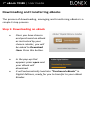
7” eBook 705EB | User Guide Downloading and transferring eBooks The process of downloading, managing and transferring eBooks is a simple 3 step process. Step 1: Downloading an eBook Once you have chosen and purchased an eBook as instructed by your chosen retailer, you will be asked to Download Item. Press this button. In the pop-up that appears press open and your eBook will download. It will automatically load into “Purchased eBooks” in Digital Editions, ready for you to transfer to your eBook Reader.