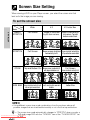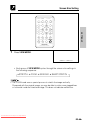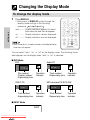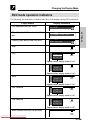
1
DV-L88W
Portable DVD Video Player
DV-L88W
OPERATION MANUAL
OPERATION MANUAL
SHARP CORPORATION
Osaka, Japan
• This Operation Manual explains the operation
for the above model which is available for two
different areas listed below. Please make sure
to carefully read the instructions for your
particular area.
1. Southeast Asia: Region Number 3
2. Australia and New Zealand: Region Number 4
ENGLISH ................
................
GB
C
1–
1–
GB
C
116
116
Printed in Japan
TINS-3973GEZZ
Downloaded From Disc-Player.com Sharp Manuals
NTSC/PAL
GENERAL
INFORMATION
ENGLISH
OPERATION MANUAL
• All mentions of “the Player” refer to the DV-L88W Portable DVD Video Player.
• All mentions of “the Remote” refer to the remote control unit.
• The following table describes the icons used in this Operation Manual.
Icon
Meaning
Icon
Meaning
OTHER
INFORMATION
Quick Start Guide
Tips and Hints for
easier operation
SPECIAL FUNCTIONS
VIDEO
CD
CD
Functions for DVD
Functions for VIDEO
CD
Functions for Audio CD
Be sure to read this Operation Manual carefully before using the Player for the
first time, and keep it on hand for future reference when you experience
operational problems.
OTHER
INFORMATION
Important!
Downloaded From Disc-Player.com Sharp Manuals
SPECIAL
FUNCTIONS
BASIC OPERATIONS
DVD
BASIC
OPERATIONS
GENERAL
INFORMATION
SETTING UP procedure
SETTING UP
About This Manual
OTHER
INFORMATION
SPECIAL
FUNCTIONS
BASIC
OPERATIONS
SETTING UP
GENERAL
INFORMATION
Contents
GENERAL INFORMATION
SAFETY INFORMATION ............................................................................................................... 4
Disc Handling and Maintenance ................................................................................................. 9
Features ...................................................................................................................................... 10
Accessories ................................................................................................................................ 12
Types of Discs that can be played on Your Player .................................................................. 13
Discs recorded by PAL system, Discs recorded by NTSC system and Type of TV connection .......... 17
Quick Start Guide ....................................................................................................................... 18
General Guide ............................................................................................................................ 25
Using Headphones .................................................................................................................... 29
SETTING UP
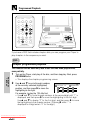
Connecting to External Equipment for Input .......................................................................... 30
Connecting a TV with External Terminals ................................................................................ 31
Connecting to Audio Equipment .............................................................................................. 32
Playing 2 channel audio ........................................................................................................ 32
Playing Dolby Digital (5.1 channel), DTS and MPEG audio ................................................. 34
Using the AC Adapter ................................................................................................................ 35
Using the Battery Pack .............................................................................................................. 36
To install a battery pack in the Player .................................................................................. 36
To charge the battery pack ................................................................................................... 37
Battery Capacity Indicator ........................................................................................................ 40
Turning Power On and Off ......................................................................................................... 41
Using the Remote Control ......................................................................................................... 43
Installing the battery in the Remote ...................................................................................... 43
Operating range of the Remote ............................................................................................ 43
Switching Operation Buttons to Select/Enter Buttons ........................................................... 45
Screen type and button functions ......................................................................................... 45
Operation Modes ........................................................................................................................ 47
Setup ........................................................................................................................................... 48
Initial setup (OSD LANGUAGE SETUP) ............................................................................... 48
TV MODE SETUP setting ..................................................................................................... 49
PARENTAL SETUP setting ................................................................................................... 51
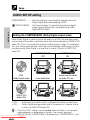
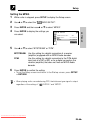
AUDIO SETUP setting .......................................................................................................... 56
DISC LANGUAGE setting ..................................................................................................... 60
OSD LANGUAGE SETUP setting ......................................................................................... 63
Screen Size Setting .................................................................................................................... 64
Changing the Display Mode ...................................................................................................... 66
To change the display mode ................................................................................................. 66
DVD mode operation indicators ............................................................................................ 67
BASIC OPERATIONS
Playing a Disc ............................................................................................................................. 68
To play a disc ........................................................................................................................ 68
To adjust the volume level ..................................................................................................... 70
To stop disc play ................................................................................................................... 70
Downloaded From Disc-Player.com
Sharp
To turn
offManuals
the LCD display ................................................................................................... 70
Playing MP3 Discs ..................................................................................................................... 71
Other Disc Play Features .......................................................................................................... 73
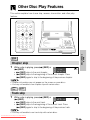
Chapter skip ......................................................................................................................... 73
Track skip .............................................................................................................................. 73
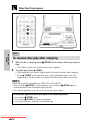
To resume disc play after stopping ....................................................................................... 74
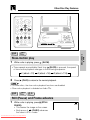
Slow-motion play .................................................................................................................. 75
Still (Pause) and Frame advance .......................................................................................... 75
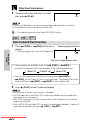
Fast forward/Fast reverse ..................................................................................................... 76
BASIC
OPERATIONS
SPECIAL
FUNCTIONS
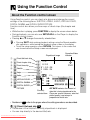
Using the Function Control ....................................................................................................... 77
About the Function control screen ........................................................................................ 77
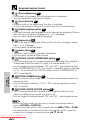
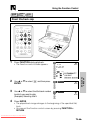
Direct title/track skip ...................................................................................................... 79
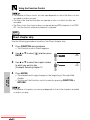
Direct chapter skip ......................................................................................................... 80
Direct time skip .............................................................................................................. 81
Subtitle language setting ............................................................................................... 82
Angle setting .................................................................................................................. 83
Audio setting .................................................................................................................. 84
VIRTUAL DOLBY (QSURROUND) setting .................................................................... 85
DIGITAL GAMMA setting ............................................................................................... 87
DIGITAL SUPER PICTURE setting ............................................................................... 88
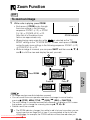
Zoom Function ........................................................................................................................... 89
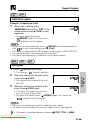
Repeat Playback ........................................................................................................................ 90
Chapter repeat .............................................................................................................. 90
Title repeat .................................................................................................................... 90
Track/Disc repeat ........................................................................................................... 91
A-B repeat ..................................................................................................................... 91
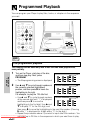
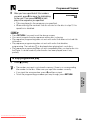
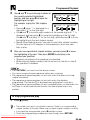
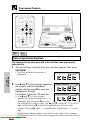
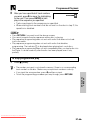
Programmed Playback .............................................................................................................. 92
Title programmed playback ........................................................................................... 92
Chapter programmed playback ..................................................................................... 94
Track programmed playback ......................................................................................... 96
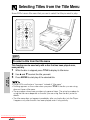
Selecting Titles from the Title Menu ......................................................................................... 98
Setting Play Parameters Using the Disc Menu ........................................................................ 99
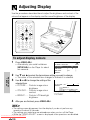
Adjusting Display ..................................................................................................................... 100
To adjust display colours ..................................................................................................... 100
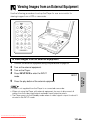
Viewing Images from an External Equipment ....................................................................... 101
SETTING UP
SPECIAL FUNCTIONS
GENERAL
INFORMATION
Contents
OTHER INFORMATION
Downloaded From Disc-Player.com Sharp Manuals
OTHER
INFORMATION
References ................................................................................................................................ 102
Precautions ......................................................................................................................... 102
AC Adapter ......................................................................................................................... 104
Care .................................................................................................................................... 104
Battery Pack (Optional Accessory) ..................................................................................... 104
Troubleshooting ....................................................................................................................... 106
Error Indicators and Warnings ................................................................................................ 110
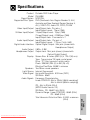
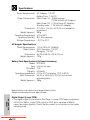
Specifications ........................................................................................................................... 111
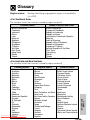
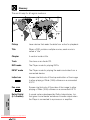
Glossary .................................................................................................................................... 113
GENERAL
INFORMATION
SAFETY INFORMATION
Note:
This Player can be used only where the power supply is AC 110V-240V,
50/60Hz. It cannot be used elsewhere.
CAUTION:
USE OF CONTROLS OR ADJUSTMENTS OR PERFORMANCE OF
PROCEDURES OTHER THAN THOSE SPECIFIED HEREIN MAY
RESULT IN HAZARDOUS RADIATION EXPOSURE.
AS THE LASER BEAM USED IN THIS PLAYER IS HARMFUL TO THE
EYES, DO NOT ATTEMPT TO DISASSEMBLE THE CABINET. REFER
SERVICING TO QUALIFIED PERSONNEL ONLY.
WARNING:
TO REDUCE THE RISK OF FIRE OR ELECTRIC SHOCK, DO NOT
EXPOSE THIS PLAYER TO RAIN OR MOISTURE.
TO REDUCE THE RISK OF FIRE OR ELECTRIC SHOCK, AND
ANNOYING INTERFERENCE, USE THE RECOMMENDED
ACCESSORIES ONLY.
Laser Diode Properties
for DVD disc Play
for CD, Video CD disc Play
Material: AlGaInP
Material: AlGaAs
Wave length: 650 nm
Wave length: 780 nm
Emission duration: Continuous
Emission duration: Continuous
Laser output: Max. 0.7 mW
Laser output: Max. 0.7 mW
Downloaded From Disc-Player.com Sharp Manuals
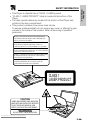
• This Player is classified as a CLASS 1 LASER product.
• “CLASS 1 LASER PRODUCT” label is located at the bottom of the
Player.
• The laser caution labels are located at the bottom of the Player and
printed in the disc compartment.
• This product contains a low power laser device.
To ensure continued safety do not remove any cover or attempt to gain
access to the inside of the product. Refer all servicing to qualified
personnel.
CAUTION : VISIBLE AND INVISIBLE LASER RADIATION WHEN OPEN
AND INTERLOCKS DEFEATED. DO NOT STARE INTO BEAM OR VIEW
DIRECTLY WITH OPTICAL INSTRUMENT.
VARNING : SYNLIG OCH OSYNLIG LASERSTRÅLNING NÄR DENNA DEL
ÄR ÖPPNAD OCH SPÄRRAR ÄR URKOPPLADE. STIRRA EJ IN I
STRÅLEN OCH BETRAKTA EJ STRÅLEN GENOM OPTISKA INSTRUMENT.
VARO : AVATTAESSA JA SUOJALUKITUS OHITETTAESSA OLET ALTTIINA
NÄKYVÄÄ JA NÄKYMÄTÖN LASERSÄTEILYLLE. ÄLÄ TUIJOTA SÄTEESEEN
ÄLÄKÄ KATSO SITÄ OPTISEN LAITTEEN LÄPI.
ADVARSEL : SYNLIG OG USYNLIG LASERSTRÅLNING NÅR DEKSEL ÅPNES
OG SIKKERHEDSLÅS BRYTES.STIRR IKKE INN I STRÅLEN ELLER SE
DIREKTE MED OPTISKE INSTRUMENTER.
ADVARSEL : SYNLIG OG USYNLIG LASERSTRÅLNING VED ÅBNING, NÅR
SIKKERHEDSAFBRYDERE ER UDE AF FUNKTION. SE IKKE IND I
STRÅLENHELLER IKKE MED OPTISKE INSTRUMENTER.
CLASS 1
LASER PRODUCT
CAUTION
VISIBLE AND INVISIBLE LASER RADIATION
WHEN OPEN AND INTERLOCKS DEFEATED.
DO NOT STARE INTO BEAM OR VIEW
DIRECTLY WITH OPTICAL INSTRUMENT.
WARNING
DO NOT DEFEAT THESE INTERLOCKS.
Downloaded From Disc-Player.com Sharp Manuals
GENERAL
INFORMATION
SAFETY INFORMATION
GENERAL
INFORMATION
SAFETY INFORMATION
Power Cord Protection
To avoid any malfunctions of the Player, and to protect against electric
shock, fire or personal injury, please observe the following.
• Hold the plug firmly when connecting or disconnecting the AC power cord.
• Keep the AC power cord away from heating appliances.
• Never put any heavy object on the AC power cord.
• Do not attempt to repair or reconstruct the AC power cord in any way.
Location and Handling
• Do not place your Player in closed spaces or do not cover it to prevent
excessive temperatures inside the unit.
• Do not place the Player in direct sunlight, or near heat sources.
• Keep the Player away from strong magnetic objects.
• Do not insert or drop anything into the Player through the gaps as this
could cause serious damage, possibly resulting in fire.
• Do not place any object containing water or other liquids on the Player.
In the event that liquid should enter the cabinet, unplug the Player
immediately and contact the retailer or service centre approved by
SHARP immediately.
• Do not remove the Player cabinet. Touching parts inside the cabinet
could result in electric shock and/or damage to the Player. For service
and adjustment inside the cabinet, call a qualified dealer or service
centre approved by SHARP.
Nonuse Periods
When the Player is not being used, turn it off.
When left unused for a long period of time, the Player should be
unplugged from the household AC outlet.
No Fingers or Other Objects Inside
Do not place any foreign object in the disc compartment.
Stacking
Place the Player in a horizontal position, and do not place anything heavy
on it.
Downloaded From Disc-Player.com Sharp Manuals
Condensation
Moisture may form on the pickup lens in the following conditions:
• immediately after a heater has been turned on.
• in a steamy or very humid room.
• when the Player is suddenly moved from a cold environment to a warm
one.
If moisture forms inside this Player, it may not operate properly.
In this case, turn on the power and wait about one hour for the moisture to
evaporate.
If there is Noise Interference on the TV While a Broadcast
is being Received
Depending on the reception condition of the TV, interference may appear
on the TV monitor while you watch a TV broadcast and the Player is left on.
This is not a malfunction of the Player or the TV. To watch a TV broadcast,
turn off the Player.
Service
Do not attempt to service this Player yourself. Please refer any service to
the nearest service centre approved by SHARP.
Copyright
For Southeast Asia
Audio-visual material may consist of copyrighted works which must not be
recorded without the authority of the owner of the copyright. Please refer to
relevant laws in your country.
For Australia and New Zealand
Copyright may exist in material you wish to record. Copying such material
without permission of the relevant licensee(s) or owner(s) of the copyright
is prohibited by law. SHARP is not in a position to authorize the recording
of copyright works and nothing in this manual should be read or implied as
giving that authority.
Copy Protection
This Player supports Macrovision copy protection.
On DVD discs that include a copy protection code, if the contents of the
DVD disc are copied using a VCR, the copy protection code prevents the
videotape copy from playing normally.
Downloaded From Disc-Player.com Sharp Manuals
GENERAL
INFORMATION
SAFETY INFORMATION
GENERAL
INFORMATION
SAFETY INFORMATION
Apparatus Claims of U.S.Patent Nos. 4,631,603, 4,577,216, 4,819,098
and 4,907,093 licensed for limited viewing uses only.
This Player incorporates copyright protection technology that is protected
by method claims of certain U.S. patents and other intellectual property
rights owned by Macrovision Corporation and other rights owners. Use of
this copyright protection technology must be authorized by Macrovision
Corporation, and is intended for home and other limited viewing uses
only unless otherwise authorized by Macrovision Corporation. Reverse
engineering or disassembly is prohibited.
Recommended Measures for Optimum Picture Excellence
The Player is a precision device that is constructed using extremely
accurate technology.
Soiling or friction affecting the pickup lens or disc drive can impair the
image quality. At the worst, neither video nor audio will be played back. To
obtain optimum picture quality, the Player should be checked (cleaning and
replacement of some parts) every 1,000 hours. Note that this period varies
depending on the environment (temperature, humidity, dust, etc.) in which
the Player is used. Contact your authorized Sharp supplier for details.
Do not attempt to clean the pickup lens yourself.
Downloaded From Disc-Player.com Sharp Manuals
Disc Handling and Maintenance
GENERAL
INFORMATION
Handling precautions
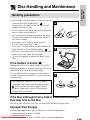
• Hold the disc by the edges so the surface will
not be soiled with fingerprints. ( A )
Fingerprints, dirt and scratches can cause
skipping and distortion.
• Do not write on the label side with a ball-point
pen or other writing utensils.
• Do not use record cleaning sprays, benzine,
thinner, static electricity prevention liquids or
any other solvent.
• Be careful not to drop or bend the disc.
• Do not install more than 1 disc.
• Do not try to close the disc compartment cover
when the disc is not installed properly. ( B )
• Be sure to store the disc in its exclusive case
when not in use. Then store upright.
• Do not stick paper or adhesive labels to the
disc.
A
B
Disc compartment cover
If the Surface is Soiled ( C )
Wipe gently with a soft, damp (water only) cloth.
When wiping discs, always move the cloth from
the centre hole toward the outer edge.
(If you wipe the discs using a circular motion,
circular scratches are likely to occur, which will
cause noise.)
Disc
C
If the playing surface of a disc is soiled or
scratched, the Player may display indicator
on the screen and fail to play the disc
correctly. Wipe any soiling off the playing
surface with a soft cloth.
If the Disc is Brought from a Cold to a Warm Environment,
Dew may form on the Disc
Wipe this dew off with a soft, dry, lint-free cloth before using the disc.
Improper Disc Storage
You can damage discs if you store them in the following places:
• Areas exposed to direct sunlight
Humid or
dusty
Downloaded From •
Disc-Player.com
Sharp
Manuals areas
• Areas directly exposed to a heat outlet or heating appliance
GENERAL
INFORMATION
Features
This Player can play back DVD video discs, VIDEO CDs
and Audio CDs.
• CD-R/CD-RW recorded in MP3 file format can also be played.
8" LCD Screen and Stereo Speakers
• A big 8" LCD screen and built-in stereo speakers provide exciting DVD
viewing, even without connecting to a TV.
2-Way Power Supply
• A 2-way power supply allows operation using the supplied AC adapter for
indoor play, or the battery pack (optional accessory) for outdoor play.
Compact, Lightweight Design
• Your Player is designed to go along just about anywhere.
High-Resolution Images, High-Quality Sound
• A high-resolution 336,960-pixel LCD screen produces images of outstanding
quality.
• DIGITAL GAMMA correction and DIGITAL SUPER PICTURE provide more
realistic image detail.
• VIRTUAL DOLBY (*1QSURROUND) ensures richer sound from two built-in
speakers.
AV input/output, optical digital output jack equipped as
standard
• An optical digital output jack (which doubles as the phones jack) can be
used to output a stream of *2Dolby Digital 5.1 channel audio, *3DTS digital
audio and MPEG audio. Connecting a Dolby Digital/DTS/MPEG Audio digital
surround processor or amplifier to this jack creates an environment of
amazingly powerful surround sound.
• The AV input/output jack can be used to connect a VCR or camcorder to
your Player. Or you can use these jacks to connect to a TV for big-screen
viewing.
Downloaded From Disc-Player.com Sharp Manuals
*1 QSURROUNDTM is a trademark of QSound Labs, Inc.
*2 Manufactured under license from Dolby Laboratories. “Dolby” and the
) are trademarks of Dolby Laboratories. Confidential
double-D symbol(
Unpublished Works. ©1992–1997 Dolby Laboratories, Inc. All rights
reserved.
3
* “DTS” and “DTS Digital Surround” are trademarks of Digital Theater Systems,
Inc.
Downloaded From Disc-Player.com Sharp Manuals
GENERAL
INFORMATION
Features
GENERAL
INFORMATION
Accessories
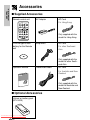
■ Supplied Accessories
Remote control unit
INPUT
OPERATE /DVD
SHIFT
ENTER
SETUP VIDEO ADJ.
ZOOM
AC Cord
For Hong Kong
– VOLUME +
TITLE FUNCTION
MENU
AC Adapter
RETURN
Only supplied with the
model for Hong Kong
PROGRAM DISPLAY VIEW MODE
LCD ON/OFF
DVD VIDEO PLAYER
CR2025 type lithium
battery for the Remote
unit
Earphones
AC Cord
For other Southeast
Asia
Only supplied with the
model for other Southeast Asia
Operation Manual
Video/Audio cable
AC Cord
For Australia and New
Zealand
Only supplied with the
model for Australia and
New Zealand
■ Optional Accessories
Lithium ion battery pack
(BT-L300S)
Downloaded From Disc-Player.com Sharp Manuals
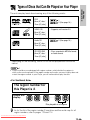
Types of Discs that Can Be Played on Your Player
DVD
[8cm (3") disc/
12cm (5") disc]
1
2 (See page 16.)
VIDEO CD
[8cm (3") disc/
12cm (5") disc]
• Supports until version 2.0.
Audio CD
[8cm (3") disc/
12cm (5") disc]
2 (See page 16.)
CD-R/CD-RW
[8cm (3") disc/
12cm (5") disc]
• Discs recorded in MP3 file format
or Audio format.
* Depending on the recording, some CD-Rs can be played back and some
cannot.
1
• Players and discs are designed with region numbers which dictate the regions in
which a disc can be played. If the region number on the disc you want to play does not
match the region number in your Player, you will not be able to play the disc.
<For Southeast Asia>
The region number for
this Player is 3.
Sample disc
display:
3
13
....
1
3
6
........ 1 2 3
456
ALL
Disc playable in all regions
As for the list of the region number 3 countries and the world map for all
region numbers, refer to pages 113 and 114.
Downloaded From Disc-Player.com Sharp Manuals
GENERAL
INFORMATION
The unit can play back discs bearing any of the following marks:
GENERAL
INFORMATION
Types of Discs that Can Be Played on Your Player
<For Australia and New Zealand>
The region number for
this Player is 4.
Sample disc
display:
4
14
....
1
4
6
........ 1 2 3
456
ALL
Disc playable in all regions
As for the list of the region number 4 countries and the world map for all
region numbers, refer to pages 113 and 114.
<For Southeast Asia>
Discs that Cannot be Played
The following types of discs cannot be played back on this Player. In many
cases, attempting to play back such discs may result in malfunction and/or
damage to this Player.
• Illegally produced, or “pirated”, discs
• Photo CD, DVD-Audio, SACD, DVD-ROM, CD-ROM, DVD-R, DVD-RW,
S-VCD/CVD, or any other disc with marks other than those displayed
above
• Discs with unusual shapes (for example, heart-shaped or hexagonal)
• DVDs with region codes other than region number 3, such as discs
intended for use in the U.S.A. (region 1) or China (region 6)
In addition to the above, when a disc is scratched, soiled, or marked with
fingerprints, this Player may determine that the disc cannot be played, and
on the screen. When this occurs, clean the disc referring to the
display
guidelines on page 9, and then try to load the disc again.
While a disc is playing, minor soiling or scratches on the disc may disrupt
the image (appearing as blocks on the screen). When the image is
disrupted, the Player automatically restores the correct image after 2 or 3
seconds.
Downloaded From Disc-Player.com Sharp Manuals
<For Australia and New Zealand>
Discs that Cannot be Played
The following types of discs cannot be played back on this Player. In many
cases, attempting to play back such discs may result in malfunction and/or
damage to this Player.
• Illegally produced, or “pirated”, discs
• Photo CD, DVD-Audio, SACD, DVD-ROM, CD-ROM, DVD-R, DVD-RW,
S-VCD/CVD, or any other disc with marks other than those displayed
above
• Discs with unusual shapes (for example, heart-shaped or hexagonal)
• DVDs with region codes other than region number 4, such as discs
intended for use in the U.S.A. (region 1) or China (region 6)
In addition to the above, when a disc is scratched, soiled, or marked with
fingerprints, this Player may determine that the disc cannot be played, and
on the screen. When this occurs, clean the disc referring to the
display
guidelines on page 9, and then try to load the disc again.
While a disc is playing, minor soiling or scratches on the disc may disrupt
the image (appearing as blocks on the screen). When the image is
disrupted, the Player automatically restores the correct image after 2 or 3
seconds.
Disc Function or Operation that is Not Available
In the cases listed below, the
or
indicator may appear on the
TV screen, which indicates that the function or operation is not
available.
• When you intend to perform the function or operation on which the
manufacturer restriction is imposed:
The specific functions on some DVDs and VIDEO CDs are determined by
the disc manufacturer. As this Player plays disc data in accordance with
the guidelines of the disc manufacturer, some functions may not be
available on some discs. Be sure to read the documentation provided
with the disc.
• When you intend to perform the functions or operations prohibited for the
current disc:
The types of functions and operations that can be used for a particular
disc vary depending on the features of that disc. Some disc functions and
operations may differ from the descriptions given in this Operation
Manual. In this event, follow the instructions given on the screen.
Downloaded From Disc-Player.com Sharp Manuals
GENERAL
INFORMATION
Types of Discs that Can Be Played on Your Player
GENERAL
INFORMATION
Types of Discs that Can Be Played on Your Player
Icons Used on DVD Discs
Sample Icons
2
1. English
2. Chinese
Number of recorded
audio tracks
2
1. English
2. Chinese
Type of subtitles
recorded
16:9 LB
2
123
456
Screen
Region code
Disc with
aspect ratio multiple camera indicator
recorded
(see pages
angles
13 and 14)
2
• This Player supports 2-channel (L/R) audio and 5.1ch (Multi-channel) MPEG Audio
1/2 (only when the OPTICAL DIGITAL OUT jack is used for connection). It does
not support 7.1 channel MPEG Audio Version 2.0.
3
• When playing back a CD-G (Graphics) or CD EXTRA disc, the audio portion will
be played, but the graphic images will not be shown.
Title, chapter and track
• DVDs are divided into “titles” and “chapters”. If the disc has more than one
movie on it, each movie would be a separate “title”. “chapters”, on the other
hand, are subdivisions of titles.
Example: DVD
Title 1
Chapter 1
Title 2
Chapter 2
Chapter 3
Chapter 1
Chapter 2
• VIDEO CDs and Audio CDs are divided into “tracks”. You can think of a
“track” as one tune on an Audio CD.
Example: VIDEO CD or Audio CD
Track 1
Track 2
Track 3
Track 4
Track 5
• Numbers identify each title, chapter, and track on a disc. Most discs have these
numbers recorded on them, but some do not.
Downloaded From Disc-Player.com Sharp Manuals
<For Southeast Asia>
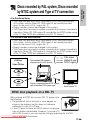
• The Player can play back discs recorded by NTSC using the modified
PAL system, such as Video CD, DVD-region 3, but cannot play back
discs for the use in U.S.A. (region No. 1).
• Region numbers cannot be changed in this system.
• This Player also has a built-in system converter which makes it possible to
view discs (Video CD, DVD-region 3) recorded by the NTSC system using
a PAL TV. (See “NTSC disc playback on a PAL TV” below.)
<For Australia and New Zealand>
• The Player can play back discs recorded by NTSC using the modified
PAL system, such as Video CD, DVD-region 4, but cannot play back
discs for the use in U.S.A. (region No. 1).
• Region numbers cannot be changed in this system.
• This Player also has a built-in system converter which makes it possible to
view discs (Video CD, DVD-region 4) recorded by the NTSC system using
a PAL TV. (See “NTSC disc playback on a PAL TV” below.)
DVD Disc
or
Video CD Disc
PAL/modified PAL image is
displayed on the LCD screen.
(
)
PAL signal
Modified PAL signal
NTSC signal
PAL
NTSC
Signal is converted from NTSC system
type to modified PAL system type.
PAL TV
Multi System TV
NTSC disc playback on a PAL TV
When playing an NTSC disc using a PAL TV, please note
the following:
• The picture will shrink vertically to some degree, as
shown in the diagram, but this does not indicate a
malfunction in your TV or Player.
• If your TV does not have a V-HOLD control, the picture
may roll and be unwatchable. However, if you use a TV
with V-HOLD control, you can stop the rolling by adjusting the V-HOLD
Downloaded From Disc-Player.com
Sharp Manuals
control and
watch the picture.
GENERAL
INFORMATION
Discs recorded by PAL system, Discs recorded
by NTSC system and Type of TV connection
GENERAL
INFORMATION
Quick Start Guide
This Quick Start Guide provides only the most basic information for operating
your Player. See the other sections of this Operation Manual for full details
about operational procedures, precautions, and other information.
• Connections and initial settings ... on pages 30 to 67
• To play a disc ............................... on pages 68 to 100
• To view images from a VCR or
other external equipment ............. on page 101
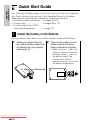
1
Install the battery in the Remote.
Correctly load a lithium battery into the Remote that comes with the Player.
1
Holding the release tab to the
left, slide the battery holder from
the Remote with your fingernail
catching the slit.
slit
Downloaded From Disc-Player.com Sharp Manuals
Release tab
2
Place a lithium battery into the
battery holder and slide the
battery holder back into place.
• Make sure the ± side of the
battery is facing in the same
direction as the ± mark on
the battery holder. The
remote control will not
operate correctly if you insert
the battery upside-down.
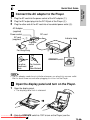
2 Connect the AC adapter to the Player.
1 Plug the AC cord into the power socket of the AC adapter (1).
2 Plug the DC output plug into the DC IN jack of the Player (2).
3 Plug the other end of the AC cord into a household power outlet (3).
AC Adapter
(supplied)
Power socket
AC cord
(supplied)
DC cord
Indicator lamp
1
To power
socket
3
For Hong Kong
2
DC IN jack
OPERATE switch
For other
Southeast
Asia
For Australia
and
New Zealand
• The AC adapter needs time to initialize whenever you plug it into a power outlet.
Wait for about three seconds after plugging it in to turn on the Player.
3 Open the display panel and turn on the Player.
1 Open the display panel.
• The display panel lock is released.
2
Slide the OPERATE switch to “ON” to turn on the Player (see the
illustration in 2 ).
Downloaded From Disc-Player.com Sharp Manuals
GENERAL
INFORMATION
Quick Start Guide
GENERAL
INFORMATION
Quick Start Guide
4
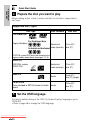
Prepare the disc you want to play.
Before loading a disc, check to make sure that it is one that is supported by
the Player.
Supported Disc Types
Disc Contents
Disc Type
Disc Size
DVD Video Disc
For Southeast Asia
Region Numbers:
3
123
456
ALL
For Australia and New Zealand
4
123
456
Audio and
video (movies)
12cm (5") /
8cm (3")
Audio and
video (movies)
12cm (5") /
8cm (3")
Audio
12cm (5") /
8cm (3") (single)
Audio
12cm (5") /
8cm (3")
ALL
NTSC/PAL system DVD discs that conform to the
region numbers noted above (see pages 13, 14)
VIDEO CD
NTSC/PAL system
VIDEO CDs
Audio CD
CD-R/CD-RW
Discs recorded in MP3 file format or Audio
format
5
Set the OSD language.
The factory default setting of the OSD (On Screen Display) language is set to
“ENGLISH”.
• Refer to page 48 to change the OSD language.
Downloaded From Disc-Player.com Sharp Manuals
6
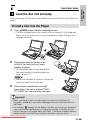
Load the disc and start play.
After confirming that the disc is compatible, you can load it into the Player and
play it.
To load a disc into the Player
1 Press îOPEN to open the disc compartment cover.
• The disc compartment cover moves within a range of 0 to 60 degrees.
Never try to force the cover to move outside this range. Doing so can
damage the cover.
2
Gently press down on the disc in the
vicinity of the centre hole so it seats
properly into place.
• You should be able to hear and feel the
disc seat securely into place when you
press down on it.
• Make sure the label of the disc is facing up
when you load it into the Player.
3
Close the disc compartment cover and
press down at the corner marked “PUSH
TO CLOSE” so it locks securely into place.
Important!
• Make sure the disc seats securely when you load it into the Player. An
improperly seated disc can result in damage to the disc and malfunction of
the Player.
• The indicator
appears on the display if the disc you are using is damaged,
if you load the disc upside-down, or if the region number of the disc you are
using is one that is not supported by this Player. If the above indicator appears,
remove the disc from the Player and take the proper corrective action.
Downloaded From Disc-Player.com Sharp Manuals
GENERAL
INFORMATION
Quick Start Guide
GENERAL
INFORMATION
Quick Start Guide
INPUT
OPERATE /DVD
– VOLUME +
TITLE FUNCTION
MENU
SHIFT
ENTER
SETUP VIDEO ADJ.
ZOOM
RETURN
PROGRAM DISPLAY VIEW MODE
LCD ON/OFF
DVD VIDEO PLAYER
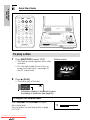
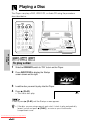
To play a disc
1 Press INPUT/DVD to select “DVD”.
Startup screen
• The Startup screen appears after a few
moments.
• For information about how to turn on
power and load a disc, see page 19
and 21 respectively.
2
Press û (PLAY).
• This starts play of the disc.
1/5
1/3‰
‰‰:‰1:23
DVD
Information display is enabled only when
the display is turned on (see page 66).
To adjust the volume level
Use –VOLUME and VOLUME+ to adjust
the volume level.
You can adjust volume level within a range
of 0 to 20.
Downloaded From Disc-Player.com Sharp Manuals
1‰
INPUT
OPERATE /DVD
– VOLUME +
TITLE FUNCTION
MENU
SHIFT
ENTER
SETUP VIDEO ADJ.
ZOOM
RETURN
PROGRAM DISPLAY VIEW MODE
LCD ON/OFF
DVD VIDEO PLAYER
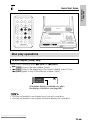
Disc play operations
To use chapter (track) skip
While a disc is playing, press à (SKIP) or À (SKIP).
• à (SKIP) skips to the next chapter (track).
• À (SKIP) skips to the beginning of the current chapter (track). Press
À (SKIP) again to skip to the previous chapter (track).
1/5
2/3‰
‰‰:13:45
DVD
Information display is enabled only when
the display is turned on (see page 66).
• You may not be able to use chapter (track) skip with some discs.
• You may not be able to use chapter information display with some discs.
Downloaded From Disc-Player.com Sharp Manuals
GENERAL
INFORMATION
Quick Start Guide
GENERAL
INFORMATION
Quick Start Guide
To fast forward and fast reverse
1
While a disc is playing, press è (FWD)
or È (REV).
• è (FWD) starts fast forward.
• È (REV) starts fast reverse.
2
To stop a fast forward or fast reverse operation, press û (PLAY).
• This returns to normal play.
1/5
1/3‰
‰‰:‰2:36
1
DVD
• You may not be able to use fast forward and fast reverse with some discs.
• Holding down the Player’s à (SKIP) or À (SKIP) for about two
seconds also performs the search operation.
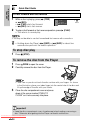
To stop disc play
1 Press Ë (STOP).
To remove the disc from the Player
1 Press îOPEN to open the cover.
2 Carefully remove the disc from the Player.
• Take care so you do not touch the disc surface with your fingers. As shown
in the illustration, place your index finger into the centre hole of the disc and
lift up the edge of the disc with your thumb.
3
Close the disc compartment cover and press
down at the corner marked “PUSH TO
CLOSE” so it locks securely into place.
Important!
• Keep the disc compartment cover closed except when loading or removing a
disc. Otherwise, dust getting into the Player can lead to malfunction.
Downloaded From Disc-Player.com Sharp Manuals
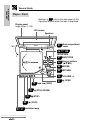
Player - Right side
Numbers in
refer to the main pages in this
Operation Manual where the topic is explained.
S-VIDEO input/output 31
jack
41
OPERATE switch
VIDEO input/output 30, 31
jack (yellow)
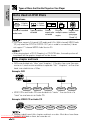
Only PAL signal can be input.
(NTSC signal cannot be input.)
AUDIO (L) 31, 32
input/output jack (white)
AUDIO (R) 31, 32
input/output jack (red)
Player - Rear
35
Downloaded From Disc-Player.com Sharp Manuals
DC IN jack
33, 34
DIGITAL OUT (OPTICAL)/
PHONES jack
GENERAL
INFORMATION
General Guide
GENERAL
INFORMATION
General Guide
Player - Front
Numbers in
refer to the main pages in this
Operation Manual where the topic is explained.
Display panel
angle range: 0°-180°
LCD screen
Speakers
21
180°
Disc compartment
cover
48, 77, 100
SETUP/ADJ.
0°
73
75
70
68
37, 41
Downloaded From Disc-Player.com Sharp Manuals
À / à (SKIP)
â (STILL/PAUSE)
Ë (STOP)
û (PLAY)
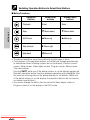
Indicator lamp
47
INPUT/DVD
48
Cursor buttons
('"\ |)
48
ENTER
50
RETURN
70
VOLUME –/+
21
î OPEN
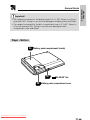
Important!
• The range of movement for the display panel is 0° to 180°. Never try to force it
open past 180°. Doing so can seriously damage the display panel and Player.
• The range of movement for the disc compartment cover is 0° to 60°. Never try
to force it open past 60°. Doing so can seriously damage the disc
compartment cover and Player.
Player - Bottom
36
Battery pack compartment (inside)
39
36
Downloaded From Disc-Player.com Sharp Manuals
“
RELEASE” tab
Battery pack compartment cover
GENERAL
INFORMATION
General Guide
GENERAL
INFORMATION
General Guide
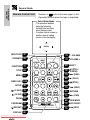
Remote Control Unit
Numbers in
refer to the main pages in this
Operation Manual where the topic is explained.
Select/Enter Mode
• The operation buttons
have the following
Select/Enter functions
when Setup screen,
Function control screen or
another type of setting
screen is on the display.
ENTER
INPUT/DVD 47
OPERATE 42
INPUT
OPERATE /DVD
TITLE FUNCTION
MENU 99
MENU
VIDEO ADJ. 100
SHIFT
ENTER
SETUP VIDEO ADJ.
RETURN
SETUP 48
(F.ADV) 75
(SLOW) 75
ZOOM
PROGRAM DISPLAY VIEW MODE
ZOOM 89
PROGRAM 92
– VOLUME
70
VOLUME +
45
SHIFT
75
â (STILL/
PAUSE)
73
à (SKIP)
68
û (PLAY)
70
Ë (STOP)
73
À (SKIP)
50
RETURN
76
è (FWD)
65
VIEW MODE
70
LCD ON/OFF
76
È (REV)
– VOLUME +
FUNCTION 77
TITLE 98
70
LCD ON/OFF
DVD VIDEO PLAYER
(REPEAT) 90
DISPLAY 66
Downloaded From Disc-Player.com Sharp Manuals
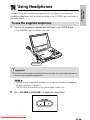
You can connect the earphones supplied with the Player or commercially
available headphones with a stereo mini plug to the PHONES jack and listen to
the audio output.
To use the supplied earphones
1 Connect the earphones supplied with the Player to the PHONES jack.
• The PHONES jack is a stereo mini jack.
PHONES
Important!
• Lower the volume level to minimum before you plug the supplied earphones or
commercially available headphones.
• Connecting the supplied earphones or commercially available headphones
disables the Player’s speakers.
• The PHONES jack doubles as the optical digital output jack.
2
Use – VOLUME and VOLUME + to adjust the volume level.
Downloaded From Disc-Player.com Sharp Manuals
GENERAL
INFORMATION
Using Headphones
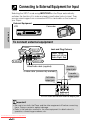
Connecting to External Equipment for Input
SETTING UP
Selecting the INPUT mode using INPUT/DVD on the Player automatically
switches the function of its video and audio input/output jacks to input. Then
you can view images from a connected VCR or camcorder on the screen of
your Player.
External Equipment
Camcorder
VCR
To connect external equipment
VIDEO
Jack and Plug Colours
AUDIO (L)
Video: Yellow
Audio Left: White
Audio Right: Red
AUDIO (R)
S-VIDEO
Video/Audio cable (supplied)
To video
output jack
S-video cable (commercially available)
To S-video
output jack
To audio
output jacks
(Yellow)
or
(Red) (White)
R
S-VIDEO
OUTPUT
VIDEO
OUT
L
AUDIO
OUT
VCR or other device with external output jack
Important!
• Be sure to turn both the Player and the other equipment off before connecting
them. Doing so protects against damage.
• Refer to the operation manual for the other equipment for details about its
operation, connecting procedures, etc.
Downloaded From Disc-Player.com Sharp Manuals
Connecting a TV with External Terminals
You can use a commercially available S-video cable to connect your Player to
a television equipped with an S-video input jack and enjoy viewing high-quality
images on the TV screen.
• Be sure to turn both the Player and the TV equipment off before connecting
them.
VIDEO
Jack and Plug Colours
AUDIO (L)
SETTING UP
Video: Yellow
Audio Left: White
Audio Right: Red
AUDIO (R)
S-VIDEO
To video
input jack
Video/Audio cable (supplied)
S-video cable
(commercially available)
To S-video
input jack
(Yellow)
(Red) (White)
or
R
S-VIDEO
INPUT
VIDEO
IN
To audio
input jacks
L
AUDIO
IN
To TV with external terminals
• If you want to listen to the audio through audio equipment, connect only the
S-video cable or video cable to the TV.
• Play is possible while the display panel of the Player is closed. In this case, no
audio is output from the Player speakers.
• Use the Remote to control the Player while the display panel is closed.
• You should turn off the LCD display to save battery by holding down
LCD ON/OFF for two or more seconds.
To watch Player images on the TV
1
2
Turn on the TV.
3
Turn on the Player and start play.
• See page 68 for details on how to play a disc.
Set the TV to channel where the Player is connected (“AV”, “VIDEO”,
etc.).
Downloaded From Disc-Player.com Sharp Manuals
Connecting to Audio Equipment
Connecting the Player to audio equipment provides normal stereo sound plus
powerful stereo sound enhanced by Dolby Digital (5.1 channel), DTS and
MPEG Audio.
Playing 2 channel audio
SETTING UP
■ Analogue Connection
Jack and Plug Colours
AUDIO (L)
AUDIO (R)
Audio Left: White
Audio Right: Red
(No need to connect)
Audio cable
(supplied)
To amplifier
audio input jacks
(White)
ANALOG INPUT
L
R
(Red)
Amplifier of
stereo system,
etc.
(No need to connect)
• When connecting to audio equipment, we recommend that you set the
“COMPRESSION (Dolby Digital Output Level)” to “OFF” (see page 56).
Downloaded From Disc-Player.com Sharp Manuals
Connecting to Audio Equipment
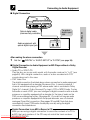
■ Digital Connection
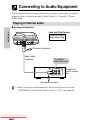
DIGITAL OUT (OPTICAL)
DIGITAL IN
Audio equipment with
optical digital input jack
COAXIAL
OPTICAL
After making the above connection
1
Set the “
DIGITAL” in “AUDIO SETUP” to “D-PCM” (see page 58).
■ Digital Connection to Audio Equipment or MD Player without a Dolby
Digital Decoder
• Audio CD or VIDEO CD
Play the disc as you normally would, with the audio mode set to “L+R” (see
page 84). With a digital connection, audio of a disc recorded with DTS
sounds abnormal in this case.
• DVD Video Disc
The digital connection illustrated above shows connection to audio equipment
that is not equipped with a decoder. Because of this, it cannot produce 5.1
channel sound when playing a DVD whose audio track is recorded in Dolby
Digital (5.1 channel), Dolby Surround (Pro Logic), DTS or MPEG Audio. To play
the audio on such a DVD, you must configure a digital connection with an audio
processor or amplifier equipped with a decoder for the type of audio on the
DVD you are attempting to play. (See page 34.) If you do not have an audio
processor or amplifier equipped with the proper decoder, use a 2-channel
analogue (Down Mix) connection. (See pages 32 and 58.) Note that discs
recorded with Linear PCM audio should play normally using the digital
connection illustrated above.
Digital Connection to an MD to Record a CD
When you are using a digital connection to record the contents of a CD to
an MD, the track numbers of the CD may not match the track numbers
Downloaded From Disc-Player.com
recordedSharp
toManuals
the MD.
SETTING UP
To optical
digital input
jack
Optical digital cable
(commercially available)
Connecting to Audio Equipment
Playing Dolby Digital (5.1 channel), DTS and MPEG audio
SETTING UP
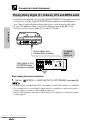
• Connecting an amplifier with a Dolby Digital/DTS/MPEG Audio digital surround
processor or a Dolby Digital/DTS/MPEG Audio digital surround decoder to
your Player’s optical digital jack provides richer, more powerful audio play.
• To use DTS digital surround, use the Disc Menu screen (page 99) or the
Function control screen (page 81) to select DTS audio.
DIGITAL OUT (OPTICAL)
To optical
digital
input jack
Optical digital cable
(commercially available)
DIGITAL IN
Dolby Digital (5.1ch)/
DTS/MPEG Audio
processor or amplifier
COAXIAL
OPTICAL
After making the above connection
1
Set the “
DIGITAL” in “AUDIO SETUP” to “BITSTREAM” (see page 58).
• To play a disc recorded with DTS, you need to use DTS processor or amplifier.
• This connection is not possible if the processor or amplifier to which you want to
connect does not have an optical digital input jack.
• Refer to the operation manual for the processor or amplifier for information about
connecting to it.
Downloaded From Disc-Player.com Sharp Manuals
Using the AC Adapter
AC Adapter
(supplied)
Power socket
AC cord
(supplied)
DC cord
To power
socket
SETTING UP
For Hong Kong
To DC IN jack
DC output plug
To household
power outlet
For other
Southeast
Asia
For Australia
and
New Zealand
Important!
• Make sure that the Player’s power is turned off before attaching or detaching
the AC adapter.
• Use only the AC adapter specified for the Player. Use of another type of AC
adapter can cause damage to and malfunction of the Player.
• The AC adapter may become warm after long-term use. This is normal and
does not indicate malfunction.
• When not in use, be sure to unplug the AC adapter from the power outlet.
• Do not leave the AC adapter in areas subject to high humidity or dust. Such
conditions create the danger of fire and electric shock.
CAUTION
Never use any commercially available electronic transformer.
• Connecting the AC adapter to an electronic voltage transformer of the type widely
available at tourist shops can result in fire, electrical shock or other hazards.
Downloaded From Disc-Player.com Sharp Manuals
Using the Battery Pack
CAUTION
SETTING UP
• Use only SHARP model “BT-L300S” battery pack with this Player.
Use of another battery may present a risk of fire or explosion.
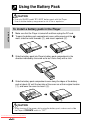
To install a battery pack in the Player
1 Make sure that the Player is turned off and then unplug the DC cord.
2 To open the battery pack compartment cover, while pressing at the
mark, slide the cover forwards (1), and raise it upwards (2).
1
2
3
Slide the battery pack into Player’s battery pack compartment in the
direction indicated by the arrow as far as it locks firmly with a click.
4
Slide the battery pack compartment cover along the ridges of the battery
pack at about 45° until the two tabs of the cover are at their original location
(1), and lower the cover to close it (2).
1
2
CAUTION
• When turning off the power, while using the battery pack, make sure to slide
the Player’s OPERATE switch to “OFF”.
Downloaded From Disc-Player.com Sharp Manuals
Using the Battery Pack
Important!
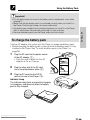
To charge the battery pack
Use the AC adapter that comes with the Player to charge the battery pack.
• Before charging the battery pack, make sure that the battery pack is firmly
installed in the Player. See “To install a battery pack in the Player” on
page 36.
1
2
3
1
Plug the AC cord into the power socket
of the AC adapter (1).
• Push the cord straight into the AC
adapter as far as it can go.
Plug the other end of the AC cord
into a household power outlet (2).
Plug the DC cord into the DC IN
jack on the rear of the Player (3).
2
For other
Southeast Asia
2
2
For Hong Kong
Indicator Lamp
The Indicator lamp lights orange while charging
is in progress, and goes out when the battery
pack is fully charged.
Downloaded From Disc-Player.com Sharp Manuals
For Australia and
New Zealand
3
SETTING UP
• Do not apply excessive force to the battery pack compartment cover when
opening it.
• Make sure that the battery pack is positioned correctly when you install it in
the Player. Positioning it wrong can cause malfunction.
• The battery pack needs time to initialize whenever you install it in the Player.
Wait for about three seconds after attaching it to turn on power.
• Remove the battery pack from the Player when you finish using it.
Using the Battery Pack
SETTING UP
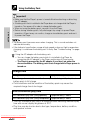
Important!
• Make sure that the Player’s power is turned off before attaching or detaching
the AC adapter.
• A battery pack that is installed in the Player does not charge while the Player is
turned on. Turn power off in order to charge the battery pack.
• When not using the battery pack, remove it from the Player.
• Before storing a battery pack, fully discharge it by using it to power Player
operation. At least every six months, charge a stored battery pack and use it
to power the Player.
• The battery pack becomes warm when charging. This is normal and does not
indicate abnormality.
• If the Indicator lamp flashes orange at high speed or does not light orange when
charging, it could mean the battery pack is faulty. See “Troubleshooting” on page
106.
Using the AC adapter with the battery pack
• You can charge the battery pack while it is installed in the Player by
connecting the AC adapter to the Player and turning off Player power.
• The Player is powered by the AC adapter if you turn it on under the
above conditions. The battery pack is not charged while Player power is
turned on.
Charge time
Approximately 5 hours
Charge time
• The charge time noted here is the time required to bring a fully depleted
battery pack to full charge.
• Cold conditions and the condition of the battery pack may cause the
required charge time to be longer.
DVD continuous play time
DVD continuous play time (Using speakers)
DVD continuous play time (Using headphones)
Approximately 3 hours
Approximately 4 hours
• The DVD continuous play time is a reference value indicating maximum play
time with normal display brightness at 20°C.
• Play time may be shorter due to disc type, temperature, battery condition,
and speaker volume.
Downloaded From Disc-Player.com Sharp Manuals
Using the Battery Pack
To remove the battery pack from the Player
1 Make sure the Player’s power is turned off and then unplug the DC cord.
2
To open the battery pack compartment cover, while pressing at the
mark, slide the cover forwards (1), and raise it upwards (2).
2
3
While holding the “
RELEASE” tab to the right, pull out the battery pack
in the direction indicated by the arrow.
“
4
RELEASE” tab
Slide the battery pack compartment cover into its original location at about
45° (1), and lower the cover to close it (2).
1
2
Important!
• Never remove the battery pack while a playback operation is in progress.
Downloaded From Disc-Player.com Sharp Manuals
SETTING UP
1
SETTING UP
Battery Capacity Indicator
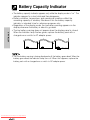
• The battery capacity indicator appears only while the display mode is “on”. The
indicator appears for a short while and then disappears.
• Battery condition, temperature, and operational conditions affect the
remaining capacity of a battery. Because of this the battery capacity
indicator is intended to be for reference purposes only.
• Regardless of the display mode, the low battery warning appears on the
display whenever the battery is about to go dead.
• The low battery warning does not appear when the display panel is closed.
When the Indicator lamp flashes green, replace the battery pack with a
charged one or switch to AC adapter power.
➜
Full charge
➜
Low
Flashing
• The low battery warning is being displayed until the battery goes dead. When the
battery goes dead, the Indicator lamp turns off. When this happens, replace the
battery pack with a charged one or switch to AC adapter power.
Downloaded From Disc-Player.com Sharp Manuals
Turning Power On and Off
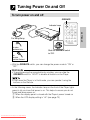
To turn power on and off
OPERATE
Indicator lamp
INPUT
OPERATE /DVD
– VOLUME +
TITLE FUNCTION
MENU
SHIFT
ENTER
For Hong Kong
ZOOM
RETURN
PROGRAM DISPLAY VIEW MODE
LCD ON/OFF
DVD VIDEO PLAYER
For other
Southeast Asia
Slide the OPERATE switch
to “ON”.
For
Australia
and New Zealand
• With the OPERATE switch, you can change the power mode to “ON” or
“OFF”.
Hold mode
• To avoid pressing the wrong button by mistake, you can slide the
OPERATE switch to “HOLD” to disable all buttons on the Player.
• Even when the Player is in Hold mode, you can operate it using the
buttons on the Remote.
• In the following cases, the Indicator lamp on the front of the Player lights
green to let you know that power is on. This helps to ensure you do not
forget and leave power on.
1 When the display panel is closed with the Player’s power turned on
2 When the LCD display setting is “off” (see page 70)
Downloaded From Disc-Player.com Sharp Manuals
SETTING UP
SETUP VIDEO ADJ.
Turning Power On and Off
Standby mode
SETTING UP
The Player goes into the Standby mode (Indicator lamp lights red) in the
following cases.
• When you use the OPERATE button on the Remote to turn off the Player.
Press again the OPERATE button on the Remote to cancel the Standby
mode.
• When you leave the Player in the DVD mode without a disc inside or
playback is stopped for more than 5 minutes.
• When no video signal is received for more than 5 minutes in INPUT mode.
• When not in use, unplug the AC adapter from the power outlet.
• The power supply circuit performs an initialization routine immediately after you
connect the AC adapter or install a battery pack. Because of this, you should wait
for about three seconds before turning on power.
Downloaded From Disc-Player.com Sharp Manuals
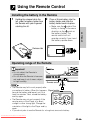
Using the Remote Control
Installing the battery in the Remote
1 Holding the release tab to the
2 Place a lithium battery into the
left, slide the battery holder from
the Remote with your fingernail
catching the slit.
Release tab
Operating range of the Remote
Important!
• Do not subject the Remote to
strong impact.
• Do not allow the Remote to become
wet and keep it out of areas subject
to high humidity.
Remote sensor
15° 15°
5m
• The Remote may fail to work properly after
you replace its battery. When this happens, Signal emitter
remove the battery and leave it out for at
INPUT
least five minutes. Next, reload the battery
– VOLUME +
OPERATE /DVD
and try again.
• The Remote may not work properly if the
TITLE FUNCTION
SHIFT
remote sensor of the Player is in direct
sunlight or other strong light. Change the
orientation of the light or the Player and try
again.
• If you do not plan to use the Remote for a long time, remove its battery.
Downloaded From Disc-Player.com Sharp Manuals
SETTING UP
slit
battery holder and slide the
battery holder back into place.
side of the
• Make sure the
battery is facing in the same
mark on
direction as the
the battery holder. The
remote control will not
operate correctly if you insert
the battery upside-down.
Using the Remote Control
Notes on the Use of the Lithium Battery
SETTING UP
REPLACE BATTERY WITH TOSHIBA OR HITACHI MAXELL TYPE CR2025
ONLY. USE OF ANOTHER BATTERY MAY PRESENT A RISK OF FIRE OR
EXPLOSION.
WARNING
• KEEP THIS BATTERY AWAY FROM CHILDREN. IF SWALLOWED,
CONSULT A PHYSICIAN IMMEDIATELY FOR EMERGENCY TREATMENT.
• BATTERY MAY EXPLODE IF MISTREATED. DO NOT RECHARGE,
DISASSEMBLE OR DISPOSE OF IN FIRE.
• Do not short-circuit, recharge, disassemble, or heat the lithium battery.
• Should the lithium battery leak, wipe the battery compartment and holder
clean, and then insert a new battery.
• The lithium battery will last about six months to one year of normal usage.
• Purchase the Remote’s replaceable lithium battery from your Sharp
authorized service centre.
Downloaded From Disc-Player.com Sharp Manuals
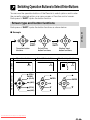
Switching Operation Buttons to Select/Enter Buttons
You can use the operation buttons of the Remote to select options and to enter
the currently selected option on a menu screen or Function control screen.
Each press of SHIFT cycles the button function.
Screen type and button functions
Each press of SHIFT cycles the button functions as shown below.
ENTER
ENTER
ENTER
Press
SHIFT.
Operation button
functions
Remote Control
Screen
Operation buttons
Press
SHIFT.
Select/Enter
button functions
Select/Enter buttons
DVD
DVD
â (STILL/
PAUSE)
Downloaded From Disc-Player.com Sharp Manuals
Number input
button functions
Number input buttons
––
'
û (PLAY)
ENTER
SETTING UP
■ Example
'
ENTER
ENTER
1~
DVD
ENTER
ENTER
à (SKIP)
|
Ë (STOP)
"
À (SKIP)
\
"
Switching Operation Buttons to Select/Enter Buttons
■ Button Functions
SETTING UP
Operation
buttons
Select/Enter
buttons
Number input
buttons
Playback
Enter
Enter
Stop
" Move down
" Move down
Still/Pause
' Move up
' Move up
Skip forward
| Move right
–
Skip back
\ Move left
–
• The above operations are not possible with certain types of discs.
• The functions of the operation buttons on the Remote change automatically
to select/enter when following screens are on the display: Function control
screen, Setup screen, Video adjust screen, Program screen, Menu screen,
Title menu screen.
Pressing SHIFT while one of the above screens is on the display toggles the
Remote’s operation button functions between operation and select/enter. See
the sections covering each of the above displays for full details. (While one
of the above screens is on the display, the operation buttons do not function
as number input buttons.)
• You cannot change the button function while the Video adjust screen or
Program screen is on the display in the DVD mode.
Downloaded From Disc-Player.com Sharp Manuals
Operation Modes
Your Player has two operation modes. Select the one that suits the operation
you want to perform.
• DVD mode for disc playback
• INPUT mode for input from external equipment
INPUT
OPERATE /DVD
– VOLUME +
MENU
SHIFT
ENTER
SETUP VIDEO ADJ.
ZOOM
SETTING UP
TITLE FUNCTION
RETURN
PROGRAM DISPLAY VIEW MODE
LCD ON/OFF
DVD VIDEO PLAYER
To select an operation mode
1 Slide the OPERATE switch to “ON”.
2
Press INPUT/DVD.
• Each press of INPUT/DVD toggles between the DVD mode and the
INPUT mode.
DVD mode
INPUT mode
INPUT
Downloaded From Disc-Player.com Sharp Manuals
Setup
INPUT
OPERATE /DVD
– VOLUME +
TITLE FUNCTION
MENU
SHIFT
ENTER
SETTING UP
SETUP VIDEO ADJ.
ZOOM
RETURN
PROGRAM DISPLAY VIEW MODE
LCD ON/OFF
DVD VIDEO PLAYER
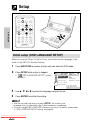
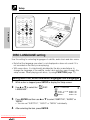
Initial setup (OSD LANGUAGE SETUP)
When you use the Player for the first time, you should set the language to be
used for the OSD (On Screen Display).
1
Press INPUT/DVD a number of times until you enter the DVD mode.
2
Press SETUP while a disc is stopped.
OSD LANGUAGE SETUP” screen
• “
appears.
OSD LANGUAGE
LANGUAGE:
ENGLISH
FRANÇAIS
DEUTSCH
ITALIANO
~
ESPANOL
3
Use ', ", \ or | to select the language you want to use.
4
Press ENTER to confirm the setting.
SETUP
ENGLISH
SVENSKA
NEDERLANDS
• After the second time when you press SETUP, the screen in the
language that you selected in step 3 above appears immediately.
• You can change OSD LANGUAGE whenever you want. For details, please refer
to “OSD LANGUAGE SETUP setting” on page 63.
Downloaded From Disc-Player.com Sharp Manuals
Setup
TV MODE SETUP setting
The following describes how to select the DVD playback display format.
Viewing on the Player Screen or a Wide Screen TV
Using a 16:9 Wide Image
for wide DVD video output.
• A wide image size is output when
playing a wide image disc.
• When playing a 4:3 image disc, you
can select the image size you want
for the Player screen or connected
TV (see page 64).
16 : 9
Viewing on a 4:3 Size TV
Using Pan Scan
Select
4:3
PS
for wide DVD video output.
When playing a wide image disc, the
left and right sides of the image are cut
(pan scan) to output a natural-looking
4:3 size image.
A wide image disc without pan scan
P S
is played back in letter box.
A 4:3 disk is played as-is in 4:3.
Using Letter Box
Select
4:3
LB
Downloaded From Disc-Player.com Sharp Manuals
for wide DVD video output.
When playing a wide image disc, black
bands are inserted at the top and
bottom and a 4:3 size image is output.
A 4:3 disk is played as-is in 4:3.
SETTING UP
Select
Setup
INPUT
OPERATE /DVD
– VOLUME +
TITLE FUNCTION
MENU
SHIFT
ENTER
SETTING UP
SETUP VIDEO ADJ.
ZOOM
RETURN
PROGRAM DISPLAY VIEW MODE
LCD ON/OFF
DVD VIDEO PLAYER
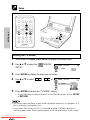
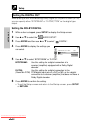
Setting the TV MODE
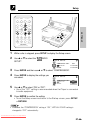
1
While a disc is stopped, press SETUP to display the Setup screen.
2
Use ' or " to select the “
SETUP”.
TV MODE
TV MODE SETUP
TV MODE:
3
Press ENTER to display the items you can select.
4
Use ' or " to select “
“ 16: 9 ”.
4:3
LB
”, “
4:3
PS
” or
TV MODE SETUP
TV MODE:
5
Press ENTER to confirm the “TV MODE” setting.
• To exit the Setup screen and return to the Startup screen, press SETUP
or RETURN.
• You cannot open the Setup screen while a playback operation is in progress. If a
disc is playing, stop playback first.
• If you select 16:9 while a 4:3 TV is connected, playing a 16:9 disc displays a
vertical image screen. (Black bands appear at the top and bottom of the screen.)
Downloaded From Disc-Player.com Sharp Manuals
Setup
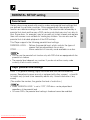
PARENTAL SETUP setting
Parental level
This Player supports the following parental level settings.
PARENTAL LEVEL .... Defines the parental level, which controls the types of
scenes that are played back from a disc.
CODE ....................... Allows selection of a country code available on a disc.
• You can use the parental lock function only with DVDs that are equipped with the
parental lock feature.
• The parental level depends on countries. If you do not set the country code
correctly, it fails to work correctly.
Player parental level settings
Level 1: for general viewing (highly restricted level that can be viewed by
anyone. Sensational scenes are cut or replaced with other scenes.) → Level 8:
for adults only (a level to be viewed by adults only. Unrestricted view of any
scene)
(The smaller the number, the greater the level of restriction.)
• When “PARENTAL LEVEL” is set to “OFF”, DVD discs can be played back
regardless of the parental level.
• On some DVDs, the parental level setting is fixed and cannot be modified.
Downloaded From Disc-Player.com Sharp Manuals
SETTING UP
Certain discs come preset with country codes and parental level settings that
are defined for particular countries. Discs equipped with the parental lock
function are rated according to their content. The rated content allowed by a
parental lock level and the way a DVD can be controlled may vary from disc to
disc. Some discs, for example, may let you edit out violent scenes and replace
them with scenes more suitable for viewing by children. You can also use the
parental lock to disable playback of the DVD entirely.
Setup
Country Codes
This Player supports country codes for the following countries.
SETTING UP
Country Code List
USA
SWEDEN
MALAYSIA
CANADA
HOLLAND
INDONESIA
JAPAN
NORWAY
TAIWAN
GERMANY
DENMARK
PHILIPPINE
FRANCE
FINLAND
AUSTRALIA
UK
BELGIUM
RUSSIA
ITALY
HONG KONG
CHINA
SPAIN
SINGAPORE
–
SWISS
THAILAND
–
Passwords
The parental level setting of the Player can be protected by a password
against unauthorized changes. Once you set a password, it must be input to
perform the following operations.
• To change the parental level
• To temporarily change the parental level during playback
Setting the parental level for the first time
INPUT
OPERATE /DVD
– VOLUME +
SHIFT
TITLE FUNCTION
MENU
ENTER
SETUP VIDEO ADJ.
ZOOM
RETURN
PROGRAM DISPLAY VIEW MODE
LCD ON/OFF
DVD VIDEO PLAYER
Downloaded From Disc-Player.com Sharp Manuals
Setup
1
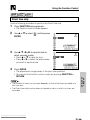
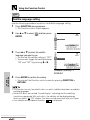
While a disc is stopped, press SETUP to display the Setup screen.
2
Use ' or " to select the “
3
Press ENTER to display the password
specification screen.
PARENTAL SETUP”.
PARENTAL SETUP
PASSWORD:
1
2
3
4
????
5
7
8
OFF
SETTING UP
CHINA
CODE:
4
6
Use ', ", \ or | to enter a 4-digit password.
• Press ' or " to select the number.
• Press \ or | to move to the place where you enter the number.
• When you have finished entering your 4-digit number,
(password verification display) appears.
• You must input the correct password to make any changes in the parental level.
Be sure to keep a separate record of your password somewhere for later
reference.
• Some DVDs allow the viewer to temporarily change the parental level setting to
view the original scenes. When this prompt appears, input the password to view
the original scenes.
5
Make sure
is displayed and then re-enter the numbers you
entered in step 4 using ', ", \ or |.
digit by digit. Make sure all
• When entering numbers, changes to
digits are changed to before performing step 6.
• If you enter the wrong number three times in succession, the normal
screen reappears.
If you forget your password, you can erase your current password by
(F.ADV) four times.
pressing
6
After the screen on the right appears, use
\ or | to change the parental level.
• Level 1: for most restrictive viewing →
Level 8: for adult viewing
(The smaller the number, the greater the
level of restriction.)
• When the parental level is set to “OFF”,
DVDs can be played back regardless of
the parental level.
Downloaded From Disc-Player.com Sharp Manuals
PARENTAL SETUP
SELECT LEVEL
1
2
CODE:
3
4
5
6
7
8
CHINA
Can be changed to
any number between
1 and 8 or OFF.
OFF
SETTING UP
Setup
7
Press " to select “CODE” and then use \ or | to select the desired
country code. (See page 52.)
8
Press ENTER to confirm the setting.
• To exit the Setup screen and return to the Startup screen, press SETUP
or RETURN.
Important!
• Be sure to try playing back the disc to confirm that the parental level setting is
working correctly. If it is not working correctly, try changing the country code.
Changing the parental level
1
While a disc is stopped, press SETUP to display the Setup screen.
2
Use ' or " to select the “
3
Press ENTER to display the password verification screen.
4
Use ', ", \ or | to enter the 4-digit password that was set previously.
• Press ' or " to select the number.
• Press \ or | to move to the place where you enter the number.
PARENTAL SETUP”.
• If you enter the wrong number three times in succession, the normal
screen reappears.
• When entering numbers, changes to digit by digit. Make sure all
before performing step 5.
digits are changed to
If you forget your password, you can erase your current password by
pressing
(F.ADV) four times.
5
After the screen for selecting level appears, use \ or | to change the
parental level.
6
Press " to select “CODE” and then use \ or | to select the desired
country code. (See page 52.)
7
Press ENTER to confirm the setting.
• To exit the Setup screen and return to the Startup screen, press SETUP
or RETURN.
Downloaded From Disc-Player.com Sharp Manuals
Setup
Temporary parental level setting
Some DVDs will prompt the viewer to temporarily change the parental level. In
this event, the following screen appears.
PARENTAL SETUP
TEMPORARY CHANGE?
When this screen appears, use the procedure described below to temporarily
change the level.
1
Use ' or " to select “YES” or “NO”.
YES: Temporarily changes the parental level (sets the level to a value
other than the current setting (page 53)).
NO: Does not change the parental level (maintains the current level
(page 53)).
2
Press ENTER.
PARENTAL SETUP
• If “NO” was selected in step 1, the
––––
PASSWORD:
normal screen reappears.
• If “YES” was selected in step 1, the
screen shown on the right appears.
• To temporarily change the parental level, enter your password (page 53)
and confirm the password. The setting automatically changes
temporarily to the disc-specific parental level.
• When you have completed the temporary change procedure, press
ENTER. (The normal screen reappears.)
• This change only applies while the current disc is being played.
Downloaded From Disc-Player.com Sharp Manuals
SETTING UP
YES
NO
Setup
AUDIO SETUP setting
SETTING UP
COMPRESSION .......... Use this setting for increasing the average volume of
Dolby Digital audio when playing a DVD.
DIGITAL/MPEG .... Use these settings for specifying the type of digital
output when playing a disc recorded using Dolby
Digital/MPEG Audio.
Setting the COMPRESSION (Dolby Digital output level)
When Dolby Digital is used to record the audio on a DVD, the average overall
volume level of the audio is relatively lower than that produced by a VIDEO CD/
Audio CD. This is to provide the widest possible dynamic range. To counteract
this, your Player automatically raises the overall average volume level of a disc
recorded using Dolby Digital to a level that is similar to that of a VIDEO CD/
Audio CD.
COMPRESSION:
COMPRESSION:
OFF
ON
DVD
Dolby Digital audio
• Low audio level
• Audio level the same
as Audio CD, etc.
VIDEO CDs
Audio CDs
• OFF ....... Audio level recorded on disc is played back without modification.
• ON ........ Dolby Digital average audio level is increased so it sounds similar
to that of a VIDEO CD/Audio CD.
• Use of the “OFF” setting is recommended when the Player is connected to
audio equipment or, depending on the disc, the sound is abnormal.
• VIRTUAL DOLBY (QSURROUND) is disabled when “COMPRESSION” is set
Downloaded From Disc-Player.com Sharp Manuals
to “ON”.
Setup
INPUT
OPERATE /DVD
– VOLUME +
TITLE FUNCTION
MENU
SHIFT
ENTER
SETUP VIDEO ADJ.
SETTING UP
ZOOM
RETURN
PROGRAM DISPLAY VIEW MODE
LCD ON/OFF
DVD VIDEO PLAYER
1
While a disc is stopped, press SETUP to display the Setup screen.
2
Use ' or " to select the “
SETUP”.
AUDIO
AUDIO SETUP
ON
COMPRESSION:
DIGITAL:
BITSTREAM
BITSTREAM
MPEG:
3
Press ENTER and then use ' or " to select “COMPRESSION”.
4
Press ENTER to display the settings you
can select.
AUDIO SETUP
COMPRESSION:
DIGITAL:
MPEG:
ON
ON
OFF
5
Use ' or " to select “ON” or “OFF”.
• Use of the “OFF” setting is recommended when the Player is connected
to audio equipment.
6
Press ENTER to confirm the setting.
• To exit the Setup screen and return to the Startup screen, press SETUP
or RETURN.
• Whenever the “COMPRESSION” setting is “ON”, VIRTUAL DOLBY setting is
changed to “OFF” automatically.
Downloaded From Disc-Player.com Sharp Manuals
Setup
Setting the DIGITAL OUT
When playing a disc recorded using Dolby Digital (5.1ch)/MPEG Audio (5.1ch),
you can specify either “BITSTREAM” or “D-PCM”/“PCM” as the digital type
output.
SETTING UP
Setting the DOLBY DIGITAL
1
While a disc is stopped, press SETUP to display the Setup screen.
2
Use ' or " to select the “
3
Press ENTER and then use ' or " to select “
4
Press ENTER to display the settings you
can select.
AUDIO SETUP”.
DIGITAL”.
AUDIO SETUP
ON
COMPRESSION:
DIGITAL:
BITSTREAM
MPEG:
BITSTREAM
D-PCM
5
Use ' or " to select “BITSTREAM” or “D-PCM”.
BITSTREAM:
Use this setting for a digital connection of a
receiver (amplifier) equipped with a Dolby Digital
decoder.
D-PCM:
Use this setting for a digital connection to the
(Down Mix PCM) PCM digital input jack of a DAT or MD, or for a digital
connection to a receiver (amplifier) that does not have a
Dolby Digital decoder.
6
Press ENTER to confirm the setting.
• To exit the Setup screen and return to the Startup screen, press SETUP
or RETURN.
Downloaded From Disc-Player.com Sharp Manuals
Setup
Setting the MPEG
1
While a disc is stopped, press SETUP to display the Setup screen.
2
Use ' or " to select the “
3
Press ENTER and then use ' or " to select “MPEG”.
4
Press ENTER to display the settings you
can select.
AUDIO SETUP”.
COMPRESSION:
ON
DIGITAL:
BITSTREAM
MPEG:
BITSTREAM
BITSTREAM
PCM
5
Use ' or " to select “BITSTREAM” or “PCM”.
BITSTREAM:
PCM:
6
Use this setting for a digital connection of a receiver
(amplifier) equipped with an MPEG Audio decoder.
Use this setting for a digital connection to the PCM digital
input jack of a DAT or MD, or for a digital connection to a
receiver (amplifier) that does not have an MPEG Audio
decoder.
Press ENTER to confirm the setting.
• To exit the Setup screen and return to the Startup screen, press SETUP
or RETURN.
• When playing a disc recorded using DTS, the bitstream type signal is output
regardless of the setting of “
DIGITAL” and “MPEG”.
Downloaded From Disc-Player.com Sharp Manuals
SETTING UP
AUDIO SETUP
Setup
INPUT
OPERATE /DVD
– VOLUME +
TITLE FUNCTION
MENU
SHIFT
ENTER
SETTING UP
SETUP VIDEO ADJ.
ZOOM
RETURN
PROGRAM DISPLAY VIEW MODE
LCD ON/OFF
DVD VIDEO PLAYER
DISC LANGUAGE setting
Use this setting for selecting languages of subtitle, audio track and disc menu.
• Note that the language you select is not displayed or does not sound if it is
not recorded on the disc you are playing.
• With some discs, it is intentionally disabled by the disc manufacturer to
change the language of the subtitle, audio track and disc menu through this
setup screen. When playing such discs, try using FUNCTION (page 77).
Setting SUBTITLE, AUDIO and MENU languages from 8 languages
1
While a disc is stopped, press SETUP to display the Setup screen.
2
Use ' or " to select the “
LANGUAGE”.
DISC
DISC LANGUAGE
SUB TITLE:ENGLISH
AUDIO:
ENGLISH
MENU:
ENGLISH
3
Press ENTER and then use ' or " to select “SUBTITLE”, “AUDIO” or
“MENU”.
• You can set “SUBTITLE”, “AUDIO” or “MENU” individually.
4
After selecting the item, press ENTER.
Downloaded From Disc-Player.com Sharp Manuals
Setup
5
Select the language you want to use with
(Example) Selecting
', ", \ or |.
“FRENCH”
• If you want to use any languages
DISC LANGUAGE
SUB TITLE:ENGLISH
which are not on OSD, proceed to step
ENGLISH
CHINESE
1 under “Selecting a language from
FRENCH
SWEDISH
OTHER” below.
GERMAN
DUTCH
ITALIAN
SPANISH
OTHER
(––)
SETTING UP
6
Press ENTER to confirm the setting.
7
Repeat steps 3 to 6 above to go on with other “DISC LANGUAGE” settings
in succession.
• To exit the Setup screen and return to the Startup screen, press SETUP
or RETURN.
Selecting a language from OTHER
1
In step 5 above, select “OTHER” with ', ",
\ and |, then press ENTER to set the
“OTHER” input item (two letters).
2
Example: To select “AF” (Afrikaans)
Use ' or " to select “A” as the first letter, use \ or | to move to the
second place, then use ' or " to select “F”.
DISC LANGUAGE
SUB TITLE:ENGLISH
ENGLISH
CHINESE
FRENCH
SWEDISH
GERMAN
DUTCH
ITALIAN
OTHER
SPANISH
(AA)
• When “A” is selected for the first letter, only letters to the right of codes beginning
with “A” can be selected as the second letter. Refer to the codes beginning with
“A” on “Language code list for Disc Language” (see page 62).
Example: First letter-A
Second letter-A, B, F, M, R, S, Y or Z
OTHER
(AA)
3
OTHER
(AF)
Press ENTER to confirm the setting.
• To exit the Setup screen and return to the Startup screen, press SETUP
or RETURN.
Downloaded From Disc-Player.com Sharp Manuals
Setup
SETTING UP
Language code list for Disc Language
Code
Language Name
Code
Language Name
Code
Language Name
Code
Language Name
AA
Afar
FY
Frisian
MG
Malagasy
SL
Slovenian
AB
Abkhazian
GA
Irish
MI
Maori
SM
Samoan
AF
Afrikaans
GD
Scots Gaelic
MK
Macedonian
SN
Shona
AM
Ameharic
GL
Galician
ML
Malayalam
SO
Somali
AR
Arabic
GN
Guarani
MN
Mongolian
SQ
Albanian
AS
Assamese
GU
Gujarati
MO
Moldavian
SR
Serbian
AY
Aymara
HA
Hausa
MR
Marathi
SS
Siswat
AZ
Azerbaijani
HI
Hindi
MS
Malay
ST
Sesotho
BA
Bashkir
HR
Croatian
MT
Maltese
SU
Sundanese
BE
Byelorussian
HU
Hungarian
MY
Burmese
SV
Swedish
BG
Bulgarian
HY
Armenian
NA
Nauru
SW
Swahili
BH
Bihari
IA
Interlingua
NE
Nepali
TA
Tamil
BI
Bislama
IE
Interlingue
NL
Dutch
TE
Telugu
BN
Bengali;
IK
Inupiak
NO
Norwegian
TG
Tajik
Bangla
IN
Indonesian
OC
Occitan
TH
Thai
BO
Tibetan
IS
Icelandic
OM
(Afan) Oromo
TI
Tigrinya
BR
Breton
IT
Italian
OR
Oriya
TK
Turkmen
CA
Catalan
IW
Hebrew
PA
Panjabi
TL
Tagalog
CO
Corsican
JA
Japanese
PL
Polish
TN
Setswana
CS
Czech
JI
Yiddish
PS
Pashto, Pushto
TO
Tonga
CY
Welsh
JW
Javanese
PT
Portuguese
TR
Turkish
DA
Danish
KA
Georgian
QU
Quechua
TS
Tsonga
DE
German
KK
Kazakh
RM
Rhaeto-
TT
Tatar
DZ
Bhutani
KL
Greenlandic
Romance
TW
Twi
EL
Greek
KM
Cambodian
RN
Kirundi
UK
Ukrainian
EN
English
KN
Kannada
RO
Romanian
UR
Urdu
EO
Esperanto
KO
Korean
RU
Russian
UZ
Uzbek
ES
Spanish
KS
Kashmiri
RW
Kinyarwanda
VI
Vietnamese
ET
Estonian
KU
Kurdish
SA
Sanskrit
VO
Volapük
EU
Basque
KY
Kirghiz
SD
Sindhi
WO
Wolof
FA
Persian
LA
Latin
SG
Sangho
XH
Xhosa
FI
Finnish
LN
Lingala
SH
Serbo-
YO
Yoruba
FJ
Fiji
LO
Laothian
Croatian
ZH
Chinese
FO
Faroese
LT
Lithuanian
SI
Singhalese
ZU
Zulu
LV
Latvian, Lettish
SK
Slovak
Downloaded From Disc-Player.com
Sharp Manuals
FR
French
Setup
INPUT
OPERATE /DVD
– VOLUME +
TITLE FUNCTION
MENU
SHIFT
ENTER
SETUP VIDEO ADJ.
SETTING UP
ZOOM
RETURN
PROGRAM DISPLAY VIEW MODE
LCD ON/OFF
DVD VIDEO PLAYER
OSD LANGUAGE SETUP setting
1
While a disc is stopped, press SETUP to display the Setup screen.
2
Use ' or " to select the “
3
Press ENTER to display the languages you
can select.
OSD LANGUAGE SETUP”.
OSD LANGUAGE
LANGUAGE:
ENGLISH
FRANÇAIS
DEUTSCH
ITALIANO
~
ESPANOL
SETUP
ENGLISH
SVENSKA
NEDERLANDS
4
Use ', ", \ or | to select the language you want to use.
5
Press ENTER to confirm the setting.
• To exit the Setup screen and return to the Startup screen, press SETUP
or RETURN.
Downloaded From Disc-Player.com Sharp Manuals
Screen Size Setting
When viewing a DVD on your Player screen, you select the screen size that
best suits the image you are viewing.
To set the screen size
Wide
4:3
4:3 Letter Box
SMART
STRETCH
Full Screen
Image is stretched
by its four corners.
Image is stretched by its
four corners. Top and
bottom remain black.
STRETCH
Full Screen
Mode
SETTING UP
Software
Type
ZOOM
Above screen stretched Screen stretched horizontally to
fit. Top and bottom remain black.
horizontally to fit.
Full Screen
Top and Bottom Cut Above screen resided to fit,
with top and bottom cut. Screen stretched vertically to fit.
SIDE BAR Screen stretched vertically to fit. Left and right remain
Left and right remain black.
black
Letter Box
• Using different screen size mode combinations from those shown above will
produce images that are stretched horizontally or cut off at the top and bottom.
• The screen size mode automatically changes to “STRETCH” when you play a
16:9 wide image DVD with the “TV MODE” item of the “TV MODE SETUP” set
Downloaded From Disc-Player.com Sharp Manuals
to 16:9.
Screen Size Setting
INPUT
OPERATE /DVD
– VOLUME +
TITLE FUNCTION
MENU
SHIFT
ENTER
SETUP VIDEO ADJ.
SETTING UP
ZOOM
RETURN
PROGRAM DISPLAY VIEW MODE
LCD ON/OFF
DVD VIDEO PLAYER
1
Press VIEW MODE.
SMAR T
S TRE TCH
• Each press of VIEW MODE cycles through the screen size settings in
the following sequence:
STRETCH
ZOOM
SIDE BAR
SMART STRETCH
• The ZOOM mode uses a special process to stretch the image vertically.
Compared with the original image, you may be able to notice some jagged lines
or horizontal inside the stretched image. This does not indicate malfunction.
Downloaded From Disc-Player.com Sharp Manuals
Changing the Display Mode
SETTING UP
To change the display mode
1 Press DISPLAY.
• Each press of DISPLAY cycles through the
display mode settings in the following
sequence:
on off auto
auto ......... Display indicators appear for about
three seconds and then disappear.
INPUT
OPERATE /DVD
– VOLUME +
TITLE FUNCTION
MENU
SHIFT
ENTER
SETUP VIDEO ADJ.
RETURN
on ............ Display indicators remain displayed.
off ............ Display indicators are not displayed.
ZOOM
• With some discs, chapter numbers and elapsed play
time may not appear.
PROGRAM DISPLAY VIEW MODE
LCD ON/OFF
DVD VIDEO PLAYER
You can select “auto”, “on”, or “off” as the display mode. The following shows
what appears on the display when “auto” or “on” is selected.
■ DVD Mode
DVD
2/5
8/3‰
‰1:23:4‰
Title number/
Chapter number/
Elapsed play time
Audio CD
DVD
Operation
indicator
VIDEO CD
2/5
23:‰‰
Track number/
Elapsed play time
Track number/
Elapsed play time
CD
Operation
indicator
MP3 recorded CD-R/CD-RW
VCD
Operation
indicator
■ INPUT Mode
INPUT
Downloaded From Disc-Player.com Sharp Manuals
2/1‰
‰5:‰‰
2/5
23:‰‰
Track number/
Elapsed play time
MP3
Operation
indicator
Changing the Display Mode
DVD mode operation indicators
The following are examples of display indicators that appear during DVD playback.
Player Status
Play attempted without a disc
Loading (data being read from disc)
2/5
NO DISC
‰1:23:4‰
SETTING UP
Play attempted with a non-compatible
disc
Display Indicators
2/5
WRONG DISC TYPE
2/5
NOW LOADING...
Stop
DVD
Play
1/5
8/3‰
‰1:23:4‰
DVD
Appears when display mode is “on”.
Pause
1/5
8/3‰
‰1:23:4‰
DVD
Appears when display mode is “on”.
Slow
1/5
8/3‰
‰1:23:4‰
1
DVD
Appears when display mode is “on”.
Fast Forward
1/5
8/3‰
‰1:23:4‰
1
DVD
Appears when display mode is “on”.
Fast Reverse
1/5
8/3‰
‰1:23:4‰
1
DVD
Appears when display mode is “on”.
When resume function can be used
Downloaded From Disc-Player.com Sharp Manuals
DVD
RESUME
Playing a Disc
This Player can play a DVD, VIDEO CD, or Audio CD using the procedure
described below.
INPUT
OPERATE /DVD
– VOLUME +
TITLE FUNCTION
MENU
SHIFT
ENTER
SETUP VIDEO ADJ.
ZOOM
RETURN
PROGRAM DISPLAY VIEW MODE
LCD ON/OFF
BASIC
OPERATIONS
DVD VIDEO PLAYER
DVD
VIDEO
CD
CD
To play a disc
1 Slide the OPERATE switch to “ON” to turn on the Player.
2
Press INPUT/DVD to display the Startup
screen shown on the right.
3
Load the disc you want to play into the Player.
4
Press û (PLAY).
• This starts disc play.
DVD
• Wait to press û (PLAY) until the Startup screen appears.
• If the disc you are using supports auto start, it starts to play automatically
(even if you do not press û (PLAY)), as soon as you close the disc
compartment cover.
Downloaded From Disc-Player.com Sharp Manuals
Playing a Disc
CAUTION
• Never try to open the disc compartment cover and look inside the disc
compartment at the laser while a disc is playing. Doing so creates the
danger of serious eye damage.
• Do not leave the Player on your lap for a long time. Heat generated
by the Player can cause low-temperature burning of the skin over
time.
•
•
•
•
Playing VIDEO CDs with Playback Control (PBC)
• Pressing û (PLAY) begins PBC playback. Time display is not shown for
some discs.
• If you specify the track number to be played (with playback stopped) and
press û (PLAY), normal playback (not PBC playback) begins.
Downloaded From Disc-Player.com Sharp Manuals
BASIC
OPERATIONS
Important!
Do not press down on the disc compartment cover while a disc is playing.
Keep the disc compartment cover closed except when loading or
removing a disc. Otherwise, dust getting into the Player can lead to
malfunction.
The battery pack becomes warm while it is being used for a long time.
This does not indicate malfunction.
ø WRONG DISC TYPE” appears on the display if the disc
The indicator “ø
you are using is damaged, if you load the disc upside-down, or if the region
number of the disc you are using is one that is not supported by this Player. If
the above indicator appears, remove the disc from the Player and take the
proper corrective action.
Playing a Disc
To adjust the volume level
Press – VOLUME or VOLUME + to adjust the
volume level of the audio within a range of 0 to 20.
• A safety feature automatically turns off Player
power if you set the volume level too high while
playing certain types of discs. If this happens,
lower the volume level and restart play.
To stop disc play
1 Press Ë (STOP).
DVD
RESUME
BASIC
OPERATIONS
Standby mode
• If you do not perform any operation for about five minutes after stopping disc
play, the Player goes into the Standby mode.
To turn off the LCD display
1 Hold down LCD ON/OFF for two or more seconds.
• Holding down LCD ON/OFF turns on/off the LCD display.
• When LCD display is turned off, the Player’s Indicator lamp lights green.
Downloaded From Disc-Player.com Sharp Manuals
Playing MP3 Discs
This Player is able to play CD-R or CD-RW discs recorded in MP3 format.
Regarding MP3 discs
• MP3 files are audio data compressed in MPEG1 Audio layer 3 file format.
“MP3 files” have “.mp3” as extensions.
• Some files that have “.mp3” extensions or files that have not been recorded
in MP3 format will produce noise or cannot be played.
• Some discs cannot be played depending on the actual CD-R/CD-RW disc
condition, the recording equipment and the disc’s recording.
• Data on the CD-R or CD-RW disc, which has not been recorded in MP3
format, audio tracks or has been recorded in other file formats except MP3,
cannot be played.
Playing MP3 discs
CAUTION
• It is impossible to make a digital copy by using a digital audio recording
device which outputs sound from discs in MP3 format through the optical
digital output jack of this Player.
Downloaded From Disc-Player.com Sharp Manuals
BASIC
OPERATIONS
• Discs that have more than 1000 folders and files in total cannot be played.
• Some MP3 files are not played in the order they were recorded.
• The number of layers, which can be recognized, including files and folders,
is maximum 8.
• Only the first session of a multi-session disc can be played.
• When both audio tracks and MP3 files are recorded on a disc, audio tracks
will be played.
• Depending on the folder tree, reading MP3 files can take time.
(The more files there are, the longer the reading time. Therefore it is
recommended to lower the number of folders before recording.)
• Folder or track (file) names are limited to 8 characters. The folder / file
names are displayed in half-size, capital letters or half-size numbers. Folder
or track (file) names that go over 8 characters will be abbreviated, and some
names may not be displayed depending on the characters or symbols used.
• The playing time may not be correctly displayed during MP3 file playback.
• It is recommended to record data at a lower speed as data recorded at fast
speed can produce noise and may not be able to be played.
Playing MP3 Discs
INPUT
OPERATE /DVD
– VOLUME +
TITLE FUNCTION
MENU
SHIFT
ENTER
SETUP VIDEO ADJ.
ZOOM
RETURN
PROGRAM DISPLAY VIEW MODE
LCD ON/OFF
BASIC
OPERATIONS
DVD VIDEO PLAYER
To play MP3 discs
1 Slide the OPERATE switch to “ON”.
2
Press INPUT/DVD to enter the DVD mode.
3
Load the MP3 recorded CD-R or the CD-RW.
• The folder selection screen will be displayed as well as the “SELECT/
ENTER button”.
4
Select the folder you want to play by using
', ", \ or | and press ENTER.
• The file (music title) in the folder is
displayed on the file selection screen.
5
Select the file (music title) you want to play
by using ', ", \ or | and press ENTER.
• The chosen file (music title) will be
played in sequence.
• When playing starts, the operation
button will be displayed.
1/7
1
3
TRACK‰1
TRACK‰3
3/7
‰‰:‰4
1
3
TRACK‰1
TRACK‰3
While the MP3 disc is playing
• Fast Forward, Rewind and Time Search are disabled.
• Programmed playback is disabled.
Downloaded From Disc-Player.com
Sharp Manuals
• It is possible
to repeat one track or the entire disc.
MP3
:SHARP1
2
TRACK‰2
4
TRACK‰4
MP3
:SHARP1
2
TRACK‰2
4
TRACK‰4
Other Disc Play Features
This section explains how to use skip, resume, slow motion, and other play
features.
INPUT
OPERATE /DVD
– VOLUME +
TITLE FUNCTION
SHIFT
ENTER
MENU
SETUP VIDEO ADJ.
ZOOM
RETURN
PROGRAM DISPLAY VIEW MODE
LCD ON/OFF
DVD VIDEO PLAYER
BASIC
OPERATIONS
DVD
Chapter skip
1 While a disc is playing, press à (SKIP) or
1/5
1/3‰
À (SKIP).
‰‰:‰1:23
• à (SKIP) skips to the next chapter.
• À (SKIP) skips to the beginning of the current chapter. Press
À (SKIP) again to skip to the beginning of the previous chapter.
DVD
• Chapter information may not appear on the screen on some discs.
• You may not be able to use chapter skip with certain discs.
VIDEO
CD
CD
Track skip
1 While a disc is playing, press à (SKIP) or
1/5
‰‰:‰1:23
À (SKIP).
• à (SKIP) skips to the next track.
• À (SKIP) skips to the beginning of the current track. Press
À (SKIP) again to skip to the beginning of the previous track.
• You may not be able to use track skip with certain discs.
Downloaded From Disc-Player.com Sharp Manuals
VCD
Other Disc Play Features
INPUT
OPERATE /DVD
– VOLUME +
TITLE FUNCTION
MENU
SHIFT
ENTER
SETUP VIDEO ADJ.
ZOOM
RETURN
PROGRAM DISPLAY VIEW MODE
LCD ON/OFF
BASIC
OPERATIONS
DVD VIDEO PLAYER
DVD
To resume disc play after stopping
1 While the disc is playing, press Ë (STOP) at the location where you want to
stop.
• The Player stores the location where you stopped.
2
To restart play, press û (PLAY).
• Play resumes from a point slightly before the point where it was stopped.
• Press û (PLAY) to resume disc play, if auto-playback starts from the
beginning of the disc when you reload the same disc after removing it.
• Resume playback is disabled on VIDEO CD and Audio CD.
• After you press Ë (STOP) to stop playback, you can press Ë (STOP) again to
resume playback from the beginning of the disc.
• This resume operation may not work with certain types of discs.
This resume operation does not work in the following cases.
• If you press Ë (STOP) twice.
• If you press Ë (STOP) during auto-playback.
• If you remove a disc and then load another one.
Downloaded From Disc-Player.com Sharp Manuals
Other Disc Play Features
INPUT
OPERATE /DVD
– VOLUME +
TITLE FUNCTION
MENU
SHIFT
ENTER
SETUP VIDEO ADJ.
ZOOM
RETURN
PROGRAM DISPLAY VIEW MODE
LCD ON/OFF
DVD VIDEO PLAYER
VIDEO
CD
Slow-motion play
1 While a disc is playing, press
BASIC
OPERATIONS
DVD
(SLOW).
• Three speeds are available. Each time
(SLOW) is pressed, the speed
of slow-motion playback changes in the following sequence:
1 (about ×1/2)
2
2 (about ×1/8)
3 (about ×1/16)
Press û (PLAY) to return to the normal playback.
• On some discs, the slow-motion playback functions are disabled.
• Slow-motion playback is disabled on Audio CDs.
DVD
VIDEO
CD
CD
Still (Pause) and Frame advance
1 While a disc is playing, press â (STILL/
PAUSE).
• This freezes the image on the screen.
(F.ADV) advances
• Each press of
the frame in STILL mode.
Downloaded From Disc-Player.com Sharp Manuals
DVD
Other Disc Play Features
2
To cancel still picture and return to normal
play, press û (PLAY).
DVD
• You may not be able to use still picture and frame advance with some discs.
• Frame advance cannot be used with Audio CDs.
• This operation performs the Audio CD PAUSE function.
DVD
VIDEO
CD
CD
Fast forward/Fast reverse
1 Press è (FWD) or È (REV) while a disc is
Scanning speed selection
BASIC
OPERATIONS
playing.
• The disc begins fast scan at ×2 speed (1).
1
DVD
Fast scan image appears here.
• Three speeds are available. Each time è (FWD) or È (REV) is
pressed, the speed of fast scan changes in the following sequence:
1 (about ×2)
2 (about ×8)
3 (about ×32)
• You can also operate this function by holding down à (SKIP) or
À (SKIP) on the Player for two or more seconds. The speed of fast scan
using the Player’s à (SKIP) or À (SKIP) is only 2 (about ×8).
2
Press û (PLAY) to return to normal playback.
• On some discs, the fast scan function is disabled.
• On DVD video discs and VIDEO CDs, audio and subtitles are not played back
during the fast scan playback.
• With a DVD video disc, you cannot search past a title. Playback starts from the
beginning of the title.
• With a VIDEO CD and Audio CD, the search speed toggles between 1 (about ×2)
and 2 (about ×8) when you press è (FWD) or È (REV).
Downloaded From Disc-Player.com Sharp Manuals
Using the Function Control
About the Function control screen
Using Function control, you can check at a glance and change the current
settings of the following items: SUBTITLE, ANGLE, AUDIO, VIRTUAL DOLBY,
DIGITAL GAMMA and DIGITAL SUPER PICTURE.
Function control also allows you three ways of direct skips (title,chapter and
time).
• While the disc is playing, press FUNCTION to display the screen shown below.
• During playback, you can also use SETUP/ADJ. on the Player to display the
Function control screen.
• Pressing ' or " changes the currently selected item.
• Pressing SHIFT while making playback settings using the Remote enables
disc operations, while leaving the playback setup screen on the display.
• To exit the setup operation, press RETURN. This returns to the screen that
was shown before the Setup screen was displayed.
Played back image
Direct title/track skip
2
Direct chapter skip
3
Direct time skip
4
Subtitle
5
Angle
6
Audio
7
VIRTUAL DOLBY
8
DIGITAL GAMMA
9
DIGITAL SUPER
PICTURE
2/5
8/3‰
‰1:3‰:‰8
2 ENGLISH
1
5..
1ch
1
ON
ON
ON
Currently
selected item
• Numbers in
BIT RATE indicates the amount of
data that is being transferred to the
Player per second. However, note that
picture quality is not always in
proportion to the bit rate.
refer to the pages where the setting procedures are described.
1
Direct title/track skip 79
• The number of the title/track currently played back is displayed.
• You can skip directly to the desired title/track.
Downloaded From Disc-Player.com Sharp Manuals
DVD
SPECIAL
FUNCTIONS
1
Operation Status
indicator
Using the Function Control
2
Direct chapter skip 80
• The number of the chapter currently played back is displayed.
• You can skip directly to the desired chapter.
3
Direct time skip 81
• Elapsed time from the beginning of the disc is displayed.
• You can skip directly to the point from which you want to start playback.
4
Subtitle language setting 82
• The subtitle number and language currently selected are displayed. (When a
disc with only one subtitle is played back, “xx” is displayed.)
• You can select the desired subtitle language.
5
Angle setting 83
• The current angle is displayed. (When a disc with only one angle is played
back, “xx” is displayed.)
• You can select the desired angle.
6
Audio setting 84
• The type of audio currently selected is displayed.
• You can select the desired type of audio.
SPECIAL
FUNCTIONS
7
VIRTUAL DOLBY (QSURROUND) setting 85
• This function provides rich surround sound by downmixing Dolby Digital 5.1
channel and Dolby Surround (Pro Logic) to 2-channel audio or TV.
• You can toggle the setting between “ON” and “OFF”, and change the level.
• When “COMPRESSION” is “ON”, this function is disabled, which is indicated
by “xx”. To use the VIRTUAL DOLBY function, set the “COMPRESSION” to
“OFF” (see page 56).
8
DIGITAL GAMMA setting 87
• You can make the entire image easier to see by brightening the darker and
obscure portions.
• You can change the setting to “ON” or “OFF” and change the level when
“ON” is selected.
9
DIGITAL SUPER PICTURE setting 88
• This function enhances the fine detail of the image and outlines of the
objects by reducing the amount of picture noise.
• You can toggle the setting between “ON” and “OFF”, and change the level.
• In Function control mode, you can return to the previous setting screen by
pressing RETURN or FUNCTION.
• You can cancel the Function control mode by pressing MENU, TITLE or ZOOM.
• The setting screen is cleared automatically when appears a DVD screen that
prompts you to change the scene by pressing ', ", \ or |.
Downloaded From Disc-Player.com Sharp Manuals
Using the Function Control
VIDEO
CD
DVD
CD
Direct title/track skip
INPUT
OPERATE /DVD
– VOLUME +
TITLE FUNCTION
MENU
SHIFT
ENTER
SETUP VIDEO ADJ.
ZOOM
RETURN
PROGRAM DISPLAY VIEW MODE
LCD ON/OFF
DVD VIDEO PLAYER
1
3
4
Use ' or " to select
ENTER.
and then press
Use ' or " to select the title/track number
to which you want to skip.
(Example) Selecting title 5
2/5
8/3‰
‰1:3‰:‰8
2 ENGLISH
1
51ch
1
.
ON
ON
ON
DVD
–/5
DVD
5/5
DVD
Press ENTER.
• The played back image changes to the beginning of the specified title/
track.
• You can exit the Function control screen by pressing FUNCTION or
RETURN.
Downloaded From Disc-Player.com Sharp Manuals
SPECIAL
FUNCTIONS
2
Press FUNCTION during playback.
• The Function control screen appears.
Using the Function Control
• The number of titles or tracks you can input depends on that of the titles or tracks
recorded on a disc you play.
• The Direct title skip function does not operate on discs on which no titles are
recorded.
• The Direct track skip function does not operate during PBC playback of a VIDEO
CD. Use the function while disc playback is stopped.
DVD
Direct chapter skip
Use the following procedure to perform the Direct chapter skip.
1
Press FUNCTION during playback.
• The Function control screen appears.
2
Use ' or " to select
ENTER.
3
SPECIAL
FUNCTIONS
4
and then press
Use ' or " to select the chapter number
to which you want to skip.
(Example) Selecting chapter 10
––/3‰
DVD
1‰/3‰
DVD
Press ENTER.
• The played back image changes to the beginning of the specified
chapter.
• You can exit the Function control screen by pressing FUNCTION or
RETURN.
• The number of chapters you can input depends on that of the chapters recorded
on a disc you play.
Downloaded From Disc-Player.com Sharp Manuals
Using the Function Control
DVD
VIDEO
CD
CD
Direct time skip
Use the following procedure to perform the Direct time skip.
1
Press FUNCTION during playback.
• The Function control screen appears.
2
Use ' or " to select
ENTER.
and then press
DVD
––:––:––
3
4
Use ', ", \ or | to input the time to
which you want to skip.
• Press ' or " to input the time.
• Press \ or | to select the place where
you want to input the time.
DVD
‰1:‰6:––
• The number of times you can input depends on that of the times recorded on a
disc you play.
• The Direct time skip function does not operate on disc on which no times are
recorded.
Downloaded From Disc-Player.com Sharp Manuals
SPECIAL
FUNCTIONS
Press ENTER.
• The played back image jumps to the point you specified.
• You can exit the Function control screen by pressing FUNCTION or
RETURN.
Using the Function Control
DVD
Subtitle language setting
Use the following procedure to perform the Subtitle language setting.
1
Press FUNCTION during playback.
• The Function control screen appears.
2
Use ' or " to select
ENTER.
and then press
DVD
2 ENGLISH
3
Press ' or " to select the subtitle
language you want to use.
• You can set the subtitle setting to “OFF”.
• You can also toggle the setting between
“ON” and “OFF” by pressing \ or |.
DVD
3 SPANISH
SPECIAL
FUNCTIONS
(Example) Selecting “3
SPANISH”
4
Press ENTER to confirm the setting.
• You can exit the Function control screen by pressing FUNCTION or
RETURN.
• This function can only be used for discs on which subtitles have been recorded in
multiple languages.
• Some DVD discs are marked “Forced Display”, indicating that the subtitling
cannot be suppressed. With such discs, the subtitles will be displayed even
when you select “
OFF” display. This does not indicate a fault with your Player.
• If no subtitles are recorded on the disc,
xx is displayed.
Downloaded From Disc-Player.com Sharp Manuals
Using the Function Control
DVD
Angle setting
You can change the angle of view when playing a DVD video disc that
contains scenes recorded from multiple angles.
Use the following procedure to perform the Angle setting.
1
Press FUNCTION during playback.
• The Function control screen appears.
2
Use ' or " to select
ENTER.
and then press
DVD
1
3
4
Press ' or " to select the angle number
you want.
• The number of recorded angles differs
depending on the disc used.
DVD
2
• This function can only be used for discs on which scenes shot from multiple
angles have been recorded.
xx is displayed.
• If only one angle is recorded,
Downloaded From Disc-Player.com Sharp Manuals
SPECIAL
FUNCTIONS
Press ENTER to confirm the setting.
• You can exit the Function control screen by pressing FUNCTION or
RETURN.
Using the Function Control
DVD
VIDEO
CD
CD
Audio setting
A number of different methods are used to record audio onto a DVD video disc,
including multi-channels (used for voiceovers in other languages), Dolby Digital
(5.1ch), DTS, and Linear PCM. Your Player provides a number of different audio
modes from which you can choose to suit the type of disc you are playing.
Use the following procedure to perform the Audio setting.
1
Press FUNCTION during playback.
• The Function control screen appears.
2
Use ' or " to select
ENTER.
and then press
DVD
1
SPECIAL
FUNCTIONS
3
Press ' or " to select the audio format
you want to use.
• See pages 114 and 115 for details
about the types of audio format.
• When playing a VIDEO CD or Audio CD,
the audio playback changes in the
following sequence:
L+R
4
L
5..
1ch
DVD
2LPCM
R
Press ENTER to confirm the setting.
• You can exit the Function control screen by pressing FUNCTION or
RETURN.
• This function can only be used for discs on which the sound has been recorded
in multiple formats.
• To play back VIDEO CDs recorded with DTS format, audio mode should be set to
“L+R”. The Digital signal cannot be output correctly if audio mode is set to “L” or “R”.
• With certain types of discs, you can change the audio using the disc menu. (See
page 99.)
• A DTS digital surround decoder is required to listen to DTS audio.
Downloaded From Disc-Player.com Sharp Manuals
Using the Function Control
DVD
VIRTUAL DOLBY (QSURROUND) setting
This function allows you to enjoy a “surround sound” effect when you are using
an analogue connection (using AUDIO OUT on the Player) to 2-channel audio
equipment (TV, etc.).
Preparation:
To use the VIRTUAL DOLBY (QSURROUND) function
• Set the “COMPRESSION” setting in “AUDIO SETUP” to “OFF” (see page 56).
Refer to the table below about the types of audio format with which VIRTUAL
DOLBY (QSURROUND) works.
Types of audio recorded on the disc
Dolby
Digital
Dolby
Pro Logic
Dolby Digital MPEG Audio
2ch/Linear
Ver. 2.0/
PCM
DTS
✕
✕
Use the following procedure to change the setting between “ON” and “OFF”,
and the level for the VIRTUAL DOLBY setting.
Press FUNCTION during playback.
• The Function control screen appears.
2
Use ' or " to select
ENTER.
and then press
DVD
ON
Downloaded From Disc-Player.com Sharp Manuals
SPECIAL
FUNCTIONS
1
Using the Function Control
3
Press ' or " to toggle VIRTUAL DOLBY between “ON” and “OFF”.
4
While “ON” is selected, use \ or | to
change the level setting.
DVD
ON
5
Press ENTER to confirm the setting.
• You can exit the Function control screen by pressing FUNCTION or
RETURN.
SPECIAL
FUNCTIONS
• VIRTUAL DOLBY (QSURROUND) does not operate on VIDEO CDs and Audio
CDs.
• VIRTUAL DOLBY (QSURROUND) does not operate when you set the
“COMPRESSION” setting in “AUDIO SETUP” to “ON”.
• VIRTUAL DOLBY (QSURROUND) does not operate when you are using a Digital
connection.
• QSURROUND™ is a trademark of QSound Labs, Inc.
• VIRTUAL DOLBY (QSURROUND) does not operate when you play back a disc
recorded using Linear PCM, DTS or MPEG Audio format.
Downloaded From Disc-Player.com Sharp Manuals
Using the Function Control
DVD
VIDEO
CD
DIGITAL GAMMA setting
DIGITAL GAMMA is a digital image quality enhancement function that gives a
richer image by brightening the darker and more obscure portions of the
image without altering the brightness of the brighter portions, thereby making
the entire image easier to see.
Use the following procedure to change the setting to “ON” or “OFF”, and
change the level for the DIGITAL GAMMA setting when “ON” is selected.
1
Press FUNCTION during playback.
• The Function control screen appears.
2
Use ' or " to select
ENTER.
and then press
DVD
ON
3
Press ' or " to change the DIGITAL GAMMA setting to “ON” or “OFF”.
4
While “ON” is selected, use \ or | to
change the level setting.
DVD
5
Press ENTER to confirm the setting.
• You can exit the Function control screen by pressing FUNCTION or
RETURN.
Downloaded From Disc-Player.com Sharp Manuals
SPECIAL
FUNCTIONS
ON
Using the Function Control
DVD
VIDEO
CD
DIGITAL SUPER PICTURE setting
DIGITAL SUPER PICTURE is a digital image quality enhancement function that
gives a clearer image by sharpening the details and outlines in the image and
reducing the amount of picture noise.
Use the following procedure to change the setting between “ON” and “OFF”,
and the level for the DIGITAL SUPER PICTURE setting.
1
Press FUNCTION during playback.
• The Function control screen appears.
2
Use ' or " to select
ENTER.
and then press
DVD
ON
Press ' or " to toggle DIGITAL SUPER PICTURE between “ON” and “OFF”.
4
While “ON” is selected, use \ or | to
change the level setting.
• To see more detail in very intricate
.
images, set this setting to
• To obtain a subtle softening of the
outlines of the displayed images, set this
.
setting to
for DVD
• Moving the setting towards
for VIDEO
playback and towards
CD playback improves image quality.
SPECIAL
FUNCTIONS
3
5
DVD
ON
Press ENTER to confirm the setting.
• You can exit the Function control screen by pressing FUNCTION or
RETURN.
• Playing back a PAL disc while a plug is connected to the VIDEO IN/OUT jack may
result in poor LCD screen image quality. This does not indicate malfunction of the
Player.
Downloaded From Disc-Player.com Sharp Manuals
Zoom Function
DVD
To zoom an image
1 While a disc is playing, press ZOOM.
• Each press of ZOOM cycles through
ZOOM : 1
the zoom settings in the following
sequence: ZOOM 1 (×1.2) → ZOOM
2 (×1.5) → ZOOM 3 (×2.0) → Off.
ZOOM indicator
Note that all of the above zoom
factors are approximate only.
• When playing a pan scan disc while 4:3 PS is selected as the “TV
MODE” setting on the “TV MODE SETUP” screen, each press of ZOOM
cycles through zoom settings in the following sequence: ZOOM 1 (×1.2)
→ ZOOM 2 (×1.5) → Off.
• While an image is zoomed, you can press SHIFT and then use ', ", \
and | to shift the view and display the part you want.
Press '.
Press |.
Press \.
Press ".
Press ZOOM.
• The ZOOM indicator changes from white to red to let you know when you are
trying to perform an illegal shift of view. If you are already at the far left side
of the image, for example, the ZOOM indicator will become red when you
Downloaded From Disc-Player.com Sharp Manuals
press \ .
SPECIAL
FUNCTIONS
• An image may become distorted when zoomed.
• You can cancel the zoom operation and return the image to normal size by
pressing Ë (STOP), MENU, TITLE, È (FWD), è (REV) or FUNCTION.
• The zoom setting is cancelled automatically whenever you display a DVD screen
that enables you to change the scene by pressing ', ", \ or |.
• Subtitle cannot be zoomed.
Repeat Playback
INPUT
OPERATE /DVD
– VOLUME +
SHIFT
TITLE FUNCTION
ENTER
MENU
SETUP VIDEO ADJ.
ZOOM
RETURN
PROGRAM DISPLAY VIEW MODE
LCD ON/OFF
DVD VIDEO PLAYER
DVD
Chapter repeat
Example: To repeat play the chapter you are currently viewing
SPECIAL
FUNCTIONS
1
2
Play the chapter you want to repeat.
Press
(REPEAT) and then press û (PLAY) to start repeat play of the chapter.
• To cancel repeat play, press
(REPEAT) again. This clears the
“
” indicator from the display.
DVD
• You may not be able to use repeat play with some discs.
DVD
Title repeat
Example: To repeat play the title you are currently viewing
1
2
Play the title you want to repeat.
Press
(REPEAT) twice and then press û (PLAY) to start repeat play of
the title.
• To cancel repeat play, press
DVD
(REPEAT) again. This clears the
” indicator from the display.
“
• You may not be able to use repeat play with some discs.
Downloaded From Disc-Player.com Sharp Manuals
Repeat Playback
VIDEO
CD
CD
Track/Disc repeat
Example: To repeat play a disc
1
While a disc is playing, press
(REPEAT) twice to flash “
” on the
screen and then press û (PLAY) to start
repeat play.
• To cancel repeat play, press
(REPEAT) again. This clears the
“ ” indicator from the display.
VCD
• To perform track repeat playback, press
(REPEAT) once during playback to
flash “
” on the screen and then press û (PLAY).
• You cannot use repeat play with PBC (playback control) play of a PBC VIDEO CD.
• You may not be able to use repeat play with some discs.
• You cannot use repeat play in combination with programmed play.
DVD
VIDEO
CD
CD
A-B repeat
Press
(REPEAT) three times.
• This displays “ A ” (repeat) indicator.
2
When play reaches the start point of the
scene, press û (PLAY).
• This registers the location at the start
point (A).
3
A
When play reaches the end point of the
A
scene, press û (PLAY) again.
• This starts A-B repeat from the start
point (A) to the end point (B).
(REPEAT) again. This clears the
• To cancel A-B repeat, press
A
B
” indicator from the display.
“
DVD
B
DVD
• The start point and end point must be inside the same chapter.
• A-B repeat cannot be used with some multi-angle functions (see page 83).
• A-B repeat is cancelled whenever you press Ë(STOP), TITLE, or MENU.
Downloaded From Disc-Player.com Sharp Manuals
SPECIAL
FUNCTIONS
1
Programmed Playback
You can program your Player to play titles, tracks, or chapters in the sequence
you want.
INPUT
OPERATE /DVD
– VOLUME +
TITLE FUNCTION
MENU
SHIFT
ENTER
SETUP VIDEO ADJ.
ZOOM
RETURN
PROGRAM DISPLAY VIEW MODE
LCD ON/OFF
DVD VIDEO PLAYER
DVD
Title programmed playback
This function can be used only with a disc that has been played once,
even partially.
SPECIAL
FUNCTIONS
1
2
Turn on the Player, start play of the disc,
and then stop play. Next, press
PROGRAM.
• The title programming screen is displayed.
TITLE PROGRAM
=TITLE
TITLE PROGRAM
Use ' and " to cycle through numbers at
=TITLE
the currently selected (highlighted)
1
position, and then press | to move the
highlighting to the right.
For example, to play the 12th title first:
TITLE PROGRAM
• Use ' and " to cycle through numbers
=TITLE
at the second digit until “1” is displayed,
12
and then press | to move the
highlighting to the first digit. Use ' and
" to display “2” for the first digit, and
then press | to move the highlighting to the next title number. (Pressing
| while “-” is displayed for a digit enters “0” for the digit.)
• Repeat the procedure above if you want to input other title numbers. You
Downloaded From Disc-Player.com
Sharpinput
Manuals up to 20 titles in the sequence in which you want them to play.
can
Programmed Playback
3
After you have specified all title numbers
PROGRAM
/9
you want, press | to move the highlighting
DVD
to the next. Then press ENTER to start
play in the sequence you specified.
• Titles are played in the sequence you specified.
• When entering title numbers that do not exist on the disc in step 2, this
operation is disabled.
• Press RETURN if you want to exit the above screens.
• You cannot program the play sequence while a disc is playing.
• Play sequence programming does not work with a disc that does not include title
information.
• Play sequence programming does not work with a disc that disables
programming. The indicator ø is displayed when playing back such discs.
• Play sequence programming does not work immediately after you load a disc into
the Player. It can be used only after the disc has been played, even if only
partially.
To stop programmed play
1
Press Ë (STOP).
• The number you input is not stored in memory if there is no corresponding
title number on the disc. Make sure you input title numbers correctly.
• If you input the wrong number, press \ and then re-input.
• To exit the programming procedure part way through, press RETURN.
SPECIAL
FUNCTIONS
Downloaded From Disc-Player.com Sharp Manuals
Programmed Playback
INPUT
OPERATE /DVD
– VOLUME +
TITLE FUNCTION
MENU
SHIFT
ENTER
SETUP VIDEO ADJ.
ZOOM
RETURN
PROGRAM DISPLAY VIEW MODE
LCD ON/OFF
DVD VIDEO PLAYER
If you have a DVD that includes chapter data, you can program your Player to
play chapters in the sequence you want.
DVD
Chapter programmed playback
SPECIAL
FUNCTIONS
This function can be used only with a disc that has been played once,
even partially.
1
Turn on the Player, start play of the disc, and then stop play. Next, press
PROGRAM twice.
• This displays the chapter programming screen.
2
Use ' and " to cycle through numbers
CHAPTER PROGRAM
=CHAPTER
=TITLE: 12
at the currently selected (highlighted)
position, and then press | to move the
highlighting to the right.
For example, to play the 12th title first:
• Use ' and " to cycle through numbers at the second digit until “1” is
displayed, and then press | to move the highlighting to the first digit.
Use ' and " to display “2” for the first digit, and then press | to move
the highlighting to the chapter number. (Pressing | while “-” is
displayed for a digit enters “0” for the digit.)
Downloaded From Disc-Player.com Sharp Manuals
Programmed Playback
3
Use ' and " to cycle through numbers at
CHAPTER PROGRAM
=TITLE: 12
=CHAPTER
the currently selected (highlighted)
‰
position, and then press | to move the
highlighting to the right.
For example, to play the 15th chapters
CHAPTER PROGRAM
=TITLE: 12
=CHAPTER
first:
‰1
• Pressing | while “-” is displayed for a
digit enters “0” for the third digit.
• Use ' and " to cycle through numbers at the second digit until “1” is
displayed, and then press | to move the highlighting to the first digit.
Use ' and " to display “5” for the first digit, and then press | to move
the highlighting to the next chapter number.
• Repeat the procedure above if you want to input other chapter numbers.
You can input up to 20 chapters in the sequence in which you want
them to play.
4
After you have specified all chapter numbers you want, press | to move
the highlighting to the next. Then press ENTER to start play in the
sequence you specified.
• Chapters are played in the sequence you specified.
• When entering chapter numbers that do not exist on the disc in step 3,
this operation is disabled.
To stop programmed play
1
Press Ë (STOP).
• The number you input is not stored in memory if there is no corresponding
chapter number on the disc. Make sure you input chapter numbers correctly.
• If you input the wrong number, press \ and then re-input.
• To exit the programming procedure part way through, press RETURN.
Downloaded From Disc-Player.com Sharp Manuals
SPECIAL
FUNCTIONS
• Press RETURN if you want to exit the above screens.
• You cannot program the play sequence while a disc is playing.
• Play sequence programming does not work with a disc that does not include
chapter information.
• Play sequence programming does not work with a disc that disables
programming. The indicator ø is displayed when playing back such discs.
• Play sequence programming does not work immediately after you load a disc into
the Player. It can be used only after the disc has been played, even if only
partially.
Programmed Playback
INPUT
OPERATE /DVD
– VOLUME +
TITLE FUNCTION
MENU
SHIFT
ENTER
SETUP VIDEO ADJ.
ZOOM
RETURN
PROGRAM DISPLAY VIEW MODE
LCD ON/OFF
DVD VIDEO PLAYER
VIDEO
CD
CD
Track programmed playback
This function can be used only with a disc that has been played once,
even partially.
SPECIAL
FUNCTIONS
1
2
Turn on the Player, start play of the disc, and then stop play. Next, press
PROGRAM.
• The track programming screen is
TRACK PROGRAM
=TRACK
displayed.
TRACK PROGRAM
Use ' and " to cycle through numbers at
=TRACK
the currently selected (highlighted)
1
position, and then press | to move the
highlighting to the right.
For example, to play the 12th track first:
TRACK PROGRAM
=TRACK
• Use ' and " to cycle through
12
numbers at the second digit until “1” is
displayed, and then press | to move
the highlighting to the first digit. Use ' and " to display “2” for the first
digit, and then press | to move the highlighting to the next track
number. (Pressing | while “-” is displayed for a digit enters “0” for the
digit.)
• Repeat the procedure above if you want to input other track numbers.
You
input up to 20 tracks in the sequence in which you want them to
Downloaded From Disc-Player.com
Sharpcan
Manuals
play.
Programmed Playback
3
After you have specified all track numbers
PROGRAM
/9
you want, press | to move the highlighting
VCD
to the next. Then press ENTER to start
play in the sequence you specified.
• Tracks are played in the sequence you specified.
• When entering track numbers that do not exist on the disc in step 2, this
operation is disabled.
• Press RETURN if you want to exit the above screens.
• You cannot program the play sequence while a disc is playing.
• Play sequence programming does not work with a disc that does not include
track information.
• Play sequence programming does not work with a disc that disables
programming. The indicator ø is displayed when playing back such discs.
• Play sequence programming does not work immediately after you load a disc into
the Player. It can be used only after the disc has been played, even if only
partially.
To stop programmed play
1
Press Ë (STOP).
• The number you input is not stored in memory if there is no corresponding
track number on the disc. Make sure you input track numbers correctly.
• If you input the wrong number, press \ and then re-input.
• To exit the programming procedure part way through, press RETURN.
SPECIAL
FUNCTIONS
Downloaded From Disc-Player.com Sharp Manuals
Selecting Titles from the Title Menu
Some DVDs have a title menu that you use to select the title you want to play.
INPUT
OPERATE /DVD
– VOLUME +
TITLE FUNCTION
MENU
SHIFT
ENTER
SETUP VIDEO ADJ.
ZOOM
RETURN
PROGRAM DISPLAY VIEW MODE
LCD ON/OFF
DVD VIDEO PLAYER
DVD
To select a title from the title menu
SPECIAL
FUNCTIONS
This function can be used only with a disc that has been played once,
even partially.
1
2
3
While the disc is stopped, press TITLE to display its title menu.
Use ' and " to select the title you want.
Press ENTER to start play of the selected title.
• Some DVDs use the term “top menu” instead of “title menu”.
• Nothing appears on the screen when you press TITLE if the disc you are using
does not have a title menu.
• The procedure shown here provides only general steps. The actual procedure for
using the title menu depends on the disc you are using. See the disc jacket for
details.
• The title menu does not appear immediately after you load a disc into the Player.
It appears only after the disc has been played, even if only partially.
Downloaded From Disc-Player.com Sharp Manuals
Setting Play Parameters Using the Disc Menu
Some DVDs include a disc menu that you can use to select subtitle set, audio
channel, and Dolby Digital (5.1 channel) or DTS audio. You can also turn disc
menu on and off.
INPUT
OPERATE /DVD
– VOLUME +
TITLE FUNCTION
MENU
SHIFT
ENTER
SETUP VIDEO ADJ.
ZOOM
RETURN
PROGRAM DISPLAY VIEW MODE
LCD ON/OFF
DVD VIDEO PLAYER
DVD
To use the disc menu to turn on subtitling
This function can be used only with a disc that has been played once,
even partially.
While the disc is stopped, press MENU to display the disc menu.
Use ', ", \ and | to select the subtitle item on the disc menu.
Press ENTER to display the subtitle language selection screen.
Use ', ", \ and | to select the subtitle language you want to use.
Press ENTER to register your selection and display the subtitles in the
language you have set.
Repeat the above procedure to make other disc menu settings.
• The procedure shown here provides only general steps. The actual procedure for
using the disc menu depends on the disc you are using. See the disc jacket for
details.
• The disc menu does not appear immediately after you load a disc into the Player.
It appears only after the disc has been played, even if only partially.
Downloaded From Disc-Player.com Sharp Manuals
SPECIAL
FUNCTIONS
1
2
3
4
5
Adjusting Display
Use the procedures described here to adjust the brightness and contrast of the
colours that appear on the display, and the overall brightness of the display.
INPUT
OPERATE /DVD
– VOLUME +
TITLE FUNCTION
MENU
SHIFT
ENTER
SETUP VIDEO ADJ.
ZOOM
RETURN
PROGRAM DISPLAY VIEW MODE
LCD ON/OFF
DVD VIDEO PLAYER
To adjust display colours
1 Press VIDEO ADJ..
SPECIAL
FUNCTIONS
• Alternatively, you could hold down
SETUP/ADJ. on the Player for about
two seconds.
VIDEO ADJUST
PICTURE
[
3‰
COLOUR
[
‰
BRIGHT
[HI
RESET
2
Use " and ' to select the item whose setting you want to change.
• The colour of the selected item changes to indicate it is selected.
3
Use \ and | to change the setting of the
selected item.
• PICTURE .... Controls image colour
brightness
• COLOUR .... Controls image colour
contrast
• BRIGHT ...... Controls LCD backlight
brightness
4
DVD
]
]
]
PICTURE 3‰ –
RESET
+
SELECT
ADJUST
RETURN
Example: When selecting
“PICTURE”
After you are finished, press VIDEO ADJ..
• The setting screen disappears from the display if you do not perform any
operation for about 30 seconds.
• The settings you make here are retained even when you turn off the Player.
• While the “VIDEO ADJUST” screen is displayed, other operations are disabled.
Downloaded From Disc-Player.com Sharp Manuals
Viewing Images from an External Equipment
Use the following procedure to set up the Player for use as a monitor for
viewing images from a VCR or camcorder.
INPUT
OPERATE /DVD
– VOLUME +
TITLE FUNCTION
MENU
SHIFT
ENTER
SETUP VIDEO ADJ.
ZOOM
RETURN
PROGRAM DISPLAY VIEW MODE
LCD ON/OFF
DVD VIDEO PLAYER
To view images from an external equipment
1
2
3
4
Turn on the external equipment.
Turn on the Player.
Press INPUT/DVD to enter the INPUT
mode.
INPUT
Press the play button of the external equipment.
• Power is not supplied from the Player to a connected camcorder.
• When not using the Player with external equipment, be sure to disconnect all
cables from the video input/output and audio input/output terminals.
• The Player goes into the Standby mode when no video signal is input for about 5
minutes in the INPUT mode.
Downloaded From Disc-Player.com Sharp Manuals
SPECIAL
FUNCTIONS
5
Connect the external equipment using the procedure on page 30.
References
Precautions
Use & Care
• Avoid magnetic sources.
Using the Player near strong fluorescent lights, motors,
televisions, or other magnetic sources may adversely affect
recorded images.
• Remember to remove the disc, turn off the power when the
Player is not in use.
• Using the Player near a broadcasting station or other powerful transmission
source may cause buzzing or picture deterioration.
• Avoid shocks and dropping.
Do not drop or otherwise subject the Player to hard shocks or
strong vibrations.
• Avoid placing the Player in close proximity to lighting
equipment.
The heat from incandescent lights may deform the Player, or cause it
to malfunction.
• Always respect prohibitions or restrictions on the use of
electronic equipment on commercial flights or in other
sensitive areas.
• Be aware of the temperature and humidity.
You can use your Player at 0°C to 40°C and at 30% to 80%
relative humidity. Do not store the Player in an unventilated car in
the summer, in direct sunlight, or near strong heat sources; this
can result in severe damage to the unit’s casing and circuitry or
in burning yourself.
OTHER
INFORMATION
• Avoid situations where water, sand, dust or other foreign matter could get on
or inside the Player, and do not use or leave your Player in
areas with excessive smoke, steam or moisture.
Such environments can cause malfunctions or cause mildew to
form on the lenses. Be sure to keep the Player in a well-ventilated
location.
• When using your Player in a cold environment, the colour LCD
screen often appears less bright immediately after the power is turned on.
This is not a malfunction. To prevent the Player from becoming too cold, wrap it in
a thick cloth (a blanket, etc.).
• Never touch the pickup lens when installing or cleaning discs.
This will cause the Player to malfunction.
Downloaded From Disc-Player.com Sharp Manuals
References
• Do not leave the Player on your lap for a long time during use.
Heat generated by the Player can cause low-temperature burning of the skin over
time.
Moving and shipment
• Remove the disc before packing the Player for moving or shipment.
It is also a good idea to remove the disc and turn off power whenever you are not
using the Player.
Saving power
• Help save power by turning off the Player when you are not using it. If you do
not plan to use the Player for a long time (such as when leaving on a trip),
unplug the power cord from the power outlet.
Care of the LCD
• To clean off the screen, turn off power and wipe the display with a soft cloth.
About the LCD Panel
• The LCD panel is a product of the latest LCD manufacturing technology that provides
a pixel yield of 99.99%. This means that less than 0.01% of the total number of pixels
are defective (they do not turn on or always remain turned on).
• The fluorescent tube that provides backlighting of the screen requires periodic
replacement. As a general rule, the life of the fluorescent tube is about 10,000
hours of continuous use under normal temperatures. If the display appears dark, if
it flickers, or if it fails to light, contact your original retailer or your nearest Sharp
service centre for replacement.
Copyright Information
Downloaded From Disc-Player.com Sharp Manuals
OTHER
INFORMATION
• Unauthorized copying, broadcast, public display, transmission, public
performance and rental (regardless of whether or not such activities are for profit)
of disc contents are prohibited by law.
• This device is equipped with copy protection technology that causes substantial
degradation of images when the contents of a disc are copied to video tape.
• This device is protected by U.S. patents and other intellectual property rights, the
copyright for which belongs to Macrovision Corporation. The use of Macrovision’s
copy protection technology in the device is authorized by Macrovision and is
intended for home use only, unless otherwise authorized in writing by Macrovision.
Reverse engineering or disassembly is prohibited.
• This device was manufactured under license from Dolby Laboratories.
• Dolby, Dolby Digital, Dolby Pro Logic, and the double-D symbol (
) are
trademarks of Dolby Laboratories.
• DTS is a trademark of Digital Theater Systems.
• QSURROUND™ is a trademark of QSound Labs, Inc.
References
AC Adapter
• The supplied AC adapter is compatible with 50Hz and 60Hz electrical
systems in the range of 110 V to 240 V AC.
• The AC adapter may interfere with reception if used near a radio.
• Prevent flammables, liquids, and metal objects from entering the adapter.
• The adapter is sealed unit. Do not attempt to open and modify it.
• Do not damage, drop, or subject the adapter to vibration.
• Do not leave the adapter in direct sunlight.
• Avoid using the adapter in humid or extremely hot places.
• If the AC adapter is misplaced or needs to be replaced, obtain the same type
of adapter from a Sharp service centre or your dealer.
Care
Cleaning and Maintenance
• Many plastic parts are used in the Player casing. Do not use thinners,
benzenes or other strong chemical cleaners. These may cause discolouration
and damage to the casing.
• Clean the casing with a soft, dry cloth. If the casing is particularly dirty, wipe
the casing with a tightly wrung cloth dampened with a diluted, neutral
detergent. Then wipe it again with a soft, dry cloth.
• Use a soft, dry cloth to wipe finger marks and other soiling off the LCD screen.
Battery Pack (Optional Accessory)
Danger!
OTHER
INFORMATION
Be sure to observe the following precautions whenever handling the battery pack. Failure
to do so can result in battery pack leakage, overheating, smoke emission, fire, or rupture.
1. Never try to take the battery pack apart or modify it in any way. Never apply solder
directly to battery pack terminals.
2. When the battery pack is removed from the unit, do not allow its terminals to contact
each other through needles, necklaces, or other metal objects.
3. Never leave the battery pack in direct sunlight, on the dashboard of a vehicle, or in
any other area where it is exposed to high temperature (greater than 60°C).
4. Never place the battery pack into water, salt water or fire, and do not expose it to heat.
5. Use only the specified AC adapter to charge the battery pack.
6. This battery pack is designed to power specific portable Players only. Never use it
with any other device.
Downloaded From Disc-Player.com Sharp Manuals
References
Warning!
1. Never drop the battery pack or otherwise subject it to strong impact.
2. Use and store the battery pack in areas that is out of the reach of small children.
3. Never place the battery pack inside a microwave oven or a washing machine.
4. Fluid from inside the battery pack getting into the eyes can cause loss of eyesight.
Wash out the eyes thoroughly with plain water and then contact a doctor
immediately. Battery pack fluid on clothing or skin can cause skin irritation. Wash off
fluid immediately with plain water.
Caution!
1. Charge the battery pack in an area where the temperature is within the range of
10°C to 30°C. Charging outside this temperature range creates the danger of battery
pack leakage, overheating, smoke emission, fire, or rupture.
2. When not in use, remove the battery pack and store it in a cool place.
3. Avoid prolonged contact with the AC adapter or battery pack while charging.
Prolonged contact while charging creates the danger of low-temperature burns.
4. Keep the battery pack out of areas subject to large amounts of oil smoke, steam,
moisture, dust, etc.
• Never leave the battery pack in food preparation areas, near heaters, or in any
other location where it can be exposed to oil smoke or steam. Doing so creates the
danger of fire and electric shock.
• Do not use or store the battery pack where it is exposed to direct sunlight, sources
of heat, or any other location subject to high temperatures. Doing so creates the
danger of battery pack leakage, overheating, smoke emission, fire, or rupture.
Battery Pack Charging Precautions
• Charge the battery pack in an area where the temperature is in the range of
10°C to 30°C.
Low temperature can inhibit charging and cause deterioration of the battery
pack. The battery pack also cannot charge fully under high temperatures.
• Charging of a battery pack may become disabled (and the Indicator lamp may
fail to light orange) whenever heat from the Player caused the internal
temperature of an installed battery pack to rise above certain level. When this
happens, remove the battery pack from the Player. Charging will start
automatically when battery pack internal temperature drops to a safe level.
• Before storing a battery pack, first fully discharge it by using it to power Player
operation. Store the battery pack in a cool place.
Storing a battery while it is charged or in a hot location promotes deterioration.
Downloaded From Disc-Player.com Sharp Manuals
OTHER
INFORMATION
Storage Precautions
Troubleshooting
Whenever you are having problems with your Player, check the following points
before requesting service.
Problem
Power does not
turn on or
suddenly turns off.
Recommended Action
Page
• Make sure the power plug of the AC adapter is
plugged into a power outlet.
35
• Try turning power off and then back on again.
41
Power does not • Check if the battery pack is charged. If not,
turn on or
charge it.
suddenly turns
off under
battery power.
37
The remote control • Make sure that battery is installed correctly.
unit does not work.
• Check for dead battery.
43
• Make sure the signal emitter of the Remote unit
is pointed at the remote sensor of the Player.
• Make sure the Remote unit is not too far from
the Player.
• Make sure nothing is blocking the signal path
between the Remote unit and Player.
No image appears
or no audio is
produced.
• Make sure video and audio cables are
connected correctly.
13-15
• Make sure the disc you are trying to play is a
DVD (Region 3 for Southeast Asia/Region 4 for
Australia and New Zealand or ALL), VIDEO CD,
or Audio CD.
• Use a disc that is free of dirt and scratches.
• Make sure the disc is not upside-down.
OTHER
INFORMATION
30-34
9
21, 69
• The Player’s pickup lens may be dirty. Take the
Player to your nearest service centre for
cleaning.
8
• If you want to display images on a connected TV,
make sure the TV channel is set to VIDEO or AV.
31
The micro-controller built into the Player can be affected by external
electrical noise and interference. If you suspect this is the problem, try
turning the Player off and then back on again.
Downloaded From Disc-Player.com Sharp Manuals
Troubleshooting
Problem
Nothing appears
on the screen.
Recommended Action
• Make sure the “PICTURE” setting of “VIDEO
ADJUST” is not set to “0”.
100
• Make sure LCD display is turned on.
70
No audio is output. • Make sure the display panel is open. Audio is
not output through the Player speakers while
the display panel is closed.
INPUT mode
31
• Check the volume setting. If it is at zero, press
VOLUME + to turn up the volume.
29, 70
• Make sure headphones are not connected to
the headphones jack. Connecting headphones
disables the Player’s speakers.
29
Nothing appears
• Make sure the Player is in the DVD mode and
on the screen and
not the INPUT mode.
no audio is output.
Image and sound
are distorted
Page
47
• Use a disc that is free of scratches.
9
• Make sure that the Player’s built-in speakers
are not receiving interference from external
speakers.
–
No image from • Make sure video and audio cables are
connected correctly.
a connected
device appears
• Make sure the Player is in the INPUT mode and
on the screen
not the DVD mode.
of the Player.
30
101
OTHER
INFORMATION
Downloaded From Disc-Player.com Sharp Manuals
Troubleshooting
DVD mode
Problem
Recommended Action
No image from • Make sure the channel of the connected TV is
the Player
set to VIDEO or AV.
appears on the
• Make sure video and audio cables are
screen of a
connected correctly.
connected
device.
31
The volume of • Change the “COMPRESSION” setting to “ON”.
This setting compensates for the relatively low
Dolby Digital
average volume level of Dolby Digital, which is
audio from a
used to provide the widest possible dynamic
DVD is too low.
range.
56
The battery
pack does not
charge.
• Make sure the Player is turned off. The battery
pack does not charge when it is installed in the
Player while Player power is turned on.
• A warm battery takes longer than normal to
charge. Wait until the battery cools to normal
temperature before trying to charge it.
36-38
104,
105
Power does
not turn on.
• Replace the battery pack with a charged one or 35-39
switch to AC adapter power.
Indicator lamp
does not light
(battery pack
does not
charge).
• Charging of a battery pack may become disabled
(and the Indicator lamp may fail to light)
whenever heat from the Player causes the
internal temperature of an installed battery pack
to rise above certain level. When this happens,
remove the battery pack from the Player.
Charging will start automatically when battery
pack internal temperature drops to a safe level.
OTHER
INFORMATION
Battery Pack Operation
Page
Downloaded From Disc-Player.com Sharp Manuals
–
• Make sure the temperature of the battery pack
is within the allowable temperature range of
10°C to 30°C for charging.
105
• Check to make sure that the AC adapter DC
cord is connected correctly.
35
Troubleshooting
Battery Pack Operation
Problem
Indicator lamp
is flashing
orange at high
speed.
Cannot record to
an MD.
Recommended Action
Page
• If the battery pack is installed in the Player, try
disconnecting the AC adapter DC cord from the
Player and then reconnecting it.
–
• Try charging another battery pack. The same
symptom occurring with another battery pack
may indicate a problem with the AC adapter. If
the other battery pack charges normally, it can
indicate a problem with the first battery pack or
that the first battery pack has reached the end
of its normal service life.
–
• Make sure the connected audio equipment is
turned on.
–
DIGITAL” setting in “AUDIO
• Make sure the “
SETUP” is set to “D-PCM”.
58
• When the space between tracks of some discs
When recording
is very short, two tracks can be recorded as a
from a CD to an
single track, which causes a mismatch of track
MD over an optical
numbers.
digital connection,
the CD track
• CD and MD track numbers may not match when
numbers and MD
recording from a CD using programmed play or
track numbers do
direct skip.
not match.
–
–
OTHER
INFORMATION
Downloaded From Disc-Player.com Sharp Manuals
Error Indicators and Warnings
The error indicators and warnings described below appear on the display
whenever there is a disc play problem, operational problem, etc.
Display
Meaning
2/5
WRONG DISC TYPE
REGION CODE ERROR
• The disc you are attempting to
play is not compatible with this
Player.
<For Southeast Asia>
• The region number of the DVD
you are attempting to play is not 3
or ALL.
<For Australia and New Zealand>
• The region number of the DVD
you are attempting to play is not 4
or ALL.
• You are trying to perform a wrong
operation.
NOT
ALLOWED
• The disc you are using does not
support the operation described in
this Operation Manual.
ACCESS
DENIED
OTHER
INFORMATION
■ Indicator lamp on the Player
Lamp status
Lit Orange
Meaning
• Battery charging is in progress.
Flashing Orange (Fast)
• Possible AC adapter or Player malfunction.
• Possible battery pack malfunction or end of
battery pack life. Try using a different battery pack.
Lit Green
• Power turned on while the LCD is turned off or
while the LCD panel is closed.
Not Lit Orange
• Battery pack is not installed correctly in the Player.
• Player is turned on. Charging cannot be
performed while the Player is turned on.
• AC adapter’s DC cord is not connected
correctly to the Player.
Flashing Green
• Battery is dead. Use a charged battery pack or
switch to AC adapter power.
• A button on the Player is pressed while in Hold
mode.
Lit Red
• The Player is in the Standby mode.
Downloaded From Disc-Player.com Sharp Manuals
Specifications
Product
Model
Signal System
Supported Disc Types
Video Input/Output
S-Video Input/Output
Audio Input/Output
Digital Audio Interface
Audio Output
Headphones Output
Display
Speakers
Light Source
Video Signal
Audio Signals
OTHER
INFORMATION
Downloaded From Disc-Player.com Sharp Manuals
Portable DVD Video Player
DV-L88W
NTSC/PAL
DVD (Southeast Asia: Region Number 3, ALL/
Australia and New Zealand: Region Number 4,
ALL), VIDEO CD, Audio CD, CD-R, CD-RW
Input/Output Jack: Pin jack × 1
Input/Output Levels: 1Vp-p (75Ω)
Y Input/Output Level: 1Vp-p (75Ω)
C Input/Output Level: 0.286Vp-p (75Ω)
Input/Output Jack: S connector × 1
Input/Output Jack: Pin jack × 1
Input/Output Levels: 1.7Vrms (1kHz, 0dB)
Optical Digital Output: Mini jack (shared with
Headphones Output)
0.8W + 0.8W
Output Jack: Mini jack (stereo) (shared with
Optical Digital Output)
Screen Size: 8 inches (99.2 (H) × 176.4 (W) mm)
Type: Transmissive TN liquid crystal panel
Drive: TFT (thin transistor) active matrix
Pixels: 336,960 (234 (H) × 480 (W) × 3)
Effective Pixel Rate: 99.99% minimum
Two 28mm round speakers
Internal (fluorescent)
Horizontal Resolution: 500 lines (DVD)
S/N Ratio: 60dB
Frequency Characteristics:
Linear PCM DVD: 4Hz to 22kHz (48kHz sampling)/
4Hz to 44kHz (96kHz sampling)
CD: 4Hz to 20kHz (EIAJ)
(MPEG Audio Version 2.0)
S/N Ratio: CD: 96dB 1kHz (EIAJ)
Dynamic Range: Linear PCM DVD: 96dB (EIAJ)
CD: 96dB (EIAJ)
Total Harmonic Distortion Ratio: 0.006% maximum
(EIAJ)
Specifications
Power Requirements AC Adapter: 10V DC
Battery Pack: 7.4V DC
Power Consumption Main Power On: 16.5W average
(12.5W without AC Adapter)
Main Power Off: 0.1W (without AC Adapter)
Standby mode: 1.1W (with AC Adapter)
Dimensions 211 (W) × 174 (D) × 42.3 (H) mm (except for
projections)
Weight (approx.) 930g
Operating Temperature 5°C to 35°C
Operating Humidity 80% RH maximum
Storage Temperature –20°C to 40°C
AC Adapter Specifications
Power Requirements 110 to 240V AC, 50/60Hz
Rated Output DVD Operation: 10V DC
Charging: 10V DC
Dimensions 54 (W) × 98 (D) × 26.5 (H) mm
Weight (approx.) 120g
Battery Pack Specifications (Optional Accessory)
Model BT-L300S
Type Lithium-ion type
DC output 7.4V
Capacity 5100mAh
Operating temperature 0°C to 40°C (charging: 10°C to 30°C)
Max. Dimensions 59 (W) × 142.5 (D) × 20.5 (H) mm without
protruding parts
Weight (approx.) 285g
OTHER
INFORMATION
Specifications are subject to change without notice.
Weight and dimensions are approximate.
Digital Output (Linear PCM)
• The digital output format used in this Player is Linear PCM audio sampled at
44.1kHz or 48kHz. Linear PCM sound for DVD discs sampled at 96kHz
cannot be output digitally. Check the disc jacket for information on the audio
sampling used.
Downloaded From Disc-Player.com Sharp Manuals
Glossary
Region number
Number identifying a geographic region of compatibility
for a DVD.
<For Southeast Asia>
The list below shows the countries covered by region number 3.
Common Names
Brunei Darussalam
Cambodia
Indonesia
Korea
Laos
Malaysia
Myanmar
Philippines
Singapore
Thailand
Viet Nam
East Timor
Hong Kong
Macau
Taiwan
Names of Nations and Areas
Brunei Darussalam
Kingdom of Cambodia
Republic of Indonesia
Republic of Korea
Lao People’s Democratic Republic
Malaysia
Union of Myanmar
Republic of the Philippines
Republic of Singapore
Kingdom of Thailand
Socialist Republic of Viet Nam
*East Timor
*Hong Kong
*Macau
*Taiwan
*Represents area name
<For Australia and New Zealand>
The list below shows the countries covered by region number 4.
Common Names
Marshall Islands
Mexico
Micronesia
Nauru
New Zealand
Nicaragua
Palau
Panama
Papua New Guinea
Paraguay
Peru
Saint Christopher and Nevis
Saint Lucia
Saint Vincent and the Grenadines
Samoa
Solomon Islands
Suriname
Tonga
Trinidad and Tobago
Tuvalu
Uruguay
Vanuatu
Venezuela
Anguilla
Common Names
Aruba
British Virgin Islands
Cayman Islands
Christmas Island
Cocos Islands
Cook Islands
Falkland Islands
French Guiana
French Polynesia
Guadeloupe
Guam
Martinique
Montserrat
Netherlands Antilles
New Caledonia
Niue
Norfolk Island
Northern Mariana Islands
Pitcairn
Tokelau
Turks and Caicos Islands
Wallis and Futuna Islands
OTHER
INFORMATION
Common Names
Antigua and Barbuda
Argentina
Australia
Bahamas
Barbados
Belize
Bolivia
Brazil
Chile
Colombia
Costa Rica
Cuba
Dominica
Dominican Republic
Ecuador
El Salvador
Fiji
Grenada
Guatemala
Guyana
Haiti
Honduras
Jamaica
Downloaded From Disc-Player.com
Kiribati Sharp Manuals
Glossary
The world map for all region numbers
;;;;;
;
;;;;; ;;
;;;
;;;;;
;;;
;;;
;;;;;;;
;;;
;;;;;;;;;;;
;;;
;;
;
;
;;;;
;;;;;;;
;;;
;;;;;;
;;;;
;;;;;
;
;;
;;;;;;;
;;
;;;;;;
;;;;;;;
;;;
;;;;;;
;;;;
;;
;;
;
;;
;;;;;;
;;
;;;;
;;
;;;
;;;; ;;;;;;
;;
;;
;
;;;
;
;;;
;;
;;
;;;
;;
;
;;;
;;;
;;;;;;;;;
;;;;;;;;;
;;;;
;;;;;;;;;
;;;
;
;;
;;;;
;;;;;;;;;
;;;;;
;;;;;;;;
;;;;;;
;;;
;;
;;;;
;;;;
;;;;;
;;;;;;;;;
;;;;;;
;;;;;;;;
;;;;
;;;;;
;;;;
;;;;;
;;
;;;;;;
;;;;;;;;
;;;;;;;;;;;;;;;;;;;;;;;;;;;;;;;;;;;;;;;;;;;
;;;;;;;;
;;;;
;;;;;
;;;
;;;;;;
;;;;;;;;
;;;;;;;;;;;;;;;;;;;;;;;;;;;;;;;;;;;;;;;;;;;
;;;;;;;;
;;;;;
;;;
;;;; ;;;
;;;;;;;;;;;;;;;;;;;;;;;;;;;;;;;;;;;;;;;;;;;
;;;;;;;;
;;;;;
;;;
;;;;;;;;;;;;;;;;;;;;;;;;;;;;;;;;;;;;;;;;;;;
;;;;;;;;
;;;
;;;;;;;;;;;;;;;;;;;;;;;;;;;;;;;;;;;;;;;;;;;
;;;;;;;;
;;;
;;;;;;;;;;;;;;;;;;;;;;;;;;;;;;;;;;;;;;;;;;;
;;;
;;;;;;;;;;;;;;;;;;;;;;;;;;;;;;;;;;;;;;;;;;;
;;;
;;;;;;;;;;;;;;;;;;;;;;;;;;;;;;;;;;;;;;;;;;;
;
;;;
;;;;;;;;;;;;;;;;;;;;;;;;;;;;;;;;;;;;;;;;;;;
;
;;;;;;;;;;;;;;;;;;;;;;;;;;;;;;;;;;;;;;;;;;;
;
;;;;;;;;;;;;;;;;;;;;;;;;;;;;;;;;;;;;;;;;;;;
;
;;;;;;;;;;;;;;;;;;;;;;;;;;;;;;;;;;;;;;;;;;;
;;;;;;;;;;;;;;;;;;;;;;;;;;;;;;;;;;;;;;;;;;;
;;;;;;;;;;;;;;;;;;;;;;;;;;;;;;;;;;;;;;;;;;;
;;;;
;;;;;;;;;;;;;;;;;;;;;;;;;;;;;;;;;;;;;;;;;;;
;;;;
;;
;;;;;;;;;;;;;;;;;;;;;;;;;;;;;;;;;;;;;;;;;;;
;;
;;;;
;;
;;;;;;;;;;;;;;;;;;;;;;;;;;;;;;;;;;;;;;;;;;;
;;
;;;;
;;;;;;;;;;;;;;;;;;;;;;;;;;;;;;;;;;;;;;;;;;;
;;;;;;;;;;;;;;;;;;;;;;;;;;;;;;;;;;;;;;;;;;;
;;;;;;;;;;;;;;;;;;;;;;;;;;;;;;;;;;;;;;;;;;;
;;;;;;;;;;;;;;;;;;;;;;;;;;;;;;;;;;;;;;;;;;;
;;;;;;;;;;;;;;;;;;;;;;;;;;;;;;;;;;;;;;;;;;;
;;;;;;;;;;;;;;;;;;;;;;;;;;;;;;;;;;;;;;;;;;;
;;;;;;;;;;;;;;;;;;;;;;;;;;;;;;;;;;;;;;;;;;;
;;;;;;;;;;;;;;;;;;;;;;;;;;;;;;;;;;;;;;;;;;;
;;;
;;
;
;;
;
;;
1
5
2
6
1
3
5
4
1
2
2
1
4
Pickup
Laser device that reads the data from a disc for playback.
Title
When a DVD contains multiple movies, each movie is
called a “title”.
Chapter
A section inside a title.
Track
One tune on an Audio CD.
DVD mode
The Player mode for playing DVDs.
INPUT mode
The Player mode for playing the audio and video from a
connected device.
Letter box
Screen size that cuts off the top and bottom of the image
to allow playing of Wide (16:9) software on a connected
4:3 TV.
4:3
LB
Pan scan
4:3
PS
OTHER
INFORMATION
Dolby Digital
(5.1 channel)
Downloaded From Disc-Player.com Sharp Manuals
Screen size that cuts off the sides of the image to allow
playing of Wide (16:9) software on a connected 4:3 TV.
A sound system developed by Dolby Laboratories, Inc.
that gives movie theater ambience to audio output when
the Player is connected to a processor or amplifier.
Glossary
DTS
Theater audio system by Digital Theater Systems, Inc. Six
audio channels are used to create accurate sound field
positioning and realistic sound.
Linear PCM audio Audio signal recording system used for Audio CDs.
Parental level
Setting that makes it possible to control the types of
scenes that can be played by the Player. This setting helps
to keep children from viewing adult material.
Compression
(Dolby Digital
output level)
Setting that increases the average volume of Dolby Digital
audio when playing a DVD.
Screen size
This setting makes it possible to fit an image onto the
screen by cutting off the top and bottom, cutting off the
sides, or by stretching the image. You can set the screen
size by selecting SIDE BAR, STRETCH, ZOOM or SMART
STRETCH.
View angle
Some DVDs have recordings from multiple angles, so you
can select a view angle when playing the disc.
VIRTUAL DOLBY Provides rich surround sound by downmixing Dolby Digital
(QSURROUND)
5.1 channel and Dolby Surround (Pro Logic) to 2-channel
audio.
DIGITAL GAMMA Corrects for gradations in dark areas of images to make
images clearer.
DIGITAL SUPER
PICTURE
Enhances the fine detail of the image and outlines of the
objects.
Zoom
This function lets you zoom in and enlarge a specific part
of an image.
OTHER
INFORMATION
Downloaded From Disc-Player.com Sharp Manuals
Glossary
Settings for controlling the backlight brightness, colour
brightness, tint, and contrast of image colours.
Backlight
Built-in fluorescent light that supplies screen illumination.
Title menu
This is a menu displayed by some DVDs for selection of
chapters and subtitle set. The title menu is also called a
“top menu”.
Playback control
(PBC)
This VIDEO CD system allows selection of scenes or
information from an on-screen menu.
OTHER
INFORMATION
Display colour
settings
Downloaded From Disc-Player.com Sharp Manuals