1
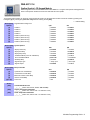
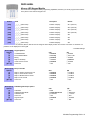
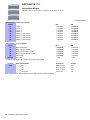
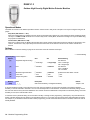
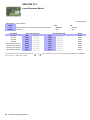
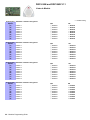
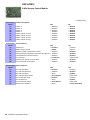
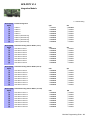
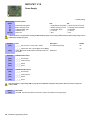
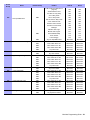
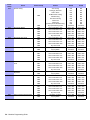
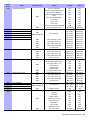
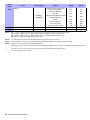
Table 4: PGM Option Programming
PGM
Activation*
PGM1
PGM2
PGM8
Event Group
[910]
[920]
+10 per PGM
[980]
Feature Group
[911]
[921]
+10 per PGM
[981]
Start #
[912]
[922]
+10 per PGM
[982]
End #
[913]
[923]
+10 per PGM
[983]
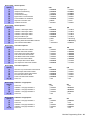
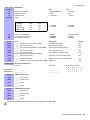
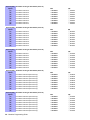
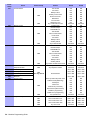
PGM
Deactivation*
PGM1
PGM2
PGM8
[914]
[924]
+10 per PGM
[984]
[915]
[925]
+10 per PGM
[985]
[916]
[926]
+10 per PGM
[986]
[917]
[927]
+10 per PGM
[987]
*For a complete list of events, refer to the PGM programming section of your Digiplex or Digiplex EVO control panel’s programming guide.
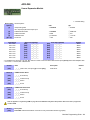
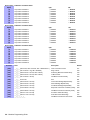
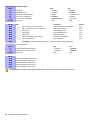
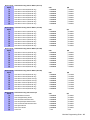
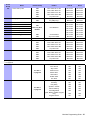
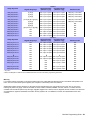
PGM Delay
(000 to 255)
Default: 005
PGM1
PGM2
PGM8
PGM Delay
[918]
[928]
+10 per PGM
[988]
[919]
[929]
+10 per PGM
[989]
Options
Option [1]: ON = PGM delay
OFF = Latch (default)
Option [2]: ON = Minutes
OFF = Seconds (default)
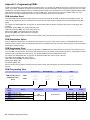
[991]
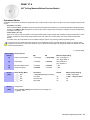
View Two-Way PGM tamper trouble (PGMs with the trouble will be indicated by their number)
[992]
View Two-Way PGM supervision trouble (PGMs with the trouble will be indicated by their number)
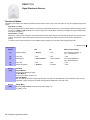
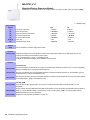
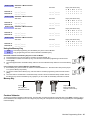
Sections
[040] to [043]
View how many of the 32 remotes are used.
[040] = remotes 1 to 8; [043] = remotes 25 to 32.
To delete a remote, press the corresponding number until it’s no longer displayed in these sections.
[201] to [232]
Assigning remote controls to the MG-RTX3.
[201] = remote 01; [232] = remote 32
Enter the desired section and then press and hold a button on the remote control until you hear a confirmation beep.
[301] to [332]
Assign the remote controls to users by entering a user number (001 to 255) in the appropriate section (Users 001 to 255, Section [301]
= remote 01, section [332] = remote 32.)
Program the remote control or delete the remote control button programming.
[401] = remote 01; [432] = remote 32
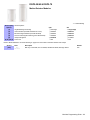
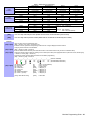
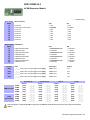
______/ ______/ ______/ ______/ ______/ ______/ ______/ ______ (default: 15000000)
N/A
+
N/A
N/A (see MG-REM1 instructions)
N/A
+
N/A
N/A (see MG-REM2 instructions)
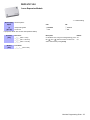
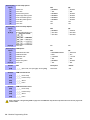
[401] to [432]
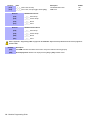
[0] = Button Disabled
[1] = Regular Arm
[2] = Stay Arm
[3] = Instant Arm
[4] = Force Arm
[5] = Disarm
[6] = Stay/Instant Disarm
[7] = Panic 1† (Police)
[8]
[9]
[stay]
[force]
[arm]
[disarm]
[byp]
[mem]
= Panic 2† (Non-Medical)
= Panic 3† (Fire)
= Smoke reset
= Utility Key 1*
= Utility Key 2*
= Utility Key 3*
= Utility Key 4*
= Utility Key 5*
[clear] = Exit without saving
[enter]
= Save data
Modules Programming Guide - 21