1
General Setup
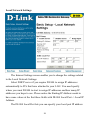
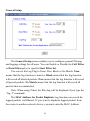
The General Setup screen enables you to configure general filtering
and logging settings for all users. You can Enable or Disable the Call Filter
or Data Filter and set a specific Start Filter Set.
You can set the Log Flag to None, Pass, Block or No Match. None
means that the log function is inactive. Block means that the log function
will record all blocked packets. Pass means that the log function will record
all passed packets. No Match means that the log function will record all
packets that are unmatched.
Note: When using Telnet, the filter log will be displayed if you type the
“log -f” command.
The MAC Address for Packet Duplicate log function can record the
logged packets via Ethernet. If you want to duplicate logged packets from
the router to another network device, you must enter the MAC Address
30