1
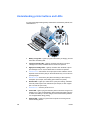
Back view
1
2
3
4
5
6
7
8
1
Battery contacts – Provides contact for power from the optional battery
(part number C8222A, see HP Supplies and Accessories).
2
Battery contact cover – Covers the battery contacts when the optional
battery is not installed.
3
Battery slot – Insert battery here.
4
Power connector – Connect the power cord here.
5
Parallel port – Connect the parallel cable here.
6
CompactFlash card slot – Accepts a Bluetooth CF card to print via a
Bluetooth connection. Also accepts a Type I or II CF card for printing
pictures taken from a digital camera.
7
Universal Serial Bus (USB) port – Connect the USB cable here.
8
Kensington lock connector – Secures the printer with a locked cable.
The Kensington MicroSaver® lock system works with this connector and is
available at many computer stores.
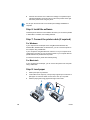
Bottom view
1
2
ENWW
1
Card holder – Holds a name card or business card.
2
Cover of replaceable ink service module – Provides access to the ink
service module. See Replaceable ink service module.
1-3