1
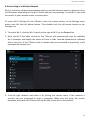
CnM TVSmart User Manual ___________________________________________________________________________________________________________________________ 8.3 Gmail / Google Play Store In order to use Gmail to access your Google Mail account or Google Play to download more Apps or Games for your TVSmart, you will either have to setup a Google Account or enter the details for an existing Google Account the first time you want to use one of these applications. Note: The Gmail application cannot be used to connect to any email service other than Google Mail. A Google Account has many benefits because it lets you organise and access your personal information from any computer or mobile device: Never lose your contacts again. When you sign in to your TVSmart with a Google account, all the contacts you associate with that account in the People app are automatically backed up. As a result, they're always accessible through your Gmail account from any computer. Synchronize and back up everything. Whether you draft an email, add an event to your calendar, or take a photo, your work gets backed up continuously by Google and synchronized with any computer where you use the same Google Account. Access from anywhere. Check your latest calendar, email, text messages, or social stream, wherever you are, no matter what computer or mobile device you are using. Keep your data secure and available. Google works round the clock to protect your personal data from unauthorized access and to ensure that you get it when you need it, wherever you need it. Use other Google services. Your Google Account also lets you take full advantage of any other Google apps and services that you may want to use, such as Gmail, YouTube, Google Play, YouTube, Google Talk, Messaging, and many more. To enter details for an existing account click the Existing option, or to create a new Google Account click the New option and follow the straightforward setup process. 34