1
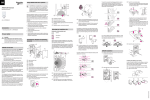
Setting the sensitivity
Putting ARGUS into operation
½
|
CAUTION
If not installed correctly, the device can be
damaged by condensation.
In the case of sloping ceilings, install the device
so that spherical head is pointing down and always at an angle of 15° - 90°. When the spherical
head points downwards, any water from condensation could run down the device.
The ARGUS operating elements are protected under a
cover plate. The arrow's position on the controllers
shows you the set values.
1 Push up the cover plate until you feel it hit the stop
(approx. 5 mm) and pull it off.
Type of protection IP 55 cannot be guaranteed if
the mounting bracket is not 15° - 90°.
15° - 90°
Setting the brightness threshold
2 Guide a programming magnet (e.g. art. no.
MTN639190) over the programming area.
The programming LED lights up.
3 Load the physical address and application into the
device from the ETS.
The programming LED goes out when the application
has been loaded successfully. This device is ready for
operation.
Installing the ARGUS on corners and fixed pipes
You can attach the ARGUS to inner/outer corners or fixed
pipes using the Merten mounting bracket (art. no.
MTN5652..). You can feed the bus line to the device from
behind through the mounting bracket.
The brightness sensor must not be covered up.
KNX
+-
3 LUX
1000 LUX
∞
2 Set the brightness controller to daytime operation
(infinity symbol/right-hand stop) or select the setting
"independent of brightness" in ETS.
½
CAUTION
The device could become damaged.
The sensor head should only be rotated until it
reaches the stop and no further. To achieve an
angle "above" the stop, change the direction of
rotation.
1 Align the sensor head in the direction of the area
that is to be monitored.
Technical data
Nominal voltage:
KNX connection:
Power consumption:
Angle of detection:
Range:
Number of levels:
Number of zones:
Minimum
mounting height:
Recommended
mounting height:
Sensitivity:
Light sensor:
Time:
– Sun symbol: The ARGUS detects movements up to
approx. 1000 lux.
Depending on the application program, you can either
set the time in the software or on the device.
Setting ARGUS
14 mm
– Moon symbol (left stop) The ARGUS will only detect
movements during the hours of darkness (approx. 3
lux).
1 Set the time controller to 1 second (left-hand stop).
The functional display lights up each time movement is
detected.
Connecting KNX
Here you can infinitely set the ambient brightness level at
which the ARGUS detects movements and triggers a
switching procedure.
– Infinity symbol (right-hand stop): The ARGUS detects
movements regardless of the ambient brightness.
Conducting a functional test
3 Set the sensitivity controller to maximum (righthand stop).
|
Here you can infinitely set the distance up to which ARGUS detects movements (any distance up to max.
16 m).
Setting the time
This makes it possible to set the overshoot time of the
connected loads. This is the time period from the last detected movement until the load is switched off. Depending on the ETS application, the overshoot time is either
set in the ETS program (infinitely variable between
3 seconds and 152 hours) or directly on the ARGUS (six
steps of approx. 1 second to approx. 8 minutes).
|
Once the load has been switched on, the set
brightness threshold is ignored. Depending on
the settings in ETS, each registered movement
can reset the overshoot time. If the movement detector no longer switches off, it is probably because it is continually detecting new movement
and is thus always extending the overshoot time.
Programming:
Display elements:
DC 24 V (+6 V / -4 V)
via terminal block
approx. 7 mA
220°
max. 16 m
7
112 with 448 switching segments
1.7 m
2.5 m
infinitely adjustable externally
infinitely adjustable externally,
from approx. 3 lux to approx.
1000 lux
infinitely adjustable in the software from 3 seconds to 152 hours
or adjustable externally in 6
steps from approx. 1 second to
approx. 8 minutes.
magnet-sensitive sensor for assigning the physical address.
1 red LED: Programming check,
1 red LED: Functional display
Possible settings for
the sensor head:
Wall mounting:
9° up, 24° down, 12° left/right,
± 12° axial
Ceiling mounting: 4° up, 29° down, 25° left/right,
± 8.5° axial
Type of protection:
IP 55 at an angle of inclination
from 15° to 90°
Ambient temperature: -25 °C to +55 °C
EC guidelines:
Low Voltage guideline 73/23/
EEC,
EMC guideline 89/336/EEC
Initialisation:
Due to the limitation of the telegram rate, a telegram cannot be
generated until at least 17 s after
the initialisation.
Blocking out individual areas
Using the four segments supplied, you can block out unwanted zones and sources of interference from the area
of detection.
You can wire the bus line through the two terminals (+) and (–) without encountering problems.
9°
24°
12° 12°
12°
A
12°
Installation of the top section of the ARGUS
1 Place the top section on the wall connection box
from the front.
The electrical connection from the terminal box to the
contact pins is established automatically when the
screws are tightened.
3 Position the cover plate at the markings on the side,
and guide it upwards.
1
2
1
2
4° 29°
25°
25°
8,5° 8,5°
2 From its edge step into the area of detection to see
whether the ARGUS switches the load and the functional display as required.
Schneider Electric Industries SAS
|
Ensure that the brightness sensor A is not covered, as the sensitivity to light is otherwise reduced.
If you have technical questions, please contact the Customer Care Center in your country.
www.schneider-electric.com
This product must be installed, connected and used in
compliance with prevailing standards and/or installation
regulations. As standards, specifications and designs
develop from time to time, always ask for confirmation of
the information given in this publication.
3
4
V6325-561-00 03/08
2 Fasten the top section with the screws provided.