1
Position the Scan Material
Position Transparencies
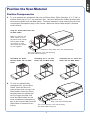
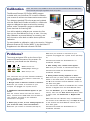
A. To scan standard-size transparent film such as 35mm slides, 35mm filmstrips, 4” x 5” film, or
medium format up to 6 x 17-cm panoramic film: Use the individual film holders provided with
the scanner together with the Main Holder. The entire assembly is then inserted into the lower
compartment (transparency bay) of the scanner. Make sure that the Main Holder is inserted
correct side up.
Using the 35mm Slide Holder with
the Main Holder
Make sure that the red
arrow marks on both
the 35mm Slide Holder
and the Main Holder
are pointing to each
other when the holders
are put together
Calibration strip (Keep clear and unobstructed)
The correct side up is the side showing
the holder labels facing up
Assembling the 35mm
Filmstrip Holder with the Main
Holder
B.
Assembling the 4” x 5” Film
Holder with the Main Holder
To scan non-standard-size
transparent film, use the Glass
Holder. Place the film to be
scanned face down on top of the
Glass Holder. Secure the film to
the glass surface if needed with
the vinyl strips provided, and
insert the Glass Holder into the
lower compartment (transparency
bay) of the scanner. Make sure the
Glass Holder is inserted correct
side up.
Assembling the 6 x 22-cm Film
Holder with the Main Holder
Calibration strip
(Keep clear and unobstructed)
The correct side up is the side showing
the holder labels facing up
3