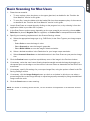
1
Basic Scanning for Mac Users (cont.)
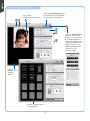
Scan frame
(enclosed by dotted lines)
Click the Scan Settings button
to switch back to the default
control panel of ScanPotter
Click the Image Settings
button to switch to a
window where contains
a composite display of
nine-image-effects (Filter
column) and additional
image correction tools
(Additional Adjustment
column) for your
scanned image.
Preview
window when
scanning
photos
Preview window when
scanning slides
8