1
3.6.3 : Scan Results Window
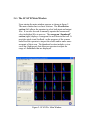
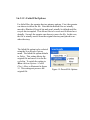
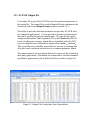
The Scan Results Windows presents
the final results of the scan processing. The Scan Results Window is
illustrated in figure 13.
At the very top of the window is the
selection criteria filter. This is the
final filter in the selection process.
SCAN’Rtm counts up the total number of detections in each file and
compares this to the selection criteria. If the number of detections is
greater than or equal to the selection
criteria value, the file is moved to the
“selected” file list (top list). Otherwise the file is moved to the “failed”
file list (bottom list).
Scan results are updated with each
file that is processed either manually
(one file at a time) or automatically
using the Action=>Scan All menu
selection. It also includes counters
that track the total number of passed
files, the total number of detections
in all of the passed files, and the
number of failed files.
Figure 13: Scan Results Window