1
CASIO Graphic Scientific Models
This software is designed for use with the following CASIO Graphic Scientific models.
• fx-9860G Series
fx-9860G SD
fx-9860G
fx-9860G Slim
fx-9860G AU
fx-9750GII
fx-9860GII SD
fx-9860GII
fx-9860G AU PLUS
• ALGEBRA FX Series
ALGEBRA FX 2.0
• CFX-9850G Series
fx-9750GA PLUS
CFX-9850G
fx-9750G
CFX-9850G PLUS
CFX-9850Ga PLUS
CFX-9850GB PLUS
• fx-7400G Series
fx-7450G
fx-7400G PLUS
ALGEBRA FX 2.0 PLUS
FX 1.0
FX 1.0 PLUS
CFX-9950G
CFX-9970G
CFX-9950GB PLUS
CFX-9850GC PLUS
fx-7400GII
In addition, the following CASIO Graphic Scientific models can exchange data with the above
models.
fx-7700GB
CFX-9800G
fx-8700GB
fx-7700GE
fx-7700GH
fx-9700GE
fx-9700GH
* All of the fx-9860G Series calculator operations shown in this manual are performed using the
fx-9860G SD/fx-9860G.
Important!
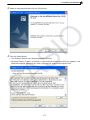
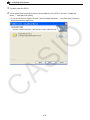
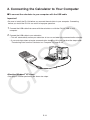
• Be sure to install the FA-124 before you connect the calculator to your computer. Connecting
before you install the FA-124 can result in improper operation.
Note
• Use only the USB cable that comes with fx-9860G Series calculator whenever connecting
your fx-9860G Series calculator to a computer to exchange data between them. Data
exchange with FA-124 will not be possible if you use a commercially available serial cable.
E-3