1
PRODUCT SHEET
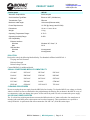
ACTIVITY
BUSY
A Bright
B Bright
MODE
LIGHT STATUS DESCRIPTION
Self-Test
ACTIVITY and BUSY be bright for the duration of the self-test and setup process.
This may take 3 – 10 seconds, depending on MP150 internal memory.
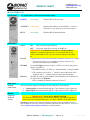
Work
Error
A Bright
B Blink
A Blink
B Bright
A Blink
B off
Error
Error
Idle-1
Idle-2
A off
[email protected]
[email protected]
www.biopac.com
Self-Test
B off
During data acquisition, ACTIVITY reflects command/data traffic (for acquisition
speeds of 1000 Hz or more, ACTIVITY will be permanently bright or blink at a high
frequency) and BUSY will be bright. It is normal for both lights to be on—this does
not indicate a problem unless an Error Message is generated on the computer screen.
ERROR: In rare cases, a serious problem may prevent a self-test and the lights may be
erratic: both on, both off, or any other static combination.
The MP150 enters the Error Mode if a fatal error occurs during the Self-test Mode. In
the Error Mode, ACTIVITY is bright and BUSY is blinking at a frequency of 5 Hz.
If the self-test fails or setup fails, the Error mode is initiated and ACTIVITY will blink
at about 5 Hz rate and BUSY will remain bright.
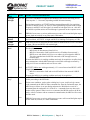
ACTIVITY blinks twice with approximately 1.5-2 second interval and BUSY is OFF.
Double blink means:
- MP150 may be disconnected from LAN or,
- MP150 is connected to LAN but did not receive IP address from network’s
DHCP server and default 169.254.xxx.xxx address is self-assigned to MP150.
This is the standard state for MP150 connected to NIC through crossover
network cable.
It means the MP150 is in working condition and ready for acquisition. AcqKnowledge
may communicate with the MP150 through a serial cable or through a network by
using 169.254.xxx.xxx address and/or crossover cable.
ACTIVITY blinks once with approximately 1.5-2 second interval and BUSY is OFF.
Single blink means:
- MP150 is connected to LAN and received IP address from network’s DHCP
server.
It means the MP150 is in working condition and ready for acquisition.
ACTIVITY and BUSY will go dark for less than 1 second at the end of the self-test
before proceeding to the Idle mode.
Wait
Under some conditions, such as when a dialog box is open, AcqKnowledge cannot
send commands to the MP150. When command flow from the workstation stops, the
MP150 acts as if there is an open dialog and enters the Wait Mode to wait for a
command from the workstation it is “locked” to—commands from any other work
station will be ignored. When it receives a command, the MP150 return to the Work
mode. After five minutes with no command communication, the MP150 will revert to
the Idle mode.
Error
ERROR: In rare cases, a serious problem may prevent a self-test and the lights may be
erratic: both on, both off, or a static combination.
BIOPAC Hardware | MP150 Systems | Page 5 - 9
Updated: 2.25.2015