1
Index
Index
A
Dish Antenna System
Connecting 29
Dish Home 8
DishPVR 69
Auto Record and On-Demand Record at the Same Time
Arrow Buttons 19
Arrows/Select 19
Attach a UHF Antenna 23
Attach a UHF Attenuator 33
Auto Recording 64, 69
Automatic Event Timer 57, 63
64
Auto Recording 64, 69
Copy Recordings to Videotape 70
DishPVR Recorded Events Menu 67
Once You’ve Made One or More Recordings
On-Demand Recording 66, 70
Recorded Event’s Info Menu 67
Displaying Program Information 50
DVR 1
DVR Events 66
DVR Features 12, 64
Auto Recording 64
Events 16, 62
On-Demand Recording 64
DVR Recorded Event 16, 62
B
Back Panel 20
Channel 3–4 Out 20
Other Connections 21
RCA Out 20
Remote Antenna 21
Satellite In 21
S-Video Out 20
Telephone Jack 21
TV Antenna/Cable In 21
TV1 Connections 20
Batteries 23
Installing or Changing 23
Low Battery Warning 23
Browse Banner 6, 45, 50
Displaying Information 50
Using 51
E
Editing Event Timers 60
Event Timer Frequency 55
Event Timer Types 55
F
C
Cables
Connecting 31
Caller ID 81
Cancelling a Procedure 46
Change the Remote Control Address 32
Changing a Favorites List 53
Changing Batteries 23
Changing Channel Locks 76
Changing Channels 48
Changing Program Languages 83
Changing Rating Locks 75
Changing the Password 79
Channel 3–4 Out 20
Confirm Remote Control 1 Operation 25
Confirm Remote Control Operation 26
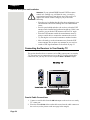
Connecting the Receiver to the Phone Line
Conventions 2
Creating a Favorites List 53
Creating Channel Locks 76
Creating Rating Locks 75
Customer 8
Factory Default Setting 82
Factory Defaults 82
Favorites 11
Favorites Lists 52
Activating 54
Changing 53
Creating 53
Naming 54
Using 52
FCC 124
Federal Communications Commission (FCC) Compliance
Radio Interference 125
Telephone Communication 124
Finding Programs to Watch 5
Fixed Images 3
Front Panel 19
Arrow Buttons 19
Arrows/Select 19
Buttons 19
Menu 19
Power 19
Recording 19
Smart Card Door 19
System Info 19
TV1 Power 19
27
D
Default Settings 82
Deleting Timers 61
Device Codes
Tuner/Amplifier 112
TV 109
TV/DVD Combo 113
VCR 110
66
G
Getting Started 4
Finding Programs to Watch 5
Ordering Your Programming 4
Page 127