1
3
Contents
Product Overview ....................................................................................................... 5
Optical Switch Module ...............................................................................................
VX500 Interface Board ..............................................................................................
Connecting to the Interface .................................................................................
Reading the Status LED ............................................................................................
Thermal Considerations .............................................................................................
5
5
6
6
6
Switch Operation ........................................................................................................ 7
Starting the Switch ..................................................................................................... 7
Resetting the Switch .................................................................................................. 7
Losing Power to the Switch ....................................................................................... 8
Selecting an Output Channel ..................................................................................... 8
Simplex 1 × N Configurations .............................................................................. 8
Synchronous Duplex 1 × N Configurations ....................................................... 10
2 × N Non-Blocking Configurations ................................................................... 11
2 × N Blocking Configurations ........................................................................... 13
Maintaining Channel Position .................................................................................. 14
Timing Parameters .................................................................................................. 15
Calculating Switching Time ...................................................................................... 16
Switch Control ........................................................................................................... 17
Controlling the VX500 Using a PC Printer Port ....................................................... 18
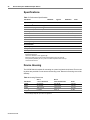
Specifications ............................................................................................................. 20
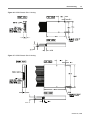
Device Housing ......................................................................................................... 20
Handling Fiberoptic Components and Cables ................................................. 22
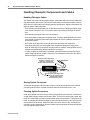
Handling Fiberoptic Cables ......................................................................................
Storing Optical Connectors ......................................................................................
Cleaning Optical Connectors ...................................................................................
Mating Optical Connectors ......................................................................................
22
22
22
23
October 20, 1998