1
FRONT PANEL
MPA250
on
signal
peak
temp
fault
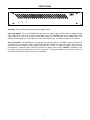
On Indicator: This green LED remains lit when AC power is applied to the unit.
Signal / Peak Indicator: This 2-color LED indicates the signal level for the amplifier. When the LED is green, the amplifier has signal
(above -30dB). When the LED is red, the amplifier signal is clipping (max. power). CAUTION: Signal levels should be adjusted to avoid
clipping. Clipping can cause severe distortion, over-temperature conditions, and even loudspeaker damage. NOTE: Signal / Peak
indicators will turn off during Temp / Fault conditions (see Temp / Fault Indicators below). This indicator also appears on the rear panel.
Temp / Fault Indicator: This red LED indicates over-temperature and output fault conditions for the amplifier. When the LED remains lit,
the amplifier has an over-temperature condition. When the LED is flashing, the amplifier has an output fault condition. Either condition will
temporarily de-activate the amplifier, causing the Signal / Peak LED to turn off as well. The amplifier will attempt to self-reset once the
over-temperature or output fault condition is resolved. This indicator also appears on the rear panel. CAUTION: The MPA250 is cooled
by a variable speed fan, which exhausts warm air from the left side panel. To allow proper ventilation, an un-obstructed clearance of at
least 0.75" must be maintained along the left side panel of the MPA250.
2