1
16 Tunings
If 16 Tunings is selected (by pressing the 16
Beats and 16 Time Steps keys together), the
sixteen pads play the selected sound at sixteen
different tunings. This is useful for playing
tuned parts like bass or melody lines.
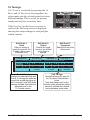
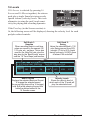
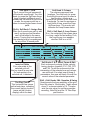
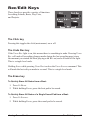
If the Pads key (in the Screens section) is
selected, the following screen is displayed,
showing the unique tuning for each pad plus
related controls:
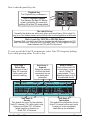
Soft Knob 1:
Scale
Offers a variety of
musical scales for the
16 pads (major, minor,
chromatic, etc.)
Soft Knob 2:
Octave
Permits the pads’
tuning to be shifted
up or down in
octaves.
Sca: Major
Octave: 0
Bt: 14/Swing beat 100 bpm
C
D
E
D
E
F
8
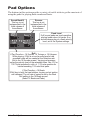
The Pad Function Keys
Transps: 0
Display: C
Snd: A12/Boomy Kick
F
G
A
G
A
B
120.0
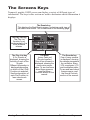
Beat & Sound
Displays the selected Beat and
Sound. To change the selected
sound (the sound that plays at
the 16 tunings), hold Shift while
pressing the pad that holds the
desired sound in the
16 Sounds screen.
Soft Knob 3:
Transpose
Selects the root note
of the scale.
1.1.01
B
C
C
D
16 Tunings
Pad Tunings
Shows the tuning for each of
the 16 pads in the selected
scale.
Note that these won’t be the
actually notes played but rather
serves to indicate the relative
tuning between scale notes.
Tempest