1
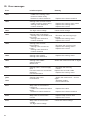
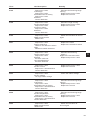
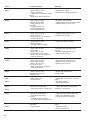
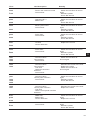
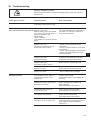
26. Troubleshooting
Caution: Danger of injury!
Exercise utmost caution when eliminating defects with the machine
switched on.
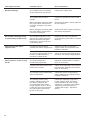
Description of fault
Possible cause
Error elimination
The display shows a message
indicating the possible cause.
The automate does not start up. Display: Info 200
Before sewing start the needle
is in front of the wrong stitch or
not in the position “up”
respectively.
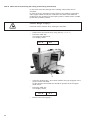
Correct position:
The needle is in front of the left
stitch.
Display: Info 210
Too low air pressure for the
pneumatic components.
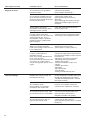
Skipped stitches
Turn the handwheel in the direction
of rotation so that the needle is in
front of the left stitch.
- Check the air pressure at the
manometer
- Has the compressed air hose been
connected?
- Check compressed air fluctuations
- Check all compressed air hoses
and connections
Display: Info 220
Thread breakage
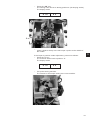
Activate the threading mode and
thread the sewing thread anew.
Display: Info 500
Threading mode is active.
Deactivate the threading mode
Display: Err 501
Deactivate the threading mode.
Display: Err 502.
Put on head cover or bridge
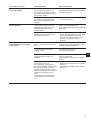
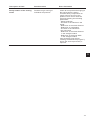
The needle is blunt, bent or
incorrectly inserted in the
needle bar.
Insert a new needle
Insert the needle in the needle bar
correctly.
Needle and looper thread are
threaded incorrectly.
Check threading of needle and
looper thread
(See Operating Instructions)
The thread reel holder is
mounted wrongly.
Check the thread reel holder
(See Assembly Instructions)
Too tight thread tension.
Check the thread tension
(See Operating Instructions)
The fabric is incorrectly held.
Check the fabric clamping pressure
(see chapter “Fabric clamping
pressure”).
69
3