1
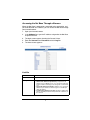
Accessing the Net Base Through a Browser
When the Net Base is powered on, connected to the workstation, and
you have obtained its IP address, you can access the Net Base through
your internet browser.
1.
Open your internet browser.
2.
In the Address line, type the IP address assigned to the Net Base
and press ENTER.
3.
The login screen appears showing the Current Values.
4.
Enter the Username and Password and click Log On.
5.
The home screen appears.
Link Bar
Link
Click this link to …
User’s Guide
Open the online help files.
Setup
Choose IP address assignments from two options:
•
•
•
Obtain all IP addresses dynamically - Requests five IP
addresses from a DHCP server: one is used for the Ethernet
interface and the remaining four are assigned to each terminal
slot.
Specify IP addresses manually - Enables you to specify IP
addresses per terminal slot and change the local USB port
(PPP) IP address.
Run Spanning Tree Protocol (STP) - Enable or disable STP.
STP is enabled by default and helps eliminate redundancy in
the network.
8