1
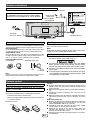
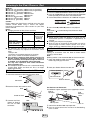
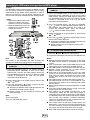
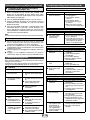
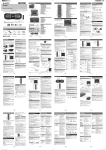
System connections
Make sure to unplug the AC power cord before making any connections.
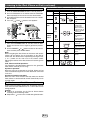
FM antenna
MODEL NO. DK-KP95P
CAUTION:
TO PREVENT ELECTRIC SHOCK, MATCH WIDE
BLADE OF PLUG TO WIDE SLOT, FULLY INSERT.
SLIM MICRO SYSTEM
AC 120V
60Hz
26W
FREQUENCY RANGE : FM 87.5 - 108.0 MHz
AM 530 - 1,710 kHz
External FM
antenna for
better reception
(not supplied)
MADE IN MALAYSIA
FABRIQUÉ IN MALAISIE
MARKETED BY : SHARP ELECTRONICS CORPORATION
SHARP PLAZA, MAHWAH, NEW JERSEY 07495 - 1163
“THIS PRODUCT COMPLIES WITH DHHS STANDARDS 21 CFR,
SUBCHAPTER J. PART 1040. 10”
This device complies with Part 15 of the FCC Rules.
Operation is subject to the following two conditions:
(1) This device may not cause harmful interference, and
(2) this device must accept any interference received,
including interference that may cause undesired operation.
TSPC-B605AWZZ
AC outlet
(AC 120 ~ 60 Hz)
■
AM loop antenna
■
Antenna connection
Supplied FM antenna:
Connect the FM antenna wire to the FM 75 OHMS jack and position the FM
antenna wire in the direction where the strongest signal can be received.
External FM antenna:
Use an external FM antenna (75 ohms coaxial cable) for better reception. When
an external FM antenna is used, disconnect the supplied FM antenna wire.
Supplied AM loop antenna:
Connect the AM loop antenna to the AM and earth (GND) terminals. Position
the AM loop antenna for optimum reception. Place the AM loop antenna on a
shelf, etc., or attach it to a stand or a wall with screws (not supplied).
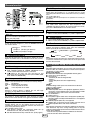
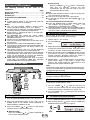
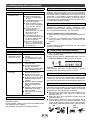
Installing the AM loop antenna:
<Assembling>
AC power connection
After checking all the connections have been made correctly, plug the AC
power cord of this unit into the AC outlet.
Note:
Unplug the AC power cord from the AC outlet if the unit will
not be in use for a prolonged period of time.
■
Demonstration (Network stand-by) mode
● The first time the unit is plugged in, the unit will enter
the demonstration mode. (refer page 4)
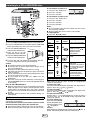
<Attaching to the wall>
Wall
Screws
(not supplied)
Note:
Placing the antenna on the unit or near the AC power cord may cause noise
pickup. Place the antenna away from the unit for better reception.
● To cancel the demonstration mode, press the DEMO
button (remote control) during power stand-by mode.
The unit will enter the low power consumption mode.
● To return to the demonstration mode, press the DEMO
button again.
● If iPod or iPhone is docked, the unit will begin charging.
“Charge Mode” will be displayed. Demonstration mode
is invalid during charge mode.
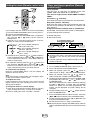
Remote control
■
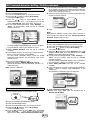
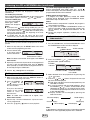
Battery installation
Use 1 “AA” size battery (UM/SUM-3, R6, HP-7 or similar).
Battery is not included.
1 Open the battery cover.
2 Insert the supplied battery according to the terminal
indicated in the battery compartment.
When inserting or removing the battery, push it towards the
(–) battery terminals.
3 Close the cover.
E-1
Caution:
● Remove the battery if the unit will not be used for a long
period of time. This will prevent potential damage due to
battery leakage.
● Do not use rechargeable battery (nickel-cadmium battery,
etc.).
● Installing the battery incorrectly may cause the unit to
malfunction.
● Batteries (battery pack or batteries installed) shall not be
exposed to excessive heat such as sunshine, fire or the
like.
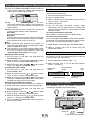
Notes concerning use:
● Replace the battery if the operating distance is reduced or
if the operation becomes erratic. Purchase an “AA” size
battery (UM/SUM-3, R6, HP-7 or similar).
● Periodically clean the transmitter on the remote control
and the sensor on the unit with a soft cloth.
● Exposing the sensor on the unit to strong light may
interfere with operation. Change the lighting or the
direction of the unit if this occurs.
● Keep the remote control away from moisture, heat, shock,
and vibrations.