1
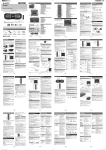
Listening to a CD or MP3/WMA disc
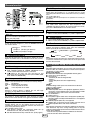
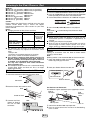
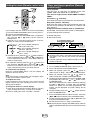
A. For example, to choose 13
1 Press the “10+” button once.
2 Press the “1” button.
3 Press the “3” button.
Selected track number
B. For example, to choose 130
1 Press the “10+” button twice.
2 Press the “1” button.
3 Press the “3” button.
4 Press the “0” button.
Notes:
● A track number higher than the number of tracks on the
disc cannot be selected.
● During random play, direct search is not possible.
To stop playback:
● Press the (CD ) button.
■
■
Disc playback
Various disc functions
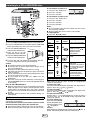
Function
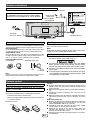
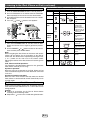
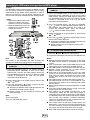
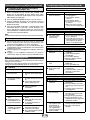
1 Press the POWER ON/STAND-BY button to turn the power on.
2 Press the CD/USB button on the remote control or FUNCTION
button repeatedly on the main unit to select CD function.
3 Press the OPEN/CLOSE button
to open the disc compartment.
4 Place the disc in the disc
compartment, label side front.
5 Press the OPEN/CLOSE button
to close the disc compartment.
Main
unit
Remote
control
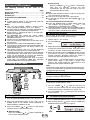
Operation
Play
Press in the stop mode.
Pause
Press in the playback
mode. Press the /
button to resume
playback from the
paused point.
Press in the playback
mode.
Stop
6 Press the / (CD
/ ) button to start playback. After the
last track is played, the unit will stop automatically.
Caution:
● Do not place two discs in the disc compartment.
● Do not play discs of special shapes (heart, octagon, etc). It
may cause malfunctions.
● Do not push the disc compartment while it is moving.
● If the power fails while the compartment is open, wait until the
power is restored.
● If TV or radio interference occurs during CD operation, move
the unit away from the TV or radio.
● Be sure to place 8 cm (3") disc in the middle of the disc
compartment.
● Due to the structure of the disc information, it takes longer to
read an MP3/WMA disc than a normal CD (approximately 20
to 90 seconds).
Notes for CD or MP3/WMA disc:
● When the end of the last track is reached during fast forward,
“END” will appear on the display and CD operation will be
paused. When the beginning of the first track is reached
during fast reverse, the unit will enter the playback mode (only
for CD).
● Rewritable multi-session discs with unfinished writing, can
still be played.
■
Direct track search
By using the Numeric buttons, the desired tracks on the
current disc can be played.
Use the Numeric buttons on the remote control to select
the desired track while playing the selected disc.
● The Numeric buttons allow you to select up to number 9.
● When selecting number 10 or higher, use the “10+” button.
E-7
Track
up/
down
Fast
forward/
reverse
■
Press in the playback or
stop mode.
If you press the button in
the stop mode, press the
/ button to start the
desired track.
Press and hold down in
the playback mode.
Release the button to
resume playback.
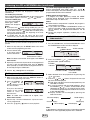
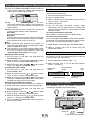
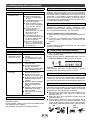
Repeat play
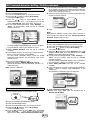
Repeat play can play one track, all tracks or a programmed
sequence continuously.
To repeat one track:
Press the PLAY MODE button repeatedly until “Repeat One”
appears. Press the / (CD / ) button.
To repeat all tracks:
Press the PLAY MODE button repeatedly until “Repeat All”
appears. Press the / (CD / ) button.
To repeat desired tracks:
Perform steps 1 - 4 in “Programmed play” section on page 8
and then press the PLAY MODE button repeatedly until
“Repeat All” appears.
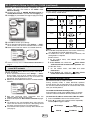
To cancel repeat play:
Press the PLAY MODE
button repeatedly until
“Normal” appears and
“
” disappears.
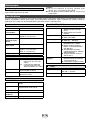
Caution:
After performing repeat play, be sure to press the (CD )
button. Otherwise, the disc will play continuously.