1
English
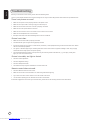
Basic connections
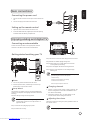
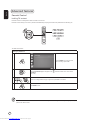
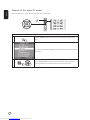
Connecting the power cord
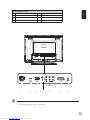
1 Connect the AC cord into the AC input on the back of the
set.
2 Connect the plug to the wall outlet as shown.
Setting up the remote control
1 Open the cover on the back of the remote unit.
2 Insert two AAA batteries (supplied) to match the polarity
indicated inside the battery compartment.
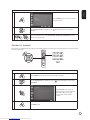
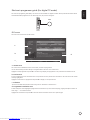
Enjoying analog and digital TV
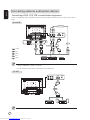
Connecting an antenna/cable
Tuner
Connect the antenna cable to the appropriate antenna
terminal on the back of the TV set as shown below.
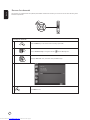
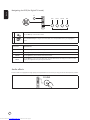
Getting started watching your TV
Step 3. Enter the correct time zone using the remote control.
1
Step 4. Enable or disable daylight saving time.
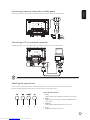
Step 5.Ensure that your co-axial cables are connected
correctly before proceeding.
Step 6.Scan for digital channels and analog channels.
2
I
O
4
1
3
Step 7. Setup is now complete. You are ready to begin
watching TV.
If you leave the setup process before it is complete,
you will be given a choice of options:
1. Resume setup
2. Resume setup wizard at next startup
3. Exit and do not remind me
Select an option and press OK to exit.
1
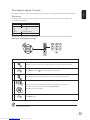
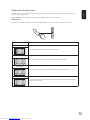
1 Power
a. Turn on the power switch beneath the screen.
b. Press the power button, number keys or channel up /
down button on the remote control.
2 Setup Wizard
The first time you switch on the TV, the Setup Wizard will
guide you to complete the language selection and channel
scanning.
Press the OK key to begin the setup process.
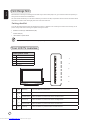
You can also adjust these settings using the front
control panel. Please see "Front panel view" on
page 4 for details.
3 Changing
channels
a. Press 0 - 9 on the remote control to select a channel. The
channel changes after 2 seconds. Press ENTER to select
the channel immediately.
b. Pressing the channel ( CH ) up / down button on the
remote control will also change the channel.
4 Adjusting
the volume
Adjust the volume level using the ( VOL ) up/down button on
the remote control.
Step 1.Select the setup language you prefer.
Step 2. Please select country.
Setup may vary due to local broadcast differences.
Downloaded from www.Manualslib.com manuals search engine