1
Chapter 3
Access to Web-based Interface
3: Access to Web-based Interface
There are two methods to access to the web-based interface of Compex
WP54G:
1. Through the Compex Utility – uConfig
You can access to the web-based interface directly without having to
change the IP address of your PC.
2.
Through your web browser
First, you will need to assign an IP address to your PC, such as
192.168.168.xxx, where x can be any value from 2 to 254, so that it is in the
same subnet as Compex WP54G. Then, enter IP address of Compex WP54G
in the address bar of Internet Explorer and press Enter.
Access to the Web interface with uConfig
Compex has developed a powerful uConfig utility that provides hassle-free
access to the web-based configuration page.
Insert the Product CD into your CD-ROM drive.
From the Utilities section, select to install the uConfig utility to your hard disk.
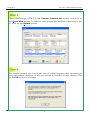
When the utility has been installed, double-click on the uConfig icon. The
following screen will appear, click on the Yes button to proceed.
8