1
Chapter 3
Access to Web-based Interface
Access to the Web interface manually
If you wish to access to the web interface manually, you need to configure the
TCP/IP of your PC. Refer to User’s Manual in the Product CD.
If you have forgotten the IP address of your access point, do not worry!
Compex has designed another utility program NpFind that helps you verify the
IP address of your Compex product. You can also find this utility in the Product
CD.
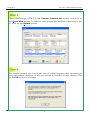
From the Product CD, click on Utilities and select NpFind program to run it.
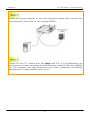
Once your Compex WP54G has connected to your PC, the program will
automatically detect the device and display its IP address.
Open your Internet browser, enter
http://192.168.168.1 in the address
bar and hit the Enter key from the
keyboard.
You will then reach the home page of Compex WP54G’s web-based
interface.
Note:
Refer to User’s Manual for instructions on how to configure Compex WP54G for
wireless access.
11