1
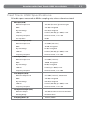
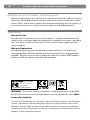
2 | Session with Fast Track USB User Guide What’s in the Box? Your M-Audio Session with Fast Track USB bundle should contain the following items: M-Audio Fast Track USB audio interface USB cable M-Audio Session DVD-ROM This User Guide If any of the above listed items are missing, please contact the retailer where you purchased the product. About This Guide This guide covers installation of the Session music-creation software for Windows and the setup and features of the Fast Track USB audio interface for Windows and Macintosh OS X. The Fast Track USB audio interface contained in this bundle can also be used with many Macintosh and Windows third-party music software applications like GarageBand, Logic Pro, and Ableton Live. Consult your software’s documentation for more information on this. M-Audio Session Software (Windows Only) Minimum System Requirements Windows XP Windows XP (SP2) or higher * 1.6 GHz processor (C PU speed requirement may be higher for laptops) 512MB RAM 4 GB free HD space for complete installation of Session DVD drive AGP 4X or faster graphics ** 32MB video RAM 1024 x 768 video resolution (1280 x 1024 recommended) One native USB port Windows Vista (edition) 32-Bit Windows Vista (edition) 32-Bit 1.6 GHz processor (CPU speed requirement may be higher for laptops) 1024 MB RAM 4 GB free HD space for complete installation of Session DVD drive AGP 4X or faster graphics ** 128MB video RAM 1024 x 768 video resolution (1280 x 1024 recommended) One native USB port