1
International Special Committee on Radio Interference (CISPR)
This equipment has been tested to and is in compliance with the Class A limits per CISPR publication 22.
Canadian Department of Communications Statement
This digital apparatus does not exceed the Class A limits for radio noise emissions from digital apparatus as set out in the Radio
Interference Regulations of the Canadian Department of Communications.
Attention
Cet appareil numérique n’émet pas de perturbations radioélectriques dépassant les normes applicables aux appareils numériques de
Classe A préscrites dans le Règlement sur les interferences radioélectriques etabli par le Ministère des Communications du Canada.
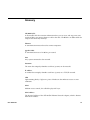
Japanese Compliance Statement
Compliance Statement in Chinese