1
Vinyl Cutter User Manual V5.0
Base assembly ...
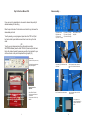
If you use vinyl roll, please before to cut unwind in advance the quantity of
material necessary for the cutting.
Place the pinch rolls about 1 inch inside on each side of vinyl, also lower the
intermediate pinch rolls.
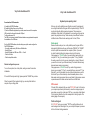
To verify manually your vinyl alignment, place the cutter "OFF Line" (Red
Led) and use the top and bottom arrows to feed in and out vinyl from the
cutter.
OR
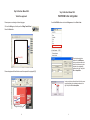
To verify your vinyl alignment using the cutting control panel from
WinPCSIGN software, place the cutter "ON Line" (Green Led) click the feed
button, the cutter will unwind the necessary quantity of vinyl material for your
cut then will return in the point of departure the origin point (0,0).
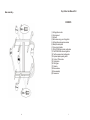
A) 4 plastic dowels.
B) 4 plastic caps.
C) 6 cover nuts.
D) 6 nuts 1 1/4” length.
E) 8 screws 1 ½” length.
F) 4 screws 5/8” length.
G) 8 screws 3/8” length.
Arrange parts as show in
the picture.
Before to cut:
1)Cutter in On Line (Green Led)
2)Click the alignment button to
check your alignment.
Use screws (E), fix the bases to the
sides bars.
Place 2 dowels in sides, use screw
shown in F and fix to the horizontal
bar.
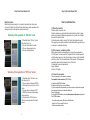
Manual check of the
alignment:
Remember always unwind manually the
necessary quantity of vinyl before
proceeding to the alignement test or
cutting.
2
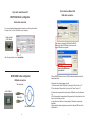
Cutter “OffLine” Red led.
Use down arrow to feed out
vinyl material.
Use top arrow to feed in vinyl
material.
Use C inside to fix the rolls bracket
Use the 8 screws shown in G to fix
the top braces.
Use a square or a
paper fix brackets at 90
degrees with the side
bars.
19