1
Vinyl Cutter User Manual V5.0
Vinyl Cutter User Manual V5.0
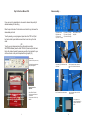
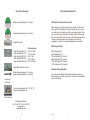
Plotting pen:
Lock nut
Pen holder shell
Pen tip
You can use standard ball pen refill as plotting pen; keep the ball pen tip out
of the holder between 4mm and 5mm. Using method is similar as blade's
process; please try it yourself according to the blade's changing method.
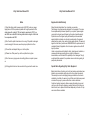
Set the knife holder or pen holder on holder's seat:
Turn off the plotter power.
Set the holder on holder's seat, turn the screw of seat of holder.
Turn on the power, the carriage will move to right side; you can press "TEST"
key to check your cutter configuration.
Load media /Load paper.
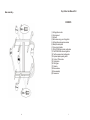
When you open the box, check the contents with the check list inside,
make sure that nothing is missing, every box must content:
Name
Cutting plotter
User manual
Sign software
Power cable 110V
Serial cable Rs232
USB cable
Fuse
Ball pen
Ball pen holder
Blade
Blade holder
Plotter ruler
Plotter cover sheet
Stand
Quantity
1 unit
1 book
WinPCSIGN Basic or Pro version
1 pcs
1 pcs
1 pcs
1 pcs
1 pcs
1 pcs
3pcs / 1
1 pcs
1 pcs
1 pcs
1pcs (only for 720/800/1360)
Load media /Load paper:
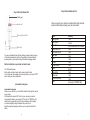
When you move the roller, you must lift the handle first; the right roller will not
move, usually.
Lift the handle, the roller will lift 1-2mm, then you can load your media.
Laying down the handle, you can press "UP" key (S+) or "DOWN" key (S-)
continuously, the paper will roll to front or back; please confirm the paper
must move straightly during the distance that you want to cut.
Adjust the speed and pressure, and then you can output the data to the
plotter.
16
5